CCNPO DevTeam
Today’s Manifest
● An app has several interfaces to interact with
the Android system.
● Basic building blocks we’d discuss
o Activity
o Context
o Intent
o Service
o Broadcast and BroadcastReceiver
o Storage
CCNPO DevTeam
Activity
● Application component which interacts with
the user
● Interaction happens via the Android UI
o i.e. the screen
● An app usually starts with a default Activity
● It can ask Android to start new Activities
http://developer.android.com/guide/components/activities.html
CCNPO DevTeam
Context
● The interface to the environment of the
application.
● Allows access to resources
o R’s resources, System resources (e.g. Content
providers)
● Allows calling new activities
o new Activities, Services
● Brings in new requests
o Broadcasts
CCNPO DevTeam
Intent
● A messaging object which can be used to
request action from another application
component
● Can be used to
o Start Activity
o Start Service
o Deliver a broadcast
CCNPO DevTeam
Intent
● Two types
o Explicit
o Implicit
● Contains >>
Intent
Component Name
Action
Data
Category
Extras
Flags
CCNPO DevTeam
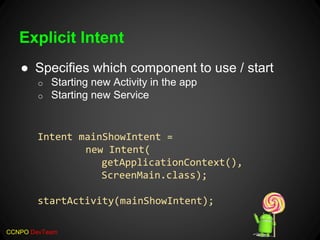
Explicit Intent
● Specifies which component to use / start
o Starting new Activity in the app
o Starting new Service
Intent mainShowIntent =
new Intent(
getApplicationContext(),
ScreenMain.class);
startActivity(mainShowIntent);
CCNPO DevTeam
Implicit Intent
● Declares a general action
to perform
o Send SMS, email
o Share something
● When the intent is
delivered to Android
System, it either decides
which app to use, or asks
the user if there are
multiple
CCNPO DevTeam
Service
● Application component which runs in the
background
● Continues to run even if the user switches to
another app.
● Can be started from an Activity using an
Intent
What do you
mean what are
they?
I just told you!
CCNPO DevTeam
Broadcast
● System-wide message sent to apps
● Broadcast contains an Intent and a Context
it was fired.
● Two types
o Un-Ordered (Normal)
o Ordered
CCNPO DevTeam
Broadcast Receiver
● Listens to a broadcast
● The broadcast can be triggered by the
system, another app and the same app.
● Application can opt-in to listen using an
Intent Filter specified in;
o Manifest entry
o By creating a runtime object
CCNPO DevTeam
Storage
● Google lists the following storage options
o Internal Storage
o External Storage
o Shared Preferences
o Database
o Network
CCNPO DevTeam
Storage - Internal Storage
● Private to the application
● Read / Write as a File
● Stored in a safe app-limited location
● Deleted when the app is uninstalled
CCNPO DevTeam
Storage - External Storage
● Stores data on the external disk
● Can be SD card / USB
● Use with care. The user could
o Un-mount the volume
o Connect the card to a PC
Which would make this unavailable for
app’s usage
CCNPO DevTeam
Storage - Shared Preferences
● App-limited data space
● Uses key-value pairs
● Only primitive data types can be stored
● Great for small persistent values in app
Note: Settings has a separate set of functions to make
things easy. Don’t manually store user’s preferences
CCNPO DevTeam
Storage - Database
● Android comes with a sqlite database
● Apps have their own databases
● Simple queries can be executed
CCNPO DevTeam
Storage - Network
● Use the internet / Wifi to send data to a
server
● How? Anyway you like
o JSON
o XML
o HTTP GET, POST
o or whatever method you want… just decide…
CCNPO DevTeam
Code Demo
Simple app to:
● Record the battery level every 10s
● View the current level
● View recorded values
● Share recorded values
CCNPO DevTeam
Stage 1
● Setup the Main Activity
● Setup the Service
o Code the required startup and looping in the service
o Code the broadcast to send
● Start the service from the activity
● Register for broadcasts from the service
● See the initial results
CCNPO DevTeam
Stage 2
● Setup a BroadcastReceiver and add it in the
manifest
● Use that class to record the samples
● Create an additional Activity to view samples
CCNPO DevTeam
Stage 3
● Configure a share menu item
● Share using intents
CCNPO DevTeam
Finalized Code
Code is available at
https://github.com/tdevinda/DialogAndroidIntro_2.git
Thanks for your participation!

Introduction to Android

  • 2.
    CCNPO DevTeam Today’s Manifest ●An app has several interfaces to interact with the Android system. ● Basic building blocks we’d discuss o Activity o Context o Intent o Service o Broadcast and BroadcastReceiver o Storage
  • 3.
    CCNPO DevTeam Activity ● Applicationcomponent which interacts with the user ● Interaction happens via the Android UI o i.e. the screen ● An app usually starts with a default Activity ● It can ask Android to start new Activities http://developer.android.com/guide/components/activities.html
  • 4.
    CCNPO DevTeam Context ● Theinterface to the environment of the application. ● Allows access to resources o R’s resources, System resources (e.g. Content providers) ● Allows calling new activities o new Activities, Services ● Brings in new requests o Broadcasts
  • 5.
    CCNPO DevTeam Intent ● Amessaging object which can be used to request action from another application component ● Can be used to o Start Activity o Start Service o Deliver a broadcast
  • 6.
    CCNPO DevTeam Intent ● Twotypes o Explicit o Implicit ● Contains >> Intent Component Name Action Data Category Extras Flags
  • 7.
    CCNPO DevTeam Explicit Intent ●Specifies which component to use / start o Starting new Activity in the app o Starting new Service Intent mainShowIntent = new Intent( getApplicationContext(), ScreenMain.class); startActivity(mainShowIntent);
  • 8.
    CCNPO DevTeam Implicit Intent ●Declares a general action to perform o Send SMS, email o Share something ● When the intent is delivered to Android System, it either decides which app to use, or asks the user if there are multiple
  • 9.
    CCNPO DevTeam Service ● Applicationcomponent which runs in the background ● Continues to run even if the user switches to another app. ● Can be started from an Activity using an Intent What do you mean what are they? I just told you!
  • 10.
    CCNPO DevTeam Broadcast ● System-widemessage sent to apps ● Broadcast contains an Intent and a Context it was fired. ● Two types o Un-Ordered (Normal) o Ordered
  • 11.
    CCNPO DevTeam Broadcast Receiver ●Listens to a broadcast ● The broadcast can be triggered by the system, another app and the same app. ● Application can opt-in to listen using an Intent Filter specified in; o Manifest entry o By creating a runtime object
  • 12.
    CCNPO DevTeam Storage ● Googlelists the following storage options o Internal Storage o External Storage o Shared Preferences o Database o Network
  • 13.
    CCNPO DevTeam Storage -Internal Storage ● Private to the application ● Read / Write as a File ● Stored in a safe app-limited location ● Deleted when the app is uninstalled
  • 14.
    CCNPO DevTeam Storage -External Storage ● Stores data on the external disk ● Can be SD card / USB ● Use with care. The user could o Un-mount the volume o Connect the card to a PC Which would make this unavailable for app’s usage
  • 15.
    CCNPO DevTeam Storage -Shared Preferences ● App-limited data space ● Uses key-value pairs ● Only primitive data types can be stored ● Great for small persistent values in app Note: Settings has a separate set of functions to make things easy. Don’t manually store user’s preferences
  • 16.
    CCNPO DevTeam Storage -Database ● Android comes with a sqlite database ● Apps have their own databases ● Simple queries can be executed
  • 17.
    CCNPO DevTeam Storage -Network ● Use the internet / Wifi to send data to a server ● How? Anyway you like o JSON o XML o HTTP GET, POST o or whatever method you want… just decide…
  • 19.
    CCNPO DevTeam Code Demo Simpleapp to: ● Record the battery level every 10s ● View the current level ● View recorded values ● Share recorded values
  • 20.
    CCNPO DevTeam Stage 1 ●Setup the Main Activity ● Setup the Service o Code the required startup and looping in the service o Code the broadcast to send ● Start the service from the activity ● Register for broadcasts from the service ● See the initial results
  • 21.
    CCNPO DevTeam Stage 2 ●Setup a BroadcastReceiver and add it in the manifest ● Use that class to record the samples ● Create an additional Activity to view samples
  • 22.
    CCNPO DevTeam Stage 3 ●Configure a share menu item ● Share using intents
  • 23.
    CCNPO DevTeam Finalized Code Codeis available at https://github.com/tdevinda/DialogAndroidIntro_2.git
  • 24.
    Thanks for yourparticipation!