Android 101נושאיההרצאה:מהזה ?Android
מהםכליהעבודה?
מהםאבניהבנייןשליישום ? Android
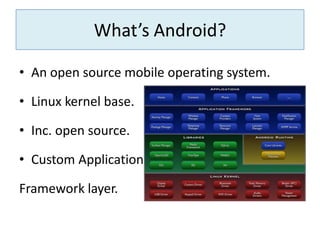
איזהכליםישבשביל? Debugging What’s Android?An open source mobile operating system.Linux kernel base.Inc. open source.Custom ApplicationFramework layer.
What’s given by Android for development?ADB.AVD manager and emulator.Android devices.SDK.NDK.Android tools.
The “Android Debug Bridge” is: A command line tool.handles communication with a development unita client-server program that includes three components:A client, which runs on your computer. A server, which runs as a background process.A daemon, which runs as a background process on each development unit.Android tools – ADB.
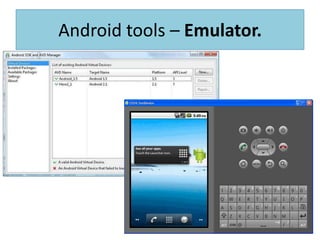
Runs on your computer.Mouse/keyboard to mimic touch and key events.Mimics all hardware and software features.Different screen sizes and densities.Emulating phone events (SMS, phone calls).Spoofing location events.Different API levels.Android tools – Emulator.
Android tools – Emulator.
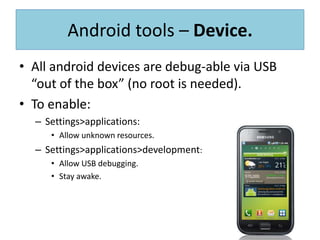
All android devices are debug-able via USB “out of the box” (no root is needed).To enable:Settings>applications:Allow unknown resources.Settings>applications>development:Allow USB debugging.Stay awake.Android tools – Device.
Programming language: JAVA + XML.Create standard android application by using and utilizing the applications framework.Most popularIDE:Eclipse + ADT.Other possible IDEs:intellij.Net beans.Android tools – SDK.
Programming language: everything!Create an android application by accessing the native code directly.Reasons for using NDK:Using non-java ready made code.Using hardware acceleration.A real need for more performance.Android tools – NDK.
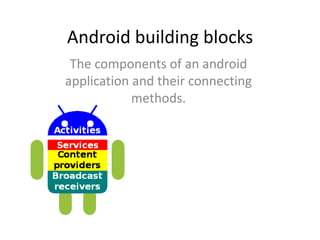
Android building blocksThe components of an android application and their connecting methods.
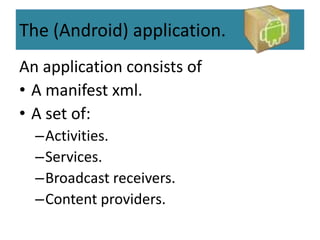
The (Android) application.An application consists ofA manifest xml.A set of:Activities.Services.Broadcast receivers.Content providers.
The ManifestThe Manifest is essentially a list of components that the application uses or requires, such as:The components of the applications.User permissions .The minimum API level.Hardware and software features.API dependencies.
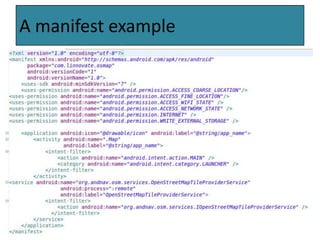
A manifest example
.The ActivityAn activity represents a single screen with a user interface (Java file + xml layout file).An application usually consists of multiple activities that are loosely bound to each other.One Activity is flagged as “main” and it is started at the application launch time.An Activity can launch other activities to create an app UI workflow. The Activity has an Intent attribute that determines how android treats it.
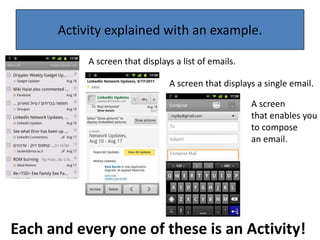
Activity explained with an example.A screen that displays a list of emails.A screen that displays a single email.A screen that enables you to compose an email.Each and every one of these is an Activity!
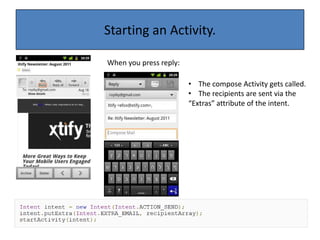
Starting an Activity.When you press reply:The compose Activity gets called.
The recipients aresent via the“Extras” attribute of the intent.
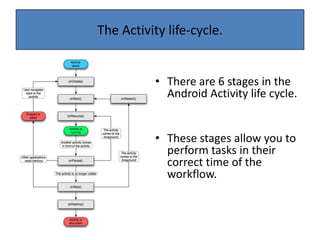
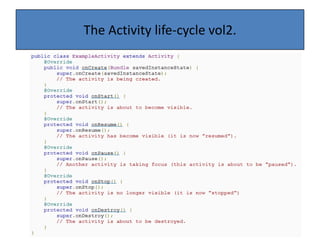
The Activity life-cycle.There are 6 stages in the Android Activity life cycle.These stages allow you to perform tasks in their correct time of the workflow.
The Activity life-cycle vol2.
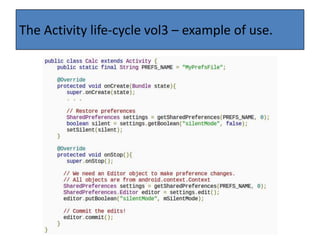
SharedPrefs – A tool that saves data to a file so it will be available even if the app is closed and restarted.It is generally used for:1. Saving user preferences.2. Saving a “snapshot” of the app so it could be resumed to precisely the same state. The Activity life-cycle vol3 – before example.
The Activity life-cycle vol3 – example of use.
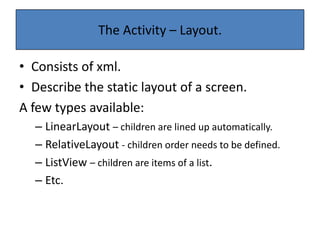
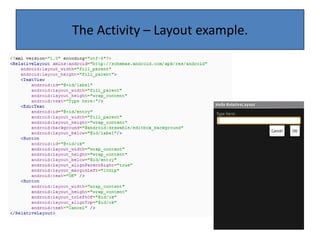
Consists of xml.Describe the static layout of a screen.A few types available:LinearLayout– children are lined up automatically.RelativeLayout- children order needs to be defined.ListView– children are items of a list.Etc.The Activity – Layout.
The Activity – Layout example.
.The ServiceAn application component that can perform long-running operations in the background and does not provide a user interface.The service has two forms:A "started“  service is called by an app component and runs in the background even if the application that called it was closed.
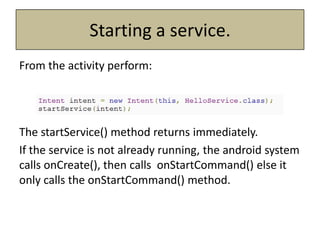
A “bound” service is bound by an app component and is used as a client-server bridge, this sort of service is terminated when the application that is bound to it is closed.Starting a service.From the activity perform:The startService() method returns immediately.If the service is not already running, the android system calls onCreate(), then calls onStartCommand()else it only calls the onStartCommand() method.
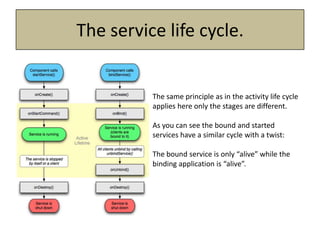
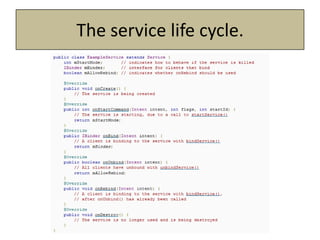
The same principle as in the activity life cycle applies here only the stages are different.As you can see the bound and started services have a similar cycle with a twist:The bound service is only “alive” while the binding application is “alive”.The service life cycle.
The service life cycle.
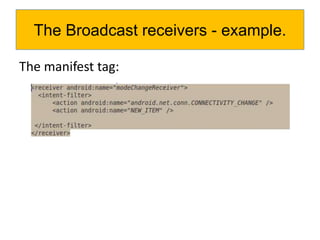
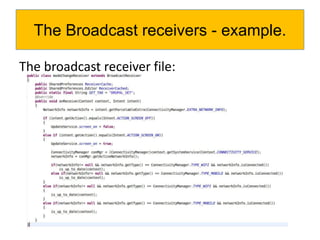
a component that responds to system-wide broadcast announcements.The announcement can originate either from a system event (screen on/off) or a custom activity event.When this protocol is customized it facilitates message sending between applications and activities that should work together.The Broadcast receivers.
The manifest tag:The Broadcast receivers - example.
The broadcast receiver file:The Broadcast receivers - example.
Components that manage a shared set of application data. The data is stored at one of the following formats:In the file system.In an SQLite database.on the web.More..Essentially you can store it in any persistent storage location your application can access. The Content providers.
Through the content provider, other applications can query or even modify the data (if the content provider allows it). providers are also useful for reading and writing data that is private to your application and is not shared.The Content providers.
Here’s a few examples for system content providers:Contacts.Text messages.Phone calls.The Content providers – examples.
Android provides a few precious tools for that:DDMS.Logcat.Hierarchy viewer.Monkey & monkey runner.Android debug tools.
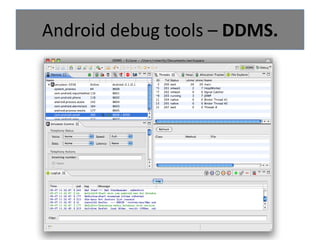
Android debug tools – DDMS.The “DalvikDebug Monitor Server (DDMS)” is: A debugging tool that provides:Port forwarding services. Screen capture. thread and heap information. Logcatand process logging.Mobile data spoofing (location, calls and SMS)Memory dump.
Android debug tools – DDMS.
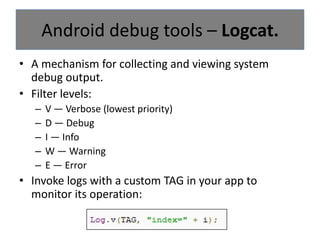
Amechanism for collecting and viewing system debug output.Filter levels:V — Verbose (lowest priority)D — DebugI — InfoW — WarningE — ErrorInvoke logs with a custom TAG in your app to monitor its operation:Android debug tools – Logcat.
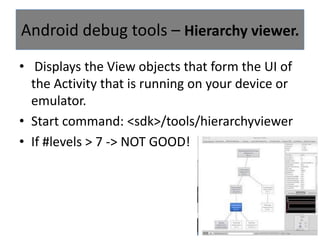
 Displays the View objects that form the UI of the Activity that is running on your device or emulator. Start command: <sdk>/tools/hierarchyviewerIf #levels > 7 -> NOT GOOD!Android debug tools – Hierarchy viewer.
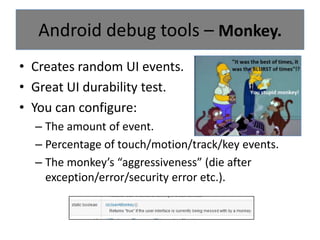
Creates random UI events.Great UI durability test.You can configure:The amount of event.Percentage of touch/motion/track/key events.The monkey’s “aggressiveness” (die after exception/error/security error etc.).Android debug tools – Monkey.
Enables using the monkey tool in a more precise way:Write a python code.The monkey performs it.Great for recreating bugs and create tests to see when they are resolved.Android debug tools – Monkey runner.
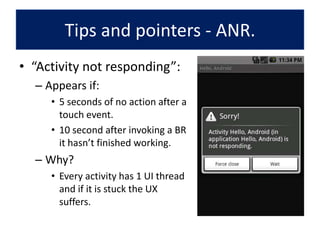
Tips and pointers - ANR.“Activity not responding”:Appears if:5 seconds of no action after a touch event.10 second after invoking a BR it hasn’t finished working.Why?Every activity has 1 UI thread and if it is stuck the UX suffers.
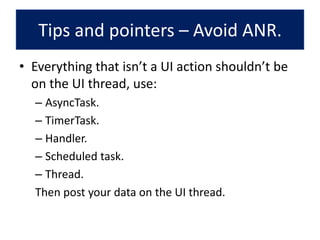
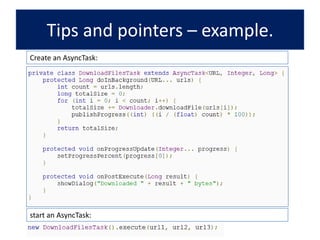
Everything that isn’t a UI action shouldn’t be on the UI thread, use:AsyncTask.TimerTask.Handler.Scheduled task.Thread.Then post your data on the UI thread.Tips and pointers – Avoid ANR.

Android 101 Session @thejunction32

  • 1.
  • 2.
  • 3.
  • 4.
    איזהכליםישבשביל? Debugging What’sAndroid?An open source mobile operating system.Linux kernel base.Inc. open source.Custom ApplicationFramework layer.
  • 5.
    What’s given byAndroid for development?ADB.AVD manager and emulator.Android devices.SDK.NDK.Android tools.
  • 6.
    The “Android DebugBridge” is: A command line tool.handles communication with a development unita client-server program that includes three components:A client, which runs on your computer. A server, which runs as a background process.A daemon, which runs as a background process on each development unit.Android tools – ADB.
  • 7.
    Runs on yourcomputer.Mouse/keyboard to mimic touch and key events.Mimics all hardware and software features.Different screen sizes and densities.Emulating phone events (SMS, phone calls).Spoofing location events.Different API levels.Android tools – Emulator.
  • 8.
  • 9.
    All android devicesare debug-able via USB “out of the box” (no root is needed).To enable:Settings>applications:Allow unknown resources.Settings>applications>development:Allow USB debugging.Stay awake.Android tools – Device.
  • 10.
    Programming language: JAVA+ XML.Create standard android application by using and utilizing the applications framework.Most popularIDE:Eclipse + ADT.Other possible IDEs:intellij.Net beans.Android tools – SDK.
  • 11.
    Programming language: everything!Createan android application by accessing the native code directly.Reasons for using NDK:Using non-java ready made code.Using hardware acceleration.A real need for more performance.Android tools – NDK.
  • 12.
    Android building blocksThecomponents of an android application and their connecting methods.
  • 13.
    The (Android) application.Anapplication consists ofA manifest xml.A set of:Activities.Services.Broadcast receivers.Content providers.
  • 14.
    The ManifestThe Manifestis essentially a list of components that the application uses or requires, such as:The components of the applications.User permissions .The minimum API level.Hardware and software features.API dependencies.
  • 15.
  • 16.
    .The ActivityAn activity represents asingle screen with a user interface (Java file + xml layout file).An application usually consists of multiple activities that are loosely bound to each other.One Activity is flagged as “main” and it is started at the application launch time.An Activity can launch other activities to create an app UI workflow. The Activity has an Intent attribute that determines how android treats it.
  • 17.
    Activity explained withan example.A screen that displays a list of emails.A screen that displays a single email.A screen that enables you to compose an email.Each and every one of these is an Activity!
  • 18.
    Starting an Activity.Whenyou press reply:The compose Activity gets called.
  • 19.
    The recipients aresentvia the“Extras” attribute of the intent.
  • 20.
    The Activity life-cycle.Thereare 6 stages in the Android Activity life cycle.These stages allow you to perform tasks in their correct time of the workflow.
  • 21.
  • 22.
    SharedPrefs – Atool that saves data to a file so it will be available even if the app is closed and restarted.It is generally used for:1. Saving user preferences.2. Saving a “snapshot” of the app so it could be resumed to precisely the same state. The Activity life-cycle vol3 – before example.
  • 23.
    The Activity life-cyclevol3 – example of use.
  • 24.
    Consists of xml.Describethe static layout of a screen.A few types available:LinearLayout– children are lined up automatically.RelativeLayout- children order needs to be defined.ListView– children are items of a list.Etc.The Activity – Layout.
  • 25.
    The Activity –Layout example.
  • 26.
    .The ServiceAn applicationcomponent that can perform long-running operations in the background and does not provide a user interface.The service has two forms:A "started“ service is called by an app component and runs in the background even if the application that called it was closed.
  • 27.
    A “bound” serviceis bound by an app component and is used as a client-server bridge, this sort of service is terminated when the application that is bound to it is closed.Starting a service.From the activity perform:The startService() method returns immediately.If the service is not already running, the android system calls onCreate(), then calls onStartCommand()else it only calls the onStartCommand() method.
  • 28.
    The same principleas in the activity life cycle applies here only the stages are different.As you can see the bound and started services have a similar cycle with a twist:The bound service is only “alive” while the binding application is “alive”.The service life cycle.
  • 29.
  • 30.
    a component thatresponds to system-wide broadcast announcements.The announcement can originate either from a system event (screen on/off) or a custom activity event.When this protocol is customized it facilitates message sending between applications and activities that should work together.The Broadcast receivers.
  • 31.
    The manifest tag:TheBroadcast receivers - example.
  • 32.
    The broadcast receiverfile:The Broadcast receivers - example.
  • 33.
    Components that managea shared set of application data. The data is stored at one of the following formats:In the file system.In an SQLite database.on the web.More..Essentially you can store it in any persistent storage location your application can access. The Content providers.
  • 34.
    Through the contentprovider, other applications can query or even modify the data (if the content provider allows it). providers are also useful for reading and writing data that is private to your application and is not shared.The Content providers.
  • 35.
    Here’s a fewexamples for system content providers:Contacts.Text messages.Phone calls.The Content providers – examples.
  • 36.
    Android provides afew precious tools for that:DDMS.Logcat.Hierarchy viewer.Monkey & monkey runner.Android debug tools.
  • 37.
    Android debug tools– DDMS.The “DalvikDebug Monitor Server (DDMS)” is: A debugging tool that provides:Port forwarding services. Screen capture. thread and heap information. Logcatand process logging.Mobile data spoofing (location, calls and SMS)Memory dump.
  • 38.
  • 39.
    Amechanism for collectingand viewing system debug output.Filter levels:V — Verbose (lowest priority)D — DebugI — InfoW — WarningE — ErrorInvoke logs with a custom TAG in your app to monitor its operation:Android debug tools – Logcat.
  • 40.
     Displays the Viewobjects that form the UI of the Activity that is running on your device or emulator. Start command: <sdk>/tools/hierarchyviewerIf #levels > 7 -> NOT GOOD!Android debug tools – Hierarchy viewer.
  • 41.
    Creates random UIevents.Great UI durability test.You can configure:The amount of event.Percentage of touch/motion/track/key events.The monkey’s “aggressiveness” (die after exception/error/security error etc.).Android debug tools – Monkey.
  • 42.
    Enables using themonkey tool in a more precise way:Write a python code.The monkey performs it.Great for recreating bugs and create tests to see when they are resolved.Android debug tools – Monkey runner.
  • 43.
    Tips and pointers- ANR.“Activity not responding”:Appears if:5 seconds of no action after a touch event.10 second after invoking a BR it hasn’t finished working.Why?Every activity has 1 UI thread and if it is stuck the UX suffers.
  • 44.
    Everything that isn’ta UI action shouldn’t be on the UI thread, use:AsyncTask.TimerTask.Handler.Scheduled task.Thread.Then post your data on the UI thread.Tips and pointers – Avoid ANR.