
Presented by Steve Stedman and Aaron Buma
Welcome
 Welcome to all those joining us remotely.
 For any questions via Google On Air Broadcasts, we will
address these at the end of the training
 Training provided by Emergency Reporting
 http://EmergencyReporting.com
 Presented by Steve Stedman
 And Aaron Buma
Agenda
 TOP(N)
 RANK and DENSE_RANK
 ROW_NUMBER
 NTILE
 OVER clause enhancements
 LAG and LEAD, FIRST_VALUE and LAST_VALUE
 PERCENT_RANK
 PERCENTILE_DISC and PERCENTILE_CONT
 CUME_DIST - Cumulative Distribution
Presented by Aaron Buma
Part One – Aaron Buma
 TOP (n)
 WITH TIES
 PERCENT
 RANK and DENSE_RANK
 ROW_NUMBER
SELECT TOP (N)
 TOP (n)
 n as variable
 WITH TIES
 PERCENT
Rank, Dense_Rank, Row_number
 RANK and DENSE_RANK
 Requires “ OVER(ORDER BY columnName ASC/DESC)
to declare what to rank and in what order
 Identical results until duplicates are encountered
 ROW_NUMBER
 Disregards duplicates
Presented by Steve Stedman
Part Two – Steve Stedman
 NTILE
 OVER Clause Enhancements
 ROWS PRECEDING, FOLLOWING, UNBOUNDED
 RANGE PRECEDING, FOLLOWING, UNBOUNDED
 LAG and LEAD
 FIRST_VALUE and LAST_VALUE
 PERCENT_RANK
 PERCENTILE_DISC and PERCENTILE_CONT
 CUME_DIST - Cumulative Distribution
NTILE
 Median – Split the group into 2 evenly sized groups.
 Evenly in this case is defined as being as close to even as
possible given the number of items in the group.
 Quartile – Split the set into 4 evenly sized groups.
 Decile – Split the set into 10 evenly sized groups.
 Percentile – Split the group into 100 evenly sized groups.
 NTile – Split the group into N evenly sized groups.
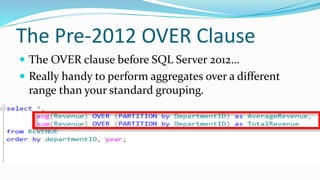
The Pre-2012 OVER Clause
 The OVER clause before SQL Server 2012…
 Really handy to perform aggregates over a different
range than your standard grouping.
OVER Clause Enhancements
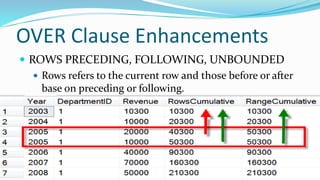
 ROWS PRECEDING, FOLLOWING, UNBOUNDED
 Rows refers to the current row and those before or after
base on preceding or following.
 RANGE PRECEDING, FOLLOWING, UNBOUNDED
 Range means all values in the current range and those
before or after.
PRECEDING, FOLLOWING,
UNBOUNDED
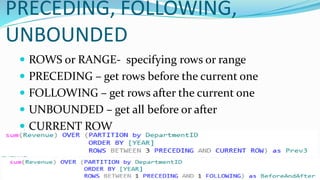
 ROWS or RANGE- specifying rows or range
 PRECEDING – get rows before the current one
 FOLLOWING – get rows after the current one
 UNBOUNDED – get all before or after
 CURRENT ROW
Demo
--ROWS PRECEDING
-- http://stevestedman.com/?p=1454
-- look at the sum of revenue over a trailing 3 year period
select Year, DepartmentID, Revenue,
sum(Revenue) OVER (PARTITION by DepartmentID
ORDER BY [YEAR]
ROWS BETWEEN 3 PRECEDING AND CURRENT ROW) as Prev3
from REVENUE order by departmentID, year;
--ROWS PRECEDING
select Year, DepartmentID, Revenue,
sum(Revenue) OVER (PARTITION by DepartmentID
ORDER BY [YEAR]
ROWS BETWEEN 5 PRECEDING AND 2 PRECEDING) as Prev5to3
from REVENUE order by departmentID, year;
-- ROWS FOLLOWING
-- http://stevestedman.com/?p=1454
select Year, DepartmentID, Revenue,
sum(Revenue) OVER (PARTITION by DepartmentID
ORDER BY [YEAR]
ROWS BETWEEN CURRENT ROW AND 3 FOLLOWING) as Next3
from REVENUE order by departmentID, year;
--ROWS PRECEDING
select Year, DepartmentID, Revenue,
sum(Revenue) OVER (PARTITION by DepartmentID
ORDER BY [YEAR]
ROWS BETWEEN 1 PRECEDING AND 1 FOLLOWING) as BeforeAndAfter
from REVENUE order by departmentID, year;
LAG and LEAD
 Allows you to reference a value in a row before or a row
after the current row
 Over clause is used to specify the ordering and
partitioning
FIRST_VALUEand LAST_VALUE
 FIRST_VALUE returns the first value in an ordered set of
values and
 LAST_VALUE returns the last value in an ordered set of
values
 Utilize the OVER clause to set ranges and orders
 Interesting catch – LAST_VALUE specifies the last value so
far unless you specify otherwise
PERCENT_RANK
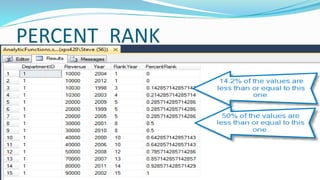
 PERCENT_RANK is defined as the number of values
that are the same or less than the current value divided
by one less than the number of values
 Different from PERCENTILE
PERCENTILE_DISC and
PERCENTILE_CONT
 PERCENTILE_CONT interpolates the appropriate value,
even if it is not in the set.
 PERCENTILE_DISC picks a percentile that exists in the set.
 Keep in mind that any nulls in the data set are ignored.
 What’s the difference in the names
 CONT stands for continuous
 DISC stands for discrete distribution which means that the
percentile will exist in the set.
CUME_DIST - Cumulative
Distribution
 CUME_DIST is the function that maps values to their
percentile rank in a distribution.
 The CUME_DIST function calculates the possibility of
another occurrence being of that value or lesser than
that among a group of values.
More statistics with Cumulative
Distribution
 Testing the Rand() function
 Testing probability with dice rolls
Quiz 1:
 Which of the following is incorrect:
 In regards to: TOP (n) PERCENT
 n can be any value
 n can be any value from 0 – 100
 n can be a variable, valued 0 - 100
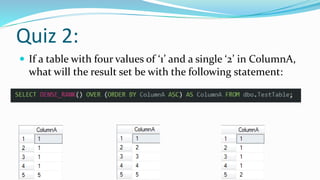
Quiz 2:
 If a table with four values of ‘1’ and a single ‘2’ in ColumnA,
what will the result set be with the following statement:
Quiz 3
 If a duplicate value is encountered, ROW_NUMBER does
which of the following:
 Repeat the counter/row number until the first non-duplicate
is found, the continue with next number
 Continue to increase the counter/row number when a
duplicate is found
 Repeat the counter/row number until the first non-duplicate
is found, then skip to number which would match the row
number as if no duplicates were encountered.
Quiz 4:
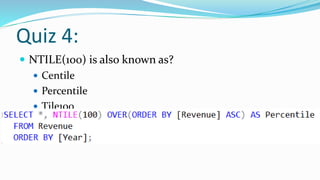
 NTILE(100) is also known as?
 Centile
 Percentile
 Tile100
 Decile
Quiz 5:
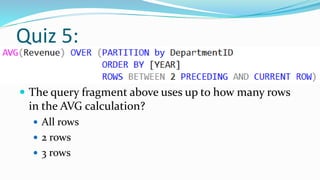
 The query fragment above uses up to how many rows
in the AVG calculation?
 All rows
 2 rows
 3 rows
Any Questions?
 TOP(N)
 RANK and DENSE_RANK
 ROW_NUMBER
 NTILE
 OVER clause enhancements
 LAG and LEAD, FIRST_VALUE and LAST_VALUE
 PERCENT_RANK
 PERCENTILE_DISC and PERCENTILE_CONT
 CUME_DIST - Cumulative Distribution
For More Information
 Visit http://EmergencyReporting.com to find out more
about Emergency Reporting.
 Aaron on the web
 http://AaronBuma.com
 Twitter: @AaronDBuma
 Steve on the web
 http://SteveStedman.com
 twitter: @SqlEmt
Tune in next week
 Thursday 2/12 at 9:00am (pacific time).
 Topics
 Set Operators
 UNION, UNION ALL, INTERSECT, EXCEPT
 Set Grouping

SQL Server TOP(), Ranking, NTILE, and Aggregate Functions

  • 1.
    Presented by SteveStedman and Aaron Buma
  • 2.
    Welcome  Welcome toall those joining us remotely.  For any questions via Google On Air Broadcasts, we will address these at the end of the training  Training provided by Emergency Reporting  http://EmergencyReporting.com  Presented by Steve Stedman  And Aaron Buma
  • 3.
    Agenda  TOP(N)  RANKand DENSE_RANK  ROW_NUMBER  NTILE  OVER clause enhancements  LAG and LEAD, FIRST_VALUE and LAST_VALUE  PERCENT_RANK  PERCENTILE_DISC and PERCENTILE_CONT  CUME_DIST - Cumulative Distribution
  • 4.
  • 5.
    Part One –Aaron Buma  TOP (n)  WITH TIES  PERCENT  RANK and DENSE_RANK  ROW_NUMBER
  • 6.
    SELECT TOP (N) TOP (n)  n as variable  WITH TIES  PERCENT
  • 7.
    Rank, Dense_Rank, Row_number RANK and DENSE_RANK  Requires “ OVER(ORDER BY columnName ASC/DESC) to declare what to rank and in what order  Identical results until duplicates are encountered  ROW_NUMBER  Disregards duplicates
  • 8.
  • 9.
    Part Two –Steve Stedman  NTILE  OVER Clause Enhancements  ROWS PRECEDING, FOLLOWING, UNBOUNDED  RANGE PRECEDING, FOLLOWING, UNBOUNDED  LAG and LEAD  FIRST_VALUE and LAST_VALUE  PERCENT_RANK  PERCENTILE_DISC and PERCENTILE_CONT  CUME_DIST - Cumulative Distribution
  • 10.
    NTILE  Median –Split the group into 2 evenly sized groups.  Evenly in this case is defined as being as close to even as possible given the number of items in the group.  Quartile – Split the set into 4 evenly sized groups.  Decile – Split the set into 10 evenly sized groups.  Percentile – Split the group into 100 evenly sized groups.  NTile – Split the group into N evenly sized groups.
  • 11.
    The Pre-2012 OVERClause  The OVER clause before SQL Server 2012…  Really handy to perform aggregates over a different range than your standard grouping.
  • 12.
    OVER Clause Enhancements ROWS PRECEDING, FOLLOWING, UNBOUNDED  Rows refers to the current row and those before or after base on preceding or following.  RANGE PRECEDING, FOLLOWING, UNBOUNDED  Range means all values in the current range and those before or after.
  • 13.
    PRECEDING, FOLLOWING, UNBOUNDED  ROWSor RANGE- specifying rows or range  PRECEDING – get rows before the current one  FOLLOWING – get rows after the current one  UNBOUNDED – get all before or after  CURRENT ROW
  • 14.
    Demo --ROWS PRECEDING -- http://stevestedman.com/?p=1454 --look at the sum of revenue over a trailing 3 year period select Year, DepartmentID, Revenue, sum(Revenue) OVER (PARTITION by DepartmentID ORDER BY [YEAR] ROWS BETWEEN 3 PRECEDING AND CURRENT ROW) as Prev3 from REVENUE order by departmentID, year; --ROWS PRECEDING select Year, DepartmentID, Revenue, sum(Revenue) OVER (PARTITION by DepartmentID ORDER BY [YEAR] ROWS BETWEEN 5 PRECEDING AND 2 PRECEDING) as Prev5to3 from REVENUE order by departmentID, year; -- ROWS FOLLOWING -- http://stevestedman.com/?p=1454 select Year, DepartmentID, Revenue, sum(Revenue) OVER (PARTITION by DepartmentID ORDER BY [YEAR] ROWS BETWEEN CURRENT ROW AND 3 FOLLOWING) as Next3 from REVENUE order by departmentID, year; --ROWS PRECEDING select Year, DepartmentID, Revenue, sum(Revenue) OVER (PARTITION by DepartmentID ORDER BY [YEAR] ROWS BETWEEN 1 PRECEDING AND 1 FOLLOWING) as BeforeAndAfter from REVENUE order by departmentID, year;
  • 15.
    LAG and LEAD Allows you to reference a value in a row before or a row after the current row  Over clause is used to specify the ordering and partitioning
  • 16.
    FIRST_VALUEand LAST_VALUE  FIRST_VALUEreturns the first value in an ordered set of values and  LAST_VALUE returns the last value in an ordered set of values  Utilize the OVER clause to set ranges and orders  Interesting catch – LAST_VALUE specifies the last value so far unless you specify otherwise
  • 17.
    PERCENT_RANK  PERCENT_RANK isdefined as the number of values that are the same or less than the current value divided by one less than the number of values  Different from PERCENTILE
  • 18.
    PERCENTILE_DISC and PERCENTILE_CONT  PERCENTILE_CONTinterpolates the appropriate value, even if it is not in the set.  PERCENTILE_DISC picks a percentile that exists in the set.  Keep in mind that any nulls in the data set are ignored.  What’s the difference in the names  CONT stands for continuous  DISC stands for discrete distribution which means that the percentile will exist in the set.
  • 19.
    CUME_DIST - Cumulative Distribution CUME_DIST is the function that maps values to their percentile rank in a distribution.  The CUME_DIST function calculates the possibility of another occurrence being of that value or lesser than that among a group of values.
  • 20.
    More statistics withCumulative Distribution  Testing the Rand() function  Testing probability with dice rolls
  • 21.
    Quiz 1:  Whichof the following is incorrect:  In regards to: TOP (n) PERCENT  n can be any value  n can be any value from 0 – 100  n can be a variable, valued 0 - 100
  • 22.
    Quiz 2:  Ifa table with four values of ‘1’ and a single ‘2’ in ColumnA, what will the result set be with the following statement:
  • 23.
    Quiz 3  Ifa duplicate value is encountered, ROW_NUMBER does which of the following:  Repeat the counter/row number until the first non-duplicate is found, the continue with next number  Continue to increase the counter/row number when a duplicate is found  Repeat the counter/row number until the first non-duplicate is found, then skip to number which would match the row number as if no duplicates were encountered.
  • 24.
    Quiz 4:  NTILE(100)is also known as?  Centile  Percentile  Tile100  Decile
  • 25.
    Quiz 5:  Thequery fragment above uses up to how many rows in the AVG calculation?  All rows  2 rows  3 rows
  • 26.
    Any Questions?  TOP(N) RANK and DENSE_RANK  ROW_NUMBER  NTILE  OVER clause enhancements  LAG and LEAD, FIRST_VALUE and LAST_VALUE  PERCENT_RANK  PERCENTILE_DISC and PERCENTILE_CONT  CUME_DIST - Cumulative Distribution
  • 27.
    For More Information Visit http://EmergencyReporting.com to find out more about Emergency Reporting.  Aaron on the web  http://AaronBuma.com  Twitter: @AaronDBuma  Steve on the web  http://SteveStedman.com  twitter: @SqlEmt
  • 28.
    Tune in nextweek  Thursday 2/12 at 9:00am (pacific time).  Topics  Set Operators  UNION, UNION ALL, INTERSECT, EXCEPT  Set Grouping