SUBMITTED BY
ARJUN S KUMAR
ARUN JOE JOSEPH
DEEPA RAMACHANDRAN
DON PAUL P
ROSHNI S A
INTRODUCTION
 Call costs that are generated for voice
calls within an institution could turn out
to be a handful if not managed properly.
 This project aims to develop a system
which can be used for voice
communication over a Wi-Fi network
provided within an institution.
 It would help to nullify the costs for voice
communication within an institution
OBJECTIVE
 To develop an application based on Python to enable
voice communication between devices that are
connected to the same Wi-Fi network.
 To assemble a mobile terminal with following features:
 Full Duplex communication over Wi-Fi.
 User interface with an LCD display and Keypad input.
 To support future extension of this system to
accommodate new devices.
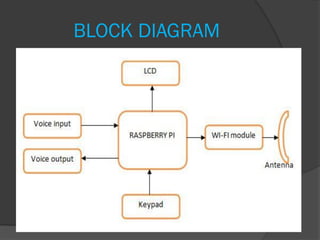
BLOCK DIAGRAM
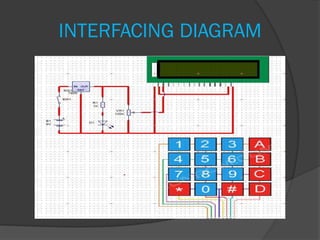
INTERFACING DIAGRAM
DESCRIPTION
 Voice input is given to raspberry pi via
microphone connected to the audio
input of sound card.
 Raspberry pi is used to process and
transmit voice signals.
 Wi fi dongle provides Wi-fi access to
raspberry pi.
 Voice signal is sampled and transmitted
via Wi-fi.
 LCD and keypad constitute user
interface part.
 LCD displays the welcome message
and messages indicating call initiation
and termination.
 In order to connect to a device, its IP
address must be entered. This is done
using interfaced keypad.
 The LCD also displays the IP address
and port number of the destination.
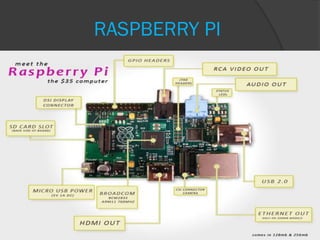
RASPBERRY PI
SPECIFICATIONS OF RASPBERRY
PI (MODEL B)
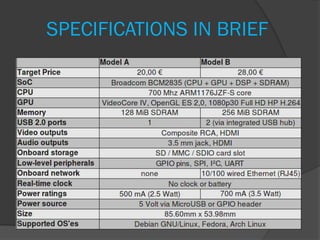
 ARM1176JZF-S700 MHz processor
 VideoCore IV GPU
 RAM-512 MB
 No built-in hard disk or solid-state drive
 Uses an SD card for booting and long-
term storage.
 2 USB ports
 10/100 Ethernet controller
 Linux kernel - based operating systems
 Raspbian is a Debian - based free
operating system optimized for the
Raspberry Pi hardware.
SPECIFICATIONS IN BRIEF
Wi-Fi
 Wi-Fi is a popular technology that allows
an electronic device to exchange data or
connect to the internet wirelessly using
radio waves.
 Spaces where cables cannot be run,
such as outdoor areas and historical
buildings, can host wireless LANs.
 An economical networking option.
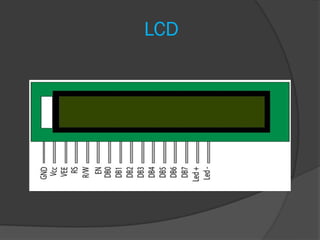
LCD
 LCDs are economical, easily programmable,
have no limitation and can display special
and even custom characters (unlike seven
segment display).
 A 16x2 LCD means it can display 16
characters per line and there are 2 such
lines.
 In this LCD each character is displayed in
5x7 pixel matrix.
 This LCD has two registers, namely,
Command and Data.
 Command-stores instructions.
 Data-stores ASCII value of character to
be displayed.
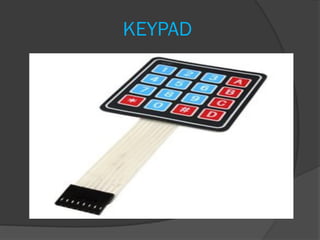
KEYPAD
 Basic 16 button keypad.
 16 buttons of this keypad are arranged
in a 4x4 grid.
 The keys are connected into a matrix,
so, we only need 8 output pins (4-
columns and 4-rows) to scan through
the pad.
 An 8-pin extra-long header strip is
provided so that it can be plugged in to
the desired GPIO pins.
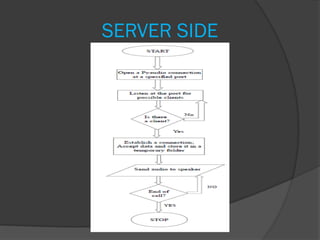
SERVER SIDE
SERVER SIDE
CHUNK = 1024
FORMAT = pyaudio.paInt16
CHANNELS = 1
RATE = 44100
RECORD_SECONDS = 10
WIDTH = 2
frames = []
HOST = '' # Symbolic name meaning
all available interfaces
PORT = 50010 # Arbitrary non-privileged
port
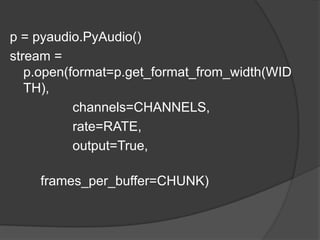
p = pyaudio.PyAudio()
stream =
p.open(format=p.get_format_from_width(WID
TH),
channels=CHANNELS,
rate=RATE,
output=True,
frames_per_buffer=CHUNK)
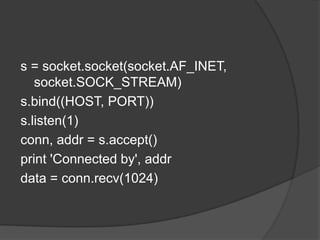
s = socket.socket(socket.AF_INET,
socket.SOCK_STREAM)
s.bind((HOST, PORT))
s.listen(1)
conn, addr = s.accept()
print 'Connected by', addr
data = conn.recv(1024)
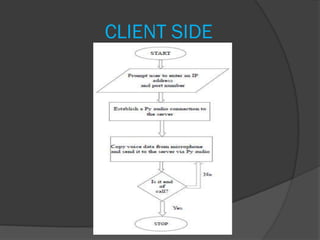
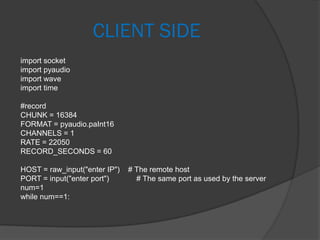
CLIENT SIDE
CLIENT SIDE
import socket
import pyaudio
import wave
import time
#record
CHUNK = 16384
FORMAT = pyaudio.paInt16
CHANNELS = 1
RATE = 22050
RECORD_SECONDS = 60
HOST = raw_input("enter IP") # The remote host
PORT = input("enter port") # The same port as used by the server
num=1
while num==1:
s = socket.socket(socket.AF_INET, socket.SOCK_STREAM)
s.connect((HOST, PORT))
p = pyaudio.PyAudio()
stream = p.open(format=FORMAT,
channels=CHANNELS,
rate=RATE,
input=True,
frames_per_buffer=CHUNK)
print("*recording")
frames = []
for i in range(0, int(RATE/CHUNK*RECORD_SECONDS)):
data = stream.read(CHUNK)
frames.append(data)
s.sendall(data)
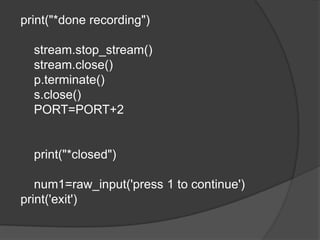
print("*done recording")
stream.stop_stream()
stream.close()
p.terminate()
s.close()
PORT=PORT+2
print("*closed")
num1=raw_input('press 1 to continue')
print('exit')
PROJECT SUMMARY
The objective was to develop
1) full duplex communication system
2) A user interface for interacting
We have successfully implemented both of
our objectives.
Why Python?
 Python is easy to write when compared
to JAVA.
 It is Dynamically typed language , so
that program length reduces.
 It has good compatibility with Raspberry
Pi.
Why Raspberry Pi?
 It is the cheapest available hardware
unit that satisfied our requirements.
 It has GPIO pins tat enabled to interface
with external hardware.
 It has a huge online support.
THE FEATURES OF FINAL END
PRODUCT
 The device we developed is of compact
size and works stand alone.
 It has at present a range of about 10m
circular radius from base station.
 It offers reconnecting and retry features
 It can be configured for any Wi-fi
network.
OTHER APPLICATIONS OF
PROJECT
 Can be used at disaster management
locations as the last resort of medium
range communication.
 Can be used as a broadcast device for
wireless audio speakers.
FUTURE DEVELOPMENTS
 Range can be extended by using a more
powerful router.
 When going for mass production the
cost can again be reduced.
 Can add texting features as well.
Intra Institutional Communication System

Intra Institutional Communication System

  • 1.
    SUBMITTED BY ARJUN SKUMAR ARUN JOE JOSEPH DEEPA RAMACHANDRAN DON PAUL P ROSHNI S A
  • 2.
    INTRODUCTION  Call coststhat are generated for voice calls within an institution could turn out to be a handful if not managed properly.  This project aims to develop a system which can be used for voice communication over a Wi-Fi network provided within an institution.  It would help to nullify the costs for voice communication within an institution
  • 3.
    OBJECTIVE  To developan application based on Python to enable voice communication between devices that are connected to the same Wi-Fi network.  To assemble a mobile terminal with following features:  Full Duplex communication over Wi-Fi.  User interface with an LCD display and Keypad input.  To support future extension of this system to accommodate new devices.
  • 4.
  • 5.
  • 6.
    DESCRIPTION  Voice inputis given to raspberry pi via microphone connected to the audio input of sound card.  Raspberry pi is used to process and transmit voice signals.  Wi fi dongle provides Wi-fi access to raspberry pi.  Voice signal is sampled and transmitted via Wi-fi.
  • 7.
     LCD andkeypad constitute user interface part.  LCD displays the welcome message and messages indicating call initiation and termination.  In order to connect to a device, its IP address must be entered. This is done using interfaced keypad.  The LCD also displays the IP address and port number of the destination.
  • 9.
  • 10.
    SPECIFICATIONS OF RASPBERRY PI(MODEL B)  ARM1176JZF-S700 MHz processor  VideoCore IV GPU  RAM-512 MB  No built-in hard disk or solid-state drive  Uses an SD card for booting and long- term storage.  2 USB ports  10/100 Ethernet controller
  • 11.
     Linux kernel- based operating systems  Raspbian is a Debian - based free operating system optimized for the Raspberry Pi hardware.
  • 12.
  • 13.
    Wi-Fi  Wi-Fi isa popular technology that allows an electronic device to exchange data or connect to the internet wirelessly using radio waves.  Spaces where cables cannot be run, such as outdoor areas and historical buildings, can host wireless LANs.  An economical networking option.
  • 14.
  • 15.
     LCDs areeconomical, easily programmable, have no limitation and can display special and even custom characters (unlike seven segment display).  A 16x2 LCD means it can display 16 characters per line and there are 2 such lines.  In this LCD each character is displayed in 5x7 pixel matrix.
  • 16.
     This LCDhas two registers, namely, Command and Data.  Command-stores instructions.  Data-stores ASCII value of character to be displayed.
  • 17.
  • 18.
     Basic 16button keypad.  16 buttons of this keypad are arranged in a 4x4 grid.  The keys are connected into a matrix, so, we only need 8 output pins (4- columns and 4-rows) to scan through the pad.  An 8-pin extra-long header strip is provided so that it can be plugged in to the desired GPIO pins.
  • 20.
  • 21.
    SERVER SIDE CHUNK =1024 FORMAT = pyaudio.paInt16 CHANNELS = 1 RATE = 44100 RECORD_SECONDS = 10 WIDTH = 2 frames = [] HOST = '' # Symbolic name meaning all available interfaces PORT = 50010 # Arbitrary non-privileged port
  • 22.
    p = pyaudio.PyAudio() stream= p.open(format=p.get_format_from_width(WID TH), channels=CHANNELS, rate=RATE, output=True, frames_per_buffer=CHUNK)
  • 23.
    s = socket.socket(socket.AF_INET, socket.SOCK_STREAM) s.bind((HOST,PORT)) s.listen(1) conn, addr = s.accept() print 'Connected by', addr data = conn.recv(1024)
  • 24.
  • 25.
    CLIENT SIDE import socket importpyaudio import wave import time #record CHUNK = 16384 FORMAT = pyaudio.paInt16 CHANNELS = 1 RATE = 22050 RECORD_SECONDS = 60 HOST = raw_input("enter IP") # The remote host PORT = input("enter port") # The same port as used by the server num=1 while num==1:
  • 26.
    s = socket.socket(socket.AF_INET,socket.SOCK_STREAM) s.connect((HOST, PORT)) p = pyaudio.PyAudio() stream = p.open(format=FORMAT, channels=CHANNELS, rate=RATE, input=True, frames_per_buffer=CHUNK) print("*recording") frames = [] for i in range(0, int(RATE/CHUNK*RECORD_SECONDS)): data = stream.read(CHUNK) frames.append(data) s.sendall(data)
  • 27.
  • 28.
    PROJECT SUMMARY The objectivewas to develop 1) full duplex communication system 2) A user interface for interacting We have successfully implemented both of our objectives.
  • 29.
    Why Python?  Pythonis easy to write when compared to JAVA.  It is Dynamically typed language , so that program length reduces.  It has good compatibility with Raspberry Pi.
  • 30.
    Why Raspberry Pi? It is the cheapest available hardware unit that satisfied our requirements.  It has GPIO pins tat enabled to interface with external hardware.  It has a huge online support.
  • 31.
    THE FEATURES OFFINAL END PRODUCT  The device we developed is of compact size and works stand alone.  It has at present a range of about 10m circular radius from base station.  It offers reconnecting and retry features  It can be configured for any Wi-fi network.
  • 32.
    OTHER APPLICATIONS OF PROJECT Can be used at disaster management locations as the last resort of medium range communication.  Can be used as a broadcast device for wireless audio speakers.
  • 33.
    FUTURE DEVELOPMENTS  Rangecan be extended by using a more powerful router.  When going for mass production the cost can again be reduced.  Can add texting features as well.