Internationalization &
 Localization Testing


              © 2011 LogiGear Corporation. All Rights Reserved
Internationalization & Localization
                                           Testing


1. What is internationalization & Localization?
2. Why do we test about Internationalization &
   Localization?
3. Example of test cases and bugs
4. Tips and Tricks


                                  © 2011 LogiGear Corporation. All Rights Reserved
Internationalization & Localization
                                             Testing

1. What is internationalization & Localization?

Internationalization and localization are means of
   adapting computer software to different languages,
   regional differences and technical requirements of a target
   market.

Internationalization is the process of designing a software
   application so that it can be adapted to various languages
   and regions without engineering changes.

Localization is the process of adapting internationalized
   software for a specific region or language by adding
   locale-specific components and translating text.


                                       © 2011 LogiGear Corporation. All Rights Reserved
Internationalization & Localization
                                              Testing


 The distinction between internationalization and
  localization is subtle but important. Internationalization
  is the adaptation of products for potential use virtually
  everywhere, while localization is the addition of special
  features for use in a specific locale. Internationalization is
  done once per product, while localization is done once for
  each combination of product and locale. The processes are
  complementary, and must be combined to lead to the
  objective of a system that works globally


                                        © 2011 LogiGear Corporation. All Rights Reserved
Internationalization & Localization
                                                    Testing
 Focal points of internationalization and localization
  efforts include:
    Language
      o Computer-encoded text
           Alphabets/scripts; most recent systems use the Unicode standard to
             solve many of the character encoding problems.
           Different systems of numerals
           Writing direction which is e.g. left to right in German, right to left in
             Persian, Hebrew and Arabic
           Spelling variants for different countries where the same language is
             spoken, e.g. localization (en-US, en-CA) vs. localisation (en-GB, en-AU)
           Text processing differences, such as the concept of capitalization which
             exists in some scripts and not in others, different text sorting rules, etc.
           Plural forms in text output, which differ depending upon language
      o Input
           Enablement of keyboard shortcuts on any keyboard layout
      o Graphical representations of text (printed materials, online images containing
        text)
      o Spoken (Audio)
      o Subtitling of film and video

                                                      © 2011 LogiGear Corporation. All Rights Reserved
Internationalization & Localization
                                                   Testing
 Focal points of internationalization and localization
  efforts include:

    Culture
      o Images and colors: issues of comprehensibility and cultural
        appropriateness
      o Names and titles
      o Government assigned numbers (such as the Social Security number in
        the US, National Insurance number in the UK, Isikukoo in Estonia, and
        Resident registration number in South Korea.) and passports
      o Telephone numbers, addresses and international postal codes
      o Currency (symbols, positions of currency markers)
      o Weights and measures
      o Paper sizes


                                                © 2011 LogiGear Corporation. All Rights Reserved
Internationalization & Localization
                                                    Testing
 Focal points of internationalization and localization
  efforts include:

    Writing conventions

       o   Date/time format, including use of different calendars
       o   Time zones (UTC in internationalized environments)
       o   Formatting of numbers (decimal separator, digit grouping)
       o   Differences in symbols (e.g. quoting text using double-quotes (" "), as
           in English, or guillemets (« »), as in French).


    Any other aspect of the product or service that is subject to
     regulatory compliance


                                                   © 2011 LogiGear Corporation. All Rights Reserved
Internationalization & Localization
                                                     Testing

2. Why do we test about Internationalization &
Localization?
Software is often localized by translating a list of strings out of context, and the
translator may choose the wrong translation for an ambiguous source string.
Technical terminology may become inconsistent if the project is translated by
several people without proper coordination or if the translator is imprudent.
Literal word-for-word translations may sound inappropriate, artificial or too
technical in the target language.
Untranslated messages in the original language may be left hard coded in the
source code.
Some messages may be created automatically at run time and the resulting
string may be ungrammatical, functionally incorrect, misleading or confusing.
Software may use a keyboard shortcut which has no function on the source
language's keyboard layout, but is used for typing characters in the layout of
the target language.


                                                     © 2011 LogiGear Corporation. All Rights Reserved
Internationalization & Localization
                                                   Testing

2. Why do we test about Internationalization &
Localization?

Software may lack support for the character encoding of the target language.
Fonts and font sizes which are appropriate in the source language, may be
inappropriate in the target language; for example, CJK characters may become
unreadable if the font is too small.
A string in the target language may be longer than the software can handle.
This may make the string partly invisible to the user or cause the software to
crash or malfunction.
Software may lack proper support for reading or writing bi-directional text.
Software may display images with text that wasn't localized.
Localized operating systems may have differently-named system configuration
files and environment variables and different formats for date and currency.


                                                 © 2011 LogiGear Corporation. All Rights Reserved
Internationalization & Localization
                                                   Testing

2. Why do we test about Internationalization &
Localization?

Software may lack support for the character encoding of the target language.
Fonts and font sizes which are appropriate in the source language, may be
inappropriate in the target language; for example, CJK characters may become
unreadable if the font is too small.
A string in the target language may be longer than the software can handle.
This may make the string partly invisible to the user or cause the software to
crash or malfunction.
Software may lack proper support for reading or writing bi-directional text.
Software may display images with text that wasn't localized.
Localized operating systems may have differently-named system configuration
files and environment variables and different formats for date and currency.


                                                 © 2011 LogiGear Corporation. All Rights Reserved
Internationalization & Localization
                                              Testing

2. Why do we test about Internationalization &
Localization?

 To avoid these and other localization problems, a tester who
knows the target language must run the program with all the
possible use cases for translation to see if the messages are
readable, translated correctly in context and don't cause
failures.


                                        © 2011 LogiGear Corporation. All Rights Reserved
Internationalization & Localization
                                             Testing

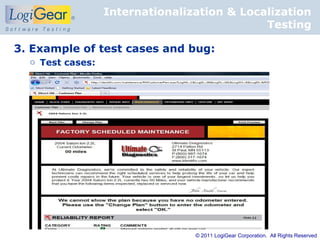
3. Example of test cases and bug:
  o Test cases:


                                 © 2011 LogiGear Corporation. All Rights Reserved
Internationalization & Localization
                                                 Testing

3. Example of test cases and bug:
  o Test cases:
  Description:
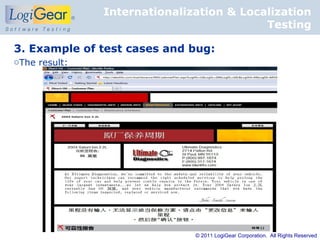
  Verify that “Next Plan”, “Change Plan”, “Print Preview” buttons are
    displayed with Chinese after switching browser language into Chinese

  Step:
  1. Open browser and change language into Chinese
  2. Navigate www.identifix.com website
  3. Create new vehicle
  4. Go to Maintenance tab
  5. Observe “Next Plan”, “Change Plan”, “Print Preview” button

  Expected Result:
  The name of “Next Plan”, “Change Plan”, “Print Preview” button change to
    Chinese


                                               © 2011 LogiGear Corporation. All Rights Reserved
Internationalization & Localization
                                          Testing

3. Example of test cases and bug:
oThe result:


                              © 2011 LogiGear Corporation. All Rights Reserved
Internationalization & Localization
                                                  Testing

3. Example of test cases and bug:
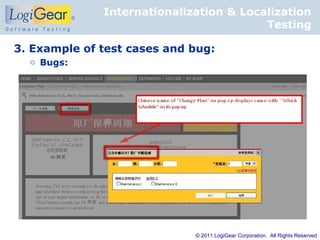
    o Bugs:
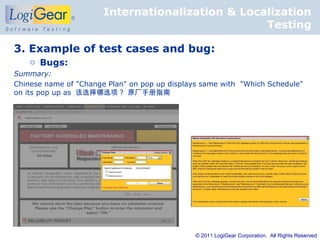
Summary:
Chinese name of "Change Plan" on pop up displays same with "Which Schedule"
on its pop up as 该选择哪选项 ? 原厂手册指南


                                               © 2011 LogiGear Corporation. All Rights Reserved
Internationalization & Localization
                                         Testing

3. Example of test cases and bug:
  o Bugs:


                             © 2011 LogiGear Corporation. All Rights Reserved
Internationalization & Localization
                                             Testing

4. Tips and Tricks

  − Prepare a suitable test environment for testing
    applications
  − Follow the correct translation
  − Begin testing with static elements
  − Pay attention to the controls, and error messages
  − Ensure that data entry can be done in terms of
    localization
  − Do not forget the national and regional particularities


                                        © 2011 LogiGear Corporation. All Rights Reserved
Internationalization & Localization
                                             Testing


Source:

      http://en.wikipedia.org/
      http://swaretesting.blogspot.com

http://www.edistalearning.com/KnowledgePapers/Localization_In
ternationalization_Testing.pdf


                                     © 2011 LogiGear Corporation. All Rights Reserved

Internationalization & localization testing

  • 1.
    Internationalization & LocalizationTesting © 2011 LogiGear Corporation. All Rights Reserved
  • 2.
    Internationalization & Localization Testing 1. What is internationalization & Localization? 2. Why do we test about Internationalization & Localization? 3. Example of test cases and bugs 4. Tips and Tricks © 2011 LogiGear Corporation. All Rights Reserved
  • 3.
    Internationalization & Localization Testing 1. What is internationalization & Localization? Internationalization and localization are means of adapting computer software to different languages, regional differences and technical requirements of a target market. Internationalization is the process of designing a software application so that it can be adapted to various languages and regions without engineering changes. Localization is the process of adapting internationalized software for a specific region or language by adding locale-specific components and translating text. © 2011 LogiGear Corporation. All Rights Reserved
  • 4.
    Internationalization & Localization Testing  The distinction between internationalization and localization is subtle but important. Internationalization is the adaptation of products for potential use virtually everywhere, while localization is the addition of special features for use in a specific locale. Internationalization is done once per product, while localization is done once for each combination of product and locale. The processes are complementary, and must be combined to lead to the objective of a system that works globally © 2011 LogiGear Corporation. All Rights Reserved
  • 5.
    Internationalization & Localization Testing  Focal points of internationalization and localization efforts include:  Language o Computer-encoded text  Alphabets/scripts; most recent systems use the Unicode standard to solve many of the character encoding problems.  Different systems of numerals  Writing direction which is e.g. left to right in German, right to left in Persian, Hebrew and Arabic  Spelling variants for different countries where the same language is spoken, e.g. localization (en-US, en-CA) vs. localisation (en-GB, en-AU)  Text processing differences, such as the concept of capitalization which exists in some scripts and not in others, different text sorting rules, etc.  Plural forms in text output, which differ depending upon language o Input  Enablement of keyboard shortcuts on any keyboard layout o Graphical representations of text (printed materials, online images containing text) o Spoken (Audio) o Subtitling of film and video © 2011 LogiGear Corporation. All Rights Reserved
  • 6.
    Internationalization & Localization Testing  Focal points of internationalization and localization efforts include:  Culture o Images and colors: issues of comprehensibility and cultural appropriateness o Names and titles o Government assigned numbers (such as the Social Security number in the US, National Insurance number in the UK, Isikukoo in Estonia, and Resident registration number in South Korea.) and passports o Telephone numbers, addresses and international postal codes o Currency (symbols, positions of currency markers) o Weights and measures o Paper sizes © 2011 LogiGear Corporation. All Rights Reserved
  • 7.
    Internationalization & Localization Testing  Focal points of internationalization and localization efforts include:  Writing conventions o Date/time format, including use of different calendars o Time zones (UTC in internationalized environments) o Formatting of numbers (decimal separator, digit grouping) o Differences in symbols (e.g. quoting text using double-quotes (" "), as in English, or guillemets (« »), as in French).  Any other aspect of the product or service that is subject to regulatory compliance © 2011 LogiGear Corporation. All Rights Reserved
  • 8.
    Internationalization & Localization Testing 2. Why do we test about Internationalization & Localization? Software is often localized by translating a list of strings out of context, and the translator may choose the wrong translation for an ambiguous source string. Technical terminology may become inconsistent if the project is translated by several people without proper coordination or if the translator is imprudent. Literal word-for-word translations may sound inappropriate, artificial or too technical in the target language. Untranslated messages in the original language may be left hard coded in the source code. Some messages may be created automatically at run time and the resulting string may be ungrammatical, functionally incorrect, misleading or confusing. Software may use a keyboard shortcut which has no function on the source language's keyboard layout, but is used for typing characters in the layout of the target language. © 2011 LogiGear Corporation. All Rights Reserved
  • 9.
    Internationalization & Localization Testing 2. Why do we test about Internationalization & Localization? Software may lack support for the character encoding of the target language. Fonts and font sizes which are appropriate in the source language, may be inappropriate in the target language; for example, CJK characters may become unreadable if the font is too small. A string in the target language may be longer than the software can handle. This may make the string partly invisible to the user or cause the software to crash or malfunction. Software may lack proper support for reading or writing bi-directional text. Software may display images with text that wasn't localized. Localized operating systems may have differently-named system configuration files and environment variables and different formats for date and currency. © 2011 LogiGear Corporation. All Rights Reserved
  • 10.
    Internationalization & Localization Testing 2. Why do we test about Internationalization & Localization? Software may lack support for the character encoding of the target language. Fonts and font sizes which are appropriate in the source language, may be inappropriate in the target language; for example, CJK characters may become unreadable if the font is too small. A string in the target language may be longer than the software can handle. This may make the string partly invisible to the user or cause the software to crash or malfunction. Software may lack proper support for reading or writing bi-directional text. Software may display images with text that wasn't localized. Localized operating systems may have differently-named system configuration files and environment variables and different formats for date and currency. © 2011 LogiGear Corporation. All Rights Reserved
  • 11.
    Internationalization & Localization Testing 2. Why do we test about Internationalization & Localization?  To avoid these and other localization problems, a tester who knows the target language must run the program with all the possible use cases for translation to see if the messages are readable, translated correctly in context and don't cause failures. © 2011 LogiGear Corporation. All Rights Reserved
  • 12.
    Internationalization & Localization Testing 3. Example of test cases and bug: o Test cases: © 2011 LogiGear Corporation. All Rights Reserved
  • 13.
    Internationalization & Localization Testing 3. Example of test cases and bug: o Test cases: Description: Verify that “Next Plan”, “Change Plan”, “Print Preview” buttons are displayed with Chinese after switching browser language into Chinese Step: 1. Open browser and change language into Chinese 2. Navigate www.identifix.com website 3. Create new vehicle 4. Go to Maintenance tab 5. Observe “Next Plan”, “Change Plan”, “Print Preview” button Expected Result: The name of “Next Plan”, “Change Plan”, “Print Preview” button change to Chinese © 2011 LogiGear Corporation. All Rights Reserved
  • 14.
    Internationalization & Localization Testing 3. Example of test cases and bug: oThe result: © 2011 LogiGear Corporation. All Rights Reserved
  • 15.
    Internationalization & Localization Testing 3. Example of test cases and bug: o Bugs: Summary: Chinese name of "Change Plan" on pop up displays same with "Which Schedule" on its pop up as 该选择哪选项 ? 原厂手册指南 © 2011 LogiGear Corporation. All Rights Reserved
  • 16.
    Internationalization & Localization Testing 3. Example of test cases and bug: o Bugs: © 2011 LogiGear Corporation. All Rights Reserved
  • 17.
    Internationalization & Localization Testing 4. Tips and Tricks − Prepare a suitable test environment for testing applications − Follow the correct translation − Begin testing with static elements − Pay attention to the controls, and error messages − Ensure that data entry can be done in terms of localization − Do not forget the national and regional particularities © 2011 LogiGear Corporation. All Rights Reserved
  • 18.
    Internationalization & Localization Testing Source: http://en.wikipedia.org/ http://swaretesting.blogspot.com http://www.edistalearning.com/KnowledgePapers/Localization_In ternationalization_Testing.pdf © 2011 LogiGear Corporation. All Rights Reserved