SoftwareL10nQAfromtheTester’sPerspective
ATA55 Carola F. Berger
Outline
!   Overview over the Internationalization and
Localization Process for Software Apps
!   The QA Testing Process
!   Problem Types
!   Software Problem Reports
!   The QA Testing Process – A Practical Example
!   Summary
!   References and Further Reading
Carola F. Berger, L10n QA Testing, ATA55 2
SoftwareL10nProcessFlow
Carola F. Berger, L10n QA Testing, ATA55 3
Preparation
• i18n (engineering)
• Style guides/glossaries (linguistic)
Translation
(linguistic)
• Translation of strings
• Review
Localized
software
(engineering)
• Compilation
• Functionality testing
QA testing
(linguistic)
Final
product
Adapted from (Bodeux, Whitty 2014)
SoftwareL10nProcessFlow
Carola F. Berger, L10n QA Testing, ATA55 3
Preparation
• i18n (engineering)
• Style guides/glossaries (linguistic)
Translation
(linguistic)
• Translation of strings
• Review
Localized
software
(engineering)
• Compilation
• Functionality testing
QA testing
(linguistic)
Final
product
Adapted from (Bodeux, Whitty 2014)
Internationalization (i18n):
•  Make software localizable without design changes
•  Take into account different character sets
•  Take into account different locales (= set of
parameters such as number formats, currency,
date/time formats…)
•  Adapt layout to different directionality
Style guides/glossaries:
•  Ensure consistency in terminology
•  Identify potential challenges for localization
SoftwareL10nProcessFlow
Carola F. Berger, L10n QA Testing, ATA55 4
Preparation
• i18n (engineering)
• Style guides/glossaries (linguistic)
Translation
(linguistic)
• Translation of strings
• Review
Localized
software
(engineering)
• Compilation
• Functionality testing
QA testing
(linguistic)
Final
product
Adapted from (Bodeux, Whitty 2014)
SoftwareL10nProcessFlow
Carola F. Berger, L10n QA Testing, ATA55 4
Preparation
• i18n (engineering)
• Style guides/glossaries (linguistic)
Translation
(linguistic)
• Translation of strings
• Review
Localized
software
(engineering)
• Compilation
• Functionality testing
QA testing
(linguistic)
Final
product
Adapted from (Bodeux, Whitty 2014)
Translation and review:
•  Usually without full context
•  Format varies
•  Review can catch grammatical and spelling errors,
but not errors due to missing context (nouns vs.
Verbs)
SoftwareL10nProcessFlow
Carola F. Berger, L10n QA Testing, ATA55 5
Preparation
• i18n (engineering)
• Style guides/glossaries (linguistic)
Translation
(linguistic)
• Translation of strings
• Review
Localized
software
(engineering)
• Compilation
• Functionality testing
QA testing
(linguistic)
Final
product
Adapted from (Bodeux, Whitty 2014)
Also development of test plan/script
SoftwareL10nProcessFlow
Carola F. Berger, L10n QA Testing, ATA55 6
Preparation
• i18n (engineering)
• Style guides/glossaries (linguistic)
Translation
(linguistic)
• Translation of strings
• Review
Localized
software
(engineering)
• Compilation
• Functionality testing
QA testing
(linguistic)
Final
product
Adapted from (Bodeux, Whitty 2014)
Globalization=i18n+L10n
Carola F. Berger, L10n QA Testing, ATA55 7
Preparation
• i18n (engineering)
• Style guides/glossaries (linguistic)
Translation
(linguistic)
• Translation of strings
• Review
Localized
software
(engineering)
• Compilation
• Functionality testing
QA testing
(linguistic)
Final
product
Adapted from (Bodeux, Whitty 2014)
QAProcessFlow
Carola F. Berger, L10n QA Testing, ATA55 8
Familiarize yourself with product,
test script (or write test script)
Set up OS (language, locale)
Follow test script; document
all bugs
File bug report(s)
Wait for new build of product
ProblemTypes
!   Linguistic problems
!   Layout problems
!   Functionality problems
!   Installation/delivery problems
See e.g (Globalme/Golota 2013), (Esselink 1998)
Carola F. Berger, L10n QA Testing, ATA55 9
Photo by ThreeHeadedMonkey (http://www.flickr.com/
photos/threeheadedmonkey/3856171871/)
LinguisticProblems
!   Grammatical, spelling, and punctuation errors
!   Translation errors due to context
!   Linguistic consistency
!   Missing translations
!   Cultural aspects
Carola F. Berger, L10n QA Testing, ATA55 10
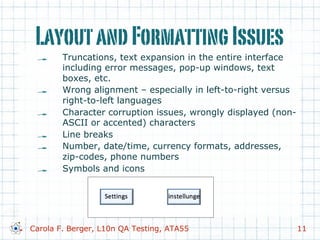
LayoutandFormattingIssues
!   Truncations, text expansion in the entire interface
including error messages, pop-up windows, text
boxes, etc.
!   Wrong alignment – especially in left-to-right versus
right-to-left languages
!   Character corruption issues, wrongly displayed (non-
ASCII or accented) characters
!   Line breaks
!   Number, date/time, currency formats, addresses,
zip-codes, phone numbers
!   Symbols and icons
Carola F. Berger, L10n QA Testing, ATA55 11
LayoutandFormattingIssues
Carola F. Berger, L10n QA Testing, ATA55 12
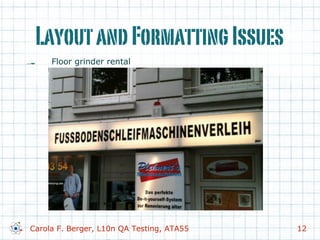
!   Floor grinder rental
FunctionalProblems
!   Link, button, menu functionality
!   Input/output validation
!   Number, date/time, currency formats, addresses,
postal codes, phone numbers, paper sizes
!   Problems with character display, sorting, or input
!   Keyboards and shortcuts
!   Interaction with OS functions such as copy/paste
and locale and language settings in the OS
!   Installation/delivery problems
Carola F. Berger, L10n QA Testing, ATA55 13
APractical(Fictional)Example
!   Localization of a fictional
starship app for
controlling a warp drive
!   Source language and
locale:
Earth English
!   Target language and
locale:
Klingon (zIfan Hol)
References:
Doohan, J.  Okrand, M. (1979, 1985). Creators
of the Klingon language. See
http://en.wikipedia.org/wiki/Klingon_language
and references therein.
Okrand, M. (1992). The Klingon Language
Dictionary. New York City: Pocket Books.
Schoen, L. M. (1992). Founder of The Klingon
Language Institute. http://www.kli.org
Carola F. Berger, L10n QA Testing, ATA55 14
Example–Step1:Familiarization
Carola F. Berger, L10n QA Testing, ATA55 15
Example–Step1:TestScript
Test of main interface:
1.  Change headings 1, 2; check
functionality of buttons, allowed
range (0-360)
2.  Change distance; check
functionality of buttons
3.  Check functionality of “Engage”
button (simulated by main
computer)
4.  Change warp speed; check
functionality of buttons = above
max warp speed (set in settings,
default 9.3) a warning message
appears and the Engage button
changes to “Override”
Carola F. Berger, L10n QA Testing, ATA55 16
Example–Step1:TestScript
Test of “Override”:
5.  Check appearance of pop-up
6.  Attempt voice authorization with
“random” false code, check pop-up
message
7.  Voice authorization with correct
code (test account: The Borg 123);
check pop-up message
8.  Check functionality of override:
engage higher warp speed -
simulated
Carola F. Berger, L10n QA Testing, ATA55 17
Example–Step1:TestScript
Test of “Settings” page:
9.  Enter settings page from main page
by tapping on button
10.  Change units (currently non-
functional – skip step)
11.  Change max speed – voice
authorization required
12.  Check functionality of voice
authorization with wrong
authorization code
13.  Check functionality of voice
authorization with correct code –
see step 7.
Carola F. Berger, L10n QA Testing, ATA55 18
Example–Step1:Familiarization
Carola F. Berger, L10n QA Testing, ATA55 19
Example–Step1:Familiarization
Carola F. Berger, L10n QA Testing, ATA55 19
Example–Step1:Familiarization
Carola F. Berger, L10n QA Testing, ATA55 19
Example–Step1:Familiarization
Carola F. Berger, L10n QA Testing, ATA55 19
Example–Step1:Familiarization
Carola F. Berger, L10n QA Testing, ATA55 19
Example–Step1:Familiarization
Carola F. Berger, L10n QA Testing, ATA55 19
Example–Step1:Familiarization
Carola F. Berger, L10n QA Testing, ATA55 19
Example–Step2:SetUpOS
1. Set OS language to Klingon (zIfan Hol)
(left to right, Klingon font)
2. Set locale/region to Kronos (konos)
3. Set number formats etc. to Klingon (zIfan Hol)
(decimal system, Klingon units, e.g.
1 Kellicam (qeliqam) = 2 km = 1.24 miles)
4. Remind yourself how to take screenshots etc. on
the testing device
5. Set up test accounts (if applicable)
Carola F. Berger, L10n QA Testing, ATA55 20
Ex.–Step3:GoThroughTestScript
Test of main interface:
1.  Change headings 1, 2; check functionality of buttons, allowed
range (0-360)
2.  Change distance; check functionality of buttons
3.  Check functionality of “Engage” button (simulated by main
computer)
4.  Change warp speed; check functionality of buttons = above
max warp speed (set in settings, default 9.3) a warning
message appears and the Engage button changes to
“Override”
Carola F. Berger, L10n QA Testing, ATA55 21
Ex.–Step3:GoThroughTestScript
Carola F. Berger, L10n QA Testing, ATA55 22
Ex.–Step3:GoThroughTestScript
Carola F. Berger, L10n QA Testing, ATA55 22
Ex.–Step3:GoThroughTestScript
Test of “Override”:
5.  Check appearance of pop-up
6.  Attempt voice authorization with “random” false code, check
pop-up message
7.  Voice authorization with correct code (test account: The Borg
123); check pop-up message
8.  Check functionality of override: engage higher warp speed -
simulated
Carola F. Berger, L10n QA Testing, ATA55 23
Ex.–Step3:GoThroughTestScript
Carola F. Berger, L10n QA Testing, ATA55 24
Ex.–Step3:GoThroughTestScript
Carola F. Berger, L10n QA Testing, ATA55 24
Ex.–Step3:GoThroughTestScript
Carola F. Berger, L10n QA Testing, ATA55 24
Ex.–Step3:GoThroughTestScript
Test of “Settings” page:
9.  Enter settings page from main page by tapping on button
10.  Change units (currently non-functional – skip step)
11.  Change max speed – voice authorization required
12.  Check functionality of voice authorization with wrong
authorization code
13.  Check functionality of voice authorization with correct code –
see step 7.
Carola F. Berger, L10n QA Testing, ATA55 25
Ex.–Step3:GoThroughTestScript
Carola F. Berger, L10n QA Testing, ATA55 26
Ex.–Step3:GoThroughTestScript
Carola F. Berger, L10n QA Testing, ATA55 26
Ex.–Step4:BugReport-Bad
Bug report: Bug Nr. 1234
Language: Klingon
Stardate: 92457.3
Issue: Layout for speed
Carola F. Berger, L10n QA Testing, ATA55 27
Ex.–Step4:BugReport-Bad
Bug report: Bug Nr. 1234
Language: Klingon
Stardate: 92457.3
Issue: Layout for speed
Not very helpful!!!
Carola F. Berger, L10n QA Testing, ATA55 27
BugReports
ü  Number or ID of the problem
ü  Software version, platform, OS version, firmware
etc.
ü  Date, (internal) build version
ü  Language and locale, format settings etc.
ü  Precise description of where bug occurred
(screen title, etc.)
ü  Precise steps to reproduce the problem
ü  Precise description of the problem
ü  Suggested solution
Carola F. Berger, L10n QA Testing, ATA55 28
Ex.–Step4:BugReport-Good
Bug report: Bug Nr. 1235
Language: Klingon
Stardate: 92457.3
Warp Drive v3.14159
OS: Terran WarpOS v1.0.0.1
Brief description: Layout for speed
overlaps
Description:
1.  Set language/locale to Klingon,
Kronos
2.  Go to main warp drive screen
3.  Observe that the words “warp
factor” (pivgob) and the
numbers for the warp factor
(e.g. 3.4 (3.4)) and the arrows
overlap. See screenshot.
Carola F. Berger, L10n QA Testing, ATA55 29
Ex.–Step4:BugReport-OK
Bug report: Bug Nr. 1234
Language: Klingon
Stardate: 92457.3
Warp Drive v3.14159
OS: Terran WarpOS v1.0.0.1
Brief description: Translation missing,
identifier displayed instead of translated
string
Description:
1.  Set language/locale to Klingon,
Kronos
2.  Go to main warp drive screen
3.  Go to settings screen – tap on
settings (cer)
4.  Observe that the word Units has not
been translated – instead, the ID
strg.units is displayed.
Carola F. Berger, L10n QA Testing, ATA55 30
Ex.–Step4:BugReports-Better
Bug report: Bug Nr. 1234
Language: Klingon
Stardate: 92457.3
Warp Drive v3.14159
OS: Terran WarpOS v1.0.0.1
Brief description: Translation missing,
identifier displayed instead of translated
string
Description:
1.  Set language/locale to Klingon,
Kronos
2.  Go to main warp drive screen
3.  Go to settings screen – tap on
settings (cer)
4.  Observe that the word Units has not
been translated – instead, the ID
strg.units is displayed.
Suggestion: juv
Carola F. Berger, L10n QA Testing, ATA55 31
SUMMARY
Carola F. Berger, L10n QA Testing, ATA55 32
Familiarize yourself with product,
test script (or write test script)
Set up OS (language, locale)
Follow test script; document
all bugs
File bug report(s)
Wait for new build of product
ThankYou!
Kapla
Carola F. Berger, L10n QA Testing, ATA55 33
ReferencesFurtherReading
!   Berger, C. F. (2014). Software Localization (L10n) Quality Assurance from the
Tester’s Perspective. Proceedings of ATA55. http://www.cfbtranslations.com/
 About  Publications.
! Bodeux, E.  Whitty, T. (2013). Two Sides of a Coin: Software Localization
from Both the Translator’s and Project Manager’s Perspectives. Presentation at
ATA54, T-6.
! Bodeux, E., McKay, C.,  Whitty, T. (2014). Software localization: insights
from the translator and PM perspectives. Speaking of Translation audio
recording,
http://speakingoftranslation.com/listen/software-localization-insights-from-
the-translator-and-pm-perspectives-new/
!   Dudgeon, R.  D. (2014). Internationalization and Localization for Translators.
Presentation at ATA55, T-6.
! Esselink, B. (1998). A Practical Guide to Software Localization. Amsterdam/
Philadelphia, John Benjamins Publishing Company.
! Globalme/Golota H. (2013). The Localization Testing Checklist.
http://www.globalme.net/blog/the-localization-testing-checklist
Carola F. Berger, L10n QA Testing, ATA55 34

Software Localization (L10N) Quality Assurance from the Tester's Perspective

  • 1.
  • 2.
    Outline !   Overviewover the Internationalization and Localization Process for Software Apps !   The QA Testing Process !   Problem Types !   Software Problem Reports !   The QA Testing Process – A Practical Example !   Summary !   References and Further Reading Carola F. Berger, L10n QA Testing, ATA55 2
  • 3.
    SoftwareL10nProcessFlow Carola F. Berger,L10n QA Testing, ATA55 3 Preparation • i18n (engineering) • Style guides/glossaries (linguistic) Translation (linguistic) • Translation of strings • Review Localized software (engineering) • Compilation • Functionality testing QA testing (linguistic) Final product Adapted from (Bodeux, Whitty 2014)
  • 4.
    SoftwareL10nProcessFlow Carola F. Berger,L10n QA Testing, ATA55 3 Preparation • i18n (engineering) • Style guides/glossaries (linguistic) Translation (linguistic) • Translation of strings • Review Localized software (engineering) • Compilation • Functionality testing QA testing (linguistic) Final product Adapted from (Bodeux, Whitty 2014) Internationalization (i18n): •  Make software localizable without design changes •  Take into account different character sets •  Take into account different locales (= set of parameters such as number formats, currency, date/time formats…) •  Adapt layout to different directionality Style guides/glossaries: •  Ensure consistency in terminology •  Identify potential challenges for localization
  • 5.
    SoftwareL10nProcessFlow Carola F. Berger,L10n QA Testing, ATA55 4 Preparation • i18n (engineering) • Style guides/glossaries (linguistic) Translation (linguistic) • Translation of strings • Review Localized software (engineering) • Compilation • Functionality testing QA testing (linguistic) Final product Adapted from (Bodeux, Whitty 2014)
  • 6.
    SoftwareL10nProcessFlow Carola F. Berger,L10n QA Testing, ATA55 4 Preparation • i18n (engineering) • Style guides/glossaries (linguistic) Translation (linguistic) • Translation of strings • Review Localized software (engineering) • Compilation • Functionality testing QA testing (linguistic) Final product Adapted from (Bodeux, Whitty 2014) Translation and review: •  Usually without full context •  Format varies •  Review can catch grammatical and spelling errors, but not errors due to missing context (nouns vs. Verbs)
  • 7.
    SoftwareL10nProcessFlow Carola F. Berger,L10n QA Testing, ATA55 5 Preparation • i18n (engineering) • Style guides/glossaries (linguistic) Translation (linguistic) • Translation of strings • Review Localized software (engineering) • Compilation • Functionality testing QA testing (linguistic) Final product Adapted from (Bodeux, Whitty 2014) Adapted from (Bodeux, Whitty 2014) Also development of test plan/script
  • 8.
    SoftwareL10nProcessFlow Carola F. Berger,L10n QA Testing, ATA55 6 Preparation • i18n (engineering) • Style guides/glossaries (linguistic) Translation (linguistic) • Translation of strings • Review Localized software (engineering) • Compilation • Functionality testing QA testing (linguistic) Final product Adapted from (Bodeux, Whitty 2014) Adapted from (Bodeux, Whitty 2014)
  • 9.
    Globalization=i18n+L10n Carola F. Berger,L10n QA Testing, ATA55 7 Preparation • i18n (engineering) • Style guides/glossaries (linguistic) Translation (linguistic) • Translation of strings • Review Localized software (engineering) • Compilation • Functionality testing QA testing (linguistic) Final product Adapted from (Bodeux, Whitty 2014)
  • 10.
    QAProcessFlow Carola F. Berger,L10n QA Testing, ATA55 8 Familiarize yourself with product, test script (or write test script) Set up OS (language, locale) Follow test script; document all bugs File bug report(s) Wait for new build of product
  • 11.
    ProblemTypes !   Linguisticproblems !   Layout problems !   Functionality problems !   Installation/delivery problems See e.g (Globalme/Golota 2013), (Esselink 1998) Carola F. Berger, L10n QA Testing, ATA55 9 Photo by ThreeHeadedMonkey (http://www.flickr.com/ photos/threeheadedmonkey/3856171871/)
  • 12.
    LinguisticProblems !   Grammatical,spelling, and punctuation errors !   Translation errors due to context !   Linguistic consistency !   Missing translations !   Cultural aspects Carola F. Berger, L10n QA Testing, ATA55 10
  • 13.
    LayoutandFormattingIssues !   Truncations,text expansion in the entire interface including error messages, pop-up windows, text boxes, etc. !   Wrong alignment – especially in left-to-right versus right-to-left languages !   Character corruption issues, wrongly displayed (non- ASCII or accented) characters !   Line breaks !   Number, date/time, currency formats, addresses, zip-codes, phone numbers !   Symbols and icons Carola F. Berger, L10n QA Testing, ATA55 11
  • 14.
    LayoutandFormattingIssues Carola F. Berger,L10n QA Testing, ATA55 12 !   Floor grinder rental
  • 15.
    FunctionalProblems !   Link,button, menu functionality !   Input/output validation !   Number, date/time, currency formats, addresses, postal codes, phone numbers, paper sizes !   Problems with character display, sorting, or input !   Keyboards and shortcuts !   Interaction with OS functions such as copy/paste and locale and language settings in the OS !   Installation/delivery problems Carola F. Berger, L10n QA Testing, ATA55 13
  • 16.
    APractical(Fictional)Example !   Localizationof a fictional starship app for controlling a warp drive !   Source language and locale: Earth English !   Target language and locale: Klingon (zIfan Hol) References: Doohan, J. Okrand, M. (1979, 1985). Creators of the Klingon language. See http://en.wikipedia.org/wiki/Klingon_language and references therein. Okrand, M. (1992). The Klingon Language Dictionary. New York City: Pocket Books. Schoen, L. M. (1992). Founder of The Klingon Language Institute. http://www.kli.org Carola F. Berger, L10n QA Testing, ATA55 14
  • 17.
  • 18.
    Example–Step1:TestScript Test of maininterface: 1.  Change headings 1, 2; check functionality of buttons, allowed range (0-360) 2.  Change distance; check functionality of buttons 3.  Check functionality of “Engage” button (simulated by main computer) 4.  Change warp speed; check functionality of buttons = above max warp speed (set in settings, default 9.3) a warning message appears and the Engage button changes to “Override” Carola F. Berger, L10n QA Testing, ATA55 16
  • 19.
    Example–Step1:TestScript Test of “Override”: 5. Check appearance of pop-up 6.  Attempt voice authorization with “random” false code, check pop-up message 7.  Voice authorization with correct code (test account: The Borg 123); check pop-up message 8.  Check functionality of override: engage higher warp speed - simulated Carola F. Berger, L10n QA Testing, ATA55 17
  • 20.
    Example–Step1:TestScript Test of “Settings”page: 9.  Enter settings page from main page by tapping on button 10.  Change units (currently non- functional – skip step) 11.  Change max speed – voice authorization required 12.  Check functionality of voice authorization with wrong authorization code 13.  Check functionality of voice authorization with correct code – see step 7. Carola F. Berger, L10n QA Testing, ATA55 18
  • 21.
  • 22.
  • 23.
  • 24.
  • 25.
  • 26.
  • 27.
  • 28.
    Example–Step2:SetUpOS 1. Set OS languageto Klingon (zIfan Hol) (left to right, Klingon font) 2. Set locale/region to Kronos (konos) 3. Set number formats etc. to Klingon (zIfan Hol) (decimal system, Klingon units, e.g. 1 Kellicam (qeliqam) = 2 km = 1.24 miles) 4. Remind yourself how to take screenshots etc. on the testing device 5. Set up test accounts (if applicable) Carola F. Berger, L10n QA Testing, ATA55 20
  • 29.
    Ex.–Step3:GoThroughTestScript Test of maininterface: 1.  Change headings 1, 2; check functionality of buttons, allowed range (0-360) 2.  Change distance; check functionality of buttons 3.  Check functionality of “Engage” button (simulated by main computer) 4.  Change warp speed; check functionality of buttons = above max warp speed (set in settings, default 9.3) a warning message appears and the Engage button changes to “Override” Carola F. Berger, L10n QA Testing, ATA55 21
  • 30.
  • 31.
  • 32.
    Ex.–Step3:GoThroughTestScript Test of “Override”: 5. Check appearance of pop-up 6.  Attempt voice authorization with “random” false code, check pop-up message 7.  Voice authorization with correct code (test account: The Borg 123); check pop-up message 8.  Check functionality of override: engage higher warp speed - simulated Carola F. Berger, L10n QA Testing, ATA55 23
  • 33.
  • 34.
  • 35.
  • 36.
    Ex.–Step3:GoThroughTestScript Test of “Settings”page: 9.  Enter settings page from main page by tapping on button 10.  Change units (currently non-functional – skip step) 11.  Change max speed – voice authorization required 12.  Check functionality of voice authorization with wrong authorization code 13.  Check functionality of voice authorization with correct code – see step 7. Carola F. Berger, L10n QA Testing, ATA55 25
  • 37.
  • 38.
  • 39.
    Ex.–Step4:BugReport-Bad Bug report: BugNr. 1234 Language: Klingon Stardate: 92457.3 Issue: Layout for speed Carola F. Berger, L10n QA Testing, ATA55 27
  • 40.
    Ex.–Step4:BugReport-Bad Bug report: BugNr. 1234 Language: Klingon Stardate: 92457.3 Issue: Layout for speed Not very helpful!!! Carola F. Berger, L10n QA Testing, ATA55 27
  • 41.
    BugReports ü  Number orID of the problem ü  Software version, platform, OS version, firmware etc. ü  Date, (internal) build version ü  Language and locale, format settings etc. ü  Precise description of where bug occurred (screen title, etc.) ü  Precise steps to reproduce the problem ü  Precise description of the problem ü  Suggested solution Carola F. Berger, L10n QA Testing, ATA55 28
  • 42.
    Ex.–Step4:BugReport-Good Bug report: BugNr. 1235 Language: Klingon Stardate: 92457.3 Warp Drive v3.14159 OS: Terran WarpOS v1.0.0.1 Brief description: Layout for speed overlaps Description: 1.  Set language/locale to Klingon, Kronos 2.  Go to main warp drive screen 3.  Observe that the words “warp factor” (pivgob) and the numbers for the warp factor (e.g. 3.4 (3.4)) and the arrows overlap. See screenshot. Carola F. Berger, L10n QA Testing, ATA55 29
  • 43.
    Ex.–Step4:BugReport-OK Bug report: BugNr. 1234 Language: Klingon Stardate: 92457.3 Warp Drive v3.14159 OS: Terran WarpOS v1.0.0.1 Brief description: Translation missing, identifier displayed instead of translated string Description: 1.  Set language/locale to Klingon, Kronos 2.  Go to main warp drive screen 3.  Go to settings screen – tap on settings (cer) 4.  Observe that the word Units has not been translated – instead, the ID strg.units is displayed. Carola F. Berger, L10n QA Testing, ATA55 30
  • 44.
    Ex.–Step4:BugReports-Better Bug report: BugNr. 1234 Language: Klingon Stardate: 92457.3 Warp Drive v3.14159 OS: Terran WarpOS v1.0.0.1 Brief description: Translation missing, identifier displayed instead of translated string Description: 1.  Set language/locale to Klingon, Kronos 2.  Go to main warp drive screen 3.  Go to settings screen – tap on settings (cer) 4.  Observe that the word Units has not been translated – instead, the ID strg.units is displayed. Suggestion: juv Carola F. Berger, L10n QA Testing, ATA55 31
  • 45.
    SUMMARY Carola F. Berger,L10n QA Testing, ATA55 32 Familiarize yourself with product, test script (or write test script) Set up OS (language, locale) Follow test script; document all bugs File bug report(s) Wait for new build of product
  • 46.
    ThankYou! Kapla Carola F. Berger,L10n QA Testing, ATA55 33
  • 47.
    ReferencesFurtherReading !   Berger,C. F. (2014). Software Localization (L10n) Quality Assurance from the Tester’s Perspective. Proceedings of ATA55. http://www.cfbtranslations.com/ About Publications. ! Bodeux, E. Whitty, T. (2013). Two Sides of a Coin: Software Localization from Both the Translator’s and Project Manager’s Perspectives. Presentation at ATA54, T-6. ! Bodeux, E., McKay, C., Whitty, T. (2014). Software localization: insights from the translator and PM perspectives. Speaking of Translation audio recording, http://speakingoftranslation.com/listen/software-localization-insights-from- the-translator-and-pm-perspectives-new/ !   Dudgeon, R. D. (2014). Internationalization and Localization for Translators. Presentation at ATA55, T-6. ! Esselink, B. (1998). A Practical Guide to Software Localization. Amsterdam/ Philadelphia, John Benjamins Publishing Company. ! Globalme/Golota H. (2013). The Localization Testing Checklist. http://www.globalme.net/blog/the-localization-testing-checklist Carola F. Berger, L10n QA Testing, ATA55 34