If you haven’t used turnitin before, you will need to
register as a new user. You may register by going to:
http://www.turnitin.com/static/index.html

  When
  Wh you submit your paper to Turnitin.com, please
                b it       t T iti           l
follow these steps:


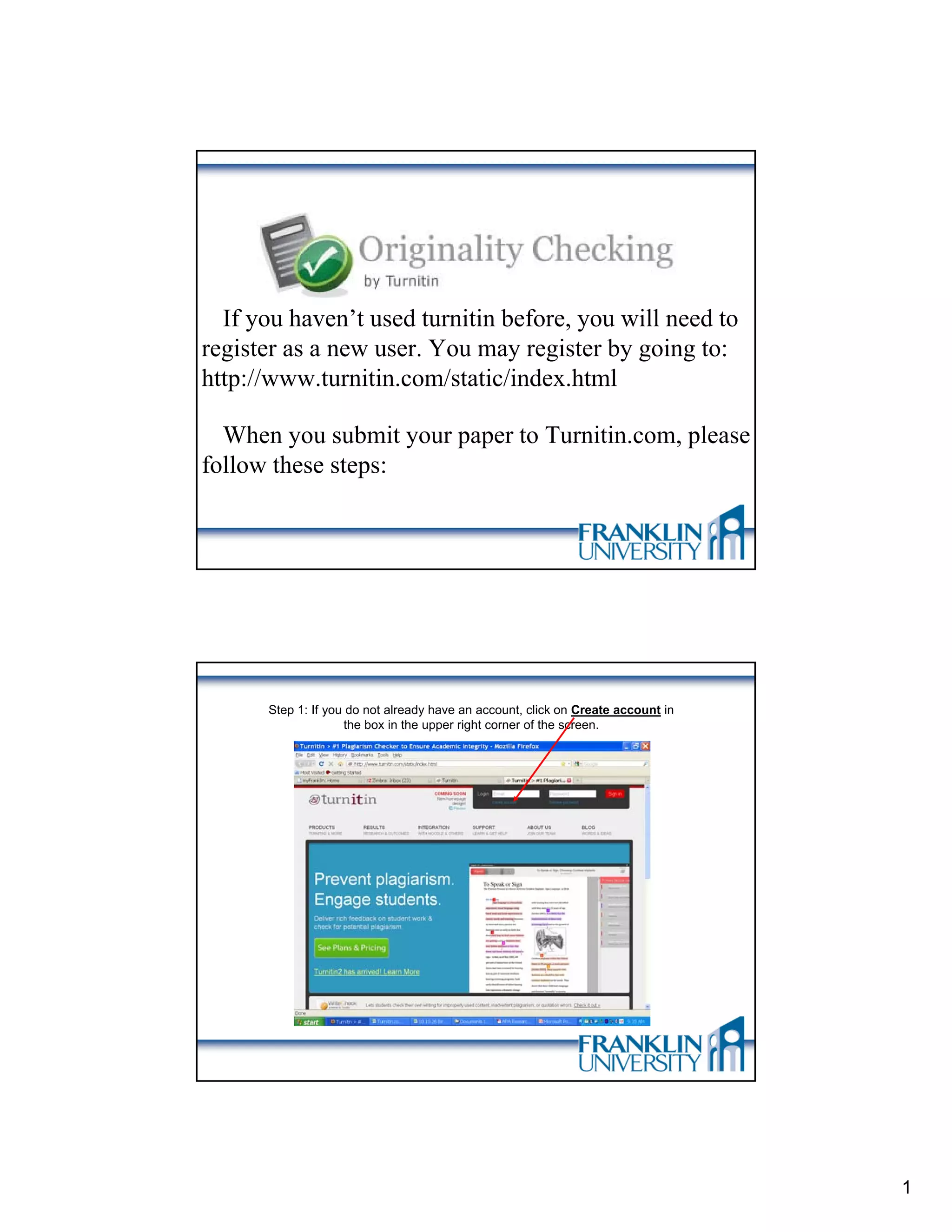
      Step 1: If you do not already have an account, click on Create account in
                    the box in the upper right corner of the screen.


                                                                                  1
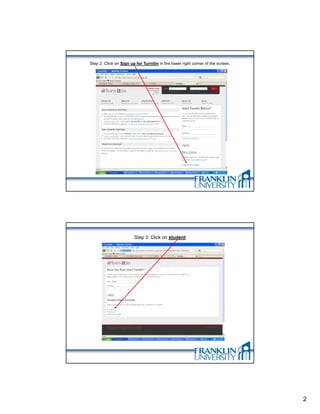
Step 2: Click on Sign up for Turnitin in the lower right corner of the screen.


                        Step 3: Click on student


                                                                                 2
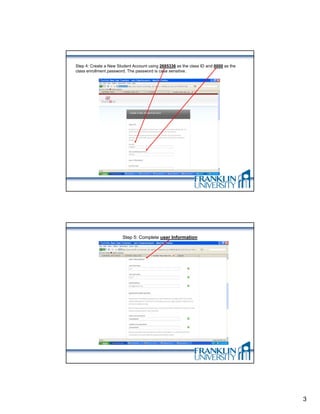
Step 4: Create a New Student Account using 2685336 as the class ID and 0000 as the
class enrollment password. The password is case sensitive.


                        Step 5: Complete user Information


                                                                                     3
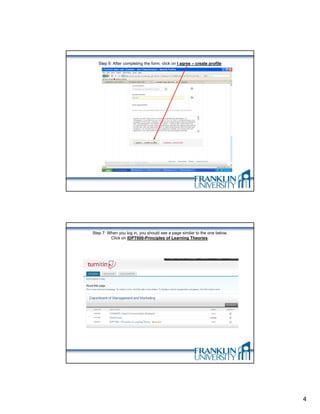
Step 6: After completing the form, click on I agree – create profile


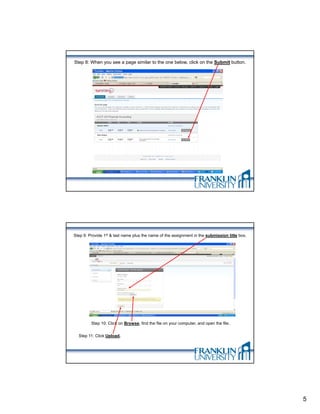
Step 7: When you log in, you should see a page similar to the one below.
         Click on IDPT600-Principles of Learning Theories.


                                                                           4
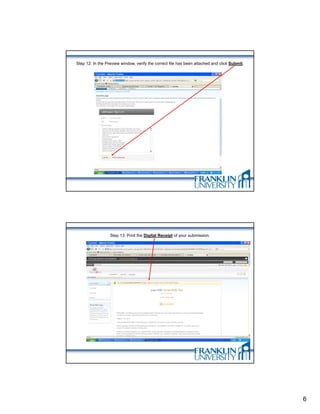
Step 8: When you see a page similar to the one below, click on the Submit button.


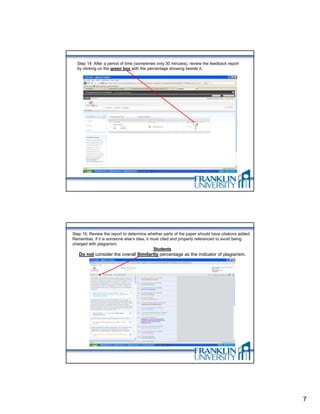
Step 9: Provide 1st & last name plus the name of the assignment in the submission title box.


         Step 10: Click on Browse, find the file on your computer, and open the file.


  Step 11: Click Upload.


                                                                                               5
Step 12: In the Preview window, verify the correct file has been attached and click Submit.


                  Step 13: Print the Digital Receipt of your submission.


                                                                                              6
Step 14: After a period of time (sometimes only 30 minutes), review the feedback report
  by clicking on the green box with the percentage showing beside it.


Step 15: Review the report to determine whether parts of the paper should have citations added.
Remember, if it is someone else’s idea, it must cited and properly referenced to avoid being
charged with plagiarism.
                                            Students
   Do not consider the overall Similarity percentage as the indicator of plagiarism.


                                                                                                  7
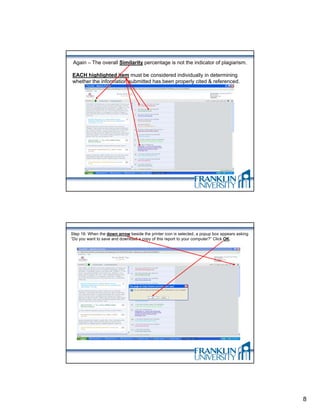
Again – The overall Similarity percentage is not the indicator of plagiarism.

EACH highlighted item must be considered individually in determining
whether the information submitted has been properly cited & referenced.


Step 16: When the down arrow beside the printer icon is selected, a popup box appears asking
“Do you want to save and download a copy of this report to your computer?” Click OK.


                                                                                               8
Step 17: Submit this report via email to your instructor
and submit your final version of the assignment to the
Drop Box before the due date noted in the myFranklin
    course companion web site announcements.


                                                           9

Instructions for Using Turnitin

  • 1.
    If you haven’tused turnitin before, you will need to register as a new user. You may register by going to: http://www.turnitin.com/static/index.html When Wh you submit your paper to Turnitin.com, please b it t T iti l follow these steps: Step 1: If you do not already have an account, click on Create account in the box in the upper right corner of the screen. 1
  • 2.
    Step 2: Clickon Sign up for Turnitin in the lower right corner of the screen. Step 3: Click on student 2
  • 3.
    Step 4: Createa New Student Account using 2685336 as the class ID and 0000 as the class enrollment password. The password is case sensitive. Step 5: Complete user Information 3
  • 4.
    Step 6: Aftercompleting the form, click on I agree – create profile Step 7: When you log in, you should see a page similar to the one below. Click on IDPT600-Principles of Learning Theories. 4
  • 5.
    Step 8: Whenyou see a page similar to the one below, click on the Submit button. Step 9: Provide 1st & last name plus the name of the assignment in the submission title box. Step 10: Click on Browse, find the file on your computer, and open the file. Step 11: Click Upload. 5
  • 6.
    Step 12: Inthe Preview window, verify the correct file has been attached and click Submit. Step 13: Print the Digital Receipt of your submission. 6
  • 7.
    Step 14: Aftera period of time (sometimes only 30 minutes), review the feedback report by clicking on the green box with the percentage showing beside it. Step 15: Review the report to determine whether parts of the paper should have citations added. Remember, if it is someone else’s idea, it must cited and properly referenced to avoid being charged with plagiarism. Students Do not consider the overall Similarity percentage as the indicator of plagiarism. 7
  • 8.
    Again – Theoverall Similarity percentage is not the indicator of plagiarism. EACH highlighted item must be considered individually in determining whether the information submitted has been properly cited & referenced. Step 16: When the down arrow beside the printer icon is selected, a popup box appears asking “Do you want to save and download a copy of this report to your computer?” Click OK. 8
  • 9.
    Step 17: Submitthis report via email to your instructor and submit your final version of the assignment to the Drop Box before the due date noted in the myFranklin course companion web site announcements. 9