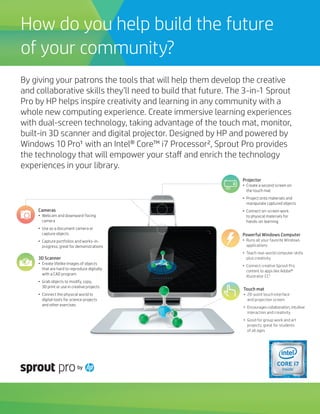
Cameras
•	 Webcam and downward-facing
camera
•	 Use as a document camera or
capture objects
•	 Capture portfolios and works-in-
progress; great for demonstrations
Projector
•	 Create a second screen on
the touch mat
•	 Project onto materials and
manipulate captured objects
•	 Connect on-screen work
to physical materials for
hands-on learning
Powerful Windows Computer
•	 Runs all your favorite Windows
applications
•	 Teach real-world computer skills
plus creativity
•	 Connect creative Sprout Pro
content to apps like Adobe® 
Illustrator CC3
Touch mat
•	 20-point touch interface
and projection screen
•	 Encourages collaboration, intuitive
interaction and creativity
•	 Good for group work and art
projects; great for students
of all ages
3D Scanner
•	 Create lifelike images of objects
that are hard to reproduce digitally
with a CAD program
•	 Grab objects to modify, copy,
3D print or use in creative projects
•	 Connect the physical world to
digital tools for science projects
and other exercises
How do you help build the future
of your community?
By giving your patrons the tools that will help them develop the creative
and collaborative skills they’ll need to build that future. The 3-in-1 Sprout
Pro by HP helps inspire creativity and learning in any community with a
whole new computing experience. Create immersive learning experiences
with dual-screen technology, taking advantage of the touch mat, monitor,
built-in 3D scanner and digital projector. Designed by HP and powered by
Windows 10 Pro¹ with an Intel® Core™ i7 Processor², Sprout Pro provides
the technology that will empower your staff and enrich the technology
experiences in your library.
Content Digitization
Sprout Pro’s innovative design allows
for unprecedented ease of digitization
of printed material. Text, photos, or
a combination can be captured, and
thanks to the innovative projector and
touch mat, Sprout Pro teaches patrons
how to best digitize their material.
•	 Quickly capture high resolution, full
letter-sized pages in black & white or
color
•	 Crop content, remove backgrounds
and save as jpg, png, or PDF
•	 Includes easy to follow instructions
for multi-page document scanning
Creative Documentation
From creating engaging assignments
to easily annotating on the ergonomic
touch mat and working effectively in
groups, Sprout Pro can help patrons
document their work and create
one-of-a-kind projects unique to their
needs.
•	 Share and switch between the
monitor, touch mat, webcam and
downward-facing camera—or view
all the sources at once—and easily
scan and magnify objects with the
native camera.
•	 Combine real-world objects with
digital content for a dynamic
blended-learning environment.
•	 Easily record tutorials and create
video reports with the built-in
cameras.
Makerspaces and 3D Scanning
If making is the new learning, turn your
library into a makerspace, with Sprout
Pro as the ideal companion to creation
and creativity. It enables an intuitive and
visual approach to STEAM subjects from
a make-to-learn perspective.
With Sprout Pro you and your patrons
can:
•	 Scan 3D objects with the HP 3D
Capture Stage (sold separately)
- Design in 3D with apps including
Autodesk® Print Studio and
Autodesk® 123D® Sculpt+
•	 Combine Sprout Pro with a 3D printer
to bring the digital world to life.
•	 Inspire learning with a collection
of science, design and art apps,
including Stop Motion5, Sketchbook5
and Video Capture5
1Not all features are available in all editions or versions of Windows. Systems may require upgraded and/or separately purchased hardware, drivers, software or BIOS update to take full advantage of Windows functionality. Windows 10 is automatically updated, which is always
enabled. ISP fees may apply and additional requirements may apply over time for updates. See http://www.microsoft.com. 2Multi-Core is designed to improve performance of certain software products. Not all customers or software applications will necessarily benefit from
use of this technology. Performance and clock frequency will vary depending on application workload and your hardware and software configurations. Intel’s numbering is not a measurement of higher performance. 3Adobe and Illustrator are either registered trademarks or
trademarks of Adobe Systems Incorporated in the United States and/or other countries. Adobe® Illustrator for Sprout requires the user to have an Adobe Creative Cloud Client license. 4Microsoft Office subscription required.  Requires either: Skype for Business installed from
either an appropriate Microsoft Office 365 or standalone Microsoft Office 2016 version, or Lync 2013 installed as part of the appropriate Microsoft Office 2013 package. 5Free download from Marketplace. ©Copyright 2016 HP Development Company, L.P. The information contained herein is
subject to change without notice. All other trademarks are the property of their respective owners. Intel, the Intel Logo, Intel Inside, Intel Core, and Core Inside are trademarks of Intel Corporation in the U.S. and/or other countries. Autodesk, the Autodesk logo, Print Studio and 123D Sculpt+
are registered trademarks or trademarks of Autodesk, Inc., and/or its subsidiaries and/or affiliates in the USA and/or other countries.
Learn more at hp.com/go/sproutpro
4AA6-6208ENW

Inspire Creativity with Immersive Learning Experiences

  • 1.
    Cameras • Webcam anddownward-facing camera • Use as a document camera or capture objects • Capture portfolios and works-in- progress; great for demonstrations Projector • Create a second screen on the touch mat • Project onto materials and manipulate captured objects • Connect on-screen work to physical materials for hands-on learning Powerful Windows Computer • Runs all your favorite Windows applications • Teach real-world computer skills plus creativity • Connect creative Sprout Pro content to apps like Adobe®  Illustrator CC3 Touch mat • 20-point touch interface and projection screen • Encourages collaboration, intuitive interaction and creativity • Good for group work and art projects; great for students of all ages 3D Scanner • Create lifelike images of objects that are hard to reproduce digitally with a CAD program • Grab objects to modify, copy, 3D print or use in creative projects • Connect the physical world to digital tools for science projects and other exercises How do you help build the future of your community? By giving your patrons the tools that will help them develop the creative and collaborative skills they’ll need to build that future. The 3-in-1 Sprout Pro by HP helps inspire creativity and learning in any community with a whole new computing experience. Create immersive learning experiences with dual-screen technology, taking advantage of the touch mat, monitor, built-in 3D scanner and digital projector. Designed by HP and powered by Windows 10 Pro¹ with an Intel® Core™ i7 Processor², Sprout Pro provides the technology that will empower your staff and enrich the technology experiences in your library.
  • 2.
    Content Digitization Sprout Pro’sinnovative design allows for unprecedented ease of digitization of printed material. Text, photos, or a combination can be captured, and thanks to the innovative projector and touch mat, Sprout Pro teaches patrons how to best digitize their material. • Quickly capture high resolution, full letter-sized pages in black & white or color • Crop content, remove backgrounds and save as jpg, png, or PDF • Includes easy to follow instructions for multi-page document scanning Creative Documentation From creating engaging assignments to easily annotating on the ergonomic touch mat and working effectively in groups, Sprout Pro can help patrons document their work and create one-of-a-kind projects unique to their needs. • Share and switch between the monitor, touch mat, webcam and downward-facing camera—or view all the sources at once—and easily scan and magnify objects with the native camera. • Combine real-world objects with digital content for a dynamic blended-learning environment. • Easily record tutorials and create video reports with the built-in cameras. Makerspaces and 3D Scanning If making is the new learning, turn your library into a makerspace, with Sprout Pro as the ideal companion to creation and creativity. It enables an intuitive and visual approach to STEAM subjects from a make-to-learn perspective. With Sprout Pro you and your patrons can: • Scan 3D objects with the HP 3D Capture Stage (sold separately) - Design in 3D with apps including Autodesk® Print Studio and Autodesk® 123D® Sculpt+ • Combine Sprout Pro with a 3D printer to bring the digital world to life. • Inspire learning with a collection of science, design and art apps, including Stop Motion5, Sketchbook5 and Video Capture5 1Not all features are available in all editions or versions of Windows. Systems may require upgraded and/or separately purchased hardware, drivers, software or BIOS update to take full advantage of Windows functionality. Windows 10 is automatically updated, which is always enabled. ISP fees may apply and additional requirements may apply over time for updates. See http://www.microsoft.com. 2Multi-Core is designed to improve performance of certain software products. Not all customers or software applications will necessarily benefit from use of this technology. Performance and clock frequency will vary depending on application workload and your hardware and software configurations. Intel’s numbering is not a measurement of higher performance. 3Adobe and Illustrator are either registered trademarks or trademarks of Adobe Systems Incorporated in the United States and/or other countries. Adobe® Illustrator for Sprout requires the user to have an Adobe Creative Cloud Client license. 4Microsoft Office subscription required.  Requires either: Skype for Business installed from either an appropriate Microsoft Office 365 or standalone Microsoft Office 2016 version, or Lync 2013 installed as part of the appropriate Microsoft Office 2013 package. 5Free download from Marketplace. ©Copyright 2016 HP Development Company, L.P. The information contained herein is subject to change without notice. All other trademarks are the property of their respective owners. Intel, the Intel Logo, Intel Inside, Intel Core, and Core Inside are trademarks of Intel Corporation in the U.S. and/or other countries. Autodesk, the Autodesk logo, Print Studio and 123D Sculpt+ are registered trademarks or trademarks of Autodesk, Inc., and/or its subsidiaries and/or affiliates in the USA and/or other countries. Learn more at hp.com/go/sproutpro 4AA6-6208ENW