QuizBrahma!!
Create a Quiz txtWeb app in just some clicks
No coding skills required
No excel sheet
By: Sagar Kadam
How to do it?
• First register yourself at
https://developer.txtweb.com/registration
•Once you are registered, login to dashboard at
https://developer.txtweb.com/signin
•Lets create a history quiz app using QuizBrahma
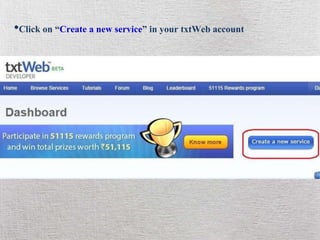
•Click on “Create a new service” in your txtWeb account
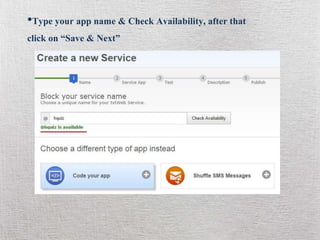
•Type your app name & Check Availability, after that
click on “Save & Next”
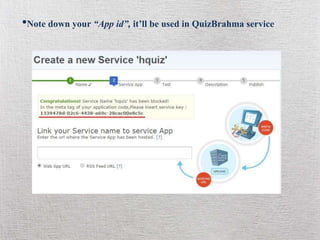
•Note down your “App id”, it’ll be used in QuizBrahma service
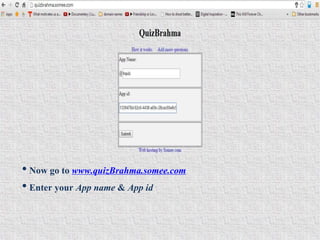
• Now go to www.quizBrahma.somee.com
• Enter your App name & App id
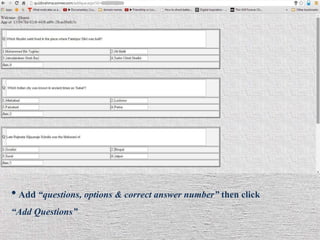
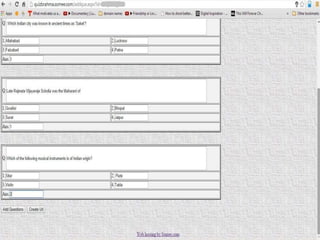
• Add “questions, options & correct answer number” then click
“Add Questions”
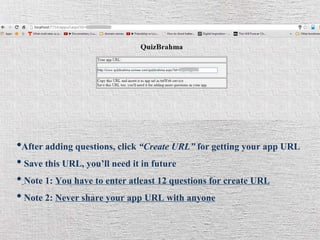
•After adding questions, click “Create URL” for getting your app URL
• Save this URL, you’ll need it in future
• Note 1: You have to enter atleast 12 questions for create URL
• Note 2: Never share your app URL with anyone
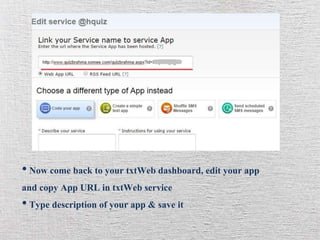
• Now come back to your txtWeb dashboard, edit your app
and copy App URL in txtWeb service
• Type description of your app & save it
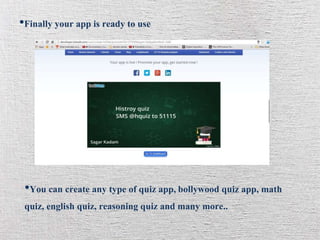
•Finally your app is ready to use
•You can create any type of quiz app,bollywood quiz app, math
quiz, english quiz, reasoning quiz and many more..
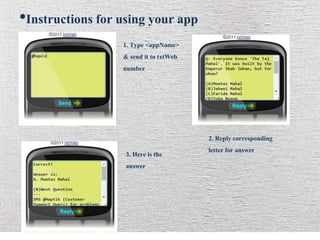
•Instructions for using your app
1. Type <appName>
& send it to txtWeb
number
2. Reply corresponding
letter for answer3. Here is the
answer

QuizBrahma by Sagar Kadam

  • 1.
    QuizBrahma!! Create a QuiztxtWeb app in just some clicks No coding skills required No excel sheet By: Sagar Kadam
  • 2.
    How to doit? • First register yourself at https://developer.txtweb.com/registration •Once you are registered, login to dashboard at https://developer.txtweb.com/signin •Lets create a history quiz app using QuizBrahma
  • 3.
    •Click on “Createa new service” in your txtWeb account
  • 4.
    •Type your appname & Check Availability, after that click on “Save & Next”
  • 5.
    •Note down your“App id”, it’ll be used in QuizBrahma service
  • 6.
    • Now goto www.quizBrahma.somee.com • Enter your App name & App id
  • 7.
    • Add “questions,options & correct answer number” then click “Add Questions”
  • 9.
    •After adding questions,click “Create URL” for getting your app URL • Save this URL, you’ll need it in future • Note 1: You have to enter atleast 12 questions for create URL • Note 2: Never share your app URL with anyone
  • 10.
    • Now comeback to your txtWeb dashboard, edit your app and copy App URL in txtWeb service • Type description of your app & save it
  • 11.
    •Finally your appis ready to use •You can create any type of quiz app,bollywood quiz app, math quiz, english quiz, reasoning quiz and many more..
  • 12.
    •Instructions for usingyour app 1. Type <appName> & send it to txtWeb number 2. Reply corresponding letter for answer3. Here is the answer