11:11PM
KEYBOARD
11:11PM
11:11PM
MICROPHONE
11:11PM
11:11PM
COMPUTER
SCANNER
11:11PM
11:11PM
GRAPHICS
TABLET
11:11PM
11:11PM
WORD
PROCESSOR
11:11PM
11:11PM
SPREADSHEET
11:11PM
11:11PM
WEB BROWSER
11:11PM
Input Data
into Computer
Add a short description
11:11PM
enda • Agenda • Agenda • Agenda • Agenda • Agenda • Agenda • Agenda • Agenda • Agenda • Agenda • Agenda • Agenda • Agen
Input: Information and
programs are entered
into the computer
through input devices
such as the keyboard,
disks, or through other
computers via
network connections
or modems connected
to the Internet. The
input device also
retrieves information
off disks.
Back to Agenda Page
Briefly elaborate on what
you want to discuss.
Output: Output Devices
display information on the
screen (monitor) or on the
printer and sends
information to other
computers. They also
display messages about
what errors may have
occurred and brings up
message or dialog box
asking for more information
to be inputted. The output
device also saves
information on the disk for
future use.
Back to Agenda Page
Briefly elaborate on what
you want to discuss.
Processing: The CPU or
central processing unit
is sometimes called the
Control Unit and
directs the operation
of the input and output
devices. The memory
or RAM temporarily
stores information
(files and programs)
while you are using or
working on them.
Back to Agenda Page
Briefly elaborate on what
you want to discuss.
INPUT DEVICES
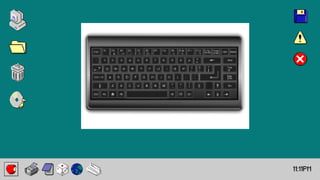
Keyboard
This is a primary input
device used with a
computer. It is
composed of different
buttons with specific
function, letters,
numbers, and symbols.
Back to Agenda Page
INPUT DEVICES
Mouse
This is a device that
controls the movement
of the cursor or
pointer on a display
screen.
Back to Agenda Page
INPUT DEVICES
Touch Screen
This is a computer
screen that can be
used by touching it
with a finger or a
stylus pen to interact
with a computer.
Back to Agenda Page
INPUT DEVICES
Microphone
This is a device that
accepts audio input
from users.
Back to Agenda Page
INPUT DEVICES
Webcam
This is a typically small
camera that sit on a
desk, attach to a user's
monitor, or are built into
the hardware. Webcam
can be used during a
video chat session
involving two or more
people, with
conversations that
include live audio and
video.
Back to Agenda Page
INPUT DEVICES
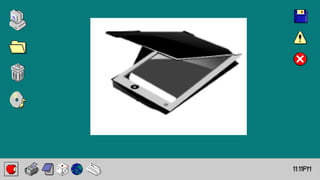
Computer Scanner
This is a device that
optically scans images,
printed text,
handwriting or an
object and converts it
to a digital image.
Back to Agenda Page
Back to Agenda Page
INPUT DEVICES
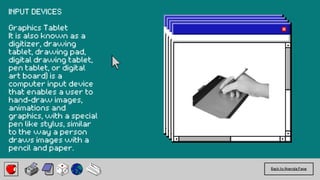
Graphics Tablet
It is also known as a
digitizer, drawing
tablet, drawing pad,
digital drawing tablet,
pen tablet, or digital
art board) is a
computer input device
that enables a user to
hand-draw images,
animations and
graphics, with a special
pen like stylus, similar
to the way a person
draws images with a
pencil and paper.
Back to Agenda Page
INPUT DEVICES
Joystick
This is an input
device that can be
used for
controlling the
movement of the
cursor or a pointer
in a computer
device.
COMMON APPLICATION
SOFTWARES
Word Processor – this
software main
purpose is to encode
data. Examples: MS
Word, Libre Office
Writer, Open Office
Writer
Back to Agenda Page
COMMON APPLICATION
SOFTWARES
Spreadsheet – it is a
spreadsheet program,
which contains several
columns and rows,
where each
intersection of a
column and a row is a
“cell.” Examples: MS
Excel, Libre Office Calc,
Google Sheets
Back to Agenda Page
COMMON APPLICATION
SOFTWARES
Database Software - is
a collection of
information that is
organized so that it
can be easily accessed,
managed, and
updated. Examples: MS
Access, MySQL, Oracle
Back to Agenda Page
COMMON APPLICATION
SOFTWARES
Presentation
Software - is a
category of application
software that is
specifically designed to
allow users to create
a presentation of ideas
by stringing together
text, images and
audio/video. Examples:
MS PowerPoint, Prezi,
Zoho Show
Back to Agenda Page
COMMON APPLICATION
SOFTWARES
Desktop Publishing
Software - software is
designed for creating
visual communications
such as brochures,
business cards, greeting
cards, web pages,
posters, and more for
professional or personal
printing online or on-
screen. Examples: MS
Publisher, Adobe InDesign,
QuarkXPress
Back to Agenda Page
COMMON APPLICATION
SOFTWARES
Graphics Programs- is a
software application that
allows you to draw, edit,
and manipulate an image
or graphic file. Examples:
CorelDraw, Photoshop,
and Computer Aided
Design (CAD)
Back to Agenda Page
COMMON APPLICATION
SOFTWARES
Educational Software-
these include tutorials
and electronic lessons
that give students’
knowledge or training in
a particular subject or
skill, such as Math or
Science or in gardening
or cooking.
Back to Agenda Page
COMMON APPLICATION
SOFTWARES
Web Browser Software –
this is a software
application for accessing
information on the World
Wide Web. Example:
Internet Explorer, Google
Chrome, Mozilla Firefox,
Safari, Opera
Back to Agenda Page
Computer Storage
Devices
Computer need storage
devices before and after
processing the data to
store information and
access later.
Back to Agenda Page
Back to Agenda Page
PRIMARY STORAGE DEVICE
A primary storage device
is a medium that holds
memory for short periods
of time while a computer
is running.
Example: RAM & Cache
Back to Agenda Page
SECONDARY STORAGE
DEVICE
Secondary storage hard
drives, which store data
for the long-term include
internal and external
types.
Example: Hard Disk, CD,
DVD, Flash Drive, Memory
Stick, SD Card
Back to Agenda Page
COMPUTER STORAGE
DEVICES
Fixed Storage Devices –
devices that is attached
inside the computer unit.
Back to Agenda Page
COMPUTER STORAGE
DEVICES
Random Access Memory -
This is a type of computer
memory that can be
accessed randomly.
Back to Agenda Page
COMPUTER STORAGE
DEVICES
Hard Disk - It is usually
installed internally in a
computer, attached
directly to the disk
controller of the
computer's motherboard.
Back to Agenda Page
COMPUTER STORAGE
DEVICES
Removable Storage
Devices – devices that
can be detach after use
and use again later to
another computer.
Back to Agenda Page
COMPUTER STORAGE
DEVICES
Flash Drive - Flash drives
are often referred to as
pen drives, thumb drives,
or jump drives. Flash
drives connect to
computers and other
devices via a built-in USB
Type-A or USB-C plug.
Back to Agenda Page
COMPUTER STORAGE
DEVICES
Optical Drive - This is a
disc drive that uses laser
light or electromagnetic
waves within or near the
visible light spectrum as
part of the process of
reading or writing data
to or from optical discs.
Back to Agenda Page
COMPUTER STORAGE
DEVICES
External Hard Drive - An
external drive is just a
hard drive (HDD) or solid-
state drive (SSD) that is
connected to a computer
on the outside rather
than on the inside.
Back to Agenda Page
COMPUTER STORAGE
DEVICES
Cloud Storage – some
websites offer free
storage to users. They
just need to sign up
before they can avail
these free storages.
Back to Agenda Page
COMPUTER STORAGE
DEVICES
Cloud Storage – Cloud
storage is a cloud
computing model that
stores data on the
Internet through a cloud
computing provider who
manages and operates
data storage as a service.
Example: pCloud, Google
Drive, Dropbox, Microsoft
SkyDrive, iCloud, Amazon
drive, OpenStack
Back to Agenda Page
ERGONOMICS
It is the science of
designing the
workstation to fit within
the capabilities and
limitations of the worker.
The goal is to eliminate
discomfort and risk of
injury due to work.
Back to Agenda Page
Back to Agenda Page

Input Data into Computer presentation powerpoint

  • 1.
  • 2.
  • 3.
  • 4.
  • 5.
  • 6.
  • 7.
  • 8.
  • 9.
  • 10.
  • 11.
  • 12.
  • 13.
  • 14.
  • 15.
    Input Data into Computer Adda short description 11:11PM
  • 16.
    enda • Agenda• Agenda • Agenda • Agenda • Agenda • Agenda • Agenda • Agenda • Agenda • Agenda • Agenda • Agenda • Agen
  • 17.
    Input: Information and programsare entered into the computer through input devices such as the keyboard, disks, or through other computers via network connections or modems connected to the Internet. The input device also retrieves information off disks. Back to Agenda Page Briefly elaborate on what you want to discuss.
  • 18.
    Output: Output Devices displayinformation on the screen (monitor) or on the printer and sends information to other computers. They also display messages about what errors may have occurred and brings up message or dialog box asking for more information to be inputted. The output device also saves information on the disk for future use. Back to Agenda Page Briefly elaborate on what you want to discuss.
  • 19.
    Processing: The CPUor central processing unit is sometimes called the Control Unit and directs the operation of the input and output devices. The memory or RAM temporarily stores information (files and programs) while you are using or working on them. Back to Agenda Page Briefly elaborate on what you want to discuss.
  • 20.
    INPUT DEVICES Keyboard This isa primary input device used with a computer. It is composed of different buttons with specific function, letters, numbers, and symbols. Back to Agenda Page
  • 21.
    INPUT DEVICES Mouse This isa device that controls the movement of the cursor or pointer on a display screen. Back to Agenda Page
  • 22.
    INPUT DEVICES Touch Screen Thisis a computer screen that can be used by touching it with a finger or a stylus pen to interact with a computer. Back to Agenda Page
  • 23.
    INPUT DEVICES Microphone This isa device that accepts audio input from users. Back to Agenda Page
  • 24.
    INPUT DEVICES Webcam This isa typically small camera that sit on a desk, attach to a user's monitor, or are built into the hardware. Webcam can be used during a video chat session involving two or more people, with conversations that include live audio and video. Back to Agenda Page
  • 25.
    INPUT DEVICES Computer Scanner Thisis a device that optically scans images, printed text, handwriting or an object and converts it to a digital image. Back to Agenda Page
  • 26.
    Back to AgendaPage INPUT DEVICES Graphics Tablet It is also known as a digitizer, drawing tablet, drawing pad, digital drawing tablet, pen tablet, or digital art board) is a computer input device that enables a user to hand-draw images, animations and graphics, with a special pen like stylus, similar to the way a person draws images with a pencil and paper.
  • 27.
    Back to AgendaPage INPUT DEVICES Joystick This is an input device that can be used for controlling the movement of the cursor or a pointer in a computer device.
  • 28.
    COMMON APPLICATION SOFTWARES Word Processor– this software main purpose is to encode data. Examples: MS Word, Libre Office Writer, Open Office Writer Back to Agenda Page
  • 29.
    COMMON APPLICATION SOFTWARES Spreadsheet –it is a spreadsheet program, which contains several columns and rows, where each intersection of a column and a row is a “cell.” Examples: MS Excel, Libre Office Calc, Google Sheets Back to Agenda Page
  • 30.
    COMMON APPLICATION SOFTWARES Database Software- is a collection of information that is organized so that it can be easily accessed, managed, and updated. Examples: MS Access, MySQL, Oracle Back to Agenda Page
  • 31.
    COMMON APPLICATION SOFTWARES Presentation Software -is a category of application software that is specifically designed to allow users to create a presentation of ideas by stringing together text, images and audio/video. Examples: MS PowerPoint, Prezi, Zoho Show Back to Agenda Page
  • 32.
    COMMON APPLICATION SOFTWARES Desktop Publishing Software- software is designed for creating visual communications such as brochures, business cards, greeting cards, web pages, posters, and more for professional or personal printing online or on- screen. Examples: MS Publisher, Adobe InDesign, QuarkXPress Back to Agenda Page
  • 33.
    COMMON APPLICATION SOFTWARES Graphics Programs-is a software application that allows you to draw, edit, and manipulate an image or graphic file. Examples: CorelDraw, Photoshop, and Computer Aided Design (CAD) Back to Agenda Page
  • 34.
    COMMON APPLICATION SOFTWARES Educational Software- theseinclude tutorials and electronic lessons that give students’ knowledge or training in a particular subject or skill, such as Math or Science or in gardening or cooking. Back to Agenda Page
  • 35.
    COMMON APPLICATION SOFTWARES Web BrowserSoftware – this is a software application for accessing information on the World Wide Web. Example: Internet Explorer, Google Chrome, Mozilla Firefox, Safari, Opera Back to Agenda Page
  • 36.
    Computer Storage Devices Computer needstorage devices before and after processing the data to store information and access later. Back to Agenda Page
  • 37.
  • 38.
    PRIMARY STORAGE DEVICE Aprimary storage device is a medium that holds memory for short periods of time while a computer is running. Example: RAM & Cache Back to Agenda Page
  • 39.
    SECONDARY STORAGE DEVICE Secondary storagehard drives, which store data for the long-term include internal and external types. Example: Hard Disk, CD, DVD, Flash Drive, Memory Stick, SD Card Back to Agenda Page
  • 40.
    COMPUTER STORAGE DEVICES Fixed StorageDevices – devices that is attached inside the computer unit. Back to Agenda Page
  • 41.
    COMPUTER STORAGE DEVICES Random AccessMemory - This is a type of computer memory that can be accessed randomly. Back to Agenda Page
  • 42.
    COMPUTER STORAGE DEVICES Hard Disk- It is usually installed internally in a computer, attached directly to the disk controller of the computer's motherboard. Back to Agenda Page
  • 43.
    COMPUTER STORAGE DEVICES Removable Storage Devices– devices that can be detach after use and use again later to another computer. Back to Agenda Page
  • 44.
    COMPUTER STORAGE DEVICES Flash Drive- Flash drives are often referred to as pen drives, thumb drives, or jump drives. Flash drives connect to computers and other devices via a built-in USB Type-A or USB-C plug. Back to Agenda Page
  • 45.
    COMPUTER STORAGE DEVICES Optical Drive- This is a disc drive that uses laser light or electromagnetic waves within or near the visible light spectrum as part of the process of reading or writing data to or from optical discs. Back to Agenda Page
  • 46.
    COMPUTER STORAGE DEVICES External HardDrive - An external drive is just a hard drive (HDD) or solid- state drive (SSD) that is connected to a computer on the outside rather than on the inside. Back to Agenda Page
  • 47.
    COMPUTER STORAGE DEVICES Cloud Storage– some websites offer free storage to users. They just need to sign up before they can avail these free storages. Back to Agenda Page
  • 48.
    COMPUTER STORAGE DEVICES Cloud Storage– Cloud storage is a cloud computing model that stores data on the Internet through a cloud computing provider who manages and operates data storage as a service. Example: pCloud, Google Drive, Dropbox, Microsoft SkyDrive, iCloud, Amazon drive, OpenStack Back to Agenda Page
  • 49.
    ERGONOMICS It is thescience of designing the workstation to fit within the capabilities and limitations of the worker. The goal is to eliminate discomfort and risk of injury due to work. Back to Agenda Page
  • 50.