INFORMATICS MOMENTS1 
Kate Williams2 
The informatics moment is the moment when a person seeks help in using some 
digital technology that is new to him or her. This article examines the informatics 
moment in people’s everyday lives as they sought help at a branch public library. 
Four types of literacy were involved: basic literacy (reading and writing), computer 
literacy (use of a mouse, buying a computer), library literacy (navigating online 
catalogs and databases), and domain literacy (most commonly and urgently, looking 
for work in a world where practically all job postings and applications are online). 
Social capital is also associated with many of these informatics moments: people 
seek help from those with enough skill who are close at hand, approachable, and 
familiar, and they collaborate with others in their networks to do so. Understanding 
the informatics moment could accelerate people’s (and society’s) anxious transition 
to an inclusive digital age. 
[Library Quarterly, vol. 82, no. 1, pp. 47–73] 
 2012 by The University of Chicago. All rights reserved. 
0024-2519/2012/8201-0004$10.00 
47 
Background and Purpose 
This study identifies and describes a phenomenon taking place in Chi-cago’s 
branch public libraries—the informatics moment—and its relation-ship 
with social capital. This moment has two meanings, one empirical 
and one abstract. Empirically, it is a moment when a library patron is 
seeking and getting help using a computer or the Internet. Abstractly, the 
informatics moment is a phase in the transition of a society or a social 
1. The author wishes to thank Aiko Takazawa for her research assistance, as well as other 
contributors to the research, including the CyberNavigators, Roberto Pang,Amy Eshleman, 
and Mary Dempsey at Chicago Public Library; other members of the Community Infor-matics 
Research Lab at the University of Illinois, especially Abdul Alkalimat, Aaron Fleisher, 
Hui Yan; Aysha Marsh and transcriptionist Sarah Meadows; and volunteers Samantha Lester 
and Matt Hampel. The research was funded by the Institute for Museum and Library 
Services and enabled by the cooperation of the Chicago Public Library. 
2. Assistant professor, University of Illinois at Urbana Champaign Graduate School of Library 
and Information Science, 501 E. Daniel Street, Champaign, IL 61820; E-mail katewill 
@illinois.edu.
48 THE LIBRARY QUARTERLY 
sector to the information age, with all the dislocations and transformations 
that are entailed in introducing digital tools and infrastructure. 
The informatics moment is a new term that I have coined. The term 
places this work within the i-schools—the professional schools and centers 
of research on the interaction of people, information, and technology that 
were organized in the late 1990s and since [1] in response to the emer-gence 
of the digital age. It also places this work under the rubric of social 
informatics [2], which emphasizes and explores the social context of com-puter 
use, to the point of coining its own new term “socio-technical systems” 
in order to reconceptualize the computer. The term also draws on concepts 
of the information revolution and the network society [3]. 
As observed in this study, the informatics moment has a structure and 
a process. The structure consists of the technological infrastructure of the 
public access computers provided in the library (and also, as this study will 
help to show, an emerging human infrastructure). The process consists of 
the interaction of the patron with a staff member called a CyberNavigator 
as the patron uses the computers. In this moment, the patron is bridging 
a digital divide that he or she faces in trying to do something. In fact, the 
CyberNavigator faces the digital divide with the patron, as they quite lit-erally 
face the computer screen side-by-side. 
The new term “informatics moment” aims at shifting the attention of 
both scholars and practitioners to the agency of those involved. We can 
understand this by comparing it to another widely used term: the digital 
divide. This term was first used in 1996 [4]. It served (and continues to 
serve) to galvanize a great deal of time and money around the world. The 
digital divide is most typically defined as the gap between those who use 
computers and those who do not. Experience with and scholarship on this 
phenomenon, also referred to as digital inequality, has shown that it is 
both multidimensional and changing. The focus on the informatics mo-ment 
looks at the digital divide from the perspective of the person or 
persons experiencing it. It relies on the CyberNavigator staff—who also 
experience the digital divide—as witness and participant, but it emphasizes 
the agency of the person seeking (and by and large getting) help. He or 
she sets out to do something that involves computers or the Internet, and 
he or she seeks help.3 
Empirically, this study collects data about informatics moments that last 
a few minutes, an hour, or perhaps through multiple encounters in the 
3. Some [5] have identified seven dimensions to the digital divide, others [6] five, and most 
recently one more scholar [7] has identified four. All noted the role of help in surmounting 
the digital divide, using different terms: social facilitation [5], social support [6], and social 
resources/learning from others [7].
INFORMATICS MOMENTS 49 
public library. Any particular informatics moment as experienced in the 
library may be successful or may end in frustration. 
As of 2008, 16,671 US public library outlets (central and branch loca-tions) 
were serving 97 percent of the population [8], thanks in large part 
to the long-standing practice of local tax support that has made US libraries 
both free and permanent.4 Some 3 percent of Americans reside outside 
of the taxing district or service area of any library, but many people are 
close enough to travel and choose to pay an annual fee for user privileges 
(e.g., $50–$200 in several Illinois locales). American libraries provide local 
residents with free book lending, reference assistance, information and 
referral services, study and meeting spaces, and access to computers and 
the Internet. Helped again by tax dollars (particularly the federal eRate 
subsidy), 99.8 percent of public libraries provide on average twelve public 
access computers per location [9]. Fifteen years of surveys and analysis of 
public access computing in the libraries by John C. Bertot and his col-leagues 
have detailed the structural aspect of the informatics moment in 
the branch public library. More recently Bertot [9] has used interviews 
and library visits to investigate the social and institutional implications of 
information technology in libraries. Complementing that work, this study 
examines and theorizes on the IT help-getting and help-giving moment 
that (almost always) takes place sitting in front of the library’s public access 
computers. 
Those computers are used for life’s necessities as well as for homework, 
leisure, and lifelong learning. Forty-two percent of those using library com-puters 
nationwide did so for formal education (doing homework, attending 
remote classes, or applying to school), and 40 percent did so for employ-ment 
or career purposes [10, p. 6]. It is also relevant that a study of recent 
change in digital reference questions discovered that “people seem to turn 
to public libraries when they face a difficult question. . . . In addition, 
unsuccessful searching of the Internet seems to motivate people to ask 
questions in the libraries. Librarians face the challenge of developing their 
skills for answering questions of increasing complexity” [11, p. 1257].5 
Others have examined the process of surmounting the digital divide in 
a community. A disregard for community members’ own predicaments, 
knowledge, connections, and goals set a technology training program on 
a course to reproduce and reinforce the digital divide [12]. The ethics of 
4. US public libraries are popularly considered free, and many of them have the word “free” 
in their name, because local residents can use them (and borrow materials) without cost 
apart from small charges for printing, overdue items, and the like. Local taxpayer support 
keeps the libraries funded, so technically they are not free. 
5. Piritta Numminen and Pertti Vakkari define digital reference service as “an Internet-based, 
professional question and answering service [whereby] users address their questions to the 
service typically through Web form, e-mail, or chat” [11, p 1250].
50 THE LIBRARY QUARTERLY 
Fig. 1.—Modeling the informatics moment in the public library 
libraries are to start from and support the patron’s own objectives and 
requests [13]. So, to recap, relying on the model in figure 1, this study 
examines the process whereby people in their everyday lives bridge some 
digital divide they face, making use of public access computing in the 
branch library and seeking and getting help there. 
My interest here is to empirically investigate how the local community— 
ordinary people in their everyday lives—is navigating the information rev-olution. 
I turn away from a consideration of deficits (the digital divide) 
to a focus on the process of crossing that divide (the informatics moment). 
The branch public library is a rich site of informatics moments: people 
using the public access computers and seeking (and getting) help in doing 
so. What does the informatics moment look like in this setting? 
So the first objective in this research is to understand the informatics 
moment. But the second objective is to understand how social capital 
affects the process and outcome of the informatics moment. Social capital 
is defined here as the resources that people access through their social 
networks rather than on the marketplace or through bureaucratic channels 
[14]. 
Social capital is a meaningful factor, or independent variable, in several 
ways. First, this takes up digital divide theory (see n. 3), which proposes
INFORMATICS MOMENTS 51 
social support as a key aspect of the digital divide. In other words, people 
with less or no access to or use of digital tools are very often those without 
connections to people who would support their use of those tools. Second, 
social capital has been found to be one of the most widely used frameworks 
for understanding the sustainability of technology in community settings 
[15]. The search for meaningful theory that can summarize our experience 
with technology use in communities requires that we continue to test this 
framework in more and wider settings. Research on community use of 
information technology suggests a positive role for social capital in helping 
individuals and groups overcome digital inequality [16–17]. Finally, social 
capital has already been recognized as both a factor and an outcome in 
the public library [18–19]. The present study asks, then, what role does 
social capital play in the informatics moment? 
As figure 1 shows, help seeking and help giving are part of the informatics 
moment. The library and its staff are a neighborhood bureaucracy available 
to the public. In what way might this entail social capital? A bureaucracy 
is quite often necessary but not sufficient in providing resources [14, 20]. 
Translating this to the branch library, the patron may get help in the 
informatics moment not only because the bureaucracy works but also be-cause 
social capital is in play. 
To understand the informatics moment in people’s everyday lives and the 
role of social capital, we chose the setting of the branch public library in 
Chicago, Illinois. This afforded us a window on hundreds, even thousands, 
of informatics moments, because the library fields a staff of CyberNavigators 
and has facilitated them in participating in the study as key informants. The 
CyberNavigator’s job is to support people in their informatics moments, so 
the study includes data about the informatics moments in which the 
CyberNavigator participates, not the informatics moments when a patron 
gets help in some other way. With the CyberNavigators the study gained 
participants with an average of twelve months’ experience of a great number 
of informatics moments. 
As of summer 2010, the CyberNavigators program operated in forty of 
the library’s seventy-four locations. CyberNavigators are recruited by the 
library and hired by the Chicago Public Library Foundation to work for 
twenty hours a week at $14 per hour. They are assigned to a particular 
library to help people use the library’s public access computers and the 
Internet in coordination with other activities in that library.6 
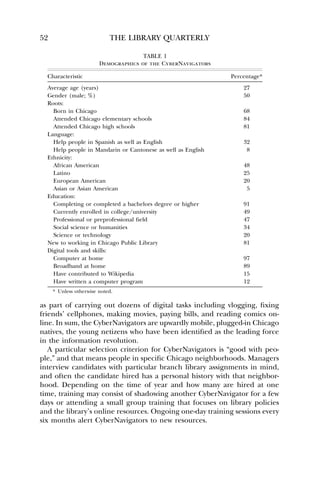
Table 1 provides some demographic information about the Cyber- 
Navigators. In open-ended questions, they also reported owning and using 
smartphones, microphones, DJ equipment, webcams, and gaming devices 
6. A history of Chicago Public Library’s public access computers and the CyberNavigator 
program itself is outside the scope of this article, but I will provide this upon request.
52 THE LIBRARY QUARTERLY 
TABLE 1 
Demographics of the CyberNavigators 
Characteristic Percentage* 
Average age (years) 27 
Gender (male; %) 50 
Roots: 
Born in Chicago 68 
Attended Chicago elementary schools 84 
Attended Chicago high schools 81 
Language: 
Help people in Spanish as well as English 32 
Help people in Mandarin or Cantonese as well as English 8 
Ethnicity: 
African American 48 
Latino 25 
European American 20 
Asian or Asian American 5 
Education: 
Completing or completed a bachelors degree or higher 91 
Currently enrolled in college/university 49 
Professional or preprofessional field 47 
Social science or humanities 34 
Science or technology 20 
New to working in Chicago Public Library 81 
Digital tools and skills: 
Computer at home 97 
Broadband at home 89 
Have contributed to Wikipedia 15 
Have written a computer program 12 
* Unless otherwise noted. 
as part of carrying out dozens of digital tasks including vlogging, fixing 
friends’ cellphones, making movies, paying bills, and reading comics on-line. 
In sum, the CyberNavigators are upwardly mobile, plugged-in Chicago 
natives, the young netizens who have been identified as the leading force 
in the information revolution. 
A particular selection criterion for CyberNavigators is “good with peo-ple,” 
and that means people in specific Chicago neighborhoods. Managers 
interview candidates with particular branch library assignments in mind, 
and often the candidate hired has a personal history with that neighbor-hood. 
Depending on the time of year and how many are hired at one 
time, training may consist of shadowing another CyberNavigator for a few 
days or attending a small group training that focuses on library policies 
and the library’s online resources. Ongoing one-day training sessions every 
six months alert CyberNavigators to new resources.
INFORMATICS MOMENTS 53 
Fig. 2.—Starting from documentary evidence (1), which tells about the past, and 
then triangulating between three field methodologies (2, 3, and 4) to collect data 
on the present. 
Literacy theories [21–28] as well as domain theory [29] and learning 
theory [30] were invaluable in helping parse the complexities of the in-formatics 
moments observed in this study. This study affirms these theories 
and demonstrates the power of applying them to digital settings. In order 
to explain this smoothly, these theories are discussed in greater detail 
alongside the empirical findings in the “Findings and Discussion” section. 
In this connection, I also celebrate the librarian who managed the North 
Pulaski Branch and joined with a patron in 1981 to set up the first public 
access computer in Chicago Public Library. He attributed his motivation 
to “the belief that computers are becoming so commonplace that learning 
how to use them is almost as important as learning how to read and write” 
[31, p. 21]. Certain methods were adopted from social informatics [32] 
and sociology [33–35]; these are discussed in the next section. 
Method 
Data for this study were collected in four ways: via documents, ethnogra-phies, 
focus groups, and questionnaires. With limited resources, the eth-nography 
required decisions on sampling; the focus groups and question-naires 
targeted the entire population of CyberNavigators. 
This methodology triangulates from three sources of data about the 
present, informed by sources from the past (see fig. 2). In other words, 
each subset of data is used to validate the others, yielding a rich description.
54 THE LIBRARY QUARTERLY 
Files and Archives 
The Chicago Public Library and its foundation made available the admin-istrative 
files on the CyberNavigators program from the mid-1990s on. I 
also queried the library’s archive for earlier documents. Administrative 
files amounted to three boxes of files that contained press clippings about 
the program, related articles, promotional materials, and internal planning 
and evaluation documents that recorded significant discussions about the 
program as it came into existence and evolved. It was possible to access 
these files because library administrators had an ongoing interest in learn-ing 
from the program. 
The CyberNavigator manager also shared internal reports and facilitated 
the research in many ways. The library’s archives staff provided at least 
one key historical document. 
Unit of Analysis, Unit of Observation, and Sampling 
The unit of analysis is the informatics moment; the unit of observation is 
the CyberNavigator. He or she is to a certain extent a proxy for the branch 
library and the community served. As of 2010, forty of Chicago’s seventy-nine 
public library locations had CyberNavigators on site. For the focus 
groups and the questionnaires, I set out to study the entire population of 
forty. Thirty-seven CyberNavigators answered the questionnaire, and 
twenty-seven participated in focus groups (93 percent and 68 percent re-sponse 
rates, respectively). 
Limited resources dictated sampling for the ethnographic work. Two 
sites were included from each subdivision of the library system (South, 
Central, and North). As part of a research program that focuses on un-derserved 
communities, this study excluded libraries serving more affluent 
areas. As a result, the six sites in the sample are more representative of 
Chicago’s population with regard to income, that is, lower income. To 
represent the population ethnically and to catch any differences across 
ethnicity, locations were selected that serve major ethnic groups of Chicago: 
African American, Mexican, Puerto Rican, Chinese, and Polish. This is 
important given Chicago’s ethnic diversity: 37 percent of the city’s pop-ulation 
is African American, 36 percent speaks a language other than 
English at home, and 22 percent is foreign born [36]. 
Ethnographies 
We carried out weeklong ethnographic observations in six branch libraries. 
According to Michael Burawoy [33, 34], our theories and our questions 
allow us to do ethnography. We cannot possibly perceive everything, so we 
look for specific aspects of a culture, setting, or social process and use our 
limited perceptions to test our beliefs. So it is better to be explicit and 
conscious about the theories and questions we take into the field. Eth-
INFORMATICS MOMENTS 55 
nography complements other social scientific methods, such as surveys or 
interviews. 
To implement this approach, our ethnographies were highly structured 
by a set of questions that the field notes had to answer. To start, the focus 
of the fieldworkers was on the patron-staff (or patron-observer, see below) 
interactions. From the study’s field handbook: 
For every request for help, or [staff/CyberNavigator] interaction with a 
patron, note down: 
Time of day? 
What did the patron ask about? 
What was the patron trying to do? 
Who did they ask for help? 
What language did they use? 
Did they seem to know the CyberNavigator? 
Those of us on the study also practiced involved observation, following 
Kenneth Clark [35]. He directed a community organization and developed 
social scientific findings from that experience. Leading the work of that 
organization, trying to effect social service delivery and social change, 
yielded a great deal of data. The check on his subjectivity was his regular 
discussions—debriefings—with an uninvolved research colleague. Like-wise, 
we aimed not to be outside but to be impartial observers. We thought 
of ourselves, and explained ourselves to staff, as learning by shadowing, 
and we all shared a commitment to seeing Chicagoans across their various 
digital divides. All of us helped the CyberNavigator at times. This meant 
that if he or she was busy and a patron was seeking help, we provided that 
help or referred the patron to another library staff person. In this way, 
allowing for the short time in the field, we observed and also became 
insiders. Since demand frequently outstrips resources, this was the only 
ethical approach that respected the setting and the community: to assist 
with current practice while carrying out research to serve future practice. 
In total, six people carried out the ethnography. Each person spent three 
to five days in a library location, jotting notes each day and typing them 
up each evening. To encourage reflection and to stimulate serendipitous 
findings in this first stage of the fieldwork, a day’s notes had to include 
one paragraph on each of the following topics: (1) the most interesting 
moment, (2) the greatest problem, and (3) the greatest solution. 
At the heart of the notes were the descriptions of 157 interactions with 
a patron seeking help. We handcoded these interactions. The three daily 
reflective paragraphs helped to shape the focus group agenda and the 
survey questions.
56 THE LIBRARY QUARTERLY 
Focus Groups 
A total of twenty-seven CyberNavigators participated in six focus group 
discussions. These discussion groups ranged in size from two to seven 
people and averaged 4.5 people per group. These focus group discussions 
were guided by Julian Orr’s study of copier repair technicians [32]. He 
found that stories were central to the work of these technicians; telling 
each other stories helped them to do, make sense of, and enjoy their work. 
If we could gather stories from the CyberNavigators, we reasoned, it would 
help us understand the informatics moment. 
In the process of recruiting the focus groups, we asked participants to 
think about and bring one best story and one worst story from their ex-periences 
as CyberNavigators. To start the discussions, everyone shared at 
least two stories. As with Orr’s copier technicians, these stories were fun 
for participants to hear. They validated their experiences. They were the 
same and different. They were causes for mourning and celebration of the 
patrons and the communities, many in crisis, and also of the Cyber- 
Navigators themselves. And unlike the copier technicians, who shared their 
repair stories every day on the job, the CyberNavigators were in their own 
branches twenty hours a week and had not had the chance to sit down 
together. They themselves recognized this, as one transcript recorded: 
CyberNavigator: “This is therapy! You’re paying us to have therapy.” 
[Everyone laughing and talking at once.] 
The stories tumbled out in vivid detail. 
The ethnographic work showed the pressures of the informatics moment 
for the staff: always on call, providing public service in distressed com-munities, 
in the branch library but not quite of the branch since they were 
paid by the Chicago Public Library Foundation and supervised by their 
own manager first and by the branch manager second. So another line of 
questions included these: How would you make your job better? How would 
you make the program better, along various dimensions: technology, space, 
training, and so on? Once the focus groups were transcribed, we identified 
and handcoded 598 distinct chunks of narrative. 
Questionnaires 
Thirty-seven CyberNavigators completed questionnaires. Twenty-seven of 
these were self-administered at the focus group sessions and ten others at 
a CyberNavigator training soon after. Participants answered eighty open-ended 
and closed-ended questions. Some questions were adopted from an 
earlier study of social capital and community technology use [37]; others 
were developed from the ethnographic data. Questions covered demo-graphics, 
technology use, technology help given and received, and social 
capital. Taken together, the documents, ethnographies, focus groups, and
INFORMATICS MOMENTS 57 
questionnaires resulted in both texts and data—narratives and numbers— 
that the research team analyzed. 
Findings and Discussion 
What does the informatics moment look like in the setting of the Chicago 
Public Library? What role does social capital play? There are two over-arching 
findings: (1) the informatics moment involves four types of digital 
literacy work; (2) social capital is a positive influence on the informatics 
moment. 
Four Types of Digital Literacy in the Informatics Moment 
The informatics moment, as observed in this study, centers on a helping 
interaction between someone seeking to use computers and the Internet 
and a helper in the public library. The ethnography suggested literacy as 
an organizing concept for these interactions, using the following definition 
(but also including nontext records: images, sound, etc.): “Technological 
literacies may be defined as social practices in which texts (i.e., meaningful 
stretches of language) are constructed, transmitted, received, modified, 
shared (and otherwise engaged) within processes employing codes which 
are digitized electronically, primarily, though not exclusively, by means of 
(micro)computers” [21, p. 141]. 
The helping interactions recorded in the ethnographies break down 
into three types. Answers to the questionnaires added one more type, and 
the focus group discussions provided more detail on all four. Four main 
types of literacies are involved in the informatics moments: 
Basic literacy: reading and writing. None of these appeared in the eth-nographic 
data. 
Computer literacy: using the computer and applications running on it. 
Library literacy: using technologies and systems that are specific to the 
Chicago Public Library or to libraries in general. 
Domain literacy: using technology in order to carry out tasks in specific 
domains of modern life. 
Quite often one informatics moment has several of these literacies em-bedded 
in it. When this was apparent, we coded for domain literacy first, 
then library, then computer, and then basic. The result of coding of the 
informatics moments that the field team observed can be seen in column 
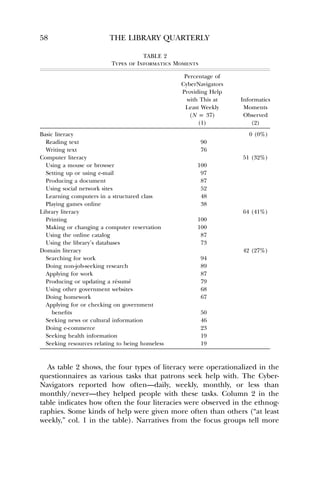
2 of table 2. Basic literacy help getting was not observed, but the 
CyberNavigators reported in the questionnaires that they did indeed pro-vide 
such help (col. 1 in the table).
58 THE LIBRARY QUARTERLY 
TABLE 2 
Types of Informatics Moments 
Percentage of 
CyberNavigators 
Providing Help 
with This at 
Least Weekly 
(N p 37) 
(1) 
Informatics 
Moments 
Observed 
(2) 
Basic literacy 0 (0%) 
Reading text 90 
Writing text 76 
Computer literacy 51 (32%) 
Using a mouse or browser 100 
Setting up or using e-mail 97 
Producing a document 87 
Using social network sites 52 
Learning computers in a structured class 48 
Playing games online 38 
Library literacy 64 (41%) 
Printing 100 
Making or changing a computer reservation 100 
Using the online catalog 87 
Using the library’s databases 73 
Domain literacy 42 (27%) 
Searching for work 94 
Doing non-job-seeking research 89 
Applying for work 87 
Producing or updating a re´sume´ 79 
Using other government websites 68 
Doing homework 67 
Applying for or checking on government 
benefits 50 
Seeking news or cultural information 46 
Doing e-commerce 23 
Seeking health information 19 
Seeking resources relating to being homeless 19 
As table 2 shows, the four types of literacy were operationalized in the 
questionnaires as various tasks that patrons seek help with. The Cyber- 
Navigators reported how often—daily, weekly, monthly, or less than 
monthly/never—they helped people with these tasks. Column 2 in the 
table indicates how often the four literacies were observed in the ethnog-raphies. 
Some kinds of help were given more often than others (“at least 
weekly,” col. 1 in the table). Narratives from the focus groups tell more
INFORMATICS MOMENTS 59 
about basic literacy, computer literacy, library literacy, and domain literacy 
in the informatics moment. They are presented roughly in order from the 
most foundational. 
Basic literacy.—People who cannot read or write do not often make their 
illiteracy plain for all to see. They hide their illiteracy out of a fear and 
often desperation that is based on an intelligent understanding of their 
vulnerability in a text-based world. They overcompensate and create dis-tractions 
[22]. Their sense of fear and shame is perhaps perpetuated by 
the “state of grace” school of literacy theory, which holds (completely 
incorrectly) that people who cannot read or write also cannot reason log-ically 
or think abstractly [23, p. 14; 24, pp. 20–21]. 
This helps to explain why the ethnographies did not reveal basic illit-eracy. 
The focus groups, however, told of patrons who say “Can you just 
type it for me?” Among the “worst stories” CyberNavigators told, one theme 
was “They don’t want to learn, they just want you to do it for them.” In 
these situations, CyberNavigators reported frequently helping by doing 
rather than by teaching because the hard-luck stories of the patrons—these 
moments are usually tied to applying for jobs—were compelling. A librarian 
commented that it is very hard to draw lines between helping, teaching, 
and doing. A more common strategy is to explain that job hunting involves 
several steps—introduction to the computer, then e-mail, and so on, and 
thus moving the patron into a sequence of help sessions, sometimes in-cluding 
the printing of job-search resources. This entails domain literacy 
(more below), and it reflected how the types of literacy in an informatics 
moment can be layered over each other. 
A total of 90 percent of CyberNavigators help people read something 
at least weekly; 76 percent help people write something at least weekly. 
Not being able to read will prevent a person from using computers or the 
Internet, except perhaps to play video games. Many patrons we observed, 
who were not asking for help, were looking at YouTube. Could it be some 
of them were limited to YouTube because most websites require more 
reading? 
Teaching people to read and write has been a priority in the Chicago 
Public Library for many decades. Even when it ended direct literacy services 
in 1996, the library continued to host efforts by partner literacy organizations 
[38]. How could illiteracy have disappeared? The data in this study are 
suggestive of illiteracy. Between patron need and CyberNavigator frustration, 
it could be helpful to train the CyberNavigators in spotting illiteracy so that 
a different intervention can be applied than attempting to press on past a 
possible foundational problem. As the CyberNavigators often say, every job 
today requires an online application. For some manual or semiskilled labor, 
applying may require more literacy than the job itself. On the other hand,
60 THE LIBRARY QUARTERLY 
the information-age job transformation can mean that the same job, driving 
a long-haul truck, for instance, now requires working with a laptop in the 
cab. 
Computer literacy.—A rich definition of computer literacy can be drawn 
from a synthesis of work from computer science, education, and literacy 
studies [23]: 
1. Having contemporary skills (e.g., browsing or text editing) 
2. Knowing foundational concepts (e.g., networks) 
3. Possessing intellectual capabilities (e.g., evaluating sources) 
4. Understanding computer literacy as an aspect of life in an information 
society 
5. Being familiar with at least the basics of computer programming 
6. Practicing computer literacy that is tailored to individual needs, in-terests, 
and goals 
7. Being part of the community of people who can use IT, which means 
knowing (a) how to keep learning, (b) who or where to go for new 
concepts and skills (including software help features and online 
sources), and (c) how to solve problems with others in that community 
8. Not assuming that someone with computer literacy is better than 
someone who isn’t computer literate 
Each of these eight aspects is in evidence in the informatics moments 
in the library. Part of what makes this remarkable is that the public access 
computers in the Chicago Public Library are very limited and locked down. 
Most machines provide only Internet Explorer. From that browser window, 
patrons can surf, open PDF documents, view word-processing files, interact 
with forms, watch videos, and initiate a print job. There is nowhere to save 
files except “on the cloud,” that is, on corporate servers (e.g., Google Docs), 
unless the CyberNavigator shows you a trick for saving in the Temp folder. 
The machines wipe all user data upon logging off. From one dedicated 
machine in every location, patrons make or change a reservation. From 
another machine, they forward a print job to the printer. At three locations 
(Harold Washington downtown, Sulzer on the North Side, and Woodson 
on the South Side), public computers also provide Microsoft Office and 
flash drive functionality so patrons can open, create, and save documents, 
including from the web. 
Focus group comments from the CyberNavigators demonstrate how each 
of these eight aspects of computer literacy appears in the library’s infor-matics 
moments. 
1. Skills. Most basic of these is using the mouse: “[I first tried to teach with 
online mouse exercises] and I’m like: ‘Dude, this is awful.’ Like, patrons
INFORMATICS MOMENTS 61 
hated it, I hated it. So I take them to Yahoo games. I’m like: ‘All right, 
pick your favorite game. Let’s go play.’ And there they are, going: ‘Oh, 
this is fun,’ and then they just, like, learn it so much faster.” 
2. Concepts. The concept of electronic mail that you come to a computer 
to check, that waits for you only—and your password—is fundamental. 
This story demonstrates how informatics moments are not always com-pletely 
successful, and it is also an example of the CyberNavigator 
solving the universal problem of forgotten passwords: 
[I’ll explain to a patron that companies] are only going to respond to you, 
you know, via e-mail. They’re going to respond to you via e-mail, and you 
need to be able to respond and have a conversation back and forth via e-mail. 
And they’re like: “Well, I don’t even use it that much. I don’t even have 
a computer.” I was like: “Well, you’re always welcome to come here during 
library hours so you can use your e-mail address.” “Well, I don’t even know 
how to login and logout.” And I’m like: “Well, I’ll be here . . . and you have 
to save your username and password.” . . . But the good thing is that I’ve 
created a format—I’ve made it that it’s their first initial, last name, and then 
last two ___. 
3. Intellectual capabilities. In this story a patron learns an online service 
that is critical for his community and then assumes CyberNavigator-type 
responsibility for others who need it: 
The truth is, if you’re filling out a Circuit Breaker [applying to a state grants 
program for seniors and disabled], you probably have some hard luck stuff 
going on in your life. Period, you know? But there was this guy. He would 
come into our branch, and he asked me for help filling out a Circuit Breaker 
one day. . . . Then he comes back, like, later in the week and he’s like: “Hey, 
remember me? I’m back. I got more Circuit Breakers.” And I was like: “OK.” 
Turns out, in his world, he was, like, the Circuit Breaker Man. . . . He took 
a lot of pride and joy in being able to help his friends and family get their 
paperwork done. 
4. Understanding computer literacy as part of life in the information society. 
The two examples above illustrate the informatics moment as a leap 
in the patron’s understanding and practice, accepting computers in 
their life. Contrary to the frustration detailed above, many stories 
were told of e-mail success. The patrons and the CyberNavigators 
(several explained a similar approach) explicitly agreed to collaborate 
on passwords in a way that secured the password for the patron. In 
effect, patrons are constructing their own IT support network by 
agreeing to rely on the CyberNavigator in this way. 
5. Familiarity with at least the basics of computer programming. The data only 
supplied one instance of this, but this story is important in two ways. 
First, Word Macros is a programming language that is available to 
any Word user if they can navigate it. But programming is an activity
62 THE LIBRARY QUARTERLY 
that only four of thirty-seven CyberNavigators report doing. Second, 
it illustrates that library staff are passing through informatics moments 
alongside the patrons: “Even the branch librarian, like, sometimes 
she gets stuck in Microsoft Word, and she’s trying to work in Word 
Macros, or something, things like that, and she’ll be like: ‘Oh, the 
CyberNavigator!’ And luckily, I do know how to do it, but they do 
expect me to know. It’s like, that’s your job, that’s what you’re sup-posed 
to know.” 
6. Practicing computer literacy tailored to individual needs, interests, goals. This 
story alludes to the fear people have who cannot use computers— 
much like those who cannot read and write, and who understand the 
power that computers, like written text, has over our lives. It also 
shows, again, the paradigm shift—patrons find entirely new ways to 
approach a task: “A lot of people come in, and they have a big anxiety 
about using the Internet. And I’m just like: ‘OK, go to Google and 
talk to Google like you were talking to me. What exactly do you want 
to do?’ . . . That’s rewarding to me, you know, in a way because it’s 
just like: ‘Oh, OK. I didn’t even think about that.’” 
7. Being part of the community of people who can use IT, practicing continuous 
learning, knowing how to find help, and helping others. In this example, 
someone has crossed the digital divide, and the CyberNavigator is 
happy to have her in her own help network: “She started out being 
afraid of, like, breaking the Internet. Wouldn’t even touch the com-puter. 
. . . It took a little over two weeks before she was able to get 
the hang of, like, the whole thing. . . . Then she’s so excited . . . 
[and] the best part of it was that she actually started schooling me 
on little things.” 
Circuit Breaker Man above is another example of this. Other stories 
featured patrons coming in groups of two or more and helping each 
other or being strangers and helping each other or the Cyber- 
Navigator. 
8. Not being better than people who aren’t computer literate. The development 
of a helping network, as above, expresses this last aspect of computer 
literacy. In talking about their own skills, the CyberNavigators re-turned 
time and again to the core skill: patience. Respect for the 
patron navigating the informatics moment was critical. One 
CyberNavigator had adopted a slogan he told his patrons in order 
to teach them patience and respect for learners: “Practice makes 
permanent.” 
Library literacy.—Library literacy means the skills and knowledge to use 
the particular systems in the library, particularly the Chicago Public Library. 
Any library’s public access computers and online resources have particular
INFORMATICS MOMENTS 63 
and multiple systems or interfaces that are often complicated by budget 
limits or rules laid down by multiple parties: publishers, vendors, software 
companies, and local and federal government, as well as the library itself. 
Patrons as well as staff have to learn these—and sometimes relearn them 
if usage is not frequent. Thus, library literacy includes knowing how to 
navigate the two systems put in place to manage the scarce resources of 
computer time and printing. A pay-as-you-go printing process starts at the 
patron’s workstation but finishes at a printing station. Software for reserv-ing 
computer time runs on another workstation, as well as on staff ma-chines. 
Then there are four tools for accessing the library’s online offer-ings: 
the library website, the catalog, the databases, and downloadable 
books and other media. These tools run on at least six different platforms, 
or software, depending on how the databases are delivered. 
1. Printing. New computer users can print wildly; every public computer 
lab has to deal with controlling costs. The Chicago Public Library has 
in place a complex system that only daily users can remember, and 
all staff spend time supporting patrons: 
That print system is the worst thing, seriously. It’s just too complicated for 
new people. New people come in, you know, you got to print from over here. 
They’re already having a problem because the print button on the screen 
[Internet Explorer] doesn’t work. So they have to go to File, then Print. Then 
they come over to you: “Where’s it going to come out at?” Now let’s take 
your library card and go to the circulation desk [to pay]. Then after they do 
that, still, nothing’s going to come out ’cause there’s too many steps. [Assents 
from other CyberNavigators] It’s too extra. 
2. Reservations. Likewise, time on the computer is scarce and hard-won. 
A “worst story” of a CyberNavigator was the day two men got into a 
fight over their reservations. This story illustrates the cooperation 
required to manage reservations, which are made and changed by 
patrons and staff—except at some branches, not the CyberNavigator, 
because of their foundation-not-library status: “So I can’t cancel res-ervations 
for people. I can’t look up reservations for people that they 
made on the computer. But I was able to do that at my first branch. 
So it’s kind of handicapping me at my new branch ’cause then I have 
to go a clerk and say, ‘Hey, can you cancel this for me?’” 
3. Library website. The library’s website is complex and content comes from 
the central administration. This is an example of a resource that 
CyberNavigators have to stay on top of, even for basic information. 
I had a patron call not so long ago. They’re like, “I saw on the website that 
these are your hours.” And I’m like, “My hours are on the website?” They’re 
on the website. Everyone’s hours are on the website. [Another CyberNavigator: 
What website?] The CPL website. They’re on there.
64 THE LIBRARY QUARTERLY 
4. Online catalog. This is an area where other library staff are poised to 
help a patron. The handing off of patrons between library staff and 
the CyberNavigator adds another level of complexity to the support-ing 
of their informatics moments: “The cool times are when, you 
know, like, you help a student find an article or there’s a really long 
line in the computers, and someone thinks that they have to get on 
the Internet, and I’m like: ‘No, we can use the catalog for that!’” 
5. Databases. Here, again, the informatics moment calls for a librarian, 
because he or she will be trained and expert at database use: 
This high school student from ____ came in the other day, and she knew 
how to use the computer. Like, I could have showed her, like, you know, 
database stuff on the computer. . . . But, like, again, going back to efficiency 
and, like, not giving people the runaround. Am I going to be able to give 
her, like, the fastest way online to, like, find age-appropriate, or whatever, 
information for school about cottonwood trees? Heck no. I took her to the 
children’s librarian, you know? I’m like: “This is a reference query.” 
6. Downloadable books and other media. Here the CyberNavigators are lim-ited 
to explaining, not demonstrating or teaching, because the down-loading 
runs on software that does not function on the public access 
computers. 
Domain literacy.—Identifying this type of literacy makes references to the 
concepts of multiliteracies [25–27] and to domain analysis work [28]. The 
multiliteracies concept emerges from findings that a person can be highly 
literate in one setting but not in another. School-sanctioned literacy skills 
and unsanctioned literacy skills are not always transferable—for instance, 
writing a term paper and writing a rap lyric [26]. Learning is situated— 
someone can do arithmetic in the supermarket but be stymied in a high 
school math class [30]. Information science is overlooking the issue of 
domain: information flows in one domain can be very different from those 
in another, and in order for new information systems to effectively serve 
various domains, the information scientist must attend to a domain’s par-ticularity 
[29]. 
Applying the concept of domain here highlights the fact that patrons 
bring tasks that require a certain amount of domain expertise. The 
CyberNavigator’s expertise varies, but quite often life experience rather 
than specific training or education is the basis for their help giving. Here 
is an example from a CyberNavigator who is not a lawyer or paralegal: “A 
lady had just lost her son, and her grandchild—his children’s mother came 
and grabbed him and took him to Indiana. She had no way of getting in 
touch with her grandson, so I helped her get through the legal parts online 
and everything, and finally she got custody. By the way, she started signing 
up for my basic Internet class!”
INFORMATICS MOMENTS 65 
In another example, a CyberNavigator—who was in college for a psy-chology 
degree, but no more—guides someone through an extended in-formatics 
moment toward a job. Job seeking is such a leading activity at 
the library’s computers that staff and administration have created an online 
resource guide, and CyberNavigators are getting a half-day orientation to 
it: 
One of my best success stories was a young lady I was assisting with job 
searching. And it went from learning how to use the computer, then she 
wanted to do a resume, and then from resumes to applying for jobs online. 
And she was coming out of a [battered] relationship. She wanted to have 
her own identity, her own income, and she went from, like, not really 
having a job or having a lot of experience, but I was able to utilize just 
her volunteer experience . . . to articulate it into a resume format. And 
we applied for a job, and she actually got the interview and the job and 
everything. She was like: “This is, like, the most money I ever made in my 
life,” and she’s like: “I would never have made it if it wasn’t for you,” and 
everything, and I just felt good because she was looking for something 
and she got it. 
The next story from the ethnographic observation echoes the same 
themes, but it is explicit that the CyberNavigator’s expertise is from his 
own job-seeking experience. He is not a career counselor but rather a 
valued peer helper: 
A woman wanted to apply for a management position at McDonald’s. She 
had an advertisement for McDonald’s employment: “Apply now! http:// 
www.mcdonald.” The McDonald’s website requires you to enter all your 
resume information as well as respond to many questions about past ex-periences 
and so on. The patron had the information, handwritten. The 
CyberNavigator helped her, reading it out loud and teaching her how to 
use a mouse and how to click. In the middle, when it asks for social security 
number, he then told her, “You need to fill in all the blanks, there are 60 
questions you have to answer.” He also offered her an extension of her 
computer reservation time, past 60 minutes. The CyberNavigator sug-gested 
either go to the shop directly and tell them you applied online or 
call them. He told me later, I learned that from experience helping and 
from my own experience. And he is just 21 years old! 
All library staff work together to help: 
At one point I was wasting a lot of time trying to help the person, like, 
write an objective in their resume. What goes in an objective? So one of 
the librarians, she does a resume workshop. She sits down with the patrons. 
She has, like, a mock resume—objective, experience, stuff like that—and 
she had books and everything and flyers, and from a certain time to a 
certain time she assists people with resumes. Then when they’re ready to
66 THE LIBRARY QUARTERLY 
actually type it up and put it on the Internet, I help. We work hand-in-hand. 
As these many examples have shown, quite often one informatics mo-ment 
entails several types of literacy. The best example, as above—and far 
and away the most common, since job losses have spiraled in the United 
States and nearly all job applications are on the Internet—is the job search. 
The Informatics Moment Draws on Social Capital 
A book-length visual sociology study of a rural repair shop explains how a 
fundamental aspect of work done at the repair shop is building and main-taining 
community [39]. A branch library is like that small shop, and the 
patrons in their informatics moments are seeking a repair so that they can 
go about their task. While the public library is structurally a government 
bureaucracy, sometimes its best work is done via social capital [18–19], and 
the present study found social capital at work in the informatics moment. 
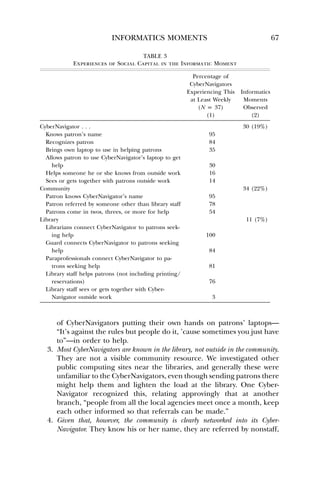
Table 3 presents the operationalization and the measurements of social 
capital in this study. Three types of social capital are identified: the social 
capital of the CyberNavigators; that of the community, which includes the 
patrons; and that of the library staff. These types of social capital are 
documented in a modest portion of the observed informatics moments 
(19 percent, 22 percent, and 7 percent, respectively) and more deeply 
documented in the surveys and focus groups. Certain forms of social capital 
are very much in action; others are not. From this emerge six main findings. 
1. Names and recognition are key. As with reference interactions [40–41], 
informatics moments are associated with the parties knowing each 
other’s names or recognizing each other: “I grew up locally, go to 
church down the street, so they either know my name, or a lot of 
them at first called me Circuit Breaker Lady.” Many references are 
made to regulars, patrons who come every day or enough to be 
known. Regulars on occasion help smooth a rough moment or even 
help another patron. One CyberNavigator began to encourage this 
in order to accelerate progress. Again, this is like the repair shop 
operator [38] or like waitressing work [42]; the bureaucracy or the 
business is the substrate for the growth of social capital, to the extent 
that this is understood, valued, and feasible. 
2. Private laptop use is another measure of social capital. Given anyone’s sense 
of urban crime, a remarkable one-third of CyberNavigators bring their 
own laptops and even help patrons use these laptops. This “going 
the extra mile” is sometimes frowned upon by branch managers, but 
it gets around the obstacle of library computers that are overbooked 
and locked down with few applications. Related to this is the practice
INFORMATICS MOMENTS 67 
TABLE 3 
Experiences of Social Capital in the Informatic Moment 
Percentage of 
CyberNavigators 
Experiencing This 
at Least Weekly 
(N p 37) 
(1) 
Informatics 
Moments 
Observed 
(2) 
CyberNavigator . . . 30 (19%) 
Knows patron’s name 95 
Recognizes patron 84 
Brings own laptop to use in helping patrons 35 
Allows patron to use CyberNavigator’s laptop to get 
help 30 
Helps someone he or she knows from outside work 16 
Sees or gets together with patrons outside work 14 
Community 34 (22%) 
Patron knows CyberNavigator’s name 95 
Patron referred by someone other than library staff 78 
Patrons come in twos, threes, or more for help 54 
Library 11 (7%) 
Librarians connect CyberNavigator to patrons seek-ing 
help 100 
Guard connects CyberNavigator to patrons seeking 
help 84 
Paraprofessionals connect CyberNavigator to pa-trons 
seeking help 81 
Library staff helps patrons (not including printing/ 
reservations) 76 
Library staff sees or gets together with Cyber- 
Navigator outside work 3 
of CyberNavigators putting their own hands on patrons’ laptops— 
“It’s against the rules but people do it, ’cause sometimes you just have 
to”—in order to help. 
3. Most CyberNavigators are known in the library, not outside in the community. 
They are not a visible community resource. We investigated other 
public computing sites near the libraries, and generally these were 
unfamiliar to the CyberNavigators, even though sending patrons there 
might help them and lighten the load at the library. One Cyber- 
Navigator recognized this, relating approvingly that at another 
branch, “people from all the local agencies meet once a month, keep 
each other informed so that referrals can be made.” 
4. Given that, however, the community is clearly networked into its Cyber- 
Navigator. They know his or her name, they are referred by nonstaff,
68 THE LIBRARY QUARTERLY 
and they come in family and other groups. This takes some time: 
“Once I helped someone, then others began to ask questions,” and 
“I’ve only been here three weeks so it’s slow still; at my old branch 
patrons knew me.” 
5. Are some community members excluded from help in their informatics mo-ments 
because they are not networked even indirectly with the library or 
the CyberNavigator? One CyberNavigator estimates that 30 percent of 
his help is to regulars, and two of the six ethnographers saw such a 
stream of regulars that they wondered if word-of-mouth through ex-isting 
networks was enough to reach the whole community. 
6. The library staff per se is actively collaborating with the CyberNavigator. The 
staff refer patrons and help patrons themselves. There is also conflict, 
but by and large the public library is embracing the public computing 
library, as these stories demonstrate: 
The staff respects me and my job, so if I know something, like, I even see 
them telling patrons the same thing I tell them now, because they, they listen. 
They watch. And we talk. So, you know, it’s good information because giving 
patrons outdated computer advice, it does make you cringe. You have to find 
a way to say, hey, buddy. You know, before the patron gets out the door, but 
not in a disrespectful way. 
[The guard] sits right next to the reservation station so she just hears me 
doing things, and I talk to her cause I stand right next to security. So she 
knows basically more about how to make [an] appointment for somebody 
with me. 
Now that [we’ve settled into a working relationship] the clerks are assisting 
with printing or making reservations, and they normally won’t interrupt me 
if I’m in a session. 
If patrons start a sentence with “computer,” the staff directs them to me. 
Finally, this field observation: 
I’m too old to learn, the librarian said. Then the CyberNavigator com-forted 
the librarian with a story of a seventy-year-old patron who has gotten 
good at the computer. The librarian and the CyberNavigator keep a close 
warm relationship. 
All in all, social capital appears to be closely associated with successful 
informatics moments, that is, people being able to get the IT help that 
they need to complete tasks which are quite often urgent. The library 
provides this resource by activating a social network: staff-CyberNavigator
INFORMATICS MOMENTS 69 
ties, CyberNavigator-community ties, library-community ties, and within-community 
ties. The close-up view afforded by this study validates social 
support as a component of the digital divide, affirms past findings for a 
positive relationship between social capital and IT use, and validates the 
public library as a resource for growing social capital and thus maintaining 
community. 
Summary of Findings 
People experience informatics moments when they seek help to do some-thing 
with information technology. This is their moment of bridging a 
digital divide. In the setting of the Chicago Public Library, they are helped 
in these moments by a CyberNavigator. 
The informatics moments observed in the library entail one or more 
of four different literacies: basic literacy, computer literacy, library lit-eracy, 
or domain literacy. These informatics moments succeed, that is, 
the collaboration between patron and CyberNavigator are successful: peo-ple 
looking online for jobs get them, and people who were afraid of 
computers become computer users and even cybernavigators in their own 
right. Their gratitude expresses the paradigm shift, the giant leap, they 
have made: they return to say “thank you,” they press food and other 
gifts on the CyberNavigators, and they even try to pay them. 
People also recommend the CyberNavigator to others, and this is just 
one way that social capital is involved in the informatics moment. The 
CyberNavigator becomes familiar and trusted by patrons and staff based 
on a track record of success in helping and his or her approachability. 
In sum, in their informatics moments, people get help via their social 
network: local people they know recommend the CyberNavigator; library 
staff recommend the CyberNavigator, and the participants turn to the 
CyberNavigator. They seek and get help from someone who is both close 
and approachable: a particular person in their own neighborhood library. 
In this moment, and at its best, the library represents both government-and 
community-based social capital; this is understood in the library pro-fession 
[18] and beyond [43], although professional, paraprofessional, and 
security guard training does not necessarily cover this aspect of library 
work. 
One particular focus group moment is worth recalling in shifting to 
future considerations: the comment “You’re paying us to have therapy!” 
followed by laughter all around. The very finding that stories of the in-formatics 
moment tumbled out in such vivid detail suggests that staff pro-viding 
this service may be more than ready to examine their work, learn 
from it, and help make a better public library.
70 THE LIBRARY QUARTERLY 
Designing the Branch Library of the Future: A Call for Theory 
After witnessing hundreds of informatics moments unfolding before them, 
the staff and patrons at one branch library began to talk: Will the library 
be a temple to books? A friendly place to use computers? Will it be both? 
As their CyberNavigator explained, “I think, actually, we get used more 
than the librarians. Like, especially at my branch, because I feel like nobody 
goes to the library for books anymore. Everything seems to be online. So 
it would only make sense that, you know, with books came the librarian, 
and with computers came the CyberNavigator, you know?” 
Certainly both electronic and physical books are circulating, and addi-tional 
data we have collected from the traditional library staff will shed 
more light on this. But it does appear that, by their words and deeds, the 
creators of the CyberNavigator program—senior administrators, managers, 
and frontline staff—are designing the branch library of the future. 
Practice can proceed further if informed by robust theory. The infor-matics 
moment in people’s everyday lives merits closer examination and 
wider understanding if we are to accelerate it. Libraries are grappling with 
this moment. A 2009–10 national survey asked public libraries if they car-ried 
out technology training [44]: 
Informal point-of-use assistance: 76.6 percent of libraries 
Formal technology training: 37 percent 
One-on-one technology training sessions by appointment: 23.5 percent 
Online training material: 21.7 percent 
No training offered: 10.9 percent 
How effective these activities are, who staffs them, and to what extent 
libraries are keeping ahead of demand is not very well known. Yet 76.6 
percent of public libraries means close to 13,000 outlets nationwide. 
Interviews with state library staff and surveys of thirty-five public libraries 
found that supporting patrons who need help with IT is just part of the 
major challenge of public access technologies [9]. A key solution emerging 
from that analysis is building “a community approach to public access with 
the library as one of the foundational institutions” [9, p. 88, and similarly 
p. 89]. By partnering with its foundation and its branches’ friends groups 
to raise funds and hire a special category of staff, the Chicago Public Library 
has sustained a critical service for patrons. At least three library schools 
and one community college—Dominican University, University of Texas 
[45], University of Illinois, and Champaign’s Parkland College—mobilize 
students as volunteer CyberNavigators in their local libraries, because staff 
cannot answer patron demand and educators recognize CyberNavigating 
as a new skill that their graduates need. The social capital reflected in
INFORMATICS MOMENTS 71 
institutional ties like these, as well as the social capital and successful in-formatics 
moments documented in this study, point to a vital library service 
and the resources to sustain it. 
A particular direction for future research is further theory building re-garding 
these findings in the context of the literature on the reference 
encounter. This can clarify how the informatics moment is a continuity 
but also something new, as the data from the Chicago Public Library sug-gests. 
Other helping professions and our information society as a whole also 
need an understanding of the literacy and the social capital involved. The 
informatics moment is in fact quite ubiquitous. Who has not either helped 
someone use computers or been helped? Within and beyond the branch 
public library, there is something hopeful to be learned about our infor-mation 
society by looking closely at these interactions. 
REFERENCES 
1. Larsen, Ronald L. “iSchools.” In Encyclopedia of Library and Information Sciences, 3rd ed., 
edited by Marcia Bates and Mary Niles Maack. Boca Raton, FL: Taylor  Francis/CRC, 
2010. 
2. Kling, Rob. “What Is Social Informatics and Why Does It Matter?” D-Lib Magazine 5, no. 1 
( January 1999), http://www./dlib.org/dlib/january99/kling/01kling.html. 
3. Castells, Manuel. The Rise of the Network Society. Oxford: Blackwell, 1996. 
4. Williams, Kate. “What Is the Digital Divide?” In d3: Proceedings of the Digital Divide Doctoral 
Students Workshop, August 2001, edited by Kate Williams. Ann Arbor: University of Michigan 
School of Information, 2001. 
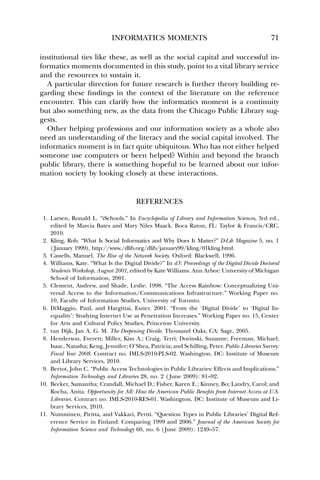
5. Clement, Andrew, and Shade, Leslie. 1998. “The Access Rainbow: Conceptualizing Uni-versal 
Access to the Information/Communications Infrastructure.” Working Paper no. 
10, Faculty of Information Studies, University of Toronto. 
6. DiMaggio, Paul, and Hargittai, Eszter. 2001. “From the ‘Digital Divide’ to ‘Digital In-equality’: 
Studying Internet Use as Penetration Increases.” Working Paper no. 15, Center 
for Arts and Cultural Policy Studies, Princeton University. 
7. van Dijk, Jan A. G. M. The Deepening Divide. Thousand Oaks, CA: Sage, 2005. 
8. Henderson, Everett; Miller, Kim A.; Craig, Terri; Dorinski, Suzanne; Freeman, Michael; 
Isaac, Natasha; Keng, Jennifer; O’Shea, Patricia; and Schilling, Peter. Public Libraries Survey: 
Fiscal Year 2008. Contract no. IMLS-2010-PLS-02. Washington, DC: Institute of Museum 
and Library Services, 2010. 
9. Bertot, John C. “Public Access Technologies in Public Libraries: Effects and Implications.” 
Information Technology and Libraries 28, no. 2 ( June 2009): 81–92. 
10. Becker, Samantha; Crandall, Michael D.; Fisher, Karen E.; Kinney, Bo; Landry, Carol; and 
Rocha, Anita. Opportunity for All: How the American Public Benefits from Internet Access at U.S. 
Libraries. Contract no. IMLS-2010-RES-01. Washington, DC: Institute of Museum and Li-brary 
Services, 2010. 
11. Numminen, Piritta, and Vakkari, Pertti. “Question Types in Public Libraries’ Digital Ref-erence 
Service in Finland: Comparing 1999 and 2006.” Journal of the American Society for 
Information Science and Technology 60, no. 6 (June 2009): 1249–57.
72 THE LIBRARY QUARTERLY 
12. Kvasny, Lynette. “Cultural (Re)production of Digital Inequality in a US Community Tech-nology 
Initiative.” Information, Communication and Society 9, no. 2 (April 2006): 160–81. 
13. American Library Association. “Code of Ethics.” http://www.ala.org/ala/issuesadvocacy/ 
proethics/codeofethics/codeethics.cfm. 
14. Lin, Nan. Social Capital: A Theory of Social Structure and Action. London: Cambridge Uni-versity 
Press, 2001. 
15. O’Neil, Dara. “Assessing Community Informatics: A Review of Methodological Approaches 
for Evaluating Community Networks and Community Technology Centers.” Internet Re-search 
12, no. 1 (2002): 76–102. 
16. Alkalimat, Abdul, and Williams, Kate. “Social Capital and Cyberpower in the African 
American Community: A Case Study of a Community Technology Center in the Dual 
City.” In Community Informatics: Shaping Computer Mediated Social Relations, edited by Leigh 
Keeble and Brian Loader. London: Routledge, 2001. 
17. Williams, Kate, and Durrance, Joan C. “Social Networks and Social Capital: Rethinking Theory 
in Community Informatics.” Journal of Community Informatics 4, no. 3 (2008). http:// 
www.ci-journal.net/index.php/ciej/article/view/465/430. 
18. Kranich, Nancy. “Libraries Create Social Capital.” Library Journal 126, no. 19 (November 
15 2001): 40–41. 
19. Va°rheim, Andreas. “Social Capital and Public Libraries: The Need for Research.” Library 
and Information Science Research 29, no. 3 (2007), 416–28. 
20. Lin, Nan; Cook, Karen; and Burt, Ronald S. Social Capital: Theory and Research. New York: 
de Gruyter, 2001. 
21. Lankshear, Colin; Gee, James P.; Knobel, Michele; and Searle, Chris. Changing Literacies. 
Buckingham: Open University Press, 1997. 
22. Eberle, Anne, and Robinson, Sandra. The Adult Illiterate Speaks Out: Personal Perspectives on 
Learning to Read and Write. Contract no. 400-79-0036. Washington, DC: National Institute for 
Community Development, Department of Health, Education and Welfare, and the Office 
of the Assistant Secretary for Planning and Evaluation, National Institute of Education, 
September 1980. http://www.eric.ed.gov/ERICWebPortal/contentdelivery/servlet/ 
ERICServlet?accnopED195771. 
23. Williams, Kate. “Literacy and Computer literacy: Analyzing the NRC’s ‘Being Fluent with In-formation 
Technology.’” Journal of Literacy and Technology 3, no. 1 (Spring 2003). http:// 
www.literacyandtechnology.org/volume3/literacy.katewilliams.pdf. 
24. Scribner, Sylvia. “Literacy in Three Metaphors.” In Literacy: Language and Power, edited 
by Dianne L. Vipond and Ronald J. Strahl. Long Beach: California State University Press, 
1994. 
25. Cope, Bill, and Kalantzis, Mary, eds. Multiliteracies: Literacy Learning and the Design of Social 
Futures. London: Routledge, 2000. 
26. Heath, Shirley Brice. “The Functions and Uses of Literacy.” In Literacy: Language and 
Power, edited by Dianne L. Vipond and Ronald J. Strahl. Long Beach: California State 
University Press, 1994. 
27. Nagle, Jane P. “Histories of Success and Failure: Working Class Students’ Literacy Ex-periences.” 
Journal of Adolescent and Adult Literacy 43, no. 2 (October 1999): 172–85. 
28. Finn, Patrick J. Literacy with an Attitude: Educating Working-Class Children in Their Own Self- 
Interest. Albany: State University of New York Press, 1999. 
29. Hjorland, Birger., and Albrechtsen, Hanne. “Toward a New Horizon in Information Science: 
Domain Analysis.” Journal of the American Society for Information Science 46, no. 6 ( July 1995): 400– 
425. 
30. Lave, Jean, and Wenger, Etienne. Situated Learning: Legitimate Peripheral Participation. Cam-bridge: 
Cambridge University Press, 1991.
INFORMATICS MOMENTS 73 
31. Dewey, Patrick R. “Public Access to Microcomputers: Thoughts from the North-Pulaski 
Experience.” Reference Services Review 11, no. 3 (Fall 1983): 21–24. 
32. Orr, Julian. Talking about Machines: An Ethnography of a Modern Job. Ithaca, NY: ILR Press, 
1996. 
33. Burawoy, Michael. Ethnography Unbound: Power and Resistance in the Modern Metropolis. 
Berkeley: University of California Press, 1991. 
34. Burawoy, Michael. The Extended Case Method: Four Countries, Four Decades, Four Great Trans-formations, 
and One Theoretical Tradition. Berkeley: University of California Press, 2009. 
35. Clark, Kenneth. Dark Ghetto: Dilemmas of Social Power. London: Gollancz, 1965. 
36. US Census. “Census 2000 Demographic Profile Highlights (Chicago, Illinois).” http:// 
www.factfinder.census.gov/. 
37. Williams, Kate. “Social Networks, Social Capital, and the Use of Information and Com-munications 
Technology in Socially Excluded Communities: A Study of Community 
Groups in Manchester, England.” PhD diss., University of Michigan, 2005. 
38. L. K. “Chicago PL Takes Heat over Literacy Cuts.” American Libraries 27, no. 9 (October 
1996): 15–17. 
39. Harper, Douglas. Working Knowledge: Skill and Community in a Small Shop. Chicago: Uni-versity 
of Chicago Press, 1987. 
40. Durrance, Joan C. “The Generic Librarian: Anonymity vs. Accountability.” Reference Quar-terly 
22, no. 3 (1983): 278–83. 
41. Durrance, Joan C. “Factors That Influence Reference Success: What Makes Questioners 
Willing to Return?” Reference Librarian 23, nos. 49–50 (February 1995): 243–65. 
42. Rose, Mike. The Mind at Work: Valuing the Intelligence of the American Worker. New York: 
Viking, 2004. 
43. Putnam, Robert. Better Together: Restoring the American Community. New York: Simon  
Schuster, 2003. 
44. Davis, Denise M.; Bertot, John Carlo; and Clark, Larra. “Libraries ConnectCommunities: Public 
Library Funding and Technology Study, 2009–2010.” American Libraries, digital suppl., June 
2010. http://www.americanlibrariesmagazine.org/archives/digital-supplement/summer-2010- 
digital-supplement. 
45. Roy, Loriene; Bolfing, Trina; and Brzozowski, Bonnie. “Computer Classes for Job Seekers: 
LIS Students Team with Public Librarians to Extend Public Services.” Public Library Quar-terly 
29, no. 3 (2010): 193–209.

Informatics moments

  • 1.
    INFORMATICS MOMENTS1 KateWilliams2 The informatics moment is the moment when a person seeks help in using some digital technology that is new to him or her. This article examines the informatics moment in people’s everyday lives as they sought help at a branch public library. Four types of literacy were involved: basic literacy (reading and writing), computer literacy (use of a mouse, buying a computer), library literacy (navigating online catalogs and databases), and domain literacy (most commonly and urgently, looking for work in a world where practically all job postings and applications are online). Social capital is also associated with many of these informatics moments: people seek help from those with enough skill who are close at hand, approachable, and familiar, and they collaborate with others in their networks to do so. Understanding the informatics moment could accelerate people’s (and society’s) anxious transition to an inclusive digital age. [Library Quarterly, vol. 82, no. 1, pp. 47–73] 2012 by The University of Chicago. All rights reserved. 0024-2519/2012/8201-0004$10.00 47 Background and Purpose This study identifies and describes a phenomenon taking place in Chi-cago’s branch public libraries—the informatics moment—and its relation-ship with social capital. This moment has two meanings, one empirical and one abstract. Empirically, it is a moment when a library patron is seeking and getting help using a computer or the Internet. Abstractly, the informatics moment is a phase in the transition of a society or a social 1. The author wishes to thank Aiko Takazawa for her research assistance, as well as other contributors to the research, including the CyberNavigators, Roberto Pang,Amy Eshleman, and Mary Dempsey at Chicago Public Library; other members of the Community Infor-matics Research Lab at the University of Illinois, especially Abdul Alkalimat, Aaron Fleisher, Hui Yan; Aysha Marsh and transcriptionist Sarah Meadows; and volunteers Samantha Lester and Matt Hampel. The research was funded by the Institute for Museum and Library Services and enabled by the cooperation of the Chicago Public Library. 2. Assistant professor, University of Illinois at Urbana Champaign Graduate School of Library and Information Science, 501 E. Daniel Street, Champaign, IL 61820; E-mail katewill @illinois.edu.
  • 2.
    48 THE LIBRARYQUARTERLY sector to the information age, with all the dislocations and transformations that are entailed in introducing digital tools and infrastructure. The informatics moment is a new term that I have coined. The term places this work within the i-schools—the professional schools and centers of research on the interaction of people, information, and technology that were organized in the late 1990s and since [1] in response to the emer-gence of the digital age. It also places this work under the rubric of social informatics [2], which emphasizes and explores the social context of com-puter use, to the point of coining its own new term “socio-technical systems” in order to reconceptualize the computer. The term also draws on concepts of the information revolution and the network society [3]. As observed in this study, the informatics moment has a structure and a process. The structure consists of the technological infrastructure of the public access computers provided in the library (and also, as this study will help to show, an emerging human infrastructure). The process consists of the interaction of the patron with a staff member called a CyberNavigator as the patron uses the computers. In this moment, the patron is bridging a digital divide that he or she faces in trying to do something. In fact, the CyberNavigator faces the digital divide with the patron, as they quite lit-erally face the computer screen side-by-side. The new term “informatics moment” aims at shifting the attention of both scholars and practitioners to the agency of those involved. We can understand this by comparing it to another widely used term: the digital divide. This term was first used in 1996 [4]. It served (and continues to serve) to galvanize a great deal of time and money around the world. The digital divide is most typically defined as the gap between those who use computers and those who do not. Experience with and scholarship on this phenomenon, also referred to as digital inequality, has shown that it is both multidimensional and changing. The focus on the informatics mo-ment looks at the digital divide from the perspective of the person or persons experiencing it. It relies on the CyberNavigator staff—who also experience the digital divide—as witness and participant, but it emphasizes the agency of the person seeking (and by and large getting) help. He or she sets out to do something that involves computers or the Internet, and he or she seeks help.3 Empirically, this study collects data about informatics moments that last a few minutes, an hour, or perhaps through multiple encounters in the 3. Some [5] have identified seven dimensions to the digital divide, others [6] five, and most recently one more scholar [7] has identified four. All noted the role of help in surmounting the digital divide, using different terms: social facilitation [5], social support [6], and social resources/learning from others [7].
  • 3.
    INFORMATICS MOMENTS 49 public library. Any particular informatics moment as experienced in the library may be successful or may end in frustration. As of 2008, 16,671 US public library outlets (central and branch loca-tions) were serving 97 percent of the population [8], thanks in large part to the long-standing practice of local tax support that has made US libraries both free and permanent.4 Some 3 percent of Americans reside outside of the taxing district or service area of any library, but many people are close enough to travel and choose to pay an annual fee for user privileges (e.g., $50–$200 in several Illinois locales). American libraries provide local residents with free book lending, reference assistance, information and referral services, study and meeting spaces, and access to computers and the Internet. Helped again by tax dollars (particularly the federal eRate subsidy), 99.8 percent of public libraries provide on average twelve public access computers per location [9]. Fifteen years of surveys and analysis of public access computing in the libraries by John C. Bertot and his col-leagues have detailed the structural aspect of the informatics moment in the branch public library. More recently Bertot [9] has used interviews and library visits to investigate the social and institutional implications of information technology in libraries. Complementing that work, this study examines and theorizes on the IT help-getting and help-giving moment that (almost always) takes place sitting in front of the library’s public access computers. Those computers are used for life’s necessities as well as for homework, leisure, and lifelong learning. Forty-two percent of those using library com-puters nationwide did so for formal education (doing homework, attending remote classes, or applying to school), and 40 percent did so for employ-ment or career purposes [10, p. 6]. It is also relevant that a study of recent change in digital reference questions discovered that “people seem to turn to public libraries when they face a difficult question. . . . In addition, unsuccessful searching of the Internet seems to motivate people to ask questions in the libraries. Librarians face the challenge of developing their skills for answering questions of increasing complexity” [11, p. 1257].5 Others have examined the process of surmounting the digital divide in a community. A disregard for community members’ own predicaments, knowledge, connections, and goals set a technology training program on a course to reproduce and reinforce the digital divide [12]. The ethics of 4. US public libraries are popularly considered free, and many of them have the word “free” in their name, because local residents can use them (and borrow materials) without cost apart from small charges for printing, overdue items, and the like. Local taxpayer support keeps the libraries funded, so technically they are not free. 5. Piritta Numminen and Pertti Vakkari define digital reference service as “an Internet-based, professional question and answering service [whereby] users address their questions to the service typically through Web form, e-mail, or chat” [11, p 1250].
  • 4.
    50 THE LIBRARYQUARTERLY Fig. 1.—Modeling the informatics moment in the public library libraries are to start from and support the patron’s own objectives and requests [13]. So, to recap, relying on the model in figure 1, this study examines the process whereby people in their everyday lives bridge some digital divide they face, making use of public access computing in the branch library and seeking and getting help there. My interest here is to empirically investigate how the local community— ordinary people in their everyday lives—is navigating the information rev-olution. I turn away from a consideration of deficits (the digital divide) to a focus on the process of crossing that divide (the informatics moment). The branch public library is a rich site of informatics moments: people using the public access computers and seeking (and getting) help in doing so. What does the informatics moment look like in this setting? So the first objective in this research is to understand the informatics moment. But the second objective is to understand how social capital affects the process and outcome of the informatics moment. Social capital is defined here as the resources that people access through their social networks rather than on the marketplace or through bureaucratic channels [14]. Social capital is a meaningful factor, or independent variable, in several ways. First, this takes up digital divide theory (see n. 3), which proposes
  • 5.
    INFORMATICS MOMENTS 51 social support as a key aspect of the digital divide. In other words, people with less or no access to or use of digital tools are very often those without connections to people who would support their use of those tools. Second, social capital has been found to be one of the most widely used frameworks for understanding the sustainability of technology in community settings [15]. The search for meaningful theory that can summarize our experience with technology use in communities requires that we continue to test this framework in more and wider settings. Research on community use of information technology suggests a positive role for social capital in helping individuals and groups overcome digital inequality [16–17]. Finally, social capital has already been recognized as both a factor and an outcome in the public library [18–19]. The present study asks, then, what role does social capital play in the informatics moment? As figure 1 shows, help seeking and help giving are part of the informatics moment. The library and its staff are a neighborhood bureaucracy available to the public. In what way might this entail social capital? A bureaucracy is quite often necessary but not sufficient in providing resources [14, 20]. Translating this to the branch library, the patron may get help in the informatics moment not only because the bureaucracy works but also be-cause social capital is in play. To understand the informatics moment in people’s everyday lives and the role of social capital, we chose the setting of the branch public library in Chicago, Illinois. This afforded us a window on hundreds, even thousands, of informatics moments, because the library fields a staff of CyberNavigators and has facilitated them in participating in the study as key informants. The CyberNavigator’s job is to support people in their informatics moments, so the study includes data about the informatics moments in which the CyberNavigator participates, not the informatics moments when a patron gets help in some other way. With the CyberNavigators the study gained participants with an average of twelve months’ experience of a great number of informatics moments. As of summer 2010, the CyberNavigators program operated in forty of the library’s seventy-four locations. CyberNavigators are recruited by the library and hired by the Chicago Public Library Foundation to work for twenty hours a week at $14 per hour. They are assigned to a particular library to help people use the library’s public access computers and the Internet in coordination with other activities in that library.6 Table 1 provides some demographic information about the Cyber- Navigators. In open-ended questions, they also reported owning and using smartphones, microphones, DJ equipment, webcams, and gaming devices 6. A history of Chicago Public Library’s public access computers and the CyberNavigator program itself is outside the scope of this article, but I will provide this upon request.
  • 6.
    52 THE LIBRARYQUARTERLY TABLE 1 Demographics of the CyberNavigators Characteristic Percentage* Average age (years) 27 Gender (male; %) 50 Roots: Born in Chicago 68 Attended Chicago elementary schools 84 Attended Chicago high schools 81 Language: Help people in Spanish as well as English 32 Help people in Mandarin or Cantonese as well as English 8 Ethnicity: African American 48 Latino 25 European American 20 Asian or Asian American 5 Education: Completing or completed a bachelors degree or higher 91 Currently enrolled in college/university 49 Professional or preprofessional field 47 Social science or humanities 34 Science or technology 20 New to working in Chicago Public Library 81 Digital tools and skills: Computer at home 97 Broadband at home 89 Have contributed to Wikipedia 15 Have written a computer program 12 * Unless otherwise noted. as part of carrying out dozens of digital tasks including vlogging, fixing friends’ cellphones, making movies, paying bills, and reading comics on-line. In sum, the CyberNavigators are upwardly mobile, plugged-in Chicago natives, the young netizens who have been identified as the leading force in the information revolution. A particular selection criterion for CyberNavigators is “good with peo-ple,” and that means people in specific Chicago neighborhoods. Managers interview candidates with particular branch library assignments in mind, and often the candidate hired has a personal history with that neighbor-hood. Depending on the time of year and how many are hired at one time, training may consist of shadowing another CyberNavigator for a few days or attending a small group training that focuses on library policies and the library’s online resources. Ongoing one-day training sessions every six months alert CyberNavigators to new resources.
  • 7.
    INFORMATICS MOMENTS 53 Fig. 2.—Starting from documentary evidence (1), which tells about the past, and then triangulating between three field methodologies (2, 3, and 4) to collect data on the present. Literacy theories [21–28] as well as domain theory [29] and learning theory [30] were invaluable in helping parse the complexities of the in-formatics moments observed in this study. This study affirms these theories and demonstrates the power of applying them to digital settings. In order to explain this smoothly, these theories are discussed in greater detail alongside the empirical findings in the “Findings and Discussion” section. In this connection, I also celebrate the librarian who managed the North Pulaski Branch and joined with a patron in 1981 to set up the first public access computer in Chicago Public Library. He attributed his motivation to “the belief that computers are becoming so commonplace that learning how to use them is almost as important as learning how to read and write” [31, p. 21]. Certain methods were adopted from social informatics [32] and sociology [33–35]; these are discussed in the next section. Method Data for this study were collected in four ways: via documents, ethnogra-phies, focus groups, and questionnaires. With limited resources, the eth-nography required decisions on sampling; the focus groups and question-naires targeted the entire population of CyberNavigators. This methodology triangulates from three sources of data about the present, informed by sources from the past (see fig. 2). In other words, each subset of data is used to validate the others, yielding a rich description.
  • 8.
    54 THE LIBRARYQUARTERLY Files and Archives The Chicago Public Library and its foundation made available the admin-istrative files on the CyberNavigators program from the mid-1990s on. I also queried the library’s archive for earlier documents. Administrative files amounted to three boxes of files that contained press clippings about the program, related articles, promotional materials, and internal planning and evaluation documents that recorded significant discussions about the program as it came into existence and evolved. It was possible to access these files because library administrators had an ongoing interest in learn-ing from the program. The CyberNavigator manager also shared internal reports and facilitated the research in many ways. The library’s archives staff provided at least one key historical document. Unit of Analysis, Unit of Observation, and Sampling The unit of analysis is the informatics moment; the unit of observation is the CyberNavigator. He or she is to a certain extent a proxy for the branch library and the community served. As of 2010, forty of Chicago’s seventy-nine public library locations had CyberNavigators on site. For the focus groups and the questionnaires, I set out to study the entire population of forty. Thirty-seven CyberNavigators answered the questionnaire, and twenty-seven participated in focus groups (93 percent and 68 percent re-sponse rates, respectively). Limited resources dictated sampling for the ethnographic work. Two sites were included from each subdivision of the library system (South, Central, and North). As part of a research program that focuses on un-derserved communities, this study excluded libraries serving more affluent areas. As a result, the six sites in the sample are more representative of Chicago’s population with regard to income, that is, lower income. To represent the population ethnically and to catch any differences across ethnicity, locations were selected that serve major ethnic groups of Chicago: African American, Mexican, Puerto Rican, Chinese, and Polish. This is important given Chicago’s ethnic diversity: 37 percent of the city’s pop-ulation is African American, 36 percent speaks a language other than English at home, and 22 percent is foreign born [36]. Ethnographies We carried out weeklong ethnographic observations in six branch libraries. According to Michael Burawoy [33, 34], our theories and our questions allow us to do ethnography. We cannot possibly perceive everything, so we look for specific aspects of a culture, setting, or social process and use our limited perceptions to test our beliefs. So it is better to be explicit and conscious about the theories and questions we take into the field. Eth-
  • 9.
    INFORMATICS MOMENTS 55 nography complements other social scientific methods, such as surveys or interviews. To implement this approach, our ethnographies were highly structured by a set of questions that the field notes had to answer. To start, the focus of the fieldworkers was on the patron-staff (or patron-observer, see below) interactions. From the study’s field handbook: For every request for help, or [staff/CyberNavigator] interaction with a patron, note down: Time of day? What did the patron ask about? What was the patron trying to do? Who did they ask for help? What language did they use? Did they seem to know the CyberNavigator? Those of us on the study also practiced involved observation, following Kenneth Clark [35]. He directed a community organization and developed social scientific findings from that experience. Leading the work of that organization, trying to effect social service delivery and social change, yielded a great deal of data. The check on his subjectivity was his regular discussions—debriefings—with an uninvolved research colleague. Like-wise, we aimed not to be outside but to be impartial observers. We thought of ourselves, and explained ourselves to staff, as learning by shadowing, and we all shared a commitment to seeing Chicagoans across their various digital divides. All of us helped the CyberNavigator at times. This meant that if he or she was busy and a patron was seeking help, we provided that help or referred the patron to another library staff person. In this way, allowing for the short time in the field, we observed and also became insiders. Since demand frequently outstrips resources, this was the only ethical approach that respected the setting and the community: to assist with current practice while carrying out research to serve future practice. In total, six people carried out the ethnography. Each person spent three to five days in a library location, jotting notes each day and typing them up each evening. To encourage reflection and to stimulate serendipitous findings in this first stage of the fieldwork, a day’s notes had to include one paragraph on each of the following topics: (1) the most interesting moment, (2) the greatest problem, and (3) the greatest solution. At the heart of the notes were the descriptions of 157 interactions with a patron seeking help. We handcoded these interactions. The three daily reflective paragraphs helped to shape the focus group agenda and the survey questions.
  • 10.
    56 THE LIBRARYQUARTERLY Focus Groups A total of twenty-seven CyberNavigators participated in six focus group discussions. These discussion groups ranged in size from two to seven people and averaged 4.5 people per group. These focus group discussions were guided by Julian Orr’s study of copier repair technicians [32]. He found that stories were central to the work of these technicians; telling each other stories helped them to do, make sense of, and enjoy their work. If we could gather stories from the CyberNavigators, we reasoned, it would help us understand the informatics moment. In the process of recruiting the focus groups, we asked participants to think about and bring one best story and one worst story from their ex-periences as CyberNavigators. To start the discussions, everyone shared at least two stories. As with Orr’s copier technicians, these stories were fun for participants to hear. They validated their experiences. They were the same and different. They were causes for mourning and celebration of the patrons and the communities, many in crisis, and also of the Cyber- Navigators themselves. And unlike the copier technicians, who shared their repair stories every day on the job, the CyberNavigators were in their own branches twenty hours a week and had not had the chance to sit down together. They themselves recognized this, as one transcript recorded: CyberNavigator: “This is therapy! You’re paying us to have therapy.” [Everyone laughing and talking at once.] The stories tumbled out in vivid detail. The ethnographic work showed the pressures of the informatics moment for the staff: always on call, providing public service in distressed com-munities, in the branch library but not quite of the branch since they were paid by the Chicago Public Library Foundation and supervised by their own manager first and by the branch manager second. So another line of questions included these: How would you make your job better? How would you make the program better, along various dimensions: technology, space, training, and so on? Once the focus groups were transcribed, we identified and handcoded 598 distinct chunks of narrative. Questionnaires Thirty-seven CyberNavigators completed questionnaires. Twenty-seven of these were self-administered at the focus group sessions and ten others at a CyberNavigator training soon after. Participants answered eighty open-ended and closed-ended questions. Some questions were adopted from an earlier study of social capital and community technology use [37]; others were developed from the ethnographic data. Questions covered demo-graphics, technology use, technology help given and received, and social capital. Taken together, the documents, ethnographies, focus groups, and
  • 11.
    INFORMATICS MOMENTS 57 questionnaires resulted in both texts and data—narratives and numbers— that the research team analyzed. Findings and Discussion What does the informatics moment look like in the setting of the Chicago Public Library? What role does social capital play? There are two over-arching findings: (1) the informatics moment involves four types of digital literacy work; (2) social capital is a positive influence on the informatics moment. Four Types of Digital Literacy in the Informatics Moment The informatics moment, as observed in this study, centers on a helping interaction between someone seeking to use computers and the Internet and a helper in the public library. The ethnography suggested literacy as an organizing concept for these interactions, using the following definition (but also including nontext records: images, sound, etc.): “Technological literacies may be defined as social practices in which texts (i.e., meaningful stretches of language) are constructed, transmitted, received, modified, shared (and otherwise engaged) within processes employing codes which are digitized electronically, primarily, though not exclusively, by means of (micro)computers” [21, p. 141]. The helping interactions recorded in the ethnographies break down into three types. Answers to the questionnaires added one more type, and the focus group discussions provided more detail on all four. Four main types of literacies are involved in the informatics moments: Basic literacy: reading and writing. None of these appeared in the eth-nographic data. Computer literacy: using the computer and applications running on it. Library literacy: using technologies and systems that are specific to the Chicago Public Library or to libraries in general. Domain literacy: using technology in order to carry out tasks in specific domains of modern life. Quite often one informatics moment has several of these literacies em-bedded in it. When this was apparent, we coded for domain literacy first, then library, then computer, and then basic. The result of coding of the informatics moments that the field team observed can be seen in column 2 of table 2. Basic literacy help getting was not observed, but the CyberNavigators reported in the questionnaires that they did indeed pro-vide such help (col. 1 in the table).
  • 12.
    58 THE LIBRARYQUARTERLY TABLE 2 Types of Informatics Moments Percentage of CyberNavigators Providing Help with This at Least Weekly (N p 37) (1) Informatics Moments Observed (2) Basic literacy 0 (0%) Reading text 90 Writing text 76 Computer literacy 51 (32%) Using a mouse or browser 100 Setting up or using e-mail 97 Producing a document 87 Using social network sites 52 Learning computers in a structured class 48 Playing games online 38 Library literacy 64 (41%) Printing 100 Making or changing a computer reservation 100 Using the online catalog 87 Using the library’s databases 73 Domain literacy 42 (27%) Searching for work 94 Doing non-job-seeking research 89 Applying for work 87 Producing or updating a re´sume´ 79 Using other government websites 68 Doing homework 67 Applying for or checking on government benefits 50 Seeking news or cultural information 46 Doing e-commerce 23 Seeking health information 19 Seeking resources relating to being homeless 19 As table 2 shows, the four types of literacy were operationalized in the questionnaires as various tasks that patrons seek help with. The Cyber- Navigators reported how often—daily, weekly, monthly, or less than monthly/never—they helped people with these tasks. Column 2 in the table indicates how often the four literacies were observed in the ethnog-raphies. Some kinds of help were given more often than others (“at least weekly,” col. 1 in the table). Narratives from the focus groups tell more
  • 13.
    INFORMATICS MOMENTS 59 about basic literacy, computer literacy, library literacy, and domain literacy in the informatics moment. They are presented roughly in order from the most foundational. Basic literacy.—People who cannot read or write do not often make their illiteracy plain for all to see. They hide their illiteracy out of a fear and often desperation that is based on an intelligent understanding of their vulnerability in a text-based world. They overcompensate and create dis-tractions [22]. Their sense of fear and shame is perhaps perpetuated by the “state of grace” school of literacy theory, which holds (completely incorrectly) that people who cannot read or write also cannot reason log-ically or think abstractly [23, p. 14; 24, pp. 20–21]. This helps to explain why the ethnographies did not reveal basic illit-eracy. The focus groups, however, told of patrons who say “Can you just type it for me?” Among the “worst stories” CyberNavigators told, one theme was “They don’t want to learn, they just want you to do it for them.” In these situations, CyberNavigators reported frequently helping by doing rather than by teaching because the hard-luck stories of the patrons—these moments are usually tied to applying for jobs—were compelling. A librarian commented that it is very hard to draw lines between helping, teaching, and doing. A more common strategy is to explain that job hunting involves several steps—introduction to the computer, then e-mail, and so on, and thus moving the patron into a sequence of help sessions, sometimes in-cluding the printing of job-search resources. This entails domain literacy (more below), and it reflected how the types of literacy in an informatics moment can be layered over each other. A total of 90 percent of CyberNavigators help people read something at least weekly; 76 percent help people write something at least weekly. Not being able to read will prevent a person from using computers or the Internet, except perhaps to play video games. Many patrons we observed, who were not asking for help, were looking at YouTube. Could it be some of them were limited to YouTube because most websites require more reading? Teaching people to read and write has been a priority in the Chicago Public Library for many decades. Even when it ended direct literacy services in 1996, the library continued to host efforts by partner literacy organizations [38]. How could illiteracy have disappeared? The data in this study are suggestive of illiteracy. Between patron need and CyberNavigator frustration, it could be helpful to train the CyberNavigators in spotting illiteracy so that a different intervention can be applied than attempting to press on past a possible foundational problem. As the CyberNavigators often say, every job today requires an online application. For some manual or semiskilled labor, applying may require more literacy than the job itself. On the other hand,
  • 14.
    60 THE LIBRARYQUARTERLY the information-age job transformation can mean that the same job, driving a long-haul truck, for instance, now requires working with a laptop in the cab. Computer literacy.—A rich definition of computer literacy can be drawn from a synthesis of work from computer science, education, and literacy studies [23]: 1. Having contemporary skills (e.g., browsing or text editing) 2. Knowing foundational concepts (e.g., networks) 3. Possessing intellectual capabilities (e.g., evaluating sources) 4. Understanding computer literacy as an aspect of life in an information society 5. Being familiar with at least the basics of computer programming 6. Practicing computer literacy that is tailored to individual needs, in-terests, and goals 7. Being part of the community of people who can use IT, which means knowing (a) how to keep learning, (b) who or where to go for new concepts and skills (including software help features and online sources), and (c) how to solve problems with others in that community 8. Not assuming that someone with computer literacy is better than someone who isn’t computer literate Each of these eight aspects is in evidence in the informatics moments in the library. Part of what makes this remarkable is that the public access computers in the Chicago Public Library are very limited and locked down. Most machines provide only Internet Explorer. From that browser window, patrons can surf, open PDF documents, view word-processing files, interact with forms, watch videos, and initiate a print job. There is nowhere to save files except “on the cloud,” that is, on corporate servers (e.g., Google Docs), unless the CyberNavigator shows you a trick for saving in the Temp folder. The machines wipe all user data upon logging off. From one dedicated machine in every location, patrons make or change a reservation. From another machine, they forward a print job to the printer. At three locations (Harold Washington downtown, Sulzer on the North Side, and Woodson on the South Side), public computers also provide Microsoft Office and flash drive functionality so patrons can open, create, and save documents, including from the web. Focus group comments from the CyberNavigators demonstrate how each of these eight aspects of computer literacy appears in the library’s infor-matics moments. 1. Skills. Most basic of these is using the mouse: “[I first tried to teach with online mouse exercises] and I’m like: ‘Dude, this is awful.’ Like, patrons
  • 15.
    INFORMATICS MOMENTS 61 hated it, I hated it. So I take them to Yahoo games. I’m like: ‘All right, pick your favorite game. Let’s go play.’ And there they are, going: ‘Oh, this is fun,’ and then they just, like, learn it so much faster.” 2. Concepts. The concept of electronic mail that you come to a computer to check, that waits for you only—and your password—is fundamental. This story demonstrates how informatics moments are not always com-pletely successful, and it is also an example of the CyberNavigator solving the universal problem of forgotten passwords: [I’ll explain to a patron that companies] are only going to respond to you, you know, via e-mail. They’re going to respond to you via e-mail, and you need to be able to respond and have a conversation back and forth via e-mail. And they’re like: “Well, I don’t even use it that much. I don’t even have a computer.” I was like: “Well, you’re always welcome to come here during library hours so you can use your e-mail address.” “Well, I don’t even know how to login and logout.” And I’m like: “Well, I’ll be here . . . and you have to save your username and password.” . . . But the good thing is that I’ve created a format—I’ve made it that it’s their first initial, last name, and then last two ___. 3. Intellectual capabilities. In this story a patron learns an online service that is critical for his community and then assumes CyberNavigator-type responsibility for others who need it: The truth is, if you’re filling out a Circuit Breaker [applying to a state grants program for seniors and disabled], you probably have some hard luck stuff going on in your life. Period, you know? But there was this guy. He would come into our branch, and he asked me for help filling out a Circuit Breaker one day. . . . Then he comes back, like, later in the week and he’s like: “Hey, remember me? I’m back. I got more Circuit Breakers.” And I was like: “OK.” Turns out, in his world, he was, like, the Circuit Breaker Man. . . . He took a lot of pride and joy in being able to help his friends and family get their paperwork done. 4. Understanding computer literacy as part of life in the information society. The two examples above illustrate the informatics moment as a leap in the patron’s understanding and practice, accepting computers in their life. Contrary to the frustration detailed above, many stories were told of e-mail success. The patrons and the CyberNavigators (several explained a similar approach) explicitly agreed to collaborate on passwords in a way that secured the password for the patron. In effect, patrons are constructing their own IT support network by agreeing to rely on the CyberNavigator in this way. 5. Familiarity with at least the basics of computer programming. The data only supplied one instance of this, but this story is important in two ways. First, Word Macros is a programming language that is available to any Word user if they can navigate it. But programming is an activity
  • 16.
    62 THE LIBRARYQUARTERLY that only four of thirty-seven CyberNavigators report doing. Second, it illustrates that library staff are passing through informatics moments alongside the patrons: “Even the branch librarian, like, sometimes she gets stuck in Microsoft Word, and she’s trying to work in Word Macros, or something, things like that, and she’ll be like: ‘Oh, the CyberNavigator!’ And luckily, I do know how to do it, but they do expect me to know. It’s like, that’s your job, that’s what you’re sup-posed to know.” 6. Practicing computer literacy tailored to individual needs, interests, goals. This story alludes to the fear people have who cannot use computers— much like those who cannot read and write, and who understand the power that computers, like written text, has over our lives. It also shows, again, the paradigm shift—patrons find entirely new ways to approach a task: “A lot of people come in, and they have a big anxiety about using the Internet. And I’m just like: ‘OK, go to Google and talk to Google like you were talking to me. What exactly do you want to do?’ . . . That’s rewarding to me, you know, in a way because it’s just like: ‘Oh, OK. I didn’t even think about that.’” 7. Being part of the community of people who can use IT, practicing continuous learning, knowing how to find help, and helping others. In this example, someone has crossed the digital divide, and the CyberNavigator is happy to have her in her own help network: “She started out being afraid of, like, breaking the Internet. Wouldn’t even touch the com-puter. . . . It took a little over two weeks before she was able to get the hang of, like, the whole thing. . . . Then she’s so excited . . . [and] the best part of it was that she actually started schooling me on little things.” Circuit Breaker Man above is another example of this. Other stories featured patrons coming in groups of two or more and helping each other or being strangers and helping each other or the Cyber- Navigator. 8. Not being better than people who aren’t computer literate. The development of a helping network, as above, expresses this last aspect of computer literacy. In talking about their own skills, the CyberNavigators re-turned time and again to the core skill: patience. Respect for the patron navigating the informatics moment was critical. One CyberNavigator had adopted a slogan he told his patrons in order to teach them patience and respect for learners: “Practice makes permanent.” Library literacy.—Library literacy means the skills and knowledge to use the particular systems in the library, particularly the Chicago Public Library. Any library’s public access computers and online resources have particular
  • 17.
    INFORMATICS MOMENTS 63 and multiple systems or interfaces that are often complicated by budget limits or rules laid down by multiple parties: publishers, vendors, software companies, and local and federal government, as well as the library itself. Patrons as well as staff have to learn these—and sometimes relearn them if usage is not frequent. Thus, library literacy includes knowing how to navigate the two systems put in place to manage the scarce resources of computer time and printing. A pay-as-you-go printing process starts at the patron’s workstation but finishes at a printing station. Software for reserv-ing computer time runs on another workstation, as well as on staff ma-chines. Then there are four tools for accessing the library’s online offer-ings: the library website, the catalog, the databases, and downloadable books and other media. These tools run on at least six different platforms, or software, depending on how the databases are delivered. 1. Printing. New computer users can print wildly; every public computer lab has to deal with controlling costs. The Chicago Public Library has in place a complex system that only daily users can remember, and all staff spend time supporting patrons: That print system is the worst thing, seriously. It’s just too complicated for new people. New people come in, you know, you got to print from over here. They’re already having a problem because the print button on the screen [Internet Explorer] doesn’t work. So they have to go to File, then Print. Then they come over to you: “Where’s it going to come out at?” Now let’s take your library card and go to the circulation desk [to pay]. Then after they do that, still, nothing’s going to come out ’cause there’s too many steps. [Assents from other CyberNavigators] It’s too extra. 2. Reservations. Likewise, time on the computer is scarce and hard-won. A “worst story” of a CyberNavigator was the day two men got into a fight over their reservations. This story illustrates the cooperation required to manage reservations, which are made and changed by patrons and staff—except at some branches, not the CyberNavigator, because of their foundation-not-library status: “So I can’t cancel res-ervations for people. I can’t look up reservations for people that they made on the computer. But I was able to do that at my first branch. So it’s kind of handicapping me at my new branch ’cause then I have to go a clerk and say, ‘Hey, can you cancel this for me?’” 3. Library website. The library’s website is complex and content comes from the central administration. This is an example of a resource that CyberNavigators have to stay on top of, even for basic information. I had a patron call not so long ago. They’re like, “I saw on the website that these are your hours.” And I’m like, “My hours are on the website?” They’re on the website. Everyone’s hours are on the website. [Another CyberNavigator: What website?] The CPL website. They’re on there.
  • 18.
    64 THE LIBRARYQUARTERLY 4. Online catalog. This is an area where other library staff are poised to help a patron. The handing off of patrons between library staff and the CyberNavigator adds another level of complexity to the support-ing of their informatics moments: “The cool times are when, you know, like, you help a student find an article or there’s a really long line in the computers, and someone thinks that they have to get on the Internet, and I’m like: ‘No, we can use the catalog for that!’” 5. Databases. Here, again, the informatics moment calls for a librarian, because he or she will be trained and expert at database use: This high school student from ____ came in the other day, and she knew how to use the computer. Like, I could have showed her, like, you know, database stuff on the computer. . . . But, like, again, going back to efficiency and, like, not giving people the runaround. Am I going to be able to give her, like, the fastest way online to, like, find age-appropriate, or whatever, information for school about cottonwood trees? Heck no. I took her to the children’s librarian, you know? I’m like: “This is a reference query.” 6. Downloadable books and other media. Here the CyberNavigators are lim-ited to explaining, not demonstrating or teaching, because the down-loading runs on software that does not function on the public access computers. Domain literacy.—Identifying this type of literacy makes references to the concepts of multiliteracies [25–27] and to domain analysis work [28]. The multiliteracies concept emerges from findings that a person can be highly literate in one setting but not in another. School-sanctioned literacy skills and unsanctioned literacy skills are not always transferable—for instance, writing a term paper and writing a rap lyric [26]. Learning is situated— someone can do arithmetic in the supermarket but be stymied in a high school math class [30]. Information science is overlooking the issue of domain: information flows in one domain can be very different from those in another, and in order for new information systems to effectively serve various domains, the information scientist must attend to a domain’s par-ticularity [29]. Applying the concept of domain here highlights the fact that patrons bring tasks that require a certain amount of domain expertise. The CyberNavigator’s expertise varies, but quite often life experience rather than specific training or education is the basis for their help giving. Here is an example from a CyberNavigator who is not a lawyer or paralegal: “A lady had just lost her son, and her grandchild—his children’s mother came and grabbed him and took him to Indiana. She had no way of getting in touch with her grandson, so I helped her get through the legal parts online and everything, and finally she got custody. By the way, she started signing up for my basic Internet class!”
  • 19.
    INFORMATICS MOMENTS 65 In another example, a CyberNavigator—who was in college for a psy-chology degree, but no more—guides someone through an extended in-formatics moment toward a job. Job seeking is such a leading activity at the library’s computers that staff and administration have created an online resource guide, and CyberNavigators are getting a half-day orientation to it: One of my best success stories was a young lady I was assisting with job searching. And it went from learning how to use the computer, then she wanted to do a resume, and then from resumes to applying for jobs online. And she was coming out of a [battered] relationship. She wanted to have her own identity, her own income, and she went from, like, not really having a job or having a lot of experience, but I was able to utilize just her volunteer experience . . . to articulate it into a resume format. And we applied for a job, and she actually got the interview and the job and everything. She was like: “This is, like, the most money I ever made in my life,” and she’s like: “I would never have made it if it wasn’t for you,” and everything, and I just felt good because she was looking for something and she got it. The next story from the ethnographic observation echoes the same themes, but it is explicit that the CyberNavigator’s expertise is from his own job-seeking experience. He is not a career counselor but rather a valued peer helper: A woman wanted to apply for a management position at McDonald’s. She had an advertisement for McDonald’s employment: “Apply now! http:// www.mcdonald.” The McDonald’s website requires you to enter all your resume information as well as respond to many questions about past ex-periences and so on. The patron had the information, handwritten. The CyberNavigator helped her, reading it out loud and teaching her how to use a mouse and how to click. In the middle, when it asks for social security number, he then told her, “You need to fill in all the blanks, there are 60 questions you have to answer.” He also offered her an extension of her computer reservation time, past 60 minutes. The CyberNavigator sug-gested either go to the shop directly and tell them you applied online or call them. He told me later, I learned that from experience helping and from my own experience. And he is just 21 years old! All library staff work together to help: At one point I was wasting a lot of time trying to help the person, like, write an objective in their resume. What goes in an objective? So one of the librarians, she does a resume workshop. She sits down with the patrons. She has, like, a mock resume—objective, experience, stuff like that—and she had books and everything and flyers, and from a certain time to a certain time she assists people with resumes. Then when they’re ready to
  • 20.
    66 THE LIBRARYQUARTERLY actually type it up and put it on the Internet, I help. We work hand-in-hand. As these many examples have shown, quite often one informatics mo-ment entails several types of literacy. The best example, as above—and far and away the most common, since job losses have spiraled in the United States and nearly all job applications are on the Internet—is the job search. The Informatics Moment Draws on Social Capital A book-length visual sociology study of a rural repair shop explains how a fundamental aspect of work done at the repair shop is building and main-taining community [39]. A branch library is like that small shop, and the patrons in their informatics moments are seeking a repair so that they can go about their task. While the public library is structurally a government bureaucracy, sometimes its best work is done via social capital [18–19], and the present study found social capital at work in the informatics moment. Table 3 presents the operationalization and the measurements of social capital in this study. Three types of social capital are identified: the social capital of the CyberNavigators; that of the community, which includes the patrons; and that of the library staff. These types of social capital are documented in a modest portion of the observed informatics moments (19 percent, 22 percent, and 7 percent, respectively) and more deeply documented in the surveys and focus groups. Certain forms of social capital are very much in action; others are not. From this emerge six main findings. 1. Names and recognition are key. As with reference interactions [40–41], informatics moments are associated with the parties knowing each other’s names or recognizing each other: “I grew up locally, go to church down the street, so they either know my name, or a lot of them at first called me Circuit Breaker Lady.” Many references are made to regulars, patrons who come every day or enough to be known. Regulars on occasion help smooth a rough moment or even help another patron. One CyberNavigator began to encourage this in order to accelerate progress. Again, this is like the repair shop operator [38] or like waitressing work [42]; the bureaucracy or the business is the substrate for the growth of social capital, to the extent that this is understood, valued, and feasible. 2. Private laptop use is another measure of social capital. Given anyone’s sense of urban crime, a remarkable one-third of CyberNavigators bring their own laptops and even help patrons use these laptops. This “going the extra mile” is sometimes frowned upon by branch managers, but it gets around the obstacle of library computers that are overbooked and locked down with few applications. Related to this is the practice
  • 21.
    INFORMATICS MOMENTS 67 TABLE 3 Experiences of Social Capital in the Informatic Moment Percentage of CyberNavigators Experiencing This at Least Weekly (N p 37) (1) Informatics Moments Observed (2) CyberNavigator . . . 30 (19%) Knows patron’s name 95 Recognizes patron 84 Brings own laptop to use in helping patrons 35 Allows patron to use CyberNavigator’s laptop to get help 30 Helps someone he or she knows from outside work 16 Sees or gets together with patrons outside work 14 Community 34 (22%) Patron knows CyberNavigator’s name 95 Patron referred by someone other than library staff 78 Patrons come in twos, threes, or more for help 54 Library 11 (7%) Librarians connect CyberNavigator to patrons seek-ing help 100 Guard connects CyberNavigator to patrons seeking help 84 Paraprofessionals connect CyberNavigator to pa-trons seeking help 81 Library staff helps patrons (not including printing/ reservations) 76 Library staff sees or gets together with Cyber- Navigator outside work 3 of CyberNavigators putting their own hands on patrons’ laptops— “It’s against the rules but people do it, ’cause sometimes you just have to”—in order to help. 3. Most CyberNavigators are known in the library, not outside in the community. They are not a visible community resource. We investigated other public computing sites near the libraries, and generally these were unfamiliar to the CyberNavigators, even though sending patrons there might help them and lighten the load at the library. One Cyber- Navigator recognized this, relating approvingly that at another branch, “people from all the local agencies meet once a month, keep each other informed so that referrals can be made.” 4. Given that, however, the community is clearly networked into its Cyber- Navigator. They know his or her name, they are referred by nonstaff,
  • 22.
    68 THE LIBRARYQUARTERLY and they come in family and other groups. This takes some time: “Once I helped someone, then others began to ask questions,” and “I’ve only been here three weeks so it’s slow still; at my old branch patrons knew me.” 5. Are some community members excluded from help in their informatics mo-ments because they are not networked even indirectly with the library or the CyberNavigator? One CyberNavigator estimates that 30 percent of his help is to regulars, and two of the six ethnographers saw such a stream of regulars that they wondered if word-of-mouth through ex-isting networks was enough to reach the whole community. 6. The library staff per se is actively collaborating with the CyberNavigator. The staff refer patrons and help patrons themselves. There is also conflict, but by and large the public library is embracing the public computing library, as these stories demonstrate: The staff respects me and my job, so if I know something, like, I even see them telling patrons the same thing I tell them now, because they, they listen. They watch. And we talk. So, you know, it’s good information because giving patrons outdated computer advice, it does make you cringe. You have to find a way to say, hey, buddy. You know, before the patron gets out the door, but not in a disrespectful way. [The guard] sits right next to the reservation station so she just hears me doing things, and I talk to her cause I stand right next to security. So she knows basically more about how to make [an] appointment for somebody with me. Now that [we’ve settled into a working relationship] the clerks are assisting with printing or making reservations, and they normally won’t interrupt me if I’m in a session. If patrons start a sentence with “computer,” the staff directs them to me. Finally, this field observation: I’m too old to learn, the librarian said. Then the CyberNavigator com-forted the librarian with a story of a seventy-year-old patron who has gotten good at the computer. The librarian and the CyberNavigator keep a close warm relationship. All in all, social capital appears to be closely associated with successful informatics moments, that is, people being able to get the IT help that they need to complete tasks which are quite often urgent. The library provides this resource by activating a social network: staff-CyberNavigator
  • 23.
    INFORMATICS MOMENTS 69 ties, CyberNavigator-community ties, library-community ties, and within-community ties. The close-up view afforded by this study validates social support as a component of the digital divide, affirms past findings for a positive relationship between social capital and IT use, and validates the public library as a resource for growing social capital and thus maintaining community. Summary of Findings People experience informatics moments when they seek help to do some-thing with information technology. This is their moment of bridging a digital divide. In the setting of the Chicago Public Library, they are helped in these moments by a CyberNavigator. The informatics moments observed in the library entail one or more of four different literacies: basic literacy, computer literacy, library lit-eracy, or domain literacy. These informatics moments succeed, that is, the collaboration between patron and CyberNavigator are successful: peo-ple looking online for jobs get them, and people who were afraid of computers become computer users and even cybernavigators in their own right. Their gratitude expresses the paradigm shift, the giant leap, they have made: they return to say “thank you,” they press food and other gifts on the CyberNavigators, and they even try to pay them. People also recommend the CyberNavigator to others, and this is just one way that social capital is involved in the informatics moment. The CyberNavigator becomes familiar and trusted by patrons and staff based on a track record of success in helping and his or her approachability. In sum, in their informatics moments, people get help via their social network: local people they know recommend the CyberNavigator; library staff recommend the CyberNavigator, and the participants turn to the CyberNavigator. They seek and get help from someone who is both close and approachable: a particular person in their own neighborhood library. In this moment, and at its best, the library represents both government-and community-based social capital; this is understood in the library pro-fession [18] and beyond [43], although professional, paraprofessional, and security guard training does not necessarily cover this aspect of library work. One particular focus group moment is worth recalling in shifting to future considerations: the comment “You’re paying us to have therapy!” followed by laughter all around. The very finding that stories of the in-formatics moment tumbled out in such vivid detail suggests that staff pro-viding this service may be more than ready to examine their work, learn from it, and help make a better public library.
  • 24.
    70 THE LIBRARYQUARTERLY Designing the Branch Library of the Future: A Call for Theory After witnessing hundreds of informatics moments unfolding before them, the staff and patrons at one branch library began to talk: Will the library be a temple to books? A friendly place to use computers? Will it be both? As their CyberNavigator explained, “I think, actually, we get used more than the librarians. Like, especially at my branch, because I feel like nobody goes to the library for books anymore. Everything seems to be online. So it would only make sense that, you know, with books came the librarian, and with computers came the CyberNavigator, you know?” Certainly both electronic and physical books are circulating, and addi-tional data we have collected from the traditional library staff will shed more light on this. But it does appear that, by their words and deeds, the creators of the CyberNavigator program—senior administrators, managers, and frontline staff—are designing the branch library of the future. Practice can proceed further if informed by robust theory. The infor-matics moment in people’s everyday lives merits closer examination and wider understanding if we are to accelerate it. Libraries are grappling with this moment. A 2009–10 national survey asked public libraries if they car-ried out technology training [44]: Informal point-of-use assistance: 76.6 percent of libraries Formal technology training: 37 percent One-on-one technology training sessions by appointment: 23.5 percent Online training material: 21.7 percent No training offered: 10.9 percent How effective these activities are, who staffs them, and to what extent libraries are keeping ahead of demand is not very well known. Yet 76.6 percent of public libraries means close to 13,000 outlets nationwide. Interviews with state library staff and surveys of thirty-five public libraries found that supporting patrons who need help with IT is just part of the major challenge of public access technologies [9]. A key solution emerging from that analysis is building “a community approach to public access with the library as one of the foundational institutions” [9, p. 88, and similarly p. 89]. By partnering with its foundation and its branches’ friends groups to raise funds and hire a special category of staff, the Chicago Public Library has sustained a critical service for patrons. At least three library schools and one community college—Dominican University, University of Texas [45], University of Illinois, and Champaign’s Parkland College—mobilize students as volunteer CyberNavigators in their local libraries, because staff cannot answer patron demand and educators recognize CyberNavigating as a new skill that their graduates need. The social capital reflected in
  • 25.
    INFORMATICS MOMENTS 71 institutional ties like these, as well as the social capital and successful in-formatics moments documented in this study, point to a vital library service and the resources to sustain it. A particular direction for future research is further theory building re-garding these findings in the context of the literature on the reference encounter. This can clarify how the informatics moment is a continuity but also something new, as the data from the Chicago Public Library sug-gests. Other helping professions and our information society as a whole also need an understanding of the literacy and the social capital involved. The informatics moment is in fact quite ubiquitous. Who has not either helped someone use computers or been helped? Within and beyond the branch public library, there is something hopeful to be learned about our infor-mation society by looking closely at these interactions. REFERENCES 1. Larsen, Ronald L. “iSchools.” In Encyclopedia of Library and Information Sciences, 3rd ed., edited by Marcia Bates and Mary Niles Maack. Boca Raton, FL: Taylor Francis/CRC, 2010. 2. Kling, Rob. “What Is Social Informatics and Why Does It Matter?” D-Lib Magazine 5, no. 1 ( January 1999), http://www./dlib.org/dlib/january99/kling/01kling.html. 3. Castells, Manuel. The Rise of the Network Society. Oxford: Blackwell, 1996. 4. Williams, Kate. “What Is the Digital Divide?” In d3: Proceedings of the Digital Divide Doctoral Students Workshop, August 2001, edited by Kate Williams. Ann Arbor: University of Michigan School of Information, 2001. 5. Clement, Andrew, and Shade, Leslie. 1998. “The Access Rainbow: Conceptualizing Uni-versal Access to the Information/Communications Infrastructure.” Working Paper no. 10, Faculty of Information Studies, University of Toronto. 6. DiMaggio, Paul, and Hargittai, Eszter. 2001. “From the ‘Digital Divide’ to ‘Digital In-equality’: Studying Internet Use as Penetration Increases.” Working Paper no. 15, Center for Arts and Cultural Policy Studies, Princeton University. 7. van Dijk, Jan A. G. M. The Deepening Divide. Thousand Oaks, CA: Sage, 2005. 8. Henderson, Everett; Miller, Kim A.; Craig, Terri; Dorinski, Suzanne; Freeman, Michael; Isaac, Natasha; Keng, Jennifer; O’Shea, Patricia; and Schilling, Peter. Public Libraries Survey: Fiscal Year 2008. Contract no. IMLS-2010-PLS-02. Washington, DC: Institute of Museum and Library Services, 2010. 9. Bertot, John C. “Public Access Technologies in Public Libraries: Effects and Implications.” Information Technology and Libraries 28, no. 2 ( June 2009): 81–92. 10. Becker, Samantha; Crandall, Michael D.; Fisher, Karen E.; Kinney, Bo; Landry, Carol; and Rocha, Anita. Opportunity for All: How the American Public Benefits from Internet Access at U.S. Libraries. Contract no. IMLS-2010-RES-01. Washington, DC: Institute of Museum and Li-brary Services, 2010. 11. Numminen, Piritta, and Vakkari, Pertti. “Question Types in Public Libraries’ Digital Ref-erence Service in Finland: Comparing 1999 and 2006.” Journal of the American Society for Information Science and Technology 60, no. 6 (June 2009): 1249–57.
  • 26.
    72 THE LIBRARYQUARTERLY 12. Kvasny, Lynette. “Cultural (Re)production of Digital Inequality in a US Community Tech-nology Initiative.” Information, Communication and Society 9, no. 2 (April 2006): 160–81. 13. American Library Association. “Code of Ethics.” http://www.ala.org/ala/issuesadvocacy/ proethics/codeofethics/codeethics.cfm. 14. Lin, Nan. Social Capital: A Theory of Social Structure and Action. London: Cambridge Uni-versity Press, 2001. 15. O’Neil, Dara. “Assessing Community Informatics: A Review of Methodological Approaches for Evaluating Community Networks and Community Technology Centers.” Internet Re-search 12, no. 1 (2002): 76–102. 16. Alkalimat, Abdul, and Williams, Kate. “Social Capital and Cyberpower in the African American Community: A Case Study of a Community Technology Center in the Dual City.” In Community Informatics: Shaping Computer Mediated Social Relations, edited by Leigh Keeble and Brian Loader. London: Routledge, 2001. 17. Williams, Kate, and Durrance, Joan C. “Social Networks and Social Capital: Rethinking Theory in Community Informatics.” Journal of Community Informatics 4, no. 3 (2008). http:// www.ci-journal.net/index.php/ciej/article/view/465/430. 18. Kranich, Nancy. “Libraries Create Social Capital.” Library Journal 126, no. 19 (November 15 2001): 40–41. 19. Va°rheim, Andreas. “Social Capital and Public Libraries: The Need for Research.” Library and Information Science Research 29, no. 3 (2007), 416–28. 20. Lin, Nan; Cook, Karen; and Burt, Ronald S. Social Capital: Theory and Research. New York: de Gruyter, 2001. 21. Lankshear, Colin; Gee, James P.; Knobel, Michele; and Searle, Chris. Changing Literacies. Buckingham: Open University Press, 1997. 22. Eberle, Anne, and Robinson, Sandra. The Adult Illiterate Speaks Out: Personal Perspectives on Learning to Read and Write. Contract no. 400-79-0036. Washington, DC: National Institute for Community Development, Department of Health, Education and Welfare, and the Office of the Assistant Secretary for Planning and Evaluation, National Institute of Education, September 1980. http://www.eric.ed.gov/ERICWebPortal/contentdelivery/servlet/ ERICServlet?accnopED195771. 23. Williams, Kate. “Literacy and Computer literacy: Analyzing the NRC’s ‘Being Fluent with In-formation Technology.’” Journal of Literacy and Technology 3, no. 1 (Spring 2003). http:// www.literacyandtechnology.org/volume3/literacy.katewilliams.pdf. 24. Scribner, Sylvia. “Literacy in Three Metaphors.” In Literacy: Language and Power, edited by Dianne L. Vipond and Ronald J. Strahl. Long Beach: California State University Press, 1994. 25. Cope, Bill, and Kalantzis, Mary, eds. Multiliteracies: Literacy Learning and the Design of Social Futures. London: Routledge, 2000. 26. Heath, Shirley Brice. “The Functions and Uses of Literacy.” In Literacy: Language and Power, edited by Dianne L. Vipond and Ronald J. Strahl. Long Beach: California State University Press, 1994. 27. Nagle, Jane P. “Histories of Success and Failure: Working Class Students’ Literacy Ex-periences.” Journal of Adolescent and Adult Literacy 43, no. 2 (October 1999): 172–85. 28. Finn, Patrick J. Literacy with an Attitude: Educating Working-Class Children in Their Own Self- Interest. Albany: State University of New York Press, 1999. 29. Hjorland, Birger., and Albrechtsen, Hanne. “Toward a New Horizon in Information Science: Domain Analysis.” Journal of the American Society for Information Science 46, no. 6 ( July 1995): 400– 425. 30. Lave, Jean, and Wenger, Etienne. Situated Learning: Legitimate Peripheral Participation. Cam-bridge: Cambridge University Press, 1991.
  • 27.
    INFORMATICS MOMENTS 73 31. Dewey, Patrick R. “Public Access to Microcomputers: Thoughts from the North-Pulaski Experience.” Reference Services Review 11, no. 3 (Fall 1983): 21–24. 32. Orr, Julian. Talking about Machines: An Ethnography of a Modern Job. Ithaca, NY: ILR Press, 1996. 33. Burawoy, Michael. Ethnography Unbound: Power and Resistance in the Modern Metropolis. Berkeley: University of California Press, 1991. 34. Burawoy, Michael. The Extended Case Method: Four Countries, Four Decades, Four Great Trans-formations, and One Theoretical Tradition. Berkeley: University of California Press, 2009. 35. Clark, Kenneth. Dark Ghetto: Dilemmas of Social Power. London: Gollancz, 1965. 36. US Census. “Census 2000 Demographic Profile Highlights (Chicago, Illinois).” http:// www.factfinder.census.gov/. 37. Williams, Kate. “Social Networks, Social Capital, and the Use of Information and Com-munications Technology in Socially Excluded Communities: A Study of Community Groups in Manchester, England.” PhD diss., University of Michigan, 2005. 38. L. K. “Chicago PL Takes Heat over Literacy Cuts.” American Libraries 27, no. 9 (October 1996): 15–17. 39. Harper, Douglas. Working Knowledge: Skill and Community in a Small Shop. Chicago: Uni-versity of Chicago Press, 1987. 40. Durrance, Joan C. “The Generic Librarian: Anonymity vs. Accountability.” Reference Quar-terly 22, no. 3 (1983): 278–83. 41. Durrance, Joan C. “Factors That Influence Reference Success: What Makes Questioners Willing to Return?” Reference Librarian 23, nos. 49–50 (February 1995): 243–65. 42. Rose, Mike. The Mind at Work: Valuing the Intelligence of the American Worker. New York: Viking, 2004. 43. Putnam, Robert. Better Together: Restoring the American Community. New York: Simon Schuster, 2003. 44. Davis, Denise M.; Bertot, John Carlo; and Clark, Larra. “Libraries ConnectCommunities: Public Library Funding and Technology Study, 2009–2010.” American Libraries, digital suppl., June 2010. http://www.americanlibrariesmagazine.org/archives/digital-supplement/summer-2010- digital-supplement. 45. Roy, Loriene; Bolfing, Trina; and Brzozowski, Bonnie. “Computer Classes for Job Seekers: LIS Students Team with Public Librarians to Extend Public Services.” Public Library Quar-terly 29, no. 3 (2010): 193–209.