1
Christopher Wynder, Ph.D
Director of Client Services
@ChrisW_thinkdox
chrisw@thinkdox.com
Managing Information in healthcare
Melding care team needs with administrative need in secure way.
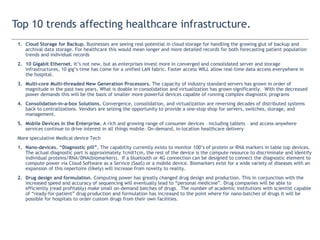
Top 10 trends affecting healthcare infrastructure.
1. Cloud Storage for Backup. Businesses are seeing real potential in cloud storage for handling the growing glut of backup and archival
data storage. For healthcare this would mean longer and more detailed records for both forecasting patient population trendsand
individual records
2. 10 Gigabit Ethernet. It’s not new, but as enterprises invest more in converged and consolidated server and storage infrastructures,
10 gig’s time has come for a unified LAN fabric. Faster access WILL allow real-time data access everywhere in the hospital.
3. Multi-core Multi-threaded New Generation Processors. The capacity of industry standard servers has grown in order of magnitude
in the past two years. What is doable in consolidation and virtualization has grown significantly. With the decreased power
demands this will be the basis of smaller more powerful devices capable of running complex diagnostic programs
4. Consolidation-in-a-box Solutions. Convergence, consolidation, and virtualization are reversing decades of distributed systems back
to centralizations. Vendors are seizing the opportunity to provide a one-stop shop for servers, switches, storage, and management.
5. Mobile Devices in the Enterprise. A rich and growing range of consumer devices – including tablets – and access-anywhere services
continue to drive interest in all things mobile. On-demand, in-location healthcare delivery
More speculative Medical device Tech
1. Nano-devices. “Diagnostic pill”. The capability currently exists to monitor 100’s of protein or RNA markers in table top devices. The
actual diagnostic part is approximately 1cmX1cm, the rest of the device is the compute resource to discriminate and identify
individual proteins/RNA/DNA(biomarkers). If a bluetooth or 4G connection can be designed to connect the diagnostic element to
compute power via Cloud Software as a Service (SaaS) or a mobile device. Biomarkers exist for a wide variety of diseases with an
expansion of this repertoire (likely) will increase from novelty to reality.
2. Drug design and formulation. Computing power has greatly changed drug design and production. This in conjunction with the
increased speed and accuracy of sequencing will eventually lead to “personal medicine”. Drug companies will be able to efficiently
(read profitably) make small on-demand batches of drugs. The number of academic institutions with scientist capable of “ready-for-
patient” drug production and formulation has increased to the point where for nano-batches of drugs it will be possible for hospitals
to order custom drugs from their own facilities.
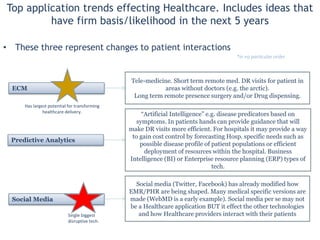
Top application trends effecting Healthcare. Includes ideas that have firm
basis/likelihood in the next 5 years
• These three represent changes to patient interactions
ECM
Predictive Analytics
Social Media
*in no particular order
Social media (Twitter, Facebook) has already modified how EMR/PHR
are being shaped. Many medical specific versions are made (WebMD
is a early example). Social media per se may not be a Healthcare
application BUT it effect the other technologies and how Healthcare
providers interact with their patients
“Artificial Intelligence” e.g. disease predicators based on symptoms. In
patients hands can provide guidance that will make DR visits more
efficient. For hospitals it may provide a way to gain cost control by
forecasting Hosp. specific needs such as possible disease profile of
patient populations or efficient deployment of resources within the
hospital. Business Intelligence (BI) or Enterprise resource planning
(ERP) types of tech.
Single biggest
disruptive tech.
Tele-medicine. Short term remote med. DR visits for patient in areas
without doctors (e.g. the arctic).
Long term remote presence surgery and/or Drug dispensing.
Has largest potential for transforming
healthcare delivery.
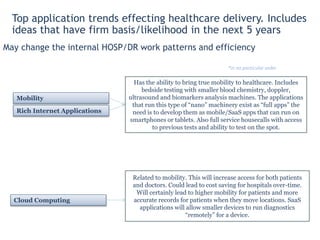
May change the internal HOSP/DR work patterns and
efficiency
Mobility
Rich Internet Applications
Cloud Computing
*in no particular order
Has the ability to bring true mobility to healthcare. Includes bedside
testing with smaller blood chemistry, doppler, ultrasound and
biomarkers analysis machines. The applications that run this type of
“nano” machinery exist as “full apps” the need is to develop them as
mobile/SaaS apps that can run on smartphones or tablets. Also full
service housecalls with access to previous tests and ability to test on
the spot.
Related to mobility. This will increase access for both patients and
doctors. Could lead to cost saving for hospitals over-time. Will
certainly lead to higher mobility for patients and more accurate
records for patients when they move locations. SaaS applications will
allow smaller devices to run diagnostics “remotely” for a device.
Top application trends effecting healthcare delivery. Includes ideas
that have firm basis/likelihood in the next 5 years
“Anywhere computing”
How did we get here?
• Explosion of mobile devices and new class of healthcare
consumer Apps.
• Cloud as a viable infrastructure option for secure
industries
• The need for a more agile application delivery system.
What is Cloud computing and is it in use in healthcare
•Definition of cloud computing
•What is the type of cloud relevant to healthcare
Mobile and consumer devices as healthcare delivery vehicles.
How does the whole system work together
Info-Tech Research Group
Meet enhanced expectations about healthcare delivery
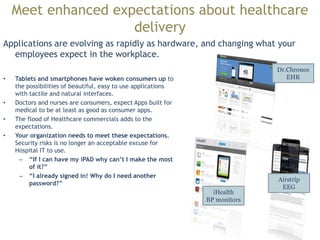
Applications are evolving as rapidly as hardware, and changing
what your employees expect in the workplace.
• Tablets and smartphones have woken consumers up to the
possibilities of beautiful, easy to use applications with tactile
and natural interfaces.
• Doctors and nurses are consumers, expect Apps built for medical
to be at least as good as consumer apps.
• The flood of Healthcare commercials adds to the expectations.
• Your organization needs to meet these expectations. Security
risks is no longer an acceptable excuse for Hospital IT to use.
• “If I can have my iPAD why can’t I make the most of it?”
• “I already signed in! Why do I need another password?”
Dr.Chronos
EHR
iHealth
BP monitors
Airstrip
EEG
“If Apple can figure out a glucose meter why can our IT department?”
-- Doctor at Ontario Hospital
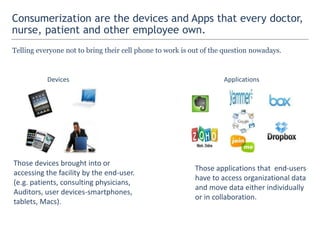
Consumerization are the devices and Apps that every doctor, nurse,
patient and other employee own.
Telling everyone not to bring their cell phone to work is out of the question nowadays.
Devices
Those devices brought into or
accessing the facility by the end-user.
(e.g. patients, consulting physicians,
Auditors, user devices-smartphones,
tablets, Macs).
Applications
Those applications that end-users
have to access organizational data
and move data either individually
or in collaboration.
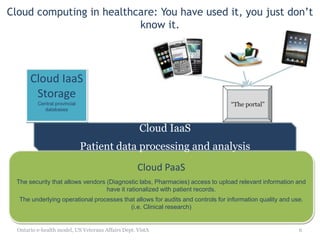
Cloud computing in healthcare: You have
used it, you just don’t know it.
Ontario e-health model, US Veterans Affairs Dept. VistA 8
Cloud PaaS
The security that allows vendors (Diagnostic labs, Pharmacies) access to upload relevant information and
have it rationalized with patient records.
The underlying operational processes that allows for audits and controls for information quality and use.
(i.e. Clinical research)
Cloud SaaS
Patient records
Cloud IaaS
Patient data processing and analysis
Cloud IaaS
Storage
Central provincial
databases
“The portal”
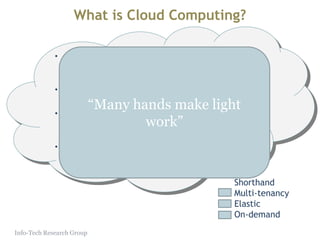
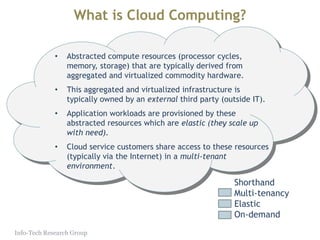
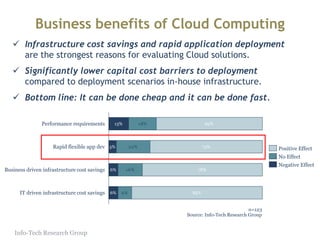
What is Cloud Computing?
• Abstracted compute resources (processor cycles,
memory, storage) that are typically derived from
aggregated and virtualized commodity hardware.
• This aggregated and virtualized infrastructure is typically
owned by an external third party (outside IT).
• Application workloads are provisioned by these
abstracted resources which are elastic (they scale up
with need).
• Cloud service customers share access to these resources
(typically via the Internet) in a multi-tenant
environment.
Info-Tech Research Group
Shorthand
Multi-tenancy
Elastic
On-demand
“Many hands make light work”
What is Cloud Computing?
• Abstracted compute resources (processor cycles,
memory, storage) that are typically derived from
aggregated and virtualized commodity hardware.
• This aggregated and virtualized infrastructure is typically
owned by an external third party (outside IT).
• Application workloads are provisioned by these
abstracted resources which are elastic (they scale up
with need).
• Cloud service customers share access to these resources
(typically via the Internet) in a multi-tenant
environment.
Info-Tech Research Group
Shorthand
Multi-tenancy
Elastic
On-demand
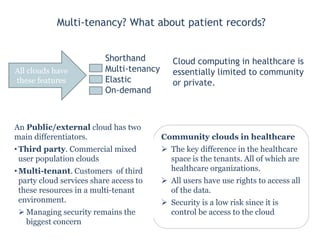
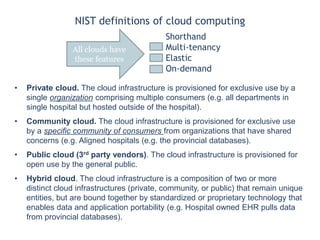
Multi-tenancy? What about patient
records?
Cloud computing in healthcare
is essentially limited to
community or private.
Community clouds in healthcare
 The key difference in the healthcare
space is the tenants. All of which are
healthcare organizations.
 All users have use rights to access all of
the data.
 Security is a low risk since it is control
be access to the cloud
An Public/external cloud has two main
differentiators.
• Third party. Commercial mixed user
population clouds
• Multi-tenant. Customers of third
party cloud services share access to
these resources in a multi-tenant
environment.
 Managing security remains the
biggest concern
Shorthand
Multi-tenancy
Elastic
On-demand
All clouds have
these features
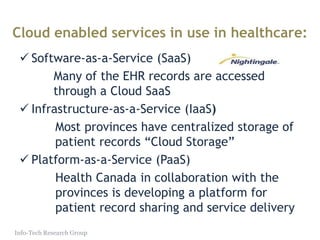
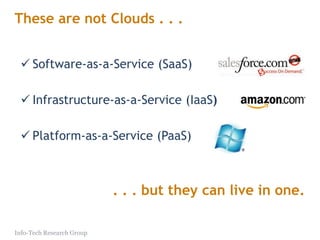
Cloud enabled services in use in healthcare:
Software-as-a-Service (SaaS)
Many of the EHR records are accessed through a Cloud
SaaS
Infrastructure-as-a-Service (IaaS)
Most provinces have centralized storage of patient
records “Cloud Storage”
Platform-as-a-Service (PaaS)
Health Canada in collaboration with the provinces is
developing a platform for patient record sharing and
service delivery
Info-Tech Research Group
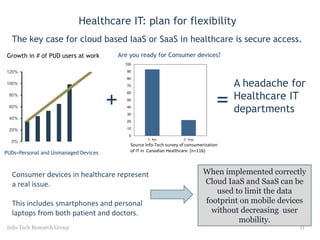
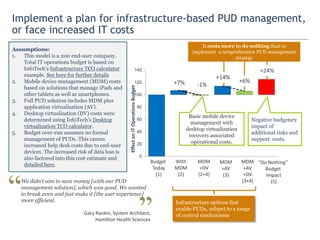
Healthcare IT: plan for flexibility
Info-Tech Research Group 13
0.78
0.88
0.98
1.08
1.18
1.28
1.38
1.48
1.58
0%
20%
40%
60%
80%
100%
120%
Growth in # of PUD users at work
0
10
20
30
40
50
60
70
80
90
100
1. No 2. Yes
Are you ready for Consumer devices?
Source Info-Tech survey of consumerization
of IT in Canadian Healthcare (n=116)
A headache for
Healthcare IT
departments
PUDs=Personal and Unmanaged Devices
The key case for cloud based IaaS or SaaS in healthcare is secure access.
+
Consumer devices in healthcare represent
a real issue.
This includes smartphones and personal
laptops from both patient and doctors.
=
When implemented correctly
Cloud IaaS and SaaS can be used
to limit the data footprint on
mobile devices without
decreasing user mobility.
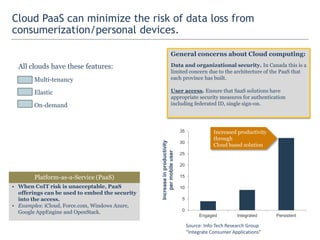
Cloud PaaS can minimize the risk of data loss from
consumerization/personal devices.
All clouds have these features:
Multi-tenancy
Elastic
On-demand
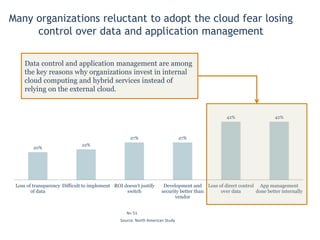
General concerns about Cloud computing:
Data and organizational security. In Canada this is a limited
concern due to the architecture of the PaaS that each province
has built.
User access. Ensure that SaaS solutions have appropriate
security measures for authentication including federated ID,
single sign-on.
0
5
10
15
20
25
30
35
Engaged Integrated Persistent
Increaseinproductivity
permobileuser
Increased productivity
through
Cloud based solution
Source: Info-Tech Research Group
“Integrate Consumer Applications”
• When CoIT risk is unacceptable, PaaS offerings can
be used to embed the security into the access.
• Examples: iCloud, Force.com, Windows Azure, Google
AppEngine and OpenStack.
Platform-as-a-Service (PaaS)
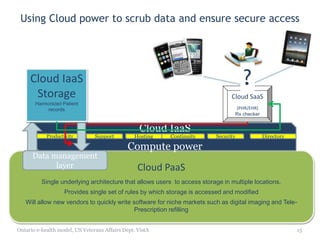
Using Cloud power to scrub data and
ensure secure access
Ontario e-health model, US Veterans Affairs Dept. VistA 15
Cloud PaaS
Single underlying architecture that allows users to access storage in multiple locations.
Provides single set of rules by which storage is accessed and modified
Will allow new vendors to quickly write software for niche markets such as digital imaging and Tele-
Prescription refilling
Cloud SaaS
(PHR/EHR)
Rx checker
Cloud IaaS
Compute power
Productivity Support Hosting Continuity Security Directory
Data management
layer
Cloud IaaS
Storage
Harmonized Patient
records
?
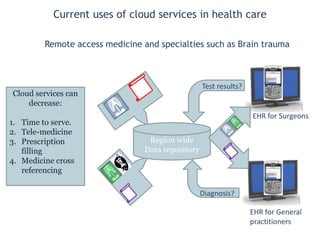
Current uses of cloud services in
health care
Region wide
Data repository
EHR for Surgeons
EHR for General
practitioners
Test results?
Diagnosis?
Cloud services can
decrease:
1. Time to serve.
2. Tele-medicine
3. Prescription filling
4. Medicine cross
referencing
Remote access medicine and specialties such as Brain trauma
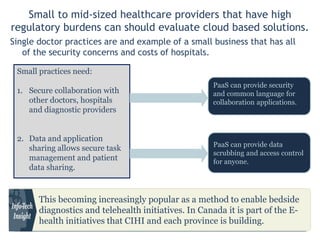
Small to mid-sized healthcare providers that have high regulatory burdens can should
evaluate cloud based solutions.
Single doctor practices are and example of a small business that has all of the
security concerns and costs of hospitals.
Small practices need:
1. Secure collaboration with
other doctors, hospitals and
diagnostic providers
2. Data and application sharing
allows secure task
management and patient
data sharing.
PaaS can provide security and
common language for
collaboration applications.
PaaS can provide data
scrubbing and access control
for anyone.
This becoming increasingly popular as a method to enable bedside
diagnostics and telehealth initiatives. In Canada it is part of the E-health
initiatives that CIHI and each province is building.
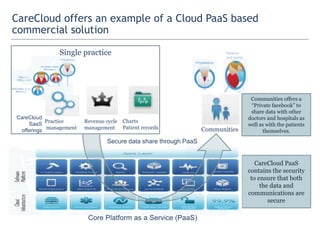
Secure data share through PaaS
CareCloud offers an example of a Cloud PaaS based commercial
solution
Core Platform as a Service (PaaS)
Communities
Patients
and family
CareCloud PaaS contains
the security to ensure
that both the data and
communications are
secure
Communities offers a
“Private facebook” to share
data with other doctors and
hospitals as well as with the
patients themselves.
Charts
Patient records
Revenue cycle
management
Practice
management
Single practice
CareCloud
SaaS
offerings
0
10
20
30
40
50
60
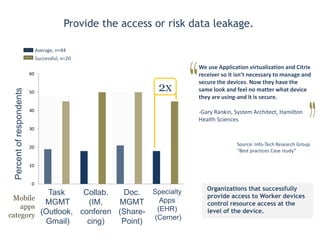
Provide the access or risk data leakage.
Organizations that successfully provide
access to Worker devices control
resource access at the level of the
device.
Percentofrespondents
Task
MGMT
(Outlook,
Gmail)
Collab.
(IM,
conferen
cing)
Doc.
MGMT
(Share-
Point)
Specialty
Apps
(EHR)
(Cerner)
Mobile
apps
category
Successful, n=20
Average, n=44
2x
Source: Info-Tech Research Group
“Best practices Case study”
We use Application virtualization and Citrix
receiver so it isn’t necessary to manage and
secure the devices. Now they have the
same look and feel no matter what device
they are using-and it is secure.
-Gary Rankin, System Architect, Hamilton
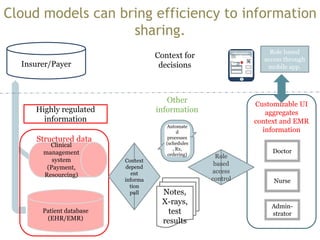
Health Sciences
Patient database
(EHR/EMR)
Clinical
management
system
(Payment,
Resourcing)
Nurse
Doctor
Admin-
strator
Insurer/Payer
Structured data
Other information Customizable UI
aggregates context
and EMR
informationAutomated
processes
(schedules,
Rx,
ordering)
Notes, X-
rays, test
results
Context
depende
nt
informat
ion pull
Role based
access through
mobile app.
Highly regulated
information
Context for
decisions
Role based
access
control
Hospital
3
Purpose built information management technology can
bring efficiency to information sharing.
Meet enhanced expectations about healthcare delivery
Applications are evolving as rapidly as hardware, and changing
what your employees expect in the workplace.
• Tablets and smartphones have woken consumers up to the
possibilities of beautiful, easy to use applications with tactile
and natural interfaces.
• Doctors and nurses are consumers, expect Apps built for medical
to be at least as good as consumer apps.
• The flood of Healthcare commercials adds to the expectations.
• Your organization needs to meet these expectations. Security
risks is no longer an acceptable excuse for Hospital IT to use.
• “If I can have my iPAD why can’t I make the most of it?”
• “I already signed in! Why do I need another password?”
Dr.Chronos
EHR
iHealth
BP monitors
Airstrip
EEG
Introduce Information Governance into patient information
management
Healthcare as an industry needs to provide greater access to digital-born and storaged
information. Get ahead of the problem by have a value driven information governance plan
Information risk and
value
Project 1:
Enterprise wide policies
Archiving
Project 3:
Disposition,
growth control
Specific risk
mitigation,
findability
Archiving can be
the driver for better
governance but it
cannot replace
governance.
Archiving requires rules
and policies for both
enterprise wide rules
and managing
exceptions to the rule.
Is specific content
valuable enough to
keep?
Information
Organization
Project 2: Build a
taxonomy
Storage management
Project 4:
Enterprise wide storage
control through deletion
The key to controlling growth
is translating governance
policies into management
practices
Find the right mix of enterprise-wide needs to structure your
Information Governance framework
• Understand the drivers for Information Governance
This need is the top ranked driver for ECM
adoption by outside of healthcare.
Administrative efficiency is the only need that
will enable a long term Information
Governance program.
Clinical efficiency is the key value add that will
make the investment worth the cost.
Information
Governance
Business Efficiency
Risk
mitigation
IT Efficiency
Compliance
Administrative Efficiency
The content growth provides a perfect
opportunity to control storage costs.
Well governed information can reduce the cost
of storage, in the long term, by 60% through
controlling growth rate, reduced duplication of
content and automated disposition.
For most organizations the limited regulatory
overhead will not be an effective driver for
Information Governance.
IT Efficiency
Litigation
eDiscovery is the elephant in the room. For
most organizations the risk is huge but the
likelihood is very low.
Internal records
All organizations have HR documents and
financial records that require governance.
Risk Mitigation
1.1
The IGRM framework provides a guide to move from drivers to policy and process
Adopt the IGRM framework to get your Information Governance
program off the ground quickly
• EDRM’s Information Governance Reference Model provides a good
starting place for a flexible and long term Information Governance
program.
• Each driver now becomes a part of the policy and process generation
strategy for the Information Governance program.
• The IGRM breaks governance into two linked parts: Policy Integration
and Process Transparency.
• The IGRM starts with the ideal that information is an asset that has a
value based on business use. The policy integration centers on putting a
value on the asset and protecting it in a manner that IT can sustain long
term.
• The long term value comes from having transparent policies for
managing, protecting, and valuing information.
• Using this model, Info-Tech has built an “Information Governance
framework”.
1.2
Information Governance
1. As hospitals adopt social and web 2.0
tools, the need for a single plan for how
information is formatted, used and
protected becomes key.
2. Start implementing your Information
Governance program on those
administrative burdens that come with
clinical upgrades.
3. Use the clinical initiatives to survey the
most important information sources and
the business units that should be part of
the Information Governance committees.
Risk is the single biggest motivator of
Information Governance but the value
comes from the getting business
initiatives up and running.
Effective internal document
sharing
Easy
knowledge
transfer
Information governance should
be robust enough to support
the business use of information
and regulations
5Xgrowthininformationperyear
Business use and re-use of information expanding
BYOD/
Mobile
Analytics
Weightofregulationsisincreasing
1
2
3
Take advantage of on-going and up-coming clinical initiatives to
implement an Information Governance program
2.1
Define the value of governance based on the initiatives that use
information
DATE
Potential information sources What information is important long term?
Most user’s spend their time making documents that will not
be used or likely opened more than once. All stakeholders can
agree that these types of files are a waste of space.
It really comes down to this: if file X was deleted tomorrow
would anyone care-or even notice?
The answer for most files is no but…..there is also no value
to end users in determining which documents are low
value.
Storage wins can drive cost reduction but without strong
backing from the executive these will not lead to long term
adoption of Information Governance.
CRM
Focus on those information sources where good governance
will increase the value or ease the implementation of a
business initiative.
Initiatives that require information to move between users or
applications will be more valuable and easier to implement
with clear guidelines on how what information should be
included, how it should be classified and who can access the
information.
All of these sources should be governed. Start
with sources that where there is a clear
enterprise wide mandate for expanding their
use.
2.1
When the initial project list includes multiple projects of the same kind, there is
opportunity to consolidate onto a content management system.
Prepare for additional IG focused projects such as content
management solutions
• Content management systems AKA ERM, DM,
WCM/WEM are the technical backbone of information
governance.
• The provide a enterprise wide platform to implement
retention, disposition, search across departments. A full
robust enterprise content management (ECM) can also
provide social and collaborative tools to ease user tasks.
• Once IT has a set of retention rules and IG projects they
potential value and time savings of moving to a ECM
platform should be evaluated.
• Strategically, ECM applications are the technical control
to implement and control content throughout its whole
lifecycle.
Web Content Management
Collaboration
eDiscovery
Capture
Analytics
Wikis
Blogs
Archiving
Workflow
Forms
Intranet
Search
DAM
Repository
Dedicated ECM suites include both core and fringe
technologies.
5.4
Good governance and appropriate technology ease information
movement and enable innovation.
• Combine how information moves within departments with the enterprise-wide needs to define the management strategy.
• Start by determining how similar the key intra- and
inter-departmental movement patterns.
• Enterprises with similar departmental and enterprise-
wide needs for their system (user profiles,
classifications) should prioritize a single ECM platform
that spans both departmental and enterprise content.
• Most ECM platforms have the controls to act as both
system of records and system of interaction with the
governance in place to distinguish records and
information.
• Multiple projects that focus on findability and access
controls can likely be consolidated into a single ECM
project that streamlines time and long terms costs.
Core Admin
Department
System of
interaction
System of
record
Personal
ICD-10/HL7-
based
replication
User-defined
document
movement
EHR/
CPOE
Archive
5.4
Ad hoc/
Fileshare
Findability enables user sharing – if they understand how to use the
technology
Users do not think about document names or properties – they are looking for information.
Direct knowledge transfer Authoritative teaching Passive knowledge sharing
Controlled vocabulary for metadata.
For stable working groups
(departments) appoint an
administrator that will define
metadata.
The key is retaining control of the store.
For user-acquired solutions, strongly
consider moving to business class
solutions, such as Evernote or
OneNote.
Ensure that users re-think subject line
use as searchable term. Be transparent
about what can be searched (titles,
metadata, full text).
Use metadata terms that match the
search terms commonly used by
groups. Limit user choice of terms.
Ensure that users understand the
value of limiting tags. Findability
requires commonly used terms that
others would use for search.
Keys to
findability
Teach these
techniques
Provide central store and email upload
into the system. These automatically
provide user tracking and central
storage.
Information movement patterns
Focus on patterns of knowledge sharing
Findability enables user sharing – if they understand how to use the technology.
A loosely coupled model involves a
variety of individual data sources
and interaction between people.
A loosely coupled model may need a
greater level of governance, federation,
or oversight.
The centralized knowledgebase model
demonstrates information flow from a
centralized store and between
individuals.
Finding documents is a continuous process
Determine what the primary goal of your findability initiative is: finding knowledge that already exists or synthesizing
new knowledge. The key steps are labor intensive. IT must focus on the optimizing the goal that will increase user
engagement.
Users create content
using a device. The
device could be a work
station or mobile device.
?
Systems create
content through the
comments and
transactions (e.g.
payable reports,
customer
comments).
Properly tagging
document improves
findability. The best
source of tags is the
user. At a minimum,
use author fields.
1
2
3
Users query on
keywords and
enterprise
descriptors.
5
A single set of enterprise
descriptors automates
association of similar
files from multiple
sources.
4
The search returns
multiple documents
that have the
keywords or the
same descriptors
(e.g. same author,
department,
project).
6
User choice becomes a
data field to rank
search (accession
date).
7
Information presentation and search is context dependent. You need to enable Nurses,
Doctors and Administators in unique was to truly increase efficiency
Focus on how people look for information
• Extend the compliance tools to take advantage of the role-based
security to build enterprise-wide author lists for content.
• Extend ECM function throughout the enterprise. Robust
classification tools and index based search are available at any
price point.
• Digital Image Management (aka DICOM, PACs) technology allows
enterprises controls for a variety of content types. Enterprises can
take advantage of DAM to enhance findability when access rights
are a concern.
• Limit the layers of classification. The simple layers that most
enterprises already have are sufficient. Author, date created, and
title provide a basis to find the majority of information through
either navigation or search-based methodologies.
• Enterprise search is about finding a specific document. Users can
do the sorting of close results if they are given the right fields to
search on.
Take advantage of how the brain works.
Semantic and ontology based classifications are built on
human learning patterns.
Weak
recall
Weak
recall
Strong
recall
Object
Who
=
=
=
Integrate search across file locations to maximize user
productivity
Users often do not know where to look for specific documents. Federated search can
help solve the problem.
Federated search often requires multiple search engines, each dedicated to a single
repository. Ensure that the indexing for each engine is optimized by having a single
descriptor library for all federated repositories.
• Taxonomy tools provide IT with a hardwired method to force users to provide a
minimal amount of information.
• Classification tools that bring context to user search that allows IT to maintain
hierarchies (i.e. the distinct sites), but the tagging and automated metadata makes
finding related data across sites simple.
• Many of the vendors including Smartlogic’s Semaphor have secured web based
interfaces that allow access to enterprise content.
• Many vendors sell industry specific tools to match ICD-10, CT-SNOMED, Insurers
codes and many others together in a manner that can be read and actualized in an
ECM this provides a single management point for administrative and clinical
workloads by care team members.
• This is also key to allowing mobile and consulting physicans to access care notes and
billing information from their office on any device.
• These products allow for a federated search across content repositories and for
more advanced tool shared drives.
• Federated search is not just enterprise search. It requires extensive integration of
security and text based search to ensure that results are not duplicated within the
search across separate repositories.
Persona and process shaped query
Consolidated
descriptor library
Pre-
indexed
Pre-
indexed
Pre-
indexed
SharePoint Networked
drive
Extranet
Compiled & Ranked
ECM/EDRMS
Be prepared for a develop and test approach to optimizing search
Descriptors and user needs are organic, the query structure will need to be flexible to
ensure findability is maintained.
Collect potential
query terms
Consolidate into a
single list of high
value terms
Monitor and measure
document use and
search times
Train search engine
with classifications
Collect from multiple
sources:
1. Controlled vocabulary
2. Terms that are
consistently used
within each
department.
3. External terms that
may be in wide use.
Most search engines
have internal term lists to
allow IT to force
prioritization of specific
descriptor fields
(location, file type,
author, etc).
Take the time to
understand how your
search engine ranks
terms.
Test the search process.
Chitika estimates that
internet searches contain
4.5 query words.
Assume this as a base for
testing purposes.
To be useful, the top
results should be
present in the first page
during training.
Monitor search by
retaining query logs.
Analyze logs for key
behaviors:
Are similar queries being
run multiple times per
day? What percentage of
searches return no
results?
Re-evaluate the query
terms and re-test.
Know how current trends are affecting the market
• Consumerization and cloud technology will have a major role to play in Enterprise Search going forward.
Strategy Implement Mitigation
Cloud: Search-as-
a-Service
BYOD: Siri, natural
language search
User controlled
file share: Box
Good fit for organizations
with cloud apps
These consumer trends
cause unrealistic
expectations for
enterprise search
Understand why file
share is being used, and
target that use case for
search
Execution
No change. Search still
requires significant
time investment
Ensure that ECM strategy
has adequate controls for
content movement
Information hoarding will
completely ruin your
ability to effectively
increase findability
No change. IT still needs to
own the skills and
the process
User engagement needs to
be an early and repetitive
IT activity
Evaluate cloud file share
and ensure build/acquire
connectors to the most
popular file share
Careful planning of Search
needs. Can focus on the
vendors that
meet your needs
Set user expectations on
enterprise search. Similar to
Google, users cannot have
everything
Policies and adequate
findability within the
enterprise repositories
Cloud-based file share represents a real obstacle to findability. Enterprises need full visibility into all content to gain value from
the cost of any findability project. For more information, see File Sharing: Risk or Remedy?
• Enterprise Search is becoming a must have enterprise app as
senior managers begin to focus on the company’s ability to find
information.
• Major IT vendors (e.g. HP, Oracle, IBM) have moved to acquire
search technology to address the Big Data problem.
• Businesses are realizing just how much information they have
in databases, but they’re finding that:
a) Existing tools are inadequate to meet the demand for
big data organization and analysis.
b) There are no employees with the skills needed to
develop the proper tools.
Big Data will change how search is used in the enterprises
Big data brings a extreme findability problem that cannot be solved with just good navigation. It
requires semantic tools that only search engines or purpose built predictive analytics (e.g. Watson
or BIRT or Digital Reasoning) can bring to the table.
Everyone wants more search capabilities
Search is becoming the engine of analytics
• As content becomes an increasingly important source of
BI, semantic search tools are being incorporated into
many platforms.
• Architecturally, as enterprises move away from SQL and
RDMS databases towards NoSQL, PostGRES “less
structured” architectures, there is an increasing need for
search algorithms as navigation tools within BI apps.
• Search platforms are beginning to perform BI-like
functions with data visualization and reporting, and BI
vendors are working Enterprise Search technologies into
their products.
Dealing with Big data is shifting the HIT and HIMSS needs
New technology, same problems
Enterprise Search is an application like ERP or ECM. Enterprise’s should take time and
care when selecting and implementing a search platform.
Increased Focus on Curation
Greater Focus on the User
• Curation will become more important as the number and type of information
sources increases and the cost of storage drops.
• The low cost of storage will continue to encourage a keep everything approach.
This will increase the need for more effective approaches to file management and
leveraging corporate data.
• Intelligent filing algorithms will offer filing suggestions that users can confirm,
deny, or correct.
• Search vendors have put a lot of effort into engines that profile content. The
future will see equal or more effort spent on profiling users.
• Systems similar to Amazon.com’s recommendations engine will be leveraged to
find and suggest relevant content on a per user basis.
• Search engines will use sentiment extraction – assessing the emotional tone of the
user – to more accurately retrieve relevant content.
The capabilities of information organization tools will increase and improve, but they will never outpace the needs of the users.
The baroque kunstkammer or cabinet of curiosities… before there was file shares
Collecting is human nature
Humans collect. It’s part of human nature. This tendency
was most evident in the baroque era when wealthy
individuals assembled large collections of… stuff.
Everything was fair game: books, coins, antiquities, cultural
and natural oddities from newly explored continents, and
models of machines.
To modern eyes, these collections had little order or
organization. Items could be arranged by size, color,
continent of provenance, or any other attribute. These
collections instigated the development of modern library
science, museum curating, and biological taxonomy. They
also figured into the explosion of development that
occurred during the Enlightenment.
File shares are the kunstkammer of the
modern enterprise. It’s up to IT to organize
the collection and turn it into an engine of
discovery.
Information Organization projects often fail to
get off the ground because they start too big.
Consider a project that starts with:
Engage all senior executives in a governance and
steering process.”
You will never get the CEO, CFO, CxO, [the Pope, the
President, etc.] in a room together at the same time. They
are too busy and are focused on bigger issues.
Governance is crucial but it’s a late-stage task. You can
never initiate Information Organization with governance.
The first common problem of Information Organization: the Popes &
Presidents Problem (P31)
You have to start within IT before pushing out to the rest of the business
Bottom Line: Start small. Do everything you can within IT before
engaging the business units.
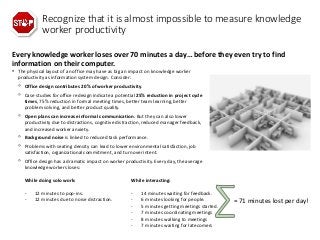
Every knowledge worker loses over 70 minutes a day… before they even try to find
information on their computer.
Recognize that it is almost impossible to measure knowledge
worker productivity
• The physical layout of an office may have as big an impact on knowledge worker
productivity as information system design. Consider:
◦ Office design contributes 20% of worker productivity.
◦ Case studies for office redesign indicate a potential 25% reduction in project cycle
times, 75% reduction in formal meeting times, better team learning, better
problem solving, and better product quality.
◦ Open plans can increase informal communication. But they can also lower
productivity due to distractions, cognitive distraction, reduced manager feedback,
and increased worker anxiety.
◦ Background noise is linked to reduced task performance.
◦ Problems with seating density can lead to lower environmental satisfaction, job
satisfaction, organizational commitment, and turnover intent.
◦ Office design has a dramatic impact on worker productivity. Every day, the average
knowledge workers loses:
While doing solo work: While interacting:
- 12 minutes to pop-ins.
- 12 minutes due to noise distraction.
- 14 minutes waiting for feedback.
- 6 minutes looking for people.
- 5 minutes getting meetings started.
- 7 minutes coordinating meetings
- 8 minutes walking to meetings
- 7 minutes waiting for latecomers
= 71 minutes lost per day!
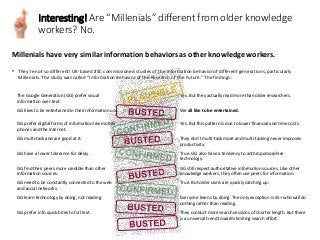
Millenials have very similar information behaviors as other knowledge workers.
Interesting! Are “Millenials” different from older knowledge
workers? No.
• They’re not so different! UK-based JISC commissioned studies of the information behavior of different generations, particularly
Millenials. The study was called “Information Behavior of the Research of the Future.” The findings:
The Google Generation (GG) prefer visual
information over text.
Yes. But they actually read more than older researchers.
GG likes to be entertained in their information use. We all like to be entertained.
GG prefer digital forms of information like mobile
phones and the Internet.
Yes. But this pattern is due to lower financial and time costs.
GG multi-task and are good at it. They don’t multi-task more and multi-tasking never improves
productivity.
GG have a lower tolerance for delay. True. GG also have a tendency to anthropomorphise
technology.
GG find their peers more credible than other
information sources.
GG still respect authoritative information sources. Like other
knowledge workers, they often use peers for information.
GG need to be constantly connected to the web
and social networks.
True. But older users are quickly catching up.
GG learn technology by doing, not reading. Everyone learns by doing. The only exception is 55+ who will do
nothing rather than reading.
GG prefer info quick bites to full text. They conduct more search sessions of shorter length. But there
is a universal trend towards limiting search effort.
Conclusions
• Most healthcare organizations in North America are already using
cloud computing in some form.
• Focus on information management as the strategic enabler of
providing greater access for patients, nurses and doctors without
substantially overloading administrative departments.
• Expect to re-built processes and Uers interfaces based on their job.
The key is understand the importance of contextual information to
the rigid, immense flow of data that is coming.
Info-Tech Research Group
Thank You
For more information visit our
website:
Thinkdox.com

Healthcare trends and information management strategy

  • 1.
    1 Christopher Wynder, Ph.D Directorof Client Services @ChrisW_thinkdox chrisw@thinkdox.com Managing Information in healthcare Melding care team needs with administrative need in secure way.
  • 2.
    Top 10 trendsaffecting healthcare infrastructure. 1. Cloud Storage for Backup. Businesses are seeing real potential in cloud storage for handling the growing glut of backup and archival data storage. For healthcare this would mean longer and more detailed records for both forecasting patient population trendsand individual records 2. 10 Gigabit Ethernet. It’s not new, but as enterprises invest more in converged and consolidated server and storage infrastructures, 10 gig’s time has come for a unified LAN fabric. Faster access WILL allow real-time data access everywhere in the hospital. 3. Multi-core Multi-threaded New Generation Processors. The capacity of industry standard servers has grown in order of magnitude in the past two years. What is doable in consolidation and virtualization has grown significantly. With the decreased power demands this will be the basis of smaller more powerful devices capable of running complex diagnostic programs 4. Consolidation-in-a-box Solutions. Convergence, consolidation, and virtualization are reversing decades of distributed systems back to centralizations. Vendors are seizing the opportunity to provide a one-stop shop for servers, switches, storage, and management. 5. Mobile Devices in the Enterprise. A rich and growing range of consumer devices – including tablets – and access-anywhere services continue to drive interest in all things mobile. On-demand, in-location healthcare delivery More speculative Medical device Tech 1. Nano-devices. “Diagnostic pill”. The capability currently exists to monitor 100’s of protein or RNA markers in table top devices. The actual diagnostic part is approximately 1cmX1cm, the rest of the device is the compute resource to discriminate and identify individual proteins/RNA/DNA(biomarkers). If a bluetooth or 4G connection can be designed to connect the diagnostic element to compute power via Cloud Software as a Service (SaaS) or a mobile device. Biomarkers exist for a wide variety of diseases with an expansion of this repertoire (likely) will increase from novelty to reality. 2. Drug design and formulation. Computing power has greatly changed drug design and production. This in conjunction with the increased speed and accuracy of sequencing will eventually lead to “personal medicine”. Drug companies will be able to efficiently (read profitably) make small on-demand batches of drugs. The number of academic institutions with scientist capable of “ready-for- patient” drug production and formulation has increased to the point where for nano-batches of drugs it will be possible for hospitals to order custom drugs from their own facilities.
  • 3.
    Top application trendseffecting Healthcare. Includes ideas that have firm basis/likelihood in the next 5 years • These three represent changes to patient interactions ECM Predictive Analytics Social Media *in no particular order Social media (Twitter, Facebook) has already modified how EMR/PHR are being shaped. Many medical specific versions are made (WebMD is a early example). Social media per se may not be a Healthcare application BUT it effect the other technologies and how Healthcare providers interact with their patients “Artificial Intelligence” e.g. disease predicators based on symptoms. In patients hands can provide guidance that will make DR visits more efficient. For hospitals it may provide a way to gain cost control by forecasting Hosp. specific needs such as possible disease profile of patient populations or efficient deployment of resources within the hospital. Business Intelligence (BI) or Enterprise resource planning (ERP) types of tech. Single biggest disruptive tech. Tele-medicine. Short term remote med. DR visits for patient in areas without doctors (e.g. the arctic). Long term remote presence surgery and/or Drug dispensing. Has largest potential for transforming healthcare delivery.
  • 4.
    May change theinternal HOSP/DR work patterns and efficiency Mobility Rich Internet Applications Cloud Computing *in no particular order Has the ability to bring true mobility to healthcare. Includes bedside testing with smaller blood chemistry, doppler, ultrasound and biomarkers analysis machines. The applications that run this type of “nano” machinery exist as “full apps” the need is to develop them as mobile/SaaS apps that can run on smartphones or tablets. Also full service housecalls with access to previous tests and ability to test on the spot. Related to mobility. This will increase access for both patients and doctors. Could lead to cost saving for hospitals over-time. Will certainly lead to higher mobility for patients and more accurate records for patients when they move locations. SaaS applications will allow smaller devices to run diagnostics “remotely” for a device. Top application trends effecting healthcare delivery. Includes ideas that have firm basis/likelihood in the next 5 years
  • 5.
    “Anywhere computing” How didwe get here? • Explosion of mobile devices and new class of healthcare consumer Apps. • Cloud as a viable infrastructure option for secure industries • The need for a more agile application delivery system. What is Cloud computing and is it in use in healthcare •Definition of cloud computing •What is the type of cloud relevant to healthcare Mobile and consumer devices as healthcare delivery vehicles. How does the whole system work together Info-Tech Research Group
  • 6.
    Meet enhanced expectationsabout healthcare delivery Applications are evolving as rapidly as hardware, and changing what your employees expect in the workplace. • Tablets and smartphones have woken consumers up to the possibilities of beautiful, easy to use applications with tactile and natural interfaces. • Doctors and nurses are consumers, expect Apps built for medical to be at least as good as consumer apps. • The flood of Healthcare commercials adds to the expectations. • Your organization needs to meet these expectations. Security risks is no longer an acceptable excuse for Hospital IT to use. • “If I can have my iPAD why can’t I make the most of it?” • “I already signed in! Why do I need another password?” Dr.Chronos EHR iHealth BP monitors Airstrip EEG “If Apple can figure out a glucose meter why can our IT department?” -- Doctor at Ontario Hospital
  • 7.
    Consumerization are thedevices and Apps that every doctor, nurse, patient and other employee own. Telling everyone not to bring their cell phone to work is out of the question nowadays. Devices Those devices brought into or accessing the facility by the end-user. (e.g. patients, consulting physicians, Auditors, user devices-smartphones, tablets, Macs). Applications Those applications that end-users have to access organizational data and move data either individually or in collaboration.
  • 8.
    Cloud computing inhealthcare: You have used it, you just don’t know it. Ontario e-health model, US Veterans Affairs Dept. VistA 8 Cloud PaaS The security that allows vendors (Diagnostic labs, Pharmacies) access to upload relevant information and have it rationalized with patient records. The underlying operational processes that allows for audits and controls for information quality and use. (i.e. Clinical research) Cloud SaaS Patient records Cloud IaaS Patient data processing and analysis Cloud IaaS Storage Central provincial databases “The portal”
  • 9.
    What is CloudComputing? • Abstracted compute resources (processor cycles, memory, storage) that are typically derived from aggregated and virtualized commodity hardware. • This aggregated and virtualized infrastructure is typically owned by an external third party (outside IT). • Application workloads are provisioned by these abstracted resources which are elastic (they scale up with need). • Cloud service customers share access to these resources (typically via the Internet) in a multi-tenant environment. Info-Tech Research Group Shorthand Multi-tenancy Elastic On-demand “Many hands make light work”
  • 10.
    What is CloudComputing? • Abstracted compute resources (processor cycles, memory, storage) that are typically derived from aggregated and virtualized commodity hardware. • This aggregated and virtualized infrastructure is typically owned by an external third party (outside IT). • Application workloads are provisioned by these abstracted resources which are elastic (they scale up with need). • Cloud service customers share access to these resources (typically via the Internet) in a multi-tenant environment. Info-Tech Research Group Shorthand Multi-tenancy Elastic On-demand
  • 11.
    Multi-tenancy? What aboutpatient records? Cloud computing in healthcare is essentially limited to community or private. Community clouds in healthcare  The key difference in the healthcare space is the tenants. All of which are healthcare organizations.  All users have use rights to access all of the data.  Security is a low risk since it is control be access to the cloud An Public/external cloud has two main differentiators. • Third party. Commercial mixed user population clouds • Multi-tenant. Customers of third party cloud services share access to these resources in a multi-tenant environment.  Managing security remains the biggest concern Shorthand Multi-tenancy Elastic On-demand All clouds have these features
  • 12.
    Cloud enabled servicesin use in healthcare: Software-as-a-Service (SaaS) Many of the EHR records are accessed through a Cloud SaaS Infrastructure-as-a-Service (IaaS) Most provinces have centralized storage of patient records “Cloud Storage” Platform-as-a-Service (PaaS) Health Canada in collaboration with the provinces is developing a platform for patient record sharing and service delivery Info-Tech Research Group
  • 13.
    Healthcare IT: planfor flexibility Info-Tech Research Group 13 0.78 0.88 0.98 1.08 1.18 1.28 1.38 1.48 1.58 0% 20% 40% 60% 80% 100% 120% Growth in # of PUD users at work 0 10 20 30 40 50 60 70 80 90 100 1. No 2. Yes Are you ready for Consumer devices? Source Info-Tech survey of consumerization of IT in Canadian Healthcare (n=116) A headache for Healthcare IT departments PUDs=Personal and Unmanaged Devices The key case for cloud based IaaS or SaaS in healthcare is secure access. + Consumer devices in healthcare represent a real issue. This includes smartphones and personal laptops from both patient and doctors. = When implemented correctly Cloud IaaS and SaaS can be used to limit the data footprint on mobile devices without decreasing user mobility.
  • 14.
    Cloud PaaS canminimize the risk of data loss from consumerization/personal devices. All clouds have these features: Multi-tenancy Elastic On-demand General concerns about Cloud computing: Data and organizational security. In Canada this is a limited concern due to the architecture of the PaaS that each province has built. User access. Ensure that SaaS solutions have appropriate security measures for authentication including federated ID, single sign-on. 0 5 10 15 20 25 30 35 Engaged Integrated Persistent Increaseinproductivity permobileuser Increased productivity through Cloud based solution Source: Info-Tech Research Group “Integrate Consumer Applications” • When CoIT risk is unacceptable, PaaS offerings can be used to embed the security into the access. • Examples: iCloud, Force.com, Windows Azure, Google AppEngine and OpenStack. Platform-as-a-Service (PaaS)
  • 15.
    Using Cloud powerto scrub data and ensure secure access Ontario e-health model, US Veterans Affairs Dept. VistA 15 Cloud PaaS Single underlying architecture that allows users to access storage in multiple locations. Provides single set of rules by which storage is accessed and modified Will allow new vendors to quickly write software for niche markets such as digital imaging and Tele- Prescription refilling Cloud SaaS (PHR/EHR) Rx checker Cloud IaaS Compute power Productivity Support Hosting Continuity Security Directory Data management layer Cloud IaaS Storage Harmonized Patient records ?
  • 16.
    Current uses ofcloud services in health care Region wide Data repository EHR for Surgeons EHR for General practitioners Test results? Diagnosis? Cloud services can decrease: 1. Time to serve. 2. Tele-medicine 3. Prescription filling 4. Medicine cross referencing Remote access medicine and specialties such as Brain trauma
  • 17.
    Small to mid-sizedhealthcare providers that have high regulatory burdens can should evaluate cloud based solutions. Single doctor practices are and example of a small business that has all of the security concerns and costs of hospitals. Small practices need: 1. Secure collaboration with other doctors, hospitals and diagnostic providers 2. Data and application sharing allows secure task management and patient data sharing. PaaS can provide security and common language for collaboration applications. PaaS can provide data scrubbing and access control for anyone. This becoming increasingly popular as a method to enable bedside diagnostics and telehealth initiatives. In Canada it is part of the E-health initiatives that CIHI and each province is building.
  • 18.
    Secure data sharethrough PaaS CareCloud offers an example of a Cloud PaaS based commercial solution Core Platform as a Service (PaaS) Communities Patients and family CareCloud PaaS contains the security to ensure that both the data and communications are secure Communities offers a “Private facebook” to share data with other doctors and hospitals as well as with the patients themselves. Charts Patient records Revenue cycle management Practice management Single practice CareCloud SaaS offerings
  • 19.
    0 10 20 30 40 50 60 Provide the accessor risk data leakage. Organizations that successfully provide access to Worker devices control resource access at the level of the device. Percentofrespondents Task MGMT (Outlook, Gmail) Collab. (IM, conferen cing) Doc. MGMT (Share- Point) Specialty Apps (EHR) (Cerner) Mobile apps category Successful, n=20 Average, n=44 2x Source: Info-Tech Research Group “Best practices Case study” We use Application virtualization and Citrix receiver so it isn’t necessary to manage and secure the devices. Now they have the same look and feel no matter what device they are using-and it is secure. -Gary Rankin, System Architect, Hamilton Health Sciences
  • 20.
    Patient database (EHR/EMR) Clinical management system (Payment, Resourcing) Nurse Doctor Admin- strator Insurer/Payer Structured data Otherinformation Customizable UI aggregates context and EMR informationAutomated processes (schedules, Rx, ordering) Notes, X- rays, test results Context depende nt informat ion pull Role based access through mobile app. Highly regulated information Context for decisions Role based access control Hospital 3 Purpose built information management technology can bring efficiency to information sharing.
  • 21.
    Meet enhanced expectationsabout healthcare delivery Applications are evolving as rapidly as hardware, and changing what your employees expect in the workplace. • Tablets and smartphones have woken consumers up to the possibilities of beautiful, easy to use applications with tactile and natural interfaces. • Doctors and nurses are consumers, expect Apps built for medical to be at least as good as consumer apps. • The flood of Healthcare commercials adds to the expectations. • Your organization needs to meet these expectations. Security risks is no longer an acceptable excuse for Hospital IT to use. • “If I can have my iPAD why can’t I make the most of it?” • “I already signed in! Why do I need another password?” Dr.Chronos EHR iHealth BP monitors Airstrip EEG
  • 22.
    Introduce Information Governanceinto patient information management Healthcare as an industry needs to provide greater access to digital-born and storaged information. Get ahead of the problem by have a value driven information governance plan Information risk and value Project 1: Enterprise wide policies Archiving Project 3: Disposition, growth control Specific risk mitigation, findability Archiving can be the driver for better governance but it cannot replace governance. Archiving requires rules and policies for both enterprise wide rules and managing exceptions to the rule. Is specific content valuable enough to keep? Information Organization Project 2: Build a taxonomy Storage management Project 4: Enterprise wide storage control through deletion The key to controlling growth is translating governance policies into management practices
  • 23.
    Find the rightmix of enterprise-wide needs to structure your Information Governance framework • Understand the drivers for Information Governance This need is the top ranked driver for ECM adoption by outside of healthcare. Administrative efficiency is the only need that will enable a long term Information Governance program. Clinical efficiency is the key value add that will make the investment worth the cost. Information Governance Business Efficiency Risk mitigation IT Efficiency Compliance Administrative Efficiency The content growth provides a perfect opportunity to control storage costs. Well governed information can reduce the cost of storage, in the long term, by 60% through controlling growth rate, reduced duplication of content and automated disposition. For most organizations the limited regulatory overhead will not be an effective driver for Information Governance. IT Efficiency Litigation eDiscovery is the elephant in the room. For most organizations the risk is huge but the likelihood is very low. Internal records All organizations have HR documents and financial records that require governance. Risk Mitigation 1.1
  • 24.
    The IGRM frameworkprovides a guide to move from drivers to policy and process Adopt the IGRM framework to get your Information Governance program off the ground quickly • EDRM’s Information Governance Reference Model provides a good starting place for a flexible and long term Information Governance program. • Each driver now becomes a part of the policy and process generation strategy for the Information Governance program. • The IGRM breaks governance into two linked parts: Policy Integration and Process Transparency. • The IGRM starts with the ideal that information is an asset that has a value based on business use. The policy integration centers on putting a value on the asset and protecting it in a manner that IT can sustain long term. • The long term value comes from having transparent policies for managing, protecting, and valuing information. • Using this model, Info-Tech has built an “Information Governance framework”. 1.2
  • 25.
    Information Governance 1. Ashospitals adopt social and web 2.0 tools, the need for a single plan for how information is formatted, used and protected becomes key. 2. Start implementing your Information Governance program on those administrative burdens that come with clinical upgrades. 3. Use the clinical initiatives to survey the most important information sources and the business units that should be part of the Information Governance committees. Risk is the single biggest motivator of Information Governance but the value comes from the getting business initiatives up and running. Effective internal document sharing Easy knowledge transfer Information governance should be robust enough to support the business use of information and regulations 5Xgrowthininformationperyear Business use and re-use of information expanding BYOD/ Mobile Analytics Weightofregulationsisincreasing 1 2 3 Take advantage of on-going and up-coming clinical initiatives to implement an Information Governance program 2.1
  • 26.
    Define the valueof governance based on the initiatives that use information DATE Potential information sources What information is important long term? Most user’s spend their time making documents that will not be used or likely opened more than once. All stakeholders can agree that these types of files are a waste of space. It really comes down to this: if file X was deleted tomorrow would anyone care-or even notice? The answer for most files is no but…..there is also no value to end users in determining which documents are low value. Storage wins can drive cost reduction but without strong backing from the executive these will not lead to long term adoption of Information Governance. CRM Focus on those information sources where good governance will increase the value or ease the implementation of a business initiative. Initiatives that require information to move between users or applications will be more valuable and easier to implement with clear guidelines on how what information should be included, how it should be classified and who can access the information. All of these sources should be governed. Start with sources that where there is a clear enterprise wide mandate for expanding their use. 2.1
  • 27.
    When the initialproject list includes multiple projects of the same kind, there is opportunity to consolidate onto a content management system. Prepare for additional IG focused projects such as content management solutions • Content management systems AKA ERM, DM, WCM/WEM are the technical backbone of information governance. • The provide a enterprise wide platform to implement retention, disposition, search across departments. A full robust enterprise content management (ECM) can also provide social and collaborative tools to ease user tasks. • Once IT has a set of retention rules and IG projects they potential value and time savings of moving to a ECM platform should be evaluated. • Strategically, ECM applications are the technical control to implement and control content throughout its whole lifecycle. Web Content Management Collaboration eDiscovery Capture Analytics Wikis Blogs Archiving Workflow Forms Intranet Search DAM Repository Dedicated ECM suites include both core and fringe technologies. 5.4
  • 28.
    Good governance andappropriate technology ease information movement and enable innovation. • Combine how information moves within departments with the enterprise-wide needs to define the management strategy. • Start by determining how similar the key intra- and inter-departmental movement patterns. • Enterprises with similar departmental and enterprise- wide needs for their system (user profiles, classifications) should prioritize a single ECM platform that spans both departmental and enterprise content. • Most ECM platforms have the controls to act as both system of records and system of interaction with the governance in place to distinguish records and information. • Multiple projects that focus on findability and access controls can likely be consolidated into a single ECM project that streamlines time and long terms costs. Core Admin Department System of interaction System of record Personal ICD-10/HL7- based replication User-defined document movement EHR/ CPOE Archive 5.4 Ad hoc/ Fileshare
  • 29.
    Findability enables usersharing – if they understand how to use the technology Users do not think about document names or properties – they are looking for information. Direct knowledge transfer Authoritative teaching Passive knowledge sharing Controlled vocabulary for metadata. For stable working groups (departments) appoint an administrator that will define metadata. The key is retaining control of the store. For user-acquired solutions, strongly consider moving to business class solutions, such as Evernote or OneNote. Ensure that users re-think subject line use as searchable term. Be transparent about what can be searched (titles, metadata, full text). Use metadata terms that match the search terms commonly used by groups. Limit user choice of terms. Ensure that users understand the value of limiting tags. Findability requires commonly used terms that others would use for search. Keys to findability Teach these techniques Provide central store and email upload into the system. These automatically provide user tracking and central storage. Information movement patterns
  • 30.
    Focus on patternsof knowledge sharing Findability enables user sharing – if they understand how to use the technology. A loosely coupled model involves a variety of individual data sources and interaction between people. A loosely coupled model may need a greater level of governance, federation, or oversight. The centralized knowledgebase model demonstrates information flow from a centralized store and between individuals.
  • 31.
    Finding documents isa continuous process Determine what the primary goal of your findability initiative is: finding knowledge that already exists or synthesizing new knowledge. The key steps are labor intensive. IT must focus on the optimizing the goal that will increase user engagement. Users create content using a device. The device could be a work station or mobile device. ? Systems create content through the comments and transactions (e.g. payable reports, customer comments). Properly tagging document improves findability. The best source of tags is the user. At a minimum, use author fields. 1 2 3 Users query on keywords and enterprise descriptors. 5 A single set of enterprise descriptors automates association of similar files from multiple sources. 4 The search returns multiple documents that have the keywords or the same descriptors (e.g. same author, department, project). 6 User choice becomes a data field to rank search (accession date). 7
  • 32.
    Information presentation andsearch is context dependent. You need to enable Nurses, Doctors and Administators in unique was to truly increase efficiency Focus on how people look for information • Extend the compliance tools to take advantage of the role-based security to build enterprise-wide author lists for content. • Extend ECM function throughout the enterprise. Robust classification tools and index based search are available at any price point. • Digital Image Management (aka DICOM, PACs) technology allows enterprises controls for a variety of content types. Enterprises can take advantage of DAM to enhance findability when access rights are a concern. • Limit the layers of classification. The simple layers that most enterprises already have are sufficient. Author, date created, and title provide a basis to find the majority of information through either navigation or search-based methodologies. • Enterprise search is about finding a specific document. Users can do the sorting of close results if they are given the right fields to search on. Take advantage of how the brain works. Semantic and ontology based classifications are built on human learning patterns. Weak recall Weak recall Strong recall Object Who = = =
  • 33.
    Integrate search acrossfile locations to maximize user productivity Users often do not know where to look for specific documents. Federated search can help solve the problem. Federated search often requires multiple search engines, each dedicated to a single repository. Ensure that the indexing for each engine is optimized by having a single descriptor library for all federated repositories. • Taxonomy tools provide IT with a hardwired method to force users to provide a minimal amount of information. • Classification tools that bring context to user search that allows IT to maintain hierarchies (i.e. the distinct sites), but the tagging and automated metadata makes finding related data across sites simple. • Many of the vendors including Smartlogic’s Semaphor have secured web based interfaces that allow access to enterprise content. • Many vendors sell industry specific tools to match ICD-10, CT-SNOMED, Insurers codes and many others together in a manner that can be read and actualized in an ECM this provides a single management point for administrative and clinical workloads by care team members. • This is also key to allowing mobile and consulting physicans to access care notes and billing information from their office on any device. • These products allow for a federated search across content repositories and for more advanced tool shared drives. • Federated search is not just enterprise search. It requires extensive integration of security and text based search to ensure that results are not duplicated within the search across separate repositories. Persona and process shaped query Consolidated descriptor library Pre- indexed Pre- indexed Pre- indexed SharePoint Networked drive Extranet Compiled & Ranked ECM/EDRMS
  • 34.
    Be prepared fora develop and test approach to optimizing search Descriptors and user needs are organic, the query structure will need to be flexible to ensure findability is maintained. Collect potential query terms Consolidate into a single list of high value terms Monitor and measure document use and search times Train search engine with classifications Collect from multiple sources: 1. Controlled vocabulary 2. Terms that are consistently used within each department. 3. External terms that may be in wide use. Most search engines have internal term lists to allow IT to force prioritization of specific descriptor fields (location, file type, author, etc). Take the time to understand how your search engine ranks terms. Test the search process. Chitika estimates that internet searches contain 4.5 query words. Assume this as a base for testing purposes. To be useful, the top results should be present in the first page during training. Monitor search by retaining query logs. Analyze logs for key behaviors: Are similar queries being run multiple times per day? What percentage of searches return no results? Re-evaluate the query terms and re-test.
  • 35.
    Know how currenttrends are affecting the market • Consumerization and cloud technology will have a major role to play in Enterprise Search going forward. Strategy Implement Mitigation Cloud: Search-as- a-Service BYOD: Siri, natural language search User controlled file share: Box Good fit for organizations with cloud apps These consumer trends cause unrealistic expectations for enterprise search Understand why file share is being used, and target that use case for search Execution No change. Search still requires significant time investment Ensure that ECM strategy has adequate controls for content movement Information hoarding will completely ruin your ability to effectively increase findability No change. IT still needs to own the skills and the process User engagement needs to be an early and repetitive IT activity Evaluate cloud file share and ensure build/acquire connectors to the most popular file share Careful planning of Search needs. Can focus on the vendors that meet your needs Set user expectations on enterprise search. Similar to Google, users cannot have everything Policies and adequate findability within the enterprise repositories Cloud-based file share represents a real obstacle to findability. Enterprises need full visibility into all content to gain value from the cost of any findability project. For more information, see File Sharing: Risk or Remedy?
  • 36.
    • Enterprise Searchis becoming a must have enterprise app as senior managers begin to focus on the company’s ability to find information. • Major IT vendors (e.g. HP, Oracle, IBM) have moved to acquire search technology to address the Big Data problem. • Businesses are realizing just how much information they have in databases, but they’re finding that: a) Existing tools are inadequate to meet the demand for big data organization and analysis. b) There are no employees with the skills needed to develop the proper tools. Big Data will change how search is used in the enterprises Big data brings a extreme findability problem that cannot be solved with just good navigation. It requires semantic tools that only search engines or purpose built predictive analytics (e.g. Watson or BIRT or Digital Reasoning) can bring to the table. Everyone wants more search capabilities Search is becoming the engine of analytics • As content becomes an increasingly important source of BI, semantic search tools are being incorporated into many platforms. • Architecturally, as enterprises move away from SQL and RDMS databases towards NoSQL, PostGRES “less structured” architectures, there is an increasing need for search algorithms as navigation tools within BI apps. • Search platforms are beginning to perform BI-like functions with data visualization and reporting, and BI vendors are working Enterprise Search technologies into their products. Dealing with Big data is shifting the HIT and HIMSS needs
  • 37.
    New technology, sameproblems Enterprise Search is an application like ERP or ECM. Enterprise’s should take time and care when selecting and implementing a search platform. Increased Focus on Curation Greater Focus on the User • Curation will become more important as the number and type of information sources increases and the cost of storage drops. • The low cost of storage will continue to encourage a keep everything approach. This will increase the need for more effective approaches to file management and leveraging corporate data. • Intelligent filing algorithms will offer filing suggestions that users can confirm, deny, or correct. • Search vendors have put a lot of effort into engines that profile content. The future will see equal or more effort spent on profiling users. • Systems similar to Amazon.com’s recommendations engine will be leveraged to find and suggest relevant content on a per user basis. • Search engines will use sentiment extraction – assessing the emotional tone of the user – to more accurately retrieve relevant content. The capabilities of information organization tools will increase and improve, but they will never outpace the needs of the users.
  • 38.
    The baroque kunstkammeror cabinet of curiosities… before there was file shares Collecting is human nature Humans collect. It’s part of human nature. This tendency was most evident in the baroque era when wealthy individuals assembled large collections of… stuff. Everything was fair game: books, coins, antiquities, cultural and natural oddities from newly explored continents, and models of machines. To modern eyes, these collections had little order or organization. Items could be arranged by size, color, continent of provenance, or any other attribute. These collections instigated the development of modern library science, museum curating, and biological taxonomy. They also figured into the explosion of development that occurred during the Enlightenment. File shares are the kunstkammer of the modern enterprise. It’s up to IT to organize the collection and turn it into an engine of discovery.
  • 39.
    Information Organization projectsoften fail to get off the ground because they start too big. Consider a project that starts with: Engage all senior executives in a governance and steering process.” You will never get the CEO, CFO, CxO, [the Pope, the President, etc.] in a room together at the same time. They are too busy and are focused on bigger issues. Governance is crucial but it’s a late-stage task. You can never initiate Information Organization with governance. The first common problem of Information Organization: the Popes & Presidents Problem (P31) You have to start within IT before pushing out to the rest of the business Bottom Line: Start small. Do everything you can within IT before engaging the business units.
  • 40.
    Every knowledge workerloses over 70 minutes a day… before they even try to find information on their computer. Recognize that it is almost impossible to measure knowledge worker productivity • The physical layout of an office may have as big an impact on knowledge worker productivity as information system design. Consider: ◦ Office design contributes 20% of worker productivity. ◦ Case studies for office redesign indicate a potential 25% reduction in project cycle times, 75% reduction in formal meeting times, better team learning, better problem solving, and better product quality. ◦ Open plans can increase informal communication. But they can also lower productivity due to distractions, cognitive distraction, reduced manager feedback, and increased worker anxiety. ◦ Background noise is linked to reduced task performance. ◦ Problems with seating density can lead to lower environmental satisfaction, job satisfaction, organizational commitment, and turnover intent. ◦ Office design has a dramatic impact on worker productivity. Every day, the average knowledge workers loses: While doing solo work: While interacting: - 12 minutes to pop-ins. - 12 minutes due to noise distraction. - 14 minutes waiting for feedback. - 6 minutes looking for people. - 5 minutes getting meetings started. - 7 minutes coordinating meetings - 8 minutes walking to meetings - 7 minutes waiting for latecomers = 71 minutes lost per day!
  • 41.
    Millenials have verysimilar information behaviors as other knowledge workers. Interesting! Are “Millenials” different from older knowledge workers? No. • They’re not so different! UK-based JISC commissioned studies of the information behavior of different generations, particularly Millenials. The study was called “Information Behavior of the Research of the Future.” The findings: The Google Generation (GG) prefer visual information over text. Yes. But they actually read more than older researchers. GG likes to be entertained in their information use. We all like to be entertained. GG prefer digital forms of information like mobile phones and the Internet. Yes. But this pattern is due to lower financial and time costs. GG multi-task and are good at it. They don’t multi-task more and multi-tasking never improves productivity. GG have a lower tolerance for delay. True. GG also have a tendency to anthropomorphise technology. GG find their peers more credible than other information sources. GG still respect authoritative information sources. Like other knowledge workers, they often use peers for information. GG need to be constantly connected to the web and social networks. True. But older users are quickly catching up. GG learn technology by doing, not reading. Everyone learns by doing. The only exception is 55+ who will do nothing rather than reading. GG prefer info quick bites to full text. They conduct more search sessions of shorter length. But there is a universal trend towards limiting search effort.
  • 42.
    Conclusions • Most healthcareorganizations in North America are already using cloud computing in some form. • Focus on information management as the strategic enabler of providing greater access for patients, nurses and doctors without substantially overloading administrative departments. • Expect to re-built processes and Uers interfaces based on their job. The key is understand the importance of contextual information to the rigid, immense flow of data that is coming. Info-Tech Research Group
  • 43.
    Thank You For moreinformation visit our website: Thinkdox.com