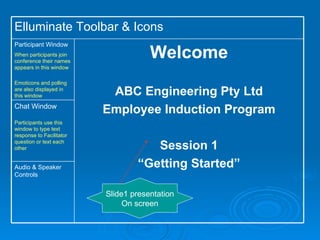
Slide1 presentation On screen Audio & Speaker Controls Chat Window Participants use this window to type text response to Facilitator question or text each other Welcome ABC Engineering Pty Ltd Employee Induction Program Session 1 “ Getting Started” Participant Window When participants join conference their names appears in this window Emoticons and polling are also displayed in this window Elluminate Toolbar & Icons
Welcome Welcome Students to Induction session as they join the conference. E.g. Thank you for joining us Amanda. John is now online – welcome John
Virtual Conference Familiarisation Strategy Q&A to achieve  Emoticon and Polling familiarisation and student participation Narration Are you happy to be at ABC Engineering today? - Click on the Emoticon in the Participant window. Have you participated in a virtual conference training session before – use the polling button in the participant screen. Emoticons Polling
Virtual Conference Familiarisation Strategy Participant involvement through “chat box” familiarisation Narration In three words describe what you want from this company induction program? Type your answer in text in your chat box. Facilitator audio response Sending Chat Messages
Course Objectives Company Policy Strategy Brainstorm Student Interaction through text chat Polling through emoticon Narration Over the next two weeks we will spend 3 sessions together to help you settle into ABC. Look at the graphics and using your text chat tell me what topics you think we will cover? Facilitator response to text chat answers Navigating the Maze!!!
Course Outcomes Strategy Brainstorm Student Interaction through text chat Polling through emoticon Narration Note:  Facilitator acknowledges participant response to “topics question’. Let’s look at the presentation screen  to understand what the course objectives are.  Is there anything else that you would like covered that you would like to explore on this program? Are you OK to get started? Use your emoticon to respond At end of this induction program you will be able to: Explain who ABC Engineering are and describe what they do. Identify key personnel within the company Recognise and carry out your responsibilities in line with company policies. Recall and employ company procedures where required.
ABC Engineering History Strategy Web tour  Narration We will take a brief web tour to the ABC website to answer the following questions. The following icon will appear on your screen. Note: Facilitator guides participants on web tour What’s in a name? Humble Beginnings What we do now
ABC – Meet the People Strategy Web tour  Participant response Narration Meet our accounts & payroll team based in Sydney. Now let’s take another web tour to meet our Leadership team Are you ready? Hit the tick or cross icon to let me know Our People –  ‘ Putting a face to the name’ Accounts and Payroll Team
ABC – Where do you fit? Strategy Student participation Narration Use the magic wand icon and point and click where you sit on the organisation chart. Facilitator commentary regarding where each employee sits. Organisation Chart  (Refer to next slide for a clearer version) General  Manager Water NSW Power Hunter Gas Victoria Telecommunication NSW Project  Manager Project Engineer Project Manager Project Engineer Project Manager Project Engineer Project Manager Project Engineer Site Manager Site Crew Site Manager Site Crew Site Manager Site Crew Site Manager Site Crew PA /Administration
Operations Team Point your wand to show where you sit on the organisation chart General  Manager Water NSW Power Hunter Gas Victoria Telecommunication NSW Project  Manager Project Engineer Project Manager Project Engineer Project Manager Project Engineer Project Manager Project Engineer Site Manager Site Crew Site Manager Site Crew Site Manager Site Crew Site Manager Site Crew PA /Administration
ABC Policies Company Policy Strategy Small group work In breakout rooms using whiteboard to record group response  Narration We will now break into groups of 2 to work in small groups in  the allocated breakout room.  Each group will work on a different company policy. At the end of the allocated time you will report back to the group and present on the requirements of the policy you reviewed Leave Policy/Procedure Petty Cash/Expense reimbursement Payroll (payroll forms + timesheets)
Taking Leave – Forms required Strategy Group Presentation White Board Web Tour of intranet if required Narrative Well done team 1 leave forms must be filled out and approved for all leave taken. Medical certificates for sick leave and carers leave must accompany leave forms. Does everyone understand? Does everyone know where to find the forms? Whiteboard Each group reports back using the answers they recorded on the whiteboard.
Taking Leave – Forms required Strategy Quiz to engage student participation and to assess learning Narrative To finish off session 1 today you will complete a short online quiz. The questions cover key topics we have covered today. Let’s get started. Thank you I will quickly check your answers as you finish. Well done – all correct You are ready to tackle your first few days in ABC Quiz
If you have a question write it on the whiteboard or in the text chat now. Strategy Student Interaction Whiteboard Text Chat Narrative Facilitator comments on responses as they come through and responds to individual questions. If you think of a question later send me an email and I will respond. If there are no more questions let’s move on to what we will cover in the next session. Question Time
Safety at Work Strategy Set task for next session Narration For the next session review the documents listed. You will find them on the company intranet.  Find out who your fire warden is and what to do in case of emergency. Using the emoticons describe your experience today.  Example: All good except Tom.  Tom you and I will follow up after class to see if I can assist further. Review for next session: Review Safety Policy Incident Notification Procedure Emergency Evacuation Procedure
Audio & Speaker Controls Chat Window Participants use this window to type text response to Facilitator question or text each other Welcome ABC Engineering Pty Ltd Employee Induction Program Session 2 “ Safety at Work” Participant Window Participants welcomed back as they join the conference. Participant questions answered whilst waiting on other participants to join the conference Elluminate Toolbar & Icons
Safety at Work Strategy Q&A through text chat Narration Let’s watch a short DVD about “Safety – what not to do”. Using text chat tell me what topics were covered? - Working at heights - Risk Assessment - Correct use of plant &  equipment. Yes correct You tube video link http:// www.youtube.com/watch?v =X19HNwZnKuc (Note: link can be uploaded in Elluminate prior to webinar)
Safety at Work Strategy Small group work and presentations using breakout rooms and whiteboard Narration We will now break into two groups of three to consider the safety policy Group 1 will look at  ‘Management Responsibilities” and Group 2 will look at  “Employee Responsibilities. Record your response on the whiteboard – remember to save it. ABC Safety Policy Employer Responsibility Employee Responsibility
Safety at Work Strategy Web tour, text chat and polling to stimulate employee engagement. Narration Has everyone heard of the term ‘non-negotiable’? Use your tick or cross to let me know.  Tom would you tell us what a safety non-negotiable is using your text chat box. Thanks Tom. Let’s take a web tour to view the ABC non-negotiables. What is a non negotiable?
Safety at Work Strategy Text chat and polling to engage participants and assess who completed preparation tasks. Narration Did everyone follow up and find out who their fire warden was – show of hands. Using your text chat let me know who your fire warden  is? Do you know what to do in an emergency?  We will test your response in the quiz. Emergency Evacuation What’s the drill?
Strategy Quiz to engage student participation and to assess learning Narrative To recap and finish off session 2 today you will complete a short online quiz. As before the questions cover key topics we have covered today. Thank you I will quickly check your answers as you finish. Well done everyone Quiz Safety First  because Safety Matters
If you have a question write it on the whiteboard or in the text chat now. Strategy Student Interaction Whiteboard Text Chat Narrative Note:   Facilitator comments on responses as they come through and responds to individual questions. If you think of a question later send me an email and I will respond. If there are no more questions let’s move on to what we will cover in the next session. Question Time
Workplace Behaviour Strategy Session preparation work Narration For the next session review the documents listed. You will find them on the company intranet.  Using the emoticons describe your experience today.  Great all good – see you next time. Review for next session: EEO Policy Code of Conduct Bullying & Harassment ZERO TOLERANCE
Audio & Speaker Controls Chat Window Participants use this window to type text response to Facilitator question or text each other Welcome ABC Engineering Pty Ltd Employee Induction Program Session 3 “ Workplace Behaviour” Participant Window Participants welcomed back as they join the conference. Participant questions answered whilst waiting on other participants to join the conference Elluminate Toolbar & Icons
Code of Conduct Brainstorm Code of Conduct requirements Strategy Assessment of session preparation. Student participation using text chat/whiteboard. Narration Let’s brainstorm the requirements of the code of conduct. I will call on each participant to provide 1 code of conduct requirement.  When I call your name type your response in text chat or on the whiteboard.
Bullying and Harassment Strategy Student interaction, small group work, presentation, short case study review using breakout room and whiteboard. Narration Let’s break into two groups.  Group 1 will be the employer and Group 2 will be the employees.  Instructions: Review the case scenario Review possible responses and place in correct box. Stop box means don’t engage in the behaviour, Amber box means think before you act and green box means no risk – so you are good to go. Let me know if you need help. E-Learning Game Stop and  think – OK!
Bullying and Harassment Stop & Think – OK! Team A Response (Employer) Team B Response (Employee) Strategy Group presentations using whiteboard. Student engagement using text chat. Narration Let’s regroup and each team will present their response. Using the text chat box tell me in one sentence what you learnt from that exercise. Yes that’s right often we need to consider the context
Workplace Behaviour Quiz Strategy Student Assessment Narration To recap and finish off session 2 today you will complete a short online quiz.  As before the questions cover key topics we have covered today. Thank you I will quickly check your answers as you finish. Well done everyone Bullying & Harassment ZERO TOLERANCE QUIZ
If you have a question write it on the whiteboard or in the text chat now. Strategy Student Interaction Whiteboard Text Chat Show of hands Narrative Note:   Facilitator comments on responses as they come through and responds to individual questions. If you think of a question later send me an email and I will respond. If there are no more questions let’s move on. Is everyone still with me? Question Time
What’s next Strategy Web tour, evaluation form, polling. Narration You will complete the next online training session (SALT) independently.  We will take a quick web tour so that you know how to navigate through the training. I will contact you all one on one over the next week to ensure that you are settling in and to confirm you have started SALT. Thank you for participating in our e-learning program. Please complete the evaluation form. May I see a show of hands to see who found the induction program useful. S.A.L.T web tour (Self Administered Legal Training) Program Evaluation Form

Induction program e learning design - c. cummins

  • 1.
    Slide1 presentation Onscreen Audio & Speaker Controls Chat Window Participants use this window to type text response to Facilitator question or text each other Welcome ABC Engineering Pty Ltd Employee Induction Program Session 1 “ Getting Started” Participant Window When participants join conference their names appears in this window Emoticons and polling are also displayed in this window Elluminate Toolbar & Icons
  • 2.
    Welcome Welcome Studentsto Induction session as they join the conference. E.g. Thank you for joining us Amanda. John is now online – welcome John
  • 3.
    Virtual Conference FamiliarisationStrategy Q&A to achieve Emoticon and Polling familiarisation and student participation Narration Are you happy to be at ABC Engineering today? - Click on the Emoticon in the Participant window. Have you participated in a virtual conference training session before – use the polling button in the participant screen. Emoticons Polling
  • 4.
    Virtual Conference FamiliarisationStrategy Participant involvement through “chat box” familiarisation Narration In three words describe what you want from this company induction program? Type your answer in text in your chat box. Facilitator audio response Sending Chat Messages
  • 5.
    Course Objectives CompanyPolicy Strategy Brainstorm Student Interaction through text chat Polling through emoticon Narration Over the next two weeks we will spend 3 sessions together to help you settle into ABC. Look at the graphics and using your text chat tell me what topics you think we will cover? Facilitator response to text chat answers Navigating the Maze!!!
  • 6.
    Course Outcomes StrategyBrainstorm Student Interaction through text chat Polling through emoticon Narration Note: Facilitator acknowledges participant response to “topics question’. Let’s look at the presentation screen to understand what the course objectives are. Is there anything else that you would like covered that you would like to explore on this program? Are you OK to get started? Use your emoticon to respond At end of this induction program you will be able to: Explain who ABC Engineering are and describe what they do. Identify key personnel within the company Recognise and carry out your responsibilities in line with company policies. Recall and employ company procedures where required.
  • 7.
    ABC Engineering HistoryStrategy Web tour Narration We will take a brief web tour to the ABC website to answer the following questions. The following icon will appear on your screen. Note: Facilitator guides participants on web tour What’s in a name? Humble Beginnings What we do now
  • 8.
    ABC – Meetthe People Strategy Web tour Participant response Narration Meet our accounts & payroll team based in Sydney. Now let’s take another web tour to meet our Leadership team Are you ready? Hit the tick or cross icon to let me know Our People – ‘ Putting a face to the name’ Accounts and Payroll Team
  • 9.
    ABC – Wheredo you fit? Strategy Student participation Narration Use the magic wand icon and point and click where you sit on the organisation chart. Facilitator commentary regarding where each employee sits. Organisation Chart (Refer to next slide for a clearer version) General Manager Water NSW Power Hunter Gas Victoria Telecommunication NSW Project Manager Project Engineer Project Manager Project Engineer Project Manager Project Engineer Project Manager Project Engineer Site Manager Site Crew Site Manager Site Crew Site Manager Site Crew Site Manager Site Crew PA /Administration
  • 10.
    Operations Team Pointyour wand to show where you sit on the organisation chart General Manager Water NSW Power Hunter Gas Victoria Telecommunication NSW Project Manager Project Engineer Project Manager Project Engineer Project Manager Project Engineer Project Manager Project Engineer Site Manager Site Crew Site Manager Site Crew Site Manager Site Crew Site Manager Site Crew PA /Administration
  • 11.
    ABC Policies CompanyPolicy Strategy Small group work In breakout rooms using whiteboard to record group response Narration We will now break into groups of 2 to work in small groups in the allocated breakout room. Each group will work on a different company policy. At the end of the allocated time you will report back to the group and present on the requirements of the policy you reviewed Leave Policy/Procedure Petty Cash/Expense reimbursement Payroll (payroll forms + timesheets)
  • 12.
    Taking Leave –Forms required Strategy Group Presentation White Board Web Tour of intranet if required Narrative Well done team 1 leave forms must be filled out and approved for all leave taken. Medical certificates for sick leave and carers leave must accompany leave forms. Does everyone understand? Does everyone know where to find the forms? Whiteboard Each group reports back using the answers they recorded on the whiteboard.
  • 13.
    Taking Leave –Forms required Strategy Quiz to engage student participation and to assess learning Narrative To finish off session 1 today you will complete a short online quiz. The questions cover key topics we have covered today. Let’s get started. Thank you I will quickly check your answers as you finish. Well done – all correct You are ready to tackle your first few days in ABC Quiz
  • 14.
    If you havea question write it on the whiteboard or in the text chat now. Strategy Student Interaction Whiteboard Text Chat Narrative Facilitator comments on responses as they come through and responds to individual questions. If you think of a question later send me an email and I will respond. If there are no more questions let’s move on to what we will cover in the next session. Question Time
  • 15.
    Safety at WorkStrategy Set task for next session Narration For the next session review the documents listed. You will find them on the company intranet. Find out who your fire warden is and what to do in case of emergency. Using the emoticons describe your experience today. Example: All good except Tom. Tom you and I will follow up after class to see if I can assist further. Review for next session: Review Safety Policy Incident Notification Procedure Emergency Evacuation Procedure
  • 16.
    Audio & SpeakerControls Chat Window Participants use this window to type text response to Facilitator question or text each other Welcome ABC Engineering Pty Ltd Employee Induction Program Session 2 “ Safety at Work” Participant Window Participants welcomed back as they join the conference. Participant questions answered whilst waiting on other participants to join the conference Elluminate Toolbar & Icons
  • 17.
    Safety at WorkStrategy Q&A through text chat Narration Let’s watch a short DVD about “Safety – what not to do”. Using text chat tell me what topics were covered? - Working at heights - Risk Assessment - Correct use of plant & equipment. Yes correct You tube video link http:// www.youtube.com/watch?v =X19HNwZnKuc (Note: link can be uploaded in Elluminate prior to webinar)
  • 18.
    Safety at WorkStrategy Small group work and presentations using breakout rooms and whiteboard Narration We will now break into two groups of three to consider the safety policy Group 1 will look at ‘Management Responsibilities” and Group 2 will look at “Employee Responsibilities. Record your response on the whiteboard – remember to save it. ABC Safety Policy Employer Responsibility Employee Responsibility
  • 19.
    Safety at WorkStrategy Web tour, text chat and polling to stimulate employee engagement. Narration Has everyone heard of the term ‘non-negotiable’? Use your tick or cross to let me know. Tom would you tell us what a safety non-negotiable is using your text chat box. Thanks Tom. Let’s take a web tour to view the ABC non-negotiables. What is a non negotiable?
  • 20.
    Safety at WorkStrategy Text chat and polling to engage participants and assess who completed preparation tasks. Narration Did everyone follow up and find out who their fire warden was – show of hands. Using your text chat let me know who your fire warden is? Do you know what to do in an emergency? We will test your response in the quiz. Emergency Evacuation What’s the drill?
  • 21.
    Strategy Quiz toengage student participation and to assess learning Narrative To recap and finish off session 2 today you will complete a short online quiz. As before the questions cover key topics we have covered today. Thank you I will quickly check your answers as you finish. Well done everyone Quiz Safety First because Safety Matters
  • 22.
    If you havea question write it on the whiteboard or in the text chat now. Strategy Student Interaction Whiteboard Text Chat Narrative Note: Facilitator comments on responses as they come through and responds to individual questions. If you think of a question later send me an email and I will respond. If there are no more questions let’s move on to what we will cover in the next session. Question Time
  • 23.
    Workplace Behaviour StrategySession preparation work Narration For the next session review the documents listed. You will find them on the company intranet. Using the emoticons describe your experience today. Great all good – see you next time. Review for next session: EEO Policy Code of Conduct Bullying & Harassment ZERO TOLERANCE
  • 24.
    Audio & SpeakerControls Chat Window Participants use this window to type text response to Facilitator question or text each other Welcome ABC Engineering Pty Ltd Employee Induction Program Session 3 “ Workplace Behaviour” Participant Window Participants welcomed back as they join the conference. Participant questions answered whilst waiting on other participants to join the conference Elluminate Toolbar & Icons
  • 25.
    Code of ConductBrainstorm Code of Conduct requirements Strategy Assessment of session preparation. Student participation using text chat/whiteboard. Narration Let’s brainstorm the requirements of the code of conduct. I will call on each participant to provide 1 code of conduct requirement. When I call your name type your response in text chat or on the whiteboard.
  • 26.
    Bullying and HarassmentStrategy Student interaction, small group work, presentation, short case study review using breakout room and whiteboard. Narration Let’s break into two groups. Group 1 will be the employer and Group 2 will be the employees. Instructions: Review the case scenario Review possible responses and place in correct box. Stop box means don’t engage in the behaviour, Amber box means think before you act and green box means no risk – so you are good to go. Let me know if you need help. E-Learning Game Stop and think – OK!
  • 27.
    Bullying and HarassmentStop & Think – OK! Team A Response (Employer) Team B Response (Employee) Strategy Group presentations using whiteboard. Student engagement using text chat. Narration Let’s regroup and each team will present their response. Using the text chat box tell me in one sentence what you learnt from that exercise. Yes that’s right often we need to consider the context
  • 28.
    Workplace Behaviour QuizStrategy Student Assessment Narration To recap and finish off session 2 today you will complete a short online quiz. As before the questions cover key topics we have covered today. Thank you I will quickly check your answers as you finish. Well done everyone Bullying & Harassment ZERO TOLERANCE QUIZ
  • 29.
    If you havea question write it on the whiteboard or in the text chat now. Strategy Student Interaction Whiteboard Text Chat Show of hands Narrative Note: Facilitator comments on responses as they come through and responds to individual questions. If you think of a question later send me an email and I will respond. If there are no more questions let’s move on. Is everyone still with me? Question Time
  • 30.
    What’s next StrategyWeb tour, evaluation form, polling. Narration You will complete the next online training session (SALT) independently. We will take a quick web tour so that you know how to navigate through the training. I will contact you all one on one over the next week to ensure that you are settling in and to confirm you have started SALT. Thank you for participating in our e-learning program. Please complete the evaluation form. May I see a show of hands to see who found the induction program useful. S.A.L.T web tour (Self Administered Legal Training) Program Evaluation Form