Independent Self Pace Learning
           Student Briefing

    To get the students familiar with the
         eLearning week activities.


1
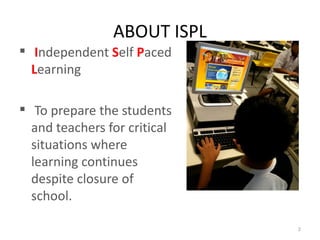
ABOUT ISPL
 Independent Self Paced
  Learning

 To prepare the students
  and teachers for critical
  situations where
  learning continues
  despite closure of
  school.

                              2
ISPL WEEK
• 3 July 2011 – 6 July 2011
• All sec 1 and 2 students ONLY
• ISPL Week
  – No school for all sec 1 and 2 students
  – Lessons will be conducted through the AsknLearn
    Portal from home.
LOGIN TO THE ePORTAL
       http://www.damaisec.moe.edu.sg              STEP : 1
                                                    Enter your “USERNAME” (IC)


                           STEP : 2
                           Enter your “ PASSWORD”


4
LOGIN TO THE ePORTAL

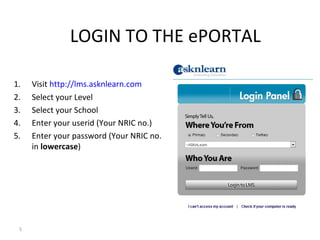
1.   Visit http://lms.asknlearn.com
2.   Select your Level
3.   Select your School
4.   Enter your userid (Your NRIC no.)
5.   Enter your password (Your NRIC no.
     in lowercase)


 5
System check

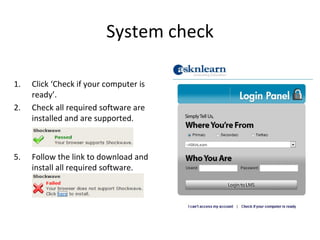
1.   Click ‘Check if your computer is
     ready’.
2.   Check all required software are
     installed and are supported.


5.   Follow the link to download and
     install all required software.
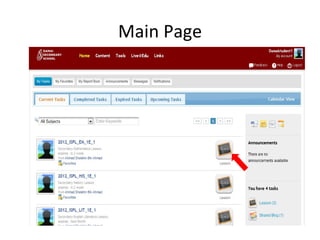
Main Page
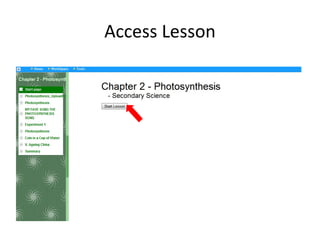
Access Lesson
IF YOU DO NOT HAVE MICROSOFT OFFICE
           Download & Install OpenOffice.org
            http://www.openoffice.org


           Use Google Docs in Damai ePortal
            Login to your ePortal.
            Select [ Google Apps > Google Docs ]


             Refer to the Google Docs section in your iPW handbook

9
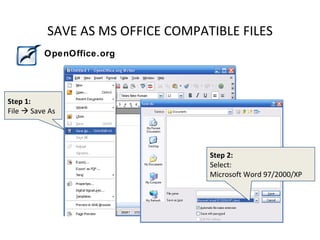
SAVE AS MS OFFICE COMPATIBLE FILES
          OpenOffice.org


Step 1:
File  Save As


                                   Step 2:
                                   Select:
                                   Microsoft Word 97/2000/XP


                                                        10
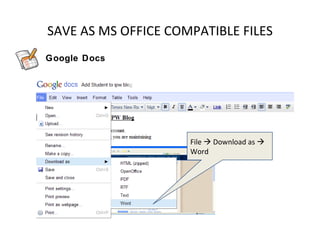
SAVE AS MS OFFICE COMPATIBLE FILES
Google Docs


                     File  Download as 
                     Word


                                            11
DURING THE HOLIDAYS…
• Ensure you can login to your ePortal.
• Ensure that your account is active and
  password is correct.
• Ensure you have Microsoft Office /
  OpenOffice.org installed.
• Ensure that your Chinese Input has been
  installed and configured properly.


                                            12

Independent Self Pace Learning 2012 Brief

  • 1.
    Independent Self PaceLearning Student Briefing To get the students familiar with the eLearning week activities. 1
  • 2.
    ABOUT ISPL  IndependentSelf Paced Learning  To prepare the students and teachers for critical situations where learning continues despite closure of school. 2
  • 3.
    ISPL WEEK • 3July 2011 – 6 July 2011 • All sec 1 and 2 students ONLY • ISPL Week – No school for all sec 1 and 2 students – Lessons will be conducted through the AsknLearn Portal from home.
  • 4.
    LOGIN TO THEePORTAL  http://www.damaisec.moe.edu.sg STEP : 1 Enter your “USERNAME” (IC) STEP : 2 Enter your “ PASSWORD” 4
  • 5.
    LOGIN TO THEePORTAL 1. Visit http://lms.asknlearn.com 2. Select your Level 3. Select your School 4. Enter your userid (Your NRIC no.) 5. Enter your password (Your NRIC no. in lowercase) 5
  • 6.
    System check 1. Click ‘Check if your computer is ready’. 2. Check all required software are installed and are supported. 5. Follow the link to download and install all required software.
  • 7.
  • 8.
  • 9.
    IF YOU DONOT HAVE MICROSOFT OFFICE Download & Install OpenOffice.org http://www.openoffice.org Use Google Docs in Damai ePortal Login to your ePortal. Select [ Google Apps > Google Docs ] Refer to the Google Docs section in your iPW handbook 9
  • 10.
    SAVE AS MSOFFICE COMPATIBLE FILES OpenOffice.org Step 1: File  Save As Step 2: Select: Microsoft Word 97/2000/XP 10
  • 11.
    SAVE AS MSOFFICE COMPATIBLE FILES Google Docs File  Download as  Word 11
  • 12.
    DURING THE HOLIDAYS… •Ensure you can login to your ePortal. • Ensure that your account is active and password is correct. • Ensure you have Microsoft Office / OpenOffice.org installed. • Ensure that your Chinese Input has been installed and configured properly. 12

Editor's Notes

  • #3 Students should understand the importance of eLearning and treat eLearning seriously. Marks obtained will count towards their CA. All planned activities must be participated and given assignments completed and submitted by the deadline. Any problems related to LMS access should be directed to the support forum. Students must pay attention to individual subject teacher ’s briefing on ISPL Week in Term 3 Week 1.
  • #5 Students can login to the ePortal at the school website: http://www.damaisec.moe.edu.sg
  • #6 Alternatively, students can also login to the ePortal from ASKnLearn website: http://damaisec.asknlearn.com
  • #10 For students who do not have Microsoft Office installed in their home computers, they have the option to download and install OpenOffice.org or use the Google Docs from the ePortal to open/read/edit the files given to them by their teachers. Software MUST be installed during June holidays and NOT on the day of eLearning.
  • #11 Students MUST save their files in Microsoft Office compatible format before submitting their work to their teachers. Students will not get any grade should the teacher fail to open their files.
  • #12 Students MUST save their files in Microsoft Office compatible format before submitting their work to their teachers. Students will not get any grade should the teacher fail to open their files.