Import
bbPress to
phpBB in 7
Steps
WordPress may have
conquered half of the
web world with its
superb site
management, but is it
that good when it
gets to forums?
Import
bbPress to phpBB
with
Why opt for
Superb Quality
Demo Migration
High speed
process
Migration
Insurance
Live Support
Automated
service
Step 1.
Start your migration by
creating CMS2CMS account
To set up the migration process, the
first thing you have to do is to sign up
with CMS2CMS.
Provide your name, email, phone
number and choose a password.
You can also sign in via your Facebook
or Google+ account. For this, choose
the appropriate option.
Step 2.
Specify Your bbPress
Forum Details
After that, you have to specify your
current forum details.
Choose your existing platform type, in
this case, bbPress.
Then provide its URL in the
corresponding field.
Establish the
Connection to
Your bbPress
Forum
Step3.
To establish the connection to your bbPress forum at first, you
have to download the Connector Plugin
After that, upload the Connector Plugin to your WordPress
website, then activate it
The only thing left to do is to
log in to your CMS2CMS
account.
After you’ve done that, you’ll
be redirected to the Migration
Wizard.
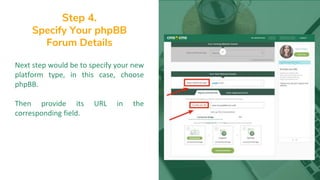
Step 4.
Specify Your phpBB
Forum Details
Next step would be to specify your new
platform type, in this case, choose
phpBB.
Then provide its URL in the
corresponding field.
Step 5.
Establish the
Connection to Your
bbPress Forum
Now you are to set up the connection
to your phpBB forum. For that
download and install the Connection
Bridge.
Here is the video tutorial, where the
process of installation is shown in
details. When you’ve done with that,
press “Verify Connection” button.
Step 6.
Run Free Demo
CMS2CMS service offers you to
preview the future look of your
website and run Free Demo migration.
Choose the Entities and needed
additional options you are going to
migrate.
In case you want to migrate all your
data without Demo, you may skip this
step.
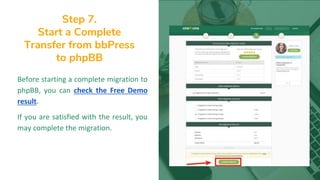
Step 7.
Start a Complete
Transfer from bbPress
to phpBB
Before starting a complete migration to
phpBB, you can check the Free Demo
result.
If you are satisfied with the result, you
may complete the migration.
Check the Results!
That’s it! Now you are a
happy owner of a phpBB
forum with all your
bbPress content on it.
Give a Fresh Start
to Your Forum
with
www.cms2cms.com

Import bbPress to phpBB in 7 steps

  • 1.
  • 2.
    WordPress may have conqueredhalf of the web world with its superb site management, but is it that good when it gets to forums? Import bbPress to phpBB with
  • 3.
    Why opt for SuperbQuality Demo Migration High speed process Migration Insurance Live Support Automated service
  • 4.
    Step 1. Start yourmigration by creating CMS2CMS account To set up the migration process, the first thing you have to do is to sign up with CMS2CMS. Provide your name, email, phone number and choose a password. You can also sign in via your Facebook or Google+ account. For this, choose the appropriate option.
  • 5.
    Step 2. Specify YourbbPress Forum Details After that, you have to specify your current forum details. Choose your existing platform type, in this case, bbPress. Then provide its URL in the corresponding field.
  • 6.
  • 7.
    To establish theconnection to your bbPress forum at first, you have to download the Connector Plugin
  • 8.
    After that, uploadthe Connector Plugin to your WordPress website, then activate it
  • 9.
    The only thingleft to do is to log in to your CMS2CMS account. After you’ve done that, you’ll be redirected to the Migration Wizard.
  • 10.
    Step 4. Specify YourphpBB Forum Details Next step would be to specify your new platform type, in this case, choose phpBB. Then provide its URL in the corresponding field.
  • 11.
    Step 5. Establish the Connectionto Your bbPress Forum Now you are to set up the connection to your phpBB forum. For that download and install the Connection Bridge. Here is the video tutorial, where the process of installation is shown in details. When you’ve done with that, press “Verify Connection” button.
  • 12.
    Step 6. Run FreeDemo CMS2CMS service offers you to preview the future look of your website and run Free Demo migration. Choose the Entities and needed additional options you are going to migrate. In case you want to migrate all your data without Demo, you may skip this step.
  • 13.
    Step 7. Start aComplete Transfer from bbPress to phpBB Before starting a complete migration to phpBB, you can check the Free Demo result. If you are satisfied with the result, you may complete the migration.
  • 14.
    Check the Results! That’sit! Now you are a happy owner of a phpBB forum with all your bbPress content on it.
  • 15.
    Give a FreshStart to Your Forum with www.cms2cms.com