DIGITAL IMAGE PROCESSING
Image Enhancement
Image Enhancement is the process of manipulating an
image so that the result is more suitable than the
original for a specific application.
Image enhancement can be done in :
Point operations
Mask Operations
Spatial Domain
 Spatial domain refers to the image plane itself and are based on direct
manipulation of pixels in an image
Frequency Domain
 Spatial Domain Transformation are :
DIGITAL IMAGE PROCESSING 2
Spatial Domain
DIGITAL IMAGE PROCESSING 3
DIGITAL IMAGE PROCESSING 4
Point Operation
Examples:
 Image Negative.
 Contrast Stretching.
 Thresholding.
 Brightness Enhancement.
 Log Transformation.
 Power Law Transformation.
Operation deals with pixel intensity values individually.
The intensity values are altered using particular
transformation techniques as per the requirement.
The transformed output pixel value does not depend on
any of the neighbouring pixel value of the input image.
DIGITAL IMAGE PROCESSING 5
Mask Operation
 Mask is a small matrix useful for blurring, sharpening,
edge-detection and more.
New image is generated by multiplying the input image
with the mask matrix.
The output pixel values thus depend on the
neighbouring input pixel values.
The mask may be of any dimension 3X3 4X4 ….
DIGITAL IMAGE PROCESSING 6
Mask Operation
X
DIGITAL IMAGE PROCESSING 7
Transfer function for different Intensity
Transformations
Transfer function of
a) Negative
b) Log
c) Nth root
d) Identity
e) Nth power
f) Inverse log
DIGITAL IMAGE PROCESSING 8
Image Negative
 Negative images are useful for enhancing white or grey
detail embedded in dark regions of an image.
 The negative of an image with gray levels in the range
[0,L-1] is obtained by using the expression
s = L -1 - r
L-1 = Maximum pixel value .
r = Pixel value of an image.
DIGITAL IMAGE PROCESSING 9
Image Negative
Original Image Image negative
DIGITAL IMAGE PROCESSING 10
Image Negative
Matlab code : % program for image enhancement using image negative
clear all
clc
close all
a=imread('clown.png');
[m,n]=size(a);
for i=1:1:m
for j=1:1:n
b(i,j)=255-a(i,j);
end
end
subplot(1,2,1),subimage((a)),title('Original Image');
subplot(1,2,2),subimage((b)),title('Image after image
negative transformation')
DIGITAL IMAGE PROCESSING 11
Image Negative
Output screen:
DIGITAL IMAGE PROCESSING 12
Contrast Stretching
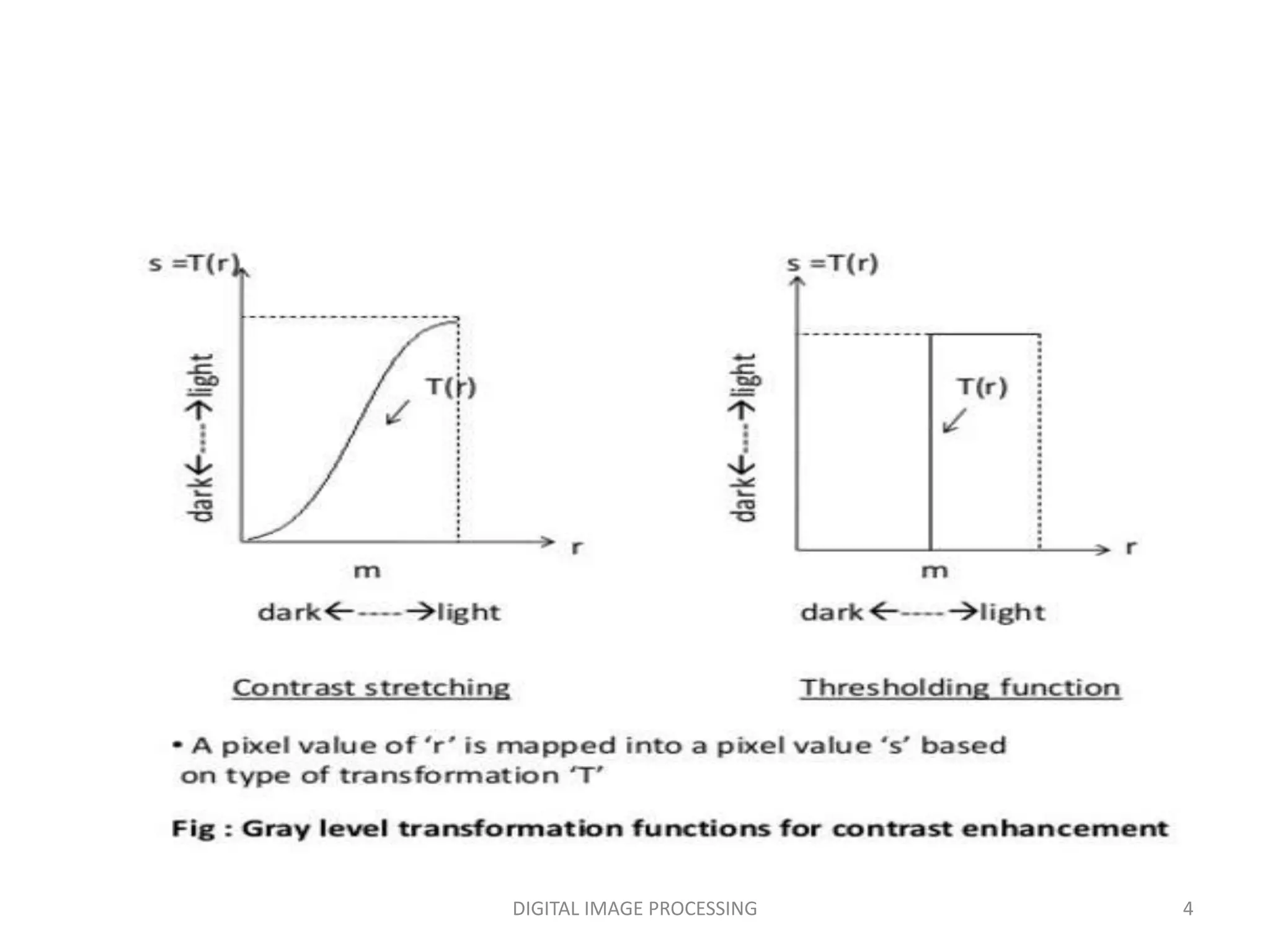
 Contrast stretching is done in three ways:
 Multiplying each input pixel intensity value with a
constant scalar.
Example: s=2*r
Using Histogram Equivalent
Applying a transform which makes dark portion darker
by assigning slope of < 1 and bright portion brighter by
assigning slope of > 1.
 Contrast basically the difference between the intensity
values of darker and brighter pixels .
 Contrast stretching expands the range of intensity levels
in an image.
DIGITAL IMAGE PROCESSING 13
Contrast Stretching (Using Transfer Function)
Formulation is given below:
s = l*r ; for 0 <= r <= a
= m(r-a) + v ; for a < r <= b
= n(r-b) + w ; for b < r
DIGITAL IMAGE PROCESSING 14
Contrast Stretching
Original Image Contrast Enhanced Image
DIGITAL IMAGE PROCESSING 15
Contrast Stretching
Matlab code: % program to increase the contrast of an image
x=input('Enter the factor which contrast should be
increased');
a=imread('clown.png');
[m,n]=size(a);
for i=1:1:m
for j=1:1:n
b(i,j)=a(i,j)*x;
end
end
subplot(1,2,1),subimage(a),title('Original Image');
subplot(1,2,2),subimage(b),title('contrast
Image'),xlabel(sprintf('Contrast increased by a factor of
%g',x));
DIGITAL IMAGE PROCESSING 16
Contrast Stretching By Multiplication of each pixel with a scalar.
Contrast Stretching
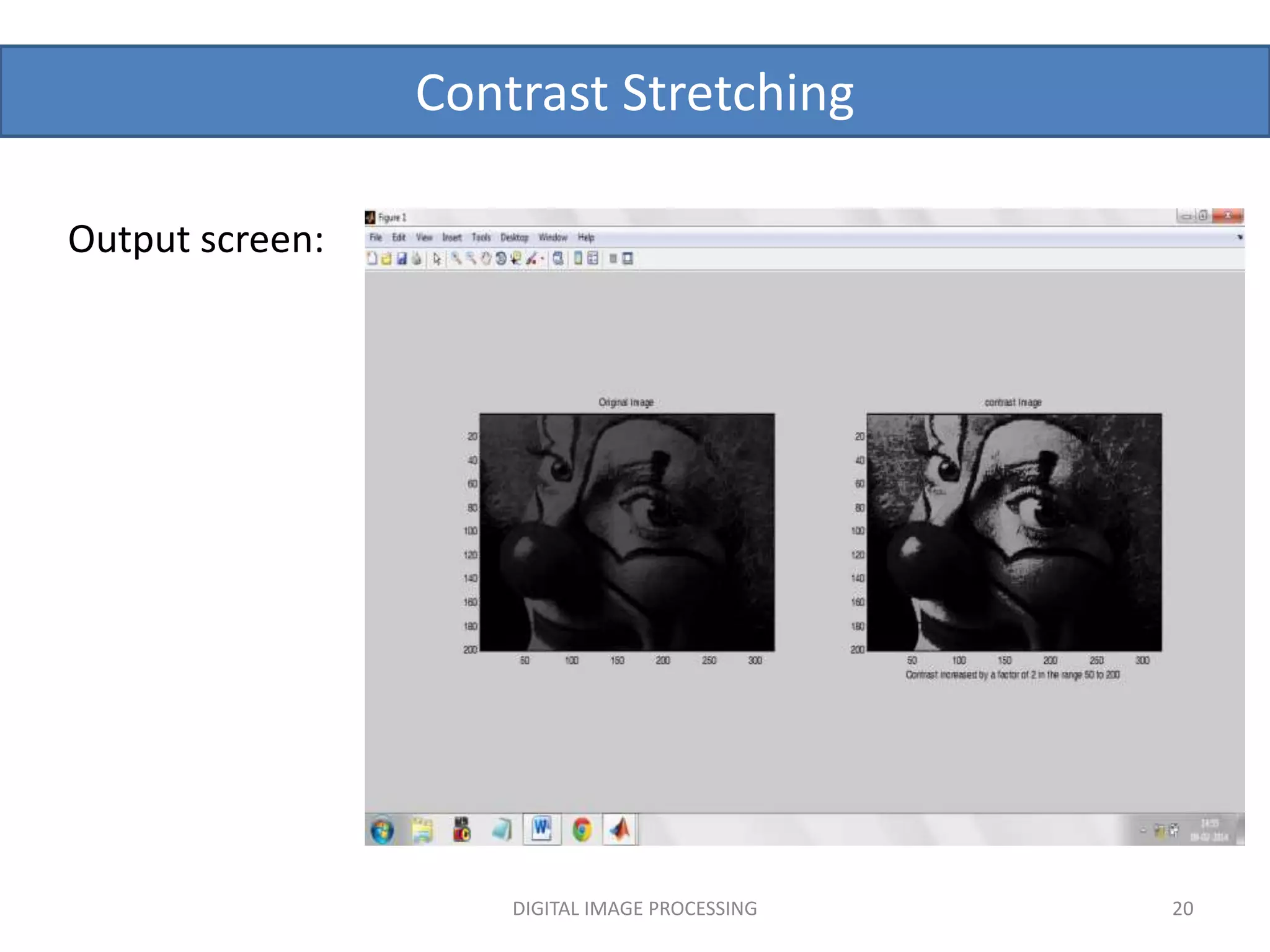
Output screen:
DIGITAL IMAGE PROCESSING 17
Contrast Stretching
Matlab code: % program to increase the contrast of an image
x=input('Enter the factor which contrast should be
increased');
a=imread('clown.png');
[m,n]=size(a);
for i=1:1:m
for j=1:1:n
if(a(i,j)<50)
b(i,j)=a(i,j);%slope of transfer function between i/p
and o/p is 1
elseif (a(i,j)>200)
b(i,j)=a(i,j);
else
b(i,j)=a(i,j)*x;%slope of transfer function between i/p
and o/p is x.Hence contrast of some particular pixel value
range increased
DIGITAL IMAGE PROCESSING 18
Contrast Stretching by using threshold function.
Contrast Stretching
Matlab code:
end
end
end
subplot(1,2,1),subimage(a),title('Original Image');
subplot(1,2,2),subimage(b),title('contrast
Image'),xlabel(sprintf('Contrast increased by a factor of %g
in the range 50 to 200',x));
DIGITAL IMAGE PROCESSING 19
Contrast Stretching
Output screen:
DIGITAL IMAGE PROCESSING 20
Contrast Stretching
Matlab code : % program to increase the contrast of an image by histogram
equivalent
a=imread('clown.png');
b=histeq(a);
subplot(2,2,1),subimage(a),title('Original Image');
subplot(2,2,2),subimage(b),title('contrast
Image'),xlabel(sprintf('Contrast increased by Histogram
equivalent'));
subplot(2,2,3),imhist(a),title('Histogram of Original Image');
subplot(2,2,4),imhist(b),title('Histogram of Contrast Image');
DIGITAL IMAGE PROCESSING 21
Contrast Stretching By Histogram Equalisation.
Contrast Stretching
Output screen :
DIGITAL IMAGE PROCESSING 22
Thresholding
 Extreme Contrast Stretching yields Thresholding.
 Thresholded image has maximum contrast as it has
only BLACK & WHITE gray values.
 In Contrast Stretching figure, if l & n slope are made
ZERO & if m slope is increased then we get
Thresholding Transformation
 If r1 = r2, s1 = 0 & s2 = L-1 ,then we get Thresholding
function.
DIGITAL IMAGE PROCESSING 23
Expression goes as under:
s = 0; if r = a
s = L – 1 ; if r >a
where, L is number of
gray levels.
Thresholding Function
DIGITAL IMAGE PROCESSING 24
Thresholding
Original Image Transformed Image
DIGITAL IMAGE PROCESSING 25
Thresholding
DIGITAL IMAGE PROCESSING 26
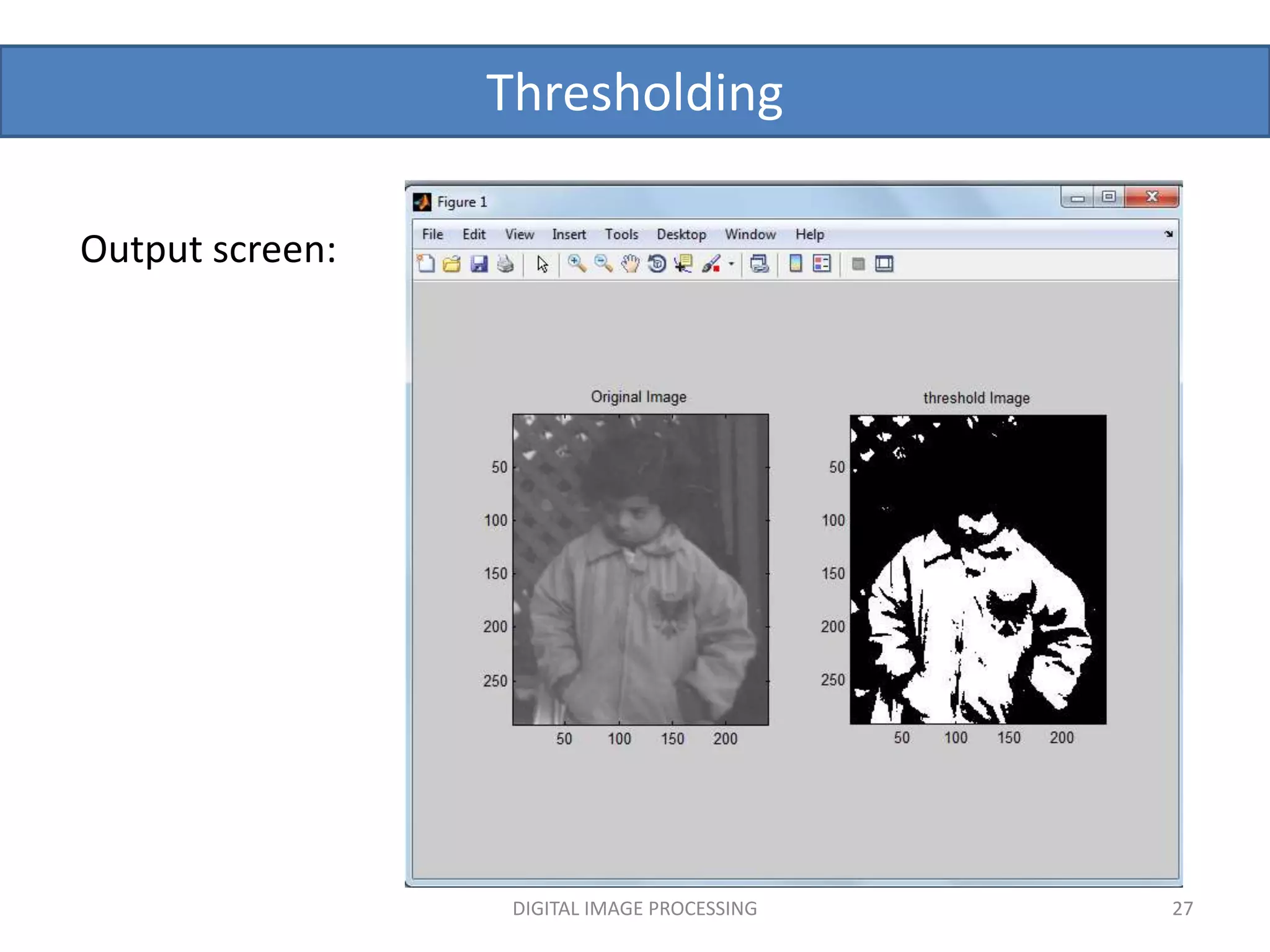
Matlab code: % program for image thresholding
a=imread('pout.tif');
[m,n]=size(a);
for i=1:1:m
for j=1:1:n
if(a(i,j)<125)
b(i,j)=0;%pixel values below 125 are mapped to zero
else
b(i,j)=255;%pixel values equal or above 125 are mapped to 255
end
end
end
subplot(1,2,1),subimage(a),title('Original Image');
subplot(1,2,2),subimage(b),title('threshold Image');
Thresholding
DIGITAL IMAGE PROCESSING 27
Output screen:
Brightness Enhancement
DIGITAL IMAGE PROCESSING 28
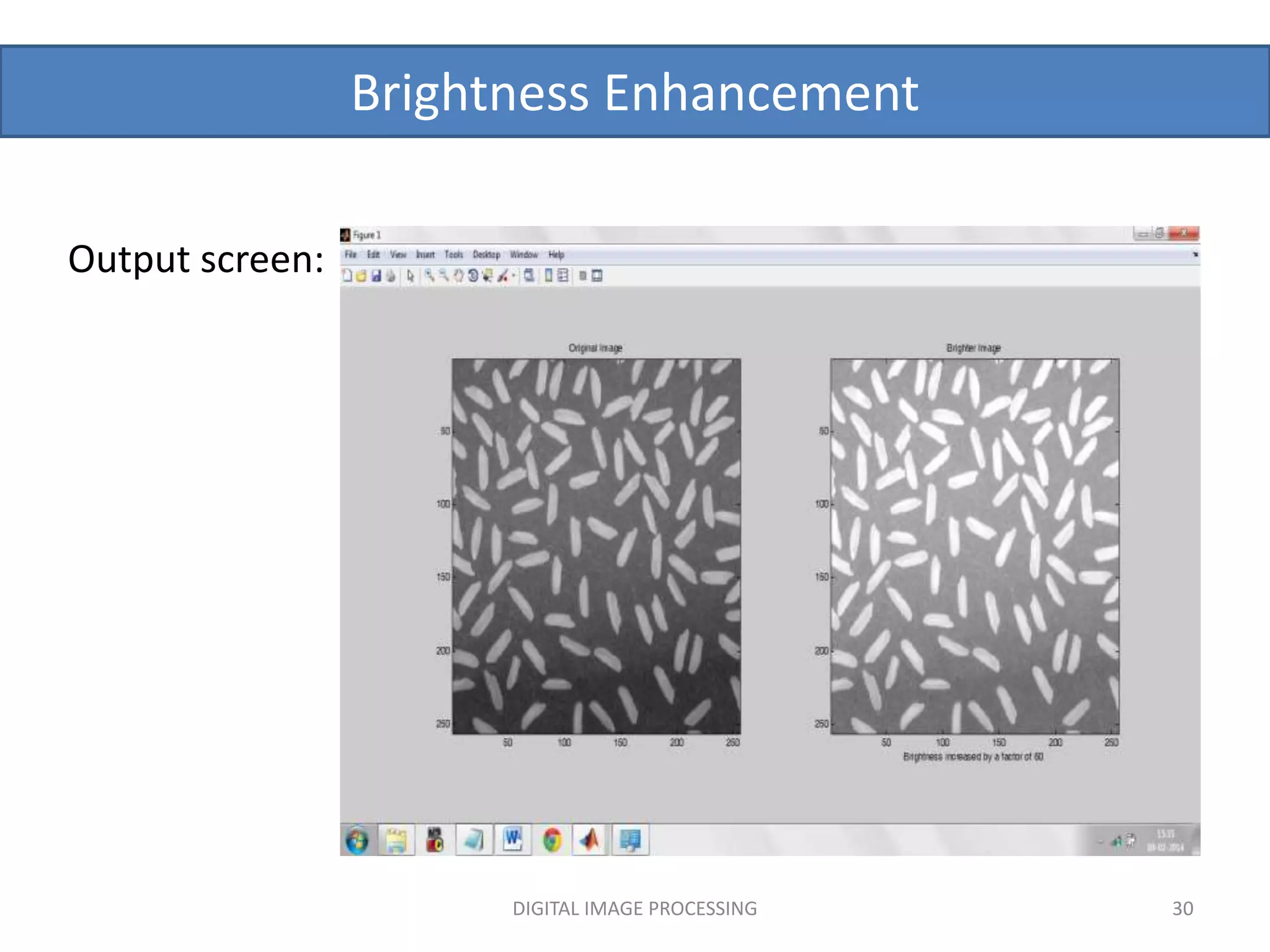
Brightness Enhancement is shifting of intensity
values to a higher level.
The darker and the lighter pixels both get their
values shifted by some constant value.
 Example : In x-ray images brightness can be
enhanced to find the darker spots.
Brightness Enhancement
Matlab code : % program to increase the brightness of an image
x=input('Enter the factor which brightness should be increased');
a=imread('clown.png');
[m,n]=size(a);
for i=1:1:m
for j=1:1:n
b(i,j)=a(i,j)+x;
end
end
subplot(1,2,1),subimage(a),title('Original Image');
subplot(1,2,2),subimage(b),title('Brighter
Image'),xlabel(sprintf('Brightness increased by a factor of %g',x));
DIGITAL IMAGE PROCESSING 29
Brightness Enhancement
Output screen:
DIGITAL IMAGE PROCESSING 30
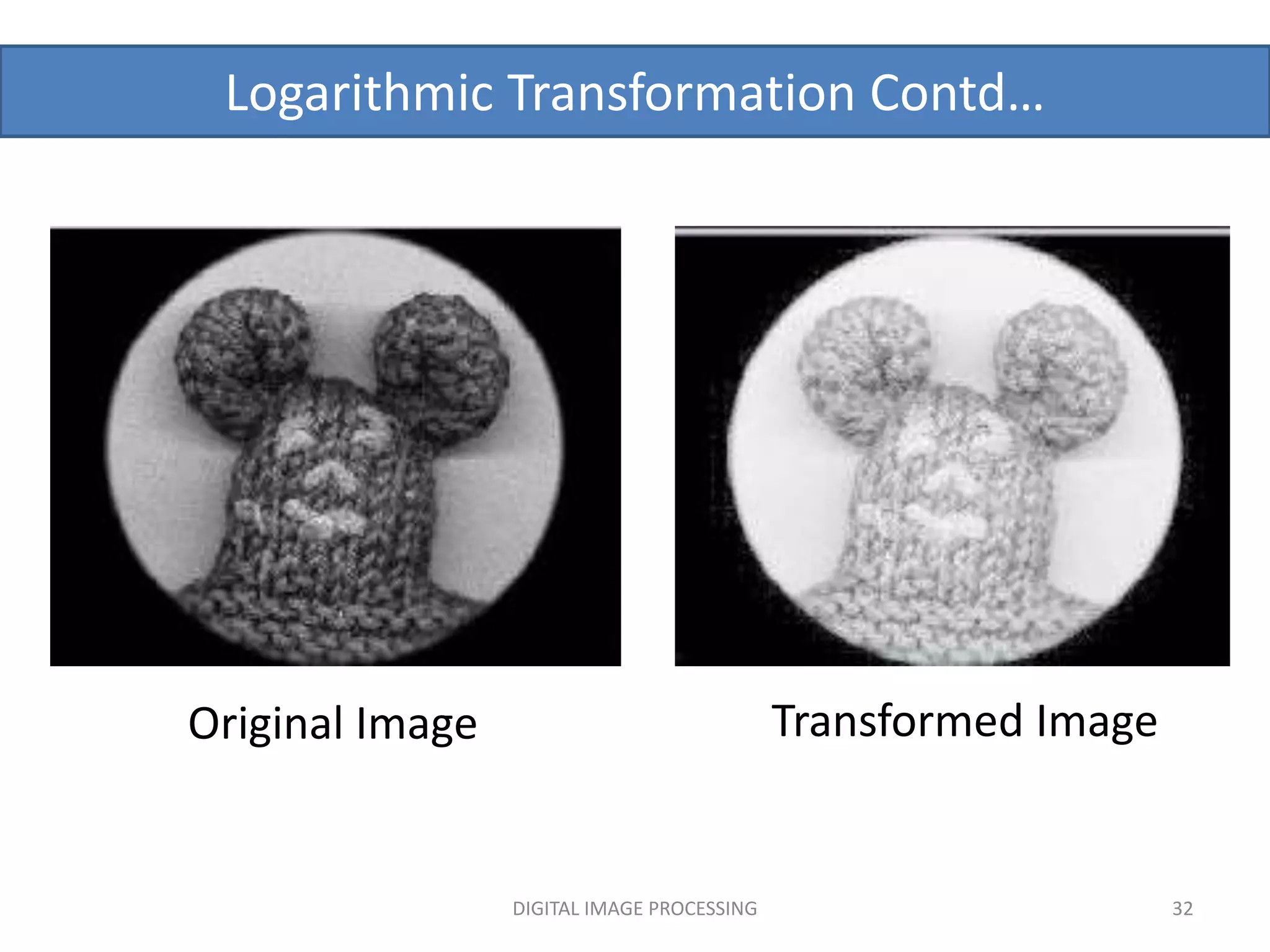
The log transformation is given by the expression
s = c log(1 + r)
where c is a constant and it is assumed that r≥0.
 This transformation maps a narrow range of low-
level grey scale intensities into a wider range of
output values.
Similarly maps the wide range of high-level grey scale
intensities into a narrow range of high level output
values.
This transform is used to expand values of dark pixels
and compress values of bright pixels.
Log Transformation
DIGITAL IMAGE PROCESSING 31
Logarithmic Transformation Contd…
Original Image Transformed Image
DIGITAL IMAGE PROCESSING 32
Log Transformation
Matlab code: % program for image enhancement using logarithmic
transformation
A=input('Enter the value of constant A');
a=imread('clown.jpg');
a=rgb2gray(a);
[m,n]=size(a);
a=double(a);
for i=1:1:m
for j=1:1:n
b(i,j)=A*log(1+a(i,j));
end
end
figure,subplot(1,2,1),subimage(uint8(a)),title('Original Image');
subplot(1,2,2),subimage(uint8(b)),title('Image after logarithmic
transformation'),xlabel(sprintf('Constant is %g',A));
DIGITAL IMAGE PROCESSING 33
Log Transformation
Output screen:
DIGITAL IMAGE PROCESSING 34
Power Law Transformation
s = c *(r γ )
Expression for power law transformation is given by:
s is the output pixels value.
r is the input pixel value.
c and γ are real numbers.
For various values of γ different levels of
enhancements can be obtained.
 This technique is quite commonly called as Gamma
Correction , used in monitor displays.
DIGITAL IMAGE PROCESSING 35
Power Law Transformation
Different display monitors display images at different
intensities and clarity because every monitor has built-in
gamma correction in it with certain gamma ranges .
A good monitor automatically corrects all the images
displayed on it for the best contrast to give user the best
experience.
The difference between the log-transformation function
and the power-law functions is that using the power-law
function a family of possible transformation curves can
be obtained just by varying the γ .
DIGITAL IMAGE PROCESSING 36
Power Law Transformation
A
D
C
B
A : original
image
For c=1
B : γ =3.0
C : γ =4.0
D : γ =5.0
DIGITAL IMAGE PROCESSING 37
Power Law Transformation
Matlab code:
% program for image enhancement using power law
A=input('Enter the value of constant A');
x=input('Enter the value of power x');
a=imread('clown.png');
[m,n]=size(a);
for i=1:1:m
for j=1:1:n
b(i,j)=A*(a(i,j)^x);
end
end
subplot(1,2,1),subimage(a),title('Original Image');
subplot(1,2,2),subimage(b),title('Image after power law
transformation'),xlabel(sprintf('Constant is %gnPower is
%g',A,x));
DIGITAL IMAGE PROCESSING 38
Power Law Transformation
Output screen:
DIGITAL IMAGE PROCESSING 39
DIGITAL IMAGE PROCESSING 40
References:
 Digital Image Processing by Gonzalez And Woods.
 Wikipedia
Matlab Help
DIGITAL IMAGE PROCESSING 41

image enhancement.pptx

  • 1.
  • 2.
    Image Enhancement Image Enhancementis the process of manipulating an image so that the result is more suitable than the original for a specific application. Image enhancement can be done in : Point operations Mask Operations Spatial Domain  Spatial domain refers to the image plane itself and are based on direct manipulation of pixels in an image Frequency Domain  Spatial Domain Transformation are : DIGITAL IMAGE PROCESSING 2
  • 3.
  • 4.
  • 5.
    Point Operation Examples:  ImageNegative.  Contrast Stretching.  Thresholding.  Brightness Enhancement.  Log Transformation.  Power Law Transformation. Operation deals with pixel intensity values individually. The intensity values are altered using particular transformation techniques as per the requirement. The transformed output pixel value does not depend on any of the neighbouring pixel value of the input image. DIGITAL IMAGE PROCESSING 5
  • 6.
    Mask Operation  Maskis a small matrix useful for blurring, sharpening, edge-detection and more. New image is generated by multiplying the input image with the mask matrix. The output pixel values thus depend on the neighbouring input pixel values. The mask may be of any dimension 3X3 4X4 …. DIGITAL IMAGE PROCESSING 6
  • 7.
  • 8.
    Transfer function fordifferent Intensity Transformations Transfer function of a) Negative b) Log c) Nth root d) Identity e) Nth power f) Inverse log DIGITAL IMAGE PROCESSING 8
  • 9.
    Image Negative  Negativeimages are useful for enhancing white or grey detail embedded in dark regions of an image.  The negative of an image with gray levels in the range [0,L-1] is obtained by using the expression s = L -1 - r L-1 = Maximum pixel value . r = Pixel value of an image. DIGITAL IMAGE PROCESSING 9
  • 10.
    Image Negative Original ImageImage negative DIGITAL IMAGE PROCESSING 10
  • 11.
    Image Negative Matlab code: % program for image enhancement using image negative clear all clc close all a=imread('clown.png'); [m,n]=size(a); for i=1:1:m for j=1:1:n b(i,j)=255-a(i,j); end end subplot(1,2,1),subimage((a)),title('Original Image'); subplot(1,2,2),subimage((b)),title('Image after image negative transformation') DIGITAL IMAGE PROCESSING 11
  • 12.
  • 13.
    Contrast Stretching  Contraststretching is done in three ways:  Multiplying each input pixel intensity value with a constant scalar. Example: s=2*r Using Histogram Equivalent Applying a transform which makes dark portion darker by assigning slope of < 1 and bright portion brighter by assigning slope of > 1.  Contrast basically the difference between the intensity values of darker and brighter pixels .  Contrast stretching expands the range of intensity levels in an image. DIGITAL IMAGE PROCESSING 13
  • 14.
    Contrast Stretching (UsingTransfer Function) Formulation is given below: s = l*r ; for 0 <= r <= a = m(r-a) + v ; for a < r <= b = n(r-b) + w ; for b < r DIGITAL IMAGE PROCESSING 14
  • 15.
    Contrast Stretching Original ImageContrast Enhanced Image DIGITAL IMAGE PROCESSING 15
  • 16.
    Contrast Stretching Matlab code:% program to increase the contrast of an image x=input('Enter the factor which contrast should be increased'); a=imread('clown.png'); [m,n]=size(a); for i=1:1:m for j=1:1:n b(i,j)=a(i,j)*x; end end subplot(1,2,1),subimage(a),title('Original Image'); subplot(1,2,2),subimage(b),title('contrast Image'),xlabel(sprintf('Contrast increased by a factor of %g',x)); DIGITAL IMAGE PROCESSING 16 Contrast Stretching By Multiplication of each pixel with a scalar.
  • 17.
  • 18.
    Contrast Stretching Matlab code:% program to increase the contrast of an image x=input('Enter the factor which contrast should be increased'); a=imread('clown.png'); [m,n]=size(a); for i=1:1:m for j=1:1:n if(a(i,j)<50) b(i,j)=a(i,j);%slope of transfer function between i/p and o/p is 1 elseif (a(i,j)>200) b(i,j)=a(i,j); else b(i,j)=a(i,j)*x;%slope of transfer function between i/p and o/p is x.Hence contrast of some particular pixel value range increased DIGITAL IMAGE PROCESSING 18 Contrast Stretching by using threshold function.
  • 19.
    Contrast Stretching Matlab code: end end end subplot(1,2,1),subimage(a),title('OriginalImage'); subplot(1,2,2),subimage(b),title('contrast Image'),xlabel(sprintf('Contrast increased by a factor of %g in the range 50 to 200',x)); DIGITAL IMAGE PROCESSING 19
  • 20.
  • 21.
    Contrast Stretching Matlab code: % program to increase the contrast of an image by histogram equivalent a=imread('clown.png'); b=histeq(a); subplot(2,2,1),subimage(a),title('Original Image'); subplot(2,2,2),subimage(b),title('contrast Image'),xlabel(sprintf('Contrast increased by Histogram equivalent')); subplot(2,2,3),imhist(a),title('Histogram of Original Image'); subplot(2,2,4),imhist(b),title('Histogram of Contrast Image'); DIGITAL IMAGE PROCESSING 21 Contrast Stretching By Histogram Equalisation.
  • 22.
    Contrast Stretching Output screen: DIGITAL IMAGE PROCESSING 22
  • 23.
    Thresholding  Extreme ContrastStretching yields Thresholding.  Thresholded image has maximum contrast as it has only BLACK & WHITE gray values.  In Contrast Stretching figure, if l & n slope are made ZERO & if m slope is increased then we get Thresholding Transformation  If r1 = r2, s1 = 0 & s2 = L-1 ,then we get Thresholding function. DIGITAL IMAGE PROCESSING 23
  • 24.
    Expression goes asunder: s = 0; if r = a s = L – 1 ; if r >a where, L is number of gray levels. Thresholding Function DIGITAL IMAGE PROCESSING 24
  • 25.
    Thresholding Original Image TransformedImage DIGITAL IMAGE PROCESSING 25
  • 26.
    Thresholding DIGITAL IMAGE PROCESSING26 Matlab code: % program for image thresholding a=imread('pout.tif'); [m,n]=size(a); for i=1:1:m for j=1:1:n if(a(i,j)<125) b(i,j)=0;%pixel values below 125 are mapped to zero else b(i,j)=255;%pixel values equal or above 125 are mapped to 255 end end end subplot(1,2,1),subimage(a),title('Original Image'); subplot(1,2,2),subimage(b),title('threshold Image');
  • 27.
  • 28.
    Brightness Enhancement DIGITAL IMAGEPROCESSING 28 Brightness Enhancement is shifting of intensity values to a higher level. The darker and the lighter pixels both get their values shifted by some constant value.  Example : In x-ray images brightness can be enhanced to find the darker spots.
  • 29.
    Brightness Enhancement Matlab code: % program to increase the brightness of an image x=input('Enter the factor which brightness should be increased'); a=imread('clown.png'); [m,n]=size(a); for i=1:1:m for j=1:1:n b(i,j)=a(i,j)+x; end end subplot(1,2,1),subimage(a),title('Original Image'); subplot(1,2,2),subimage(b),title('Brighter Image'),xlabel(sprintf('Brightness increased by a factor of %g',x)); DIGITAL IMAGE PROCESSING 29
  • 30.
  • 31.
    The log transformationis given by the expression s = c log(1 + r) where c is a constant and it is assumed that r≥0.  This transformation maps a narrow range of low- level grey scale intensities into a wider range of output values. Similarly maps the wide range of high-level grey scale intensities into a narrow range of high level output values. This transform is used to expand values of dark pixels and compress values of bright pixels. Log Transformation DIGITAL IMAGE PROCESSING 31
  • 32.
    Logarithmic Transformation Contd… OriginalImage Transformed Image DIGITAL IMAGE PROCESSING 32
  • 33.
    Log Transformation Matlab code:% program for image enhancement using logarithmic transformation A=input('Enter the value of constant A'); a=imread('clown.jpg'); a=rgb2gray(a); [m,n]=size(a); a=double(a); for i=1:1:m for j=1:1:n b(i,j)=A*log(1+a(i,j)); end end figure,subplot(1,2,1),subimage(uint8(a)),title('Original Image'); subplot(1,2,2),subimage(uint8(b)),title('Image after logarithmic transformation'),xlabel(sprintf('Constant is %g',A)); DIGITAL IMAGE PROCESSING 33
  • 34.
  • 35.
    Power Law Transformation s= c *(r γ ) Expression for power law transformation is given by: s is the output pixels value. r is the input pixel value. c and γ are real numbers. For various values of γ different levels of enhancements can be obtained.  This technique is quite commonly called as Gamma Correction , used in monitor displays. DIGITAL IMAGE PROCESSING 35
  • 36.
    Power Law Transformation Differentdisplay monitors display images at different intensities and clarity because every monitor has built-in gamma correction in it with certain gamma ranges . A good monitor automatically corrects all the images displayed on it for the best contrast to give user the best experience. The difference between the log-transformation function and the power-law functions is that using the power-law function a family of possible transformation curves can be obtained just by varying the γ . DIGITAL IMAGE PROCESSING 36
  • 37.
    Power Law Transformation A D C B A: original image For c=1 B : γ =3.0 C : γ =4.0 D : γ =5.0 DIGITAL IMAGE PROCESSING 37
  • 38.
    Power Law Transformation Matlabcode: % program for image enhancement using power law A=input('Enter the value of constant A'); x=input('Enter the value of power x'); a=imread('clown.png'); [m,n]=size(a); for i=1:1:m for j=1:1:n b(i,j)=A*(a(i,j)^x); end end subplot(1,2,1),subimage(a),title('Original Image'); subplot(1,2,2),subimage(b),title('Image after power law transformation'),xlabel(sprintf('Constant is %gnPower is %g',A,x)); DIGITAL IMAGE PROCESSING 38
  • 39.
    Power Law Transformation Outputscreen: DIGITAL IMAGE PROCESSING 39
  • 40.
    DIGITAL IMAGE PROCESSING40 References:  Digital Image Processing by Gonzalez And Woods.  Wikipedia Matlab Help
  • 41.