Digital Image Processing:
Image Enhancement in Spatial
Domain
Nidhi Sharma
Image Enhancement
 Image enhancement in the spatial domain is a technique used to improve the
visual quality of digital images by directly manipulating the pixel values.
 It involves modifying the image pixel by pixel, considering their spatial
relationships within the image.
 Image enhancement approaches fall into two broad categories:
 Spatial domain methods
 Point processes
 Area processes
 Frame process
 Frequency domain methods
Image Enhancement: Spatial Domain
 The term spatial domain refers to the aggregate of pixels composing an
image.
 Spatial domain methods are procedures that operate directly on these pixels.
Spatial domain processes will be denoted by the expression
g (x, y) = T [f (x, y)]
where f(x, y) is the input image, g(x, y) is the processed image, and T is an
operator on f, defined over some neighborhood of (x, y).
For example:
T can operate on a set of input images, such as performing the pixel-by-pixel sum
of K images for noise reduction.
Spatial Image Enhancement
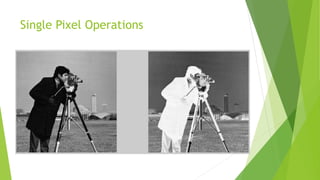
 Single-pixel operation (Intensity Transformation)
Negative Image, contrast stretching etc.
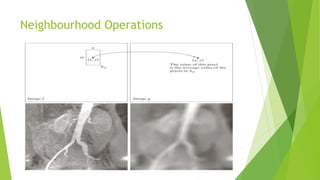
 Neighbourhood operations
Averaging filter, median filtering etc.
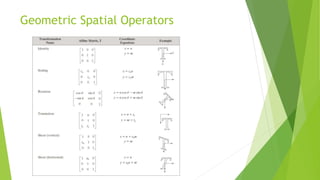
 Geometric spatial transformations
Scaling, Rotation, Translations et
Single Pixel Operations
Neighbourhood Operations
Geometric Spatial Operators
Averaging
 Often done to improve SNR.
avgI = (img1+img2+img3+img4+img5)/5;
Remember that the data is Uint8 type…..which may saturate the sum values to 255!
So
avgI = (im2double(img1)+im2double(img2)+ im2double(img3)+ im2double(img4)+
im2double(img5))/5;
Im2double also rescales range to [0,1]
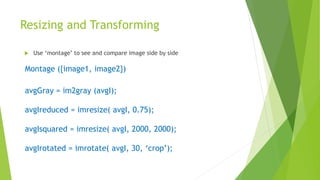
Resizing and Transforming
 Use ‘montage’ to see and compare image side by side
Montage ({image1, image2})
avgGray = im2gray (avgI);
avgIreduced = imresize( avgI, 0.75);
avgIsquared = imresize( avgI, 2000, 2000);
avgIrotated = imrotate( avgI, 30, ‘crop’);
 Imwrite( avgI, “filename.png”); % to save image as a given file name
 Imwrite( avgI, “filename.jpg”, “Quality”, 80); % to save image as a given file name
Some Basic Intensity Transformation
Functions
 Image Negatives
s = L – 1 – r
S is the output intensity value
L is the highest intensity levels
r is the input intensity value
 Particularly suited for enhancing white or gray detail embedded in dark
regions of an image, especially when the black areas are dominant in size
Some Basic Intensity Transformation
Functions
 Log Transformations
 s = c log(1 + r) where , c is a constant
 It maps a narrow range of low intensity values in the input into a wide range of output
levels
 The opposite is true of higher values of input levels
 It expands the values of dark pixels in an image while compressing the higher level
values
 It compresses the dynamic range of images with large variations in pixel values
% Read the input image
inputImage = imread('input_image.jpg'); % Replace 'input_image.jpg' with your image file name and
extension
% Convert the input image to double precision for accurate calculations
inputImage = im2double(inputImage);
% Perform log transformation
c = 1; % Constant value for scaling
outputImage = c * log(1 + inputImage);
% Rescale the output image to the range [0, 1] for display
outputImage = (outputImage - min(outputImage(:))) / (max(outputImage(:)) - min(outputImage(:)));
% Display the input and output images figure;
subplot(1, 2, 1);
imshow(inputImage);
title('Input Image');
subplot(1, 2, 2);
imshow(outputImage);
title('Log Transformed Image');
% Save the output image
imwrite(outputImage, 'output_image.jpg'); % Replace 'output_image.jpg' with your desired output image
file name and extension
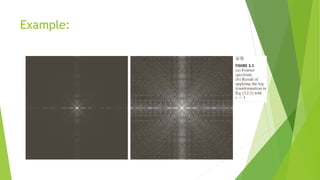
Example:
Some Basic Intensity Transformation
Functions
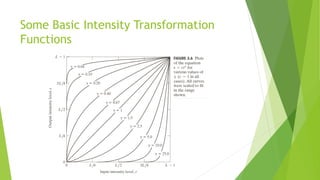
 Power Law (Gamma) Transformations
 s = c rγ
 c and γ are both positive constants
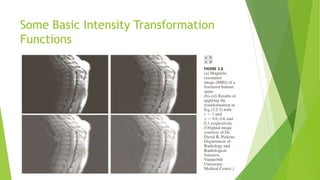
 With fractional values(0<γ<1) of gamma map a narrow range of dark input
values into a wider range of output values, with the opposite being true for
higher values (γ >1)of input levels.
 C=gamma=1 means it is an identity transformations.
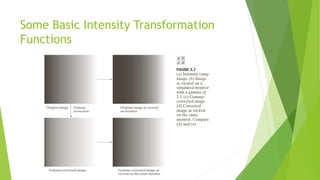
 Variety of devices used for image capture , printing, and display respond
according to a power law.
 Process used to correct these power law response phenomena is called
gamma correction.
Some Basic Intensity Transformation
Functions
Some Basic Intensity Transformation
Functions
Power Law (Gamma) Transformations
 Images that are not corrected properly look either bleached out or too dark.
 Varying gamma changes not only intensity, but also the ratio of red to green to blue in
a color images.
 Gamma correction has become increasingly important, as the use of the digital images
over internet.
 Useful for general purpose contrast manipulation.
 Apply gamma correction on CRT (Television, monitor), printers, scanners etc.
 Gamma value depends on device.
Some Basic Intensity Transformation
Functions
DIP-Enhancement-Spatial.pptx

DIP-Enhancement-Spatial.pptx

  • 1.
    Digital Image Processing: ImageEnhancement in Spatial Domain Nidhi Sharma
  • 2.
    Image Enhancement  Imageenhancement in the spatial domain is a technique used to improve the visual quality of digital images by directly manipulating the pixel values.  It involves modifying the image pixel by pixel, considering their spatial relationships within the image.  Image enhancement approaches fall into two broad categories:  Spatial domain methods  Point processes  Area processes  Frame process  Frequency domain methods
  • 3.
    Image Enhancement: SpatialDomain  The term spatial domain refers to the aggregate of pixels composing an image.  Spatial domain methods are procedures that operate directly on these pixels. Spatial domain processes will be denoted by the expression g (x, y) = T [f (x, y)] where f(x, y) is the input image, g(x, y) is the processed image, and T is an operator on f, defined over some neighborhood of (x, y). For example: T can operate on a set of input images, such as performing the pixel-by-pixel sum of K images for noise reduction.
  • 4.
    Spatial Image Enhancement Single-pixel operation (Intensity Transformation) Negative Image, contrast stretching etc.  Neighbourhood operations Averaging filter, median filtering etc.  Geometric spatial transformations Scaling, Rotation, Translations et
  • 5.
  • 6.
  • 7.
  • 8.
    Averaging  Often doneto improve SNR. avgI = (img1+img2+img3+img4+img5)/5; Remember that the data is Uint8 type…..which may saturate the sum values to 255! So avgI = (im2double(img1)+im2double(img2)+ im2double(img3)+ im2double(img4)+ im2double(img5))/5; Im2double also rescales range to [0,1]
  • 9.
    Resizing and Transforming Use ‘montage’ to see and compare image side by side Montage ({image1, image2}) avgGray = im2gray (avgI); avgIreduced = imresize( avgI, 0.75); avgIsquared = imresize( avgI, 2000, 2000); avgIrotated = imrotate( avgI, 30, ‘crop’);
  • 10.
     Imwrite( avgI,“filename.png”); % to save image as a given file name  Imwrite( avgI, “filename.jpg”, “Quality”, 80); % to save image as a given file name
  • 11.
    Some Basic IntensityTransformation Functions  Image Negatives s = L – 1 – r S is the output intensity value L is the highest intensity levels r is the input intensity value  Particularly suited for enhancing white or gray detail embedded in dark regions of an image, especially when the black areas are dominant in size
  • 12.
    Some Basic IntensityTransformation Functions  Log Transformations  s = c log(1 + r) where , c is a constant  It maps a narrow range of low intensity values in the input into a wide range of output levels  The opposite is true of higher values of input levels  It expands the values of dark pixels in an image while compressing the higher level values  It compresses the dynamic range of images with large variations in pixel values
  • 13.
    % Read theinput image inputImage = imread('input_image.jpg'); % Replace 'input_image.jpg' with your image file name and extension % Convert the input image to double precision for accurate calculations inputImage = im2double(inputImage); % Perform log transformation c = 1; % Constant value for scaling outputImage = c * log(1 + inputImage); % Rescale the output image to the range [0, 1] for display outputImage = (outputImage - min(outputImage(:))) / (max(outputImage(:)) - min(outputImage(:))); % Display the input and output images figure; subplot(1, 2, 1); imshow(inputImage); title('Input Image'); subplot(1, 2, 2); imshow(outputImage); title('Log Transformed Image'); % Save the output image imwrite(outputImage, 'output_image.jpg'); % Replace 'output_image.jpg' with your desired output image file name and extension
  • 14.
  • 15.
    Some Basic IntensityTransformation Functions  Power Law (Gamma) Transformations  s = c rγ  c and γ are both positive constants  With fractional values(0<γ<1) of gamma map a narrow range of dark input values into a wider range of output values, with the opposite being true for higher values (γ >1)of input levels.  C=gamma=1 means it is an identity transformations.  Variety of devices used for image capture , printing, and display respond according to a power law.  Process used to correct these power law response phenomena is called gamma correction.
  • 16.
    Some Basic IntensityTransformation Functions
  • 17.
    Some Basic IntensityTransformation Functions
  • 18.
    Power Law (Gamma)Transformations  Images that are not corrected properly look either bleached out or too dark.  Varying gamma changes not only intensity, but also the ratio of red to green to blue in a color images.  Gamma correction has become increasingly important, as the use of the digital images over internet.  Useful for general purpose contrast manipulation.  Apply gamma correction on CRT (Television, monitor), printers, scanners etc.  Gamma value depends on device.
  • 19.
    Some Basic IntensityTransformation Functions