ILTA Speakers/
Committee Webinar
July 17, 2013
#ILTA13
Welcome…
2013 ILTA
Conference
Vice Presidents
#ILTA13
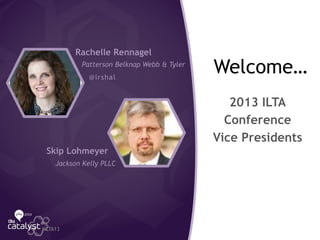
Rachelle Rennagel
Patterson Belknap Webb & Tyler
@irshal
Skip Lohmeyer
Jackson Kelly PLLC
Promoting
Your ILTA Session
Through Social
Media
#ILTA13
JoAnna Forshee
@InsideLegal
ILTA Social Media Channels
#ILTA13
Twitter
• ILTA Organization Account @ILTANet
• ILTA Conference Account @ILTAConf
• 2013 ILTA Conference Hashtag - #ILTA13
• Join Twitter list of ILTA 2013 Attendees at bit.ly/ILTAList13
Blog - ILTA Conference [bit.ly/ILTABlog]
Facebook
• ILTA Event Page [bit.ly/ILTAFBE]
• ILTA Main Page [bit.ly/ILTAFB]
Connected Community - ILTA Connected Community [bit.ly/ILTACC]
LinkedIn - ILTA Group [bit.ly/ILTALink] (members only)
Access this list at bit.ly/ilta2013
Hashtags
Attach hashtags to your messages to connect them to
the ILTA conversation
ILTA hashtags - #ILTA13 #SPEC9 #BigData
Utilize hashtags to monitor messages
Track/search hashtags with tools such as HootSuite or
TweetDeck
#ILTA13@InsideLegal
Get Involved in the
ILTA Conversation
Spend 10 minutes/day catching up on conference chatter
(based on specific topics/themes/interests)
Monitor Twitter/hashtags
Review ILTA blogs & Connected Community posts
Scan LinkedIn Group discussions
Author a blog post (either your own or guest column) on a
specific subject matter that is being covered at conference -
does not need to be session specific
Collaborate with your peers - either peer groups or co-presenters
on ‘turning up’ the ILTA conversation volume
#ILTA13@InsideLegal
What to Tweet? Quality over quantity
Talk about your session and what you’ll be covering
Introduce your panelists/fellow speakers
Tweet out pertinent facts, stats and metrics
Support/reinforce your session with complementary blog
posts
Invite co-presenters to create content
Submit post for inclusion in the ILTA Conference Blog
#ILTA13@InsideLegal
Utilizing Social Media
to Promote Your Session
Pre-Conference
Utilizing Social Media
to Promote Your Session
Pre-Conference
Get setup
Announce that you’ll be presenting
Think outside your session box … promote related sessions
Ask what your audience wants covered - engage in
community feedback
Invite specific people to attend
Make it easy – include the day, time & room
Remember to include your session hashtag
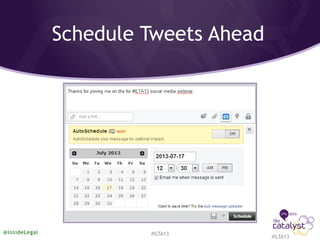
Schedule tweets before you leave for conference
#ILTA13@InsideLegal
Schedule last-minute tweets before your session
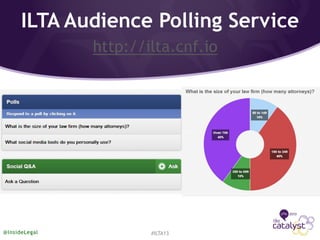
Utilize the Audience Polling system during your session
Send out poll results from session the next day
Encourage your fellow speakers to promote your content
based on the session
#ILTA13@InsideLegal
Utilizing Social Media
to Promote Your Session
At Conference
After the conference is a slow time – perfect for follow-up
Create detailed content based on findings/discussion from
your session
Use your content to pitch articles to legal/tech publications
Use the audio recordings/other downloads to re-energize
your session & discussion
Plan post-conference social media follow-up
#ILTA13@InsideLegal
Utilizing Social Media
to Promote Your Session
Post-Conference
Social Media Tools
Dashboard - Monitor/Schedule tweets early
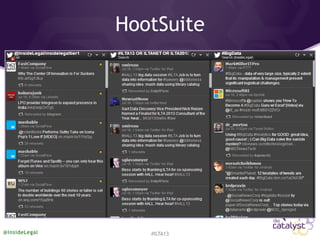
HootSuite
TweetDeck
Search Tools
http://search.twitter.com
Topsy.com
Google – Blog search
Twilert.com (small monthly fee)
Analytics
Internal – HootSuite
TweetArchivist.com
#ILTA13@InsideLegal
HootSuite
#ILTA13@InsideLegal
Schedule Tweets Ahead
#ILTA13
@InsideLegal #ILTA13
ILTA Audience Polling Service
http://ilta.cnf.io
#ILTA13@InsideLegal
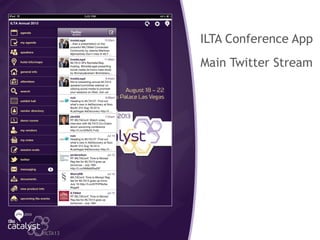
ILTA App
ILTA Conference App
Main Twitter Stream
#ILTA13
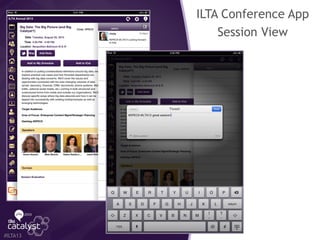
ILTA App
ILTA Conference App
Session View
#ILTA13
Remember to…
Let people know you’re attending & speaking
Utilize hashtags - #ILTA13 & your session hashtag
Follow the conference blog & check in on Facebook page
Track your session comments & respond to questions
Support your session with content
Schedule tweets & blog posts early
#ILTA13@InsideLegal
Things to Avoid
#Too #many #hashtags
Too many tweets, posts and session reminders - engage
vs. talking ‘at’
Don’t post from multiple accounts when using hashtags
Don’t abandon – so many social media efforts begin &
then get abandoned
It’s great to show your personality in your social media
activity, but don’t cross the line. No one wants to know
what you ate for breakfast.
@InsideLegal #ILTA13
Experts’ Twitter Tips
I tweet from HootSuite because it shows multiple ‘streams’. Set it up to
show home, mentions and sent tweets and, at conferences add a stream
for the hashtag. Having all the streams in a single browser tab facilitates
monitoring an active Twitter discussion.
Ron Friedmann, Fireman & Company, @RonFriedmann
Attribute the comment you are tweeting to the specific speaker. Also
make tweets count and use discretion. Not all your followers are at ILTA.
Donna Payne, PayneGroup, @Donna_Payne
@InsideLegal #ILTA13
Experts’ Twitter Tips
Be Coordinated: set goals such as increasing awareness, sharing tips.
Be Consistent: find balance between too much tweeting and ‘just right’.
Be Careful: use common sense.
Rob Robinson, ComplexDiscovery, @ComplexD
Use social media to foster the ‘thank you economy’ … a way of having
meaningful, fun, informational and engaging relationships with your
clients and potential clients.
Roe Frazer, cicayda, @cicayda
@InsideLegal #ILTA13
Tweeting works well for note taking/onsite session discussion and post
event content sharing. Use hashtags to ID & organize content while
building awareness and offering value for attendees.
Jen Bullett, One North Interactive, @OneNorth
A picture is worth a 1,000 words. Timely stats & industry metrics are
worth nearly as much. Make it a point to tweet out informative visuals
such as links to infographics, charts/stats, etc.
Jobst Elster, InsideLegal.com, @InsideLegal
@InsideLegal #ILTA13
Experts’ Twitter Tips
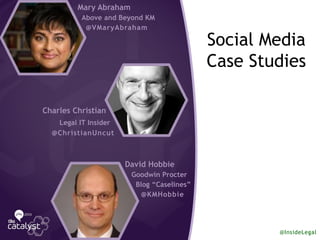
Social Media
Case Studies
Mary Abraham
Above and Beyond KM
@VMaryAbraham
Charles Christian
Legal IT Insider
@ChristianUncut
David Hobbie
Goodwin Procter
Blog “Caselines”
@KMHobbie
@InsideLegal
ILTA’s Connected
Community
A Tool to Promote, Engage and Add Value to Your Session
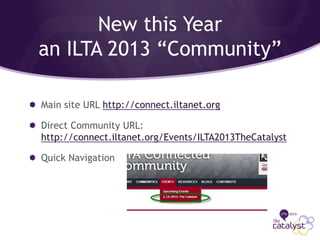
New this Year
an ILTA 2013 “Community”
Main site URL http://connect.iltanet.org
Direct Community URL:
http://connect.iltanet.org/Events/ILTA2013TheCatalyst
Quick Navigation
Your Audience
“Attendees” are automatically added to the ILTA 2013:
The Catalyst Community.
They are subscribed in Real Time to the Discussion area
and will have access to any shared files for the
community.
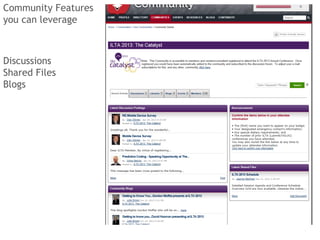
Community Features
you can leverage
Discussions
Shared Files
Blogs
The Mechanics
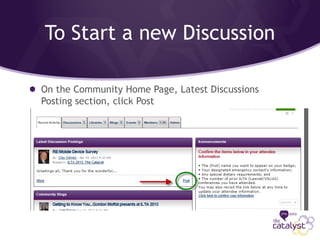
To Start a new Discussion
On the Community Home Page, Latest Discussions
Posting section, click Post
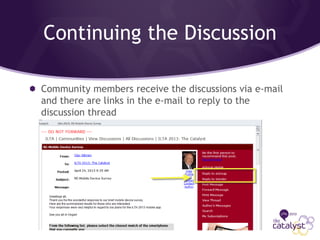
Continuing the Discussion
Community members receive the discussions via e-mail
and there are links in the e-mail to reply to the
discussion thread
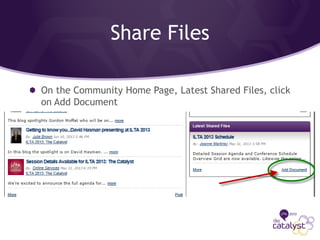
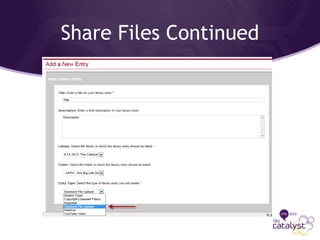
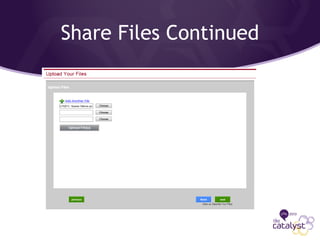
Share Files
On the Community Home Page, Latest Shared Files, click
on Add Document
Share Files Continued
Blogs
Anyone can blog
Authors determines the blog visibility and who can
comment
Additional/optional reference to the community that
the blog is pertinent to.
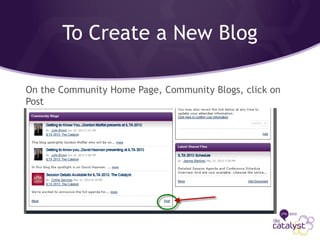
To Create a New Blog
On the Community Home Page, Community Blogs, click on
Post
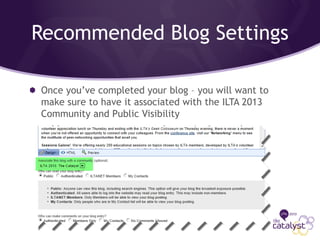
Recommended Blog Settings
Once you’ve completed your blog – you will want to
make sure to have it associated with the ILTA 2013
Community and Public Visibility
Need Help?
Jeanne Martinez – jeanne@iltanet.org
Questions?

Utilizing Social Media to Promote Your Speaking Engagements (ILTA Speakers Webinar)

  • 1.
  • 2.
    Welcome… 2013 ILTA Conference Vice Presidents #ILTA13 RachelleRennagel Patterson Belknap Webb & Tyler @irshal Skip Lohmeyer Jackson Kelly PLLC
  • 3.
    Promoting Your ILTA Session ThroughSocial Media #ILTA13 JoAnna Forshee @InsideLegal
  • 4.
    ILTA Social MediaChannels #ILTA13 Twitter • ILTA Organization Account @ILTANet • ILTA Conference Account @ILTAConf • 2013 ILTA Conference Hashtag - #ILTA13 • Join Twitter list of ILTA 2013 Attendees at bit.ly/ILTAList13 Blog - ILTA Conference [bit.ly/ILTABlog] Facebook • ILTA Event Page [bit.ly/ILTAFBE] • ILTA Main Page [bit.ly/ILTAFB] Connected Community - ILTA Connected Community [bit.ly/ILTACC] LinkedIn - ILTA Group [bit.ly/ILTALink] (members only) Access this list at bit.ly/ilta2013
  • 5.
    Hashtags Attach hashtags toyour messages to connect them to the ILTA conversation ILTA hashtags - #ILTA13 #SPEC9 #BigData Utilize hashtags to monitor messages Track/search hashtags with tools such as HootSuite or TweetDeck #ILTA13@InsideLegal
  • 6.
    Get Involved inthe ILTA Conversation Spend 10 minutes/day catching up on conference chatter (based on specific topics/themes/interests) Monitor Twitter/hashtags Review ILTA blogs & Connected Community posts Scan LinkedIn Group discussions Author a blog post (either your own or guest column) on a specific subject matter that is being covered at conference - does not need to be session specific Collaborate with your peers - either peer groups or co-presenters on ‘turning up’ the ILTA conversation volume #ILTA13@InsideLegal
  • 7.
    What to Tweet?Quality over quantity Talk about your session and what you’ll be covering Introduce your panelists/fellow speakers Tweet out pertinent facts, stats and metrics Support/reinforce your session with complementary blog posts Invite co-presenters to create content Submit post for inclusion in the ILTA Conference Blog #ILTA13@InsideLegal Utilizing Social Media to Promote Your Session Pre-Conference
  • 8.
    Utilizing Social Media toPromote Your Session Pre-Conference Get setup Announce that you’ll be presenting Think outside your session box … promote related sessions Ask what your audience wants covered - engage in community feedback Invite specific people to attend Make it easy – include the day, time & room Remember to include your session hashtag Schedule tweets before you leave for conference #ILTA13@InsideLegal
  • 9.
    Schedule last-minute tweetsbefore your session Utilize the Audience Polling system during your session Send out poll results from session the next day Encourage your fellow speakers to promote your content based on the session #ILTA13@InsideLegal Utilizing Social Media to Promote Your Session At Conference
  • 10.
    After the conferenceis a slow time – perfect for follow-up Create detailed content based on findings/discussion from your session Use your content to pitch articles to legal/tech publications Use the audio recordings/other downloads to re-energize your session & discussion Plan post-conference social media follow-up #ILTA13@InsideLegal Utilizing Social Media to Promote Your Session Post-Conference
  • 11.
    Social Media Tools Dashboard- Monitor/Schedule tweets early HootSuite TweetDeck Search Tools http://search.twitter.com Topsy.com Google – Blog search Twilert.com (small monthly fee) Analytics Internal – HootSuite TweetArchivist.com #ILTA13@InsideLegal
  • 12.
  • 13.
  • 14.
    ILTA Audience PollingService http://ilta.cnf.io #ILTA13@InsideLegal
  • 15.
    ILTA App ILTA ConferenceApp Main Twitter Stream #ILTA13
  • 16.
    ILTA App ILTA ConferenceApp Session View #ILTA13
  • 17.
    Remember to… Let peopleknow you’re attending & speaking Utilize hashtags - #ILTA13 & your session hashtag Follow the conference blog & check in on Facebook page Track your session comments & respond to questions Support your session with content Schedule tweets & blog posts early #ILTA13@InsideLegal
  • 18.
    Things to Avoid #Too#many #hashtags Too many tweets, posts and session reminders - engage vs. talking ‘at’ Don’t post from multiple accounts when using hashtags Don’t abandon – so many social media efforts begin & then get abandoned It’s great to show your personality in your social media activity, but don’t cross the line. No one wants to know what you ate for breakfast. @InsideLegal #ILTA13
  • 19.
    Experts’ Twitter Tips Itweet from HootSuite because it shows multiple ‘streams’. Set it up to show home, mentions and sent tweets and, at conferences add a stream for the hashtag. Having all the streams in a single browser tab facilitates monitoring an active Twitter discussion. Ron Friedmann, Fireman & Company, @RonFriedmann Attribute the comment you are tweeting to the specific speaker. Also make tweets count and use discretion. Not all your followers are at ILTA. Donna Payne, PayneGroup, @Donna_Payne @InsideLegal #ILTA13
  • 20.
    Experts’ Twitter Tips BeCoordinated: set goals such as increasing awareness, sharing tips. Be Consistent: find balance between too much tweeting and ‘just right’. Be Careful: use common sense. Rob Robinson, ComplexDiscovery, @ComplexD Use social media to foster the ‘thank you economy’ … a way of having meaningful, fun, informational and engaging relationships with your clients and potential clients. Roe Frazer, cicayda, @cicayda @InsideLegal #ILTA13
  • 21.
    Tweeting works wellfor note taking/onsite session discussion and post event content sharing. Use hashtags to ID & organize content while building awareness and offering value for attendees. Jen Bullett, One North Interactive, @OneNorth A picture is worth a 1,000 words. Timely stats & industry metrics are worth nearly as much. Make it a point to tweet out informative visuals such as links to infographics, charts/stats, etc. Jobst Elster, InsideLegal.com, @InsideLegal @InsideLegal #ILTA13 Experts’ Twitter Tips
  • 22.
    Social Media Case Studies MaryAbraham Above and Beyond KM @VMaryAbraham Charles Christian Legal IT Insider @ChristianUncut David Hobbie Goodwin Procter Blog “Caselines” @KMHobbie @InsideLegal
  • 23.
    ILTA’s Connected Community A Toolto Promote, Engage and Add Value to Your Session
  • 24.
    New this Year anILTA 2013 “Community” Main site URL http://connect.iltanet.org Direct Community URL: http://connect.iltanet.org/Events/ILTA2013TheCatalyst Quick Navigation
  • 25.
    Your Audience “Attendees” areautomatically added to the ILTA 2013: The Catalyst Community. They are subscribed in Real Time to the Discussion area and will have access to any shared files for the community.
  • 26.
    Community Features you canleverage Discussions Shared Files Blogs
  • 27.
  • 28.
    To Start anew Discussion On the Community Home Page, Latest Discussions Posting section, click Post
  • 29.
    Continuing the Discussion Communitymembers receive the discussions via e-mail and there are links in the e-mail to reply to the discussion thread
  • 30.
    Share Files On theCommunity Home Page, Latest Shared Files, click on Add Document
  • 31.
  • 32.
  • 33.
    Blogs Anyone can blog Authorsdetermines the blog visibility and who can comment Additional/optional reference to the community that the blog is pertinent to.
  • 34.
    To Create aNew Blog On the Community Home Page, Community Blogs, click on Post
  • 35.
    Recommended Blog Settings Onceyou’ve completed your blog – you will want to make sure to have it associated with the ILTA 2013 Community and Public Visibility
  • 36.
    Need Help? Jeanne Martinez– jeanne@iltanet.org
  • 37.