1-IF then Logic in C#
EHSAN EHRARI
Operators
 Operators in C # are special symbols that specify what operations to perform on
operands.
 C # has different operators that have different meanings depending on the data of
the types of operands.
 C # operators usually have one or two operands. Operators that have an operand
are called unit operators.
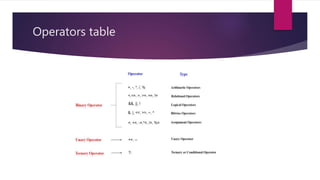
Operators table
Truth table
What is IF Logic?
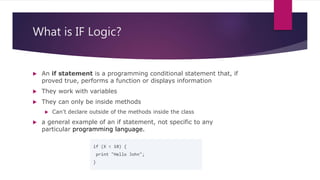
 An if statement is a programming conditional statement that, if
proved true, performs a function or displays information
 They work with variables
 They can only be inside methods
 Can’t declare outside of the methods inside the class
 a general example of an if statement, not specific to any
particular programming language.
Challenge!
Name some IF conditions on
video games?
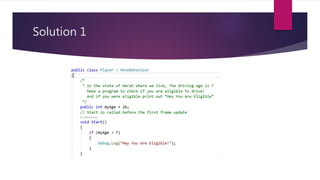
Problem
 In the state of Herat where we live, The driving age is 7
 Make a program to check if you are eligible to drive!
 And if you were eligible print out “Hey You Are Eligible”
Solution 1
Solution 2
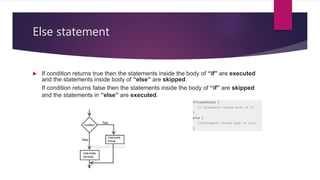
Else statement
 If condition returns true then the statements inside the body of “if” are executed
and the statements inside body of “else” are skipped.
If condition returns false then the statements inside the body of “if” are skipped
and the statements in “else” are executed.
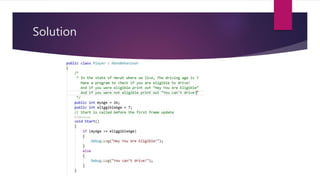
Problem
 In the state of Herat where we live, The driving age is 7
 Make a program to check if you are eligible to drive!
 And if you were eligible print out “Hey You Are Eligible”
 And If you were not eligible print out “You can’t drive”
Solution
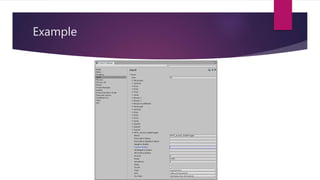
Input Manager
 The Input Manager window allows you to define input axes and their associated
actions for your Project. To access it, from Unity’s main menu, go to Edit >
Project Settings, then select the Input category.
Example
Input.GetKey
 Input.GetKey
 public static bool GetKey(string name);
 Returns true while the user holds down the key identified by name.
Input.GetKeyDown
 Input.GetKeyDown
 public static bool GetKeyDown(string name);
 Returns true while the user holds down the key identified by name.
Input.GetKeyUp
 Input.GetKeyUp
 public static bool GetKeyUp(string name);
 Returns true during the frame the user releases the key identified by name.
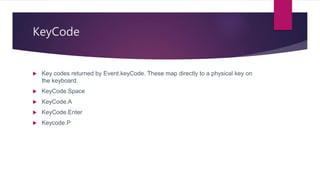
KeyCode
 Key codes returned by Event.keyCode. These map directly to a physical key on
the keyboard.
 KeyCode.Space
 KeyCode.A
 KeyCode.Enter
 Keycode.P
SerializeField
 When you want a private member to be visible in inspector we use SerializeField
//because it has the SerializeField attribute applied.
[SerializeField]
private bool hasHealthPotion = true;
Challenge!
 Make a program to collect points every time the user presses space key.
 Points should be visible only to player and also in the inspector
Challenge!
 Make a program to collect points every time the user presses space key.
 Points should be visible only to player and also in the inspector
 If points are greater than or equal to 50 then print “You are awesome”
Challenge!
 Make a program to collect points every time the user presses space key.
 Points should be visible only to player and also in the inspector
 If points are greater than or equal to 50 then print “You are awesome”
 Make a condition to print “You are awesome” only once
 Check if we have printed the text don’t do it again
Homework!
1. Write a C# Sharp program to read the age of a candidate and determine whether
it is eligible for casting his/her own vote.
1. Test Data : 21
Expected Output:
Congratulation! You are eligible for casting your vote.
2. Write a C# Sharp program to check whether a given number is positive or
negative.
1. Test Data : 14
Expected Output :
14 is a positive number
Want more resources!
 https://www.programiz.com/csharp-programming/if-else-statement
 https://www.w3schools.com/cs/cs_conditions.asp
 https://www.tutorialsteacher.com/csharp/csharp-ternary-operator
 https://www.tutorialspoint.com/csharp/csharp_operators.htm
 https://docs.microsoft.com/en-us/dotnet/csharp/language-reference/operators/
 https://docs.microsoft.com/en-us/dotnet/csharp/language-reference/keywords/if-
else

IF Else logic in c#

  • 1.
    1-IF then Logicin C# EHSAN EHRARI
  • 2.
    Operators  Operators inC # are special symbols that specify what operations to perform on operands.  C # has different operators that have different meanings depending on the data of the types of operands.  C # operators usually have one or two operands. Operators that have an operand are called unit operators.
  • 3.
  • 4.
  • 5.
    What is IFLogic?  An if statement is a programming conditional statement that, if proved true, performs a function or displays information  They work with variables  They can only be inside methods  Can’t declare outside of the methods inside the class  a general example of an if statement, not specific to any particular programming language.
  • 6.
    Challenge! Name some IFconditions on video games?
  • 7.
    Problem  In thestate of Herat where we live, The driving age is 7  Make a program to check if you are eligible to drive!  And if you were eligible print out “Hey You Are Eligible”
  • 8.
  • 9.
  • 10.
    Else statement  Ifcondition returns true then the statements inside the body of “if” are executed and the statements inside body of “else” are skipped. If condition returns false then the statements inside the body of “if” are skipped and the statements in “else” are executed.
  • 11.
    Problem  In thestate of Herat where we live, The driving age is 7  Make a program to check if you are eligible to drive!  And if you were eligible print out “Hey You Are Eligible”  And If you were not eligible print out “You can’t drive”
  • 12.
  • 13.
    Input Manager  TheInput Manager window allows you to define input axes and their associated actions for your Project. To access it, from Unity’s main menu, go to Edit > Project Settings, then select the Input category.
  • 14.
  • 15.
    Input.GetKey  Input.GetKey  publicstatic bool GetKey(string name);  Returns true while the user holds down the key identified by name.
  • 16.
    Input.GetKeyDown  Input.GetKeyDown  publicstatic bool GetKeyDown(string name);  Returns true while the user holds down the key identified by name.
  • 17.
    Input.GetKeyUp  Input.GetKeyUp  publicstatic bool GetKeyUp(string name);  Returns true during the frame the user releases the key identified by name.
  • 18.
    KeyCode  Key codesreturned by Event.keyCode. These map directly to a physical key on the keyboard.  KeyCode.Space  KeyCode.A  KeyCode.Enter  Keycode.P
  • 19.
    SerializeField  When youwant a private member to be visible in inspector we use SerializeField //because it has the SerializeField attribute applied. [SerializeField] private bool hasHealthPotion = true;
  • 20.
    Challenge!  Make aprogram to collect points every time the user presses space key.  Points should be visible only to player and also in the inspector
  • 21.
    Challenge!  Make aprogram to collect points every time the user presses space key.  Points should be visible only to player and also in the inspector  If points are greater than or equal to 50 then print “You are awesome”
  • 22.
    Challenge!  Make aprogram to collect points every time the user presses space key.  Points should be visible only to player and also in the inspector  If points are greater than or equal to 50 then print “You are awesome”  Make a condition to print “You are awesome” only once  Check if we have printed the text don’t do it again
  • 23.
    Homework! 1. Write aC# Sharp program to read the age of a candidate and determine whether it is eligible for casting his/her own vote. 1. Test Data : 21 Expected Output: Congratulation! You are eligible for casting your vote. 2. Write a C# Sharp program to check whether a given number is positive or negative. 1. Test Data : 14 Expected Output : 14 is a positive number
  • 24.
    Want more resources! https://www.programiz.com/csharp-programming/if-else-statement  https://www.w3schools.com/cs/cs_conditions.asp  https://www.tutorialsteacher.com/csharp/csharp-ternary-operator  https://www.tutorialspoint.com/csharp/csharp_operators.htm  https://docs.microsoft.com/en-us/dotnet/csharp/language-reference/operators/  https://docs.microsoft.com/en-us/dotnet/csharp/language-reference/keywords/if- else