A Case Study on the Advantages of 3D
Walkthroughs over Photo Stitching Techniques
Kieran Latham(1)
, William Hurst(1)
, Nathan Shone (1)
, Abdennour El Rhalibi (1)
, Zhigeng Pan(2)
(1) Department of Computer Science
Liverpool John Moores University
Byrom Street
Liverpool, L3 3AF, UK
K.Latham@2013.ljmu.ac.uk, {W.Hurst, N.Shone,
A.Elrhalibi}@ljmu.ac.uk
(2) Digital Media and Interaction(DMI) Research Centre,
Hangzhou Normal University,
China
zgpan@cad.zju.edu.cn
Abstract—Virtual tours and interactive walkthroughs enable a
more in-depth platform for communicating information. Many current
techniques employ the use of Photo Stitching to accomplish this.
However, over the last decade advancements in computing power and
the accessibility of game engines, meant that developing rich 3D
content for virtual tours is more possiblethan ever before. As such, the
purpose of this paper is to present a study into the advantages of
developing an interactive 3D virtual tour of student facilities, using the
Unreal Development 4 Game Engine, for educational establishments.
The project aims to demonstrate a comparison between the use of
Photo Stitching and 3D Modelled interactive walkthrough for
developing rich visual environments. The research reveals that the
approach in this paper can improve educational facilities prominence
within universities, and contains many advantages over Photo
Stitching techniques.
Index Terms— Virtual Tour, 3D Modelling, Animation,
Education
1. INTRODUCTION
The use of visualisation and virtual reality can change the way
in which we see and interpret data in the world. The methods,
in which data is interacted with, can be essential for
comprehending information. Using 3D technologies simplifies
this process.It assists with understanding environments around
us and is used as a distribution metric for sharing information
readily with others.The current uses of3D technology for data
processing are diverse; ranging from visualising big data sets to
performing computer network modelling [1]. Virtual tours are
proven to have the ability to be applied to a number of
applications outside of video games (the industry that has taken
advantage of this technology for many years) such as tourism,
education and military. The applications are varied. However,
one commonality remains. The technology can be used for the
knowledge sharing process.A complex dataset,or a real-world
environment, can be understood and shared with others, once
visualisation techniques are applied [1, 2].
The growing use of 3D technology to create walkthroughs
and digitalise museums is an example of this. Information
access and knowledge transfer are more widely accessible to
anyone with an Internet connection. Existing projects, such as
CyArk, are an illustration of this [3]. They endeavour to
preserve heritage data for future generations by developing an
online 3D library of world cultural heritage sites. Other similar
techniques are used by museums to share information with the
wider online world. Projects, such as ARTtube, which profile
European museums, digitalise collections using Photo Stitching
to provide the global scientific community with access to data
gathered [4].
However, current digital ‘walkthroughs’ extend beyond
information sharing. In recent years, various museums exploit
the use of information and communication technologies to
enhance visitor experiences. With the emergence of innovative
virtual reality devices,such as the Oculus Rift [5] and Microsoft
HoloLens [6], it could be conceived that the uses of 3D
immersive technology are receiving.
It is this feature that this paper transfers over to the creation
of a tool for the visualisation of education establishment
facilities. The techniques presented take advantage of the latest
advances in software and hardware; particularly the
accessibility ofgame engine and 3D modelling software. In this
paper, the focus is on the development of a serious game, which
can be used to educate and train individuals about 3D
environments. The aim is to create a knowledge sharing tool,
which digitalises university facilities and makes them more
accessible to the wider audience.
Virtual reality technology combines the interaction between
digital data with the users’ view of the real world. The user is
completely immersed in an artificial environment. As such,the
research presented in this paper consists of four parts. Firstly, a
literature review into a related research on serious games,
gaming in education and the use of virtual tours is presented in
Section 2. Secondly a case study into current related 3D
walkthroughs is highlighted in Section 3. Thirdly, an approach
for the production of 2D and 3D assets is put forward in Section
4. Finally, the development and evaluation of the interactive
virtual tour, within a high level game engine, which allows the
userto explore and interact with the environment, is detailed in
Section 5.
2. BACKGROUND
With the rising enthusiasm for the use of virtual reality
technologies in academia, there has been an increase in research
and case studies. In this section, related research projects are
discussed and used as guidance for the creation of the tool
presented in this paper.
A. Related Projects
The improved graphical capabilities of modern devices have
significantly increased the popularity of 3D and virtual tours.
Such solutions often offer significant benefits such as ease-of-
use, wider dissemination potential and greater accessibility.
Naturally, as a relatively infantile area, there are many
emerging and ongoing research projects.Hence, in this section,
we will examine some of the most current and pertinent
research in this area.
Bonacini [7] presents a 360-degree tour of the Paolo Orsi
Syracuse Archaeological Museum, which is based upon
Google’s Indoor Street view. It outlines the improved quality
of Google’s techniques forindoor tours,which offer significant
improvements to the quality of the virtual tour by preventing
collimation and image blurring. Similarly, Fineschi et al. [8]
propose a 3D tour of the Santa Maria Della Scala Museum
using the Oculus Rift virtual reality headset. This solution
involved the 360-degree capture of images from the museum
environment, which were combined into panoramic views and
a 3D visitor path throughout the museumwas overlaid onto this.
Gonzalez-Delgado et al. [9] also propose a virtual 3D tour,
focusing on paleontological heritage. Using geo-informatic
tools, they created virtual tours of three geo- referenced sites
supported by multi-thematic geospatialinformation. They used
various data sources such as digitalterrain data and orthophotos
data to create different thematic layers of satellite images of the
area.
A project aimed at University tours is that proposed by
Cosido et al. [10] whereby they created a prototype virtual geo-
referenced tour with high precision positioning and geometry
of objects and buildings. They utilize photogrammetry
(obtaining measurements from images) and differential GPS
data to obtain highly accurate three- dimensional measurements
and coordinates. Their motivation behind the work is to allow
access to artefacts held in non- public locations and build a
digitized archive so that in the eventuality of a building being
damaged, it can be accurately reconstructed.
The work by Noordin et al. [11] bears some resemblance to
the direction of the work outlined in this paper. They propose a
3D walkthrough virtual tourism application that can combine
both 3D modelling and marker based augmented reality to
overlay virtual 3D elements within the real environment.
There are also other elements of ongoing supplementary
research, such as that by Zhang et al. [12], which is looking at
using big data analytics to construct virtual tour schemas using
image clustering of popular tour photos. There is also
ongoing research examining the different ways in which to
provide improved user experiences, for example, the work by
Alletto et al. investigates the use of wearable cameras to
provide a first person perspective [13]. Additionally, studies
like those conducted by Chen and Mo [14] demonstrate the
wide-ranging use of 3D tour solutions. In their study, they
evaluate the use of a 3D tour as a training tool for new tour
guides, with promising results.
B. Digital Photo Stitching
Most of the existing virtual tour solutions found during our
literature review, involve the photographing of an environment
to produce still 2D images, which are then assembled to form a
pseudo-3D virtualised environment. This means that every part
of the environment needs to be photographed,which is a time -
consuming task. Also, it requires high levels of accuracy in the
photographs taken (e.g. positioning and height) to ensure
smooth transitioning between images, without blurring or
distortion. Although 2D images can provide a perfectly
adequate virtual tour, they have a number of inherent
limitations. Firstly, they lack a sense of realism, in that you
cannot sense perspective, depth, texture and often scale, which
can detract from the user experience and immersion into the
environment. Secondly, the level of interactivity available in
such approaches is often limited (such as clickable hotspotsand
modal boxes); hence, there is a need to provide extended
interactive capabilities (e.g. ability to rotate artefacts through
360 degrees). Finally, exhibits and tourist attractions are often
revised or restructured to ensure a continually engaging
experience. However, this can cause problems when it comes to
updating the virtual tours, as the whole environment will need
to be re- photographed and re-processed.
C. Digital Content Creation and Tools
There are many types of digital content creation tools which
provide different methods of creating digital content and
application. The tools can be divided into 2D, 3D, game engines
and multimedia development platform, and some of the
common digital creation content tools, in particular 3D tools,
Flash, Unity 3D and UE4 are introduced below.
3D Tools - Digital content creation tools for 3D include
Autodesk3D Studio Max, Cinema 4D and AutodeskMaya for
3D modelling, animation and rendering. The tools are used to
create 3D meshes as well as animations in 3D space. They are
also used to render graphics and animations. Autodesk
Mudbox, ZBrush and the free tool Blender are common tools
for sculpting 3D meshes as well as texture painting. There are
specialist tools for texture creation and texture.
Flash – Flash is a powerful tool that enables the creation and
animation of videos, games, websites and applications that can
combine all of these together. Multimedia is at the heart of
Flash meaning it is encouraged that many different types of
media are combined into one application. The multimedia
application can then be enhanced with the use of ActionScript;
coding to make objects animate or convert
images into a game. Collision detection, camera control,
navigation handlers, interactive buttons, material loaders and
geometry loaders are just some of the features that will be
utilized in the Virtual Tour when loaded into Flash.
Away 3D / Flare3D – These APIs are a Real-Time 3D engine
for Flash. They support animation, camera, lighting, Level of
Details (LOD) and a range of other features seen in
conventional3D graphic engine.A graphic engine is a software
framework which consists ofmethods that enable real-time 3D
applications to be rapidly created. Using a 3D graphic engine
means you have to use the methods in the library and feeding
them the data to render 3D environment you need.These game
engines involve 3D loaders which load the 3D content being
used for the Virtual Tour and enable them to be manipulated
using Flash ActionScript code.
Unity 3D / UE4 - As game engine these software frameworks
support the creation of video games. Their main functionalities
include a renderer for 2D and 3D graphics, collision detection,
Sound, Scripting, AI, Localization and a scene graph.
Unity provides a platform to develop games for multiple
platforms including IOS, Android, Windows, Mac, PS4, Xbox,
Oculus rift and many more, supporting development for
desktop,console,mobile, web and VR platforms. It also has real
time global illumination and physically based shader. Unity
combines both level editor, and programming languages
including C#, Boo and JavaScript to develop the application. As
a professional tool, it supports a large number of images, sound
and video formats to allow for easy importing.
UE4 is a game development tool that provides a platform to
develop games for multiple platforms including IOS, Android,
Windows, Mac, PS4, Xbox, Oculus rift and many more,
supporting development for desktop, console,mobile, web and
VR platforms. Unreal uses custom lighting, shading visual
effects and cinematic systems. UE4 also combine a variety of
tools and editors with programming using C++.
Unreal also has a feature called blueprints, which allow you
to develop game logic without using any code. It also has a
terrain and foliage tool which allows you to create large open
world environments, and then painting them with trees, grass
and other terrains. It has a simple drag and drop system that
allows the userto quickly and easily populate the virtual world.
It is also Oculus rift compatible which is exactly what we need
for the creation of this project.
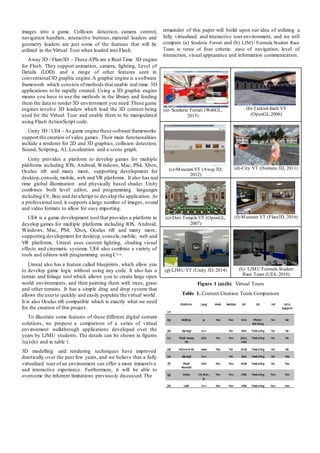
To illustrate some features of these different digital content
solutions, we propose a comparison of a series of virtual
environment walkthrough applications developed over the
years by LJMU students. The details can be shown in figures
1(a)-(h) and in table 1.
3D modelling and rendering techniques have improved
drastically over the past few years, and we believe that a fully
virtualized tour of an environment can offer a more immersive
and interactive experience. Furthermore, it will be able to
overcome the inherent limitations previously discussed.The
remainder of this paper will build upon our idea of utilizing a
fully virtualized and interactive tour environment, and we will
compare (a) Scuderia Ferrari and (h) LJMU Formula Student Race
Team in terms of four criteria: ease of navigation, level of
interaction, visual appearance and information communication.
(a)- Scuderia Ferrari (WebGL,
2015)
(b)-Turkish Bath VT
(OpenGL,2006)
(c)-MuseumVT (Away3D,
2012)
(d)-City VT (Homura 3D, 2011)
(e)-Deri TempleVT (OpenGL,
2007)
(f)-Museum VT (Flare3D, 2016)
(g)-LJMU VT (Unity 3D, 2014) (h)- LJMU Formula Student
Race Team (UE4, 2016)
Figure 1 (a)-(h). Virtual Tours
Table 1. Content Creation Tools Comparison
3. APPROACH
The virtual tour developed in this paper focuses on the Formula
Student Race Team project at Liverpool John Moores
University. It is a self-sufficient organization that operates
solely on endorsements and sponsorships from external
companies. This could include either financial aids to fund the
research and development costs or purchase parts, or even
sending in equipment and parts for the vehicle and driver. The
team also rely on the skills and talents of students to help their
cause. They have dedicated staff working on different aspects
of the vehicle, such as electrical engineers, engineers putting
together the engine and welders building the chassis.
A. Case Study
Given the nature of the virtual tour, a dedicated case study
was conducted prior to the development of the virtual tour. In
this section of the paper, the focus of the research is on one
related virtual tour project; the Scuderia Ferrari Garage tour.
“It takesyears of hard work to step foot into the Scuderia
Ferrari Garage. You can enter with one click.”
Above is the opening quote to Scuderia Ferrari Uncovered;
a 360o
degree Interactive Virtual pit-stop tour developed by
Shell. The quote itself, sums up the benefits of virtual tours
for information sharing. The Scuderia tool educates and
informs users about the amount of labour and effort that goes
into racing and maintaining the Scuderia Ferrari SF15-T
Formula 1 Race car during a race weekend. It carefully
articulates itself to disseminate the most amount of
information in a clean, minimal yet highly informative manner.
This Interactive Virtual application consists of a main hub,
where the user can explore the Ferrari pit-stop and learn more
about how it works. This is achieved by interacting with the
environments hotspots located around the map, visualized on
screen by yellow circles with pulsating rings around them.
These represent interactive hotspots and are frequent
throughout different areas of the tour. They are accessible by
clicking different parts of the map such as: doorways or floor
markings, using the google maps gizmo.
The systemalso allows users to explore the Ferrari pit-stop
and learn more about its functionality. This is, again, achieved
by interacting with the environments through use of hotspots
located around the 3D map. The UI’s Map and Progress Meter
monitor the user’s progress within the virtual tourand output it
to the screen so that the user can see where they are and how
far into the tour they are.
A drop down menu tab in the top left of the screen, enabling
the user to see how many hotspots they’ve uncovered. This
means that users are able to understand which ones have been
viewed and those that have not.The built-in map allows the user
to navigate around the virtual pit stop,jumping to different areas
of the map. This is so that the usercan see clearly identify which
hotspots have been unseen, as well as where the user is located
in the virtualenvironment.
Specifically, uncovered hotspots are red with white crosses
in, while the ones yet to be viewed are yellow with black
crosses inside. The use of colour gives the user a clear view of
how much progress has been made in the tour environment.
Overall the Scuderia virtual tour employs a variety of
techniques which are applied to our implementation. In the
following section,the approach for the systempresented in this
paper is put forward.
B. Methodology
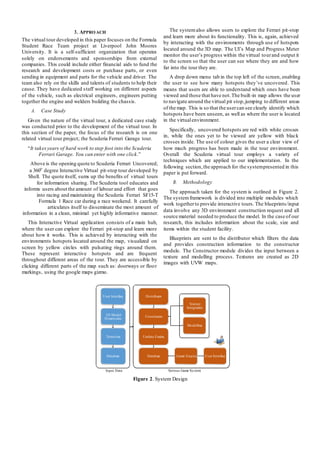
The approach taken for the system is outlined in Figure 2.
The systemframework is divided into multiple modules which
work togetherto provide interactive tours. The blueprints/input
data involve any 3D environment construction request and all
source material needed to produce the model. In the case of our
research, this includes information about the scale, size and
items within the student facility.
Blueprints are sent to the distributor which filters the data
and provides construction information to the constructor
module. The Constructor module divides the input between a
texture and modelling process. Textures are created as 2D
images with UVW maps.
Input Data Serious Game System
Figure 2. System Design
User Interface Distributor
Texture
Integration
3D Model
Dimensions
Constructor
Modelling
Texturing Update Engine
Database Database Game Engine User Interface
The models are created in 3D. The Update Engine interacts
between to the Constructor and Game Engine to update any
content within the visualisation as needed. The future ambition
of this project is to automate the process for the development
of rapid virtual environment construction. However, for the
purposes of the work presented in this paper, each of these
stages was completed individually. The various development
stages are presented in the following section.
4. DEVELOPMENT
The development process involved, first of all, understanding
the game world being developed.
A. The Game World
The game world is a 3D environment built in Unreal Engine
4.10, consisting of 3D objects modelled by hand imported as
static meshes. The objects are then scaled and placed
accordingly, in order to create a highly accurate resemblance to
the Formula Student Race Team Workshop Facility. As such,
the process involves planning the following steps.
 World Layout: The layout is based heavily on the Formula
Student Race Team Workshop,as such object position and
locations, with constant on site visits to the workshop to
ensure all objects and texture are presented and positioned
correctly in the game world.
 Game Character: The player takes control of the game
camera, which is essentially the player character, as the
player role is simply that of a person playing the game with
the intention of learning, therefore there’s not much need
for a player character besides a camera.
 Single Player Mode: In its current iteration, the LJMU
Formula Student Interactive Virtual Tour consists of a
single player game mode, where the player can explore and
interact with a recreated environment, as evident in the
gameplay that gives the userthe ability to do these things.
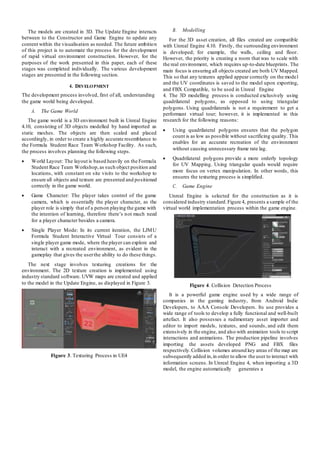
The next stage involves texturing creations for the
environment. The 2D texture creation is implemented using
industry standard software. UVW maps are created and applied
to the model in the Update Engine, as displayed in Figure 3.
Figure 3. Texturing Process in UE4
B. Modelling
For the 3D asset creation, all files created are compatible
with Unreal Engine 4.10. Firstly, the surrounding environment
is developed; for example, the walls, ceiling and floor.
However, the priority is creating a room that was to scale with
the real environment, which requires up-to-date blueprints. The
main focus is ensuring all objects created are both UV Mapped.
This so that any textures applied appear correctly on the model
and the UV coordinates is saved to the model upon exporting,
and FBX Compatible, to be used in Unreal Engine
4. The 3D modelling process is conducted exclusively using
quadrilateral polygons, as opposed to using triangular
polygons. Using quadrilaterals is not a requirement to get a
performant virtual tour; however, it is implemented in this
research for the following reasons:
 Using quadrilateral polygons ensures that the polygon
count is as low as possible without sacrificing quality. This
enables for an accurate recreation of the environment
without causing unnecessary frame rate lag.
 Quadrilateral polygons provide a more orderly topology
for UV Mapping. Using triangular quads would require
more focus on vertex manipulation. In other words, this
ensures the texturing process is simplified.
C. Game Engine
Unreal Engine is selected for the construction as it is
considered industry standard.Figure 4, presents a sample of the
virtual world implementation process within the game engine.
Figure 4. Collision Detection Process
It is a powerful game engine used by a wide range of
companies in the gaming industry, from Android Indie
Developers, to AAA Console Developers. Its use provides a
wide range of tools to develop a fully functional and well-built
artefact. It also possesses a rudimentary asset importer and
editor to import models, textures, and sounds, and edit them
extensively in the engine, and also with animation tools to script
interactions and animations. The production pipeline involves
importing the assets developed PNG and FBX files
respectively.Collision volumes around key areas of the map are
subsequently added in,in order to allow the user to interact with
information screens. In Unreal Engine 4, when importing a 3D
model, the engine automatically generates a
convex collision map for the object that prevents the player, or
certain object from passing through.
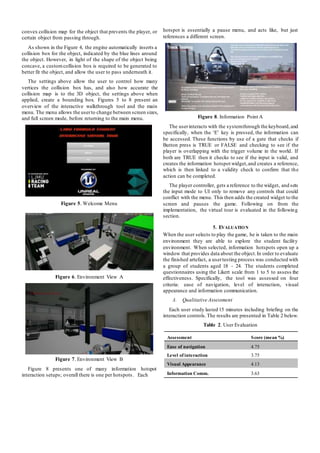
As shown in the Figure 4, the engine automatically inserts a
collision box for the object, indicated by the blue lines around
the object. However, in light of the shape of the object being
concave, a customcollision box is required to be generated to
better fit the object, and allow the user to pass underneath it.
The settings above allow the user to control how many
vertices the collision box has, and also how accurate the
collision map is to the 3D object, the settings above when
applied, create a bounding box. Figures 5 to 8 present an
overview of the interactive walkthrough tool and the main
menu. The menu allows the userto change between screen sizes,
and full screen mode, before returning to the main menu.
Figure 5. Welcome Menu
Figure 6. Environment View A
hotspot is essentially a pause menu, and acts like, but just
references a different screen.
Figure 8. Information Point A
The userinteracts with the systemthrough the keyboard,and
specifically, when the ‘E’ key is pressed, the information can
be accessed. These functions by use of a gate that checks if
Button press is TRUE or FALSE and checking to see if the
player is overlapping with the trigger volume in the world. If
both are TRUE then it checks to see if the input is valid, and
creates the information hotspot widget,and creates a reference,
which is then linked to a validity check to confirm that the
action can be completed.
The player controller, gets a reference to the widget, and sets
the input mode to UI only to remove any controls that could
conflict with the menu. This then adds the created widget to the
screen and pauses the game. Following on from the
implementation, the virtual tour is evaluated in the following
section.
5. EVALUATION
When the user selects to play the game, he is taken to the main
environment they are able to explore the student facility
environment. When selected, information hotspots open up a
window that provides data about the object.In order to evaluate
the finished artefact, a usertesting process was conducted with
a group of students aged 18 - 24. The students completed
questionnaires using the Likert scale from 1 to 5 to assess the
effectiveness. Specifically, the tool was assessed on four
criteria: ease of navigation, level of interaction, visual
appearance and information communication.
A. Qualitative Assessment
Each user study lasted 15 minutes including briefing on the
interaction controls.The results are presented in Table 2 below.
Figure 7. Environment View B
Figure 8 presents one of many information hotspot
interaction setups; overall there is one per hotspots. Each
Table 2. User Evaluation
Assessment Score (mean %)
Ease of navigation 4.75
Level of interaction 3.75
Visual Appearance 4.13
Information Comm. 3.63
In addition to the above,the students were asked to compare
the artefact to a control model; specifically, the Scuderia Ferrari
Uncovered (SFU) presented in Section 3. An artefact
preference metric was added to each section of the
questionnaire presented above. Students were asked to select
their preference for each tool based on the fours assessment
criteria. This was a simple qualitative question, where the
students could only select one or the other. The results are
presented in Table 3 as percentage scores of the user choice.
Table 3. Artefact Comparison
The overall mean score for the userevaluation process was
4.065 (81.3%). In addition, a mean average of 68.75% of users
preferred the tool created to case study comparison for each
assessment.As the SFU was developed by a professional team
of developers,the above results are unexpected. However, SFU
virtual tour is developed by Spherical Photo Stitching
techniques.This allows for the creation of highly detailed maps
for the user to explore, along with responsive functionality.
However, Photo Stitching methods depend upon the suitably of
captured photos, which in turn restricts the approach to
photographed places and objects.The Photo Stitching approach
makes use of pre- positioned points for exploring the
environment.
Whereas, the LJMU tool was developed as a 3D graphical-
based approach, which means the content can be updated
dynamically and the interaction possibilities are higher. This
was reflected in the results, where 75% of users selected the
LJMU tool as having a higher level of interaction.
B. KLM Analysis Comparison
To complete the assessment,a KLM analysis is conducted on
four tasks:Opening Artefact from main menu, activating a close
hotspot, activating a faraway hotspot and accessing the map.
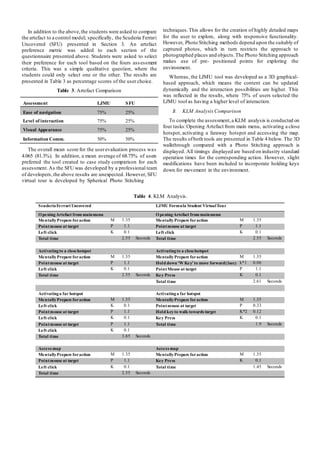
The results ofboth tools are presented in Table 4 below. The 3D
walkthrough compared with a Photo Stitching approach is
displayed. All timings displayed are based on industry standard
operation times for the corresponding action. However, slight
modifications have been included to incorporate holding keys
down for movement in the environment.
Table 4. KLM Analysis.
ScuderiaFerrari Uncovered LJMU Formula Student VirtualTour
OpeningArtefact from mainmenu OpeningArtefact from mainmenu
MentallyPrepare foraction M 1.35 MentallyPrepare foraction M 1.35
Pointmouse at target P 1.1 Pointmouse at target P 1.1
Left click K 0.1 Left click K 0.1
Total time 2.55 Seconds Total time 2.55 Seconds
Activatingto a closehotspot Activatingto a closehotspot
MentallyPrepare foraction M 1.35 MentallyPrepare foraction M 1.35
Pointmouse at target P 1.1 Hold down ‘W Key’ to move forward(1sec) k*1
sec
0.06
Left click K 0.1 PointMouse at target P 1.1
Total time 2.55 Seconds Key Press K 0.1
Total time 2.61 Seconds
Activatinga far hotspot Activatinga far hotspot
MentallyPrepare foraction M 1.35 MentallyPrepare foraction M 1.35
Left click K 0.1 Pointmouse at target P 0.33
Pointmouse at target P 1.1 Hold keyto walk towards target K*2
sec
0.12
Left click K 0.1 Key Press K 0.1
Pointmouse at target P 1.1 Total time 1.9 Seconds
Left click K 0.1
Total time 3.85 Seconds
Access map Access map
MentallyPrepare foraction M 1.35 MentallyPrepare foraction M 1.35
Pointmouse at target P 1.1 Key Press K 0.1
Left click K 0.1 Total time 1.45 Seconds
Total time 2.55 Seconds
Assessment LJMU SFU
Ease of navigation 75% 25%
Level of interaction 75% 25%
Visual Appearance 75% 25%
Information Comm. 50% 50%
Table 5. KLM Analysis.
SFU Total OperationTime 11.5 3D Tool Total Operation Time 8.51
Average task time 2.875 Average task time 2.1275
Table 5 displays the overall mean average task time for the
SFU Photo Sketch environment compared to the LJMU 3D
walkthrough. Using Table 4 as a reference point, it is possible
to calculate and compare individual tasks. For example,
accessing activating a close hotspot, the calculations are as
follows:
more detail, and the controller will provide a more
ergonomic method of control for the users.
Acknowledgments: The last author’s research work is
supported by national projects with grant no: 61332017
and 2015BAK04B00.
𝑆𝐹𝑈 = M + 𝑃 +K
LJM 𝑈 = M + (K∗ 𝑛)+ K
Scuderia Ferrari Uncovered is more efficient by 0.06
seconds. This due to a modified calculation within LJMU
Virtual Tour which calculates key press by the time it is held
down. Within the SFU environment, hotspots are activated by
clicking them on the screen; whereas LJMU Virtual Tour
requires the user to ‘walk’ up to themand interact.
Activating a far hotspot is calculated as follows:
𝑆𝐹𝑈 = M + K + P + K + P + K
LJMU = M + (P * n) + (K * n) + K
In this case, the LJMU 3D walkthrough is more efficient by
a 1.95 margin. This is due to users having to click and drag the
screen multiple times in Scuderia to be able to interact with a
hotspot.Within the 3Dmodelled environment, the useronly has
to walk over for an interaction. Overall, the total task times in
seconds for the artefacts were: 11.5 for Scuderia, and 8.51 for
LJMU, which average times being 2.875 and 2.1275
respectively.
6. CONCLUSIONAND FUTURE WORK
Specific considerations for the advancement of this research
include the following:
 Console Support: One fact I discovered through testing,
was that a majority of users had access to a gaming
console,as well as a PC, the issue with PC is that each PC
is different hardware wise, and has differing responses to
my application, whereas a console version would work on
any console,and can reach more people effectively, so this
is an area of interest.
 Online Multiplayer: As the student facility is a team
project, the virtual touris intended for use at open days and
fresher fairs. Therefore, the first consideration is that it will
be incorporated into an online mode for users to group up
and explore, with assigned moderators in-game to help
inform and enhance the experience of the user.
 Racing Sim: Due to the nature of the team, and the
development made on the simulator by researchers, it is
possible to create a 3D simulation based on the actual car,
which could be imported into Unreal Engine, and create a
racing mini-game to demonstrate driver training.
 Controller and VR support: Both these aspects are
considered for a future implementation process. The use of
VR will allow users to look around in depth, taking in
REFERENCES
[1] S. Okajima., & Y. Okada, Treecube 3D-ViSOM: Combinational
Visualization Tool for Browsing3DMultimedia Data,11thInternational
Conference on Information Visualization, IV '07, pp 40- 45, 2007
[2] H. Xu., W. Yu., L. Wei., N. Zhang., et al., An interactive system for
heterogeneous 3D volumetric data visualization, 5th International
Conference on Computer Science and Education (ICCSE), pp 24-27,
2010
[3] D. Walsh, WorldHeritage in Google Earth: 3D Models Across the Globe,
Available at [http://www.cyark.org/news/world-heritage-in- google-
earth-3d-models-across-the-globe], Accessed, June 2016
[4] Arttube, Videos About Art and Design, Available at
[http://www.arttube.nl/en?gclid=CKG3hufqvc0CFcsp0wodCGgMxQ],
Accessed June 2016
[5] W. Woodard.,& S. Sukittanon., Interactive virtual buildingwalkthrough
using Oculus Rift andMicrosoft Kinect, SoutheastCon, pp 1-3, 2015
[6] L. Avila., &M. Bailey.,Augment Your Reality, IEEEComputerGraphics
and Applications (Volume:36, Issue: 1), pp 6-7, 2016.
[7] Bonacini, E., The Paolo Orsi Syracuse Archaeological Museum pilot
project, in 2015 11th International Conference on Signal-image
technology & Internet-based Systems, Bangkok, Thailand, 2015
[8] Fineschi, A. & Pozzebon,A., A 3D Virtual Tour ofthe SantaMariaDella
Scala Museum Complex in Siena, Italy, basedon the use of Oculus Rift
HMD, in 2015 International Conference on3D Imaging(IC3D), Liege,
2015
[9] Gonzalez-Delgado, J. A., Martinez-Grana, A. M., Civis, J., Sierro, F. J.,
Goy, J. L., Dabrio, C. J., Ruiz, F.,Gonzalez-Regalado,M/ l/ & Abad, M.,
Virtual 3D tour of the Neogene paleontological heritage of Huelva
(Guadalquivir Basin, Spain), EnvironEarthSci, vol.73,no.8, pp. 4609-
4618, 2014.
[10] Cosido, O.,Teran,L.,Lopez, O. R.,Sarachaga, M.,Campi, M., Catuogno,
R., Gutierrez, N. G. & Latorre, E. M., 3D Tour through University
Spaces for the Management andDisseminationof the Cultural Heritage
of the UniversityofCantabria, in 2015Digital Heritage, Granada,2015.
[11] Noordin,M.,Ismail, I. &Yahya, M., Virtual Tourism Application through
3D Walkthrough: Flor De La Mar, in 7th International Conference on
Information Technology (ICIT), Seville, 2015.
[12] Zhang, D., Zheng, R. & Yang, G., Image Clusters Based3D Virtual Tour
Schema, in 5th International Conference on Software Engineering and
Service Science (ICSESS), Beijing, 2014.
[13] Alletto, S., Abati, D., Serra, G. & Cucchiara, R., ExploringArchitectural
Details Through a Wearable Egocentric Vision Device, Sensors, vol.
16, no. 2, 2016
[14] Chen, F, & Mo, H., Users’ Perspectives onandLearningEffectiveness of
Tour-Guide Training Courses With 3D Tourist Sites, Journal of
Teachingin Travel & Tourism, vol. 13, no. 4, pp. 374-390, 2013.
[15] C. Silenzi., Software Engineering in Ferrari F1, 37th IEEE International
Conference on Software Engineering, vol. 1, pp 1, 2015

ICVRV_161[170]

  • 1.
    A Case Studyon the Advantages of 3D Walkthroughs over Photo Stitching Techniques Kieran Latham(1) , William Hurst(1) , Nathan Shone (1) , Abdennour El Rhalibi (1) , Zhigeng Pan(2) (1) Department of Computer Science Liverpool John Moores University Byrom Street Liverpool, L3 3AF, UK K.Latham@2013.ljmu.ac.uk, {W.Hurst, N.Shone, A.Elrhalibi}@ljmu.ac.uk (2) Digital Media and Interaction(DMI) Research Centre, Hangzhou Normal University, China zgpan@cad.zju.edu.cn Abstract—Virtual tours and interactive walkthroughs enable a more in-depth platform for communicating information. Many current techniques employ the use of Photo Stitching to accomplish this. However, over the last decade advancements in computing power and the accessibility of game engines, meant that developing rich 3D content for virtual tours is more possiblethan ever before. As such, the purpose of this paper is to present a study into the advantages of developing an interactive 3D virtual tour of student facilities, using the Unreal Development 4 Game Engine, for educational establishments. The project aims to demonstrate a comparison between the use of Photo Stitching and 3D Modelled interactive walkthrough for developing rich visual environments. The research reveals that the approach in this paper can improve educational facilities prominence within universities, and contains many advantages over Photo Stitching techniques. Index Terms— Virtual Tour, 3D Modelling, Animation, Education 1. INTRODUCTION The use of visualisation and virtual reality can change the way in which we see and interpret data in the world. The methods, in which data is interacted with, can be essential for comprehending information. Using 3D technologies simplifies this process.It assists with understanding environments around us and is used as a distribution metric for sharing information readily with others.The current uses of3D technology for data processing are diverse; ranging from visualising big data sets to performing computer network modelling [1]. Virtual tours are proven to have the ability to be applied to a number of applications outside of video games (the industry that has taken advantage of this technology for many years) such as tourism, education and military. The applications are varied. However, one commonality remains. The technology can be used for the knowledge sharing process.A complex dataset,or a real-world environment, can be understood and shared with others, once visualisation techniques are applied [1, 2]. The growing use of 3D technology to create walkthroughs and digitalise museums is an example of this. Information access and knowledge transfer are more widely accessible to anyone with an Internet connection. Existing projects, such as CyArk, are an illustration of this [3]. They endeavour to preserve heritage data for future generations by developing an online 3D library of world cultural heritage sites. Other similar techniques are used by museums to share information with the wider online world. Projects, such as ARTtube, which profile European museums, digitalise collections using Photo Stitching to provide the global scientific community with access to data gathered [4]. However, current digital ‘walkthroughs’ extend beyond information sharing. In recent years, various museums exploit the use of information and communication technologies to enhance visitor experiences. With the emergence of innovative virtual reality devices,such as the Oculus Rift [5] and Microsoft HoloLens [6], it could be conceived that the uses of 3D immersive technology are receiving. It is this feature that this paper transfers over to the creation of a tool for the visualisation of education establishment facilities. The techniques presented take advantage of the latest advances in software and hardware; particularly the accessibility ofgame engine and 3D modelling software. In this paper, the focus is on the development of a serious game, which can be used to educate and train individuals about 3D environments. The aim is to create a knowledge sharing tool, which digitalises university facilities and makes them more accessible to the wider audience. Virtual reality technology combines the interaction between digital data with the users’ view of the real world. The user is completely immersed in an artificial environment. As such,the research presented in this paper consists of four parts. Firstly, a literature review into a related research on serious games, gaming in education and the use of virtual tours is presented in Section 2. Secondly a case study into current related 3D walkthroughs is highlighted in Section 3. Thirdly, an approach for the production of 2D and 3D assets is put forward in Section 4. Finally, the development and evaluation of the interactive virtual tour, within a high level game engine, which allows the userto explore and interact with the environment, is detailed in Section 5.
  • 2.
    2. BACKGROUND With therising enthusiasm for the use of virtual reality technologies in academia, there has been an increase in research and case studies. In this section, related research projects are discussed and used as guidance for the creation of the tool presented in this paper. A. Related Projects The improved graphical capabilities of modern devices have significantly increased the popularity of 3D and virtual tours. Such solutions often offer significant benefits such as ease-of- use, wider dissemination potential and greater accessibility. Naturally, as a relatively infantile area, there are many emerging and ongoing research projects.Hence, in this section, we will examine some of the most current and pertinent research in this area. Bonacini [7] presents a 360-degree tour of the Paolo Orsi Syracuse Archaeological Museum, which is based upon Google’s Indoor Street view. It outlines the improved quality of Google’s techniques forindoor tours,which offer significant improvements to the quality of the virtual tour by preventing collimation and image blurring. Similarly, Fineschi et al. [8] propose a 3D tour of the Santa Maria Della Scala Museum using the Oculus Rift virtual reality headset. This solution involved the 360-degree capture of images from the museum environment, which were combined into panoramic views and a 3D visitor path throughout the museumwas overlaid onto this. Gonzalez-Delgado et al. [9] also propose a virtual 3D tour, focusing on paleontological heritage. Using geo-informatic tools, they created virtual tours of three geo- referenced sites supported by multi-thematic geospatialinformation. They used various data sources such as digitalterrain data and orthophotos data to create different thematic layers of satellite images of the area. A project aimed at University tours is that proposed by Cosido et al. [10] whereby they created a prototype virtual geo- referenced tour with high precision positioning and geometry of objects and buildings. They utilize photogrammetry (obtaining measurements from images) and differential GPS data to obtain highly accurate three- dimensional measurements and coordinates. Their motivation behind the work is to allow access to artefacts held in non- public locations and build a digitized archive so that in the eventuality of a building being damaged, it can be accurately reconstructed. The work by Noordin et al. [11] bears some resemblance to the direction of the work outlined in this paper. They propose a 3D walkthrough virtual tourism application that can combine both 3D modelling and marker based augmented reality to overlay virtual 3D elements within the real environment. There are also other elements of ongoing supplementary research, such as that by Zhang et al. [12], which is looking at using big data analytics to construct virtual tour schemas using image clustering of popular tour photos. There is also ongoing research examining the different ways in which to provide improved user experiences, for example, the work by Alletto et al. investigates the use of wearable cameras to provide a first person perspective [13]. Additionally, studies like those conducted by Chen and Mo [14] demonstrate the wide-ranging use of 3D tour solutions. In their study, they evaluate the use of a 3D tour as a training tool for new tour guides, with promising results. B. Digital Photo Stitching Most of the existing virtual tour solutions found during our literature review, involve the photographing of an environment to produce still 2D images, which are then assembled to form a pseudo-3D virtualised environment. This means that every part of the environment needs to be photographed,which is a time - consuming task. Also, it requires high levels of accuracy in the photographs taken (e.g. positioning and height) to ensure smooth transitioning between images, without blurring or distortion. Although 2D images can provide a perfectly adequate virtual tour, they have a number of inherent limitations. Firstly, they lack a sense of realism, in that you cannot sense perspective, depth, texture and often scale, which can detract from the user experience and immersion into the environment. Secondly, the level of interactivity available in such approaches is often limited (such as clickable hotspotsand modal boxes); hence, there is a need to provide extended interactive capabilities (e.g. ability to rotate artefacts through 360 degrees). Finally, exhibits and tourist attractions are often revised or restructured to ensure a continually engaging experience. However, this can cause problems when it comes to updating the virtual tours, as the whole environment will need to be re- photographed and re-processed. C. Digital Content Creation and Tools There are many types of digital content creation tools which provide different methods of creating digital content and application. The tools can be divided into 2D, 3D, game engines and multimedia development platform, and some of the common digital creation content tools, in particular 3D tools, Flash, Unity 3D and UE4 are introduced below. 3D Tools - Digital content creation tools for 3D include Autodesk3D Studio Max, Cinema 4D and AutodeskMaya for 3D modelling, animation and rendering. The tools are used to create 3D meshes as well as animations in 3D space. They are also used to render graphics and animations. Autodesk Mudbox, ZBrush and the free tool Blender are common tools for sculpting 3D meshes as well as texture painting. There are specialist tools for texture creation and texture. Flash – Flash is a powerful tool that enables the creation and animation of videos, games, websites and applications that can combine all of these together. Multimedia is at the heart of Flash meaning it is encouraged that many different types of media are combined into one application. The multimedia application can then be enhanced with the use of ActionScript; coding to make objects animate or convert
  • 3.
    images into agame. Collision detection, camera control, navigation handlers, interactive buttons, material loaders and geometry loaders are just some of the features that will be utilized in the Virtual Tour when loaded into Flash. Away 3D / Flare3D – These APIs are a Real-Time 3D engine for Flash. They support animation, camera, lighting, Level of Details (LOD) and a range of other features seen in conventional3D graphic engine.A graphic engine is a software framework which consists ofmethods that enable real-time 3D applications to be rapidly created. Using a 3D graphic engine means you have to use the methods in the library and feeding them the data to render 3D environment you need.These game engines involve 3D loaders which load the 3D content being used for the Virtual Tour and enable them to be manipulated using Flash ActionScript code. Unity 3D / UE4 - As game engine these software frameworks support the creation of video games. Their main functionalities include a renderer for 2D and 3D graphics, collision detection, Sound, Scripting, AI, Localization and a scene graph. Unity provides a platform to develop games for multiple platforms including IOS, Android, Windows, Mac, PS4, Xbox, Oculus rift and many more, supporting development for desktop,console,mobile, web and VR platforms. It also has real time global illumination and physically based shader. Unity combines both level editor, and programming languages including C#, Boo and JavaScript to develop the application. As a professional tool, it supports a large number of images, sound and video formats to allow for easy importing. UE4 is a game development tool that provides a platform to develop games for multiple platforms including IOS, Android, Windows, Mac, PS4, Xbox, Oculus rift and many more, supporting development for desktop, console,mobile, web and VR platforms. Unreal uses custom lighting, shading visual effects and cinematic systems. UE4 also combine a variety of tools and editors with programming using C++. Unreal also has a feature called blueprints, which allow you to develop game logic without using any code. It also has a terrain and foliage tool which allows you to create large open world environments, and then painting them with trees, grass and other terrains. It has a simple drag and drop system that allows the userto quickly and easily populate the virtual world. It is also Oculus rift compatible which is exactly what we need for the creation of this project. To illustrate some features of these different digital content solutions, we propose a comparison of a series of virtual environment walkthrough applications developed over the years by LJMU students. The details can be shown in figures 1(a)-(h) and in table 1. 3D modelling and rendering techniques have improved drastically over the past few years, and we believe that a fully virtualized tour of an environment can offer a more immersive and interactive experience. Furthermore, it will be able to overcome the inherent limitations previously discussed.The remainder of this paper will build upon our idea of utilizing a fully virtualized and interactive tour environment, and we will compare (a) Scuderia Ferrari and (h) LJMU Formula Student Race Team in terms of four criteria: ease of navigation, level of interaction, visual appearance and information communication. (a)- Scuderia Ferrari (WebGL, 2015) (b)-Turkish Bath VT (OpenGL,2006) (c)-MuseumVT (Away3D, 2012) (d)-City VT (Homura 3D, 2011) (e)-Deri TempleVT (OpenGL, 2007) (f)-Museum VT (Flare3D, 2016) (g)-LJMU VT (Unity 3D, 2014) (h)- LJMU Formula Student Race Team (UE4, 2016) Figure 1 (a)-(h). Virtual Tours Table 1. Content Creation Tools Comparison
  • 4.
    3. APPROACH The virtualtour developed in this paper focuses on the Formula Student Race Team project at Liverpool John Moores University. It is a self-sufficient organization that operates solely on endorsements and sponsorships from external companies. This could include either financial aids to fund the research and development costs or purchase parts, or even sending in equipment and parts for the vehicle and driver. The team also rely on the skills and talents of students to help their cause. They have dedicated staff working on different aspects of the vehicle, such as electrical engineers, engineers putting together the engine and welders building the chassis. A. Case Study Given the nature of the virtual tour, a dedicated case study was conducted prior to the development of the virtual tour. In this section of the paper, the focus of the research is on one related virtual tour project; the Scuderia Ferrari Garage tour. “It takesyears of hard work to step foot into the Scuderia Ferrari Garage. You can enter with one click.” Above is the opening quote to Scuderia Ferrari Uncovered; a 360o degree Interactive Virtual pit-stop tour developed by Shell. The quote itself, sums up the benefits of virtual tours for information sharing. The Scuderia tool educates and informs users about the amount of labour and effort that goes into racing and maintaining the Scuderia Ferrari SF15-T Formula 1 Race car during a race weekend. It carefully articulates itself to disseminate the most amount of information in a clean, minimal yet highly informative manner. This Interactive Virtual application consists of a main hub, where the user can explore the Ferrari pit-stop and learn more about how it works. This is achieved by interacting with the environments hotspots located around the map, visualized on screen by yellow circles with pulsating rings around them. These represent interactive hotspots and are frequent throughout different areas of the tour. They are accessible by clicking different parts of the map such as: doorways or floor markings, using the google maps gizmo. The systemalso allows users to explore the Ferrari pit-stop and learn more about its functionality. This is, again, achieved by interacting with the environments through use of hotspots located around the 3D map. The UI’s Map and Progress Meter monitor the user’s progress within the virtual tourand output it to the screen so that the user can see where they are and how far into the tour they are. A drop down menu tab in the top left of the screen, enabling the user to see how many hotspots they’ve uncovered. This means that users are able to understand which ones have been viewed and those that have not.The built-in map allows the user to navigate around the virtual pit stop,jumping to different areas of the map. This is so that the usercan see clearly identify which hotspots have been unseen, as well as where the user is located in the virtualenvironment. Specifically, uncovered hotspots are red with white crosses in, while the ones yet to be viewed are yellow with black crosses inside. The use of colour gives the user a clear view of how much progress has been made in the tour environment. Overall the Scuderia virtual tour employs a variety of techniques which are applied to our implementation. In the following section,the approach for the systempresented in this paper is put forward. B. Methodology The approach taken for the system is outlined in Figure 2. The systemframework is divided into multiple modules which work togetherto provide interactive tours. The blueprints/input data involve any 3D environment construction request and all source material needed to produce the model. In the case of our research, this includes information about the scale, size and items within the student facility. Blueprints are sent to the distributor which filters the data and provides construction information to the constructor module. The Constructor module divides the input between a texture and modelling process. Textures are created as 2D images with UVW maps. Input Data Serious Game System Figure 2. System Design User Interface Distributor Texture Integration 3D Model Dimensions Constructor Modelling Texturing Update Engine Database Database Game Engine User Interface
  • 5.
    The models arecreated in 3D. The Update Engine interacts between to the Constructor and Game Engine to update any content within the visualisation as needed. The future ambition of this project is to automate the process for the development of rapid virtual environment construction. However, for the purposes of the work presented in this paper, each of these stages was completed individually. The various development stages are presented in the following section. 4. DEVELOPMENT The development process involved, first of all, understanding the game world being developed. A. The Game World The game world is a 3D environment built in Unreal Engine 4.10, consisting of 3D objects modelled by hand imported as static meshes. The objects are then scaled and placed accordingly, in order to create a highly accurate resemblance to the Formula Student Race Team Workshop Facility. As such, the process involves planning the following steps.  World Layout: The layout is based heavily on the Formula Student Race Team Workshop,as such object position and locations, with constant on site visits to the workshop to ensure all objects and texture are presented and positioned correctly in the game world.  Game Character: The player takes control of the game camera, which is essentially the player character, as the player role is simply that of a person playing the game with the intention of learning, therefore there’s not much need for a player character besides a camera.  Single Player Mode: In its current iteration, the LJMU Formula Student Interactive Virtual Tour consists of a single player game mode, where the player can explore and interact with a recreated environment, as evident in the gameplay that gives the userthe ability to do these things. The next stage involves texturing creations for the environment. The 2D texture creation is implemented using industry standard software. UVW maps are created and applied to the model in the Update Engine, as displayed in Figure 3. Figure 3. Texturing Process in UE4 B. Modelling For the 3D asset creation, all files created are compatible with Unreal Engine 4.10. Firstly, the surrounding environment is developed; for example, the walls, ceiling and floor. However, the priority is creating a room that was to scale with the real environment, which requires up-to-date blueprints. The main focus is ensuring all objects created are both UV Mapped. This so that any textures applied appear correctly on the model and the UV coordinates is saved to the model upon exporting, and FBX Compatible, to be used in Unreal Engine 4. The 3D modelling process is conducted exclusively using quadrilateral polygons, as opposed to using triangular polygons. Using quadrilaterals is not a requirement to get a performant virtual tour; however, it is implemented in this research for the following reasons:  Using quadrilateral polygons ensures that the polygon count is as low as possible without sacrificing quality. This enables for an accurate recreation of the environment without causing unnecessary frame rate lag.  Quadrilateral polygons provide a more orderly topology for UV Mapping. Using triangular quads would require more focus on vertex manipulation. In other words, this ensures the texturing process is simplified. C. Game Engine Unreal Engine is selected for the construction as it is considered industry standard.Figure 4, presents a sample of the virtual world implementation process within the game engine. Figure 4. Collision Detection Process It is a powerful game engine used by a wide range of companies in the gaming industry, from Android Indie Developers, to AAA Console Developers. Its use provides a wide range of tools to develop a fully functional and well-built artefact. It also possesses a rudimentary asset importer and editor to import models, textures, and sounds, and edit them extensively in the engine, and also with animation tools to script interactions and animations. The production pipeline involves importing the assets developed PNG and FBX files respectively.Collision volumes around key areas of the map are subsequently added in,in order to allow the user to interact with information screens. In Unreal Engine 4, when importing a 3D model, the engine automatically generates a
  • 6.
    convex collision mapfor the object that prevents the player, or certain object from passing through. As shown in the Figure 4, the engine automatically inserts a collision box for the object, indicated by the blue lines around the object. However, in light of the shape of the object being concave, a customcollision box is required to be generated to better fit the object, and allow the user to pass underneath it. The settings above allow the user to control how many vertices the collision box has, and also how accurate the collision map is to the 3D object, the settings above when applied, create a bounding box. Figures 5 to 8 present an overview of the interactive walkthrough tool and the main menu. The menu allows the userto change between screen sizes, and full screen mode, before returning to the main menu. Figure 5. Welcome Menu Figure 6. Environment View A hotspot is essentially a pause menu, and acts like, but just references a different screen. Figure 8. Information Point A The userinteracts with the systemthrough the keyboard,and specifically, when the ‘E’ key is pressed, the information can be accessed. These functions by use of a gate that checks if Button press is TRUE or FALSE and checking to see if the player is overlapping with the trigger volume in the world. If both are TRUE then it checks to see if the input is valid, and creates the information hotspot widget,and creates a reference, which is then linked to a validity check to confirm that the action can be completed. The player controller, gets a reference to the widget, and sets the input mode to UI only to remove any controls that could conflict with the menu. This then adds the created widget to the screen and pauses the game. Following on from the implementation, the virtual tour is evaluated in the following section. 5. EVALUATION When the user selects to play the game, he is taken to the main environment they are able to explore the student facility environment. When selected, information hotspots open up a window that provides data about the object.In order to evaluate the finished artefact, a usertesting process was conducted with a group of students aged 18 - 24. The students completed questionnaires using the Likert scale from 1 to 5 to assess the effectiveness. Specifically, the tool was assessed on four criteria: ease of navigation, level of interaction, visual appearance and information communication. A. Qualitative Assessment Each user study lasted 15 minutes including briefing on the interaction controls.The results are presented in Table 2 below. Figure 7. Environment View B Figure 8 presents one of many information hotspot interaction setups; overall there is one per hotspots. Each Table 2. User Evaluation Assessment Score (mean %) Ease of navigation 4.75 Level of interaction 3.75 Visual Appearance 4.13 Information Comm. 3.63
  • 7.
    In addition tothe above,the students were asked to compare the artefact to a control model; specifically, the Scuderia Ferrari Uncovered (SFU) presented in Section 3. An artefact preference metric was added to each section of the questionnaire presented above. Students were asked to select their preference for each tool based on the fours assessment criteria. This was a simple qualitative question, where the students could only select one or the other. The results are presented in Table 3 as percentage scores of the user choice. Table 3. Artefact Comparison The overall mean score for the userevaluation process was 4.065 (81.3%). In addition, a mean average of 68.75% of users preferred the tool created to case study comparison for each assessment.As the SFU was developed by a professional team of developers,the above results are unexpected. However, SFU virtual tour is developed by Spherical Photo Stitching techniques.This allows for the creation of highly detailed maps for the user to explore, along with responsive functionality. However, Photo Stitching methods depend upon the suitably of captured photos, which in turn restricts the approach to photographed places and objects.The Photo Stitching approach makes use of pre- positioned points for exploring the environment. Whereas, the LJMU tool was developed as a 3D graphical- based approach, which means the content can be updated dynamically and the interaction possibilities are higher. This was reflected in the results, where 75% of users selected the LJMU tool as having a higher level of interaction. B. KLM Analysis Comparison To complete the assessment,a KLM analysis is conducted on four tasks:Opening Artefact from main menu, activating a close hotspot, activating a faraway hotspot and accessing the map. The results ofboth tools are presented in Table 4 below. The 3D walkthrough compared with a Photo Stitching approach is displayed. All timings displayed are based on industry standard operation times for the corresponding action. However, slight modifications have been included to incorporate holding keys down for movement in the environment. Table 4. KLM Analysis. ScuderiaFerrari Uncovered LJMU Formula Student VirtualTour OpeningArtefact from mainmenu OpeningArtefact from mainmenu MentallyPrepare foraction M 1.35 MentallyPrepare foraction M 1.35 Pointmouse at target P 1.1 Pointmouse at target P 1.1 Left click K 0.1 Left click K 0.1 Total time 2.55 Seconds Total time 2.55 Seconds Activatingto a closehotspot Activatingto a closehotspot MentallyPrepare foraction M 1.35 MentallyPrepare foraction M 1.35 Pointmouse at target P 1.1 Hold down ‘W Key’ to move forward(1sec) k*1 sec 0.06 Left click K 0.1 PointMouse at target P 1.1 Total time 2.55 Seconds Key Press K 0.1 Total time 2.61 Seconds Activatinga far hotspot Activatinga far hotspot MentallyPrepare foraction M 1.35 MentallyPrepare foraction M 1.35 Left click K 0.1 Pointmouse at target P 0.33 Pointmouse at target P 1.1 Hold keyto walk towards target K*2 sec 0.12 Left click K 0.1 Key Press K 0.1 Pointmouse at target P 1.1 Total time 1.9 Seconds Left click K 0.1 Total time 3.85 Seconds Access map Access map MentallyPrepare foraction M 1.35 MentallyPrepare foraction M 1.35 Pointmouse at target P 1.1 Key Press K 0.1 Left click K 0.1 Total time 1.45 Seconds Total time 2.55 Seconds Assessment LJMU SFU Ease of navigation 75% 25% Level of interaction 75% 25% Visual Appearance 75% 25% Information Comm. 50% 50%
  • 8.
    Table 5. KLMAnalysis. SFU Total OperationTime 11.5 3D Tool Total Operation Time 8.51 Average task time 2.875 Average task time 2.1275 Table 5 displays the overall mean average task time for the SFU Photo Sketch environment compared to the LJMU 3D walkthrough. Using Table 4 as a reference point, it is possible to calculate and compare individual tasks. For example, accessing activating a close hotspot, the calculations are as follows: more detail, and the controller will provide a more ergonomic method of control for the users. Acknowledgments: The last author’s research work is supported by national projects with grant no: 61332017 and 2015BAK04B00. 𝑆𝐹𝑈 = M + 𝑃 +K LJM 𝑈 = M + (K∗ 𝑛)+ K Scuderia Ferrari Uncovered is more efficient by 0.06 seconds. This due to a modified calculation within LJMU Virtual Tour which calculates key press by the time it is held down. Within the SFU environment, hotspots are activated by clicking them on the screen; whereas LJMU Virtual Tour requires the user to ‘walk’ up to themand interact. Activating a far hotspot is calculated as follows: 𝑆𝐹𝑈 = M + K + P + K + P + K LJMU = M + (P * n) + (K * n) + K In this case, the LJMU 3D walkthrough is more efficient by a 1.95 margin. This is due to users having to click and drag the screen multiple times in Scuderia to be able to interact with a hotspot.Within the 3Dmodelled environment, the useronly has to walk over for an interaction. Overall, the total task times in seconds for the artefacts were: 11.5 for Scuderia, and 8.51 for LJMU, which average times being 2.875 and 2.1275 respectively. 6. CONCLUSIONAND FUTURE WORK Specific considerations for the advancement of this research include the following:  Console Support: One fact I discovered through testing, was that a majority of users had access to a gaming console,as well as a PC, the issue with PC is that each PC is different hardware wise, and has differing responses to my application, whereas a console version would work on any console,and can reach more people effectively, so this is an area of interest.  Online Multiplayer: As the student facility is a team project, the virtual touris intended for use at open days and fresher fairs. Therefore, the first consideration is that it will be incorporated into an online mode for users to group up and explore, with assigned moderators in-game to help inform and enhance the experience of the user.  Racing Sim: Due to the nature of the team, and the development made on the simulator by researchers, it is possible to create a 3D simulation based on the actual car, which could be imported into Unreal Engine, and create a racing mini-game to demonstrate driver training.  Controller and VR support: Both these aspects are considered for a future implementation process. The use of VR will allow users to look around in depth, taking in REFERENCES [1] S. Okajima., & Y. Okada, Treecube 3D-ViSOM: Combinational Visualization Tool for Browsing3DMultimedia Data,11thInternational Conference on Information Visualization, IV '07, pp 40- 45, 2007 [2] H. Xu., W. Yu., L. Wei., N. Zhang., et al., An interactive system for heterogeneous 3D volumetric data visualization, 5th International Conference on Computer Science and Education (ICCSE), pp 24-27, 2010 [3] D. Walsh, WorldHeritage in Google Earth: 3D Models Across the Globe, Available at [http://www.cyark.org/news/world-heritage-in- google- earth-3d-models-across-the-globe], Accessed, June 2016 [4] Arttube, Videos About Art and Design, Available at [http://www.arttube.nl/en?gclid=CKG3hufqvc0CFcsp0wodCGgMxQ], Accessed June 2016 [5] W. Woodard.,& S. Sukittanon., Interactive virtual buildingwalkthrough using Oculus Rift andMicrosoft Kinect, SoutheastCon, pp 1-3, 2015 [6] L. Avila., &M. Bailey.,Augment Your Reality, IEEEComputerGraphics and Applications (Volume:36, Issue: 1), pp 6-7, 2016. [7] Bonacini, E., The Paolo Orsi Syracuse Archaeological Museum pilot project, in 2015 11th International Conference on Signal-image technology & Internet-based Systems, Bangkok, Thailand, 2015 [8] Fineschi, A. & Pozzebon,A., A 3D Virtual Tour ofthe SantaMariaDella Scala Museum Complex in Siena, Italy, basedon the use of Oculus Rift HMD, in 2015 International Conference on3D Imaging(IC3D), Liege, 2015 [9] Gonzalez-Delgado, J. A., Martinez-Grana, A. M., Civis, J., Sierro, F. J., Goy, J. L., Dabrio, C. J., Ruiz, F.,Gonzalez-Regalado,M/ l/ & Abad, M., Virtual 3D tour of the Neogene paleontological heritage of Huelva (Guadalquivir Basin, Spain), EnvironEarthSci, vol.73,no.8, pp. 4609- 4618, 2014. [10] Cosido, O.,Teran,L.,Lopez, O. R.,Sarachaga, M.,Campi, M., Catuogno, R., Gutierrez, N. G. & Latorre, E. M., 3D Tour through University Spaces for the Management andDisseminationof the Cultural Heritage of the UniversityofCantabria, in 2015Digital Heritage, Granada,2015. [11] Noordin,M.,Ismail, I. &Yahya, M., Virtual Tourism Application through 3D Walkthrough: Flor De La Mar, in 7th International Conference on Information Technology (ICIT), Seville, 2015. [12] Zhang, D., Zheng, R. & Yang, G., Image Clusters Based3D Virtual Tour Schema, in 5th International Conference on Software Engineering and Service Science (ICSESS), Beijing, 2014. [13] Alletto, S., Abati, D., Serra, G. & Cucchiara, R., ExploringArchitectural Details Through a Wearable Egocentric Vision Device, Sensors, vol. 16, no. 2, 2016 [14] Chen, F, & Mo, H., Users’ Perspectives onandLearningEffectiveness of Tour-Guide Training Courses With 3D Tourist Sites, Journal of Teachingin Travel & Tourism, vol. 13, no. 4, pp. 374-390, 2013. [15] C. Silenzi., Software Engineering in Ferrari F1, 37th IEEE International Conference on Software Engineering, vol. 1, pp 1, 2015