www.iita.orgA member of CGIAR consortium
“ICT Security is Everyone’s
Business”
Presented by
Adeoluwa Modupe
www.iita.orgA member of CGIAR consortium
Outline
Preambles
Terms of reference
Issues Identified
Justification
www.iita.orgA member of CGIAR consortium
INTRODUCTION
What is Computer Security?
- protection
- confidentiality,
- integrity
- availability
-computing systems and the data that they store or
access.
www.iita.orgA member of CGIAR consortium
Security refers to the degree of protection against
danger, damage, loss and crime.
Can refer to physical media, financial transactions,
computer hardware, data, application, email,
information and network security.
Terms of reference
www.iita.orgA member of CGIAR consortium
Sources that call for interest
• Internet
• Exchange of information on Network
within an organization
• Files
• Server
www.iita.orgA member of CGIAR consortium
RISKS AND REMEDY
Internet sites
e.g. Social Networking sites
On-line Scams
Information Security
Personal computers
www.iita.orgA member of CGIAR consortium
Social Networking sites
Hacking
Malicious applications that are
suggested for inclusion/update
www.iita.orgA member of CGIAR consortium
Hacking
• Sites such as Facebook, Tweeter, LinkedIn,
MySpace ask users to create profiles of
themselves in order to help build links with
friends and family.
• Anyone with a link to one of your friends, or
friend friend could potentially access the
information held on your page
www.iita.orgA member of CGIAR consortium
Malicious Applications
• Don’t respond to friend request from people
that you don’t recognise
• Check applications before installing them
• Call ICT helpdesk
www.iita.orgA member of CGIAR consortium
Phishing
• Use of e-mail purporting to be from banks or other
companies such as utilities to fool people
• The e-mail generally claims to be part of security
check. The URL used in the mail disguises the true
location of the sites.
• The destination pages are designed to look like the
genuine site.
• For example First Bank or GTB
www.iita.orgA member of CGIAR consortium
Pharming
• The “Troj/BankAsh-virus” is the latest attack
which divert people visiting legitimate bank
websites to fake domain addresses owned by
criminals.
• Unlike phishing, which relies on the user
clicking on a link to a bogus websites
•
www.iita.orgA member of CGIAR consortium
On-line Scams
• Never reply to phishing emails –once
asking you to confirm your bank
details.
• Never open email from people
unknown to you.
• Personal information of your finances
must be deleted from your emails
www.iita.orgA member of CGIAR consortium
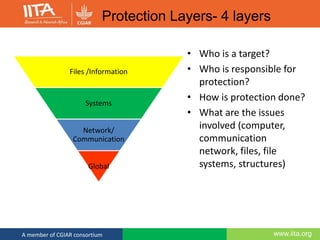
• Who is a target?
• Who is responsible for
protection?
• How is protection done?
• What are the issues
involved (computer,
communication
network, files, file
systems, structures)
Files /Information
Systems
Network/
Communication
Global
Protection Layers- 4 layers
www.iita.orgA member of CGIAR consortium
Social engineering
(Hacking the mind!)
• The hack that requires no knowledge of code.
• Social engineering is the art of manipulating/tricking
people so they give up confidential information
• Accounts for an estimated 90% of security breaches.
• Everyone is a target and be vigilantly aware of anyone
asking for personal or private information.
www.iita.orgA member of CGIAR consortium
Social Engineering (Contd.)
• Criminals can only succeed if they obtain your secret
security information such as a PIN number or
password.
• No bank will ever ask you for your full PIN or
password when identifying you over the phone or
online.
• If asked to call back the number on the back of the
card; use another phone line or wait a few minutes
before using the same phone again.
www.iita.orgA member of CGIAR consortium
Social Engineering - Can lead to Identity Theft
• WHAT IS IDENTITY THEFT?
• It occurs when someone steals your
personal information – e.g., credit card or
Personal Identification number – and uses it
fraudulently.
• When your private financial information gets
into the wrong hands, the consequences can
be devastating.
www.iita.orgA member of CGIAR consortium
How to minimize the risk of becoming a victim of
identity theft
• Practice Safe Internet Use.
• keep your anti-virus software up-to-date. Delete spam emails that
ask for personal information.
• Shop online only with secure web pages (check the bottom of your
browser for an image of a lock or look for “https” in the address
bar).
• Never send credit card numbers and other personal information
via email.
• Regularly check your credit card statements.
• Destroy Private Records
Tear up or shred credit/debit card, ATM and bank deposit
statement/receipts.
www.iita.orgA member of CGIAR consortium
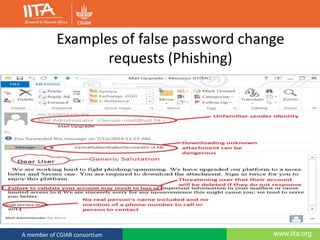
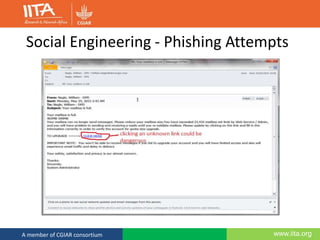
Social Engineering - Password Phishing
• Phishing is a form of social engineering that attempts to
obtain your username and password.
• Downloading unknown attachments could be dangerous
• Check the sender (trusted e.g. @cgiar.org)
• Check any web link (trusted links)
• Check hyperlink is the same as the web link
• Does the “feel” of the email seem right?
• If in doubt contact US! (Helpdesk x2255)
www.iita.orgA member of CGIAR consortium
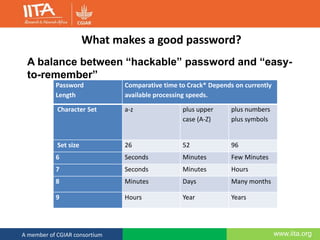
What makes a good password?
Password
Length
Comparative time to Crack* Depends on currently
available processing speeds.
Character Set a-z plus upper
case (A-Z)
plus numbers
plus symbols
Set size 26 52 96
6 Seconds Minutes Few Minutes
7 Seconds Minutes Hours
8 Minutes Days Many months
9 Hours Year Years
A balance between “hackable” password and “easy-
to-remember”
www.iita.orgA member of CGIAR consortium
Password Policy
• Change every 180 days.
• Must be at least 8 characters from at least three of
the following sets:
• Lower case letters a-z
• UPPER CASE LETTERS A-Z
• Numerics 0-9
• Special characters (!"# $%& ' *+, -./ : ;<=>?@ []^_` {|}~ )
• If you feel your password has been compromised
change it immediately.
www.iita.orgA member of CGIAR consortium
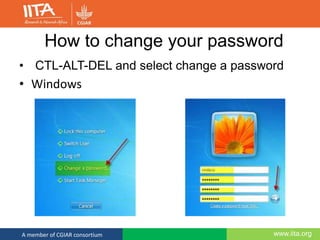
How to change your password
• CTL-ALT-DEL and select change a password
• Windows
www.iita.orgA member of CGIAR consortium
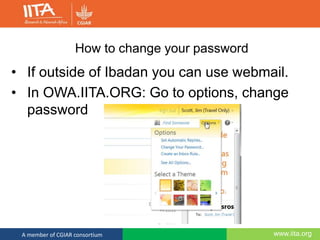
How to change your password
• If outside of Ibadan you can use webmail.
• In OWA.IITA.ORG: Go to options, change
password
www.iita.orgA member of CGIAR consortium
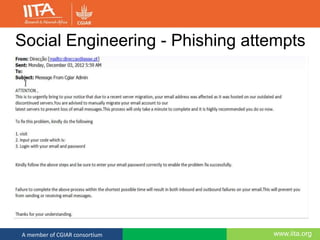
Examples of false password change
requests (Phishing)
www.iita.orgA member of CGIAR consortium
Social Engineering - Phishing Attempts
www.iita.orgA member of CGIAR consortium
Social Engineering - Phishing attempts
www.iita.orgA member of CGIAR consortium
Email – genuine examples
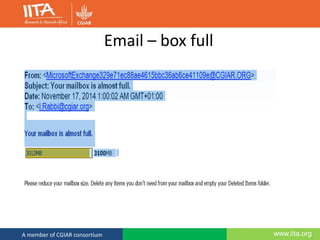
• Email box nearly full
• Quota on server full
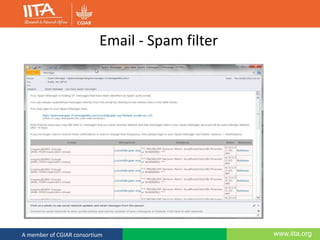
• Spam filter
• Bank update
www.iita.orgA member of CGIAR consortium
Email – box full
www.iita.orgA member of CGIAR consortium
Email - Spam filter
www.iita.orgA member of CGIAR consortium
Other security issues
• If sharing a folder specify who is allowed to
access it. Otherwise anyone can read or
possibly delete the information.
• Be careful when downloading and installing
software from the internet. Many links
especially to anti malware and anti-virus
sites are 419.
www.iita.orgA member of CGIAR consortium
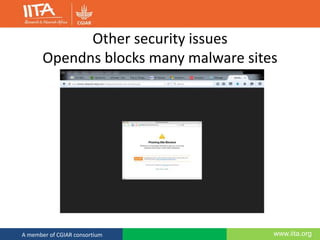
Other security issues
Opendns blocks many malware sites
www.iita.orgA member of CGIAR consortium
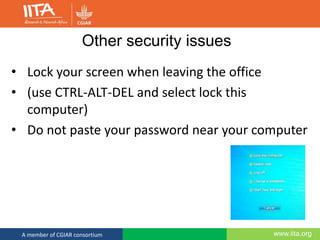
Other security issues
• Lock your screen when leaving the office
• (use CTRL-ALT-DEL and select lock this
computer)
• Do not paste your password near your computer
www.iita.orgA member of CGIAR consortium
Other security issues
• Wireless SSID broadcasts
• Be aware which wireless networks you are
connecting to, especially if carrying out bank
transactions.
www.iita.orgA member of CGIAR consortium
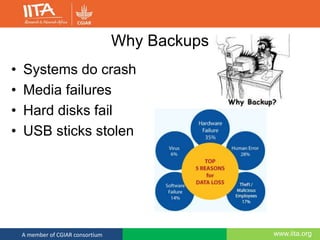
Why Backups
• Systems do crash
• Media failures
• Hard disks fail
• USB sticks stolen
www.iita.orgA member of CGIAR consortium
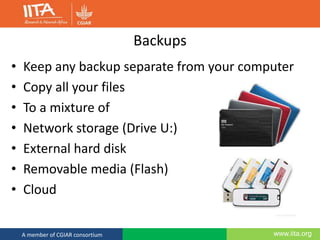
Backups
• Keep any backup separate from your computer
• Copy all your files
• To a mixture of
• Network storage (Drive U:)
• External hard disk
• Removable media (Flash)
• Cloud
www.iita.orgA member of CGIAR consortium
Cyber security: The DOs
• If unclear about any aspect of cyber security, call
helpdesk
• Change password if suspicious it may have been
compromised
• Keep antivirus and software up to date
• Comply with the institutes acceptable usage / user policy
• Beware of the risks of using unsecured(open) wireless
networks in public places
• Know that cyber security is relevant to YOU and begins
with you.
www.iita.orgA member of CGIAR consortium
Cyber security: The DON’Ts
• Don’t disclose your password to anyone
• Don’t send unauthorized bulk email (Spam)
• Don’t leave your computer unlocked when not in use
• Don’t leave hard copies of confidential information unsecured
• Don’t give unauthorized access to your system or institutes
information
www.iita.orgA member of CGIAR consortium
Summary
• Security depends on all of us
90/10 rule:
• 10% of security safeguards are technical
• 90% rely on the computer user adhering to good
computer practices
• Beware of phishing attempts
• Passwords are to be changed regularly
• Beware of clicking on untrusted web sites
• Backup, backup and backup your data!
www.iita.orgA member of CGIAR consortium
ICT Help contacts
• Helpdesk: EXT.2255
• Email:IITA-Helpdesk@cgiar.org
• Skype: IITAhelpdesk
• Office: Bld500 Rm 221 upper floor
www.iita.orgA member of CGIAR consortium
THANK YOU
Merci pour votre attention
www.iita.orgA member of CGIAR consortium
?

ICT Security is Everyone's Business

  • 1.
    www.iita.orgA member ofCGIAR consortium “ICT Security is Everyone’s Business” Presented by Adeoluwa Modupe
  • 2.
    www.iita.orgA member ofCGIAR consortium Outline Preambles Terms of reference Issues Identified Justification
  • 3.
    www.iita.orgA member ofCGIAR consortium INTRODUCTION What is Computer Security? - protection - confidentiality, - integrity - availability -computing systems and the data that they store or access.
  • 4.
    www.iita.orgA member ofCGIAR consortium Security refers to the degree of protection against danger, damage, loss and crime. Can refer to physical media, financial transactions, computer hardware, data, application, email, information and network security. Terms of reference
  • 5.
    www.iita.orgA member ofCGIAR consortium Sources that call for interest • Internet • Exchange of information on Network within an organization • Files • Server
  • 6.
    www.iita.orgA member ofCGIAR consortium RISKS AND REMEDY Internet sites e.g. Social Networking sites On-line Scams Information Security Personal computers
  • 7.
    www.iita.orgA member ofCGIAR consortium Social Networking sites Hacking Malicious applications that are suggested for inclusion/update
  • 8.
    www.iita.orgA member ofCGIAR consortium Hacking • Sites such as Facebook, Tweeter, LinkedIn, MySpace ask users to create profiles of themselves in order to help build links with friends and family. • Anyone with a link to one of your friends, or friend friend could potentially access the information held on your page
  • 9.
    www.iita.orgA member ofCGIAR consortium Malicious Applications • Don’t respond to friend request from people that you don’t recognise • Check applications before installing them • Call ICT helpdesk
  • 10.
    www.iita.orgA member ofCGIAR consortium Phishing • Use of e-mail purporting to be from banks or other companies such as utilities to fool people • The e-mail generally claims to be part of security check. The URL used in the mail disguises the true location of the sites. • The destination pages are designed to look like the genuine site. • For example First Bank or GTB
  • 11.
    www.iita.orgA member ofCGIAR consortium Pharming • The “Troj/BankAsh-virus” is the latest attack which divert people visiting legitimate bank websites to fake domain addresses owned by criminals. • Unlike phishing, which relies on the user clicking on a link to a bogus websites •
  • 12.
    www.iita.orgA member ofCGIAR consortium On-line Scams • Never reply to phishing emails –once asking you to confirm your bank details. • Never open email from people unknown to you. • Personal information of your finances must be deleted from your emails
  • 13.
    www.iita.orgA member ofCGIAR consortium • Who is a target? • Who is responsible for protection? • How is protection done? • What are the issues involved (computer, communication network, files, file systems, structures) Files /Information Systems Network/ Communication Global Protection Layers- 4 layers
  • 14.
    www.iita.orgA member ofCGIAR consortium Social engineering (Hacking the mind!) • The hack that requires no knowledge of code. • Social engineering is the art of manipulating/tricking people so they give up confidential information • Accounts for an estimated 90% of security breaches. • Everyone is a target and be vigilantly aware of anyone asking for personal or private information.
  • 15.
    www.iita.orgA member ofCGIAR consortium Social Engineering (Contd.) • Criminals can only succeed if they obtain your secret security information such as a PIN number or password. • No bank will ever ask you for your full PIN or password when identifying you over the phone or online. • If asked to call back the number on the back of the card; use another phone line or wait a few minutes before using the same phone again.
  • 16.
    www.iita.orgA member ofCGIAR consortium Social Engineering - Can lead to Identity Theft • WHAT IS IDENTITY THEFT? • It occurs when someone steals your personal information – e.g., credit card or Personal Identification number – and uses it fraudulently. • When your private financial information gets into the wrong hands, the consequences can be devastating.
  • 17.
    www.iita.orgA member ofCGIAR consortium How to minimize the risk of becoming a victim of identity theft • Practice Safe Internet Use. • keep your anti-virus software up-to-date. Delete spam emails that ask for personal information. • Shop online only with secure web pages (check the bottom of your browser for an image of a lock or look for “https” in the address bar). • Never send credit card numbers and other personal information via email. • Regularly check your credit card statements. • Destroy Private Records Tear up or shred credit/debit card, ATM and bank deposit statement/receipts.
  • 18.
    www.iita.orgA member ofCGIAR consortium Social Engineering - Password Phishing • Phishing is a form of social engineering that attempts to obtain your username and password. • Downloading unknown attachments could be dangerous • Check the sender (trusted e.g. @cgiar.org) • Check any web link (trusted links) • Check hyperlink is the same as the web link • Does the “feel” of the email seem right? • If in doubt contact US! (Helpdesk x2255)
  • 19.
    www.iita.orgA member ofCGIAR consortium What makes a good password? Password Length Comparative time to Crack* Depends on currently available processing speeds. Character Set a-z plus upper case (A-Z) plus numbers plus symbols Set size 26 52 96 6 Seconds Minutes Few Minutes 7 Seconds Minutes Hours 8 Minutes Days Many months 9 Hours Year Years A balance between “hackable” password and “easy- to-remember”
  • 20.
    www.iita.orgA member ofCGIAR consortium Password Policy • Change every 180 days. • Must be at least 8 characters from at least three of the following sets: • Lower case letters a-z • UPPER CASE LETTERS A-Z • Numerics 0-9 • Special characters (!"# $%& ' *+, -./ : ;<=>?@ []^_` {|}~ ) • If you feel your password has been compromised change it immediately.
  • 21.
    www.iita.orgA member ofCGIAR consortium How to change your password • CTL-ALT-DEL and select change a password • Windows
  • 22.
    www.iita.orgA member ofCGIAR consortium How to change your password • If outside of Ibadan you can use webmail. • In OWA.IITA.ORG: Go to options, change password
  • 23.
    www.iita.orgA member ofCGIAR consortium Examples of false password change requests (Phishing)
  • 24.
    www.iita.orgA member ofCGIAR consortium Social Engineering - Phishing Attempts
  • 25.
    www.iita.orgA member ofCGIAR consortium Social Engineering - Phishing attempts
  • 26.
    www.iita.orgA member ofCGIAR consortium Email – genuine examples • Email box nearly full • Quota on server full • Spam filter • Bank update
  • 27.
    www.iita.orgA member ofCGIAR consortium Email – box full
  • 28.
    www.iita.orgA member ofCGIAR consortium Email - Spam filter
  • 29.
    www.iita.orgA member ofCGIAR consortium Other security issues • If sharing a folder specify who is allowed to access it. Otherwise anyone can read or possibly delete the information. • Be careful when downloading and installing software from the internet. Many links especially to anti malware and anti-virus sites are 419.
  • 30.
    www.iita.orgA member ofCGIAR consortium Other security issues Opendns blocks many malware sites
  • 31.
    www.iita.orgA member ofCGIAR consortium Other security issues • Lock your screen when leaving the office • (use CTRL-ALT-DEL and select lock this computer) • Do not paste your password near your computer
  • 32.
    www.iita.orgA member ofCGIAR consortium Other security issues • Wireless SSID broadcasts • Be aware which wireless networks you are connecting to, especially if carrying out bank transactions.
  • 33.
    www.iita.orgA member ofCGIAR consortium Why Backups • Systems do crash • Media failures • Hard disks fail • USB sticks stolen
  • 34.
    www.iita.orgA member ofCGIAR consortium Backups • Keep any backup separate from your computer • Copy all your files • To a mixture of • Network storage (Drive U:) • External hard disk • Removable media (Flash) • Cloud
  • 35.
    www.iita.orgA member ofCGIAR consortium Cyber security: The DOs • If unclear about any aspect of cyber security, call helpdesk • Change password if suspicious it may have been compromised • Keep antivirus and software up to date • Comply with the institutes acceptable usage / user policy • Beware of the risks of using unsecured(open) wireless networks in public places • Know that cyber security is relevant to YOU and begins with you.
  • 36.
    www.iita.orgA member ofCGIAR consortium Cyber security: The DON’Ts • Don’t disclose your password to anyone • Don’t send unauthorized bulk email (Spam) • Don’t leave your computer unlocked when not in use • Don’t leave hard copies of confidential information unsecured • Don’t give unauthorized access to your system or institutes information
  • 37.
    www.iita.orgA member ofCGIAR consortium Summary • Security depends on all of us 90/10 rule: • 10% of security safeguards are technical • 90% rely on the computer user adhering to good computer practices • Beware of phishing attempts • Passwords are to be changed regularly • Beware of clicking on untrusted web sites • Backup, backup and backup your data!
  • 38.
    www.iita.orgA member ofCGIAR consortium ICT Help contacts • Helpdesk: EXT.2255 • Email:IITA-Helpdesk@cgiar.org • Skype: IITAhelpdesk • Office: Bld500 Rm 221 upper floor
  • 39.
    www.iita.orgA member ofCGIAR consortium THANK YOU Merci pour votre attention
  • 40.
    www.iita.orgA member ofCGIAR consortium ?

Editor's Notes

  • #20 The length of the password and the set of characters used.  A short password which is lower case only, and one which is in a dictionary can be cracked in seconds a modern PC.   If you use a complex password which is a combination of letters, (upper and lower case, A-Z, a-z), numbers (0-9) and special characters: !"# $%& '() *+, -./ : ;<=>?@ [\]^_` {|}~ then the crack time goes up dramatically: