Understanding JavaScript 
Event-Based Interactions 
Saba Alimadadi 
Sheldon Sequeira 
Ali Mesbah 
Karthik Pattabiraman
Motivation 
• JavaScript 
– Widely used, very popular 
– Event driven, dynamic, asynchronous 
• Difficult to understand the dynamic 
behavior and the control flow 
– Lower level events 
– Their interactions 
1
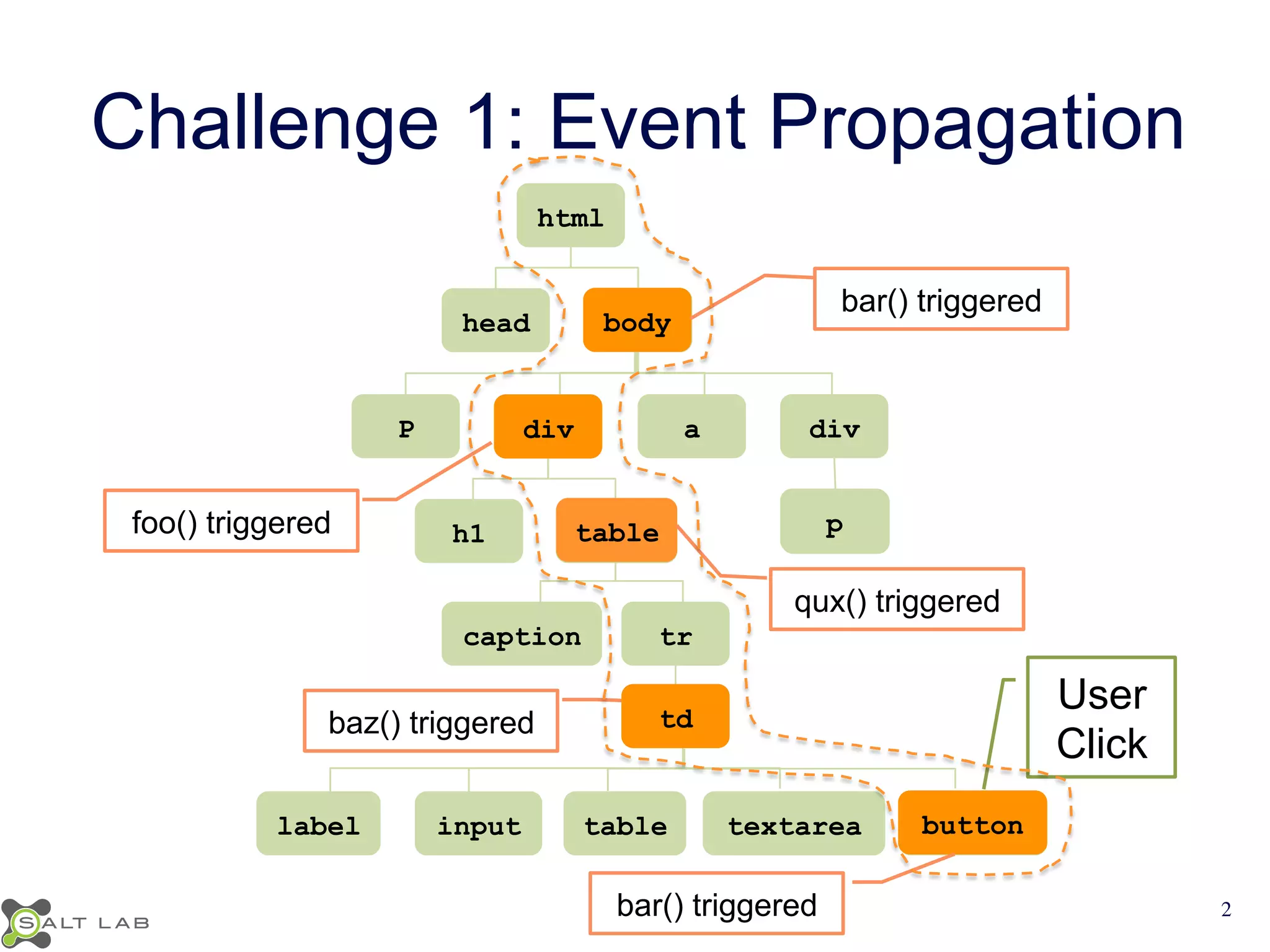
Challenge 1: Event Propagation 
html 
head P div 
a div 
h1 caption tr 
p 
qux() triggered 
label input table textarea User 
Click 
button 
bod y 
foo() triggered table 
baz() triggered 
bar() triggered 
bar() triggered 
td 
2
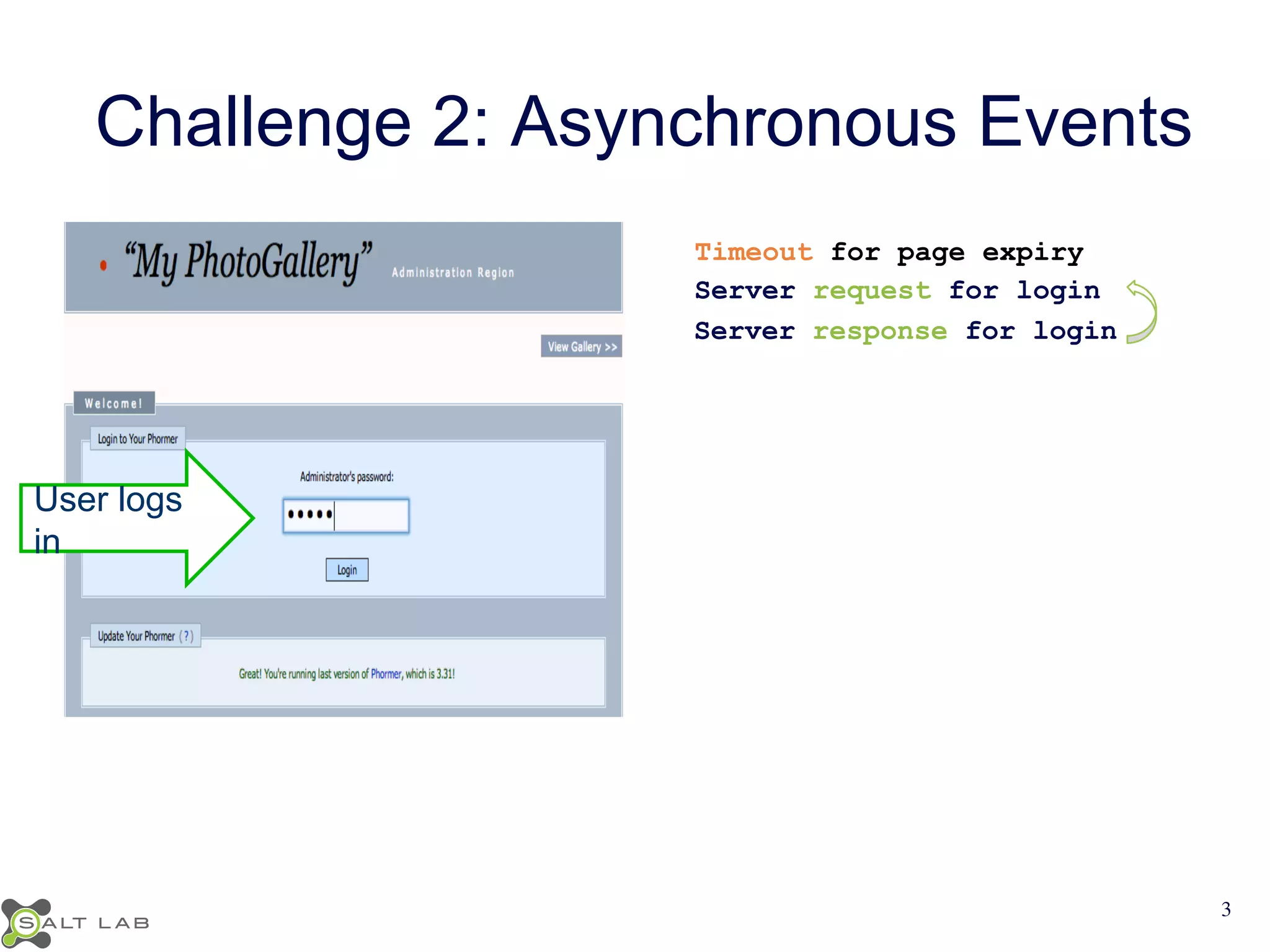
Challenge 2: Asynchronous Events 
User logs 
in 
Timeout for page expiry 
Server request for login 
Server response for login 
3
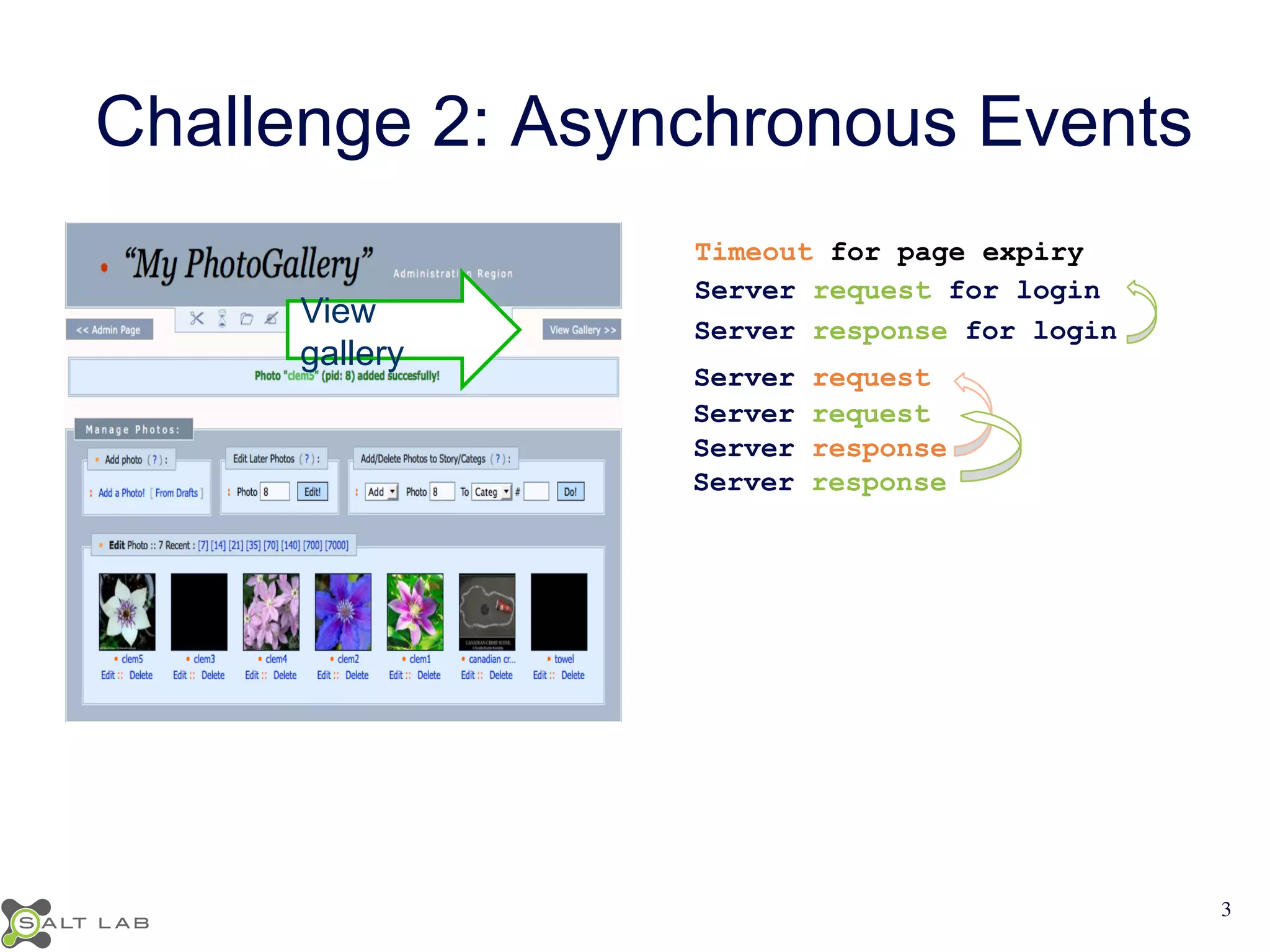
Challenge 2: Asynchronous Events 
Timeout for page expiry 
Server request for login 
Server response for login View 
gallery 
Server request 
Server request 
Server response 
Server response 
3
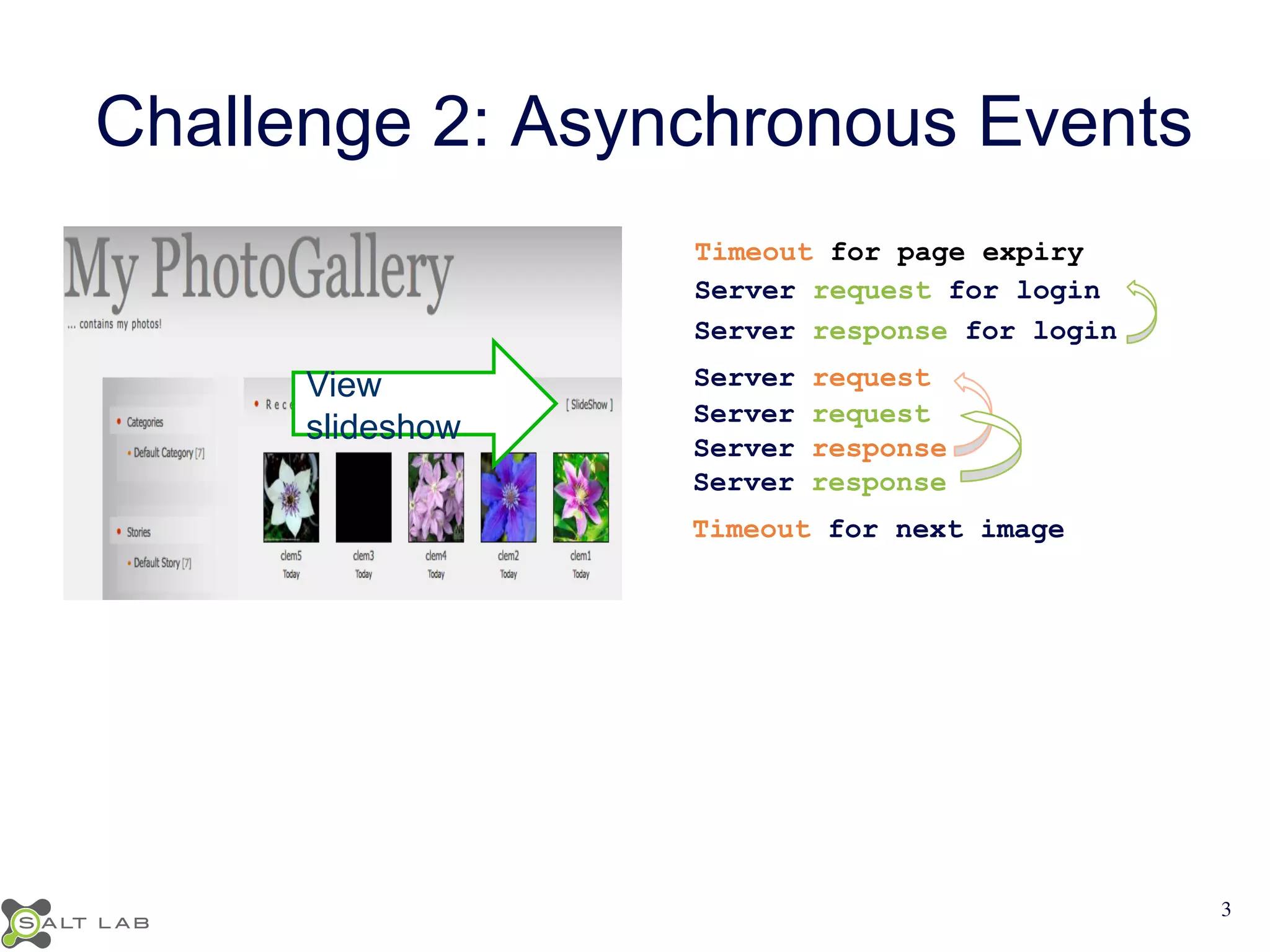
Challenge 2: Asynchronous Events 
Timeout for page expiry 
Server request for login 
Server response for login 
Server request 
Server request 
Server response 
Server response 
View 
slideshow 
Timeout for next image 
3
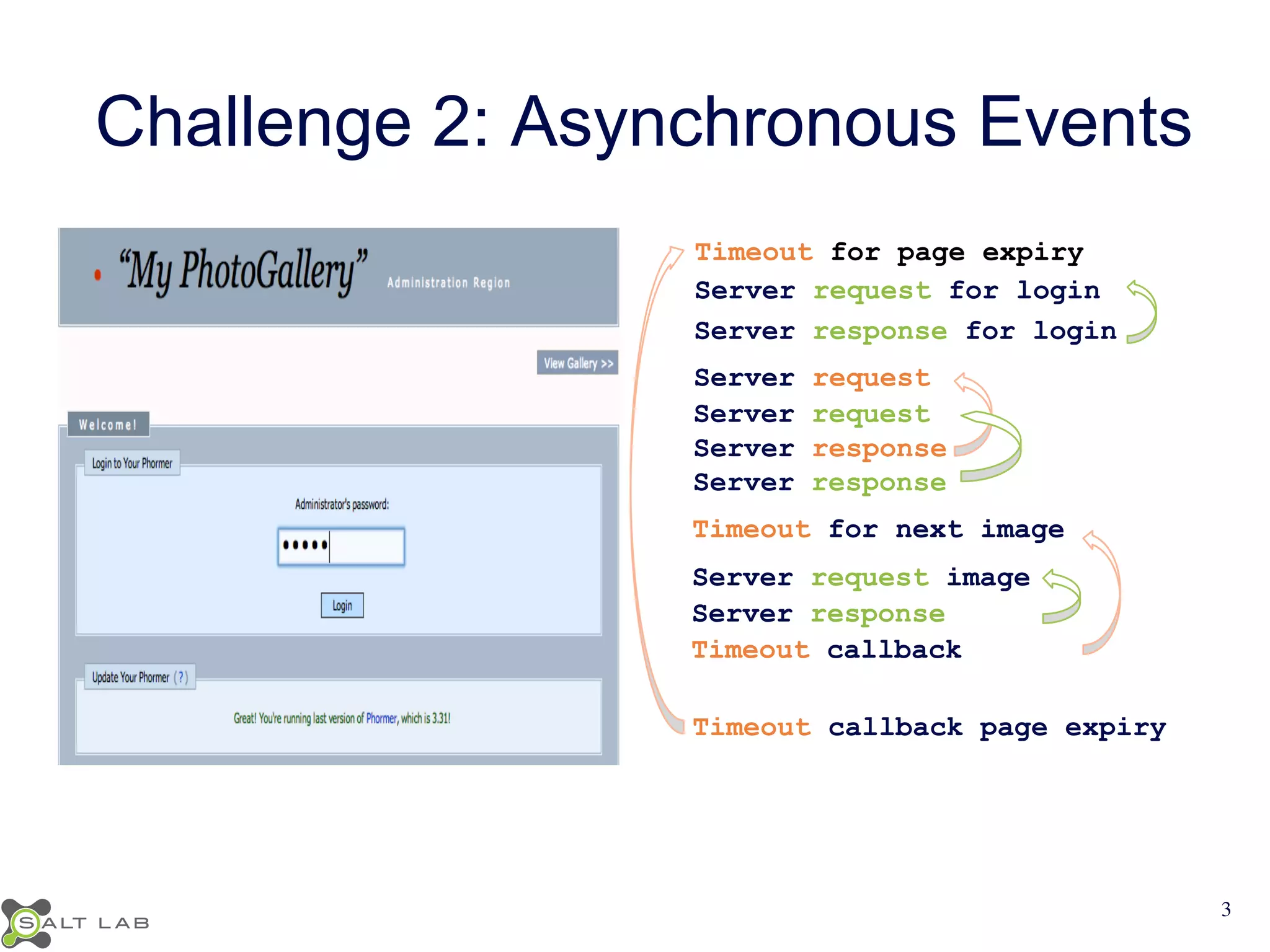
Challenge 2: Asynchronous Events 
Timeout for page expiry 
Server request for login 
Server response for login 
Server request 
Server request 
Server response 
Server response 
Timeout for next image 
Server request image 
Server response 
Timeout callback 
Timeout callback page expiry 
3
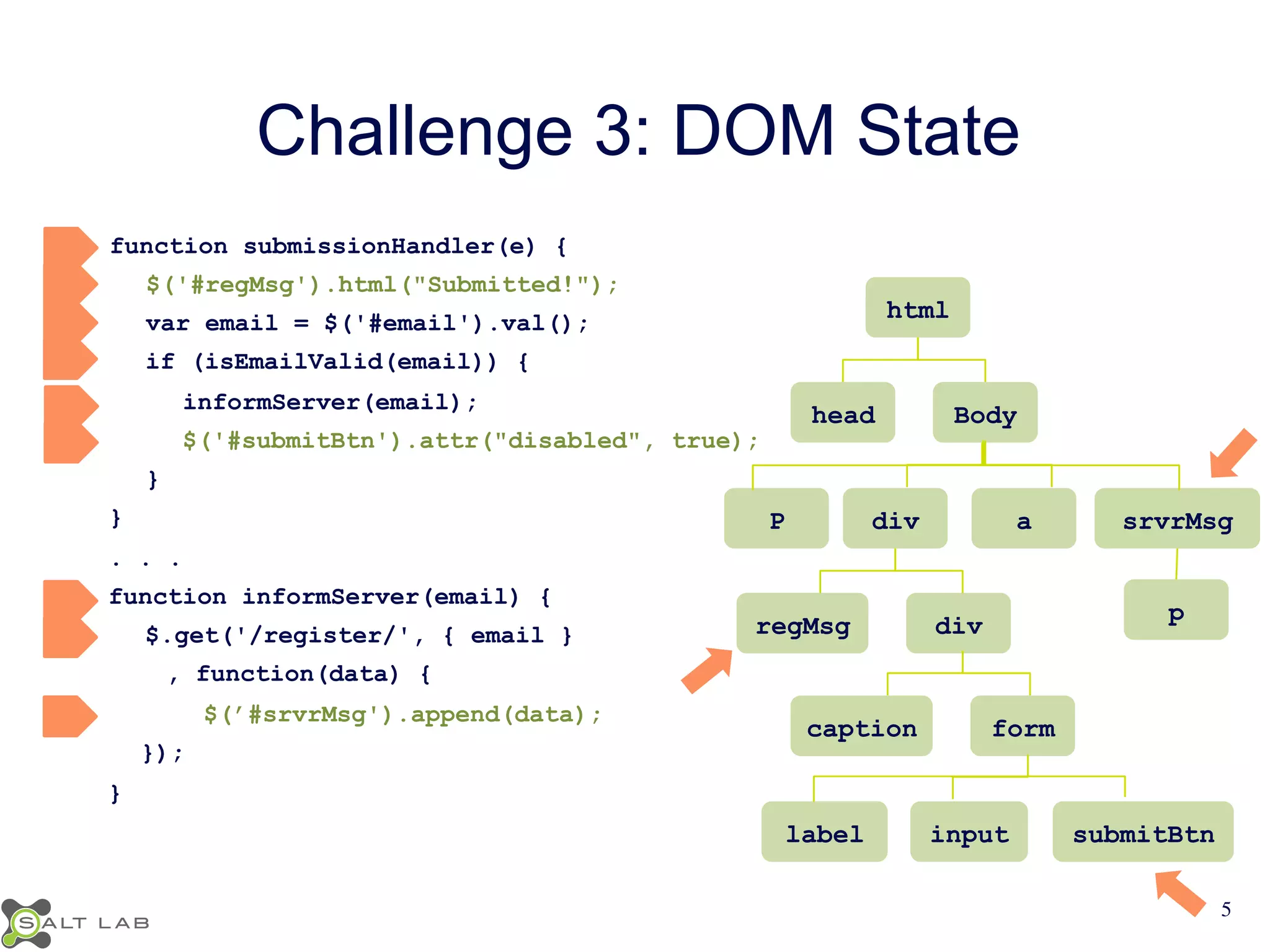
Challenge 3: DOM State 
function submissionHandler(e) { 
$('#regMsg').html("Submitted!"); 
var email = $('#email').val(); 
if (isEmailValid(email)) { 
informServer(email); 
$('#submitBtn').attr("disabled", true); 
} 
} 
. . . 
function informServer(email) { 
$.get('/register/', { email } 
, function(data) { 
$(’#srvrMsg').append(data); 
}); 
} 
html 
head Body 
P div a srvrMsg 
regMsg div 
caption form 
p 
label input submitBtn 
5
Summary of Challenges 
• Event propagation 
• Asynchronous events 
• Implications of events 
6
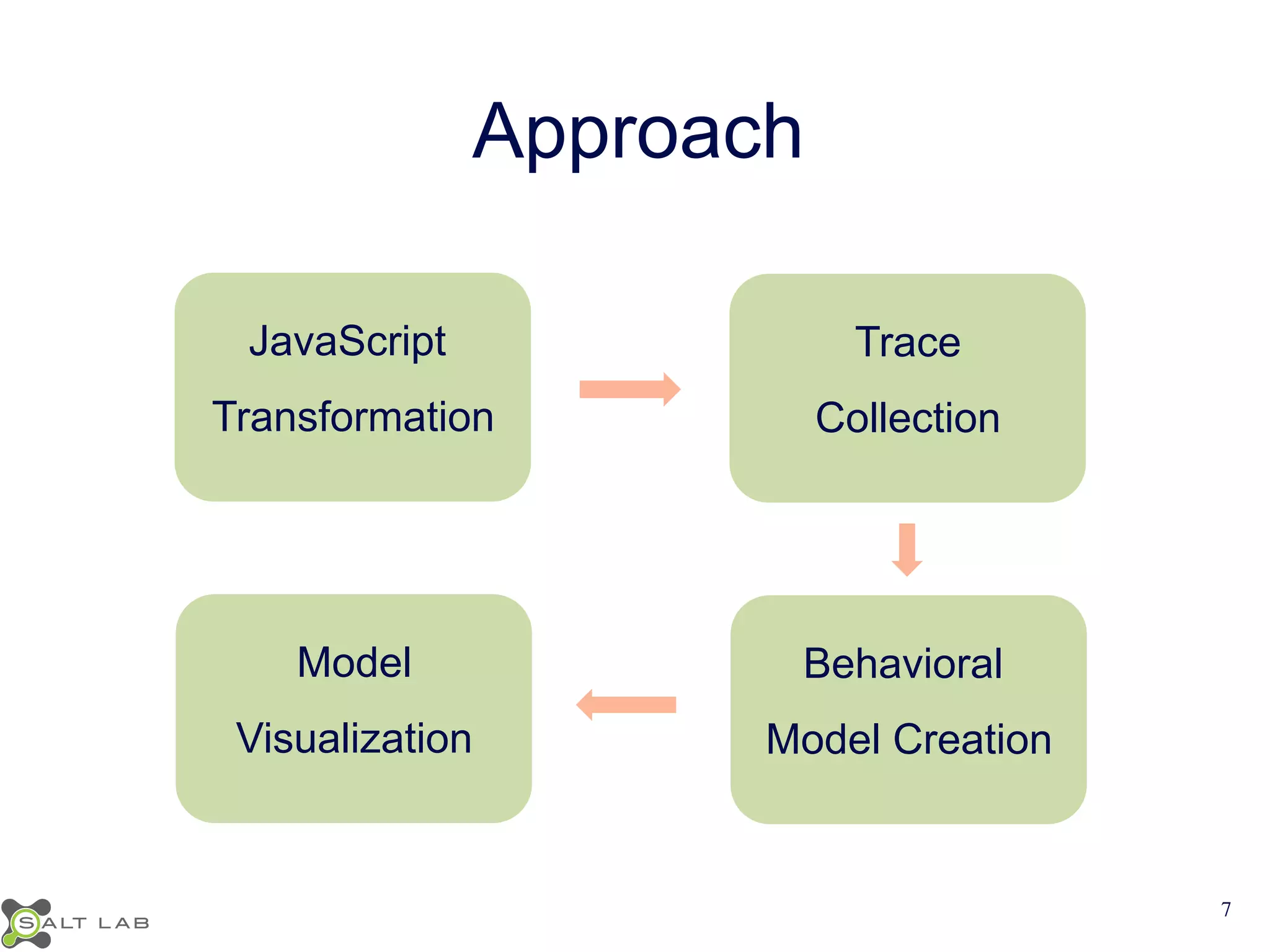
Approach 
JavaScript 
Transformation 
Trace 
Collection 
Model 
Visualization 
Behavioral 
Model Creation 
7
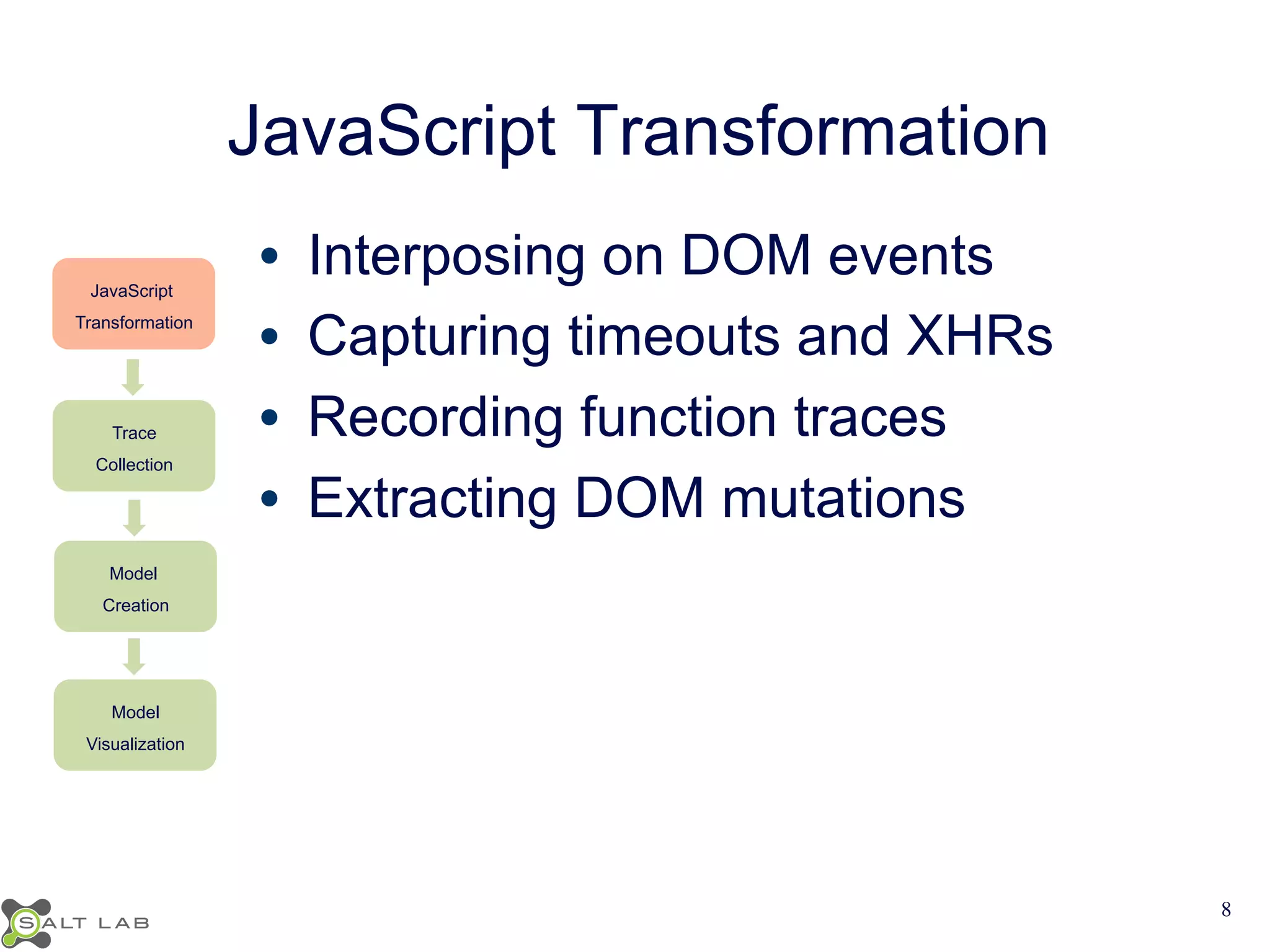
JavaScript Transformation 
• Interposing on DOM events 
• Capturing timeouts and XHRs 
• Recording function traces 
• Extracting DOM mutations 
JavaScript 
Transformation 
Trace 
Collection 
Model 
Creation 
Model 
Visualization 
8
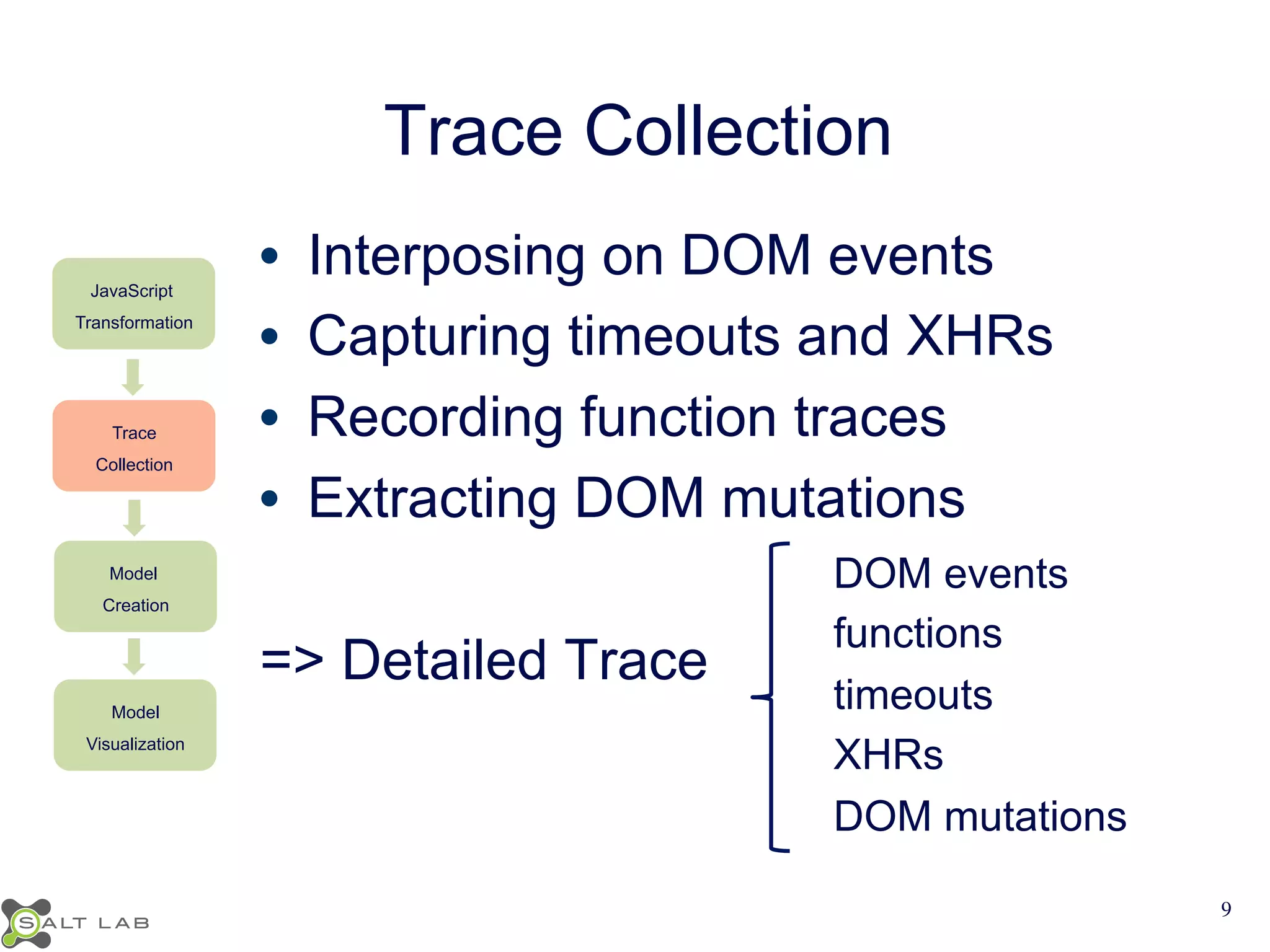
Trace Collection 
JavaScript 
Transformation 
Trace 
Collection 
Model 
Creation 
Model 
Visualization 
• Interposing on DOM events 
• Capturing timeouts and XHRs 
• Recording function traces 
• Extracting DOM mutations 
=> Detailed Trace 
DOM events 
functions 
timeouts 
XHRs 
DOM mutations 
9
Behavioral Model Creation 
JavaScript 
Transformation 
Trace 
Collection 
Model 
Creation 
Model 
Visualization 
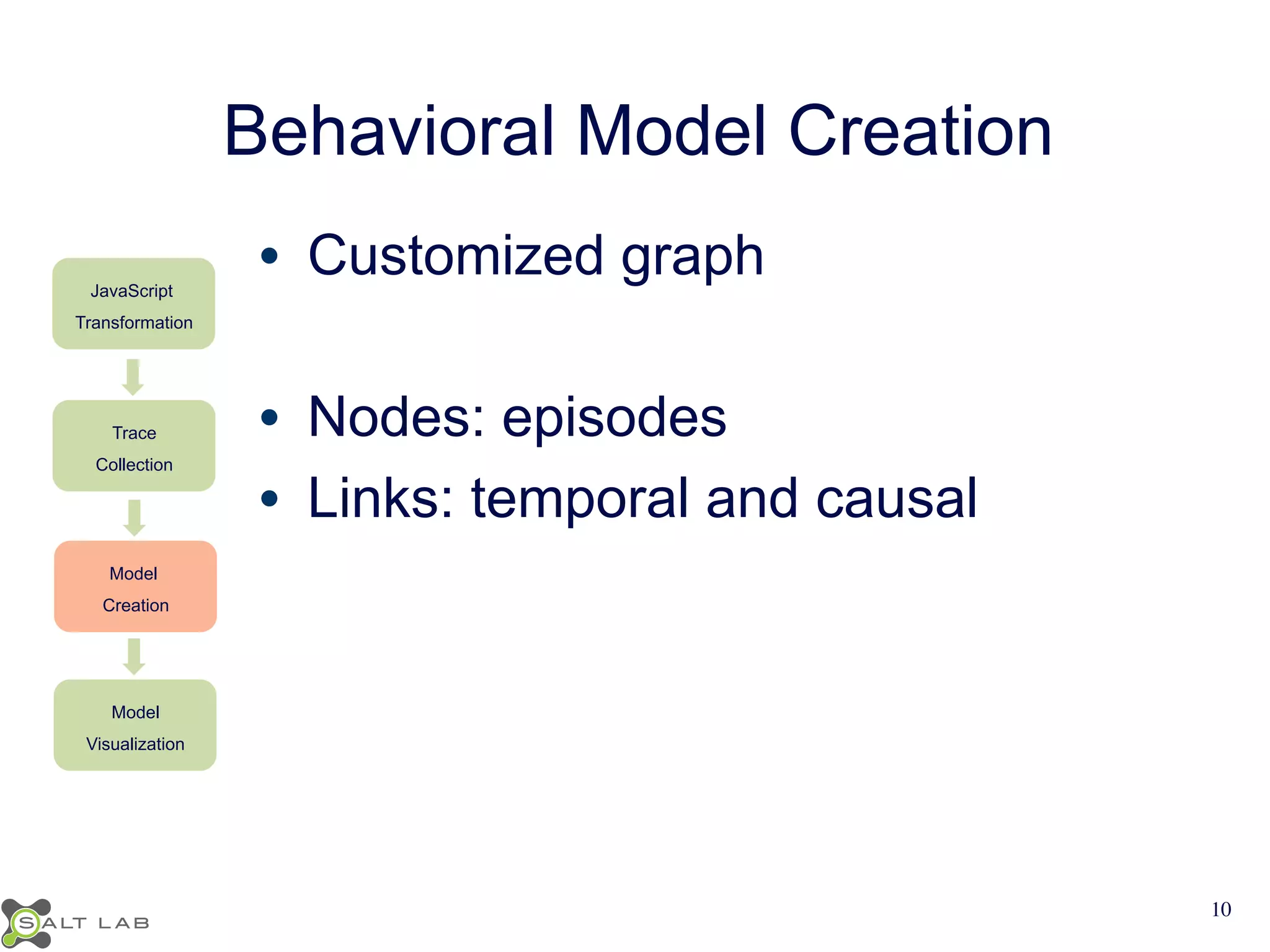
• Customized graph 
• Nodes: episodes 
• Links: temporal and causal 
10
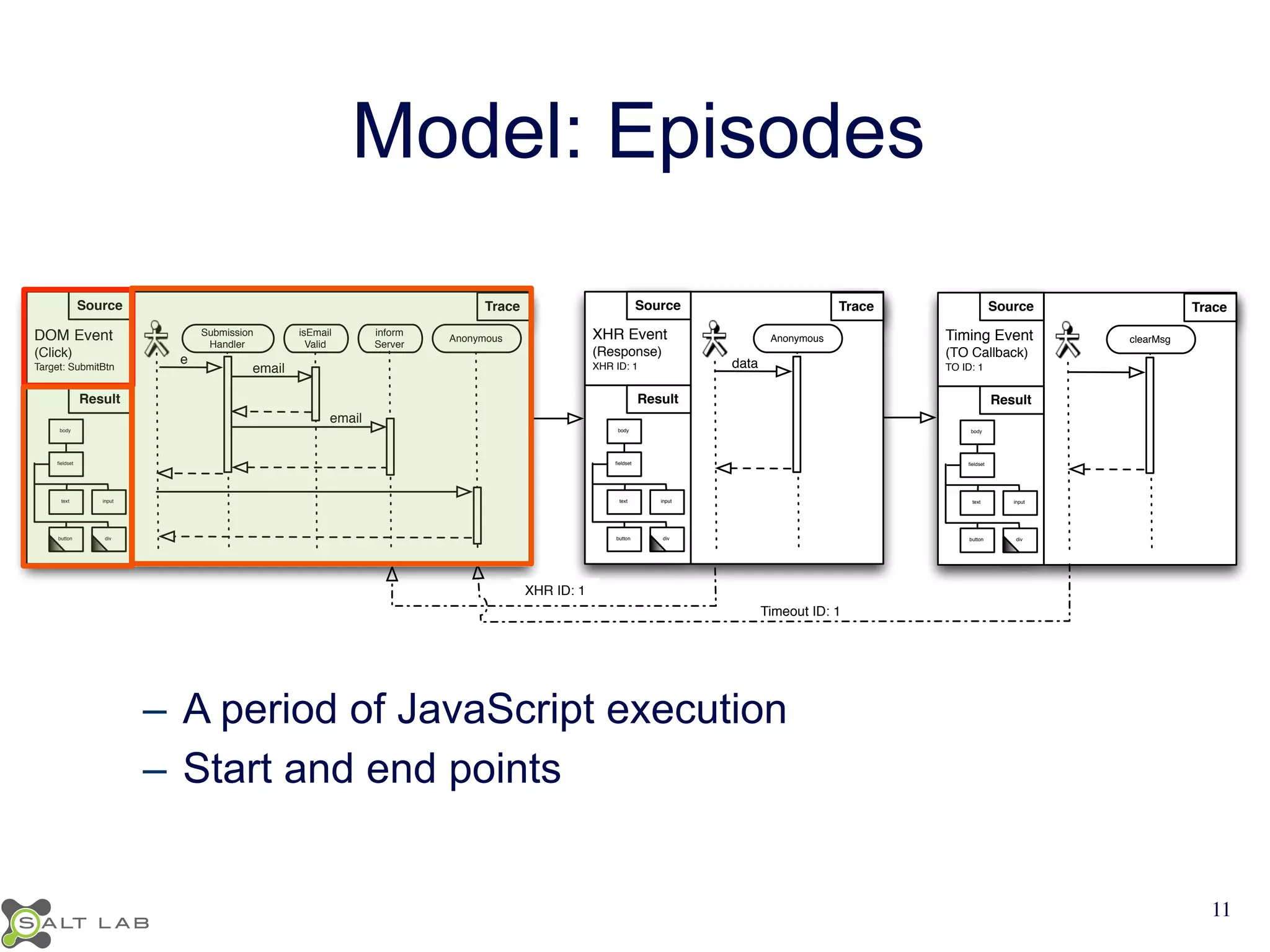
Model: Episodes 
Source Trace 
Timeout ID: 1 
XHR ID: 1 
Source 
DOM Event 
(Click) 
Target: SubmitBtn 
Result 
Trace 
body 
fieldset 
text input 
button div 
inform 
Server 
Anonymous 
e 
email 
isEmail 
Valid 
Submission 
Handler 
email 
XHR Event 
(Response) 
XHR ID: 1 
body 
fieldset 
text input 
button div 
data 
Source Trace 
Anonymous Timing Event 
(TO Callback) 
TO ID: 1 
body 
fieldset 
text input 
button div 
clearMsg 
Result Result 
– A period of JavaScript execution 
– Start and end points 
11
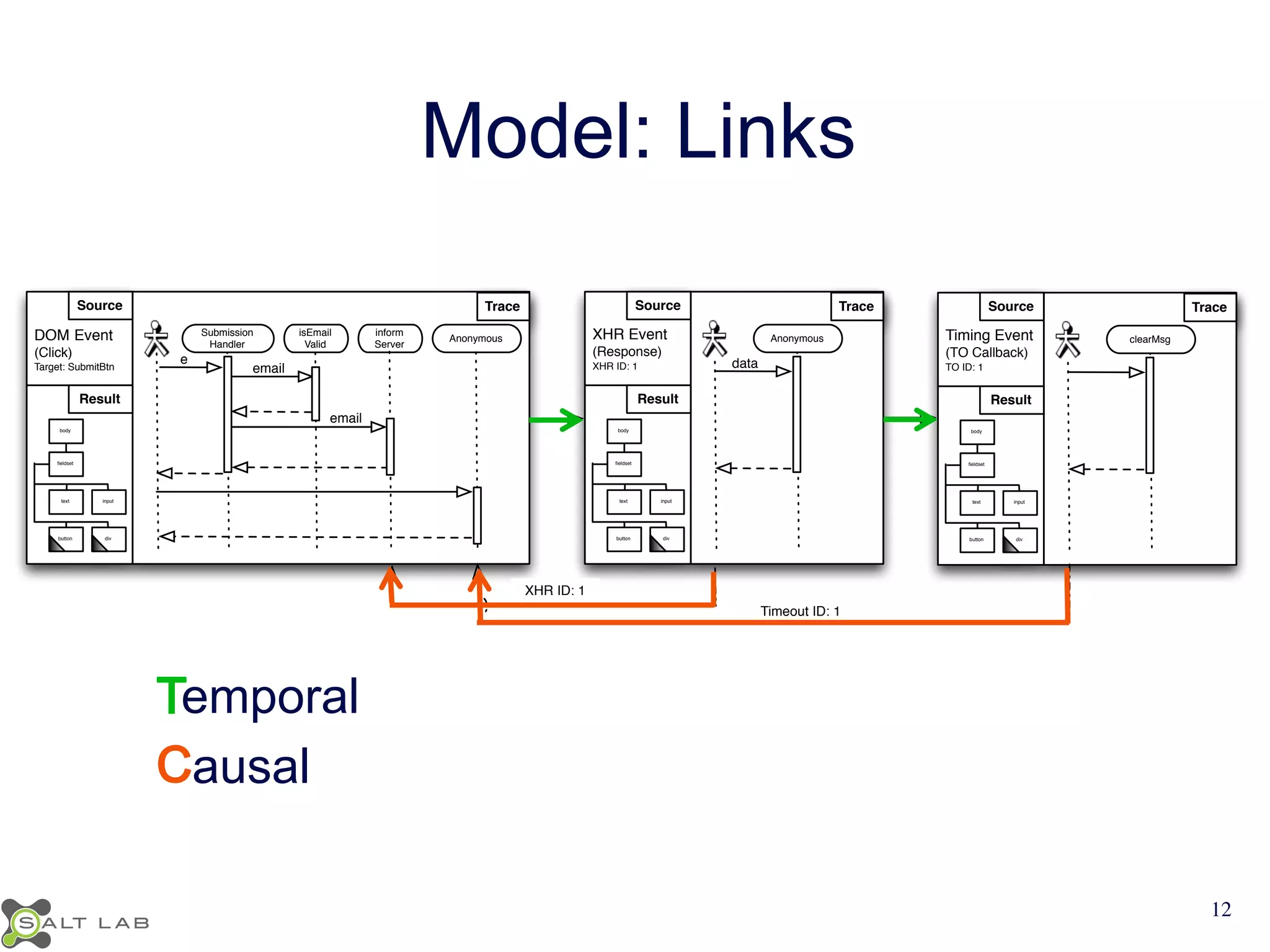
Model: Links 
Source Trace 
Timeout ID: 1 
XHR ID: 1 
Source 
DOM Event 
(Click) 
Target: SubmitBtn 
Result 
Trace 
body 
fieldset 
text input 
button div 
inform 
Server 
Anonymous 
e 
email 
isEmail 
Valid 
Submission 
Handler 
email 
XHR Event 
(Response) 
XHR ID: 1 
body 
fieldset 
text input 
button div 
data 
Source Trace 
Anonymous Timing Event 
(TO Callback) 
TO ID: 1 
body 
fieldset 
text input 
button div 
clearMsg 
Result Result 
emporal 
ausal 
12
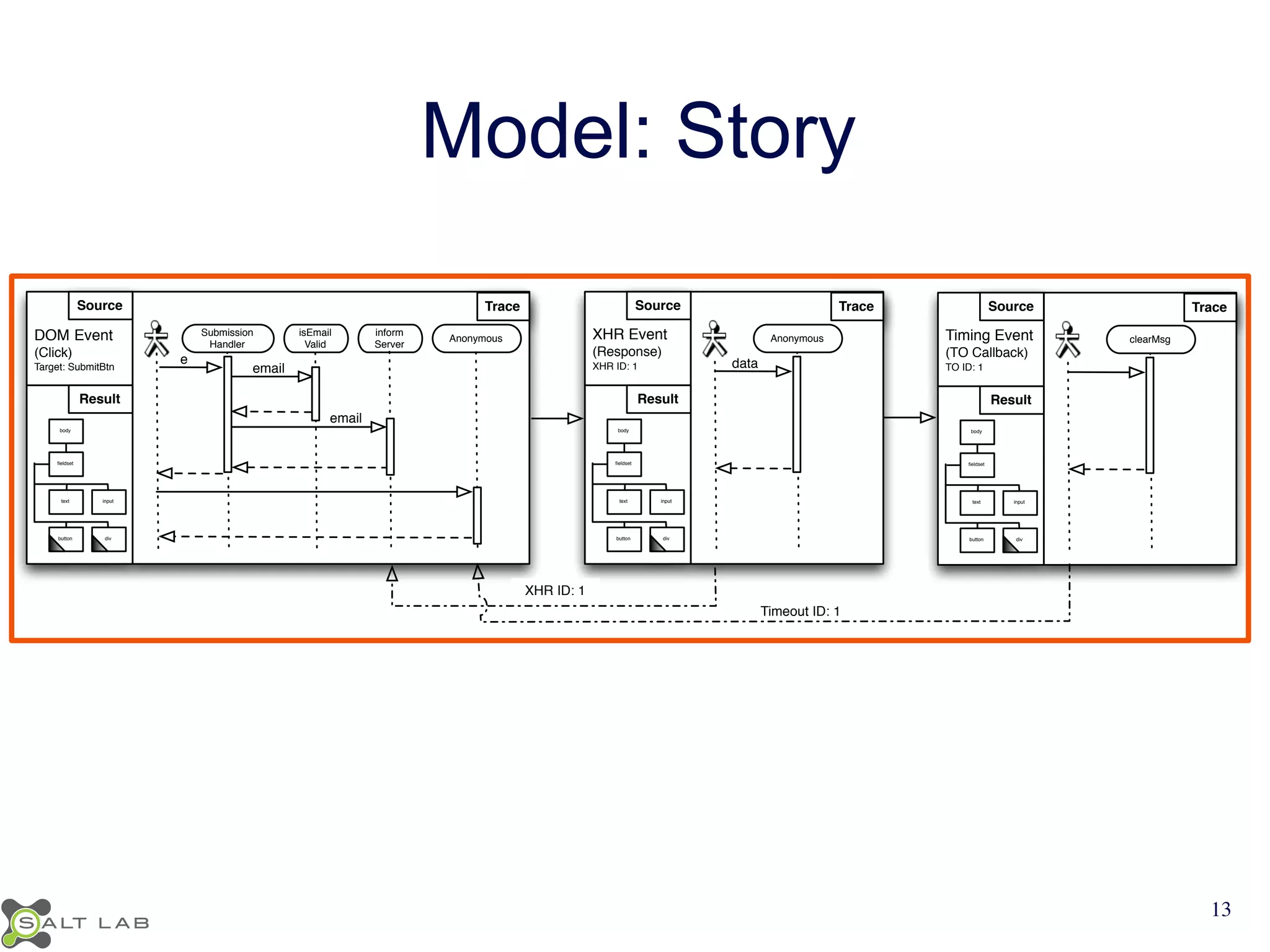
Model: Story 
Source Trace 
Timeout ID: 1 
XHR ID: 1 
Source 
DOM Event 
(Click) 
Target: SubmitBtn 
Result 
Trace 
body 
fieldset 
text input 
button div 
inform 
Server 
Anonymous 
e 
email 
isEmail 
Valid 
Submission 
Handler 
email 
XHR Event 
(Response) 
XHR ID: 1 
body 
fieldset 
text input 
button div 
data 
Source Trace 
Anonymous Timing Event 
(TO Callback) 
TO ID: 1 
body 
fieldset 
text input 
button div 
clearMsg 
Result Result 
13
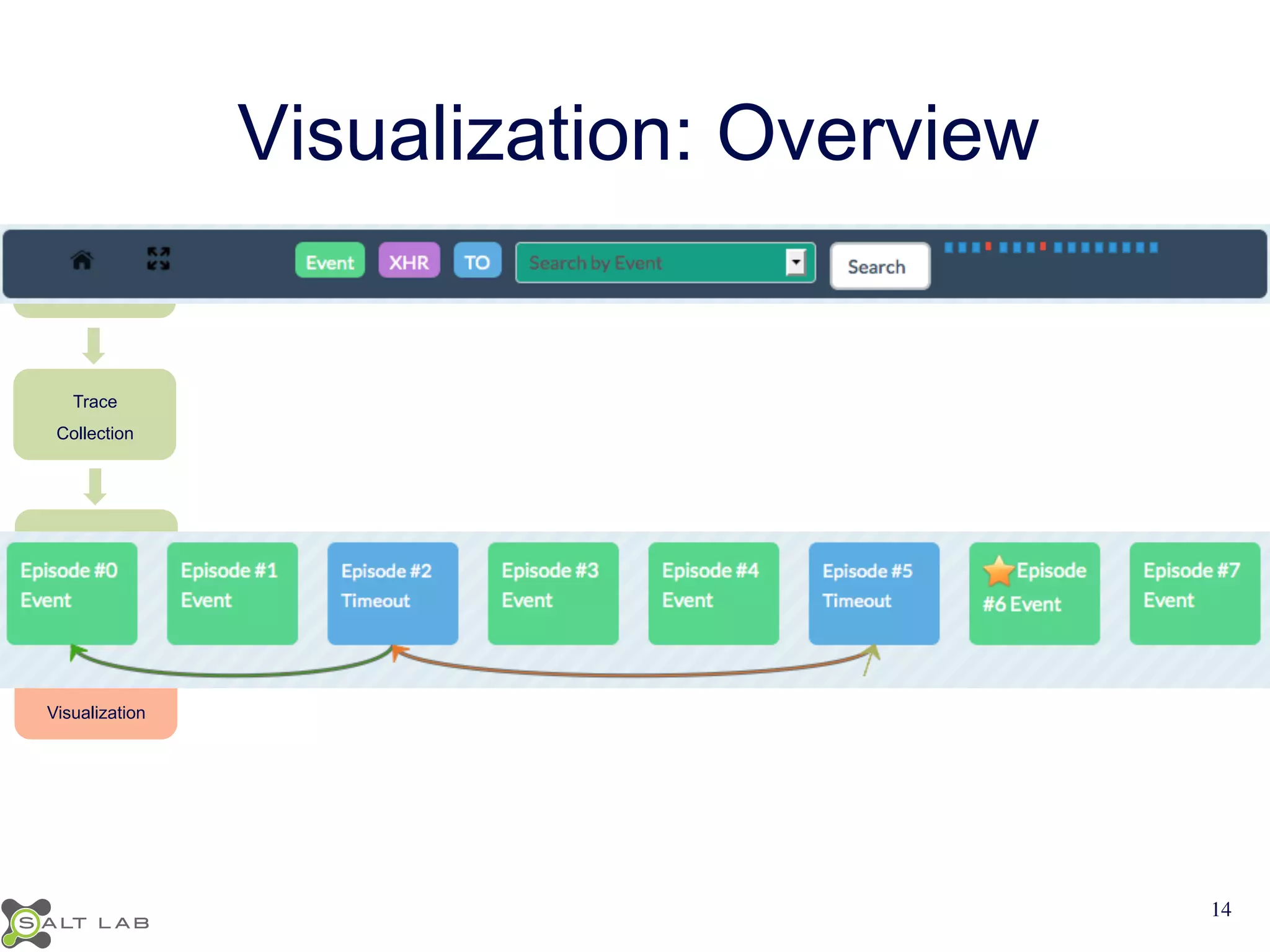
Visualization: Overview 
JavaScript 
Transformation 
Trace 
Collection 
Model 
Creation 
Model 
Visualization 
14
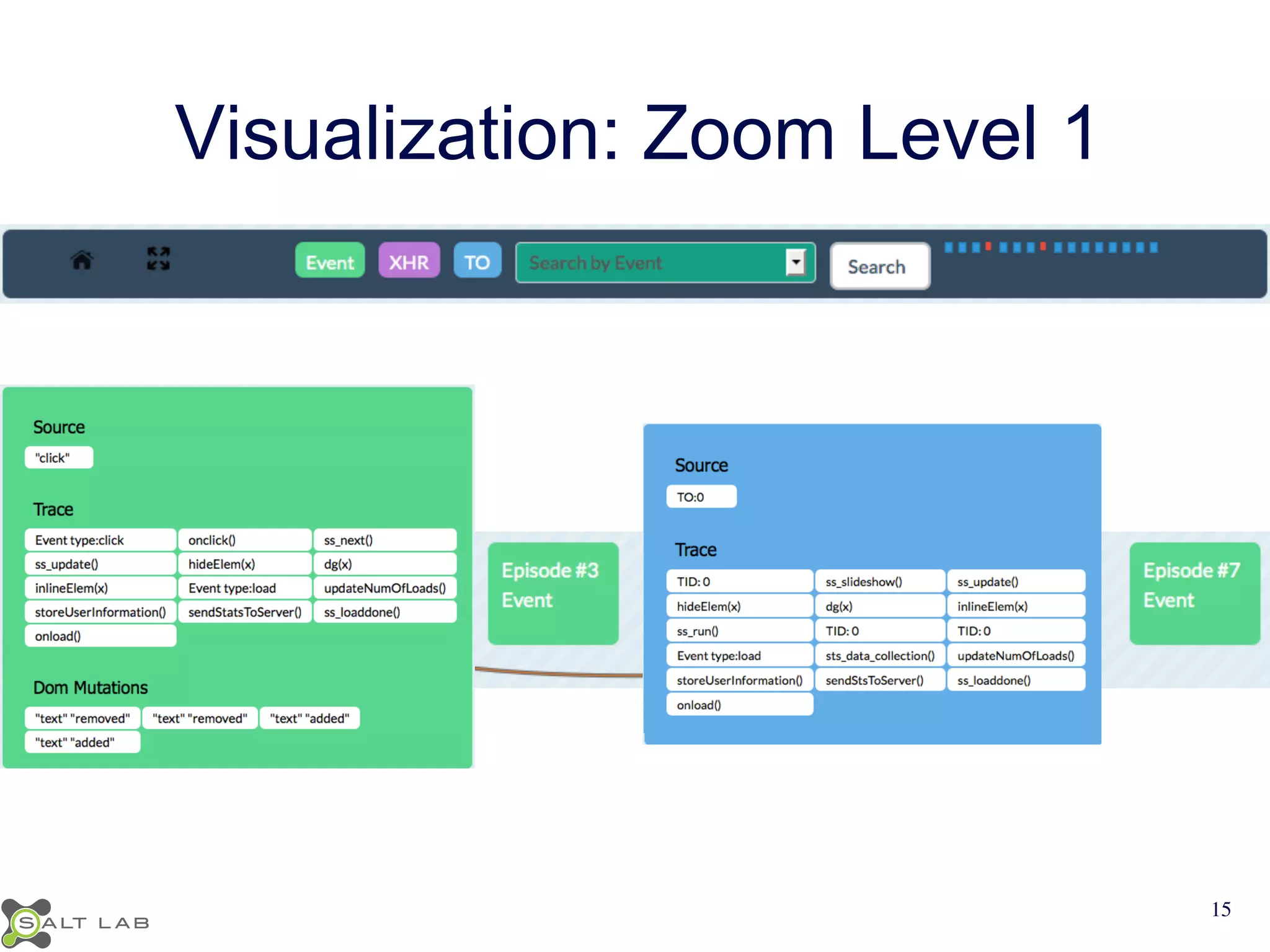
Visualization: Zoom Level 1 
15
Visualization: Zoom Level 1 
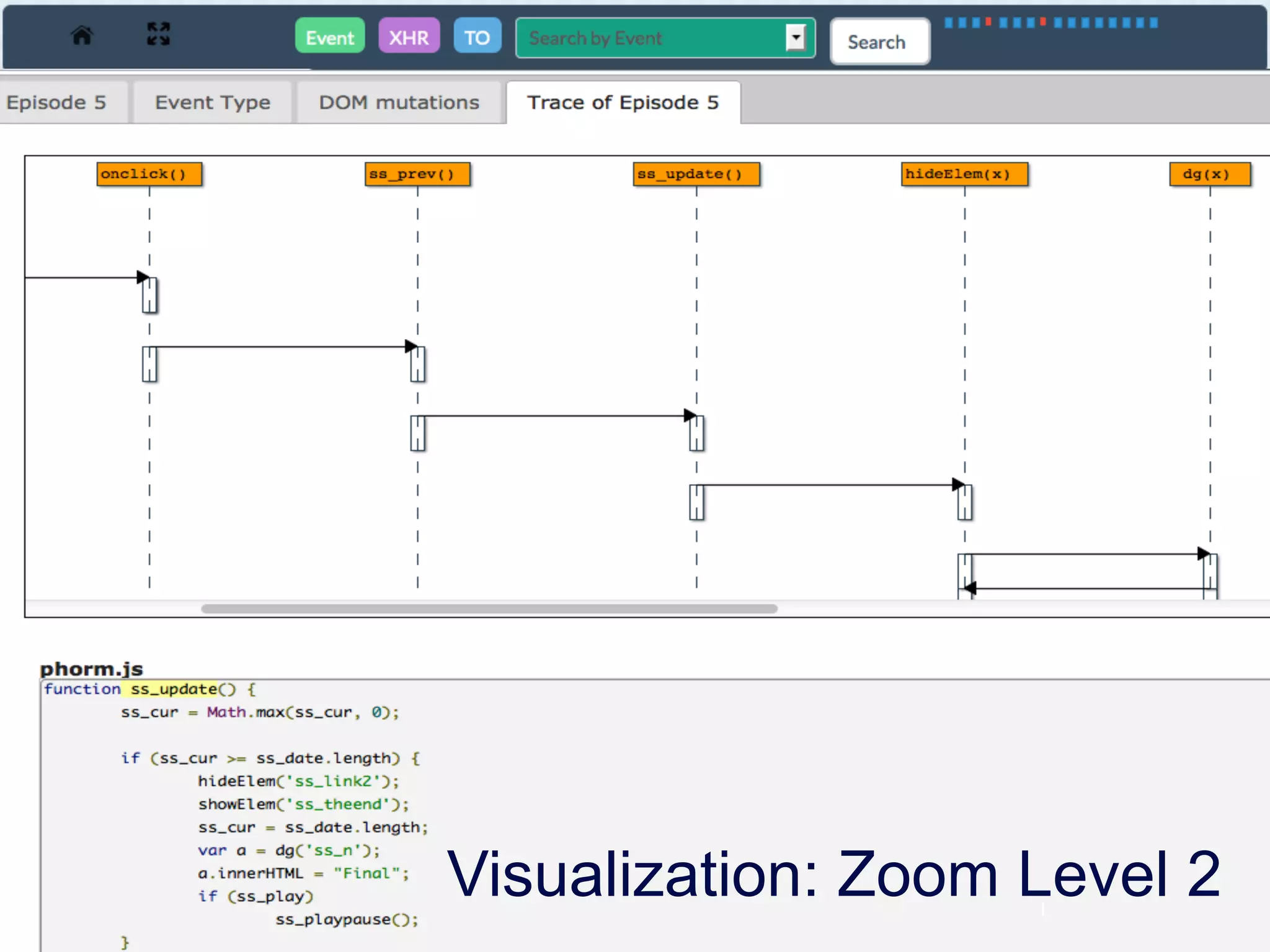
Visualization: Zoom Level 2 
1
Implementation 
• Clematis 
https://github.com/saltlab/clematis 
• Languages: Java, JavaScript 
• Transform JavaScript & inject toolbar via proxy 
• Provide a RESTful API for retrieving data 
• Render a web-based visualization 
17
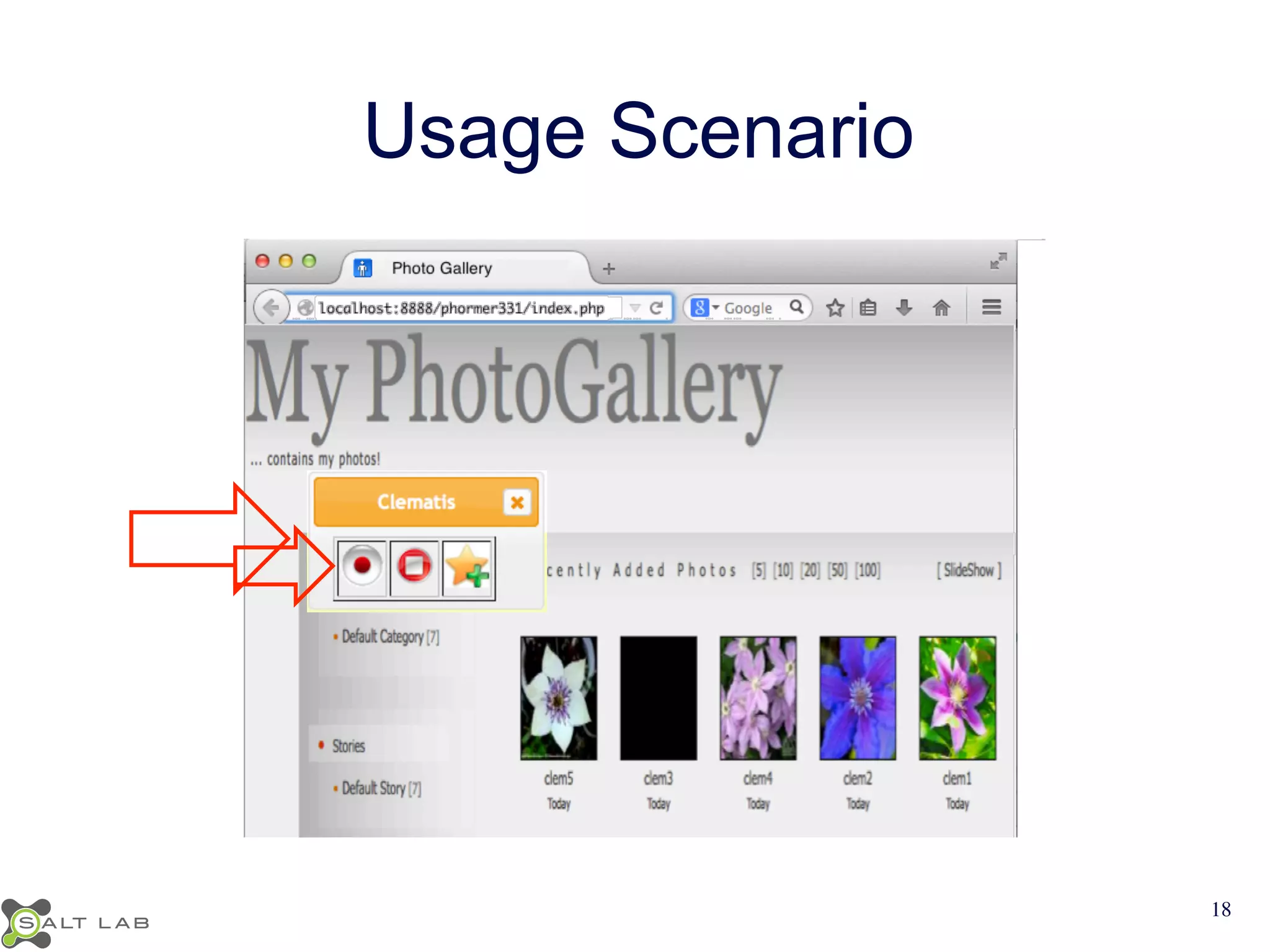
Usage Scenario 
18
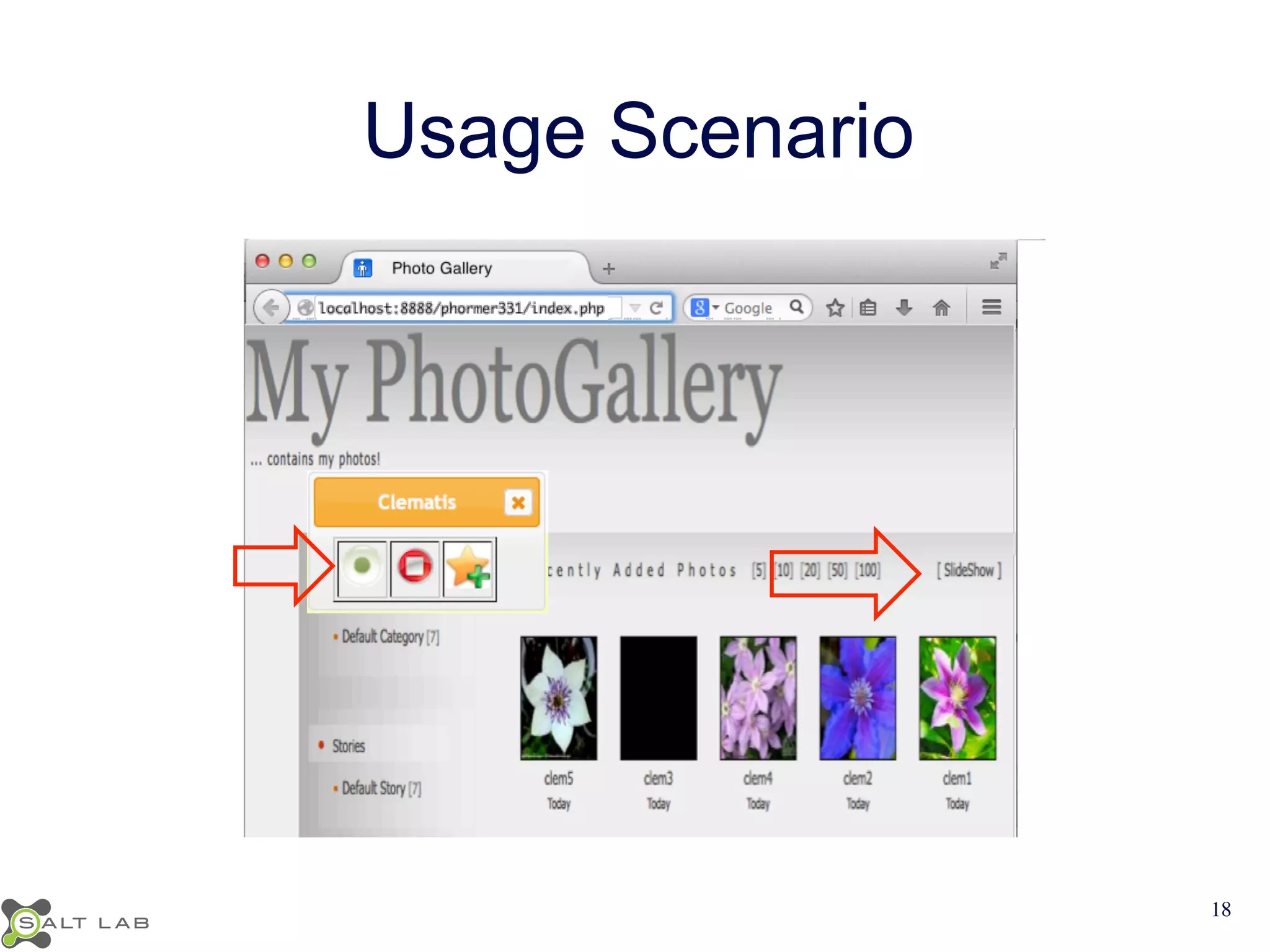
Usage Scenario 
18
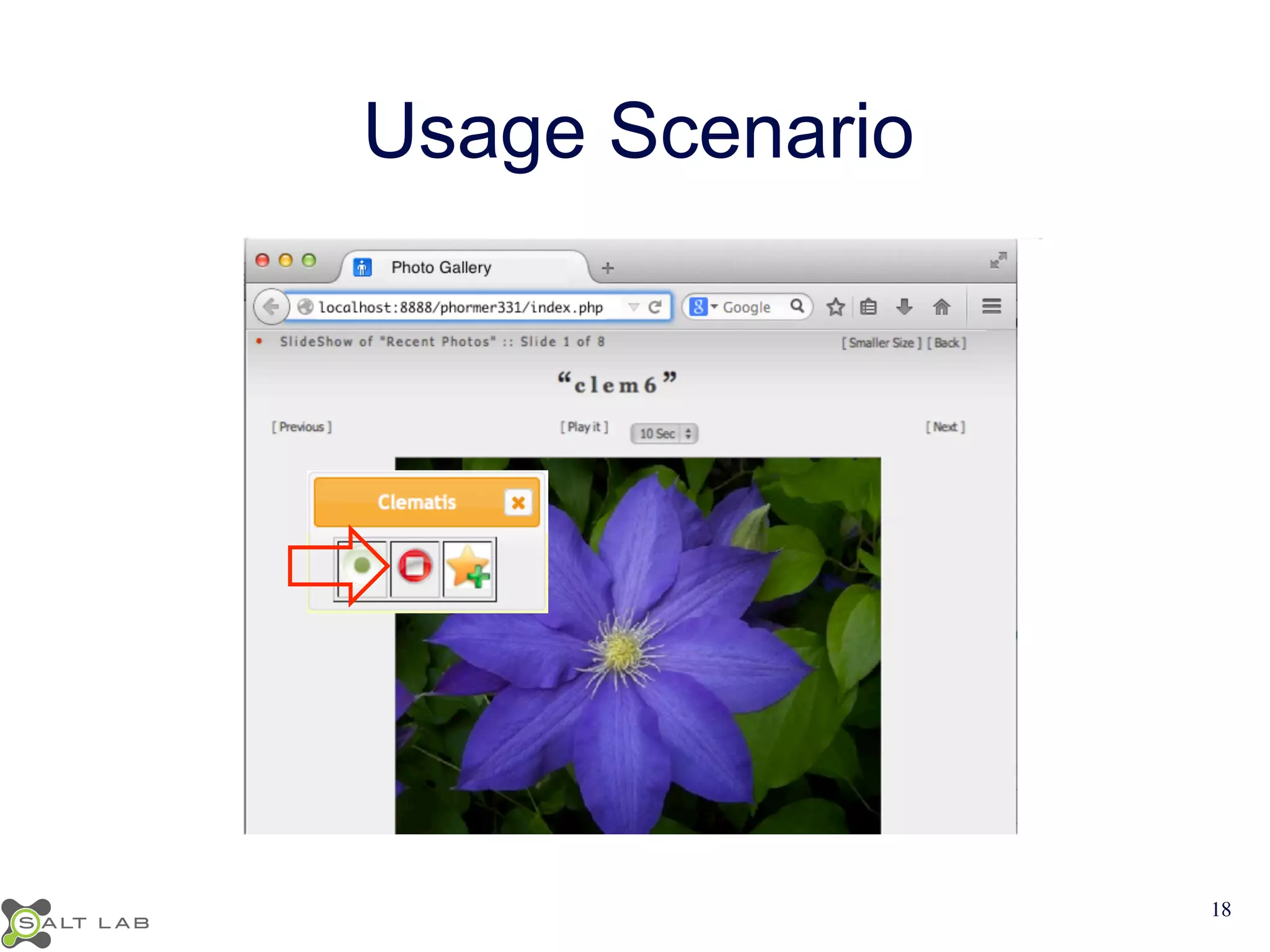
Usage Scenario 
18
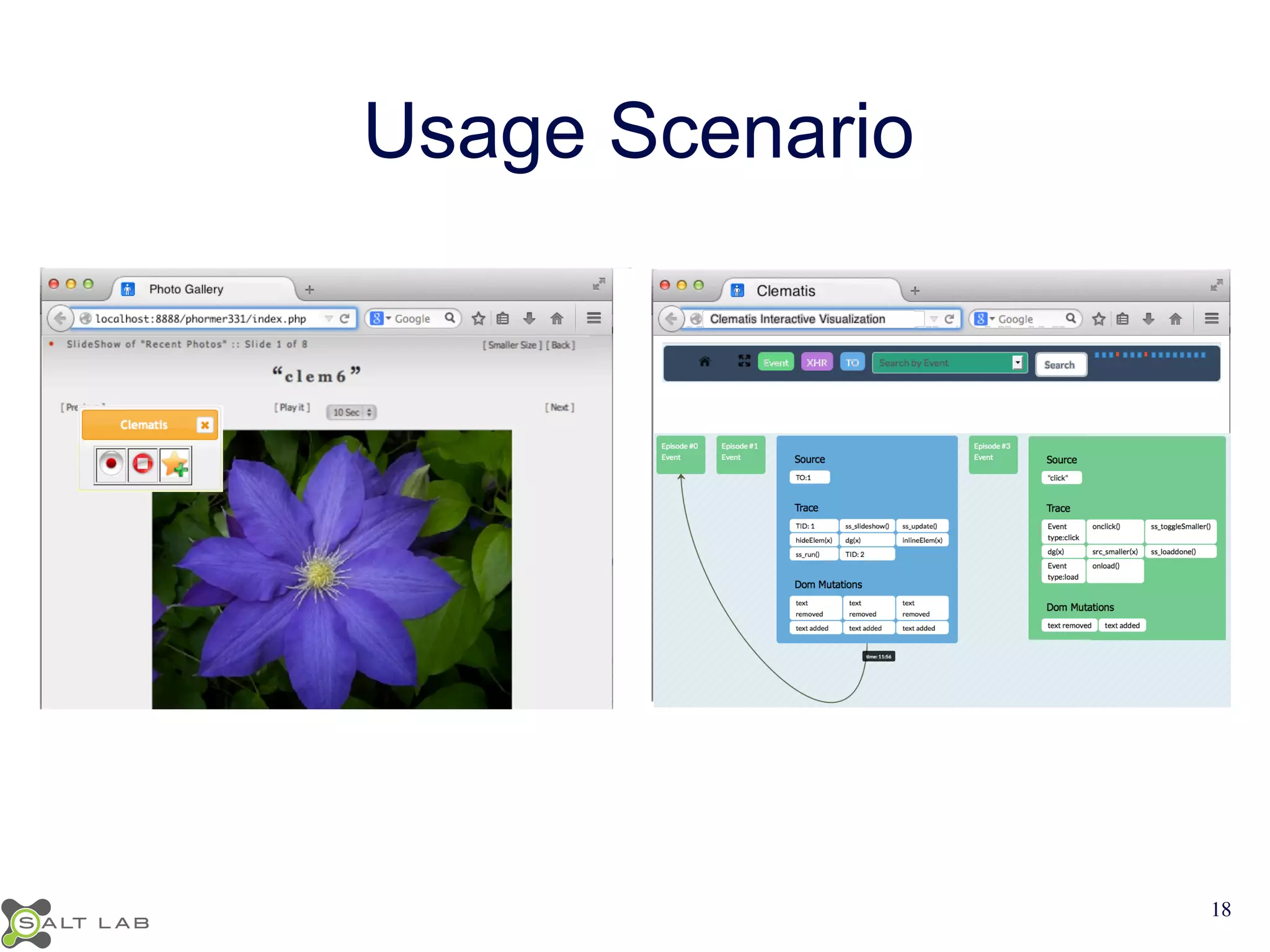
Usage Scenario 
18
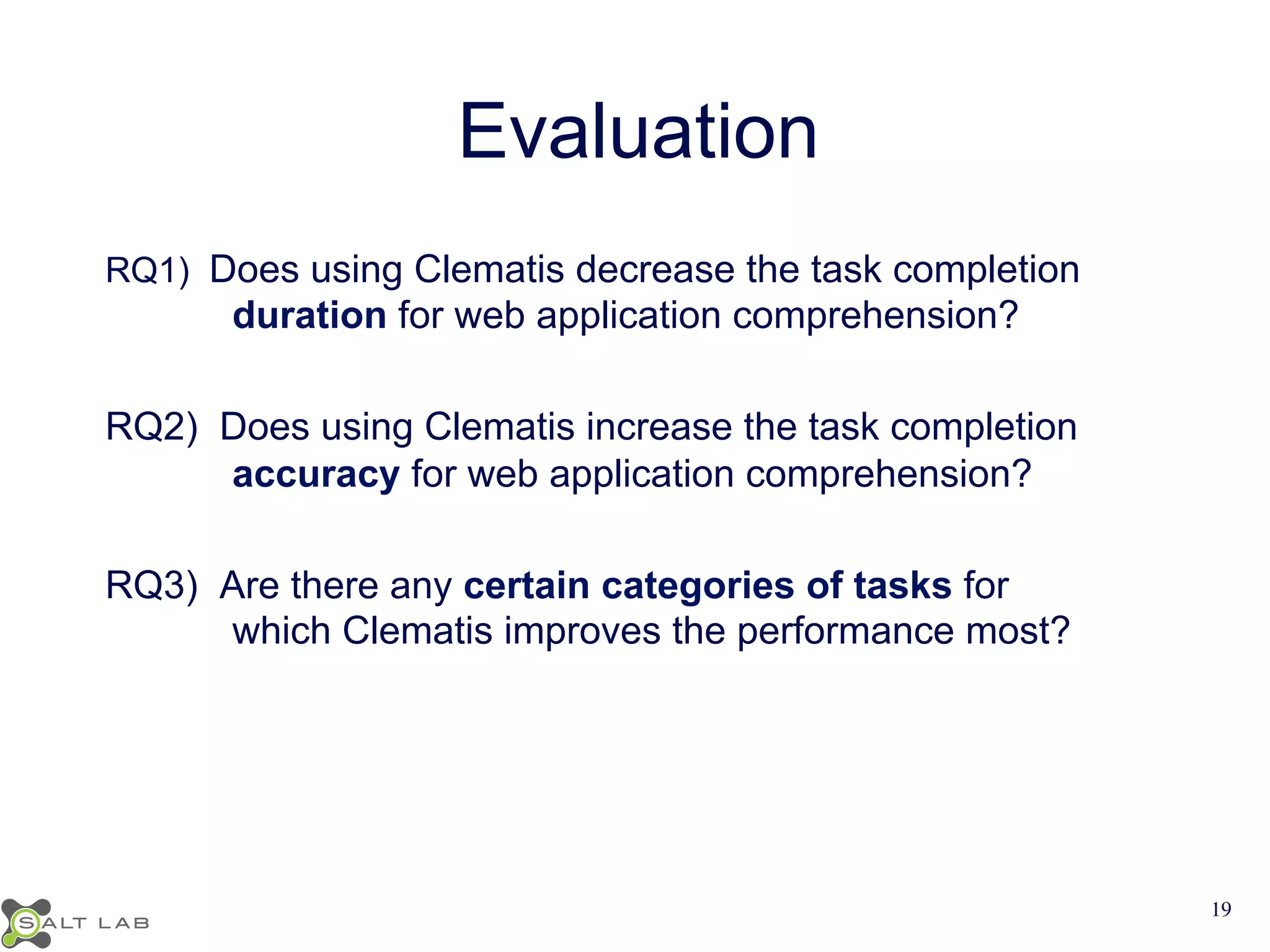
Evaluation 
RQ1) Does using Clematis decrease the task completion 
duration for web application comprehension? 
RQ2) Does using Clematis increase the task completion 
accuracy for web application comprehension? 
RQ3) Are there any certain categories of tasks for 
which Clematis improves the performance most? 
19
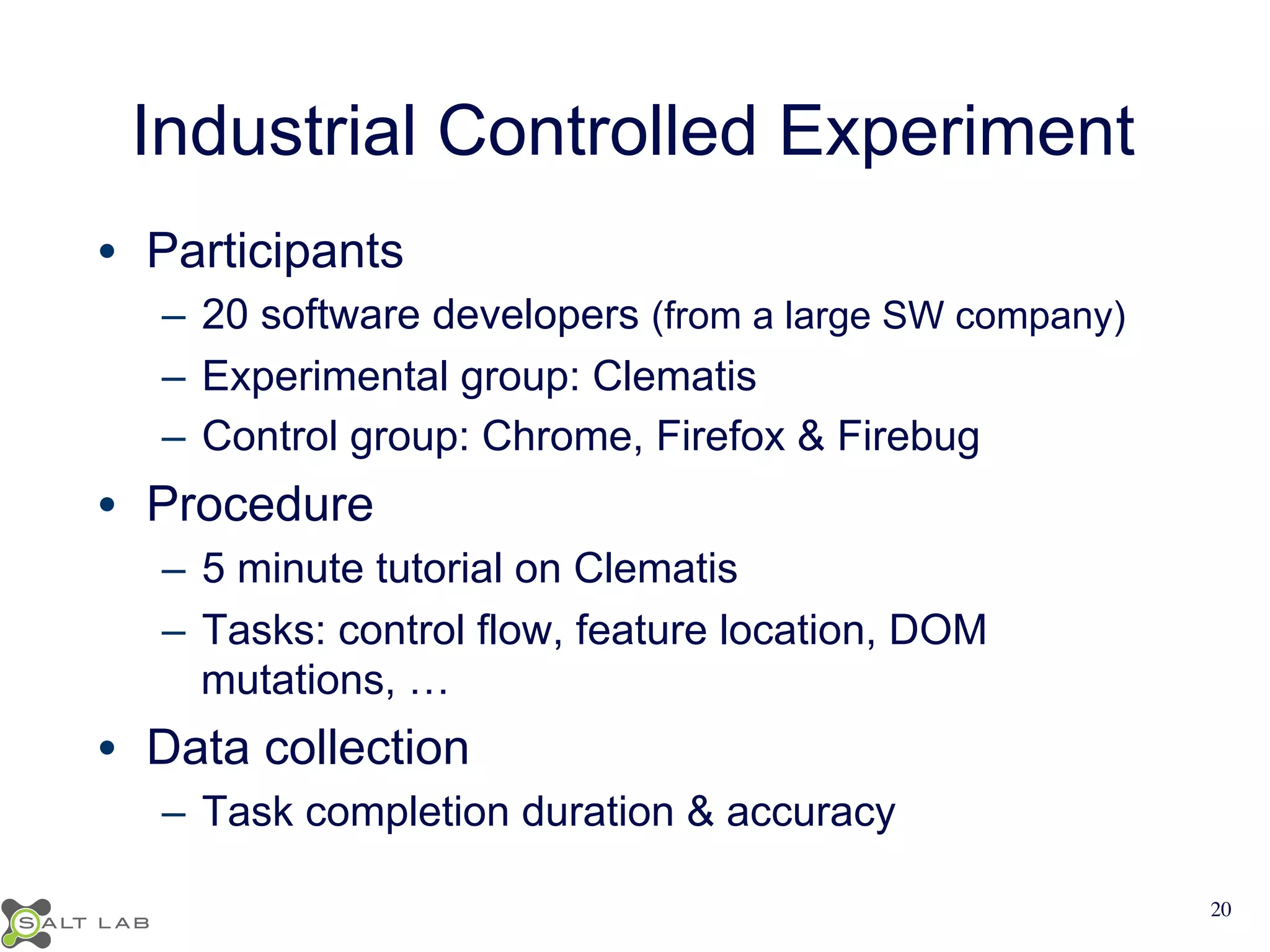
Industrial Controlled Experiment 
• Participants 
– 20 software developers (from a large SW company) 
– Experimental group: Clematis 
– Control group: Chrome, Firefox & Firebug 
• Procedure 
– 5 minute tutorial on Clematis 
– Tasks: control flow, feature location, DOM 
mutations, … 
• Data collection 
– Task completion duration & accuracy 
20
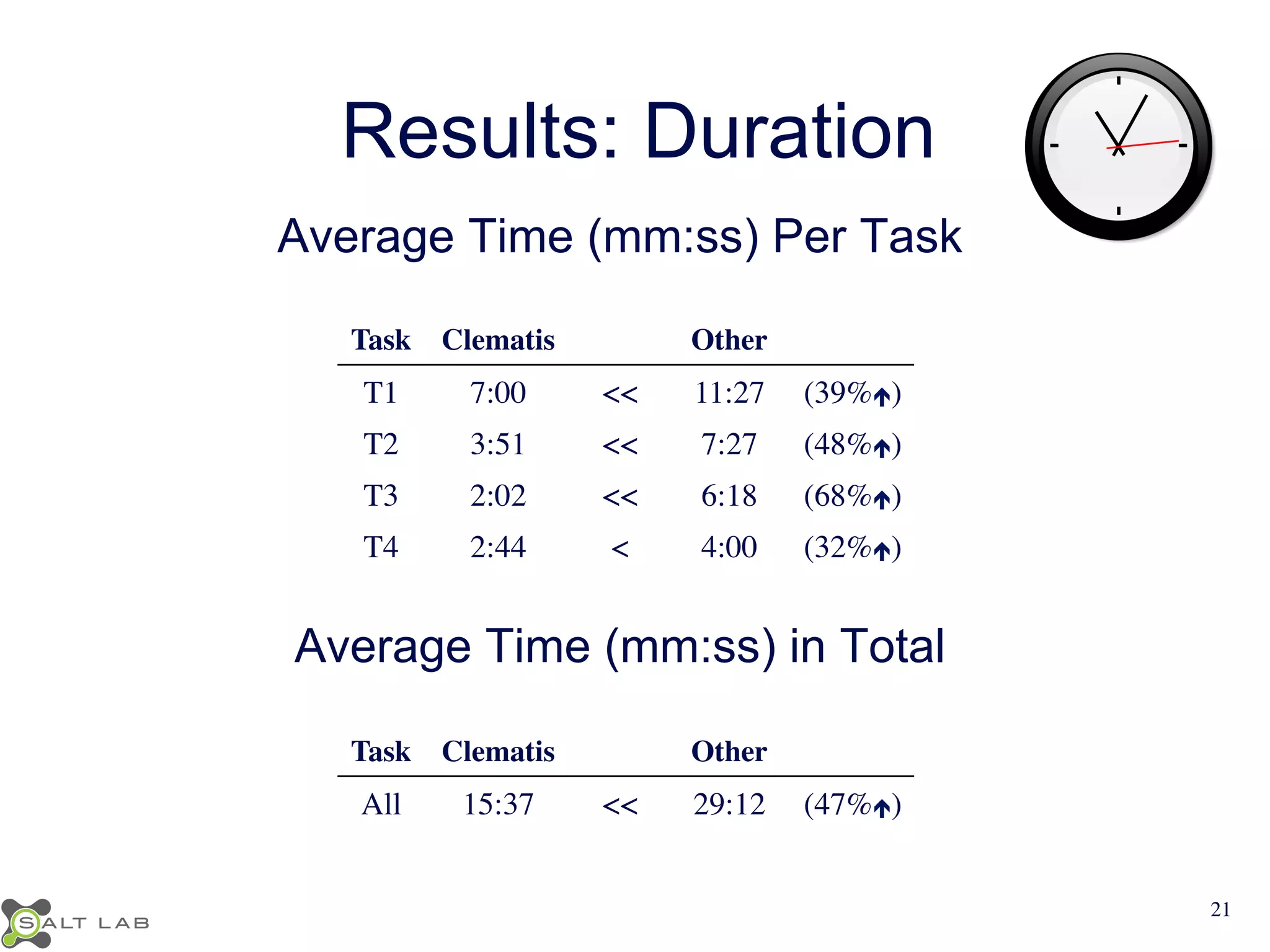
Results: Duration 
Average Time (mm:ss) Per Task 
Task 
Clematis 
Other 
T1 
7:00 
<< 
11:27 
(39%é) 
T2 
3:51 
<< 
7:27 
(48%é) 
T3 
2:02 
<< 
6:18 
(68%é) 
T4 
2:44 
< 
4:00 
(32%é) 
Average Time (mm:ss) in Total 
Task 
Clematis 
Other 
All 
15:37 
<< 
29:12 
(47%é) 
21
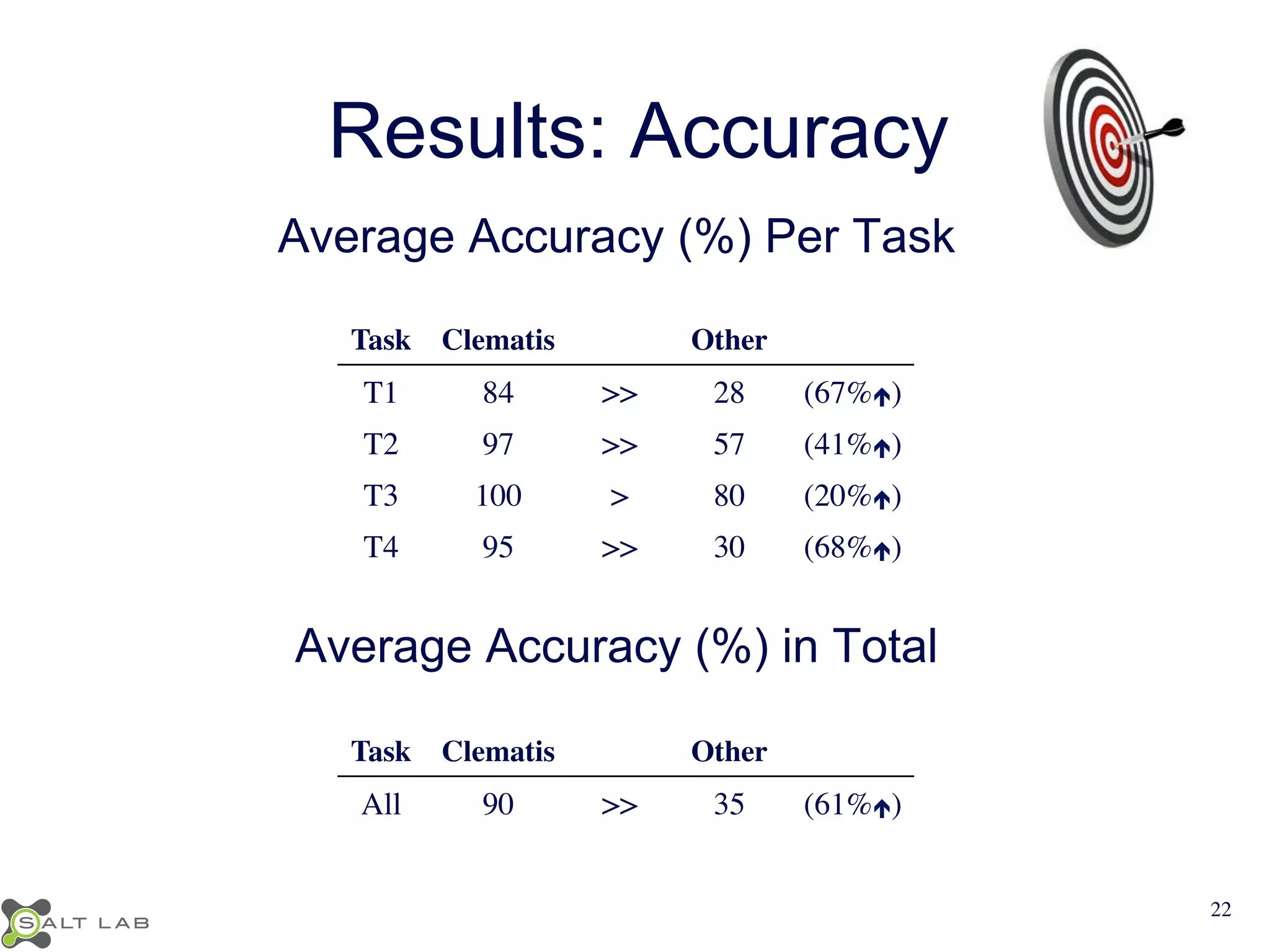
Results: Accuracy 
Average Accuracy (%) Per Task 
Task 
Clematis 
Other 
T1 
84 
>> 
28 
(67%é) 
T2 
97 
>> 
57 
(41%é) 
T3 
100 
> 
80 
(20%é) 
T4 
95 
>> 
30 
(68%é) 
Average Accuracy (%) in Total 
Task 
Clematis 
Other 
All 
90 
>> 
35 
(61%é) 
22
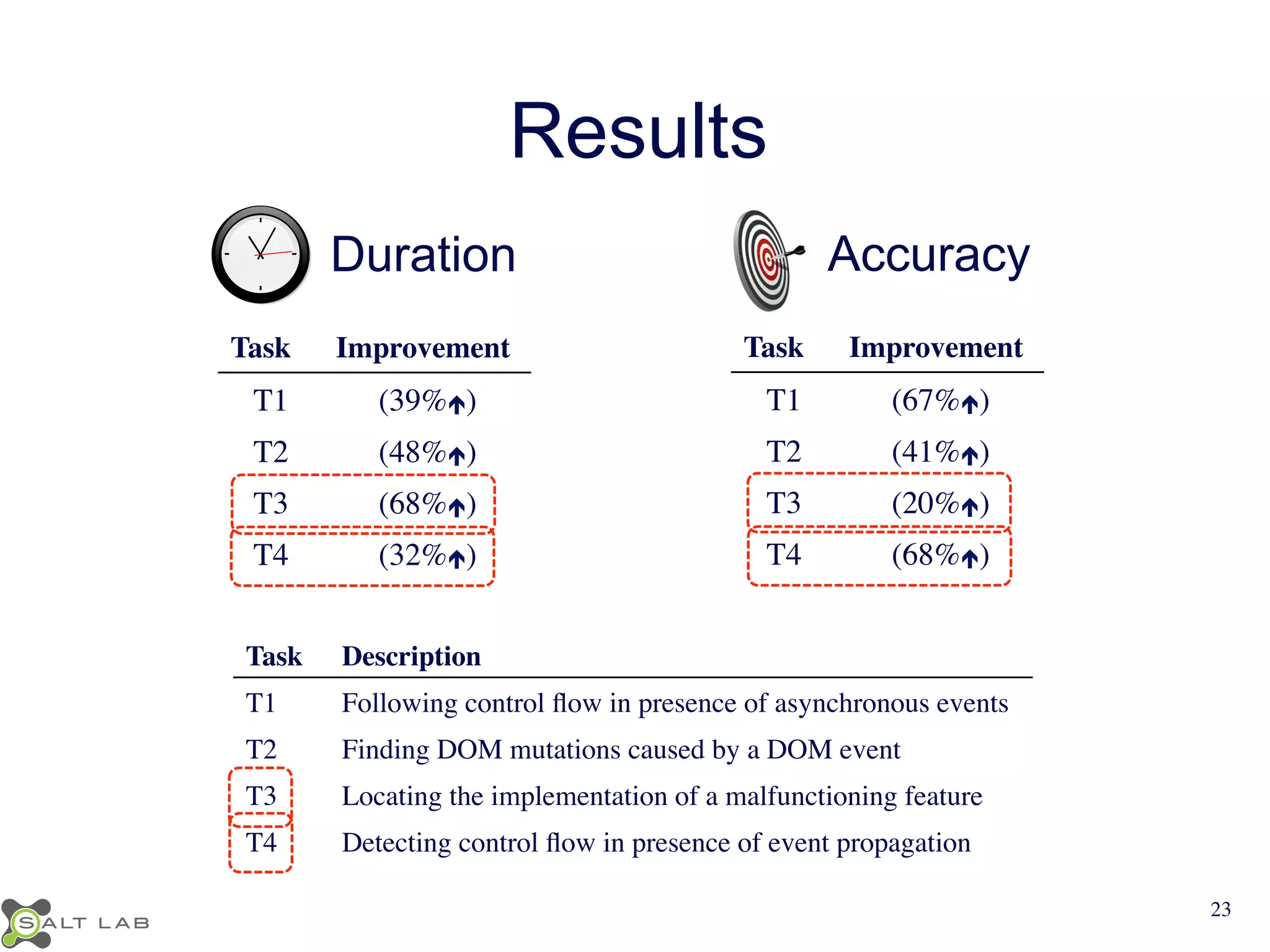
Results 
Duration 
Task 
Improvement 
T1 
(39%é) 
T2 
(48%é) 
T3 
(68%é) 
T4 
(32%é) 
Accuracy 
Task 
Improvement 
T1 
(67%é) 
T2 
(41%é) 
T3 
(20%é) 
T4 
(68%é) 
Task 
Description 
T1 
Following control flow in presence of asynchronous events 
T2 
Finding DOM mutations caused by a DOM event 
T3 
Locating the implementation of a malfunctioning feature 
T4 
Detecting control flow in presence of event propagation 
23
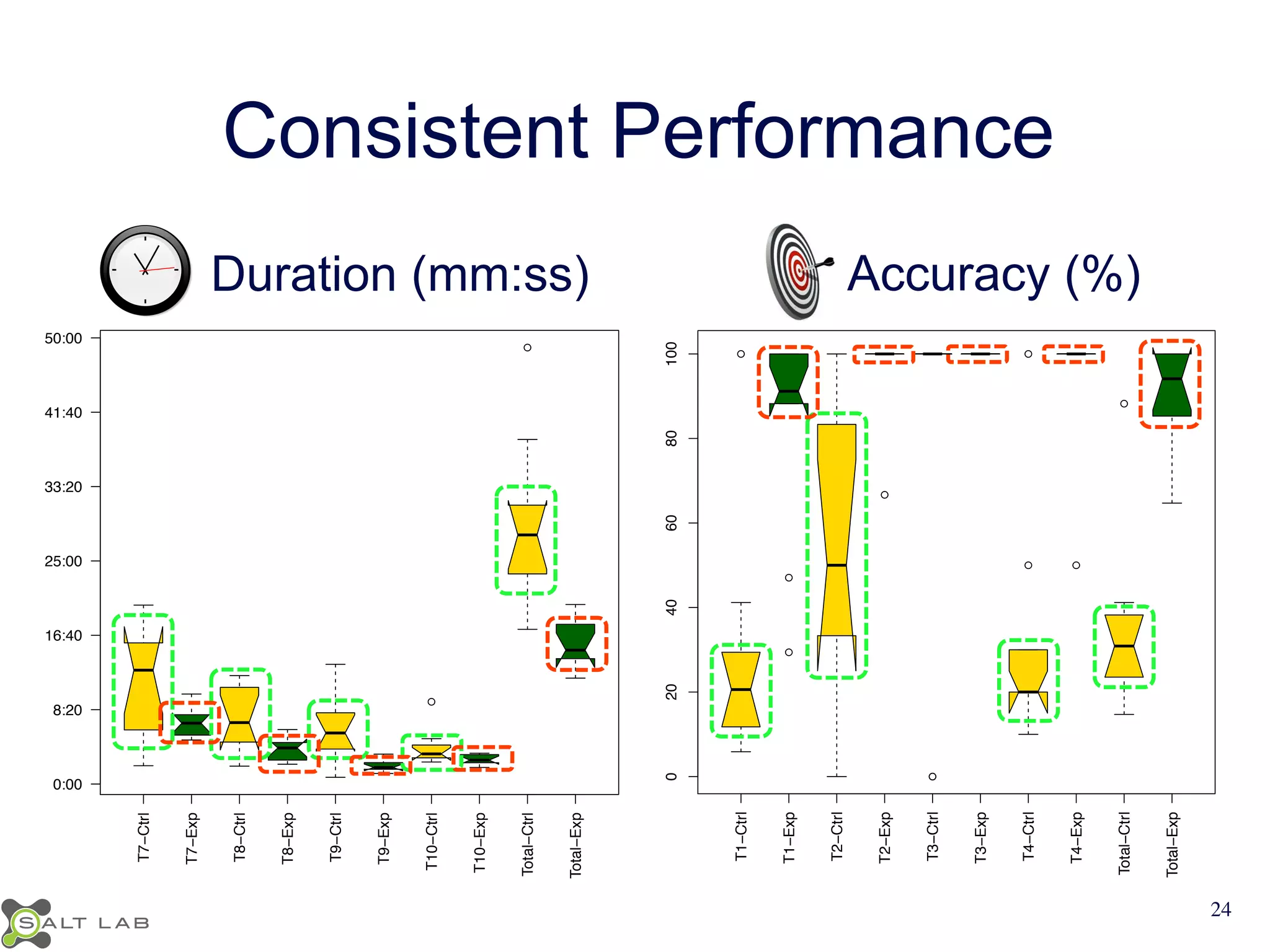
Consistent Performance 
● 
● 
● 
● 
● 
● 
● ● 
● 
T1−Ctrl 
T1−Exp 
T2−Ctrl 
T2−Exp 
T3−Ctrl 
T3−Exp 
T4−Ctrl 
T4−Exp 
Total−Ctrl 
Total−Exp 
0 20 40 60 80 100 
Accuracy (%) 
● 
● 
T7−Ctrl 
T7−Exp 
T8−Ctrl 
T8−Exp 
T9−Ctrl 
T9−Exp 
T10−Ctrl 
T10−Exp 
Total−Ctrl 
Total−Exp 
Duration (mm:ss) Accuracy (%) 
Duration (mm:ss) 
0:00 
8:20 
16:40 
25:00 
33:20 
41:40 
50:00 
24
1

Understanding JavaScript Event-based Interactions

  • 1.
    Understanding JavaScript Event-BasedInteractions Saba Alimadadi Sheldon Sequeira Ali Mesbah Karthik Pattabiraman
  • 2.
    Motivation • JavaScript – Widely used, very popular – Event driven, dynamic, asynchronous • Difficult to understand the dynamic behavior and the control flow – Lower level events – Their interactions 1
  • 3.
    Challenge 1: EventPropagation html head P div a div h1 caption tr p qux() triggered label input table textarea User Click button bod y foo() triggered table baz() triggered bar() triggered bar() triggered td 2
  • 4.
    Challenge 2: AsynchronousEvents User logs in Timeout for page expiry Server request for login Server response for login 3
  • 5.
    Challenge 2: AsynchronousEvents Timeout for page expiry Server request for login Server response for login View gallery Server request Server request Server response Server response 3
  • 6.
    Challenge 2: AsynchronousEvents Timeout for page expiry Server request for login Server response for login Server request Server request Server response Server response View slideshow Timeout for next image 3
  • 7.
    Challenge 2: AsynchronousEvents Timeout for page expiry Server request for login Server response for login Server request Server request Server response Server response Timeout for next image Server request image Server response Timeout callback Timeout callback page expiry 3
  • 8.
    Challenge 3: DOMState function submissionHandler(e) { $('#regMsg').html("Submitted!"); var email = $('#email').val(); if (isEmailValid(email)) { informServer(email); $('#submitBtn').attr("disabled", true); } } . . . function informServer(email) { $.get('/register/', { email } , function(data) { $(’#srvrMsg').append(data); }); } html head Body P div a srvrMsg regMsg div caption form p label input submitBtn 5
  • 9.
    Summary of Challenges • Event propagation • Asynchronous events • Implications of events 6
  • 10.
    Approach JavaScript Transformation Trace Collection Model Visualization Behavioral Model Creation 7
  • 11.
    JavaScript Transformation •Interposing on DOM events • Capturing timeouts and XHRs • Recording function traces • Extracting DOM mutations JavaScript Transformation Trace Collection Model Creation Model Visualization 8
  • 12.
    Trace Collection JavaScript Transformation Trace Collection Model Creation Model Visualization • Interposing on DOM events • Capturing timeouts and XHRs • Recording function traces • Extracting DOM mutations => Detailed Trace DOM events functions timeouts XHRs DOM mutations 9
  • 13.
    Behavioral Model Creation JavaScript Transformation Trace Collection Model Creation Model Visualization • Customized graph • Nodes: episodes • Links: temporal and causal 10
  • 14.
    Model: Episodes SourceTrace Timeout ID: 1 XHR ID: 1 Source DOM Event (Click) Target: SubmitBtn Result Trace body fieldset text input button div inform Server Anonymous e email isEmail Valid Submission Handler email XHR Event (Response) XHR ID: 1 body fieldset text input button div data Source Trace Anonymous Timing Event (TO Callback) TO ID: 1 body fieldset text input button div clearMsg Result Result – A period of JavaScript execution – Start and end points 11
  • 15.
    Model: Links SourceTrace Timeout ID: 1 XHR ID: 1 Source DOM Event (Click) Target: SubmitBtn Result Trace body fieldset text input button div inform Server Anonymous e email isEmail Valid Submission Handler email XHR Event (Response) XHR ID: 1 body fieldset text input button div data Source Trace Anonymous Timing Event (TO Callback) TO ID: 1 body fieldset text input button div clearMsg Result Result emporal ausal 12
  • 16.
    Model: Story SourceTrace Timeout ID: 1 XHR ID: 1 Source DOM Event (Click) Target: SubmitBtn Result Trace body fieldset text input button div inform Server Anonymous e email isEmail Valid Submission Handler email XHR Event (Response) XHR ID: 1 body fieldset text input button div data Source Trace Anonymous Timing Event (TO Callback) TO ID: 1 body fieldset text input button div clearMsg Result Result 13
  • 17.
    Visualization: Overview JavaScript Transformation Trace Collection Model Creation Model Visualization 14
  • 18.
  • 19.
    Visualization: Zoom Level1 Visualization: Zoom Level 2 1
  • 20.
    Implementation • Clematis https://github.com/saltlab/clematis • Languages: Java, JavaScript • Transform JavaScript & inject toolbar via proxy • Provide a RESTful API for retrieving data • Render a web-based visualization 17
  • 21.
  • 22.
  • 23.
  • 24.
  • 25.
    Evaluation RQ1) Doesusing Clematis decrease the task completion duration for web application comprehension? RQ2) Does using Clematis increase the task completion accuracy for web application comprehension? RQ3) Are there any certain categories of tasks for which Clematis improves the performance most? 19
  • 26.
    Industrial Controlled Experiment • Participants – 20 software developers (from a large SW company) – Experimental group: Clematis – Control group: Chrome, Firefox & Firebug • Procedure – 5 minute tutorial on Clematis – Tasks: control flow, feature location, DOM mutations, … • Data collection – Task completion duration & accuracy 20
  • 27.
    Results: Duration AverageTime (mm:ss) Per Task Task Clematis Other T1 7:00 << 11:27 (39%é) T2 3:51 << 7:27 (48%é) T3 2:02 << 6:18 (68%é) T4 2:44 < 4:00 (32%é) Average Time (mm:ss) in Total Task Clematis Other All 15:37 << 29:12 (47%é) 21
  • 28.
    Results: Accuracy AverageAccuracy (%) Per Task Task Clematis Other T1 84 >> 28 (67%é) T2 97 >> 57 (41%é) T3 100 > 80 (20%é) T4 95 >> 30 (68%é) Average Accuracy (%) in Total Task Clematis Other All 90 >> 35 (61%é) 22
  • 29.
    Results Duration Task Improvement T1 (39%é) T2 (48%é) T3 (68%é) T4 (32%é) Accuracy Task Improvement T1 (67%é) T2 (41%é) T3 (20%é) T4 (68%é) Task Description T1 Following control flow in presence of asynchronous events T2 Finding DOM mutations caused by a DOM event T3 Locating the implementation of a malfunctioning feature T4 Detecting control flow in presence of event propagation 23
  • 30.
    Consistent Performance ● ● ● ● ● ● ● ● ● T1−Ctrl T1−Exp T2−Ctrl T2−Exp T3−Ctrl T3−Exp T4−Ctrl T4−Exp Total−Ctrl Total−Exp 0 20 40 60 80 100 Accuracy (%) ● ● T7−Ctrl T7−Exp T8−Ctrl T8−Exp T9−Ctrl T9−Exp T10−Ctrl T10−Exp Total−Ctrl Total−Exp Duration (mm:ss) Accuracy (%) Duration (mm:ss) 0:00 8:20 16:40 25:00 33:20 41:40 50:00 24
  • 31.