About.com Adobe Aarki
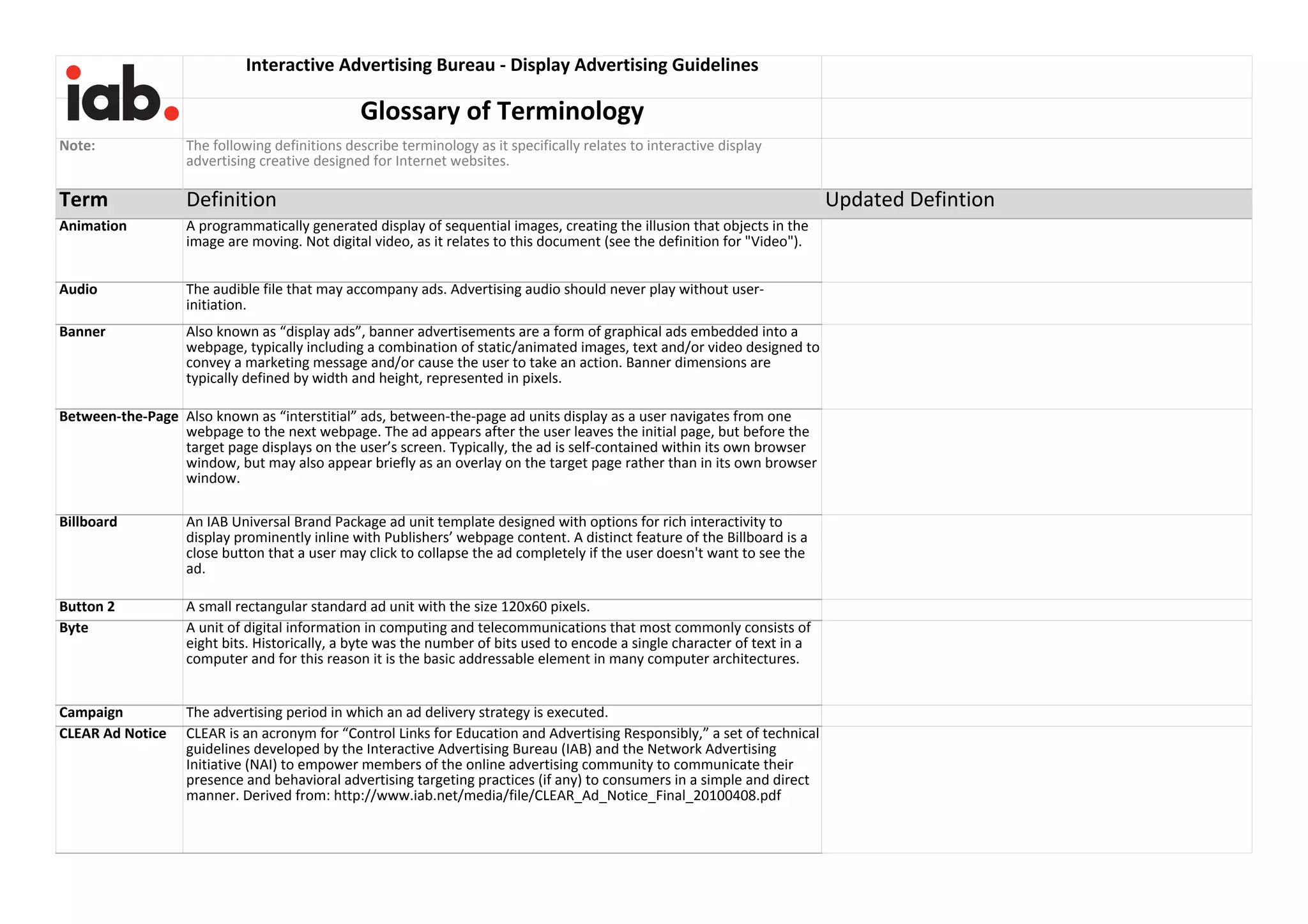
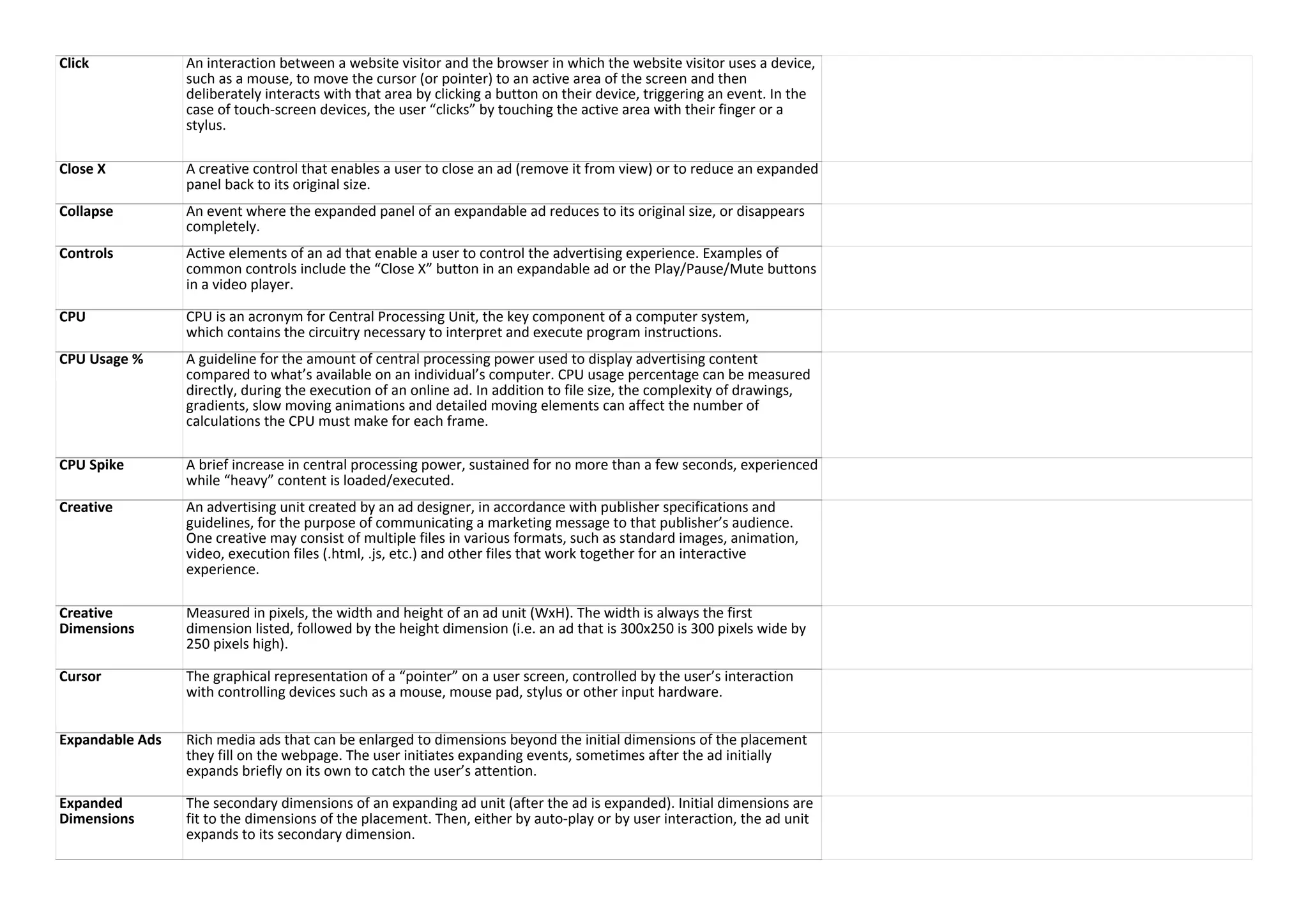
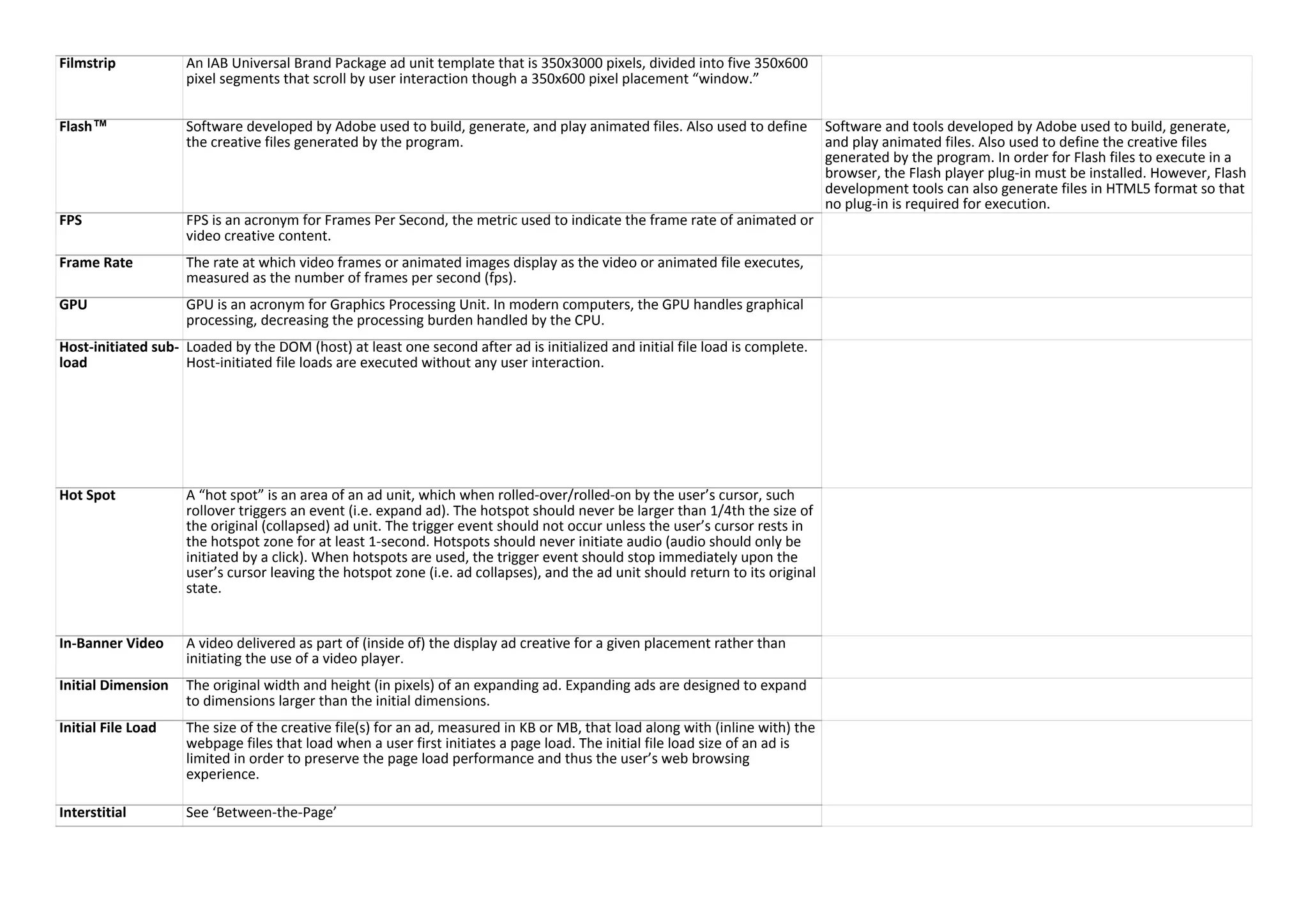
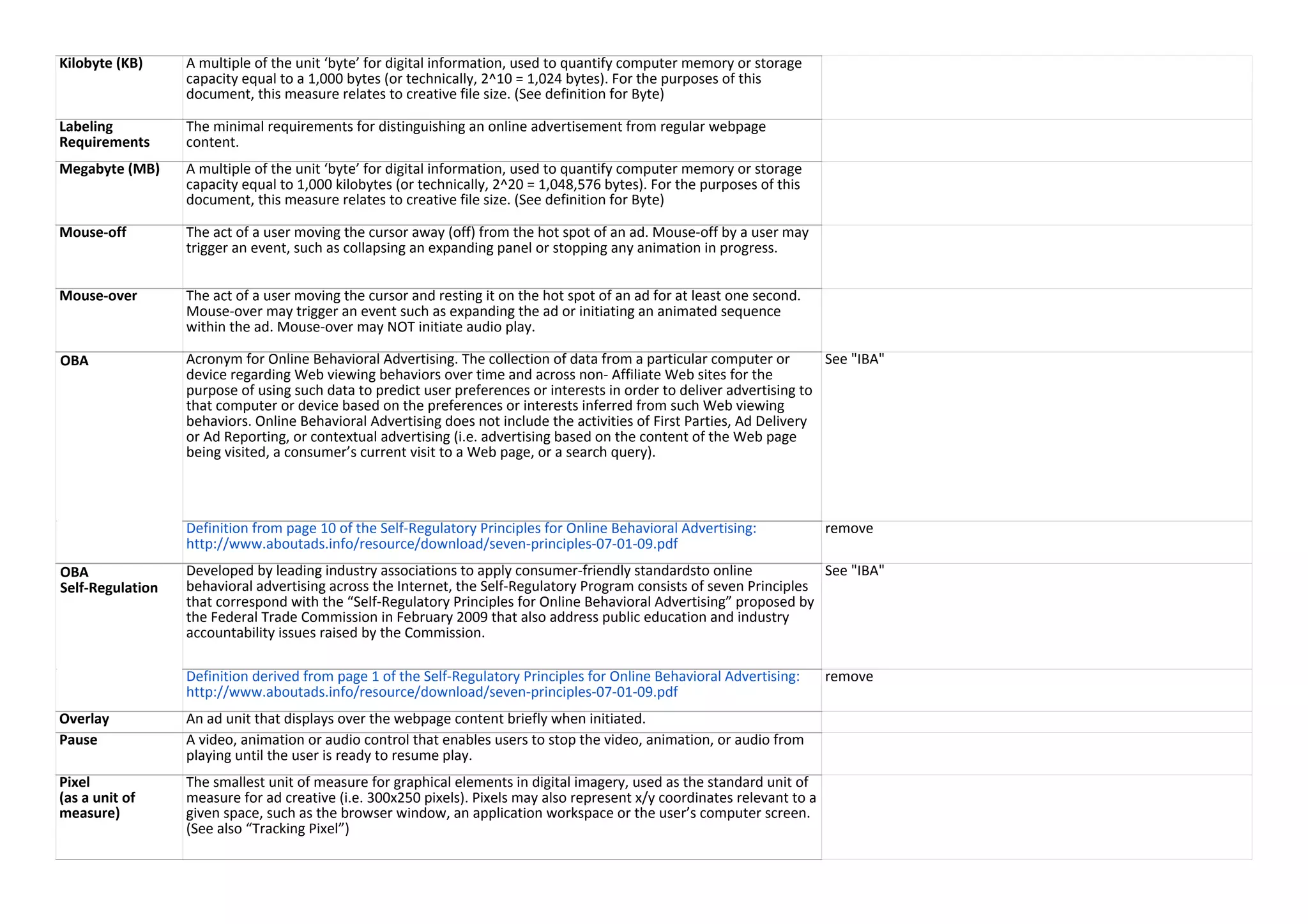
Addroid BabyCenter Amazon
AOL Bazaarvoice Bloomberg
Condé Nast Centro comScore
Disney Interactive Discovery Communications Crisp
Facebook Dominion Digital Media Demand Media
Hanley Wood Google Gawker Media
IAB UK LIN Digital LA Times
Interactive Advertising Bureau - Display Advertising Creative Format Guidelines
VERSION 1.0 DRAFT FOR PUBLIC COMMENT(PDF version here: https://goo.gl/0CKw7y)
Public Comment Period: August 17 to September 18, 2015
IMPORTANT DRAFT RELEASE NOTES: This is a draft for public comment, this comment period will close on September 18, 2015. Please submit feedback
via Google Doc Comments or via email to Shailley Singh, IAB lead on this initiative, at shailley@iab.net prior to the deadline. You should take no
reliance or action on this draft specification. Please wait for the final specification to be published.
This document for Public Comments has been developed by the IAB Creative Display Guidelines Committee
The display guidelines in this document have been updated to reference HTML5 Ad requirements. Extensive ad load performance testing was done over a
period of 4 -5 months to collect performance data of different types of ad units on real publisher pages across browsers and controlled network speeds to
reflect average internet and mobile usage to conclude optimum file weights
The working group was led by:
Francis Phan, Senior Manager Advertising UX at Yahoo
Aaron Wood, Director Production Service AOL Premium Exepriences at AOL Platforms
Steve Suthiana, Global Head, Digital Media and Operations at Mansueto Ventures
Contributions for Testing and Ad creatives were provided by
AOL
Celtra
Crisp Media
Pointroll
Following IAB member companies were part of the working group to create this draft
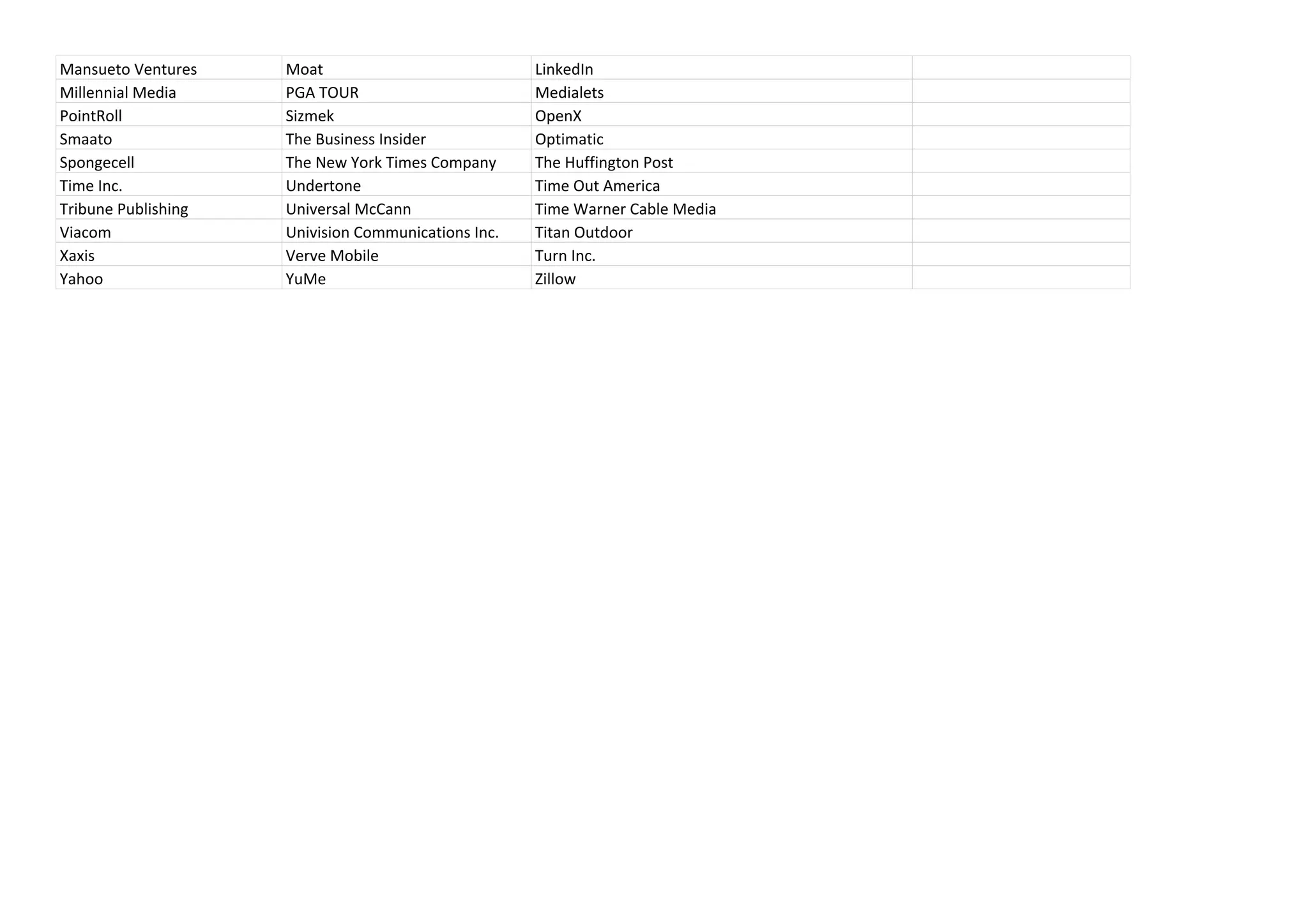
Mansueto Ventures Moat LinkedIn
Millennial Media PGA TOUR Medialets
PointRoll Sizmek OpenX
Smaato The Business Insider Optimatic
Spongecell The New York Times Company The Huffington Post
Time Inc. Undertone Time Out America
Tribune Publishing Universal McCann Time Warner Cable Media
Viacom Univision Communications Inc. Titan Outdoor
Xaxis Verve Mobile Turn Inc.
Yahoo YuMe Zillow
Creative Unit Name
Initial
Dimensions
(WxH in
pixels)
Maximum
Expanded
Dimensions
(WxH in
pixels)
Max Initial
File Load Size
(See note 6
below)
Host-initiated
Subload for
Interactive
Ads (See note
6 below)
Max Number
of Host-
Initiated File
Requests
Video/Animation Guidelines
(See video notes below)
Z-index
Range
Max
Percentage
of CPU
Usage
(Note 3)
Minimum Required
Controls
Labeling Requirements,
Font Size, etc. General Ad Requirements
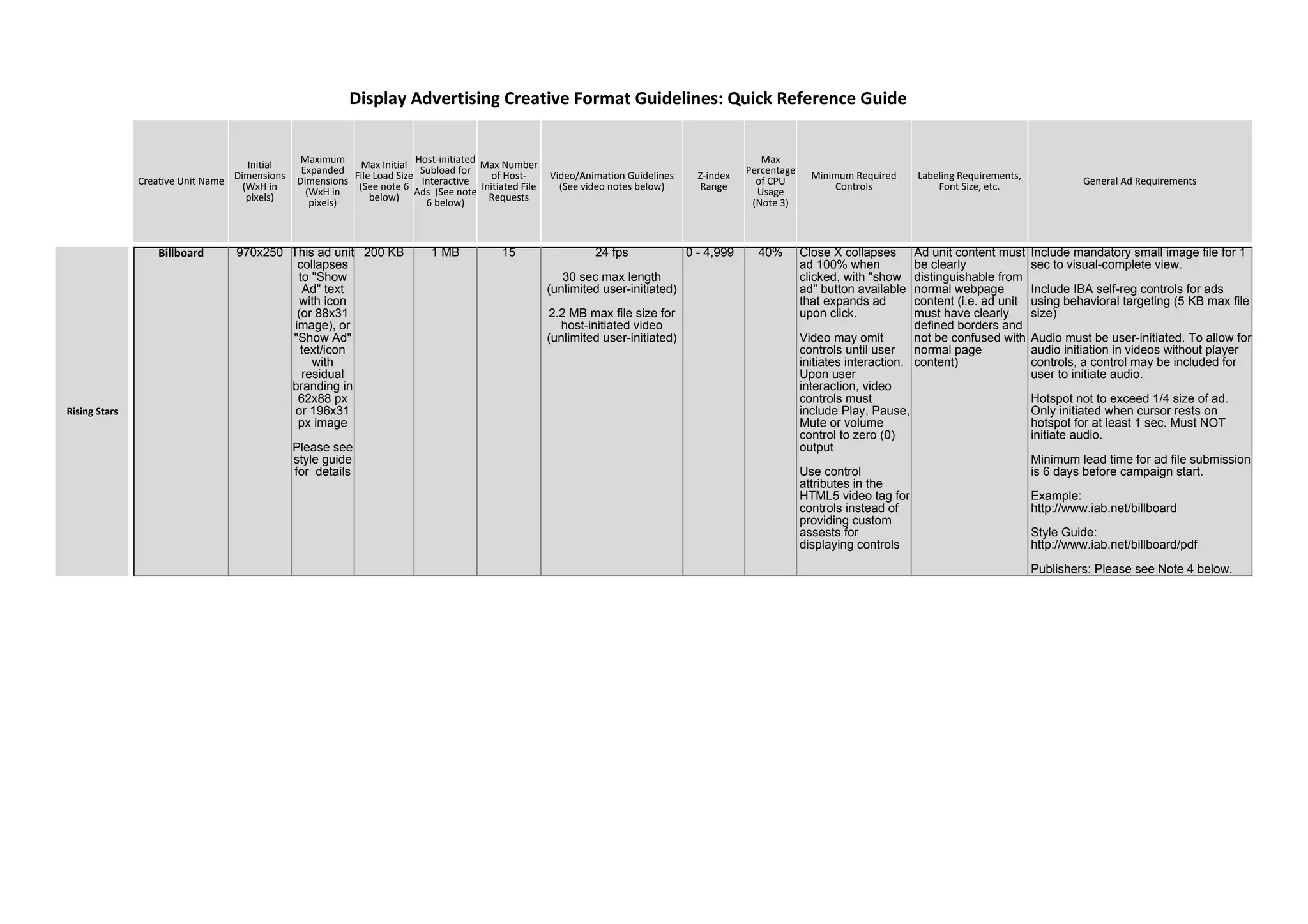
Billboard 970x250 This ad unit
collapses
to "Show
Ad" text
with icon
(or 88x31
image), or
"Show Ad"
text/icon
with
residual
branding in
62x88 px
or 196x31
px image
Please see
style guide
for details
200 KB 1 MB 15 24 fps
30 sec max length
(unlimited user-initiated)
2.2 MB max file size for
host-initiated video
(unlimited user-initiated)
0 - 4,999 40% Close X collapses
ad 100% when
clicked, with "show
ad" button available
that expands ad
upon click.
Video may omit
controls until user
initiates interaction.
Upon user
interaction, video
controls must
include Play, Pause,
Mute or volume
control to zero (0)
output
Use control
attributes in the
HTML5 video tag for
controls instead of
providing custom
assests for
displaying controls
Ad unit content must
be clearly
distinguishable from
normal webpage
content (i.e. ad unit
must have clearly
defined borders and
not be confused with
normal page
content)
Include mandatory small image file for 1
sec to visual-complete view.
Include IBA self-reg controls for ads
using behavioral targeting (5 KB max file
size)
Audio must be user-initiated. To allow for
audio initiation in videos without player
controls, a control may be included for
user to initiate audio.
Hotspot not to exceed 1/4 size of ad.
Only initiated when cursor rests on
hotspot for at least 1 sec. Must NOT
initiate audio.
Minimum lead time for ad file submission
is 6 days before campaign start.
Example:
http://www.iab.net/billboard
Style Guide:
http://www.iab.net/billboard/pdf
Publishers: Please see Note 4 below.
Display Advertising Creative Format Guidelines: Quick Reference Guide
Rising Stars
Creative Unit Name
Initial
Dimensions
(WxH in
pixels)
Maximum
Expanded
Dimensions
(WxH in
pixels)
Max Initial
File Load Size
(See note 6
below)
Host-initiated
Subload for
Interactive
Ads (See note
6 below)
Max Number
of Host-
Initiated File
Requests
Video/Animation Guidelines
(See video notes below)
Z-index
Range
Max
Percentage
of CPU
Usage
(Note 3)
Minimum Required
Controls
Labeling Requirements,
Font Size, etc. General Ad Requirements
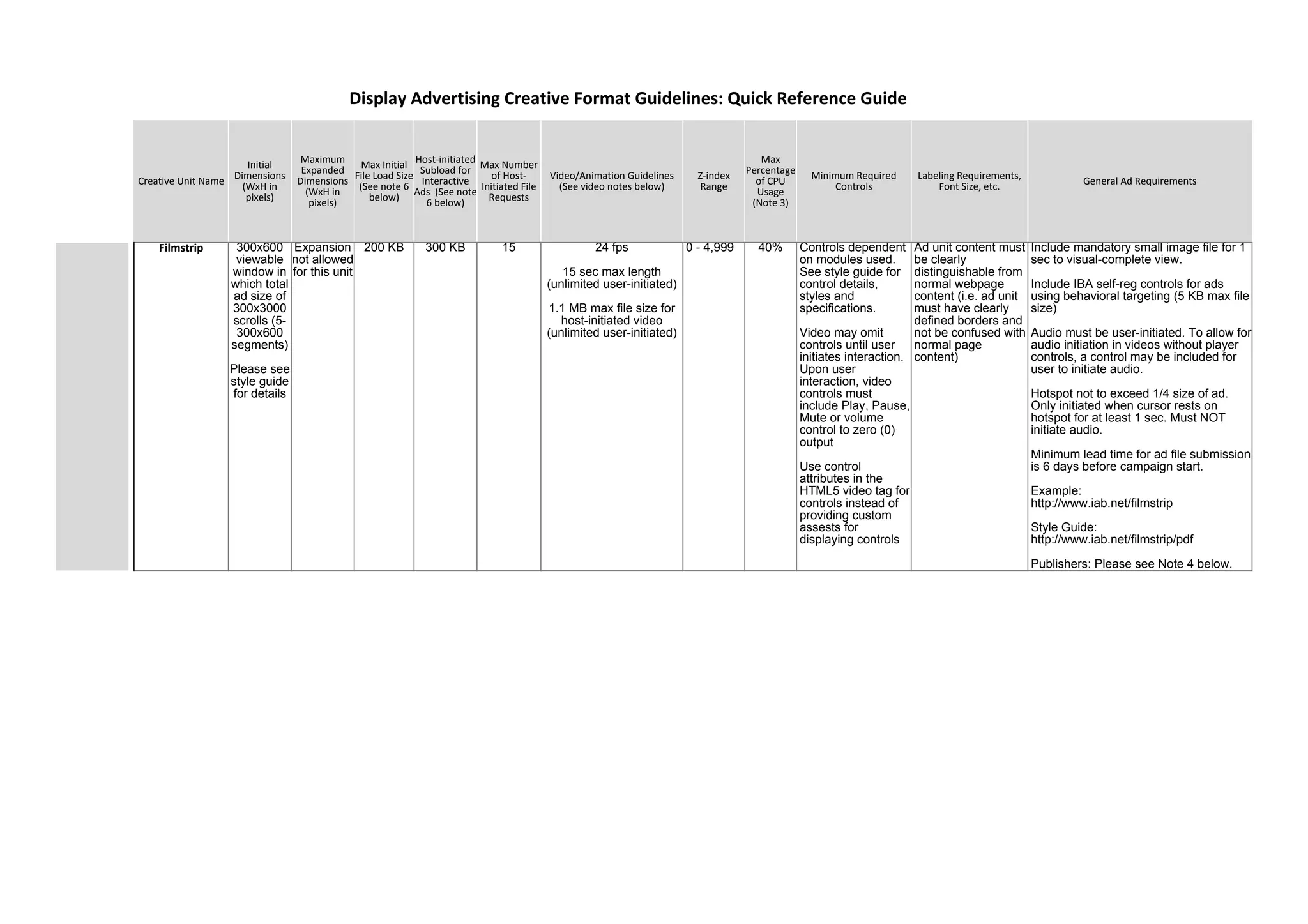
Filmstrip 300x600
viewable
window in
which total
ad size of
300x3000
scrolls (5-
300x600
segments)
Please see
style guide
for details
Expansion
not allowed
for this unit
200 KB 300 KB 15 24 fps
15 sec max length
(unlimited user-initiated)
1.1 MB max file size for
host-initiated video
(unlimited user-initiated)
0 - 4,999 40% Controls dependent
on modules used.
See style guide for
control details,
styles and
specifications.
Video may omit
controls until user
initiates interaction.
Upon user
interaction, video
controls must
include Play, Pause,
Mute or volume
control to zero (0)
output
Use control
attributes in the
HTML5 video tag for
controls instead of
providing custom
assests for
displaying controls
Ad unit content must
be clearly
distinguishable from
normal webpage
content (i.e. ad unit
must have clearly
defined borders and
not be confused with
normal page
content)
Include mandatory small image file for 1
sec to visual-complete view.
Include IBA self-reg controls for ads
using behavioral targeting (5 KB max file
size)
Audio must be user-initiated. To allow for
audio initiation in videos without player
controls, a control may be included for
user to initiate audio.
Hotspot not to exceed 1/4 size of ad.
Only initiated when cursor rests on
hotspot for at least 1 sec. Must NOT
initiate audio.
Minimum lead time for ad file submission
is 6 days before campaign start.
Example:
http://www.iab.net/filmstrip
Style Guide:
http://www.iab.net/filmstrip/pdf
Publishers: Please see Note 4 below.
Display Advertising Creative Format Guidelines: Quick Reference Guide
Creative Unit Name
Initial
Dimensions
(WxH in
pixels)
Maximum
Expanded
Dimensions
(WxH in
pixels)
Max Initial
File Load Size
(See note 6
below)
Host-initiated
Subload for
Interactive
Ads (See note
6 below)
Max Number
of Host-
Initiated File
Requests
Video/Animation Guidelines
(See video notes below)
Z-index
Range
Max
Percentage
of CPU
Usage
(Note 3)
Minimum Required
Controls
Labeling Requirements,
Font Size, etc. General Ad Requirements
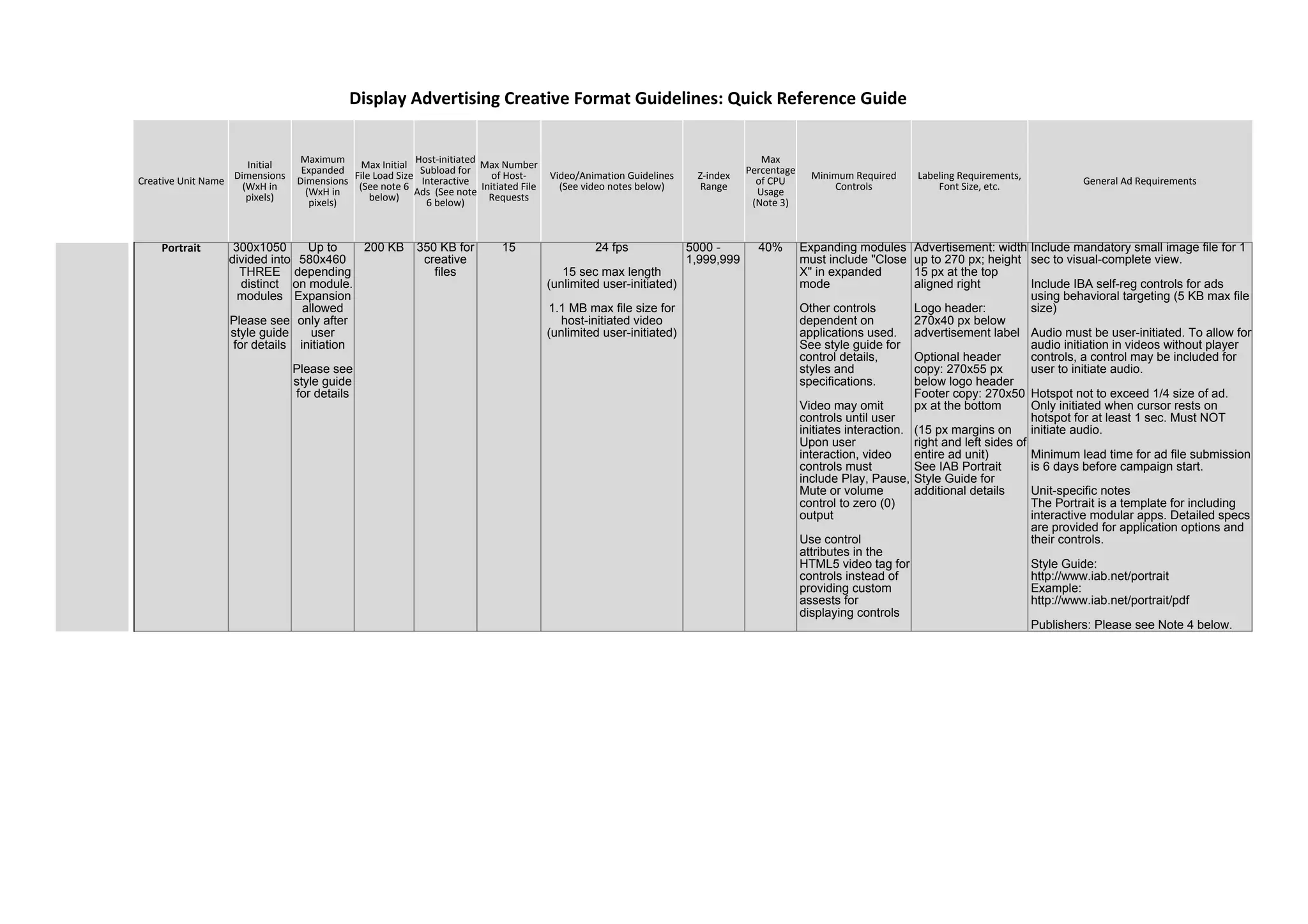
Portrait 300x1050
divided into
THREE
distinct
modules
Please see
style guide
for details
Up to
580x460
depending
on module.
Expansion
allowed
only after
user
initiation
Please see
style guide
for details
200 KB 350 KB for
creative
files
15 24 fps
15 sec max length
(unlimited user-initiated)
1.1 MB max file size for
host-initiated video
(unlimited user-initiated)
5000 -
1,999,999
40% Expanding modules
must include "Close
X" in expanded
mode
Other controls
dependent on
applications used.
See style guide for
control details,
styles and
specifications.
Video may omit
controls until user
initiates interaction.
Upon user
interaction, video
controls must
include Play, Pause,
Mute or volume
control to zero (0)
output
Use control
attributes in the
HTML5 video tag for
controls instead of
providing custom
assests for
displaying controls
Advertisement: width
up to 270 px; height
15 px at the top
aligned right
Logo header:
270x40 px below
advertisement label
Optional header
copy: 270x55 px
below logo header
Footer copy: 270x50
px at the bottom
(15 px margins on
right and left sides of
entire ad unit)
See IAB Portrait
Style Guide for
additional details
Include mandatory small image file for 1
sec to visual-complete view.
Include IBA self-reg controls for ads
using behavioral targeting (5 KB max file
size)
Audio must be user-initiated. To allow for
audio initiation in videos without player
controls, a control may be included for
user to initiate audio.
Hotspot not to exceed 1/4 size of ad.
Only initiated when cursor rests on
hotspot for at least 1 sec. Must NOT
initiate audio.
Minimum lead time for ad file submission
is 6 days before campaign start.
Unit-specific notes
The Portrait is a template for including
interactive modular apps. Detailed specs
are provided for application options and
their controls.
Style Guide:
http://www.iab.net/portrait
Example:
http://www.iab.net/portrait/pdf
Publishers: Please see Note 4 below.
Display Advertising Creative Format Guidelines: Quick Reference Guide
Creative Unit Name
Initial
Dimensions
(WxH in
pixels)
Maximum
Expanded
Dimensions
(WxH in
pixels)
Max Initial
File Load Size
(See note 6
below)
Host-initiated
Subload for
Interactive
Ads (See note
6 below)
Max Number
of Host-
Initiated File
Requests
Video/Animation Guidelines
(See video notes below)
Z-index
Range
Max
Percentage
of CPU
Usage
(Note 3)
Minimum Required
Controls
Labeling Requirements,
Font Size, etc. General Ad Requirements
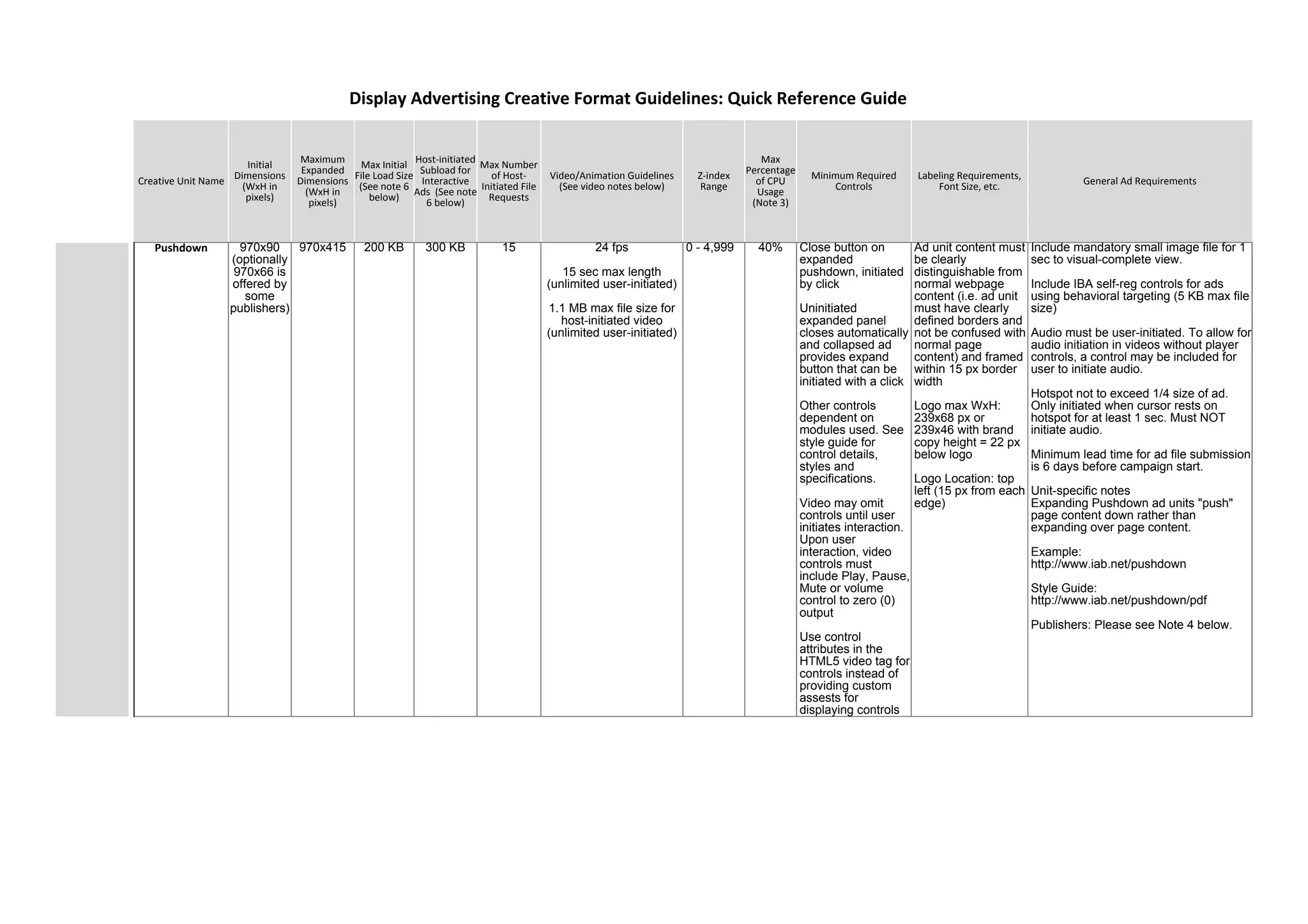
Pushdown 970x90
(optionally
970x66 is
offered by
some
publishers)
970x415 200 KB 300 KB 15 24 fps
15 sec max length
(unlimited user-initiated)
1.1 MB max file size for
host-initiated video
(unlimited user-initiated)
0 - 4,999 40% Close button on
expanded
pushdown, initiated
by click
Uninitiated
expanded panel
closes automatically
and collapsed ad
provides expand
button that can be
initiated with a click
Other controls
dependent on
modules used. See
style guide for
control details,
styles and
specifications.
Video may omit
controls until user
initiates interaction.
Upon user
interaction, video
controls must
include Play, Pause,
Mute or volume
control to zero (0)
output
Use control
attributes in the
HTML5 video tag for
controls instead of
providing custom
assests for
displaying controls
Ad unit content must
be clearly
distinguishable from
normal webpage
content (i.e. ad unit
must have clearly
defined borders and
not be confused with
normal page
content) and framed
within 15 px border
width
Logo max WxH:
239x68 px or
239x46 with brand
copy height = 22 px
below logo
Logo Location: top
left (15 px from each
edge)
Include mandatory small image file for 1
sec to visual-complete view.
Include IBA self-reg controls for ads
using behavioral targeting (5 KB max file
size)
Audio must be user-initiated. To allow for
audio initiation in videos without player
controls, a control may be included for
user to initiate audio.
Hotspot not to exceed 1/4 size of ad.
Only initiated when cursor rests on
hotspot for at least 1 sec. Must NOT
initiate audio.
Minimum lead time for ad file submission
is 6 days before campaign start.
Unit-specific notes
Expanding Pushdown ad units "push"
page content down rather than
expanding over page content.
Example:
http://www.iab.net/pushdown
Style Guide:
http://www.iab.net/pushdown/pdf
Publishers: Please see Note 4 below.
Display Advertising Creative Format Guidelines: Quick Reference Guide
Creative Unit Name
Initial
Dimensions
(WxH in
pixels)
Maximum
Expanded
Dimensions
(WxH in
pixels)
Max Initial
File Load Size
(See note 6
below)
Host-initiated
Subload for
Interactive
Ads (See note
6 below)
Max Number
of Host-
Initiated File
Requests
Video/Animation Guidelines
(See video notes below)
Z-index
Range
Max
Percentage
of CPU
Usage
(Note 3)
Minimum Required
Controls
Labeling Requirements,
Font Size, etc. General Ad Requirements
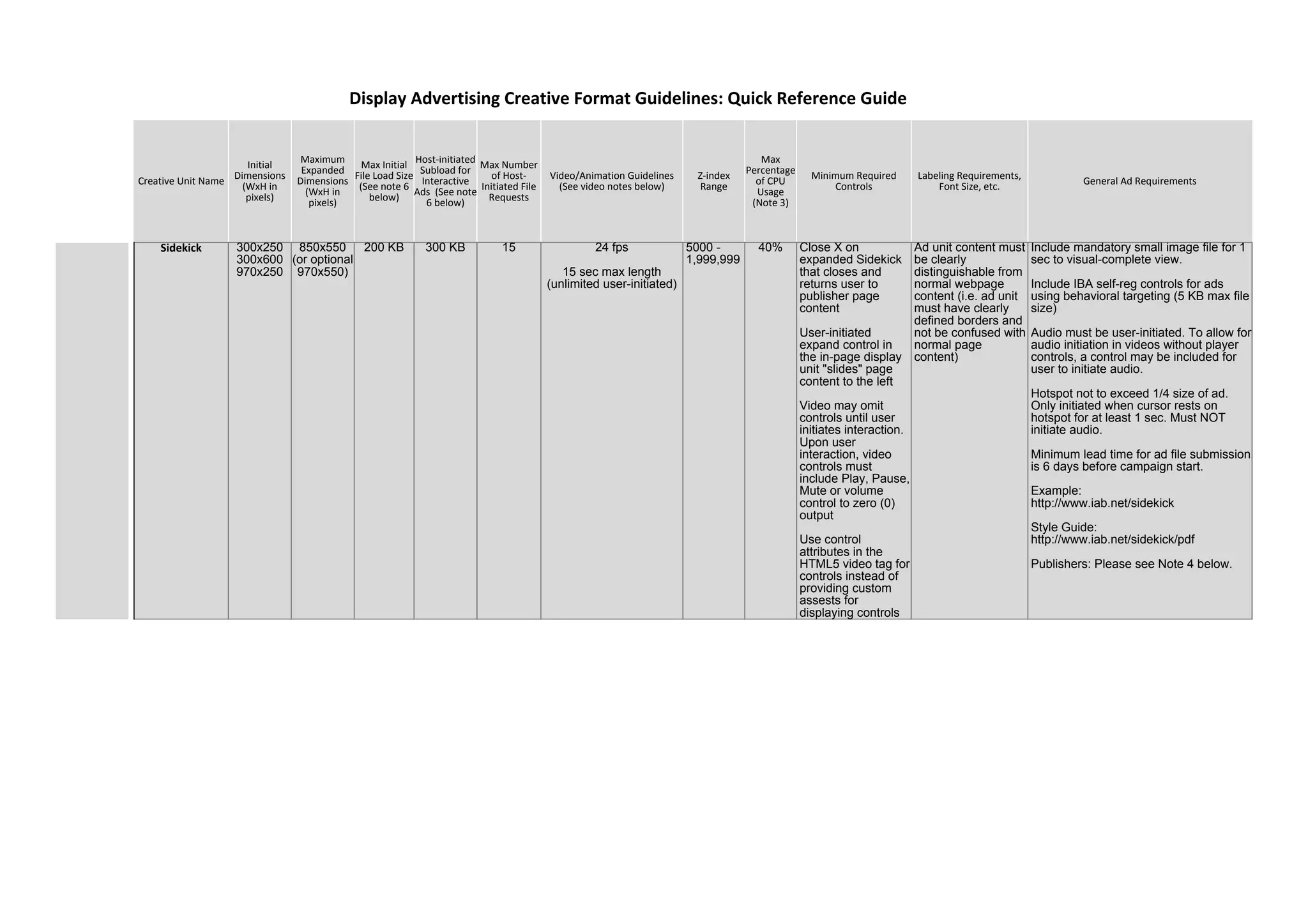
Sidekick 300x250
300x600
970x250
850x550
(or optional
970x550)
200 KB 300 KB 15 24 fps
15 sec max length
(unlimited user-initiated)
5000 -
1,999,999
40% Close X on
expanded Sidekick
that closes and
returns user to
publisher page
content
User-initiated
expand control in
the in-page display
unit "slides" page
content to the left
Video may omit
controls until user
initiates interaction.
Upon user
interaction, video
controls must
include Play, Pause,
Mute or volume
control to zero (0)
output
Use control
attributes in the
HTML5 video tag for
controls instead of
providing custom
assests for
displaying controls
Ad unit content must
be clearly
distinguishable from
normal webpage
content (i.e. ad unit
must have clearly
defined borders and
not be confused with
normal page
content)
Include mandatory small image file for 1
sec to visual-complete view.
Include IBA self-reg controls for ads
using behavioral targeting (5 KB max file
size)
Audio must be user-initiated. To allow for
audio initiation in videos without player
controls, a control may be included for
user to initiate audio.
Hotspot not to exceed 1/4 size of ad.
Only initiated when cursor rests on
hotspot for at least 1 sec. Must NOT
initiate audio.
Minimum lead time for ad file submission
is 6 days before campaign start.
Example:
http://www.iab.net/sidekick
Style Guide:
http://www.iab.net/sidekick/pdf
Publishers: Please see Note 4 below.
Display Advertising Creative Format Guidelines: Quick Reference Guide
Creative Unit Name
Initial
Dimensions
(WxH in
pixels)
Maximum
Expanded
Dimensions
(WxH in
pixels)
Max Initial
File Load Size
(See note 6
below)
Host-initiated
Subload for
Interactive
Ads (See note
6 below)
Max Number
of Host-
Initiated File
Requests
Video/Animation Guidelines
(See video notes below)
Z-index
Range
Max
Percentage
of CPU
Usage
(Note 3)
Minimum Required
Controls
Labeling Requirements,
Font Size, etc. General Ad Requirements
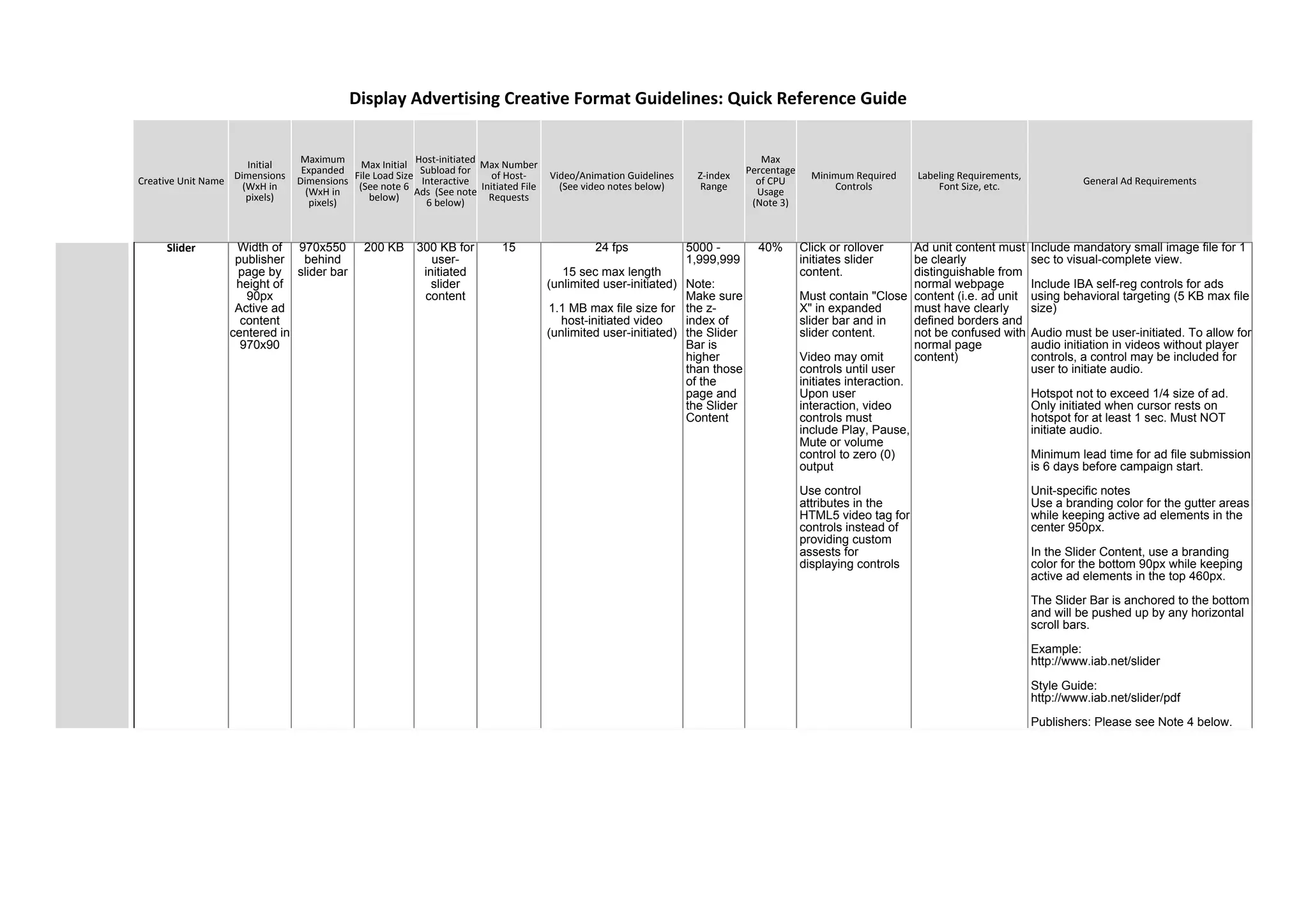
Slider Width of
publisher
page by
height of
90px
Active ad
content
centered in
970x90
970x550
behind
slider bar
200 KB 300 KB for
user-
initiated
slider
content
15 24 fps
15 sec max length
(unlimited user-initiated)
1.1 MB max file size for
host-initiated video
(unlimited user-initiated)
5000 -
1,999,999
Note:
Make sure
the z-
index of
the Slider
Bar is
higher
than those
of the
page and
the Slider
Content
40% Click or rollover
initiates slider
content.
Must contain "Close
X" in expanded
slider bar and in
slider content.
Video may omit
controls until user
initiates interaction.
Upon user
interaction, video
controls must
include Play, Pause,
Mute or volume
control to zero (0)
output
Use control
attributes in the
HTML5 video tag for
controls instead of
providing custom
assests for
displaying controls
Ad unit content must
be clearly
distinguishable from
normal webpage
content (i.e. ad unit
must have clearly
defined borders and
not be confused with
normal page
content)
Include mandatory small image file for 1
sec to visual-complete view.
Include IBA self-reg controls for ads
using behavioral targeting (5 KB max file
size)
Audio must be user-initiated. To allow for
audio initiation in videos without player
controls, a control may be included for
user to initiate audio.
Hotspot not to exceed 1/4 size of ad.
Only initiated when cursor rests on
hotspot for at least 1 sec. Must NOT
initiate audio.
Minimum lead time for ad file submission
is 6 days before campaign start.
Unit-specific notes
Use a branding color for the gutter areas
while keeping active ad elements in the
center 950px.
In the Slider Content, use a branding
color for the bottom 90px while keeping
active ad elements in the top 460px.
The Slider Bar is anchored to the bottom
and will be pushed up by any horizontal
scroll bars.
Example:
http://www.iab.net/slider
Style Guide:
http://www.iab.net/slider/pdf
Publishers: Please see Note 4 below.
Display Advertising Creative Format Guidelines: Quick Reference Guide
Creative Unit Name
Initial
Dimensions
(WxH in
pixels)
Maximum
Expanded
Dimensions
(WxH in
pixels)
Max Initial
File Load Size
(See note 6
below)
Host-initiated
Subload for
Interactive
Ads (See note
6 below)
Max Number
of Host-
Initiated File
Requests
Video/Animation Guidelines
(See video notes below)
Z-index
Range
Max
Percentage
of CPU
Usage
(Note 3)
Minimum Required
Controls
Labeling Requirements,
Font Size, etc. General Ad Requirements
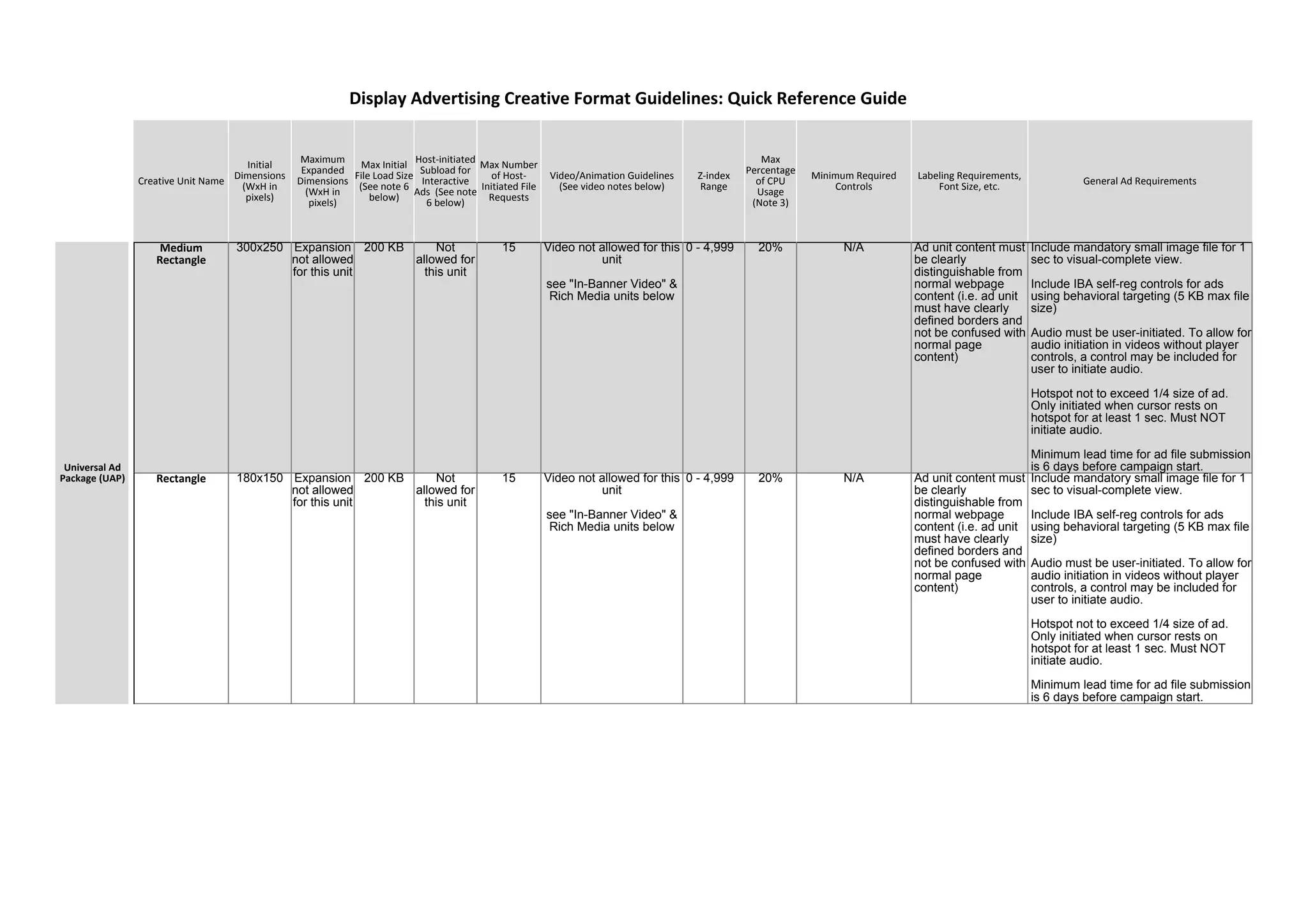
Medium
Rectangle
300x250 Expansion
not allowed
for this unit
200 KB Not
allowed for
this unit
15 Video not allowed for this
unit
see "In-Banner Video" &
Rich Media units below
0 - 4,999 20% N/A Ad unit content must
be clearly
distinguishable from
normal webpage
content (i.e. ad unit
must have clearly
defined borders and
not be confused with
normal page
content)
Include mandatory small image file for 1
sec to visual-complete view.
Include IBA self-reg controls for ads
using behavioral targeting (5 KB max file
size)
Audio must be user-initiated. To allow for
audio initiation in videos without player
controls, a control may be included for
user to initiate audio.
Hotspot not to exceed 1/4 size of ad.
Only initiated when cursor rests on
hotspot for at least 1 sec. Must NOT
initiate audio.
Minimum lead time for ad file submission
is 6 days before campaign start.
Rectangle 180x150 Expansion
not allowed
for this unit
200 KB Not
allowed for
this unit
15 Video not allowed for this
unit
see "In-Banner Video" &
Rich Media units below
0 - 4,999 20% N/A Ad unit content must
be clearly
distinguishable from
normal webpage
content (i.e. ad unit
must have clearly
defined borders and
not be confused with
normal page
content)
Include mandatory small image file for 1
sec to visual-complete view.
Include IBA self-reg controls for ads
using behavioral targeting (5 KB max file
size)
Audio must be user-initiated. To allow for
audio initiation in videos without player
controls, a control may be included for
user to initiate audio.
Hotspot not to exceed 1/4 size of ad.
Only initiated when cursor rests on
hotspot for at least 1 sec. Must NOT
initiate audio.
Minimum lead time for ad file submission
is 6 days before campaign start.
Display Advertising Creative Format Guidelines: Quick Reference Guide
Universal Ad
Package (UAP)
Creative Unit Name
Initial
Dimensions
(WxH in
pixels)
Maximum
Expanded
Dimensions
(WxH in
pixels)
Max Initial
File Load Size
(See note 6
below)
Host-initiated
Subload for
Interactive
Ads (See note
6 below)
Max Number
of Host-
Initiated File
Requests
Video/Animation Guidelines
(See video notes below)
Z-index
Range
Max
Percentage
of CPU
Usage
(Note 3)
Minimum Required
Controls
Labeling Requirements,
Font Size, etc. General Ad Requirements
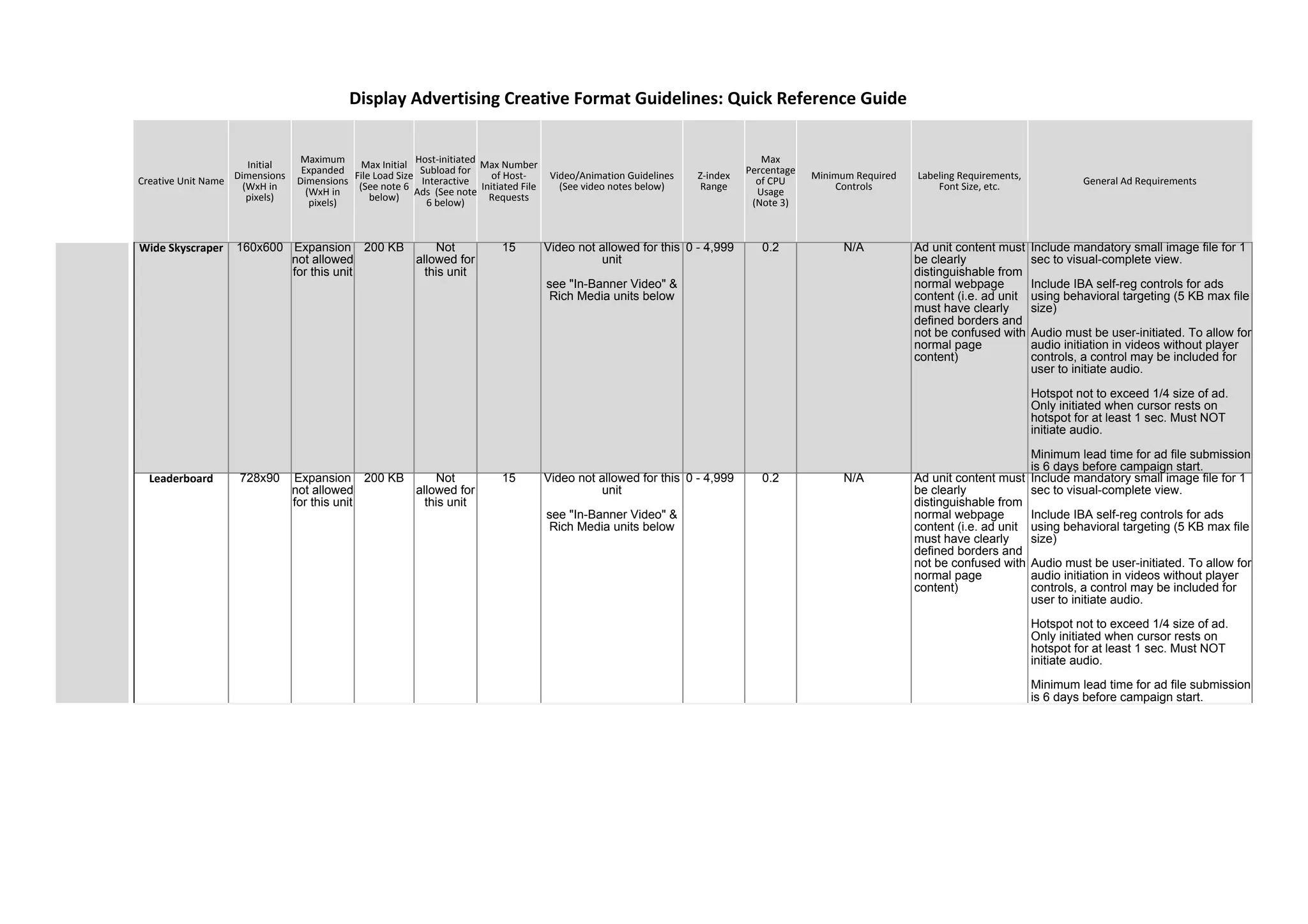
Wide Skyscraper 160x600 Expansion
not allowed
for this unit
200 KB Not
allowed for
this unit
15 Video not allowed for this
unit
see "In-Banner Video" &
Rich Media units below
0 - 4,999 0.2 N/A Ad unit content must
be clearly
distinguishable from
normal webpage
content (i.e. ad unit
must have clearly
defined borders and
not be confused with
normal page
content)
Include mandatory small image file for 1
sec to visual-complete view.
Include IBA self-reg controls for ads
using behavioral targeting (5 KB max file
size)
Audio must be user-initiated. To allow for
audio initiation in videos without player
controls, a control may be included for
user to initiate audio.
Hotspot not to exceed 1/4 size of ad.
Only initiated when cursor rests on
hotspot for at least 1 sec. Must NOT
initiate audio.
Minimum lead time for ad file submission
is 6 days before campaign start.
Leaderboard 728x90 Expansion
not allowed
for this unit
200 KB Not
allowed for
this unit
15 Video not allowed for this
unit
see "In-Banner Video" &
Rich Media units below
0 - 4,999 0.2 N/A Ad unit content must
be clearly
distinguishable from
normal webpage
content (i.e. ad unit
must have clearly
defined borders and
not be confused with
normal page
content)
Include mandatory small image file for 1
sec to visual-complete view.
Include IBA self-reg controls for ads
using behavioral targeting (5 KB max file
size)
Audio must be user-initiated. To allow for
audio initiation in videos without player
controls, a control may be included for
user to initiate audio.
Hotspot not to exceed 1/4 size of ad.
Only initiated when cursor rests on
hotspot for at least 1 sec. Must NOT
initiate audio.
Minimum lead time for ad file submission
is 6 days before campaign start.
Display Advertising Creative Format Guidelines: Quick Reference Guide
Creative Unit Name
Initial
Dimensions
(WxH in
pixels)
Maximum
Expanded
Dimensions
(WxH in
pixels)
Max Initial
File Load Size
(See note 6
below)
Host-initiated
Subload for
Interactive
Ads (See note
6 below)
Max Number
of Host-
Initiated File
Requests
Video/Animation Guidelines
(See video notes below)
Z-index
Range
Max
Percentage
of CPU
Usage
(Note 3)
Minimum Required
Controls
Labeling Requirements,
Font Size, etc. General Ad Requirements
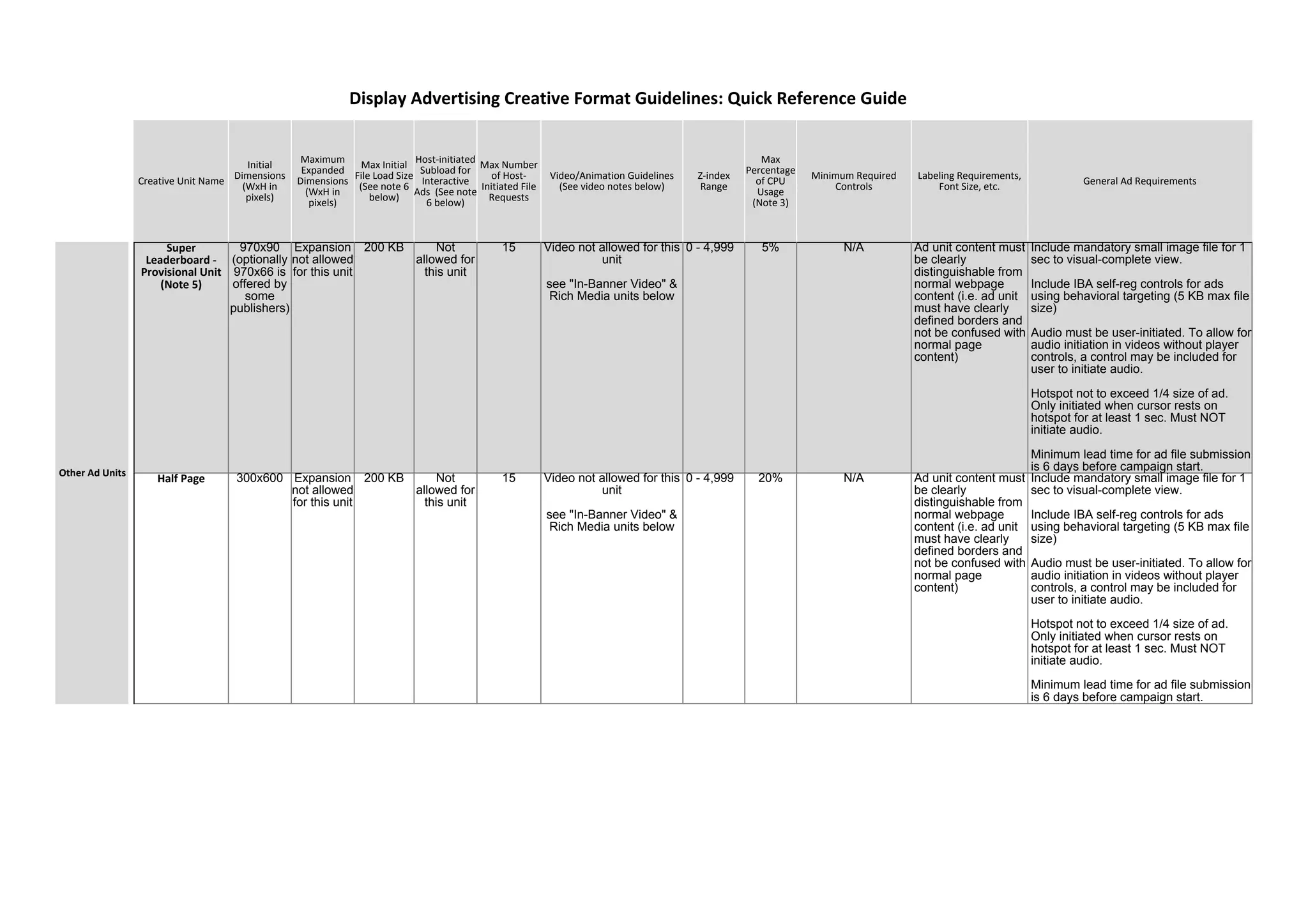
Super
Leaderboard -
Provisional Unit
(Note 5)
970x90
(optionally
970x66 is
offered by
some
publishers)
Expansion
not allowed
for this unit
200 KB Not
allowed for
this unit
15 Video not allowed for this
unit
see "In-Banner Video" &
Rich Media units below
0 - 4,999 5% N/A Ad unit content must
be clearly
distinguishable from
normal webpage
content (i.e. ad unit
must have clearly
defined borders and
not be confused with
normal page
content)
Include mandatory small image file for 1
sec to visual-complete view.
Include IBA self-reg controls for ads
using behavioral targeting (5 KB max file
size)
Audio must be user-initiated. To allow for
audio initiation in videos without player
controls, a control may be included for
user to initiate audio.
Hotspot not to exceed 1/4 size of ad.
Only initiated when cursor rests on
hotspot for at least 1 sec. Must NOT
initiate audio.
Minimum lead time for ad file submission
is 6 days before campaign start.
Half Page 300x600 Expansion
not allowed
for this unit
200 KB Not
allowed for
this unit
15 Video not allowed for this
unit
see "In-Banner Video" &
Rich Media units below
0 - 4,999 20% N/A Ad unit content must
be clearly
distinguishable from
normal webpage
content (i.e. ad unit
must have clearly
defined borders and
not be confused with
normal page
content)
Include mandatory small image file for 1
sec to visual-complete view.
Include IBA self-reg controls for ads
using behavioral targeting (5 KB max file
size)
Audio must be user-initiated. To allow for
audio initiation in videos without player
controls, a control may be included for
user to initiate audio.
Hotspot not to exceed 1/4 size of ad.
Only initiated when cursor rests on
hotspot for at least 1 sec. Must NOT
initiate audio.
Minimum lead time for ad file submission
is 6 days before campaign start.
Display Advertising Creative Format Guidelines: Quick Reference Guide
Other Ad Units
Creative Unit Name
Initial
Dimensions
(WxH in
pixels)
Maximum
Expanded
Dimensions
(WxH in
pixels)
Max Initial
File Load Size
(See note 6
below)
Host-initiated
Subload for
Interactive
Ads (See note
6 below)
Max Number
of Host-
Initiated File
Requests
Video/Animation Guidelines
(See video notes below)
Z-index
Range
Max
Percentage
of CPU
Usage
(Note 3)
Minimum Required
Controls
Labeling Requirements,
Font Size, etc. General Ad Requirements
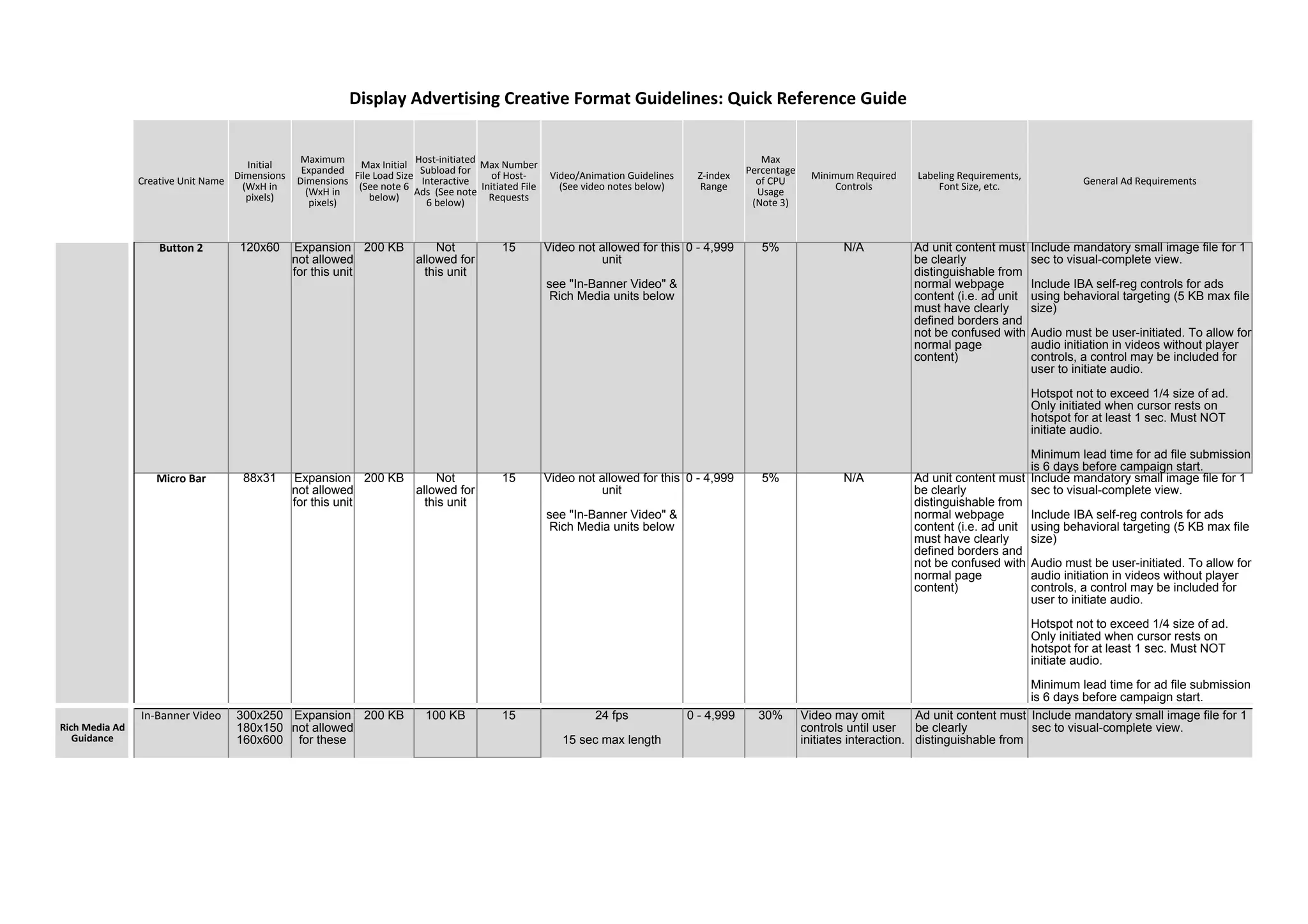
Button 2 120x60 Expansion
not allowed
for this unit
200 KB Not
allowed for
this unit
15 Video not allowed for this
unit
see "In-Banner Video" &
Rich Media units below
0 - 4,999 5% N/A Ad unit content must
be clearly
distinguishable from
normal webpage
content (i.e. ad unit
must have clearly
defined borders and
not be confused with
normal page
content)
Include mandatory small image file for 1
sec to visual-complete view.
Include IBA self-reg controls for ads
using behavioral targeting (5 KB max file
size)
Audio must be user-initiated. To allow for
audio initiation in videos without player
controls, a control may be included for
user to initiate audio.
Hotspot not to exceed 1/4 size of ad.
Only initiated when cursor rests on
hotspot for at least 1 sec. Must NOT
initiate audio.
Minimum lead time for ad file submission
is 6 days before campaign start.
Micro Bar 88x31 Expansion
not allowed
for this unit
200 KB Not
allowed for
this unit
15 Video not allowed for this
unit
see "In-Banner Video" &
Rich Media units below
0 - 4,999 5% N/A Ad unit content must
be clearly
distinguishable from
normal webpage
content (i.e. ad unit
must have clearly
defined borders and
not be confused with
normal page
content)
Include mandatory small image file for 1
sec to visual-complete view.
Include IBA self-reg controls for ads
using behavioral targeting (5 KB max file
size)
Audio must be user-initiated. To allow for
audio initiation in videos without player
controls, a control may be included for
user to initiate audio.
Hotspot not to exceed 1/4 size of ad.
Only initiated when cursor rests on
hotspot for at least 1 sec. Must NOT
initiate audio.
Minimum lead time for ad file submission
is 6 days before campaign start.
Display Advertising Creative Format Guidelines: Quick Reference Guide
Rich Media Ad
Guidance
In-Banner Video 300x250
180x150
160x600
Expansion
not allowed
for these
200 KB 100 KB 15 24 fps
15 sec max length
0 - 4,999 30% Video may omit
controls until user
initiates interaction.
Ad unit content must
be clearly
distinguishable from
Include mandatory small image file for 1
sec to visual-complete view.
Creative Unit Name
Initial
Dimensions
(WxH in
pixels)
Maximum
Expanded
Dimensions
(WxH in
pixels)
Max Initial
File Load Size
(See note 6
below)
Host-initiated
Subload for
Interactive
Ads (See note
6 below)
Max Number
of Host-
Initiated File
Requests
Video/Animation Guidelines
(See video notes below)
Z-index
Range
Max
Percentage
of CPU
Usage
(Note 3)
Minimum Required
Controls
Labeling Requirements,
Font Size, etc. General Ad Requirements
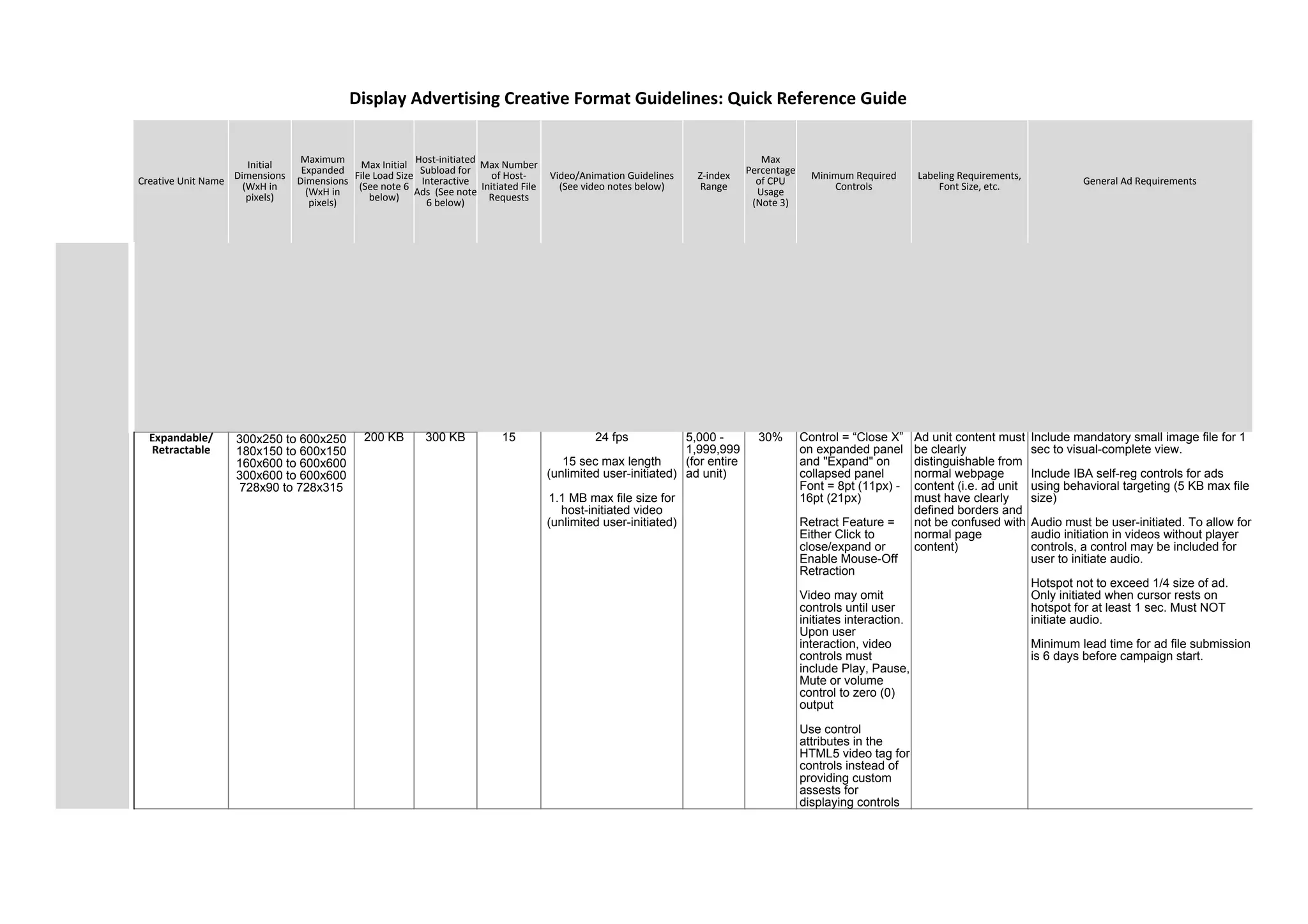
Expandable/
Retractable
200 KB 300 KB 15 24 fps
15 sec max length
(unlimited user-initiated)
1.1 MB max file size for
host-initiated video
(unlimited user-initiated)
5,000 -
1,999,999
(for entire
ad unit)
30% Control = “Close X”
on expanded panel
and "Expand" on
collapsed panel
Font = 8pt (11px) -
16pt (21px)
Retract Feature =
Either Click to
close/expand or
Enable Mouse-Off
Retraction
Video may omit
controls until user
initiates interaction.
Upon user
interaction, video
controls must
include Play, Pause,
Mute or volume
control to zero (0)
output
Use control
attributes in the
HTML5 video tag for
controls instead of
providing custom
assests for
displaying controls
Ad unit content must
be clearly
distinguishable from
normal webpage
content (i.e. ad unit
must have clearly
defined borders and
not be confused with
normal page
content)
Include mandatory small image file for 1
sec to visual-complete view.
Include IBA self-reg controls for ads
using behavioral targeting (5 KB max file
size)
Audio must be user-initiated. To allow for
audio initiation in videos without player
controls, a control may be included for
user to initiate audio.
Hotspot not to exceed 1/4 size of ad.
Only initiated when cursor rests on
hotspot for at least 1 sec. Must NOT
initiate audio.
Minimum lead time for ad file submission
is 6 days before campaign start.
Display Advertising Creative Format Guidelines: Quick Reference Guide
300x250 to 600x250
180x150 to 600x150
160x600 to 600x600
300x600 to 600x600
728x90 to 728x315
Creative Unit Name
Initial
Dimensions
(WxH in
pixels)
Maximum
Expanded
Dimensions
(WxH in
pixels)
Max Initial
File Load Size
(See note 6
below)
Host-initiated
Subload for
Interactive
Ads (See note
6 below)
Max Number
of Host-
Initiated File
Requests
Video/Animation Guidelines
(See video notes below)
Z-index
Range
Max
Percentage
of CPU
Usage
(Note 3)
Minimum Required
Controls
Labeling Requirements,
Font Size, etc. General Ad Requirements
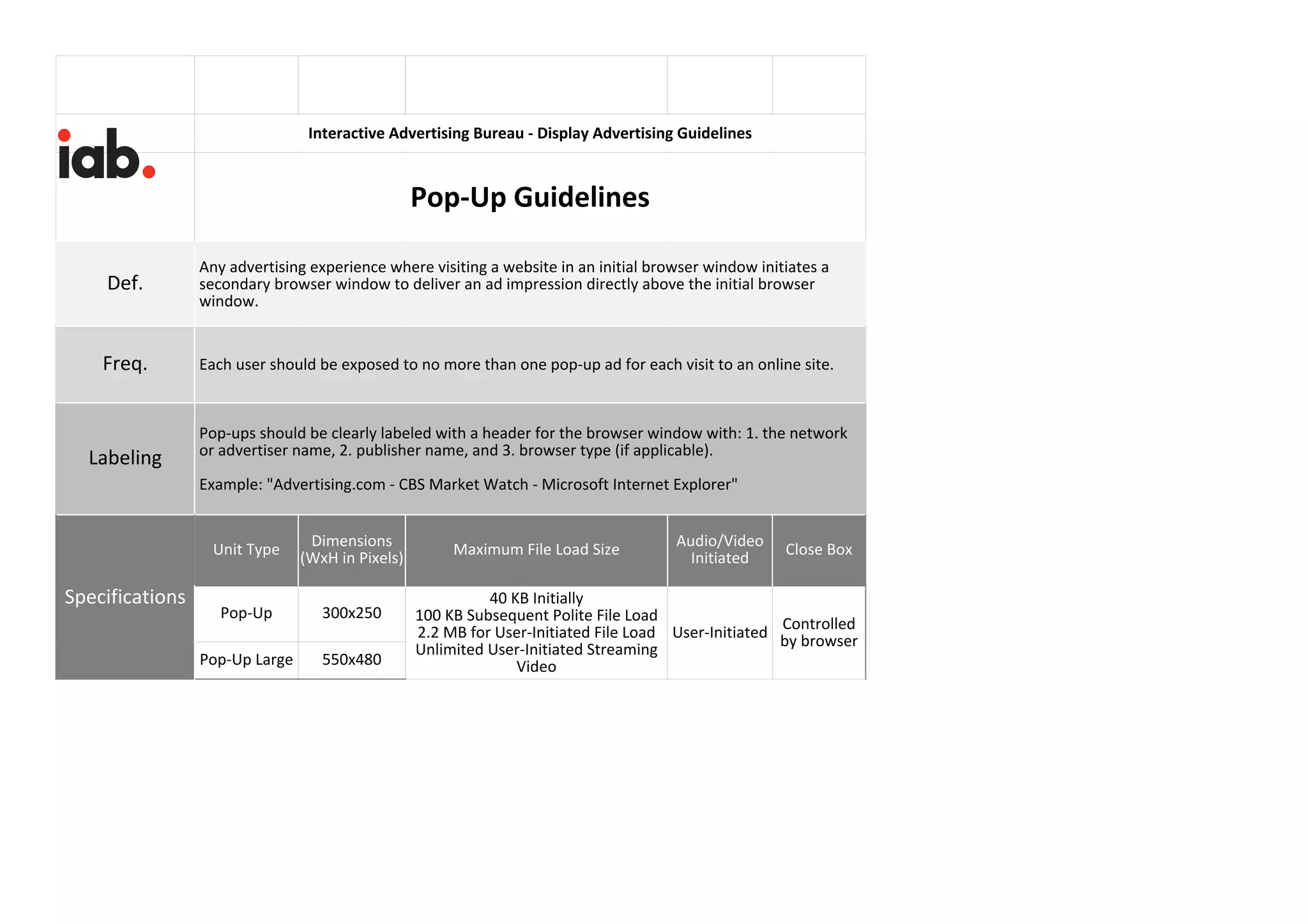
Pop Ups 300x250
550x480
null
Expansion
not allowed
for these
units
200 KB 300 KB 15 24 fps
15 sec max length
(unlimited user-initiated)
1.1 MB max file size for
host-initiated video
(unlimited user-initiated)
N/A
Pop-ups
display in
their own
browser
window,
so pop-up
ad content
has its
own z-
index
30% "Close" control
provided by browser
window.
Video may omit
controls until user
initiates interaction.
Upon user
interaction, video
controls must
include Play, Pause,
Mute or volume
control to zero (0)
output
Use control
attributes in the
HTML5 video tag for
controls instead of
providing custom
assests for
displaying controls
In the browser bar,
all Pop Ups must be
clearly labeled with:
Name of
Network/Advertiser,
Publisher, Browser
Type [in this order]
(ex.:
"Advertising.com -
CBS Market Watch -
Microsoft Internet
Explorer")
Include mandatory small image file for 1
sec to visual-complete view.
Include IBA self-reg controls for ads
using behavioral targeting (5 KB max file
size)
Audio must be user-initiated. To allow for
audio initiation in videos without player
controls, a control may be included for
user to initiate audio.
Hotspot not to exceed 1/4 size of ad.
Only initiated when cursor rests on
hotspot for at least 1 sec. Must NOT
initiate audio.
Minimum lead time for ad file submission
is 6 days before campaign start.
Floating Variable
Initial
Dimension
s
Expansion
not allowed
for this unit
200 KB 300 KB 15 24 fps
15 sec max length
(unlimited user-initiated)
1.1 MB max file size for
host-initiated video
(unlimited user-initiated)
2,000,000
-
2,999,999
30% Control = “Close X”
Font = 8pt (11px) -
16pt (11px)
Video may omit
controls until user
initiates interaction.
Upon user
interaction, video
controls must
include Play, Pause,
Mute or volume
control to zero (0)
output
Use control
attributes in the
HTML5 video tag for
controls instead of
providing custom
assests for
displaying controls
Label =
"Advertisement"
Font = 8pt (11px) -
16pt (21px)
Include mandatory small image file for 1
sec to visual-complete view.
Include IBA self-reg controls for ads
using behavioral targeting (5 KB max file
size)
Audio must be user-initiated. To allow for
audio initiation in videos without player
controls, a control may be included for
user to initiate audio.
Hotspot not to exceed 1/4 size of ad.
Only initiated when cursor rests on
hotspot for at least 1 sec. Must NOT
initiate audio.
Minimum lead time for ad file submission
is 6 days before campaign start.
Display Advertising Creative Format Guidelines: Quick Reference Guide
Creative Unit Name
Initial
Dimensions
(WxH in
pixels)
Maximum
Expanded
Dimensions
(WxH in
pixels)
Max Initial
File Load Size
(See note 6
below)
Host-initiated
Subload for
Interactive
Ads (See note
6 below)
Max Number
of Host-
Initiated File
Requests
Video/Animation Guidelines
(See video notes below)
Z-index
Range
Max
Percentage
of CPU
Usage
(Note 3)
Minimum Required
Controls
Labeling Requirements,
Font Size, etc. General Ad Requirements
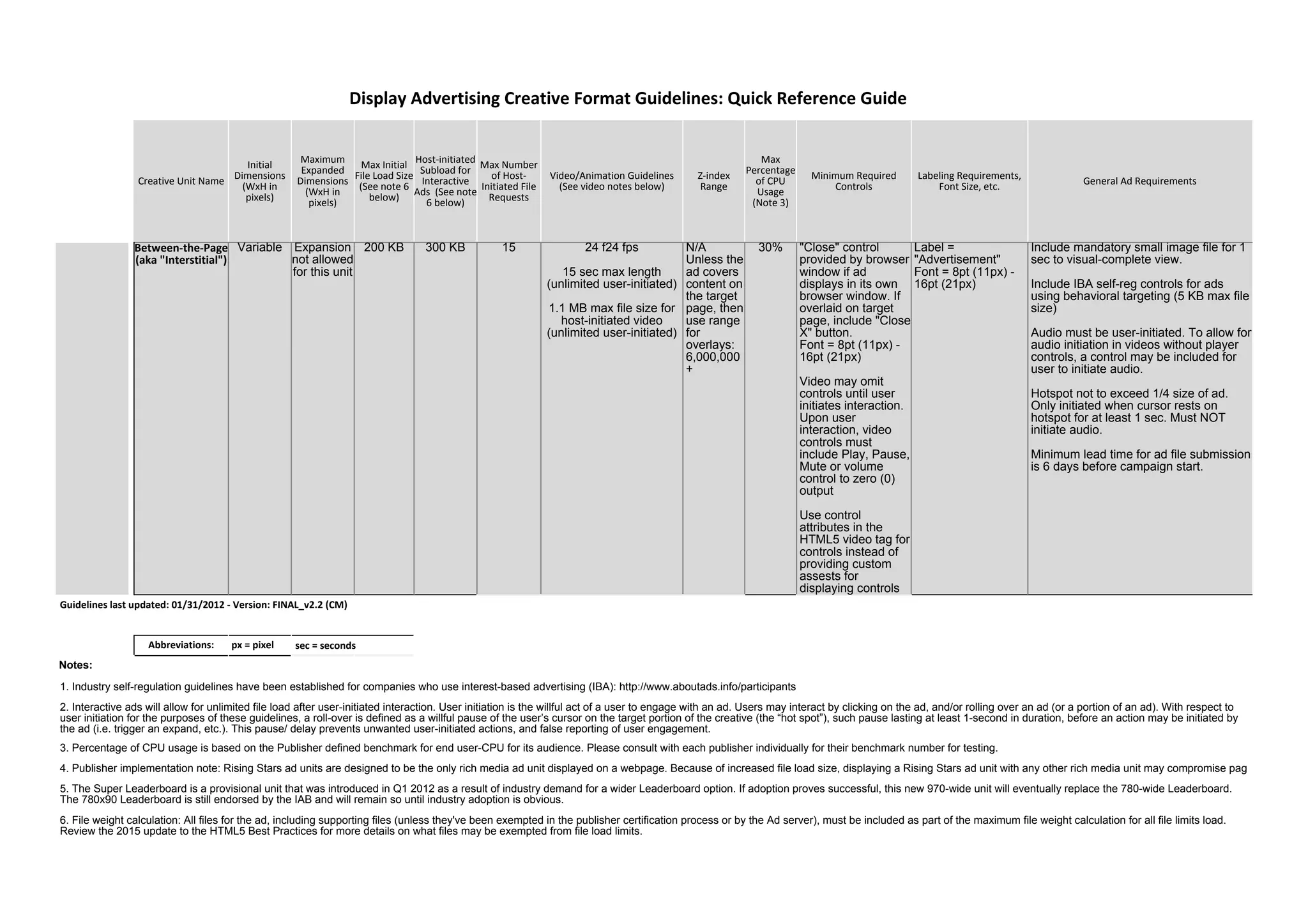
Between-the-Page
(aka "Interstitial")
Variable Expansion
not allowed
for this unit
200 KB 300 KB 15 24 f24 fps
15 sec max length
(unlimited user-initiated)
1.1 MB max file size for
host-initiated video
(unlimited user-initiated)
N/A
Unless the
ad covers
content on
the target
page, then
use range
for
overlays:
6,000,000
+
30% "Close" control
provided by browser
window if ad
displays in its own
browser window. If
overlaid on target
page, include "Close
X" button.
Font = 8pt (11px) -
16pt (21px)
Video may omit
controls until user
initiates interaction.
Upon user
interaction, video
controls must
include Play, Pause,
Mute or volume
control to zero (0)
output
Use control
attributes in the
HTML5 video tag for
controls instead of
providing custom
assests for
displaying controls
Label =
"Advertisement"
Font = 8pt (11px) -
16pt (21px)
Include mandatory small image file for 1
sec to visual-complete view.
Include IBA self-reg controls for ads
using behavioral targeting (5 KB max file
size)
Audio must be user-initiated. To allow for
audio initiation in videos without player
controls, a control may be included for
user to initiate audio.
Hotspot not to exceed 1/4 size of ad.
Only initiated when cursor rests on
hotspot for at least 1 sec. Must NOT
initiate audio.
Minimum lead time for ad file submission
is 6 days before campaign start.
Abbreviations: px = pixel
Notes:
Display Advertising Creative Format Guidelines: Quick Reference Guide
Guidelines last updated: 01/31/2012 - Version: FINAL_v2.2 (CM)
sec = seconds
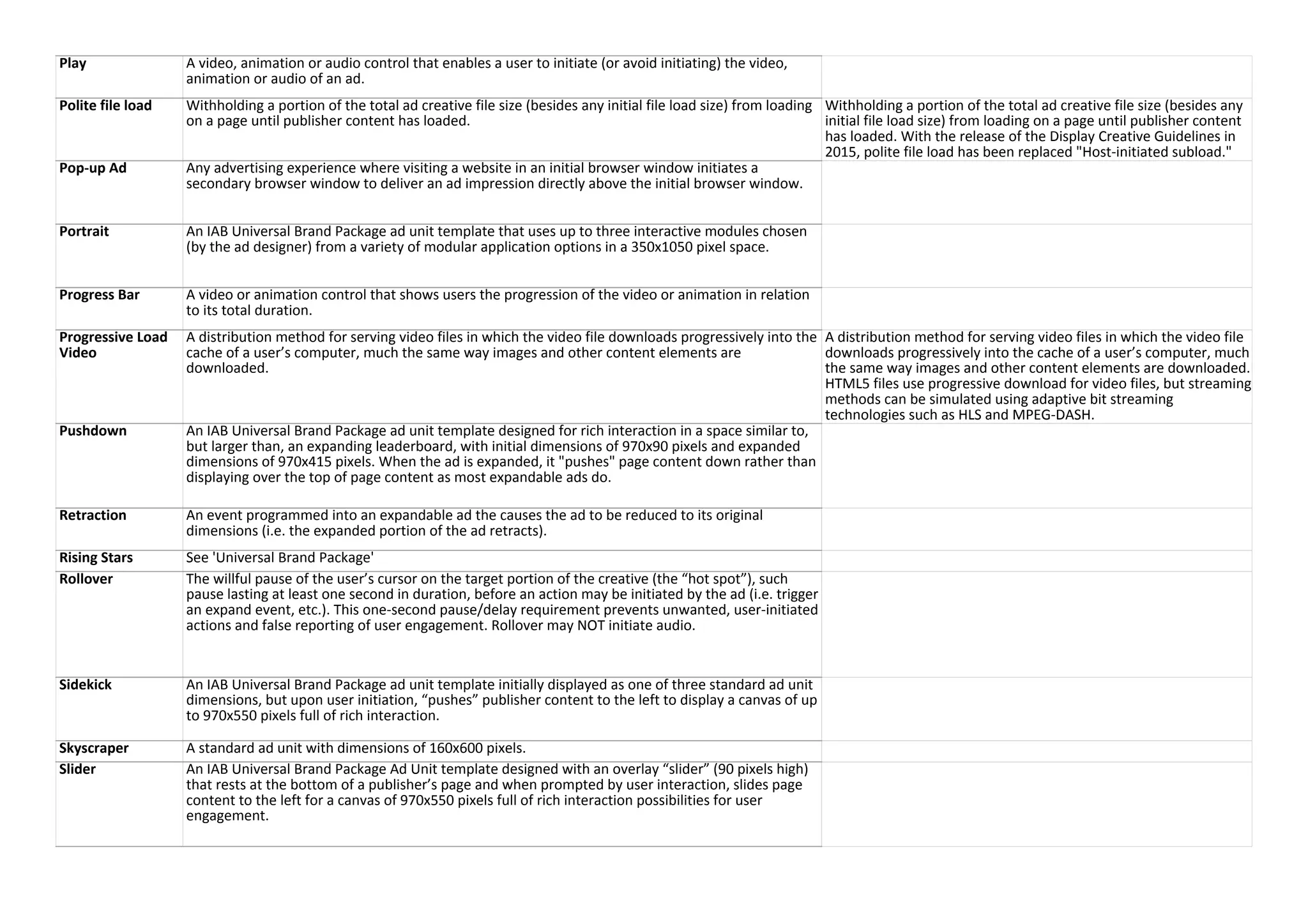
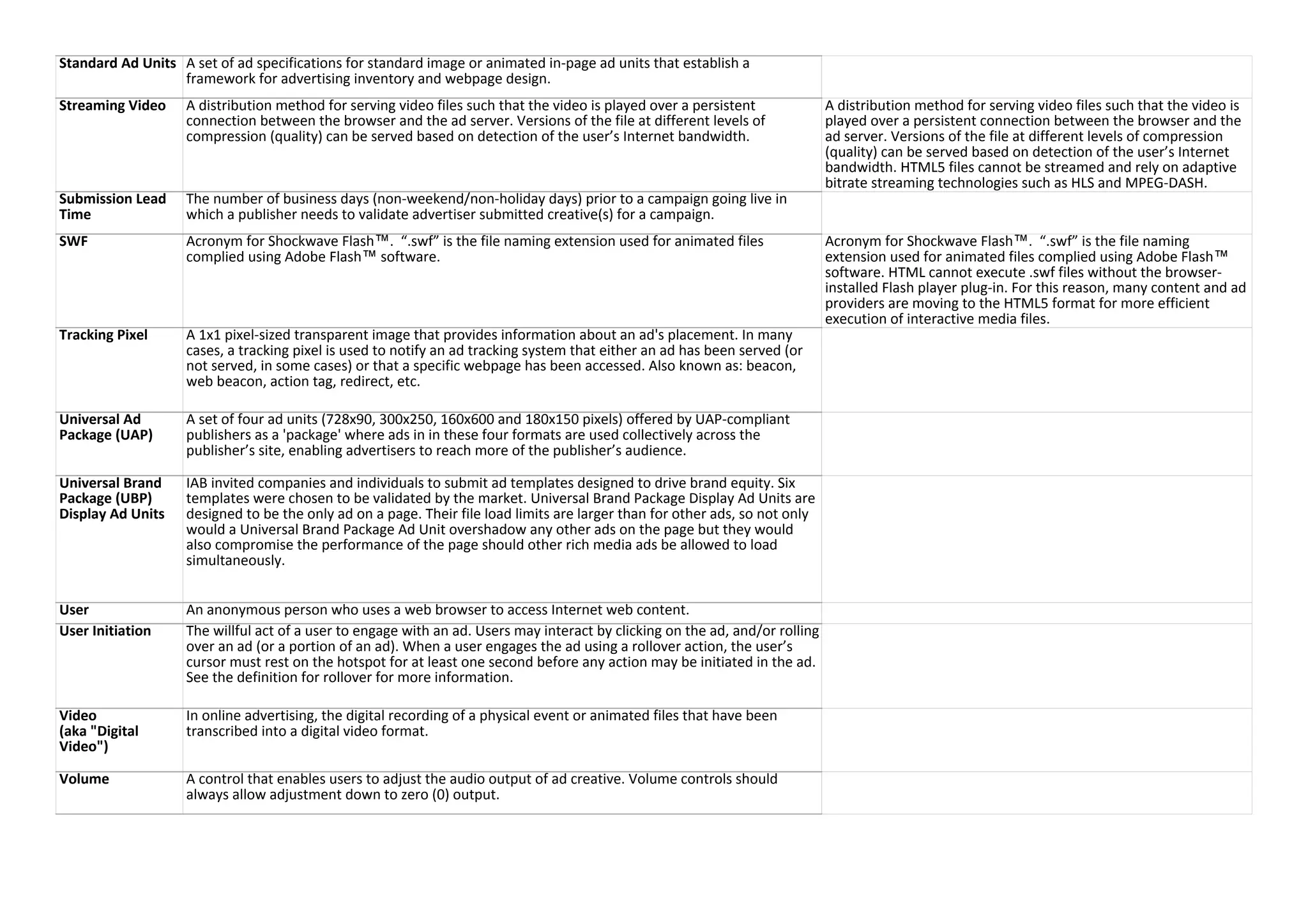
1. Industry self-regulation guidelines have been established for companies who use interest-based advertising (IBA): http://www.aboutads.info/participants
2. Interactive ads will allow for unlimited file load after user-initiated interaction. User initiation is the willful act of a user to engage with an ad. Users may interact by clicking on the ad, and/or rolling over an ad (or a portion of an ad). With respect to
user initiation for the purposes of these guidelines, a roll-over is defined as a willful pause of the user’s cursor on the target portion of the creative (the “hot spot”), such pause lasting at least 1-second in duration, before an action may be initiated by
the ad (i.e. trigger an expand, etc.). This pause/ delay prevents unwanted user-initiated actions, and false reporting of user engagement.
3. Percentage of CPU usage is based on the Publisher defined benchmark for end user-CPU for its audience. Please consult with each publisher individually for their benchmark number for testing.
4. Publisher implementation note: Rising Stars ad units are designed to be the only rich media ad unit displayed on a webpage. Because of increased file load size, displaying a Rising Stars ad unit with any other rich media unit may compromise pag
5. The Super Leaderboard is a provisional unit that was introduced in Q1 2012 as a result of industry demand for a wider Leaderboard option. If adoption proves successful, this new 970-wide unit will eventually replace the 780-wide Leaderboard.
The 780x90 Leaderboard is still endorsed by the IAB and will remain so until industry adoption is obvious.
6. File weight calculation: All files for the ad, including supporting files (unless they've been exempted in the publisher certification process or by the Ad server), must be included as part of the maximum file weight calculation for all file limits load.
Review the 2015 update to the HTML5 Best Practices for more details on what files may be exempted from file load limits.
Creative Unit Name
Initial
Dimensions
(WxH in
pixels)
Maximum
Expanded
Dimensions
(WxH in
pixels)
Max Initial
File Load Size
(See note 6
below)
Host-initiated
Subload for
Interactive
Ads (See note
6 below)
Max Number
of Host-
Initiated File
Requests
Video/Animation Guidelines
(See video notes below)
Z-index
Range
Max
Percentage
of CPU
Usage
(Note 3)
Minimum Required
Controls
Labeling Requirements,
Font Size, etc. General Ad Requirements
Video Assets
• Defer h
• Use tec
• Avoid u
Video Notes:
Display Advertising Creative Format Guidelines: Quick Reference Guide
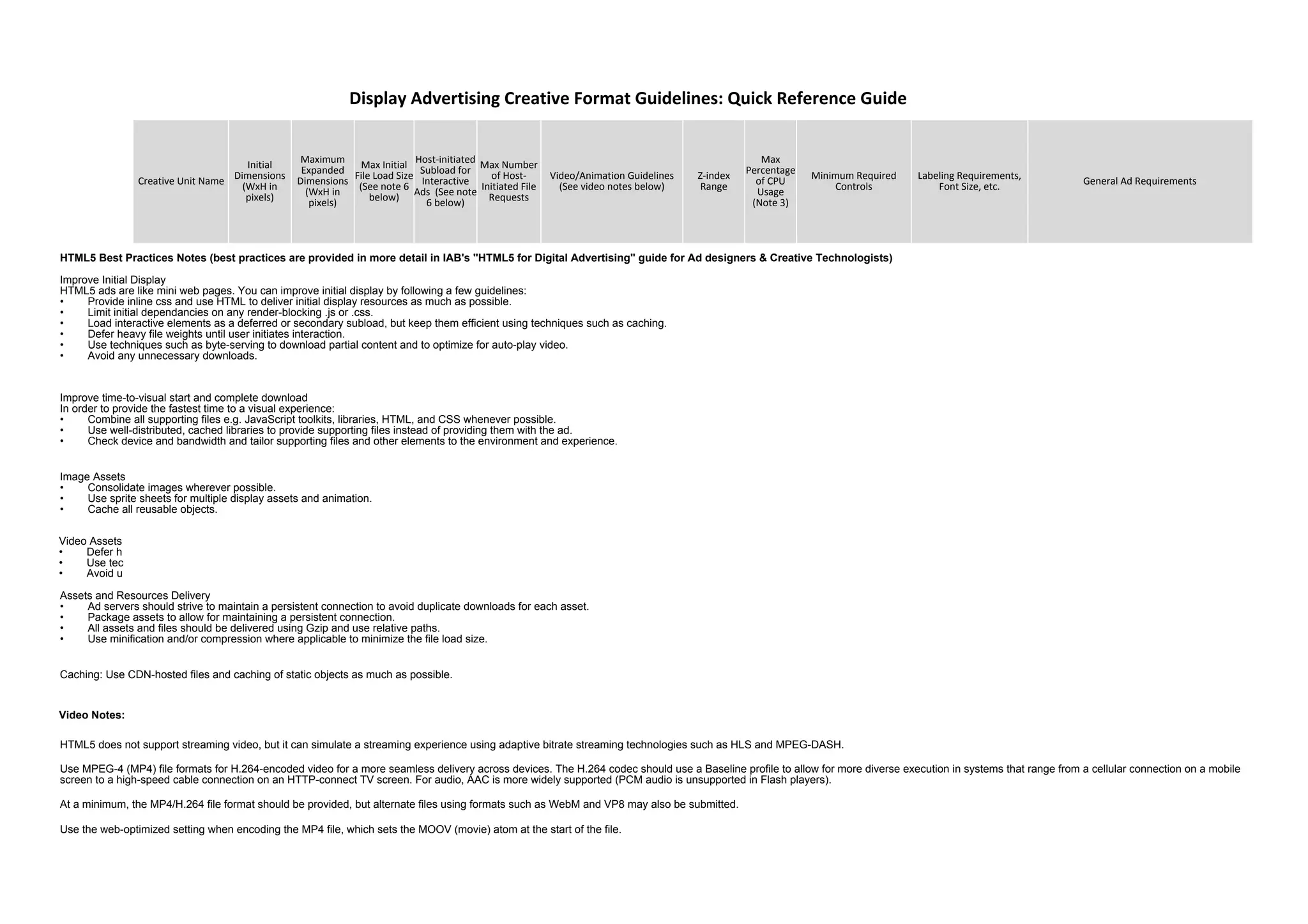
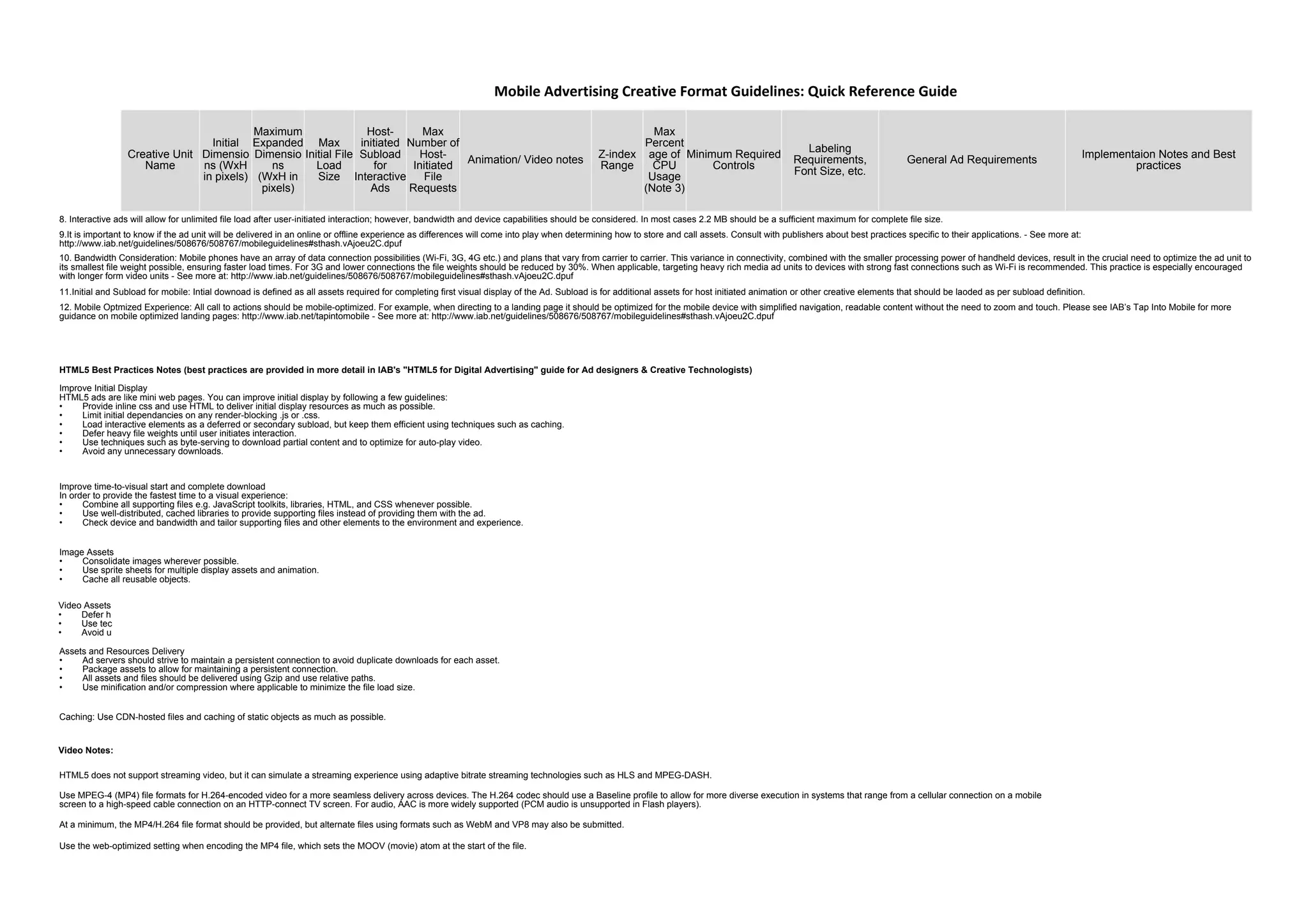
HTML5 Best Practices Notes (best practices are provided in more detail in IAB's "HTML5 for Digital Advertising" guide for Ad designers & Creative Technologists)
Improve Initial Display
HTML5 ads are like mini web pages. You can improve initial display by following a few guidelines:
• Provide inline css and use HTML to deliver initial display resources as much as possible.
• Limit initial dependancies on any render-blocking .js or .css.
• Load interactive elements as a deferred or secondary subload, but keep them efficient using techniques such as caching.
• Defer heavy file weights until user initiates interaction.
• Use techniques such as byte-serving to download partial content and to optimize for auto-play video.
• Avoid any unnecessary downloads.
Improve time-to-visual start and complete download
In order to provide the fastest time to a visual experience:
• Combine all supporting files e.g. JavaScript toolkits, libraries, HTML, and CSS whenever possible.
• Use well-distributed, cached libraries to provide supporting files instead of providing them with the ad.
• Check device and bandwidth and tailor supporting files and other elements to the environment and experience.
Image Assets
• Consolidate images wherever possible.
• Use sprite sheets for multiple display assets and animation.
• Cache all reusable objects.
Assets and Resources Delivery
• Ad servers should strive to maintain a persistent connection to avoid duplicate downloads for each asset.
• Package assets to allow for maintaining a persistent connection.
• All assets and files should be delivered using Gzip and use relative paths.
• Use minification and/or compression where applicable to minimize the file load size.
Caching: Use CDN-hosted files and caching of static objects as much as possible.
HTML5 does not support streaming video, but it can simulate a streaming experience using adaptive bitrate streaming technologies such as HLS and MPEG-DASH.
Use MPEG-4 (MP4) file formats for H.264-encoded video for a more seamless delivery across devices. The H.264 codec should use a Baseline profile to allow for more diverse execution in systems that range from a cellular connection on a mobile
screen to a high-speed cable connection on an HTTP-connect TV screen. For audio, AAC is more widely supported (PCM audio is unsupported in Flash players).
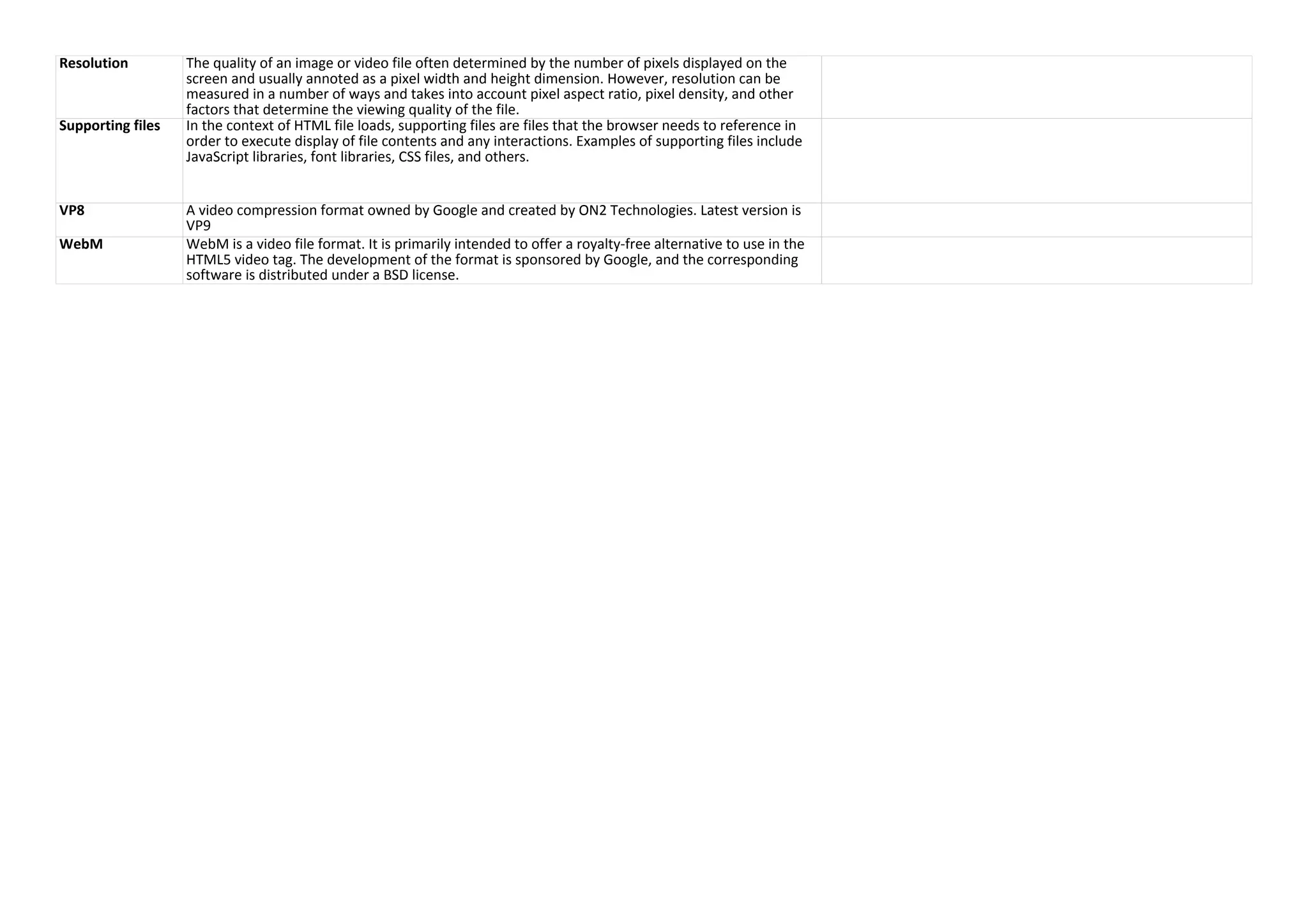
At a minimum, the MP4/H.264 file format should be provided, but alternate files using formats such as WebM and VP8 may also be submitted.
Use the web-optimized setting when encoding the MP4 file, which sets the MOOV (movie) atom at the start of the file.
Creative Unit Name
Initial
Dimensions
(WxH in
pixels)
Maximum
Expanded
Dimensions
(WxH in
pixels)
Max Initial
File Load Size
(See note 6
below)
Host-initiated
Subload for
Interactive
Ads (See note
6 below)
Max Number
of Host-
Initiated File
Requests
Video/Animation Guidelines
(See video notes below)
Z-index
Range
Max
Percentage
of CPU
Usage
(Note 3)
Minimum Required
Controls
Labeling Requirements,
Font Size, etc. General Ad Requirements
Display Advertising Creative Format Guidelines: Quick Reference Guide
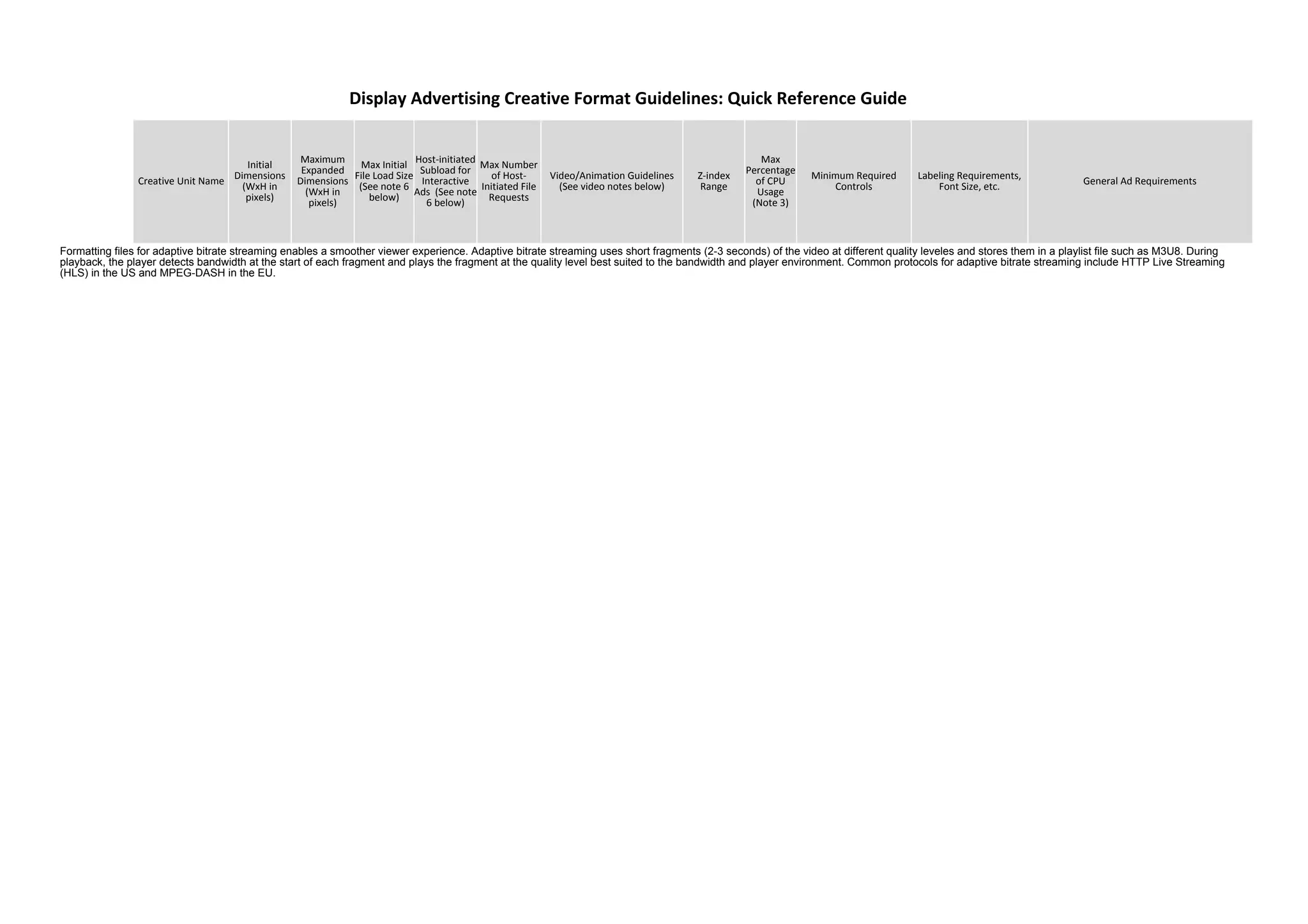
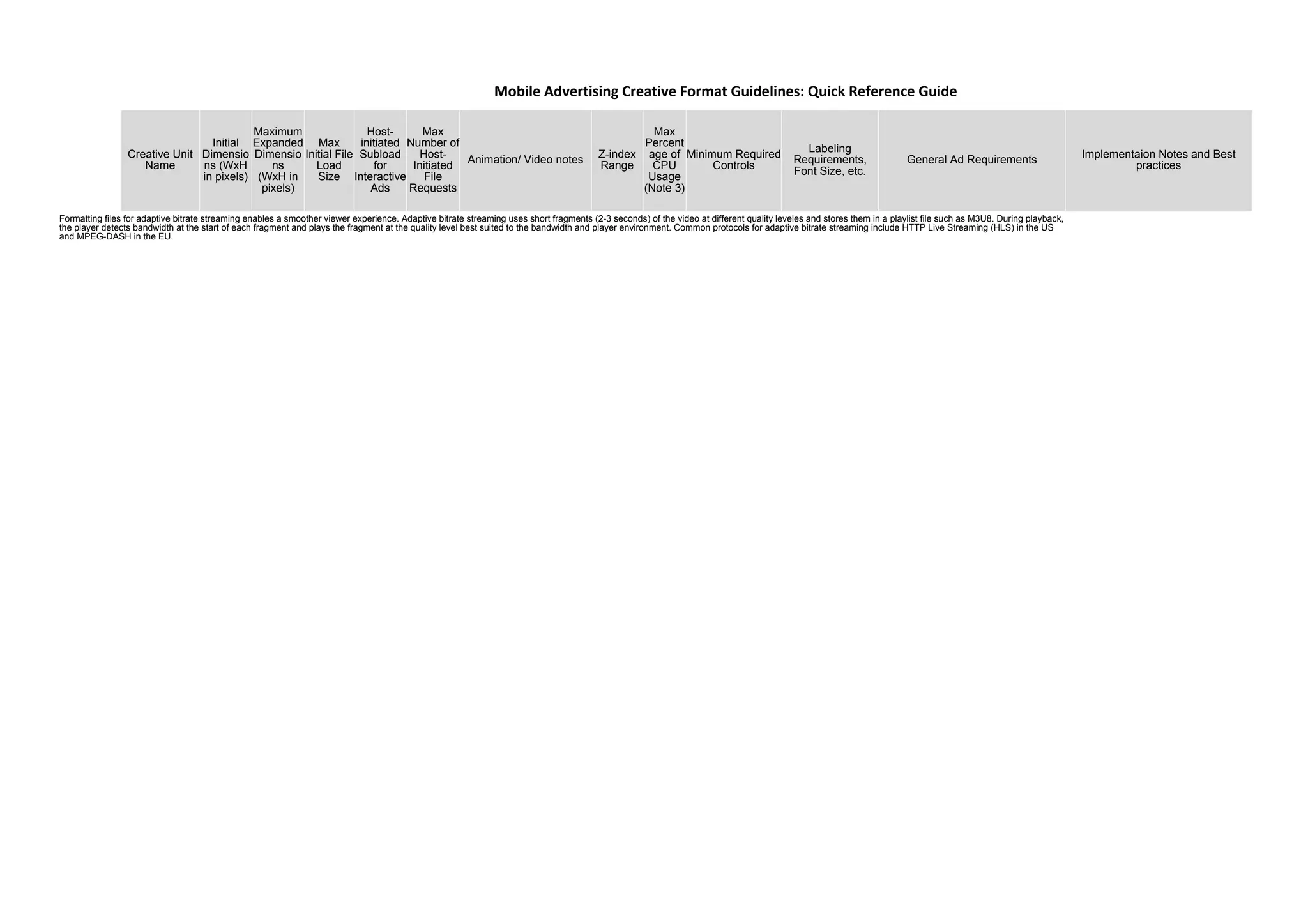
Formatting files for adaptive bitrate streaming enables a smoother viewer experience. Adaptive bitrate streaming uses short fragments (2-3 seconds) of the video at different quality leveles and stores them in a playlist file such as M3U8. During
playback, the player detects bandwidth at the start of each fragment and plays the fragment at the quality level best suited to the bandwidth and player environment. Common protocols for adaptive bitrate streaming include HTTP Live Streaming
(HLS) in the US and MPEG-DASH in the EU.
Creative Unit
Name
Initial
Dimensio
ns (WxH
in pixels)
Maximum
Expanded
Dimensio
ns
(WxH in
pixels)
Max
Initial File
Load
Size
Host-
initiated
Subload
for
Interactive
Ads
Max
Number of
Host-
Initiated
File
Requests
Animation/ Video notes
Z-index
Range
Max
Percent
age of
CPU
Usage
(Note 3)
Minimum Required
Controls
Labeling
Requirements,
Font Size, etc.
General Ad Requirements
Implementaion Notes and Best
practices
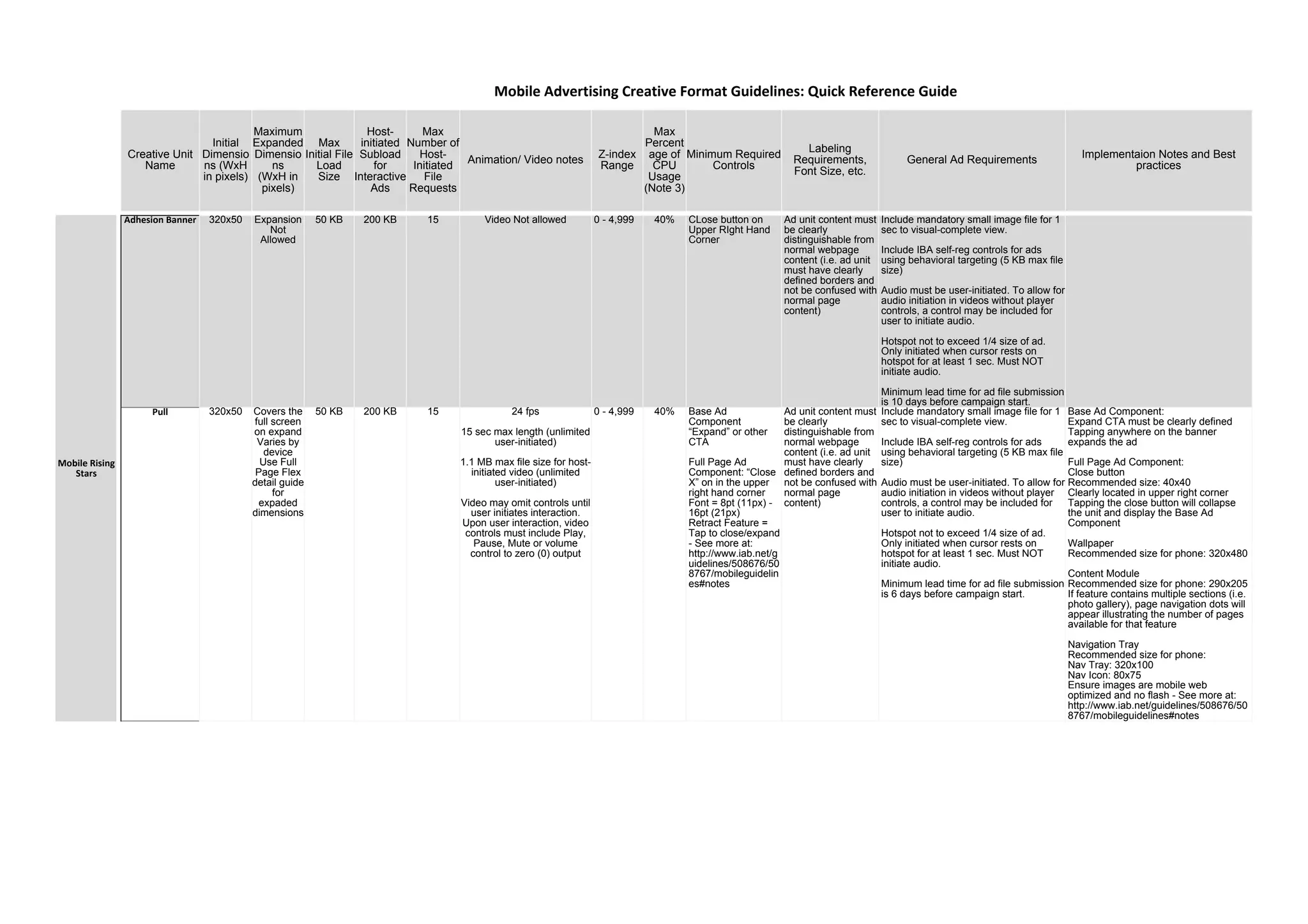
Adhesion Banner 320x50 Expansion
Not
Allowed
50 KB 200 KB 15 Video Not allowed 0 - 4,999 40% CLose button on
Upper RIght Hand
Corner
Ad unit content must
be clearly
distinguishable from
normal webpage
content (i.e. ad unit
must have clearly
defined borders and
not be confused with
normal page
content)
Include mandatory small image file for 1
sec to visual-complete view.
Include IBA self-reg controls for ads
using behavioral targeting (5 KB max file
size)
Audio must be user-initiated. To allow for
audio initiation in videos without player
controls, a control may be included for
user to initiate audio.
Hotspot not to exceed 1/4 size of ad.
Only initiated when cursor rests on
hotspot for at least 1 sec. Must NOT
initiate audio.
Minimum lead time for ad file submission
is 10 days before campaign start.
Pull 320x50 Covers the
full screen
on expand
Varies by
device
Use Full
Page Flex
detail guide
for
expaded
dimensions
50 KB 200 KB 15 24 fps
15 sec max length (unlimited
user-initiated)
1.1 MB max file size for host-
initiated video (unlimited
user-initiated)
Video may omit controls until
user initiates interaction.
Upon user interaction, video
controls must include Play,
Pause, Mute or volume
control to zero (0) output
0 - 4,999 40% Base Ad
Component
“Expand” or other
CTA
Full Page Ad
Component: “Close
X” on in the upper
right hand corner
Font = 8pt (11px) -
16pt (21px)
Retract Feature =
Tap to close/expand
- See more at:
http://www.iab.net/g
uidelines/508676/50
8767/mobileguidelin
es#notes
Ad unit content must
be clearly
distinguishable from
normal webpage
content (i.e. ad unit
must have clearly
defined borders and
not be confused with
normal page
content)
Include mandatory small image file for 1
sec to visual-complete view.
Include IBA self-reg controls for ads
using behavioral targeting (5 KB max file
size)
Audio must be user-initiated. To allow for
audio initiation in videos without player
controls, a control may be included for
user to initiate audio.
Hotspot not to exceed 1/4 size of ad.
Only initiated when cursor rests on
hotspot for at least 1 sec. Must NOT
initiate audio.
Minimum lead time for ad file submission
is 6 days before campaign start.
Base Ad Component:
Expand CTA must be clearly defined
Tapping anywhere on the banner
expands the ad
Full Page Ad Component:
Close button
Recommended size: 40x40
Clearly located in upper right corner
Tapping the close button will collapse
the unit and display the Base Ad
Component
Wallpaper
Recommended size for phone: 320x480
Content Module
Recommended size for phone: 290x205
If feature contains multiple sections (i.e.
photo gallery), page navigation dots will
appear illustrating the number of pages
available for that feature
Navigation Tray
Recommended size for phone:
Nav Tray: 320x100
Nav Icon: 80x75
Ensure images are mobile web
optimized and no flash - See more at:
http://www.iab.net/guidelines/508676/50
8767/mobileguidelines#notes
Mobile Advertising Creative Format Guidelines: Quick Reference Guide
Mobile Rising
Stars
Creative Unit
Name
Initial
Dimensio
ns (WxH
in pixels)
Maximum
Expanded
Dimensio
ns
(WxH in
pixels)
Max
Initial File
Load
Size
Host-
initiated
Subload
for
Interactive
Ads
Max
Number of
Host-
Initiated
File
Requests
Animation/ Video notes
Z-index
Range
Max
Percent
age of
CPU
Usage
(Note 3)
Minimum Required
Controls
Labeling
Requirements,
Font Size, etc.
General Ad Requirements
Implementaion Notes and Best
practices
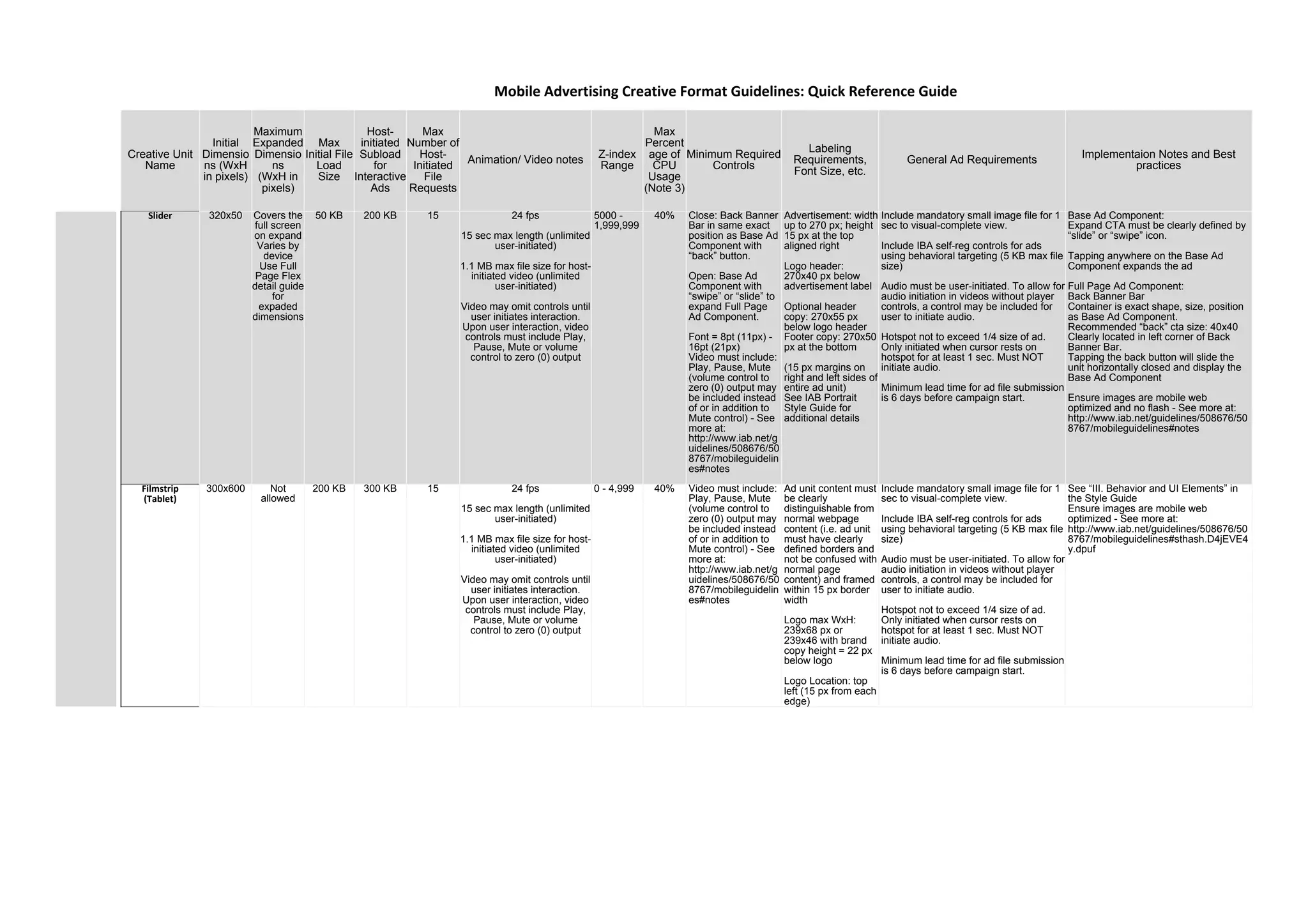
Slider 320x50 Covers the
full screen
on expand
Varies by
device
Use Full
Page Flex
detail guide
for
expaded
dimensions
50 KB 200 KB 15 24 fps
15 sec max length (unlimited
user-initiated)
1.1 MB max file size for host-
initiated video (unlimited
user-initiated)
Video may omit controls until
user initiates interaction.
Upon user interaction, video
controls must include Play,
Pause, Mute or volume
control to zero (0) output
5000 -
1,999,999
40% Close: Back Banner
Bar in same exact
position as Base Ad
Component with
“back” button.
Open: Base Ad
Component with
“swipe” or “slide” to
expand Full Page
Ad Component.
Font = 8pt (11px) -
16pt (21px)
Video must include:
Play, Pause, Mute
(volume control to
zero (0) output may
be included instead
of or in addition to
Mute control) - See
more at:
http://www.iab.net/g
uidelines/508676/50
8767/mobileguidelin
es#notes
Advertisement: width
up to 270 px; height
15 px at the top
aligned right
Logo header:
270x40 px below
advertisement label
Optional header
copy: 270x55 px
below logo header
Footer copy: 270x50
px at the bottom
(15 px margins on
right and left sides of
entire ad unit)
See IAB Portrait
Style Guide for
additional details
Include mandatory small image file for 1
sec to visual-complete view.
Include IBA self-reg controls for ads
using behavioral targeting (5 KB max file
size)
Audio must be user-initiated. To allow for
audio initiation in videos without player
controls, a control may be included for
user to initiate audio.
Hotspot not to exceed 1/4 size of ad.
Only initiated when cursor rests on
hotspot for at least 1 sec. Must NOT
initiate audio.
Minimum lead time for ad file submission
is 6 days before campaign start.
Base Ad Component:
Expand CTA must be clearly defined by
“slide” or “swipe” icon.
Tapping anywhere on the Base Ad
Component expands the ad
Full Page Ad Component:
Back Banner Bar
Container is exact shape, size, position
as Base Ad Component.
Recommended “back” cta size: 40x40
Clearly located in left corner of Back
Banner Bar.
Tapping the back button will slide the
unit horizontally closed and display the
Base Ad Component
Ensure images are mobile web
optimized and no flash - See more at:
http://www.iab.net/guidelines/508676/50
8767/mobileguidelines#notes
Filmstrip
(Tablet)
300x600 Not
allowed
200 KB 300 KB 15 24 fps
15 sec max length (unlimited
user-initiated)
1.1 MB max file size for host-
initiated video (unlimited
user-initiated)
Video may omit controls until
user initiates interaction.
Upon user interaction, video
controls must include Play,
Pause, Mute or volume
control to zero (0) output
0 - 4,999 40% Video must include:
Play, Pause, Mute
(volume control to
zero (0) output may
be included instead
of or in addition to
Mute control) - See
more at:
http://www.iab.net/g
uidelines/508676/50
8767/mobileguidelin
es#notes
Ad unit content must
be clearly
distinguishable from
normal webpage
content (i.e. ad unit
must have clearly
defined borders and
not be confused with
normal page
content) and framed
within 15 px border
width
Logo max WxH:
239x68 px or
239x46 with brand
copy height = 22 px
below logo
Logo Location: top
left (15 px from each
edge)
Include mandatory small image file for 1
sec to visual-complete view.
Include IBA self-reg controls for ads
using behavioral targeting (5 KB max file
size)
Audio must be user-initiated. To allow for
audio initiation in videos without player
controls, a control may be included for
user to initiate audio.
Hotspot not to exceed 1/4 size of ad.
Only initiated when cursor rests on
hotspot for at least 1 sec. Must NOT
initiate audio.
Minimum lead time for ad file submission
is 6 days before campaign start.
See “III. Behavior and UI Elements” in
the Style Guide
Ensure images are mobile web
optimized - See more at:
http://www.iab.net/guidelines/508676/50
8767/mobileguidelines#sthash.D4jEVE4
y.dpuf
Mobile Advertising Creative Format Guidelines: Quick Reference Guide
Creative Unit
Name
Initial
Dimensio
ns (WxH
in pixels)
Maximum
Expanded
Dimensio
ns
(WxH in
pixels)
Max
Initial File
Load
Size
Host-
initiated
Subload
for
Interactive
Ads
Max
Number of
Host-
Initiated
File
Requests
Animation/ Video notes
Z-index
Range
Max
Percent
age of
CPU
Usage
(Note 3)
Minimum Required
Controls
Labeling
Requirements,
Font Size, etc.
General Ad Requirements
Implementaion Notes and Best
practices
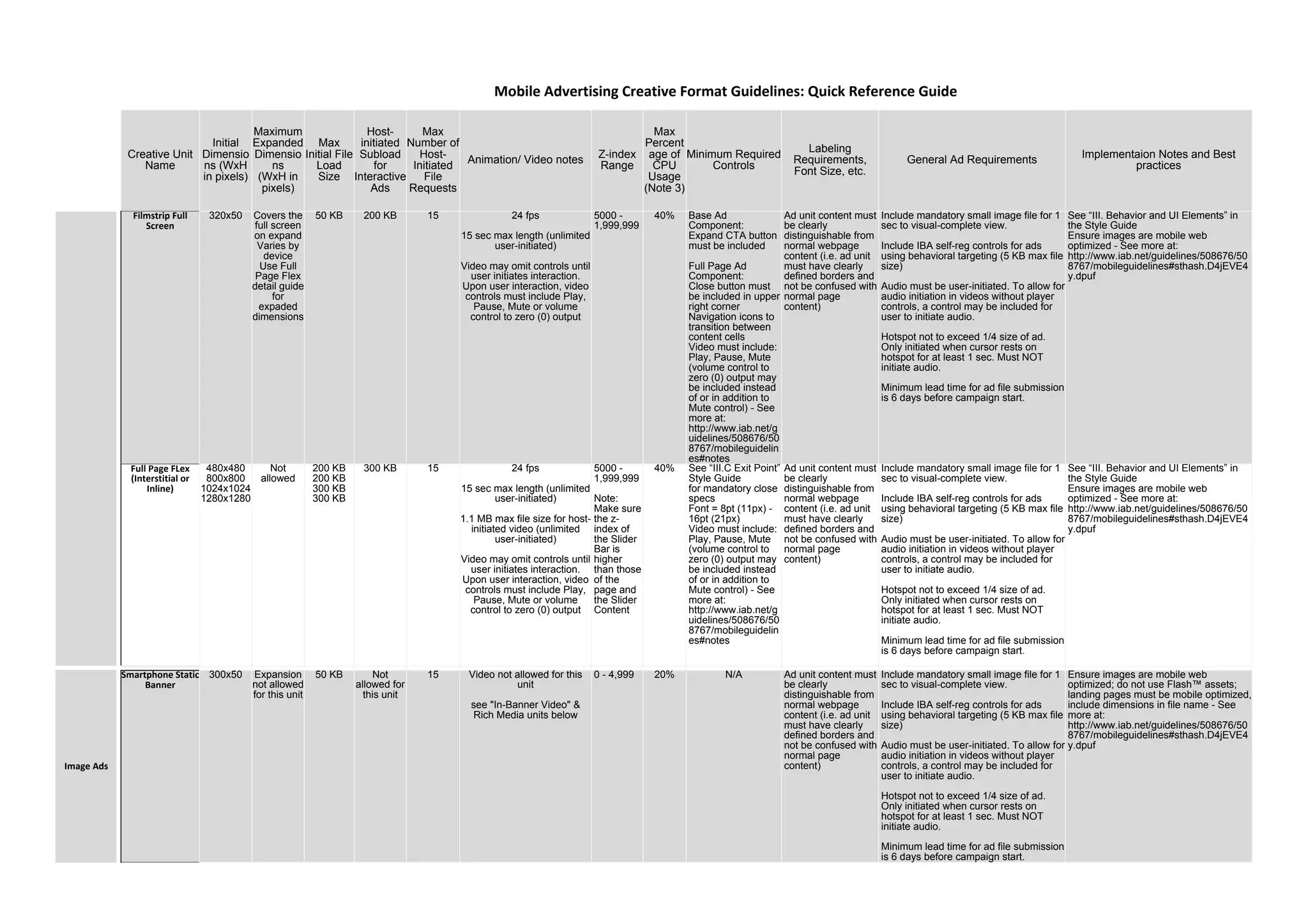
Filmstrip Full
Screen
320x50 Covers the
full screen
on expand
Varies by
device
Use Full
Page Flex
detail guide
for
expaded
dimensions
50 KB 200 KB 15 24 fps
15 sec max length (unlimited
user-initiated)
Video may omit controls until
user initiates interaction.
Upon user interaction, video
controls must include Play,
Pause, Mute or volume
control to zero (0) output
5000 -
1,999,999
40% Base Ad
Component:
Expand CTA button
must be included
Full Page Ad
Component:
Close button must
be included in upper
right corner
Navigation icons to
transition between
content cells
Video must include:
Play, Pause, Mute
(volume control to
zero (0) output may
be included instead
of or in addition to
Mute control) - See
more at:
http://www.iab.net/g
uidelines/508676/50
8767/mobileguidelin
es#notes
Ad unit content must
be clearly
distinguishable from
normal webpage
content (i.e. ad unit
must have clearly
defined borders and
not be confused with
normal page
content)
Include mandatory small image file for 1
sec to visual-complete view.
Include IBA self-reg controls for ads
using behavioral targeting (5 KB max file
size)
Audio must be user-initiated. To allow for
audio initiation in videos without player
controls, a control may be included for
user to initiate audio.
Hotspot not to exceed 1/4 size of ad.
Only initiated when cursor rests on
hotspot for at least 1 sec. Must NOT
initiate audio.
Minimum lead time for ad file submission
is 6 days before campaign start.
See “III. Behavior and UI Elements” in
the Style Guide
Ensure images are mobile web
optimized - See more at:
http://www.iab.net/guidelines/508676/50
8767/mobileguidelines#sthash.D4jEVE4
y.dpuf
Full Page FLex
(Interstitial or
Inline)
480x480
800x800
1024x1024
1280x1280
Not
allowed
200 KB
200 KB
300 KB
300 KB
300 KB 15 24 fps
15 sec max length (unlimited
user-initiated)
1.1 MB max file size for host-
initiated video (unlimited
user-initiated)
Video may omit controls until
user initiates interaction.
Upon user interaction, video
controls must include Play,
Pause, Mute or volume
control to zero (0) output
5000 -
1,999,999
Note:
Make sure
the z-
index of
the Slider
Bar is
higher
than those
of the
page and
the Slider
Content
40% See “III.C Exit Point”
Style Guide
for mandatory close
specs
Font = 8pt (11px) -
16pt (21px)
Video must include:
Play, Pause, Mute
(volume control to
zero (0) output may
be included instead
of or in addition to
Mute control) - See
more at:
http://www.iab.net/g
uidelines/508676/50
8767/mobileguidelin
es#notes
Ad unit content must
be clearly
distinguishable from
normal webpage
content (i.e. ad unit
must have clearly
defined borders and
not be confused with
normal page
content)
Include mandatory small image file for 1
sec to visual-complete view.
Include IBA self-reg controls for ads
using behavioral targeting (5 KB max file
size)
Audio must be user-initiated. To allow for
audio initiation in videos without player
controls, a control may be included for
user to initiate audio.
Hotspot not to exceed 1/4 size of ad.
Only initiated when cursor rests on
hotspot for at least 1 sec. Must NOT
initiate audio.
Minimum lead time for ad file submission
is 6 days before campaign start.
See “III. Behavior and UI Elements” in
the Style Guide
Ensure images are mobile web
optimized - See more at:
http://www.iab.net/guidelines/508676/50
8767/mobileguidelines#sthash.D4jEVE4
y.dpuf
Smartphone Static
Banner
300x50 Expansion
not allowed
for this unit
50 KB Not
allowed for
this unit
15 Video not allowed for this
unit
see "In-Banner Video" &
Rich Media units below
0 - 4,999 20% N/A Ad unit content must
be clearly
distinguishable from
normal webpage
content (i.e. ad unit
must have clearly
defined borders and
not be confused with
normal page
content)
Include mandatory small image file for 1
sec to visual-complete view.
Include IBA self-reg controls for ads
using behavioral targeting (5 KB max file
size)
Audio must be user-initiated. To allow for
audio initiation in videos without player
controls, a control may be included for
user to initiate audio.
Hotspot not to exceed 1/4 size of ad.
Only initiated when cursor rests on
hotspot for at least 1 sec. Must NOT
initiate audio.
Minimum lead time for ad file submission
is 6 days before campaign start.
Ensure images are mobile web
optimized; do not use Flash™ assets;
landing pages must be mobile optimized,
include dimensions in file name - See
more at:
http://www.iab.net/guidelines/508676/50
8767/mobileguidelines#sthash.D4jEVE4
y.dpuf
Mobile Advertising Creative Format Guidelines: Quick Reference Guide
Image Ads
Creative Unit
Name
Initial
Dimensio
ns (WxH
in pixels)
Maximum
Expanded
Dimensio
ns
(WxH in
pixels)
Max
Initial File
Load
Size
Host-
initiated
Subload
for
Interactive
Ads
Max
Number of
Host-
Initiated
File
Requests
Animation/ Video notes
Z-index
Range
Max
Percent
age of
CPU
Usage
(Note 3)
Minimum Required
Controls
Labeling
Requirements,
Font Size, etc.
General Ad Requirements
Implementaion Notes and Best
practices
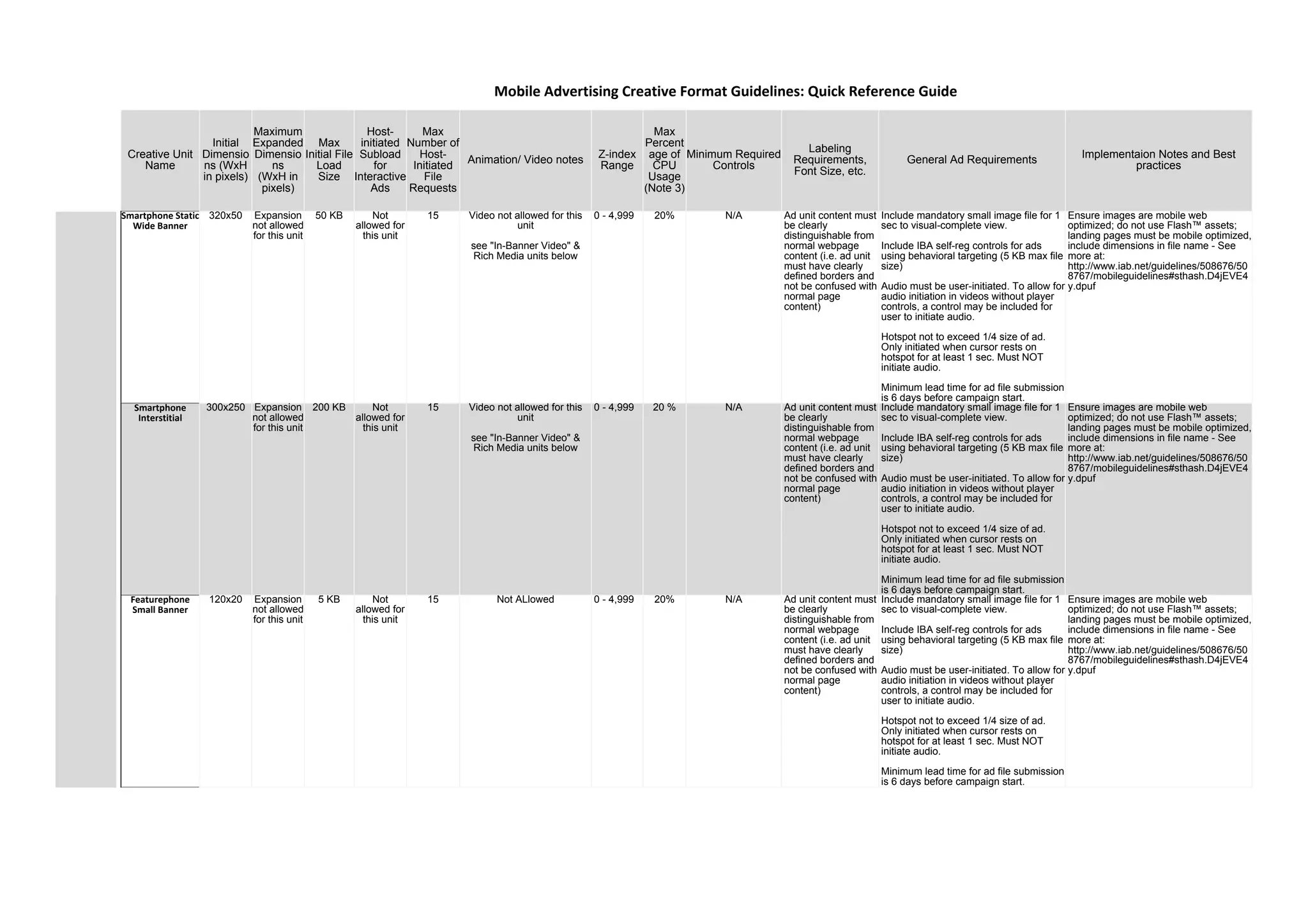
Smartphone Static
Wide Banner
320x50 Expansion
not allowed
for this unit
50 KB Not
allowed for
this unit
15 Video not allowed for this
unit
see "In-Banner Video" &
Rich Media units below
0 - 4,999 20% N/A Ad unit content must
be clearly
distinguishable from
normal webpage
content (i.e. ad unit
must have clearly
defined borders and
not be confused with
normal page
content)
Include mandatory small image file for 1
sec to visual-complete view.
Include IBA self-reg controls for ads
using behavioral targeting (5 KB max file
size)
Audio must be user-initiated. To allow for
audio initiation in videos without player
controls, a control may be included for
user to initiate audio.
Hotspot not to exceed 1/4 size of ad.
Only initiated when cursor rests on
hotspot for at least 1 sec. Must NOT
initiate audio.
Minimum lead time for ad file submission
is 6 days before campaign start.
Ensure images are mobile web
optimized; do not use Flash™ assets;
landing pages must be mobile optimized,
include dimensions in file name - See
more at:
http://www.iab.net/guidelines/508676/50
8767/mobileguidelines#sthash.D4jEVE4
y.dpuf
Smartphone
Interstitial
300x250 Expansion
not allowed
for this unit
200 KB Not
allowed for
this unit
15 Video not allowed for this
unit
see "In-Banner Video" &
Rich Media units below
0 - 4,999 20 % N/A Ad unit content must
be clearly
distinguishable from
normal webpage
content (i.e. ad unit
must have clearly
defined borders and
not be confused with
normal page
content)
Include mandatory small image file for 1
sec to visual-complete view.
Include IBA self-reg controls for ads
using behavioral targeting (5 KB max file
size)
Audio must be user-initiated. To allow for
audio initiation in videos without player
controls, a control may be included for
user to initiate audio.
Hotspot not to exceed 1/4 size of ad.
Only initiated when cursor rests on
hotspot for at least 1 sec. Must NOT
initiate audio.
Minimum lead time for ad file submission
is 6 days before campaign start.
Ensure images are mobile web
optimized; do not use Flash™ assets;
landing pages must be mobile optimized,
include dimensions in file name - See
more at:
http://www.iab.net/guidelines/508676/50
8767/mobileguidelines#sthash.D4jEVE4
y.dpuf
Featurephone
Small Banner
120x20 Expansion
not allowed
for this unit
5 KB Not
allowed for
this unit
15 Not ALlowed 0 - 4,999 20% N/A Ad unit content must
be clearly
distinguishable from
normal webpage
content (i.e. ad unit
must have clearly
defined borders and
not be confused with
normal page
content)
Include mandatory small image file for 1
sec to visual-complete view.
Include IBA self-reg controls for ads
using behavioral targeting (5 KB max file
size)
Audio must be user-initiated. To allow for
audio initiation in videos without player
controls, a control may be included for
user to initiate audio.
Hotspot not to exceed 1/4 size of ad.
Only initiated when cursor rests on
hotspot for at least 1 sec. Must NOT
initiate audio.
Minimum lead time for ad file submission
is 6 days before campaign start.
Ensure images are mobile web
optimized; do not use Flash™ assets;
landing pages must be mobile optimized,
include dimensions in file name - See
more at:
http://www.iab.net/guidelines/508676/50
8767/mobileguidelines#sthash.D4jEVE4
y.dpuf
Mobile Advertising Creative Format Guidelines: Quick Reference Guide
Creative Unit
Name
Initial
Dimensio
ns (WxH
in pixels)
Maximum
Expanded
Dimensio
ns
(WxH in
pixels)
Max
Initial File
Load
Size
Host-
initiated
Subload
for
Interactive
Ads
Max
Number of
Host-
Initiated
File
Requests
Animation/ Video notes
Z-index
Range
Max
Percent
age of
CPU
Usage
(Note 3)
Minimum Required
Controls
Labeling
Requirements,
Font Size, etc.
General Ad Requirements
Implementaion Notes and Best
practices
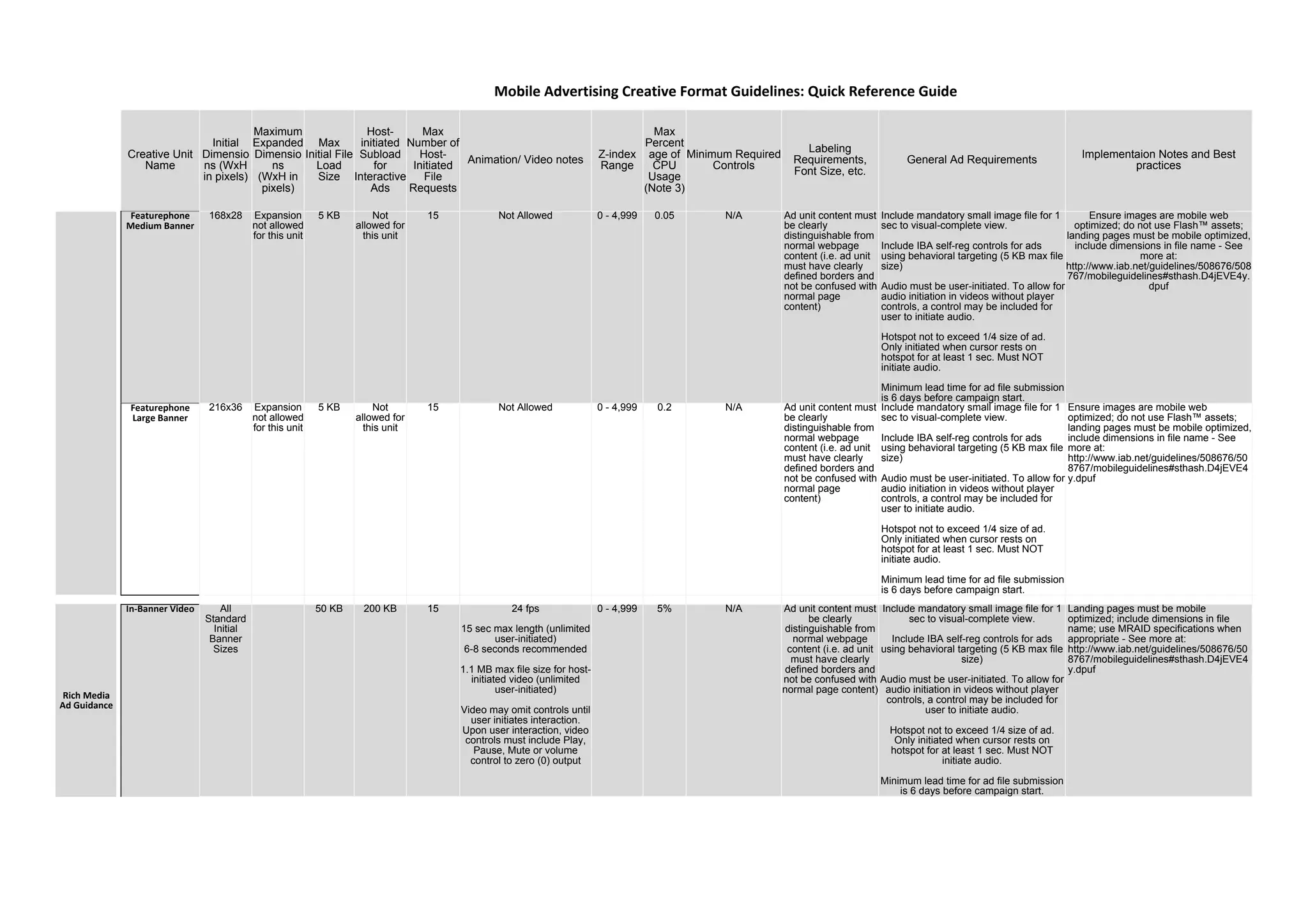
Featurephone
Medium Banner
168x28 Expansion
not allowed
for this unit
5 KB Not
allowed for
this unit
15 Not Allowed 0 - 4,999 0.05 N/A Ad unit content must
be clearly
distinguishable from
normal webpage
content (i.e. ad unit
must have clearly
defined borders and
not be confused with
normal page
content)
Include mandatory small image file for 1
sec to visual-complete view.
Include IBA self-reg controls for ads
using behavioral targeting (5 KB max file
size)
Audio must be user-initiated. To allow for
audio initiation in videos without player
controls, a control may be included for
user to initiate audio.
Hotspot not to exceed 1/4 size of ad.
Only initiated when cursor rests on
hotspot for at least 1 sec. Must NOT
initiate audio.
Minimum lead time for ad file submission
is 6 days before campaign start.
Ensure images are mobile web
optimized; do not use Flash™ assets;
landing pages must be mobile optimized,
include dimensions in file name - See
more at:
http://www.iab.net/guidelines/508676/508
767/mobileguidelines#sthash.D4jEVE4y.
dpuf
Featurephone
Large Banner
216x36 Expansion
not allowed
for this unit
5 KB Not
allowed for
this unit
15 Not Allowed 0 - 4,999 0.2 N/A Ad unit content must
be clearly
distinguishable from
normal webpage
content (i.e. ad unit
must have clearly
defined borders and
not be confused with
normal page
content)
Include mandatory small image file for 1
sec to visual-complete view.
Include IBA self-reg controls for ads
using behavioral targeting (5 KB max file
size)
Audio must be user-initiated. To allow for
audio initiation in videos without player
controls, a control may be included for
user to initiate audio.
Hotspot not to exceed 1/4 size of ad.
Only initiated when cursor rests on
hotspot for at least 1 sec. Must NOT
initiate audio.
Minimum lead time for ad file submission
is 6 days before campaign start.
Ensure images are mobile web
optimized; do not use Flash™ assets;
landing pages must be mobile optimized,
include dimensions in file name - See
more at:
http://www.iab.net/guidelines/508676/50
8767/mobileguidelines#sthash.D4jEVE4
y.dpuf
In-Banner Video All
Standard
Initial
Banner
Sizes
50 KB 200 KB 15 24 fps
15 sec max length (unlimited
user-initiated)
6-8 seconds recommended
1.1 MB max file size for host-
initiated video (unlimited
user-initiated)
Video may omit controls until
user initiates interaction.
Upon user interaction, video
controls must include Play,
Pause, Mute or volume
control to zero (0) output
0 - 4,999 5% N/A Ad unit content must
be clearly
distinguishable from
normal webpage
content (i.e. ad unit
must have clearly
defined borders and
not be confused with
normal page content)
Include mandatory small image file for 1
sec to visual-complete view.
Include IBA self-reg controls for ads
using behavioral targeting (5 KB max file
size)
Audio must be user-initiated. To allow for
audio initiation in videos without player
controls, a control may be included for
user to initiate audio.
Hotspot not to exceed 1/4 size of ad.
Only initiated when cursor rests on
hotspot for at least 1 sec. Must NOT
initiate audio.
Minimum lead time for ad file submission
is 6 days before campaign start.
Landing pages must be mobile
optimized; include dimensions in file
name; use MRAID specifications when
appropriate - See more at:
http://www.iab.net/guidelines/508676/50
8767/mobileguidelines#sthash.D4jEVE4
y.dpuf
Mobile Advertising Creative Format Guidelines: Quick Reference Guide
Rich Media
Ad Guidance
Creative Unit
Name
Initial
Dimensio
ns (WxH
in pixels)
Maximum
Expanded
Dimensio
ns
(WxH in
pixels)
Max
Initial File
Load
Size
Host-
initiated
Subload
for
Interactive
Ads
Max
Number of
Host-
Initiated
File
Requests
Animation/ Video notes
Z-index
Range
Max
Percent
age of
CPU
Usage
(Note 3)
Minimum Required
Controls
Labeling
Requirements,
Font Size, etc.
General Ad Requirements
Implementaion Notes and Best
practices
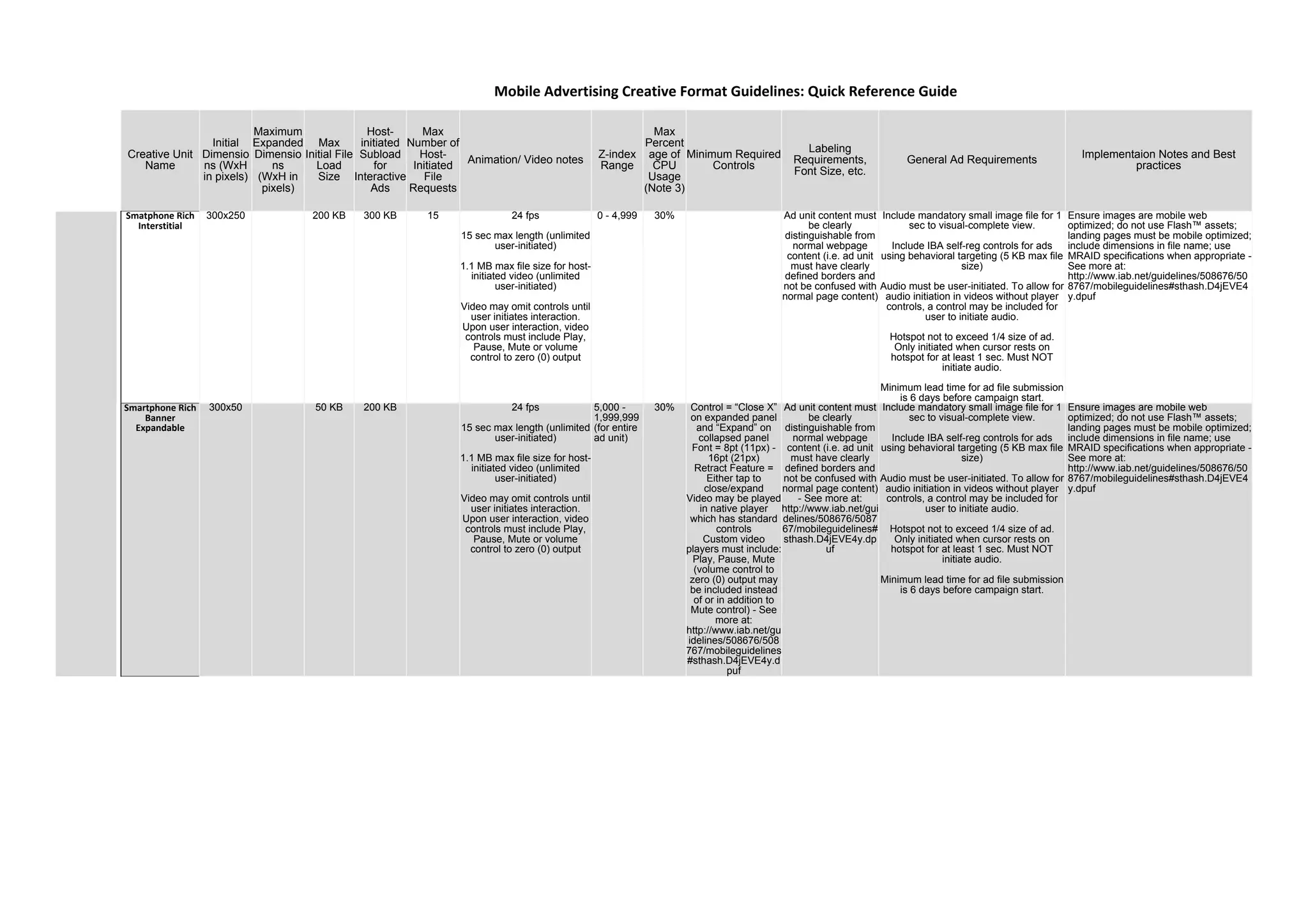
Smatphone Rich
Interstitial
300x250 200 KB 300 KB 15 24 fps
15 sec max length (unlimited
user-initiated)
1.1 MB max file size for host-
initiated video (unlimited
user-initiated)
Video may omit controls until
user initiates interaction.
Upon user interaction, video
controls must include Play,
Pause, Mute or volume
control to zero (0) output
0 - 4,999 30% Ad unit content must
be clearly
distinguishable from
normal webpage
content (i.e. ad unit
must have clearly
defined borders and
not be confused with
normal page content)
Include mandatory small image file for 1
sec to visual-complete view.
Include IBA self-reg controls for ads
using behavioral targeting (5 KB max file
size)
Audio must be user-initiated. To allow for
audio initiation in videos without player
controls, a control may be included for
user to initiate audio.
Hotspot not to exceed 1/4 size of ad.
Only initiated when cursor rests on
hotspot for at least 1 sec. Must NOT
initiate audio.
Minimum lead time for ad file submission
is 6 days before campaign start.
Ensure images are mobile web
optimized; do not use Flash™ assets;
landing pages must be mobile optimized;
include dimensions in file name; use
MRAID specifications when appropriate -
See more at:
http://www.iab.net/guidelines/508676/50
8767/mobileguidelines#sthash.D4jEVE4
y.dpuf
Smartphone Rich
Banner
Expandable
300x50 50 KB 200 KB 24 fps
15 sec max length (unlimited
user-initiated)
1.1 MB max file size for host-
initiated video (unlimited
user-initiated)
Video may omit controls until
user initiates interaction.
Upon user interaction, video
controls must include Play,
Pause, Mute or volume
control to zero (0) output
5,000 -
1,999,999
(for entire
ad unit)
30% Control = “Close X”
on expanded panel
and “Expand” on
collapsed panel
Font = 8pt (11px) -
16pt (21px)
Retract Feature =
Either tap to
close/expand
Video may be played
in native player
which has standard
controls
Custom video
players must include:
Play, Pause, Mute
(volume control to
zero (0) output may
be included instead
of or in addition to
Mute control) - See
more at:
http://www.iab.net/gu
idelines/508676/508
767/mobileguidelines
#sthash.D4jEVE4y.d
puf
Ad unit content must
be clearly
distinguishable from
normal webpage
content (i.e. ad unit
must have clearly
defined borders and
not be confused with
normal page content)
- See more at:
http://www.iab.net/gui
delines/508676/5087
67/mobileguidelines#
sthash.D4jEVE4y.dp
uf
Include mandatory small image file for 1
sec to visual-complete view.
Include IBA self-reg controls for ads
using behavioral targeting (5 KB max file
size)
Audio must be user-initiated. To allow for
audio initiation in videos without player
controls, a control may be included for
user to initiate audio.
Hotspot not to exceed 1/4 size of ad.
Only initiated when cursor rests on
hotspot for at least 1 sec. Must NOT
initiate audio.
Minimum lead time for ad file submission
is 6 days before campaign start.
Ensure images are mobile web
optimized; do not use Flash™ assets;
landing pages must be mobile optimized;
include dimensions in file name; use
MRAID specifications when appropriate -
See more at:
http://www.iab.net/guidelines/508676/50
8767/mobileguidelines#sthash.D4jEVE4
y.dpuf
Mobile Advertising Creative Format Guidelines: Quick Reference Guide
Creative Unit
Name
Initial
Dimensio
ns (WxH
in pixels)
Maximum
Expanded
Dimensio
ns
(WxH in
pixels)
Max
Initial File
Load
Size
Host-
initiated
Subload
for
Interactive
Ads
Max
Number of
Host-
Initiated
File
Requests
Animation/ Video notes
Z-index
Range
Max
Percent
age of
CPU
Usage
(Note 3)
Minimum Required
Controls
Labeling
Requirements,
Font Size, etc.
General Ad Requirements
Implementaion Notes and Best
practices
Smartphone Rich
Wide Banner
Expandable
320x50 100 KB 300 KB 15 24 fps
15 sec max length (unlimited
user-initiated)
1.1 MB max file size for host-
initiated video (unlimited
user-initiated)
Video may omit controls until
user initiates interaction.
Upon user interaction, video
controls must include Play,
Pause, Mute or volume
control to zero (0) output
5,000 -
1,999,999
(for entire
ad unit)
30% Control = “Close X”
on expanded panel
and "Expand" on
collapsed panel
Font = 8pt (11px) -
16pt (21px)
Retract Feature =
Either Click to
close/expand or
Enable Mouse-Off
Retraction
Ad unit content must
be clearly
distinguishable from
normal webpage
content (i.e. ad unit
must have clearly
defined borders and
not be confused with
normal page
content)
Include mandatory small image file for 1
sec to visual-complete view.
Include IBA self-reg controls for ads
using behavioral targeting (5 KB max file
size)
Audio must be user-initiated. To allow for
audio initiation in videos without player
controls, a control may be included for
user to initiate audio.
Hotspot not to exceed 1/4 size of ad.
Only initiated when cursor rests on
hotspot for at least 1 sec. Must NOT
initiate audio.
Minimum lead time for ad file submission
is 6 days before campaign start.
Ensure images are mobile web
optimized; do not use Flash™ assets;
landing pages must be mobile optimized;
include dimensions in file name; use
MRAID specifications when appropriate -
See more at:
http://www.iab.net/guidelines/508676/50
8767/mobileguidelines#sthash.D4jEVE4
y.dpuf
Full Screen
(Phone and
Tablet)
Various
sizes
based on
different
screen
sizes
320x480 to
1280x1280
Expansion
not allowed
for this unit
200 KB 300 KB 15 24 fps
15 sec max length (unlimited
user-initiated)
1.1 MB max file size for host-
initiated video (unlimited
user-initiated)
Video may omit controls until
user initiates interaction.
Upon user interaction, video
controls must include Play,
Pause, Mute or volume
control to zero (0) output
N/A
Pop-ups
display in
their own
browser
window,
so pop-up
ad content
has its
own z-
index
30% "Close" control
provided by browser
window.
In the browser bar,
all Pop Ups must be
clearly labeled with:
Name of
Network/Advertiser,
Publisher, Browser
Type [in this order]
(ex.:
"Advertising.com -
CBS Market Watch -
Microsoft Internet
Explorer")
Include mandatory small image file for 1
sec to visual-complete view.
Include IBA self-reg controls for ads
using behavioral targeting (5 KB max file
size)
Audio must be user-initiated. To allow for
audio initiation in videos without player
controls, a control may be included for
user to initiate audio.
Hotspot not to exceed 1/4 size of ad.
Only initiated when cursor rests on
hotspot for at least 1 sec. Must NOT
initiate audio.
Minimum lead time for ad file submission
is 6 days before campaign start.
Ensure images are mobile web
optimized; do not use Flash™ assets;
landing pages must be mobile optimized;
include dimensions in file name; use
MRAID specifications when appropriate -
See more at:
http://www.iab.net/guidelines/508676/50
8767/mobileguidelines#sthash.D4jEVE4
y.dpuf
Abbreviations: px = pixel
Notes:
Mobile Advertising Creative Format Guidelines: Quick Reference Guide
sec = seconds
1. High resolution creative (Only applies for Intial Load): All size and file weights listed are for a pixel density of 1. For higher resolution devices, higher file weights can be accepted for all ad units but no more than 2x. the guideline. Check with your publisher guidelines.
2. The ad-serving vendor should be able to detect device pixel density and bandwidth and deliver appropriate resolution creatives.
3. Full screen display is dependent on the device model and may be restricted by status bars or navigation menus on the OS, browser, and/or application. Use Flex Fullpage responsive specificaitons for all full screen creative.
4. IAB Mobile Rising Stars File Size Approach: The IAB Mobile Rising Stars, will load in three distinct phases. (the first of which applies to the IAB Mobile Adhesion Banner) - See more at: http://www.iab.net/guidelines/508676/508767/mobileguidelines#sthash.vAjoeu2C.dpuf
File weight calculation: All files for the ad, including supporting files (unless they'be been exempted in the publisher certification process or by the Ad server), must be included as part of the maximun file weight calculation for all file limits load. Review the 2015 update to the HTML5 Best Practices for
more details on what files may be exempted from file load limits.
4.1 Initial File Load whereby the Base Ad Component loads (for the Adhesion Banner, should the ad include a tap to expand component,) a “hidden frame” of the Full Page Ad Component also loads. This hidden frame enables rapid deployment of the Full Page Ad Component before additional files
download. - See more at: http://www.iab.net/guidelines/508676/508767/mobileguidelines#sthash.vAjoeu2C.dpuf
4.2 Subsequent User-Initiated File Load, where the “resting state” of the Full Page Ad Component loads. This resting state presents the full experience to the viewer but has not loaded additional files that may be called upon further interaction. Note: for IAB Mobile Rising Stars that do not have a
Base Ad Component like the in-content IAB Mobile Filmstrip or the in-line IAB Mobile Full Page Flex or Mobile Filmstrip, this is the first loading of any ad files. - See more at: http://www.iab.net/guidelines/508676/508767/mobileguidelines#sthash.vAjoeu2C.dpuf
4.3 Subsequent Additional User-Initiated File Load includes all files that load when the viewer interacts with the Full Page Ad Component. - See more at: http://www.iab.net/guidelines/508676/508767/mobileguidelines#sthash.vAjoeu2C.dpuf
5. For the Filmstrip’s full screen deployment, the Base Ad Component is considered the “Initial File,” the first full page panel is the “Subsequent User-Initiated File,” and the additional Filmstrip panels are the “Subsequent Additional User-Initiated Files.” - See more at:
http://www.iab.net/guidelines/508676/508767/mobileguidelines#sthash.vAjoeu2C.dpuf
6. The Filmstrip’s content for tablet deployment does not have a Base Ad Component and the first loading of the ad unit is the initial full panel. As such, the size restrictions on this initial file load will mirror the “Subsequent User." - See more at:
http://www.iab.net/guidelines/508676/508767/mobileguidelines#sthash.vAjoeu2C.dpuf
7. Ad Serving Standards: The IAB Mobile Adhesion Banner must be compatible with MRAID 1.0 and MRAID 2.0 - See more at: http://www.iab.net/guidelines/508676/508767/mobileguidelines#sthash.vAjoeu2C.dpuf
Creative Unit
Name
Initial
Dimensio
ns (WxH
in pixels)
Maximum
Expanded
Dimensio
ns
(WxH in
pixels)
Max
Initial File
Load
Size
Host-
initiated
Subload
for
Interactive
Ads
Max
Number of
Host-
Initiated
File
Requests
Animation/ Video notes
Z-index
Range
Max
Percent
age of
CPU
Usage
(Note 3)
Minimum Required
Controls
Labeling
Requirements,
Font Size, etc.
General Ad Requirements
Implementaion Notes and Best
practices
Video Assets
• Defer h
• Use tec
• Avoid u
Video Notes:
Mobile Advertising Creative Format Guidelines: Quick Reference Guide
8. Interactive ads will allow for unlimited file load after user-initiated interaction; however, bandwidth and device capabilities should be considered. In most cases 2.2 MB should be a sufficient maximum for complete file size.
9.It is important to know if the ad unit will be delivered in an online or offline experience as differences will come into play when determining how to store and call assets. Consult with publishers about best practices specific to their applications. - See more at:
http://www.iab.net/guidelines/508676/508767/mobileguidelines#sthash.vAjoeu2C.dpuf
10. Bandwidth Consideration: Mobile phones have an array of data connection possibilities (Wi-Fi, 3G, 4G etc.) and plans that vary from carrier to carrier. This variance in connectivity, combined with the smaller processing power of handheld devices, result in the crucial need to optimize the ad unit to
its smallest file weight possible, ensuring faster load times. For 3G and lower connections the file weights should be reduced by 30%. When applicable, targeting heavy rich media ad units to devices with strong fast connections such as Wi-Fi is recommended. This practice is especially encouraged
with longer form video units - See more at: http://www.iab.net/guidelines/508676/508767/mobileguidelines#sthash.vAjoeu2C.dpuf
11.Initial and Subload for mobile: Intial downoad is defined as all assets required for completing first visual display of the Ad. Subload is for additional assets for host initiated animation or other creative elements that should be laoded as per subload definition.
12. Mobile Optmized Experience: All call to actions should be mobile-optimized. For example, when directing to a landing page it should be optimized for the mobile device with simplified navigation, readable content without the need to zoom and touch. Please see IAB’s Tap Into Mobile for more
guidance on mobile optimized landing pages: http://www.iab.net/tapintomobile - See more at: http://www.iab.net/guidelines/508676/508767/mobileguidelines#sthash.vAjoeu2C.dpuf
HTML5 Best Practices Notes (best practices are provided in more detail in IAB's "HTML5 for Digital Advertising" guide for Ad designers & Creative Technologists)
Improve Initial Display
HTML5 ads are like mini web pages. You can improve initial display by following a few guidelines:
• Provide inline css and use HTML to deliver initial display resources as much as possible.
• Limit initial dependancies on any render-blocking .js or .css.
• Load interactive elements as a deferred or secondary subload, but keep them efficient using techniques such as caching.
• Defer heavy file weights until user initiates interaction.
• Use techniques such as byte-serving to download partial content and to optimize for auto-play video.
• Avoid any unnecessary downloads.
Improve time-to-visual start and complete download
In order to provide the fastest time to a visual experience:
• Combine all supporting files e.g. JavaScript toolkits, libraries, HTML, and CSS whenever possible.
• Use well-distributed, cached libraries to provide supporting files instead of providing them with the ad.
• Check device and bandwidth and tailor supporting files and other elements to the environment and experience.
Image Assets
• Consolidate images wherever possible.
• Use sprite sheets for multiple display assets and animation.
• Cache all reusable objects.
Assets and Resources Delivery
• Ad servers should strive to maintain a persistent connection to avoid duplicate downloads for each asset.
• Package assets to allow for maintaining a persistent connection.
• All assets and files should be delivered using Gzip and use relative paths.
• Use minification and/or compression where applicable to minimize the file load size.
Caching: Use CDN-hosted files and caching of static objects as much as possible.
HTML5 does not support streaming video, but it can simulate a streaming experience using adaptive bitrate streaming technologies such as HLS and MPEG-DASH.
Use MPEG-4 (MP4) file formats for H.264-encoded video for a more seamless delivery across devices. The H.264 codec should use a Baseline profile to allow for more diverse execution in systems that range from a cellular connection on a mobile
screen to a high-speed cable connection on an HTTP-connect TV screen. For audio, AAC is more widely supported (PCM audio is unsupported in Flash players).
At a minimum, the MP4/H.264 file format should be provided, but alternate files using formats such as WebM and VP8 may also be submitted.
Use the web-optimized setting when encoding the MP4 file, which sets the MOOV (movie) atom at the start of the file.
Creative Unit
Name
Initial
Dimensio
ns (WxH
in pixels)
Maximum
Expanded
Dimensio
ns
(WxH in
pixels)
Max
Initial File
Load
Size
Host-
initiated
Subload
for
Interactive
Ads
Max
Number of
Host-
Initiated
File
Requests
Animation/ Video notes
Z-index
Range
Max
Percent
age of
CPU
Usage
(Note 3)
Minimum Required
Controls
Labeling
Requirements,
Font Size, etc.
General Ad Requirements
Implementaion Notes and Best
practices
Mobile Advertising Creative Format Guidelines: Quick Reference Guide
Formatting files for adaptive bitrate streaming enables a smoother viewer experience. Adaptive bitrate streaming uses short fragments (2-3 seconds) of the video at different quality leveles and stores them in a playlist file such as M3U8. During playback,
the player detects bandwidth at the start of each fragment and plays the fragment at the quality level best suited to the bandwidth and player environment. Common protocols for adaptive bitrate streaming include HTTP Live Streaming (HLS) in the US
and MPEG-DASH in the EU.
Interactive Advertising Bureau - Display Advertising Guidelines
Glossary of Terminology
Note: The following definitions describe terminology as it specifically relates to interactive display
advertising creative designed for Internet websites.
Term Definition Updated Defintion
Animation A programmatically generated display of sequential images, creating the illusion that objects in the
image are moving. Not digital video, as it relates to this document (see the definition for "Video").
Audio The audible file that may accompany ads. Advertising audio should never play without user-
initiation.
Banner Also known as “display ads”, banner advertisements are a form of graphical ads embedded into a
webpage, typically including a combination of static/animated images, text and/or video designed to
convey a marketing message and/or cause the user to take an action. Banner dimensions are
typically defined by width and height, represented in pixels.
Between-the-Page Also known as “interstitial” ads, between-the-page ad units display as a user navigates from one
webpage to the next webpage. The ad appears after the user leaves the initial page, but before the
target page displays on the user’s screen. Typically, the ad is self-contained within its own browser
window, but may also appear briefly as an overlay on the target page rather than in its own browser
window.
Billboard An IAB Universal Brand Package ad unit template designed with options for rich interactivity to
display prominently inline with Publishers’ webpage content. A distinct feature of the Billboard is a
close button that a user may click to collapse the ad completely if the user doesn't want to see the
ad.
Button 2 A small rectangular standard ad unit with the size 120x60 pixels.
Byte A unit of digital information in computing and telecommunications that most commonly consists of
eight bits. Historically, a byte was the number of bits used to encode a single character of text in a
computer and for this reason it is the basic addressable element in many computer architectures.
Campaign The advertising period in which an ad delivery strategy is executed.
CLEAR Ad Notice CLEAR is an acronym for “Control Links for Education and Advertising Responsibly,” a set of technical
guidelines developed by the Interactive Advertising Bureau (IAB) and the Network Advertising
Initiative (NAI) to empower members of the online advertising community to communicate their
presence and behavioral advertising targeting practices (if any) to consumers in a simple and direct
manner. Derived from: http://www.iab.net/media/file/CLEAR_Ad_Notice_Final_20100408.pdf
Click An interaction between a website visitor and the browser in which the website visitor uses a device,
such as a mouse, to move the cursor (or pointer) to an active area of the screen and then
deliberately interacts with that area by clicking a button on their device, triggering an event. In the
case of touch-screen devices, the user “clicks” by touching the active area with their finger or a
stylus.
Close X A creative control that enables a user to close an ad (remove it from view) or to reduce an expanded
panel back to its original size.
Collapse An event where the expanded panel of an expandable ad reduces to its original size, or disappears
completely.
Controls Active elements of an ad that enable a user to control the advertising experience. Examples of
common controls include the “Close X” button in an expandable ad or the Play/Pause/Mute buttons
in a video player.
CPU CPU is an acronym for Central Processing Unit, the key component of a computer system,
which contains the circuitry necessary to interpret and execute program instructions.
CPU Usage % A guideline for the amount of central processing power used to display advertising content
compared to what’s available on an individual’s computer. CPU usage percentage can be measured
directly, during the execution of an online ad. In addition to file size, the complexity of drawings,
gradients, slow moving animations and detailed moving elements can affect the number of
calculations the CPU must make for each frame.
CPU Spike A brief increase in central processing power, sustained for no more than a few seconds, experienced
while “heavy” content is loaded/executed.
Creative An advertising unit created by an ad designer, in accordance with publisher specifications and
guidelines, for the purpose of communicating a marketing message to that publisher’s audience.
One creative may consist of multiple files in various formats, such as standard images, animation,
video, execution files (.html, .js, etc.) and other files that work together for an interactive
experience.
Creative
Dimensions
Measured in pixels, the width and height of an ad unit (WxH). The width is always the first
dimension listed, followed by the height dimension (i.e. an ad that is 300x250 is 300 pixels wide by
250 pixels high).
Cursor The graphical representation of a “pointer” on a user screen, controlled by the user’s interaction
with controlling devices such as a mouse, mouse pad, stylus or other input hardware.
Expandable Ads Rich media ads that can be enlarged to dimensions beyond the initial dimensions of the placement
they fill on the webpage. The user initiates expanding events, sometimes after the ad initially
expands briefly on its own to catch the user’s attention.
Expanded
Dimensions
The secondary dimensions of an expanding ad unit (after the ad is expanded). Initial dimensions are
fit to the dimensions of the placement. Then, either by auto-play or by user interaction, the ad unit
expands to its secondary dimension.
Filmstrip An IAB Universal Brand Package ad unit template that is 350x3000 pixels, divided into five 350x600
pixel segments that scroll by user interaction though a 350x600 pixel placement “window.”
Flash™ Software developed by Adobe used to build, generate, and play animated files. Also used to define
the creative files generated by the program.
Software and tools developed by Adobe used to build, generate,
and play animated files. Also used to define the creative files
generated by the program. In order for Flash files to execute in a
browser, the Flash player plug-in must be installed. However, Flash
development tools can also generate files in HTML5 format so that
no plug-in is required for execution.
FPS FPS is an acronym for Frames Per Second, the metric used to indicate the frame rate of animated or
video creative content.
Frame Rate The rate at which video frames or animated images display as the video or animated file executes,
measured as the number of frames per second (fps).
GPU GPU is an acronym for Graphics Processing Unit. In modern computers, the GPU handles graphical
processing, decreasing the processing burden handled by the CPU.
Host-initiated sub-
load
Loaded by the DOM (host) at least one second after ad is initialized and initial file load is complete.
Host-initiated file loads are executed without any user interaction.
Hot Spot A “hot spot” is an area of an ad unit, which when rolled-over/rolled-on by the user’s cursor, such
rollover triggers an event (i.e. expand ad). The hotspot should never be larger than 1/4th the size of
the original (collapsed) ad unit. The trigger event should not occur unless the user’s cursor rests in
the hotspot zone for at least 1-second. Hotspots should never initiate audio (audio should only be
initiated by a click). When hotspots are used, the trigger event should stop immediately upon the
user’s cursor leaving the hotspot zone (i.e. ad collapses), and the ad unit should return to its original
state.
In-Banner Video A video delivered as part of (inside of) the display ad creative for a given placement rather than
initiating the use of a video player.
Initial Dimension The original width and height (in pixels) of an expanding ad. Expanding ads are designed to expand
to dimensions larger than the initial dimensions.
Initial File Load The size of the creative file(s) for an ad, measured in KB or MB, that load along with (inline with) the
webpage files that load when a user first initiates a page load. The initial file load size of an ad is
limited in order to preserve the page load performance and thus the user’s web browsing
experience.
Interstitial See ‘Between-the-Page’
Kilobyte (KB) A multiple of the unit ‘byte’ for digital information, used to quantify computer memory or storage
capacity equal to a 1,000 bytes (or technically, 2^10 = 1,024 bytes). For the purposes of this
document, this measure relates to creative file size. (See definition for Byte)
Labeling
Requirements
The minimal requirements for distinguishing an online advertisement from regular webpage
content.
Megabyte (MB) A multiple of the unit ‘byte’ for digital information, used to quantify computer memory or storage
capacity equal to 1,000 kilobytes (or technically, 2^20 = 1,048,576 bytes). For the purposes of this
document, this measure relates to creative file size. (See definition for Byte)
Mouse-off The act of a user moving the cursor away (off) from the hot spot of an ad. Mouse-off by a user may
trigger an event, such as collapsing an expanding panel or stopping any animation in progress.
Mouse-over The act of a user moving the cursor and resting it on the hot spot of an ad for at least one second.
Mouse-over may trigger an event such as expanding the ad or initiating an animated sequence
within the ad. Mouse-over may NOT initiate audio play.
Acronym for Online Behavioral Advertising. The collection of data from a particular computer or
device regarding Web viewing behaviors over time and across non- Affiliate Web sites for the
purpose of using such data to predict user preferences or interests in order to deliver advertising to
that computer or device based on the preferences or interests inferred from such Web viewing
behaviors. Online Behavioral Advertising does not include the activities of First Parties, Ad Delivery
or Ad Reporting, or contextual advertising (i.e. advertising based on the content of the Web page
being visited, a consumer’s current visit to a Web page, or a search query).
See "IBA"
Definition from page 10 of the Self-Regulatory Principles for Online Behavioral Advertising:
http://www.aboutads.info/resource/download/seven-principles-07-01-09.pdf
remove
Developed by leading industry associations to apply consumer-friendly standards
to online
behavioral advertising across the Internet, the Self-Regulatory Program consists of seven Principles
that correspond with the “Self-Regulatory Principles for Online Behavioral Advertising” proposed by
the Federal Trade Commission in February 2009 that also address public education and industry
accountability issues raised by the Commission.
See "IBA"
Definition derived from page 1 of the Self-Regulatory Principles for Online Behavioral Advertising:
http://www.aboutads.info/resource/download/seven-principles-07-01-09.pdf
remove
Overlay An ad unit that displays over the webpage content briefly when initiated.
Pause A video, animation or audio control that enables users to stop the video, animation, or audio from
playing until the user is ready to resume play.
Pixel
(as a unit of
measure)
The smallest unit of measure for graphical elements in digital imagery, used as the standard unit of
measure for ad creative (i.e. 300x250 pixels). Pixels may also represent x/y coordinates relevant to a
given space, such as the browser window, an application workspace or the user’s computer screen.
(See also “Tracking Pixel”)
OBA
OBA
Self-Regulation
Play A video, animation or audio control that enables a user to initiate (or avoid initiating) the video,
animation or audio of an ad.
Polite file load Withholding a portion of the total ad creative file size (besides any initial file load size) from loading
on a page until publisher content has loaded.
Withholding a portion of the total ad creative file size (besides any
initial file load size) from loading on a page until publisher content
has loaded. With the release of the Display Creative Guidelines in
2015, polite file load has been replaced "Host-initiated subload."
Pop-up Ad Any advertising experience where visiting a website in an initial browser window initiates a
secondary browser window to deliver an ad impression directly above the initial browser window.
Portrait An IAB Universal Brand Package ad unit template that uses up to three interactive modules chosen
(by the ad designer) from a variety of modular application options in a 350x1050 pixel space.
Progress Bar A video or animation control that shows users the progression of the video or animation in relation
to its total duration.
Progressive Load
Video
A distribution method for serving video files in which the video file downloads progressively into the
cache of a user’s computer, much the same way images and other content elements are
downloaded.
A distribution method for serving video files in which the video file
downloads progressively into the cache of a user’s computer, much
the same way images and other content elements are downloaded.
HTML5 files use progressive download for video files, but streaming
methods can be simulated using adaptive bit streaming
technologies such as HLS and MPEG-DASH.
Pushdown An IAB Universal Brand Package ad unit template designed for rich interaction in a space similar to,
but larger than, an expanding leaderboard, with initial dimensions of 970x90 pixels and expanded
dimensions of 970x415 pixels. When the ad is expanded, it "pushes" page content down rather than
displaying over the top of page content as most expandable ads do.
Retraction An event programmed into an expandable ad the causes the ad to be reduced to its original
dimensions (i.e. the expanded portion of the ad retracts).
Rising Stars See 'Universal Brand Package'
Rollover The willful pause of the user’s cursor on the target portion of the creative (the “hot spot”), such
pause lasting at least one second in duration, before an action may be initiated by the ad (i.e. trigger
an expand event, etc.). This one-second pause/delay requirement prevents unwanted, user-initiated
actions and false reporting of user engagement. Rollover may NOT initiate audio.
Sidekick An IAB Universal Brand Package ad unit template initially displayed as one of three standard ad unit
dimensions, but upon user initiation, “pushes” publisher content to the left to display a canvas of up
to 970x550 pixels full of rich interaction.
Skyscraper A standard ad unit with dimensions of 160x600 pixels.
Slider An IAB Universal Brand Package Ad Unit template designed with an overlay “slider” (90 pixels high)
that rests at the bottom of a publisher’s page and when prompted by user interaction, slides page
content to the left for a canvas of 970x550 pixels full of rich interaction possibilities for user
engagement.
Standard Ad Units A set of ad specifications for standard image or animated in-page ad units that establish a
framework for advertising inventory and webpage design.
Streaming Video A distribution method for serving video files such that the video is played over a persistent
connection between the browser and the ad server. Versions of the file at different levels of
compression (quality) can be served based on detection of the user’s Internet bandwidth.
A distribution method for serving video files such that the video is
played over a persistent connection between the browser and the
ad server. Versions of the file at different levels of compression
(quality) can be served based on detection of the user’s Internet
bandwidth. HTML5 files cannot be streamed and rely on adaptive
bitrate streaming technologies such as HLS and MPEG-DASH.
Submission Lead
Time
The number of business days (non-weekend/non-holiday days) prior to a campaign going live in
which a publisher needs to validate advertiser submitted creative(s) for a campaign.
SWF Acronym for Shockwave Flash™. “.swf” is the file naming extension used for animated files
complied using Adobe Flash™ software.
Acronym for Shockwave Flash™. “.swf” is the file naming
extension used for animated files complied using Adobe Flash™
software. HTML cannot execute .swf files without the browser-
installed Flash player plug-in. For this reason, many content and ad
providers are moving to the HTML5 format for more efficient
execution of interactive media files.
Tracking Pixel A 1x1 pixel-sized transparent image that provides information about an ad's placement. In many
cases, a tracking pixel is used to notify an ad tracking system that either an ad has been served (or
not served, in some cases) or that a specific webpage has been accessed. Also known as: beacon,
web beacon, action tag, redirect, etc.
Universal Ad
Package (UAP)
A set of four ad units (728x90, 300x250, 160x600 and 180x150 pixels) offered by UAP-compliant
publishers as a 'package' where ads in in these four formats are used collectively across the
publisher’s site, enabling advertisers to reach more of the publisher’s audience.
Universal Brand
Package (UBP)
Display Ad Units
IAB invited companies and individuals to submit ad templates designed to drive brand equity. Six
templates were chosen to be validated by the market. Universal Brand Package Display Ad Units are
designed to be the only ad on a page. Their file load limits are larger than for other ads, so not only
would a Universal Brand Package Ad Unit overshadow any other ads on the page but they would
also compromise the performance of the page should other rich media ads be allowed to load
simultaneously.
User An anonymous person who uses a web browser to access Internet web content.
User Initiation The willful act of a user to engage with an ad. Users may interact by clicking on the ad, and/or rolling
over an ad (or a portion of an ad). When a user engages the ad using a rollover action, the user’s
cursor must rest on the hotspot for at least one second before any action may be initiated in the ad.
See the definition for rollover for more information.
Video
(aka "Digital
Video")
In online advertising, the digital recording of a physical event or animated files that have been
transcribed into a digital video format.
Volume A control that enables users to adjust the audio output of ad creative. Volume controls should
always allow adjustment down to zero (0) output.
Z-index Enumerated layers of elements and content on a publisher’s webpage. Consideration of the z-
element in page content design such as navigation, imagery, and ads is important for providing a
seamless experience when page content overlaps (i.e. an expanding ad with a z-index that is lower
[on the z-index scale] than navigational elements may give the appearance that page navigational
elements are showing through the expanded portions of the ad).
New Terms Definition
bitrate The rate of bits processed per unit of time, commonly measured in bits per second (bps), kilobits per
second (Kbps), or megabits per second (Mbps). The bitrate is one of the biggest factors in audio or
video quality.
Caching The practice of temporarily storing files on local servers for quick retrieval the next time the file is
needed. Cached files supply an old copy that may not be up to date with the file stored at the
original source, but are often necessary for improving page load performance.
CDN An acronym for Content Distribution Network, a CDN is a system of geographically dispersed servers
used to provide web content to a browser or other client. Files are strategically pulled from a server
on the network based on the location of the user, the requesting server, and the delivery server of
the CDN to provide the best delivery performance.
compression The practice of packaging a digital file so that it uses less storage space.
MPEG-DASH An acronym for MPEG Dynamic Adaptive Streaming over HTTP. This adaptive streaming technique
allows for a streaming experience using progressive download of several small chunks of video at
different bitrates. An HTTP-connected video player (the client) detects the bandwidth at each chunk
of time (about 3-5 seconds) and determines which quality level to download and play for the small
duration allotted.
file requests In the context of displaying digital content, the browser loads code that contains instructions about
where to retrieve files such as text, images, videos, and any other components that contribute to the
display experience. Each time the browser must retrieve content from another server, a file request
is made. Too many file request may reduce page load performance.
gzip Automatic compression of creative assets for an ad when delivering from an ad server to a web page
or application. The key difference between .zip files and gzip is that zip is used for storing files, and
gzip is used for compressing files that are in transmission from one server to another.
A video coding format that uses a block-oriented, motion-compensation-based video compression
standard. H.264/MPEG-4 AVC is one of the most common formats used for recording, compressing,
and distributing video content.
For more information see: https://en.wikipedia.org/wiki/H.264/MPEG-4_AVC
H.264
HLS An acronym for HTTP Live Streaming is an HTTP-based media streaming communications protocol
implemented by Apple Inc. It works by breaking the overall stream into a sequence of small HTTP-
based file downloads, each download loading one short chunk of an overall potentially unbounded
transport stream. As the stream is played, the client may select from a number of different alternate
streams containing the same material encoded at a variety of data rates, allowing the streaming
session to adapt to the available data rate. At the start of the streaming session, it downloads an
extended M3U playlist containing the metadata for the various sub-streams [that] are available. See
http://en.wikipedia.org/wiki/HTTP_Live_Streaming for more information.
HTML5 An acronym for Hypertext Markup Language, version 5. HTML5 extends earlier versions to include
tags for processing video, audio, canvas, an other embedded audio and video items withoug
requiring proprietary plug-ins and APIs. HTML5 has been used as an alternative to developing and
executing interactions similar to those using Adobe Flash but with very different technology.
Interest-based advertising -- which is also sometimes called "online behavioral advertising" -- uses
information gathered about a site user's visits over time and across different websites or
applications in order to help predict preferences and show ads that are more likely to be of interest
to you. For example, a sporting goods manufacturer might work with an advertising network that
collects and uses interest-based advertising information to deliver ads to the browsers of users that
have recently visited sports-related sites, or an airline might direct ads to users that recently visited
mobile travel apps.
Definition from aboutads.info site: http://www.aboutads.info/how-interest-based-ads-work
JavaScript libraries A collection of pre-written code used to simplify development of web-based applications.
Minification The practice of removing unnecessary characters from code to reduce its size, removing unnecessary
spacing, and optimizing the CSS code; thus improving load times.
moov atom A video data object in a media file used to execute the video. The moov (or movie) atom should be
placed at the beginning of a video file to ensure proper execution.
MP4 A digital multimedia format used to store video and audio, but may also include features such as
subtitles, chapter details, and other data related to the video or audio file. The filename extension
for MPEG-4 files is .mp4.
MPEG A set of standards for audio and video compression and transmission established by the Moving
Picture Experts Group.
MRAID An acronym for Mobile Rich Media Ad Interface Definition. MRAID is a protocol that enables
communication between an ad and a mobile application in order to execute interactions such as
geolocation, ad resizing, and accelerometer functions among others.
Pixel Density The number of pixels displayed on the screen with in an inch (pixels per inch or PPI) or within a
centimeter (pixels per centimeter or PPCM). Screen pixel density varies by device with older
monitors displaying 67 - 130 PPI. Mobile devices often exceed that at 300+ PPI. Pixel density of 163
PPI is referred to as pixel density of 1 in this document
IBA
Resolution The quality of an image or video file often determined by the number of pixels displayed on the
screen and usually annoted as a pixel width and height dimension. However, resolution can be
measured in a number of ways and takes into account pixel aspect ratio, pixel density, and other
factors that determine the viewing quality of the file.
Supporting files In the context of HTML file loads, supporting files are files that the browser needs to reference in
order to execute display of file contents and any interactions. Examples of supporting files include
JavaScript libraries, font libraries, CSS files, and others.
VP8 A video compression format owned by Google and created by ON2 Technologies. Latest version is
VP9
WebM WebM is a video file format. It is primarily intended to offer a royalty-free alternative to use in the
HTML5 video tag. The development of the format is sponsored by Google, and the corresponding
software is distributed under a BSD license.
Def.
Freq.
Labeling
Unit Type
Dimensions
(WxH in Pixels)
Maximum File Load Size
Audio/Video
Initiated
Close Box
Pop-Up 300x250
Pop-Up Large 550x480
Interactive Advertising Bureau - Display Advertising Guidelines
Pop-Up Guidelines
Any advertising experience where visiting a website in an initial browser window initiates a
secondary browser window to deliver an ad impression directly above the initial browser
window.
Each user should be exposed to no more than one pop-up ad for each visit to an online site.
Pop-ups should be clearly labeled with a header for the browser window with: 1. the network
or advertiser name, 2. publisher name, and 3. browser type (if applicable).
Example: "Advertising.com - CBS Market Watch - Microsoft Internet Explorer"
Specifications 40 KB Initially
100 KB Subsequent Polite File Load
2.2 MB for User-Initiated File Load
Unlimited User-Initiated Streaming
Video
User-Initiated
Controlled
by browser
Z-Index Range Content Type Details
< 0 Background Elements None
0 - 4,999 Main Content, Standard Ads
Standard ad tags in place with
regular content. Includes OBA Self
Regulation Message (CLEAR Ad
Notice)
5,000 - 1,999,999 Expanding Advertising
The entire expandable ad unit
should be set within this range
2,000,000 - 2,999,999 Floating Advertising Over The Page ads (OTP's)
3,000,000 - 3,999,999 Pop-up Elements Chat windows, message notifications
4,000,000 - 4,999,999
Non-anchored Floating
Elements
Survey recruitment panels
5,000,000 - 5,999,999
Expanding Site Navigation
Elements
Drop down navigation, site warnings,
etc. Only the expanding portion of
navigation elements should be
included on this level.
6,000,000+ Full-page Overlays
Full-window Over-the-Page (OTP)
ads and Between-the-Page ads IF
they cover page content
Interactive Advertising Bureau - Display Advertising Guidelines
Z-Index Guidelines
Note: ad designers should consult each publisher individually for their specific Z-index guidelines

IAB DISPLAY ADVERTISING creative HTML5

  • 1.
    About.com Adobe Aarki AddroidBabyCenter Amazon AOL Bazaarvoice Bloomberg Condé Nast Centro comScore Disney Interactive Discovery Communications Crisp Facebook Dominion Digital Media Demand Media Hanley Wood Google Gawker Media IAB UK LIN Digital LA Times Interactive Advertising Bureau - Display Advertising Creative Format Guidelines VERSION 1.0 DRAFT FOR PUBLIC COMMENT(PDF version here: https://goo.gl/0CKw7y) Public Comment Period: August 17 to September 18, 2015 IMPORTANT DRAFT RELEASE NOTES: This is a draft for public comment, this comment period will close on September 18, 2015. Please submit feedback via Google Doc Comments or via email to Shailley Singh, IAB lead on this initiative, at shailley@iab.net prior to the deadline. You should take no reliance or action on this draft specification. Please wait for the final specification to be published. This document for Public Comments has been developed by the IAB Creative Display Guidelines Committee The display guidelines in this document have been updated to reference HTML5 Ad requirements. Extensive ad load performance testing was done over a period of 4 -5 months to collect performance data of different types of ad units on real publisher pages across browsers and controlled network speeds to reflect average internet and mobile usage to conclude optimum file weights The working group was led by: Francis Phan, Senior Manager Advertising UX at Yahoo Aaron Wood, Director Production Service AOL Premium Exepriences at AOL Platforms Steve Suthiana, Global Head, Digital Media and Operations at Mansueto Ventures Contributions for Testing and Ad creatives were provided by AOL Celtra Crisp Media Pointroll Following IAB member companies were part of the working group to create this draft
  • 2.
    Mansueto Ventures MoatLinkedIn Millennial Media PGA TOUR Medialets PointRoll Sizmek OpenX Smaato The Business Insider Optimatic Spongecell The New York Times Company The Huffington Post Time Inc. Undertone Time Out America Tribune Publishing Universal McCann Time Warner Cable Media Viacom Univision Communications Inc. Titan Outdoor Xaxis Verve Mobile Turn Inc. Yahoo YuMe Zillow
  • 3.
    Creative Unit Name Initial Dimensions (WxHin pixels) Maximum Expanded Dimensions (WxH in pixels) Max Initial File Load Size (See note 6 below) Host-initiated Subload for Interactive Ads (See note 6 below) Max Number of Host- Initiated File Requests Video/Animation Guidelines (See video notes below) Z-index Range Max Percentage of CPU Usage (Note 3) Minimum Required Controls Labeling Requirements, Font Size, etc. General Ad Requirements Billboard 970x250 This ad unit collapses to "Show Ad" text with icon (or 88x31 image), or "Show Ad" text/icon with residual branding in 62x88 px or 196x31 px image Please see style guide for details 200 KB 1 MB 15 24 fps 30 sec max length (unlimited user-initiated) 2.2 MB max file size for host-initiated video (unlimited user-initiated) 0 - 4,999 40% Close X collapses ad 100% when clicked, with "show ad" button available that expands ad upon click. Video may omit controls until user initiates interaction. Upon user interaction, video controls must include Play, Pause, Mute or volume control to zero (0) output Use control attributes in the HTML5 video tag for controls instead of providing custom assests for displaying controls Ad unit content must be clearly distinguishable from normal webpage content (i.e. ad unit must have clearly defined borders and not be confused with normal page content) Include mandatory small image file for 1 sec to visual-complete view. Include IBA self-reg controls for ads using behavioral targeting (5 KB max file size) Audio must be user-initiated. To allow for audio initiation in videos without player controls, a control may be included for user to initiate audio. Hotspot not to exceed 1/4 size of ad. Only initiated when cursor rests on hotspot for at least 1 sec. Must NOT initiate audio. Minimum lead time for ad file submission is 6 days before campaign start. Example: http://www.iab.net/billboard Style Guide: http://www.iab.net/billboard/pdf Publishers: Please see Note 4 below. Display Advertising Creative Format Guidelines: Quick Reference Guide Rising Stars
  • 4.
    Creative Unit Name Initial Dimensions (WxHin pixels) Maximum Expanded Dimensions (WxH in pixels) Max Initial File Load Size (See note 6 below) Host-initiated Subload for Interactive Ads (See note 6 below) Max Number of Host- Initiated File Requests Video/Animation Guidelines (See video notes below) Z-index Range Max Percentage of CPU Usage (Note 3) Minimum Required Controls Labeling Requirements, Font Size, etc. General Ad Requirements Filmstrip 300x600 viewable window in which total ad size of 300x3000 scrolls (5- 300x600 segments) Please see style guide for details Expansion not allowed for this unit 200 KB 300 KB 15 24 fps 15 sec max length (unlimited user-initiated) 1.1 MB max file size for host-initiated video (unlimited user-initiated) 0 - 4,999 40% Controls dependent on modules used. See style guide for control details, styles and specifications. Video may omit controls until user initiates interaction. Upon user interaction, video controls must include Play, Pause, Mute or volume control to zero (0) output Use control attributes in the HTML5 video tag for controls instead of providing custom assests for displaying controls Ad unit content must be clearly distinguishable from normal webpage content (i.e. ad unit must have clearly defined borders and not be confused with normal page content) Include mandatory small image file for 1 sec to visual-complete view. Include IBA self-reg controls for ads using behavioral targeting (5 KB max file size) Audio must be user-initiated. To allow for audio initiation in videos without player controls, a control may be included for user to initiate audio. Hotspot not to exceed 1/4 size of ad. Only initiated when cursor rests on hotspot for at least 1 sec. Must NOT initiate audio. Minimum lead time for ad file submission is 6 days before campaign start. Example: http://www.iab.net/filmstrip Style Guide: http://www.iab.net/filmstrip/pdf Publishers: Please see Note 4 below. Display Advertising Creative Format Guidelines: Quick Reference Guide
  • 5.
    Creative Unit Name Initial Dimensions (WxHin pixels) Maximum Expanded Dimensions (WxH in pixels) Max Initial File Load Size (See note 6 below) Host-initiated Subload for Interactive Ads (See note 6 below) Max Number of Host- Initiated File Requests Video/Animation Guidelines (See video notes below) Z-index Range Max Percentage of CPU Usage (Note 3) Minimum Required Controls Labeling Requirements, Font Size, etc. General Ad Requirements Portrait 300x1050 divided into THREE distinct modules Please see style guide for details Up to 580x460 depending on module. Expansion allowed only after user initiation Please see style guide for details 200 KB 350 KB for creative files 15 24 fps 15 sec max length (unlimited user-initiated) 1.1 MB max file size for host-initiated video (unlimited user-initiated) 5000 - 1,999,999 40% Expanding modules must include "Close X" in expanded mode Other controls dependent on applications used. See style guide for control details, styles and specifications. Video may omit controls until user initiates interaction. Upon user interaction, video controls must include Play, Pause, Mute or volume control to zero (0) output Use control attributes in the HTML5 video tag for controls instead of providing custom assests for displaying controls Advertisement: width up to 270 px; height 15 px at the top aligned right Logo header: 270x40 px below advertisement label Optional header copy: 270x55 px below logo header Footer copy: 270x50 px at the bottom (15 px margins on right and left sides of entire ad unit) See IAB Portrait Style Guide for additional details Include mandatory small image file for 1 sec to visual-complete view. Include IBA self-reg controls for ads using behavioral targeting (5 KB max file size) Audio must be user-initiated. To allow for audio initiation in videos without player controls, a control may be included for user to initiate audio. Hotspot not to exceed 1/4 size of ad. Only initiated when cursor rests on hotspot for at least 1 sec. Must NOT initiate audio. Minimum lead time for ad file submission is 6 days before campaign start. Unit-specific notes The Portrait is a template for including interactive modular apps. Detailed specs are provided for application options and their controls. Style Guide: http://www.iab.net/portrait Example: http://www.iab.net/portrait/pdf Publishers: Please see Note 4 below. Display Advertising Creative Format Guidelines: Quick Reference Guide
  • 6.
    Creative Unit Name Initial Dimensions (WxHin pixels) Maximum Expanded Dimensions (WxH in pixels) Max Initial File Load Size (See note 6 below) Host-initiated Subload for Interactive Ads (See note 6 below) Max Number of Host- Initiated File Requests Video/Animation Guidelines (See video notes below) Z-index Range Max Percentage of CPU Usage (Note 3) Minimum Required Controls Labeling Requirements, Font Size, etc. General Ad Requirements Pushdown 970x90 (optionally 970x66 is offered by some publishers) 970x415 200 KB 300 KB 15 24 fps 15 sec max length (unlimited user-initiated) 1.1 MB max file size for host-initiated video (unlimited user-initiated) 0 - 4,999 40% Close button on expanded pushdown, initiated by click Uninitiated expanded panel closes automatically and collapsed ad provides expand button that can be initiated with a click Other controls dependent on modules used. See style guide for control details, styles and specifications. Video may omit controls until user initiates interaction. Upon user interaction, video controls must include Play, Pause, Mute or volume control to zero (0) output Use control attributes in the HTML5 video tag for controls instead of providing custom assests for displaying controls Ad unit content must be clearly distinguishable from normal webpage content (i.e. ad unit must have clearly defined borders and not be confused with normal page content) and framed within 15 px border width Logo max WxH: 239x68 px or 239x46 with brand copy height = 22 px below logo Logo Location: top left (15 px from each edge) Include mandatory small image file for 1 sec to visual-complete view. Include IBA self-reg controls for ads using behavioral targeting (5 KB max file size) Audio must be user-initiated. To allow for audio initiation in videos without player controls, a control may be included for user to initiate audio. Hotspot not to exceed 1/4 size of ad. Only initiated when cursor rests on hotspot for at least 1 sec. Must NOT initiate audio. Minimum lead time for ad file submission is 6 days before campaign start. Unit-specific notes Expanding Pushdown ad units "push" page content down rather than expanding over page content. Example: http://www.iab.net/pushdown Style Guide: http://www.iab.net/pushdown/pdf Publishers: Please see Note 4 below. Display Advertising Creative Format Guidelines: Quick Reference Guide
  • 7.
    Creative Unit Name Initial Dimensions (WxHin pixels) Maximum Expanded Dimensions (WxH in pixels) Max Initial File Load Size (See note 6 below) Host-initiated Subload for Interactive Ads (See note 6 below) Max Number of Host- Initiated File Requests Video/Animation Guidelines (See video notes below) Z-index Range Max Percentage of CPU Usage (Note 3) Minimum Required Controls Labeling Requirements, Font Size, etc. General Ad Requirements Sidekick 300x250 300x600 970x250 850x550 (or optional 970x550) 200 KB 300 KB 15 24 fps 15 sec max length (unlimited user-initiated) 5000 - 1,999,999 40% Close X on expanded Sidekick that closes and returns user to publisher page content User-initiated expand control in the in-page display unit "slides" page content to the left Video may omit controls until user initiates interaction. Upon user interaction, video controls must include Play, Pause, Mute or volume control to zero (0) output Use control attributes in the HTML5 video tag for controls instead of providing custom assests for displaying controls Ad unit content must be clearly distinguishable from normal webpage content (i.e. ad unit must have clearly defined borders and not be confused with normal page content) Include mandatory small image file for 1 sec to visual-complete view. Include IBA self-reg controls for ads using behavioral targeting (5 KB max file size) Audio must be user-initiated. To allow for audio initiation in videos without player controls, a control may be included for user to initiate audio. Hotspot not to exceed 1/4 size of ad. Only initiated when cursor rests on hotspot for at least 1 sec. Must NOT initiate audio. Minimum lead time for ad file submission is 6 days before campaign start. Example: http://www.iab.net/sidekick Style Guide: http://www.iab.net/sidekick/pdf Publishers: Please see Note 4 below. Display Advertising Creative Format Guidelines: Quick Reference Guide
  • 8.
    Creative Unit Name Initial Dimensions (WxHin pixels) Maximum Expanded Dimensions (WxH in pixels) Max Initial File Load Size (See note 6 below) Host-initiated Subload for Interactive Ads (See note 6 below) Max Number of Host- Initiated File Requests Video/Animation Guidelines (See video notes below) Z-index Range Max Percentage of CPU Usage (Note 3) Minimum Required Controls Labeling Requirements, Font Size, etc. General Ad Requirements Slider Width of publisher page by height of 90px Active ad content centered in 970x90 970x550 behind slider bar 200 KB 300 KB for user- initiated slider content 15 24 fps 15 sec max length (unlimited user-initiated) 1.1 MB max file size for host-initiated video (unlimited user-initiated) 5000 - 1,999,999 Note: Make sure the z- index of the Slider Bar is higher than those of the page and the Slider Content 40% Click or rollover initiates slider content. Must contain "Close X" in expanded slider bar and in slider content. Video may omit controls until user initiates interaction. Upon user interaction, video controls must include Play, Pause, Mute or volume control to zero (0) output Use control attributes in the HTML5 video tag for controls instead of providing custom assests for displaying controls Ad unit content must be clearly distinguishable from normal webpage content (i.e. ad unit must have clearly defined borders and not be confused with normal page content) Include mandatory small image file for 1 sec to visual-complete view. Include IBA self-reg controls for ads using behavioral targeting (5 KB max file size) Audio must be user-initiated. To allow for audio initiation in videos without player controls, a control may be included for user to initiate audio. Hotspot not to exceed 1/4 size of ad. Only initiated when cursor rests on hotspot for at least 1 sec. Must NOT initiate audio. Minimum lead time for ad file submission is 6 days before campaign start. Unit-specific notes Use a branding color for the gutter areas while keeping active ad elements in the center 950px. In the Slider Content, use a branding color for the bottom 90px while keeping active ad elements in the top 460px. The Slider Bar is anchored to the bottom and will be pushed up by any horizontal scroll bars. Example: http://www.iab.net/slider Style Guide: http://www.iab.net/slider/pdf Publishers: Please see Note 4 below. Display Advertising Creative Format Guidelines: Quick Reference Guide
  • 9.
    Creative Unit Name Initial Dimensions (WxHin pixels) Maximum Expanded Dimensions (WxH in pixels) Max Initial File Load Size (See note 6 below) Host-initiated Subload for Interactive Ads (See note 6 below) Max Number of Host- Initiated File Requests Video/Animation Guidelines (See video notes below) Z-index Range Max Percentage of CPU Usage (Note 3) Minimum Required Controls Labeling Requirements, Font Size, etc. General Ad Requirements Medium Rectangle 300x250 Expansion not allowed for this unit 200 KB Not allowed for this unit 15 Video not allowed for this unit see "In-Banner Video" & Rich Media units below 0 - 4,999 20% N/A Ad unit content must be clearly distinguishable from normal webpage content (i.e. ad unit must have clearly defined borders and not be confused with normal page content) Include mandatory small image file for 1 sec to visual-complete view. Include IBA self-reg controls for ads using behavioral targeting (5 KB max file size) Audio must be user-initiated. To allow for audio initiation in videos without player controls, a control may be included for user to initiate audio. Hotspot not to exceed 1/4 size of ad. Only initiated when cursor rests on hotspot for at least 1 sec. Must NOT initiate audio. Minimum lead time for ad file submission is 6 days before campaign start. Rectangle 180x150 Expansion not allowed for this unit 200 KB Not allowed for this unit 15 Video not allowed for this unit see "In-Banner Video" & Rich Media units below 0 - 4,999 20% N/A Ad unit content must be clearly distinguishable from normal webpage content (i.e. ad unit must have clearly defined borders and not be confused with normal page content) Include mandatory small image file for 1 sec to visual-complete view. Include IBA self-reg controls for ads using behavioral targeting (5 KB max file size) Audio must be user-initiated. To allow for audio initiation in videos without player controls, a control may be included for user to initiate audio. Hotspot not to exceed 1/4 size of ad. Only initiated when cursor rests on hotspot for at least 1 sec. Must NOT initiate audio. Minimum lead time for ad file submission is 6 days before campaign start. Display Advertising Creative Format Guidelines: Quick Reference Guide Universal Ad Package (UAP)
  • 10.
    Creative Unit Name Initial Dimensions (WxHin pixels) Maximum Expanded Dimensions (WxH in pixels) Max Initial File Load Size (See note 6 below) Host-initiated Subload for Interactive Ads (See note 6 below) Max Number of Host- Initiated File Requests Video/Animation Guidelines (See video notes below) Z-index Range Max Percentage of CPU Usage (Note 3) Minimum Required Controls Labeling Requirements, Font Size, etc. General Ad Requirements Wide Skyscraper 160x600 Expansion not allowed for this unit 200 KB Not allowed for this unit 15 Video not allowed for this unit see "In-Banner Video" & Rich Media units below 0 - 4,999 0.2 N/A Ad unit content must be clearly distinguishable from normal webpage content (i.e. ad unit must have clearly defined borders and not be confused with normal page content) Include mandatory small image file for 1 sec to visual-complete view. Include IBA self-reg controls for ads using behavioral targeting (5 KB max file size) Audio must be user-initiated. To allow for audio initiation in videos without player controls, a control may be included for user to initiate audio. Hotspot not to exceed 1/4 size of ad. Only initiated when cursor rests on hotspot for at least 1 sec. Must NOT initiate audio. Minimum lead time for ad file submission is 6 days before campaign start. Leaderboard 728x90 Expansion not allowed for this unit 200 KB Not allowed for this unit 15 Video not allowed for this unit see "In-Banner Video" & Rich Media units below 0 - 4,999 0.2 N/A Ad unit content must be clearly distinguishable from normal webpage content (i.e. ad unit must have clearly defined borders and not be confused with normal page content) Include mandatory small image file for 1 sec to visual-complete view. Include IBA self-reg controls for ads using behavioral targeting (5 KB max file size) Audio must be user-initiated. To allow for audio initiation in videos without player controls, a control may be included for user to initiate audio. Hotspot not to exceed 1/4 size of ad. Only initiated when cursor rests on hotspot for at least 1 sec. Must NOT initiate audio. Minimum lead time for ad file submission is 6 days before campaign start. Display Advertising Creative Format Guidelines: Quick Reference Guide
  • 11.
    Creative Unit Name Initial Dimensions (WxHin pixels) Maximum Expanded Dimensions (WxH in pixels) Max Initial File Load Size (See note 6 below) Host-initiated Subload for Interactive Ads (See note 6 below) Max Number of Host- Initiated File Requests Video/Animation Guidelines (See video notes below) Z-index Range Max Percentage of CPU Usage (Note 3) Minimum Required Controls Labeling Requirements, Font Size, etc. General Ad Requirements Super Leaderboard - Provisional Unit (Note 5) 970x90 (optionally 970x66 is offered by some publishers) Expansion not allowed for this unit 200 KB Not allowed for this unit 15 Video not allowed for this unit see "In-Banner Video" & Rich Media units below 0 - 4,999 5% N/A Ad unit content must be clearly distinguishable from normal webpage content (i.e. ad unit must have clearly defined borders and not be confused with normal page content) Include mandatory small image file for 1 sec to visual-complete view. Include IBA self-reg controls for ads using behavioral targeting (5 KB max file size) Audio must be user-initiated. To allow for audio initiation in videos without player controls, a control may be included for user to initiate audio. Hotspot not to exceed 1/4 size of ad. Only initiated when cursor rests on hotspot for at least 1 sec. Must NOT initiate audio. Minimum lead time for ad file submission is 6 days before campaign start. Half Page 300x600 Expansion not allowed for this unit 200 KB Not allowed for this unit 15 Video not allowed for this unit see "In-Banner Video" & Rich Media units below 0 - 4,999 20% N/A Ad unit content must be clearly distinguishable from normal webpage content (i.e. ad unit must have clearly defined borders and not be confused with normal page content) Include mandatory small image file for 1 sec to visual-complete view. Include IBA self-reg controls for ads using behavioral targeting (5 KB max file size) Audio must be user-initiated. To allow for audio initiation in videos without player controls, a control may be included for user to initiate audio. Hotspot not to exceed 1/4 size of ad. Only initiated when cursor rests on hotspot for at least 1 sec. Must NOT initiate audio. Minimum lead time for ad file submission is 6 days before campaign start. Display Advertising Creative Format Guidelines: Quick Reference Guide Other Ad Units
  • 12.
    Creative Unit Name Initial Dimensions (WxHin pixels) Maximum Expanded Dimensions (WxH in pixels) Max Initial File Load Size (See note 6 below) Host-initiated Subload for Interactive Ads (See note 6 below) Max Number of Host- Initiated File Requests Video/Animation Guidelines (See video notes below) Z-index Range Max Percentage of CPU Usage (Note 3) Minimum Required Controls Labeling Requirements, Font Size, etc. General Ad Requirements Button 2 120x60 Expansion not allowed for this unit 200 KB Not allowed for this unit 15 Video not allowed for this unit see "In-Banner Video" & Rich Media units below 0 - 4,999 5% N/A Ad unit content must be clearly distinguishable from normal webpage content (i.e. ad unit must have clearly defined borders and not be confused with normal page content) Include mandatory small image file for 1 sec to visual-complete view. Include IBA self-reg controls for ads using behavioral targeting (5 KB max file size) Audio must be user-initiated. To allow for audio initiation in videos without player controls, a control may be included for user to initiate audio. Hotspot not to exceed 1/4 size of ad. Only initiated when cursor rests on hotspot for at least 1 sec. Must NOT initiate audio. Minimum lead time for ad file submission is 6 days before campaign start. Micro Bar 88x31 Expansion not allowed for this unit 200 KB Not allowed for this unit 15 Video not allowed for this unit see "In-Banner Video" & Rich Media units below 0 - 4,999 5% N/A Ad unit content must be clearly distinguishable from normal webpage content (i.e. ad unit must have clearly defined borders and not be confused with normal page content) Include mandatory small image file for 1 sec to visual-complete view. Include IBA self-reg controls for ads using behavioral targeting (5 KB max file size) Audio must be user-initiated. To allow for audio initiation in videos without player controls, a control may be included for user to initiate audio. Hotspot not to exceed 1/4 size of ad. Only initiated when cursor rests on hotspot for at least 1 sec. Must NOT initiate audio. Minimum lead time for ad file submission is 6 days before campaign start. Display Advertising Creative Format Guidelines: Quick Reference Guide Rich Media Ad Guidance In-Banner Video 300x250 180x150 160x600 Expansion not allowed for these 200 KB 100 KB 15 24 fps 15 sec max length 0 - 4,999 30% Video may omit controls until user initiates interaction. Ad unit content must be clearly distinguishable from Include mandatory small image file for 1 sec to visual-complete view.
  • 13.
    Creative Unit Name Initial Dimensions (WxHin pixels) Maximum Expanded Dimensions (WxH in pixels) Max Initial File Load Size (See note 6 below) Host-initiated Subload for Interactive Ads (See note 6 below) Max Number of Host- Initiated File Requests Video/Animation Guidelines (See video notes below) Z-index Range Max Percentage of CPU Usage (Note 3) Minimum Required Controls Labeling Requirements, Font Size, etc. General Ad Requirements Expandable/ Retractable 200 KB 300 KB 15 24 fps 15 sec max length (unlimited user-initiated) 1.1 MB max file size for host-initiated video (unlimited user-initiated) 5,000 - 1,999,999 (for entire ad unit) 30% Control = “Close X” on expanded panel and "Expand" on collapsed panel Font = 8pt (11px) - 16pt (21px) Retract Feature = Either Click to close/expand or Enable Mouse-Off Retraction Video may omit controls until user initiates interaction. Upon user interaction, video controls must include Play, Pause, Mute or volume control to zero (0) output Use control attributes in the HTML5 video tag for controls instead of providing custom assests for displaying controls Ad unit content must be clearly distinguishable from normal webpage content (i.e. ad unit must have clearly defined borders and not be confused with normal page content) Include mandatory small image file for 1 sec to visual-complete view. Include IBA self-reg controls for ads using behavioral targeting (5 KB max file size) Audio must be user-initiated. To allow for audio initiation in videos without player controls, a control may be included for user to initiate audio. Hotspot not to exceed 1/4 size of ad. Only initiated when cursor rests on hotspot for at least 1 sec. Must NOT initiate audio. Minimum lead time for ad file submission is 6 days before campaign start. Display Advertising Creative Format Guidelines: Quick Reference Guide 300x250 to 600x250 180x150 to 600x150 160x600 to 600x600 300x600 to 600x600 728x90 to 728x315
  • 14.
    Creative Unit Name Initial Dimensions (WxHin pixels) Maximum Expanded Dimensions (WxH in pixels) Max Initial File Load Size (See note 6 below) Host-initiated Subload for Interactive Ads (See note 6 below) Max Number of Host- Initiated File Requests Video/Animation Guidelines (See video notes below) Z-index Range Max Percentage of CPU Usage (Note 3) Minimum Required Controls Labeling Requirements, Font Size, etc. General Ad Requirements Pop Ups 300x250 550x480 null Expansion not allowed for these units 200 KB 300 KB 15 24 fps 15 sec max length (unlimited user-initiated) 1.1 MB max file size for host-initiated video (unlimited user-initiated) N/A Pop-ups display in their own browser window, so pop-up ad content has its own z- index 30% "Close" control provided by browser window. Video may omit controls until user initiates interaction. Upon user interaction, video controls must include Play, Pause, Mute or volume control to zero (0) output Use control attributes in the HTML5 video tag for controls instead of providing custom assests for displaying controls In the browser bar, all Pop Ups must be clearly labeled with: Name of Network/Advertiser, Publisher, Browser Type [in this order] (ex.: "Advertising.com - CBS Market Watch - Microsoft Internet Explorer") Include mandatory small image file for 1 sec to visual-complete view. Include IBA self-reg controls for ads using behavioral targeting (5 KB max file size) Audio must be user-initiated. To allow for audio initiation in videos without player controls, a control may be included for user to initiate audio. Hotspot not to exceed 1/4 size of ad. Only initiated when cursor rests on hotspot for at least 1 sec. Must NOT initiate audio. Minimum lead time for ad file submission is 6 days before campaign start. Floating Variable Initial Dimension s Expansion not allowed for this unit 200 KB 300 KB 15 24 fps 15 sec max length (unlimited user-initiated) 1.1 MB max file size for host-initiated video (unlimited user-initiated) 2,000,000 - 2,999,999 30% Control = “Close X” Font = 8pt (11px) - 16pt (11px) Video may omit controls until user initiates interaction. Upon user interaction, video controls must include Play, Pause, Mute or volume control to zero (0) output Use control attributes in the HTML5 video tag for controls instead of providing custom assests for displaying controls Label = "Advertisement" Font = 8pt (11px) - 16pt (21px) Include mandatory small image file for 1 sec to visual-complete view. Include IBA self-reg controls for ads using behavioral targeting (5 KB max file size) Audio must be user-initiated. To allow for audio initiation in videos without player controls, a control may be included for user to initiate audio. Hotspot not to exceed 1/4 size of ad. Only initiated when cursor rests on hotspot for at least 1 sec. Must NOT initiate audio. Minimum lead time for ad file submission is 6 days before campaign start. Display Advertising Creative Format Guidelines: Quick Reference Guide
  • 15.
    Creative Unit Name Initial Dimensions (WxHin pixels) Maximum Expanded Dimensions (WxH in pixels) Max Initial File Load Size (See note 6 below) Host-initiated Subload for Interactive Ads (See note 6 below) Max Number of Host- Initiated File Requests Video/Animation Guidelines (See video notes below) Z-index Range Max Percentage of CPU Usage (Note 3) Minimum Required Controls Labeling Requirements, Font Size, etc. General Ad Requirements Between-the-Page (aka "Interstitial") Variable Expansion not allowed for this unit 200 KB 300 KB 15 24 f24 fps 15 sec max length (unlimited user-initiated) 1.1 MB max file size for host-initiated video (unlimited user-initiated) N/A Unless the ad covers content on the target page, then use range for overlays: 6,000,000 + 30% "Close" control provided by browser window if ad displays in its own browser window. If overlaid on target page, include "Close X" button. Font = 8pt (11px) - 16pt (21px) Video may omit controls until user initiates interaction. Upon user interaction, video controls must include Play, Pause, Mute or volume control to zero (0) output Use control attributes in the HTML5 video tag for controls instead of providing custom assests for displaying controls Label = "Advertisement" Font = 8pt (11px) - 16pt (21px) Include mandatory small image file for 1 sec to visual-complete view. Include IBA self-reg controls for ads using behavioral targeting (5 KB max file size) Audio must be user-initiated. To allow for audio initiation in videos without player controls, a control may be included for user to initiate audio. Hotspot not to exceed 1/4 size of ad. Only initiated when cursor rests on hotspot for at least 1 sec. Must NOT initiate audio. Minimum lead time for ad file submission is 6 days before campaign start. Abbreviations: px = pixel Notes: Display Advertising Creative Format Guidelines: Quick Reference Guide Guidelines last updated: 01/31/2012 - Version: FINAL_v2.2 (CM) sec = seconds 1. Industry self-regulation guidelines have been established for companies who use interest-based advertising (IBA): http://www.aboutads.info/participants 2. Interactive ads will allow for unlimited file load after user-initiated interaction. User initiation is the willful act of a user to engage with an ad. Users may interact by clicking on the ad, and/or rolling over an ad (or a portion of an ad). With respect to user initiation for the purposes of these guidelines, a roll-over is defined as a willful pause of the user’s cursor on the target portion of the creative (the “hot spot”), such pause lasting at least 1-second in duration, before an action may be initiated by the ad (i.e. trigger an expand, etc.). This pause/ delay prevents unwanted user-initiated actions, and false reporting of user engagement. 3. Percentage of CPU usage is based on the Publisher defined benchmark for end user-CPU for its audience. Please consult with each publisher individually for their benchmark number for testing. 4. Publisher implementation note: Rising Stars ad units are designed to be the only rich media ad unit displayed on a webpage. Because of increased file load size, displaying a Rising Stars ad unit with any other rich media unit may compromise pag 5. The Super Leaderboard is a provisional unit that was introduced in Q1 2012 as a result of industry demand for a wider Leaderboard option. If adoption proves successful, this new 970-wide unit will eventually replace the 780-wide Leaderboard. The 780x90 Leaderboard is still endorsed by the IAB and will remain so until industry adoption is obvious. 6. File weight calculation: All files for the ad, including supporting files (unless they've been exempted in the publisher certification process or by the Ad server), must be included as part of the maximum file weight calculation for all file limits load. Review the 2015 update to the HTML5 Best Practices for more details on what files may be exempted from file load limits.
  • 16.
    Creative Unit Name Initial Dimensions (WxHin pixels) Maximum Expanded Dimensions (WxH in pixels) Max Initial File Load Size (See note 6 below) Host-initiated Subload for Interactive Ads (See note 6 below) Max Number of Host- Initiated File Requests Video/Animation Guidelines (See video notes below) Z-index Range Max Percentage of CPU Usage (Note 3) Minimum Required Controls Labeling Requirements, Font Size, etc. General Ad Requirements Video Assets • Defer h • Use tec • Avoid u Video Notes: Display Advertising Creative Format Guidelines: Quick Reference Guide HTML5 Best Practices Notes (best practices are provided in more detail in IAB's "HTML5 for Digital Advertising" guide for Ad designers & Creative Technologists) Improve Initial Display HTML5 ads are like mini web pages. You can improve initial display by following a few guidelines: • Provide inline css and use HTML to deliver initial display resources as much as possible. • Limit initial dependancies on any render-blocking .js or .css. • Load interactive elements as a deferred or secondary subload, but keep them efficient using techniques such as caching. • Defer heavy file weights until user initiates interaction. • Use techniques such as byte-serving to download partial content and to optimize for auto-play video. • Avoid any unnecessary downloads. Improve time-to-visual start and complete download In order to provide the fastest time to a visual experience: • Combine all supporting files e.g. JavaScript toolkits, libraries, HTML, and CSS whenever possible. • Use well-distributed, cached libraries to provide supporting files instead of providing them with the ad. • Check device and bandwidth and tailor supporting files and other elements to the environment and experience. Image Assets • Consolidate images wherever possible. • Use sprite sheets for multiple display assets and animation. • Cache all reusable objects. Assets and Resources Delivery • Ad servers should strive to maintain a persistent connection to avoid duplicate downloads for each asset. • Package assets to allow for maintaining a persistent connection. • All assets and files should be delivered using Gzip and use relative paths. • Use minification and/or compression where applicable to minimize the file load size. Caching: Use CDN-hosted files and caching of static objects as much as possible. HTML5 does not support streaming video, but it can simulate a streaming experience using adaptive bitrate streaming technologies such as HLS and MPEG-DASH. Use MPEG-4 (MP4) file formats for H.264-encoded video for a more seamless delivery across devices. The H.264 codec should use a Baseline profile to allow for more diverse execution in systems that range from a cellular connection on a mobile screen to a high-speed cable connection on an HTTP-connect TV screen. For audio, AAC is more widely supported (PCM audio is unsupported in Flash players). At a minimum, the MP4/H.264 file format should be provided, but alternate files using formats such as WebM and VP8 may also be submitted. Use the web-optimized setting when encoding the MP4 file, which sets the MOOV (movie) atom at the start of the file.
  • 17.
    Creative Unit Name Initial Dimensions (WxHin pixels) Maximum Expanded Dimensions (WxH in pixels) Max Initial File Load Size (See note 6 below) Host-initiated Subload for Interactive Ads (See note 6 below) Max Number of Host- Initiated File Requests Video/Animation Guidelines (See video notes below) Z-index Range Max Percentage of CPU Usage (Note 3) Minimum Required Controls Labeling Requirements, Font Size, etc. General Ad Requirements Display Advertising Creative Format Guidelines: Quick Reference Guide Formatting files for adaptive bitrate streaming enables a smoother viewer experience. Adaptive bitrate streaming uses short fragments (2-3 seconds) of the video at different quality leveles and stores them in a playlist file such as M3U8. During playback, the player detects bandwidth at the start of each fragment and plays the fragment at the quality level best suited to the bandwidth and player environment. Common protocols for adaptive bitrate streaming include HTTP Live Streaming (HLS) in the US and MPEG-DASH in the EU.
  • 18.
    Creative Unit Name Initial Dimensio ns (WxH inpixels) Maximum Expanded Dimensio ns (WxH in pixels) Max Initial File Load Size Host- initiated Subload for Interactive Ads Max Number of Host- Initiated File Requests Animation/ Video notes Z-index Range Max Percent age of CPU Usage (Note 3) Minimum Required Controls Labeling Requirements, Font Size, etc. General Ad Requirements Implementaion Notes and Best practices Adhesion Banner 320x50 Expansion Not Allowed 50 KB 200 KB 15 Video Not allowed 0 - 4,999 40% CLose button on Upper RIght Hand Corner Ad unit content must be clearly distinguishable from normal webpage content (i.e. ad unit must have clearly defined borders and not be confused with normal page content) Include mandatory small image file for 1 sec to visual-complete view. Include IBA self-reg controls for ads using behavioral targeting (5 KB max file size) Audio must be user-initiated. To allow for audio initiation in videos without player controls, a control may be included for user to initiate audio. Hotspot not to exceed 1/4 size of ad. Only initiated when cursor rests on hotspot for at least 1 sec. Must NOT initiate audio. Minimum lead time for ad file submission is 10 days before campaign start. Pull 320x50 Covers the full screen on expand Varies by device Use Full Page Flex detail guide for expaded dimensions 50 KB 200 KB 15 24 fps 15 sec max length (unlimited user-initiated) 1.1 MB max file size for host- initiated video (unlimited user-initiated) Video may omit controls until user initiates interaction. Upon user interaction, video controls must include Play, Pause, Mute or volume control to zero (0) output 0 - 4,999 40% Base Ad Component “Expand” or other CTA Full Page Ad Component: “Close X” on in the upper right hand corner Font = 8pt (11px) - 16pt (21px) Retract Feature = Tap to close/expand - See more at: http://www.iab.net/g uidelines/508676/50 8767/mobileguidelin es#notes Ad unit content must be clearly distinguishable from normal webpage content (i.e. ad unit must have clearly defined borders and not be confused with normal page content) Include mandatory small image file for 1 sec to visual-complete view. Include IBA self-reg controls for ads using behavioral targeting (5 KB max file size) Audio must be user-initiated. To allow for audio initiation in videos without player controls, a control may be included for user to initiate audio. Hotspot not to exceed 1/4 size of ad. Only initiated when cursor rests on hotspot for at least 1 sec. Must NOT initiate audio. Minimum lead time for ad file submission is 6 days before campaign start. Base Ad Component: Expand CTA must be clearly defined Tapping anywhere on the banner expands the ad Full Page Ad Component: Close button Recommended size: 40x40 Clearly located in upper right corner Tapping the close button will collapse the unit and display the Base Ad Component Wallpaper Recommended size for phone: 320x480 Content Module Recommended size for phone: 290x205 If feature contains multiple sections (i.e. photo gallery), page navigation dots will appear illustrating the number of pages available for that feature Navigation Tray Recommended size for phone: Nav Tray: 320x100 Nav Icon: 80x75 Ensure images are mobile web optimized and no flash - See more at: http://www.iab.net/guidelines/508676/50 8767/mobileguidelines#notes Mobile Advertising Creative Format Guidelines: Quick Reference Guide Mobile Rising Stars
  • 19.
    Creative Unit Name Initial Dimensio ns (WxH inpixels) Maximum Expanded Dimensio ns (WxH in pixels) Max Initial File Load Size Host- initiated Subload for Interactive Ads Max Number of Host- Initiated File Requests Animation/ Video notes Z-index Range Max Percent age of CPU Usage (Note 3) Minimum Required Controls Labeling Requirements, Font Size, etc. General Ad Requirements Implementaion Notes and Best practices Slider 320x50 Covers the full screen on expand Varies by device Use Full Page Flex detail guide for expaded dimensions 50 KB 200 KB 15 24 fps 15 sec max length (unlimited user-initiated) 1.1 MB max file size for host- initiated video (unlimited user-initiated) Video may omit controls until user initiates interaction. Upon user interaction, video controls must include Play, Pause, Mute or volume control to zero (0) output 5000 - 1,999,999 40% Close: Back Banner Bar in same exact position as Base Ad Component with “back” button. Open: Base Ad Component with “swipe” or “slide” to expand Full Page Ad Component. Font = 8pt (11px) - 16pt (21px) Video must include: Play, Pause, Mute (volume control to zero (0) output may be included instead of or in addition to Mute control) - See more at: http://www.iab.net/g uidelines/508676/50 8767/mobileguidelin es#notes Advertisement: width up to 270 px; height 15 px at the top aligned right Logo header: 270x40 px below advertisement label Optional header copy: 270x55 px below logo header Footer copy: 270x50 px at the bottom (15 px margins on right and left sides of entire ad unit) See IAB Portrait Style Guide for additional details Include mandatory small image file for 1 sec to visual-complete view. Include IBA self-reg controls for ads using behavioral targeting (5 KB max file size) Audio must be user-initiated. To allow for audio initiation in videos without player controls, a control may be included for user to initiate audio. Hotspot not to exceed 1/4 size of ad. Only initiated when cursor rests on hotspot for at least 1 sec. Must NOT initiate audio. Minimum lead time for ad file submission is 6 days before campaign start. Base Ad Component: Expand CTA must be clearly defined by “slide” or “swipe” icon. Tapping anywhere on the Base Ad Component expands the ad Full Page Ad Component: Back Banner Bar Container is exact shape, size, position as Base Ad Component. Recommended “back” cta size: 40x40 Clearly located in left corner of Back Banner Bar. Tapping the back button will slide the unit horizontally closed and display the Base Ad Component Ensure images are mobile web optimized and no flash - See more at: http://www.iab.net/guidelines/508676/50 8767/mobileguidelines#notes Filmstrip (Tablet) 300x600 Not allowed 200 KB 300 KB 15 24 fps 15 sec max length (unlimited user-initiated) 1.1 MB max file size for host- initiated video (unlimited user-initiated) Video may omit controls until user initiates interaction. Upon user interaction, video controls must include Play, Pause, Mute or volume control to zero (0) output 0 - 4,999 40% Video must include: Play, Pause, Mute (volume control to zero (0) output may be included instead of or in addition to Mute control) - See more at: http://www.iab.net/g uidelines/508676/50 8767/mobileguidelin es#notes Ad unit content must be clearly distinguishable from normal webpage content (i.e. ad unit must have clearly defined borders and not be confused with normal page content) and framed within 15 px border width Logo max WxH: 239x68 px or 239x46 with brand copy height = 22 px below logo Logo Location: top left (15 px from each edge) Include mandatory small image file for 1 sec to visual-complete view. Include IBA self-reg controls for ads using behavioral targeting (5 KB max file size) Audio must be user-initiated. To allow for audio initiation in videos without player controls, a control may be included for user to initiate audio. Hotspot not to exceed 1/4 size of ad. Only initiated when cursor rests on hotspot for at least 1 sec. Must NOT initiate audio. Minimum lead time for ad file submission is 6 days before campaign start. See “III. Behavior and UI Elements” in the Style Guide Ensure images are mobile web optimized - See more at: http://www.iab.net/guidelines/508676/50 8767/mobileguidelines#sthash.D4jEVE4 y.dpuf Mobile Advertising Creative Format Guidelines: Quick Reference Guide
  • 20.
    Creative Unit Name Initial Dimensio ns (WxH inpixels) Maximum Expanded Dimensio ns (WxH in pixels) Max Initial File Load Size Host- initiated Subload for Interactive Ads Max Number of Host- Initiated File Requests Animation/ Video notes Z-index Range Max Percent age of CPU Usage (Note 3) Minimum Required Controls Labeling Requirements, Font Size, etc. General Ad Requirements Implementaion Notes and Best practices Filmstrip Full Screen 320x50 Covers the full screen on expand Varies by device Use Full Page Flex detail guide for expaded dimensions 50 KB 200 KB 15 24 fps 15 sec max length (unlimited user-initiated) Video may omit controls until user initiates interaction. Upon user interaction, video controls must include Play, Pause, Mute or volume control to zero (0) output 5000 - 1,999,999 40% Base Ad Component: Expand CTA button must be included Full Page Ad Component: Close button must be included in upper right corner Navigation icons to transition between content cells Video must include: Play, Pause, Mute (volume control to zero (0) output may be included instead of or in addition to Mute control) - See more at: http://www.iab.net/g uidelines/508676/50 8767/mobileguidelin es#notes Ad unit content must be clearly distinguishable from normal webpage content (i.e. ad unit must have clearly defined borders and not be confused with normal page content) Include mandatory small image file for 1 sec to visual-complete view. Include IBA self-reg controls for ads using behavioral targeting (5 KB max file size) Audio must be user-initiated. To allow for audio initiation in videos without player controls, a control may be included for user to initiate audio. Hotspot not to exceed 1/4 size of ad. Only initiated when cursor rests on hotspot for at least 1 sec. Must NOT initiate audio. Minimum lead time for ad file submission is 6 days before campaign start. See “III. Behavior and UI Elements” in the Style Guide Ensure images are mobile web optimized - See more at: http://www.iab.net/guidelines/508676/50 8767/mobileguidelines#sthash.D4jEVE4 y.dpuf Full Page FLex (Interstitial or Inline) 480x480 800x800 1024x1024 1280x1280 Not allowed 200 KB 200 KB 300 KB 300 KB 300 KB 15 24 fps 15 sec max length (unlimited user-initiated) 1.1 MB max file size for host- initiated video (unlimited user-initiated) Video may omit controls until user initiates interaction. Upon user interaction, video controls must include Play, Pause, Mute or volume control to zero (0) output 5000 - 1,999,999 Note: Make sure the z- index of the Slider Bar is higher than those of the page and the Slider Content 40% See “III.C Exit Point” Style Guide for mandatory close specs Font = 8pt (11px) - 16pt (21px) Video must include: Play, Pause, Mute (volume control to zero (0) output may be included instead of or in addition to Mute control) - See more at: http://www.iab.net/g uidelines/508676/50 8767/mobileguidelin es#notes Ad unit content must be clearly distinguishable from normal webpage content (i.e. ad unit must have clearly defined borders and not be confused with normal page content) Include mandatory small image file for 1 sec to visual-complete view. Include IBA self-reg controls for ads using behavioral targeting (5 KB max file size) Audio must be user-initiated. To allow for audio initiation in videos without player controls, a control may be included for user to initiate audio. Hotspot not to exceed 1/4 size of ad. Only initiated when cursor rests on hotspot for at least 1 sec. Must NOT initiate audio. Minimum lead time for ad file submission is 6 days before campaign start. See “III. Behavior and UI Elements” in the Style Guide Ensure images are mobile web optimized - See more at: http://www.iab.net/guidelines/508676/50 8767/mobileguidelines#sthash.D4jEVE4 y.dpuf Smartphone Static Banner 300x50 Expansion not allowed for this unit 50 KB Not allowed for this unit 15 Video not allowed for this unit see "In-Banner Video" & Rich Media units below 0 - 4,999 20% N/A Ad unit content must be clearly distinguishable from normal webpage content (i.e. ad unit must have clearly defined borders and not be confused with normal page content) Include mandatory small image file for 1 sec to visual-complete view. Include IBA self-reg controls for ads using behavioral targeting (5 KB max file size) Audio must be user-initiated. To allow for audio initiation in videos without player controls, a control may be included for user to initiate audio. Hotspot not to exceed 1/4 size of ad. Only initiated when cursor rests on hotspot for at least 1 sec. Must NOT initiate audio. Minimum lead time for ad file submission is 6 days before campaign start. Ensure images are mobile web optimized; do not use Flash™ assets; landing pages must be mobile optimized, include dimensions in file name - See more at: http://www.iab.net/guidelines/508676/50 8767/mobileguidelines#sthash.D4jEVE4 y.dpuf Mobile Advertising Creative Format Guidelines: Quick Reference Guide Image Ads
  • 21.
    Creative Unit Name Initial Dimensio ns (WxH inpixels) Maximum Expanded Dimensio ns (WxH in pixels) Max Initial File Load Size Host- initiated Subload for Interactive Ads Max Number of Host- Initiated File Requests Animation/ Video notes Z-index Range Max Percent age of CPU Usage (Note 3) Minimum Required Controls Labeling Requirements, Font Size, etc. General Ad Requirements Implementaion Notes and Best practices Smartphone Static Wide Banner 320x50 Expansion not allowed for this unit 50 KB Not allowed for this unit 15 Video not allowed for this unit see "In-Banner Video" & Rich Media units below 0 - 4,999 20% N/A Ad unit content must be clearly distinguishable from normal webpage content (i.e. ad unit must have clearly defined borders and not be confused with normal page content) Include mandatory small image file for 1 sec to visual-complete view. Include IBA self-reg controls for ads using behavioral targeting (5 KB max file size) Audio must be user-initiated. To allow for audio initiation in videos without player controls, a control may be included for user to initiate audio. Hotspot not to exceed 1/4 size of ad. Only initiated when cursor rests on hotspot for at least 1 sec. Must NOT initiate audio. Minimum lead time for ad file submission is 6 days before campaign start. Ensure images are mobile web optimized; do not use Flash™ assets; landing pages must be mobile optimized, include dimensions in file name - See more at: http://www.iab.net/guidelines/508676/50 8767/mobileguidelines#sthash.D4jEVE4 y.dpuf Smartphone Interstitial 300x250 Expansion not allowed for this unit 200 KB Not allowed for this unit 15 Video not allowed for this unit see "In-Banner Video" & Rich Media units below 0 - 4,999 20 % N/A Ad unit content must be clearly distinguishable from normal webpage content (i.e. ad unit must have clearly defined borders and not be confused with normal page content) Include mandatory small image file for 1 sec to visual-complete view. Include IBA self-reg controls for ads using behavioral targeting (5 KB max file size) Audio must be user-initiated. To allow for audio initiation in videos without player controls, a control may be included for user to initiate audio. Hotspot not to exceed 1/4 size of ad. Only initiated when cursor rests on hotspot for at least 1 sec. Must NOT initiate audio. Minimum lead time for ad file submission is 6 days before campaign start. Ensure images are mobile web optimized; do not use Flash™ assets; landing pages must be mobile optimized, include dimensions in file name - See more at: http://www.iab.net/guidelines/508676/50 8767/mobileguidelines#sthash.D4jEVE4 y.dpuf Featurephone Small Banner 120x20 Expansion not allowed for this unit 5 KB Not allowed for this unit 15 Not ALlowed 0 - 4,999 20% N/A Ad unit content must be clearly distinguishable from normal webpage content (i.e. ad unit must have clearly defined borders and not be confused with normal page content) Include mandatory small image file for 1 sec to visual-complete view. Include IBA self-reg controls for ads using behavioral targeting (5 KB max file size) Audio must be user-initiated. To allow for audio initiation in videos without player controls, a control may be included for user to initiate audio. Hotspot not to exceed 1/4 size of ad. Only initiated when cursor rests on hotspot for at least 1 sec. Must NOT initiate audio. Minimum lead time for ad file submission is 6 days before campaign start. Ensure images are mobile web optimized; do not use Flash™ assets; landing pages must be mobile optimized, include dimensions in file name - See more at: http://www.iab.net/guidelines/508676/50 8767/mobileguidelines#sthash.D4jEVE4 y.dpuf Mobile Advertising Creative Format Guidelines: Quick Reference Guide
  • 22.
    Creative Unit Name Initial Dimensio ns (WxH inpixels) Maximum Expanded Dimensio ns (WxH in pixels) Max Initial File Load Size Host- initiated Subload for Interactive Ads Max Number of Host- Initiated File Requests Animation/ Video notes Z-index Range Max Percent age of CPU Usage (Note 3) Minimum Required Controls Labeling Requirements, Font Size, etc. General Ad Requirements Implementaion Notes and Best practices Featurephone Medium Banner 168x28 Expansion not allowed for this unit 5 KB Not allowed for this unit 15 Not Allowed 0 - 4,999 0.05 N/A Ad unit content must be clearly distinguishable from normal webpage content (i.e. ad unit must have clearly defined borders and not be confused with normal page content) Include mandatory small image file for 1 sec to visual-complete view. Include IBA self-reg controls for ads using behavioral targeting (5 KB max file size) Audio must be user-initiated. To allow for audio initiation in videos without player controls, a control may be included for user to initiate audio. Hotspot not to exceed 1/4 size of ad. Only initiated when cursor rests on hotspot for at least 1 sec. Must NOT initiate audio. Minimum lead time for ad file submission is 6 days before campaign start. Ensure images are mobile web optimized; do not use Flash™ assets; landing pages must be mobile optimized, include dimensions in file name - See more at: http://www.iab.net/guidelines/508676/508 767/mobileguidelines#sthash.D4jEVE4y. dpuf Featurephone Large Banner 216x36 Expansion not allowed for this unit 5 KB Not allowed for this unit 15 Not Allowed 0 - 4,999 0.2 N/A Ad unit content must be clearly distinguishable from normal webpage content (i.e. ad unit must have clearly defined borders and not be confused with normal page content) Include mandatory small image file for 1 sec to visual-complete view. Include IBA self-reg controls for ads using behavioral targeting (5 KB max file size) Audio must be user-initiated. To allow for audio initiation in videos without player controls, a control may be included for user to initiate audio. Hotspot not to exceed 1/4 size of ad. Only initiated when cursor rests on hotspot for at least 1 sec. Must NOT initiate audio. Minimum lead time for ad file submission is 6 days before campaign start. Ensure images are mobile web optimized; do not use Flash™ assets; landing pages must be mobile optimized, include dimensions in file name - See more at: http://www.iab.net/guidelines/508676/50 8767/mobileguidelines#sthash.D4jEVE4 y.dpuf In-Banner Video All Standard Initial Banner Sizes 50 KB 200 KB 15 24 fps 15 sec max length (unlimited user-initiated) 6-8 seconds recommended 1.1 MB max file size for host- initiated video (unlimited user-initiated) Video may omit controls until user initiates interaction. Upon user interaction, video controls must include Play, Pause, Mute or volume control to zero (0) output 0 - 4,999 5% N/A Ad unit content must be clearly distinguishable from normal webpage content (i.e. ad unit must have clearly defined borders and not be confused with normal page content) Include mandatory small image file for 1 sec to visual-complete view. Include IBA self-reg controls for ads using behavioral targeting (5 KB max file size) Audio must be user-initiated. To allow for audio initiation in videos without player controls, a control may be included for user to initiate audio. Hotspot not to exceed 1/4 size of ad. Only initiated when cursor rests on hotspot for at least 1 sec. Must NOT initiate audio. Minimum lead time for ad file submission is 6 days before campaign start. Landing pages must be mobile optimized; include dimensions in file name; use MRAID specifications when appropriate - See more at: http://www.iab.net/guidelines/508676/50 8767/mobileguidelines#sthash.D4jEVE4 y.dpuf Mobile Advertising Creative Format Guidelines: Quick Reference Guide Rich Media Ad Guidance
  • 23.
    Creative Unit Name Initial Dimensio ns (WxH inpixels) Maximum Expanded Dimensio ns (WxH in pixels) Max Initial File Load Size Host- initiated Subload for Interactive Ads Max Number of Host- Initiated File Requests Animation/ Video notes Z-index Range Max Percent age of CPU Usage (Note 3) Minimum Required Controls Labeling Requirements, Font Size, etc. General Ad Requirements Implementaion Notes and Best practices Smatphone Rich Interstitial 300x250 200 KB 300 KB 15 24 fps 15 sec max length (unlimited user-initiated) 1.1 MB max file size for host- initiated video (unlimited user-initiated) Video may omit controls until user initiates interaction. Upon user interaction, video controls must include Play, Pause, Mute or volume control to zero (0) output 0 - 4,999 30% Ad unit content must be clearly distinguishable from normal webpage content (i.e. ad unit must have clearly defined borders and not be confused with normal page content) Include mandatory small image file for 1 sec to visual-complete view. Include IBA self-reg controls for ads using behavioral targeting (5 KB max file size) Audio must be user-initiated. To allow for audio initiation in videos without player controls, a control may be included for user to initiate audio. Hotspot not to exceed 1/4 size of ad. Only initiated when cursor rests on hotspot for at least 1 sec. Must NOT initiate audio. Minimum lead time for ad file submission is 6 days before campaign start. Ensure images are mobile web optimized; do not use Flash™ assets; landing pages must be mobile optimized; include dimensions in file name; use MRAID specifications when appropriate - See more at: http://www.iab.net/guidelines/508676/50 8767/mobileguidelines#sthash.D4jEVE4 y.dpuf Smartphone Rich Banner Expandable 300x50 50 KB 200 KB 24 fps 15 sec max length (unlimited user-initiated) 1.1 MB max file size for host- initiated video (unlimited user-initiated) Video may omit controls until user initiates interaction. Upon user interaction, video controls must include Play, Pause, Mute or volume control to zero (0) output 5,000 - 1,999,999 (for entire ad unit) 30% Control = “Close X” on expanded panel and “Expand” on collapsed panel Font = 8pt (11px) - 16pt (21px) Retract Feature = Either tap to close/expand Video may be played in native player which has standard controls Custom video players must include: Play, Pause, Mute (volume control to zero (0) output may be included instead of or in addition to Mute control) - See more at: http://www.iab.net/gu idelines/508676/508 767/mobileguidelines #sthash.D4jEVE4y.d puf Ad unit content must be clearly distinguishable from normal webpage content (i.e. ad unit must have clearly defined borders and not be confused with normal page content) - See more at: http://www.iab.net/gui delines/508676/5087 67/mobileguidelines# sthash.D4jEVE4y.dp uf Include mandatory small image file for 1 sec to visual-complete view. Include IBA self-reg controls for ads using behavioral targeting (5 KB max file size) Audio must be user-initiated. To allow for audio initiation in videos without player controls, a control may be included for user to initiate audio. Hotspot not to exceed 1/4 size of ad. Only initiated when cursor rests on hotspot for at least 1 sec. Must NOT initiate audio. Minimum lead time for ad file submission is 6 days before campaign start. Ensure images are mobile web optimized; do not use Flash™ assets; landing pages must be mobile optimized; include dimensions in file name; use MRAID specifications when appropriate - See more at: http://www.iab.net/guidelines/508676/50 8767/mobileguidelines#sthash.D4jEVE4 y.dpuf Mobile Advertising Creative Format Guidelines: Quick Reference Guide
  • 24.
    Creative Unit Name Initial Dimensio ns (WxH inpixels) Maximum Expanded Dimensio ns (WxH in pixels) Max Initial File Load Size Host- initiated Subload for Interactive Ads Max Number of Host- Initiated File Requests Animation/ Video notes Z-index Range Max Percent age of CPU Usage (Note 3) Minimum Required Controls Labeling Requirements, Font Size, etc. General Ad Requirements Implementaion Notes and Best practices Smartphone Rich Wide Banner Expandable 320x50 100 KB 300 KB 15 24 fps 15 sec max length (unlimited user-initiated) 1.1 MB max file size for host- initiated video (unlimited user-initiated) Video may omit controls until user initiates interaction. Upon user interaction, video controls must include Play, Pause, Mute or volume control to zero (0) output 5,000 - 1,999,999 (for entire ad unit) 30% Control = “Close X” on expanded panel and "Expand" on collapsed panel Font = 8pt (11px) - 16pt (21px) Retract Feature = Either Click to close/expand or Enable Mouse-Off Retraction Ad unit content must be clearly distinguishable from normal webpage content (i.e. ad unit must have clearly defined borders and not be confused with normal page content) Include mandatory small image file for 1 sec to visual-complete view. Include IBA self-reg controls for ads using behavioral targeting (5 KB max file size) Audio must be user-initiated. To allow for audio initiation in videos without player controls, a control may be included for user to initiate audio. Hotspot not to exceed 1/4 size of ad. Only initiated when cursor rests on hotspot for at least 1 sec. Must NOT initiate audio. Minimum lead time for ad file submission is 6 days before campaign start. Ensure images are mobile web optimized; do not use Flash™ assets; landing pages must be mobile optimized; include dimensions in file name; use MRAID specifications when appropriate - See more at: http://www.iab.net/guidelines/508676/50 8767/mobileguidelines#sthash.D4jEVE4 y.dpuf Full Screen (Phone and Tablet) Various sizes based on different screen sizes 320x480 to 1280x1280 Expansion not allowed for this unit 200 KB 300 KB 15 24 fps 15 sec max length (unlimited user-initiated) 1.1 MB max file size for host- initiated video (unlimited user-initiated) Video may omit controls until user initiates interaction. Upon user interaction, video controls must include Play, Pause, Mute or volume control to zero (0) output N/A Pop-ups display in their own browser window, so pop-up ad content has its own z- index 30% "Close" control provided by browser window. In the browser bar, all Pop Ups must be clearly labeled with: Name of Network/Advertiser, Publisher, Browser Type [in this order] (ex.: "Advertising.com - CBS Market Watch - Microsoft Internet Explorer") Include mandatory small image file for 1 sec to visual-complete view. Include IBA self-reg controls for ads using behavioral targeting (5 KB max file size) Audio must be user-initiated. To allow for audio initiation in videos without player controls, a control may be included for user to initiate audio. Hotspot not to exceed 1/4 size of ad. Only initiated when cursor rests on hotspot for at least 1 sec. Must NOT initiate audio. Minimum lead time for ad file submission is 6 days before campaign start. Ensure images are mobile web optimized; do not use Flash™ assets; landing pages must be mobile optimized; include dimensions in file name; use MRAID specifications when appropriate - See more at: http://www.iab.net/guidelines/508676/50 8767/mobileguidelines#sthash.D4jEVE4 y.dpuf Abbreviations: px = pixel Notes: Mobile Advertising Creative Format Guidelines: Quick Reference Guide sec = seconds 1. High resolution creative (Only applies for Intial Load): All size and file weights listed are for a pixel density of 1. For higher resolution devices, higher file weights can be accepted for all ad units but no more than 2x. the guideline. Check with your publisher guidelines. 2. The ad-serving vendor should be able to detect device pixel density and bandwidth and deliver appropriate resolution creatives. 3. Full screen display is dependent on the device model and may be restricted by status bars or navigation menus on the OS, browser, and/or application. Use Flex Fullpage responsive specificaitons for all full screen creative. 4. IAB Mobile Rising Stars File Size Approach: The IAB Mobile Rising Stars, will load in three distinct phases. (the first of which applies to the IAB Mobile Adhesion Banner) - See more at: http://www.iab.net/guidelines/508676/508767/mobileguidelines#sthash.vAjoeu2C.dpuf File weight calculation: All files for the ad, including supporting files (unless they'be been exempted in the publisher certification process or by the Ad server), must be included as part of the maximun file weight calculation for all file limits load. Review the 2015 update to the HTML5 Best Practices for more details on what files may be exempted from file load limits. 4.1 Initial File Load whereby the Base Ad Component loads (for the Adhesion Banner, should the ad include a tap to expand component,) a “hidden frame” of the Full Page Ad Component also loads. This hidden frame enables rapid deployment of the Full Page Ad Component before additional files download. - See more at: http://www.iab.net/guidelines/508676/508767/mobileguidelines#sthash.vAjoeu2C.dpuf 4.2 Subsequent User-Initiated File Load, where the “resting state” of the Full Page Ad Component loads. This resting state presents the full experience to the viewer but has not loaded additional files that may be called upon further interaction. Note: for IAB Mobile Rising Stars that do not have a Base Ad Component like the in-content IAB Mobile Filmstrip or the in-line IAB Mobile Full Page Flex or Mobile Filmstrip, this is the first loading of any ad files. - See more at: http://www.iab.net/guidelines/508676/508767/mobileguidelines#sthash.vAjoeu2C.dpuf 4.3 Subsequent Additional User-Initiated File Load includes all files that load when the viewer interacts with the Full Page Ad Component. - See more at: http://www.iab.net/guidelines/508676/508767/mobileguidelines#sthash.vAjoeu2C.dpuf 5. For the Filmstrip’s full screen deployment, the Base Ad Component is considered the “Initial File,” the first full page panel is the “Subsequent User-Initiated File,” and the additional Filmstrip panels are the “Subsequent Additional User-Initiated Files.” - See more at: http://www.iab.net/guidelines/508676/508767/mobileguidelines#sthash.vAjoeu2C.dpuf 6. The Filmstrip’s content for tablet deployment does not have a Base Ad Component and the first loading of the ad unit is the initial full panel. As such, the size restrictions on this initial file load will mirror the “Subsequent User." - See more at: http://www.iab.net/guidelines/508676/508767/mobileguidelines#sthash.vAjoeu2C.dpuf 7. Ad Serving Standards: The IAB Mobile Adhesion Banner must be compatible with MRAID 1.0 and MRAID 2.0 - See more at: http://www.iab.net/guidelines/508676/508767/mobileguidelines#sthash.vAjoeu2C.dpuf
  • 25.
    Creative Unit Name Initial Dimensio ns (WxH inpixels) Maximum Expanded Dimensio ns (WxH in pixels) Max Initial File Load Size Host- initiated Subload for Interactive Ads Max Number of Host- Initiated File Requests Animation/ Video notes Z-index Range Max Percent age of CPU Usage (Note 3) Minimum Required Controls Labeling Requirements, Font Size, etc. General Ad Requirements Implementaion Notes and Best practices Video Assets • Defer h • Use tec • Avoid u Video Notes: Mobile Advertising Creative Format Guidelines: Quick Reference Guide 8. Interactive ads will allow for unlimited file load after user-initiated interaction; however, bandwidth and device capabilities should be considered. In most cases 2.2 MB should be a sufficient maximum for complete file size. 9.It is important to know if the ad unit will be delivered in an online or offline experience as differences will come into play when determining how to store and call assets. Consult with publishers about best practices specific to their applications. - See more at: http://www.iab.net/guidelines/508676/508767/mobileguidelines#sthash.vAjoeu2C.dpuf 10. Bandwidth Consideration: Mobile phones have an array of data connection possibilities (Wi-Fi, 3G, 4G etc.) and plans that vary from carrier to carrier. This variance in connectivity, combined with the smaller processing power of handheld devices, result in the crucial need to optimize the ad unit to its smallest file weight possible, ensuring faster load times. For 3G and lower connections the file weights should be reduced by 30%. When applicable, targeting heavy rich media ad units to devices with strong fast connections such as Wi-Fi is recommended. This practice is especially encouraged with longer form video units - See more at: http://www.iab.net/guidelines/508676/508767/mobileguidelines#sthash.vAjoeu2C.dpuf 11.Initial and Subload for mobile: Intial downoad is defined as all assets required for completing first visual display of the Ad. Subload is for additional assets for host initiated animation or other creative elements that should be laoded as per subload definition. 12. Mobile Optmized Experience: All call to actions should be mobile-optimized. For example, when directing to a landing page it should be optimized for the mobile device with simplified navigation, readable content without the need to zoom and touch. Please see IAB’s Tap Into Mobile for more guidance on mobile optimized landing pages: http://www.iab.net/tapintomobile - See more at: http://www.iab.net/guidelines/508676/508767/mobileguidelines#sthash.vAjoeu2C.dpuf HTML5 Best Practices Notes (best practices are provided in more detail in IAB's "HTML5 for Digital Advertising" guide for Ad designers & Creative Technologists) Improve Initial Display HTML5 ads are like mini web pages. You can improve initial display by following a few guidelines: • Provide inline css and use HTML to deliver initial display resources as much as possible. • Limit initial dependancies on any render-blocking .js or .css. • Load interactive elements as a deferred or secondary subload, but keep them efficient using techniques such as caching. • Defer heavy file weights until user initiates interaction. • Use techniques such as byte-serving to download partial content and to optimize for auto-play video. • Avoid any unnecessary downloads. Improve time-to-visual start and complete download In order to provide the fastest time to a visual experience: • Combine all supporting files e.g. JavaScript toolkits, libraries, HTML, and CSS whenever possible. • Use well-distributed, cached libraries to provide supporting files instead of providing them with the ad. • Check device and bandwidth and tailor supporting files and other elements to the environment and experience. Image Assets • Consolidate images wherever possible. • Use sprite sheets for multiple display assets and animation. • Cache all reusable objects. Assets and Resources Delivery • Ad servers should strive to maintain a persistent connection to avoid duplicate downloads for each asset. • Package assets to allow for maintaining a persistent connection. • All assets and files should be delivered using Gzip and use relative paths. • Use minification and/or compression where applicable to minimize the file load size. Caching: Use CDN-hosted files and caching of static objects as much as possible. HTML5 does not support streaming video, but it can simulate a streaming experience using adaptive bitrate streaming technologies such as HLS and MPEG-DASH. Use MPEG-4 (MP4) file formats for H.264-encoded video for a more seamless delivery across devices. The H.264 codec should use a Baseline profile to allow for more diverse execution in systems that range from a cellular connection on a mobile screen to a high-speed cable connection on an HTTP-connect TV screen. For audio, AAC is more widely supported (PCM audio is unsupported in Flash players). At a minimum, the MP4/H.264 file format should be provided, but alternate files using formats such as WebM and VP8 may also be submitted. Use the web-optimized setting when encoding the MP4 file, which sets the MOOV (movie) atom at the start of the file.
  • 26.
    Creative Unit Name Initial Dimensio ns (WxH inpixels) Maximum Expanded Dimensio ns (WxH in pixels) Max Initial File Load Size Host- initiated Subload for Interactive Ads Max Number of Host- Initiated File Requests Animation/ Video notes Z-index Range Max Percent age of CPU Usage (Note 3) Minimum Required Controls Labeling Requirements, Font Size, etc. General Ad Requirements Implementaion Notes and Best practices Mobile Advertising Creative Format Guidelines: Quick Reference Guide Formatting files for adaptive bitrate streaming enables a smoother viewer experience. Adaptive bitrate streaming uses short fragments (2-3 seconds) of the video at different quality leveles and stores them in a playlist file such as M3U8. During playback, the player detects bandwidth at the start of each fragment and plays the fragment at the quality level best suited to the bandwidth and player environment. Common protocols for adaptive bitrate streaming include HTTP Live Streaming (HLS) in the US and MPEG-DASH in the EU.
  • 27.
    Interactive Advertising Bureau- Display Advertising Guidelines Glossary of Terminology Note: The following definitions describe terminology as it specifically relates to interactive display advertising creative designed for Internet websites. Term Definition Updated Defintion Animation A programmatically generated display of sequential images, creating the illusion that objects in the image are moving. Not digital video, as it relates to this document (see the definition for "Video"). Audio The audible file that may accompany ads. Advertising audio should never play without user- initiation. Banner Also known as “display ads”, banner advertisements are a form of graphical ads embedded into a webpage, typically including a combination of static/animated images, text and/or video designed to convey a marketing message and/or cause the user to take an action. Banner dimensions are typically defined by width and height, represented in pixels. Between-the-Page Also known as “interstitial” ads, between-the-page ad units display as a user navigates from one webpage to the next webpage. The ad appears after the user leaves the initial page, but before the target page displays on the user’s screen. Typically, the ad is self-contained within its own browser window, but may also appear briefly as an overlay on the target page rather than in its own browser window. Billboard An IAB Universal Brand Package ad unit template designed with options for rich interactivity to display prominently inline with Publishers’ webpage content. A distinct feature of the Billboard is a close button that a user may click to collapse the ad completely if the user doesn't want to see the ad. Button 2 A small rectangular standard ad unit with the size 120x60 pixels. Byte A unit of digital information in computing and telecommunications that most commonly consists of eight bits. Historically, a byte was the number of bits used to encode a single character of text in a computer and for this reason it is the basic addressable element in many computer architectures. Campaign The advertising period in which an ad delivery strategy is executed. CLEAR Ad Notice CLEAR is an acronym for “Control Links for Education and Advertising Responsibly,” a set of technical guidelines developed by the Interactive Advertising Bureau (IAB) and the Network Advertising Initiative (NAI) to empower members of the online advertising community to communicate their presence and behavioral advertising targeting practices (if any) to consumers in a simple and direct manner. Derived from: http://www.iab.net/media/file/CLEAR_Ad_Notice_Final_20100408.pdf
  • 28.
    Click An interactionbetween a website visitor and the browser in which the website visitor uses a device, such as a mouse, to move the cursor (or pointer) to an active area of the screen and then deliberately interacts with that area by clicking a button on their device, triggering an event. In the case of touch-screen devices, the user “clicks” by touching the active area with their finger or a stylus. Close X A creative control that enables a user to close an ad (remove it from view) or to reduce an expanded panel back to its original size. Collapse An event where the expanded panel of an expandable ad reduces to its original size, or disappears completely. Controls Active elements of an ad that enable a user to control the advertising experience. Examples of common controls include the “Close X” button in an expandable ad or the Play/Pause/Mute buttons in a video player. CPU CPU is an acronym for Central Processing Unit, the key component of a computer system, which contains the circuitry necessary to interpret and execute program instructions. CPU Usage % A guideline for the amount of central processing power used to display advertising content compared to what’s available on an individual’s computer. CPU usage percentage can be measured directly, during the execution of an online ad. In addition to file size, the complexity of drawings, gradients, slow moving animations and detailed moving elements can affect the number of calculations the CPU must make for each frame. CPU Spike A brief increase in central processing power, sustained for no more than a few seconds, experienced while “heavy” content is loaded/executed. Creative An advertising unit created by an ad designer, in accordance with publisher specifications and guidelines, for the purpose of communicating a marketing message to that publisher’s audience. One creative may consist of multiple files in various formats, such as standard images, animation, video, execution files (.html, .js, etc.) and other files that work together for an interactive experience. Creative Dimensions Measured in pixels, the width and height of an ad unit (WxH). The width is always the first dimension listed, followed by the height dimension (i.e. an ad that is 300x250 is 300 pixels wide by 250 pixels high). Cursor The graphical representation of a “pointer” on a user screen, controlled by the user’s interaction with controlling devices such as a mouse, mouse pad, stylus or other input hardware. Expandable Ads Rich media ads that can be enlarged to dimensions beyond the initial dimensions of the placement they fill on the webpage. The user initiates expanding events, sometimes after the ad initially expands briefly on its own to catch the user’s attention. Expanded Dimensions The secondary dimensions of an expanding ad unit (after the ad is expanded). Initial dimensions are fit to the dimensions of the placement. Then, either by auto-play or by user interaction, the ad unit expands to its secondary dimension.
  • 29.
    Filmstrip An IABUniversal Brand Package ad unit template that is 350x3000 pixels, divided into five 350x600 pixel segments that scroll by user interaction though a 350x600 pixel placement “window.” Flash™ Software developed by Adobe used to build, generate, and play animated files. Also used to define the creative files generated by the program. Software and tools developed by Adobe used to build, generate, and play animated files. Also used to define the creative files generated by the program. In order for Flash files to execute in a browser, the Flash player plug-in must be installed. However, Flash development tools can also generate files in HTML5 format so that no plug-in is required for execution. FPS FPS is an acronym for Frames Per Second, the metric used to indicate the frame rate of animated or video creative content. Frame Rate The rate at which video frames or animated images display as the video or animated file executes, measured as the number of frames per second (fps). GPU GPU is an acronym for Graphics Processing Unit. In modern computers, the GPU handles graphical processing, decreasing the processing burden handled by the CPU. Host-initiated sub- load Loaded by the DOM (host) at least one second after ad is initialized and initial file load is complete. Host-initiated file loads are executed without any user interaction. Hot Spot A “hot spot” is an area of an ad unit, which when rolled-over/rolled-on by the user’s cursor, such rollover triggers an event (i.e. expand ad). The hotspot should never be larger than 1/4th the size of the original (collapsed) ad unit. The trigger event should not occur unless the user’s cursor rests in the hotspot zone for at least 1-second. Hotspots should never initiate audio (audio should only be initiated by a click). When hotspots are used, the trigger event should stop immediately upon the user’s cursor leaving the hotspot zone (i.e. ad collapses), and the ad unit should return to its original state. In-Banner Video A video delivered as part of (inside of) the display ad creative for a given placement rather than initiating the use of a video player. Initial Dimension The original width and height (in pixels) of an expanding ad. Expanding ads are designed to expand to dimensions larger than the initial dimensions. Initial File Load The size of the creative file(s) for an ad, measured in KB or MB, that load along with (inline with) the webpage files that load when a user first initiates a page load. The initial file load size of an ad is limited in order to preserve the page load performance and thus the user’s web browsing experience. Interstitial See ‘Between-the-Page’
  • 30.
    Kilobyte (KB) Amultiple of the unit ‘byte’ for digital information, used to quantify computer memory or storage capacity equal to a 1,000 bytes (or technically, 2^10 = 1,024 bytes). For the purposes of this document, this measure relates to creative file size. (See definition for Byte) Labeling Requirements The minimal requirements for distinguishing an online advertisement from regular webpage content. Megabyte (MB) A multiple of the unit ‘byte’ for digital information, used to quantify computer memory or storage capacity equal to 1,000 kilobytes (or technically, 2^20 = 1,048,576 bytes). For the purposes of this document, this measure relates to creative file size. (See definition for Byte) Mouse-off The act of a user moving the cursor away (off) from the hot spot of an ad. Mouse-off by a user may trigger an event, such as collapsing an expanding panel or stopping any animation in progress. Mouse-over The act of a user moving the cursor and resting it on the hot spot of an ad for at least one second. Mouse-over may trigger an event such as expanding the ad or initiating an animated sequence within the ad. Mouse-over may NOT initiate audio play. Acronym for Online Behavioral Advertising. The collection of data from a particular computer or device regarding Web viewing behaviors over time and across non- Affiliate Web sites for the purpose of using such data to predict user preferences or interests in order to deliver advertising to that computer or device based on the preferences or interests inferred from such Web viewing behaviors. Online Behavioral Advertising does not include the activities of First Parties, Ad Delivery or Ad Reporting, or contextual advertising (i.e. advertising based on the content of the Web page being visited, a consumer’s current visit to a Web page, or a search query). See "IBA" Definition from page 10 of the Self-Regulatory Principles for Online Behavioral Advertising: http://www.aboutads.info/resource/download/seven-principles-07-01-09.pdf remove Developed by leading industry associations to apply consumer-friendly standards
to online behavioral advertising across the Internet, the Self-Regulatory Program consists of seven Principles that correspond with the “Self-Regulatory Principles for Online Behavioral Advertising” proposed by the Federal Trade Commission in February 2009 that also address public education and industry accountability issues raised by the Commission. See "IBA" Definition derived from page 1 of the Self-Regulatory Principles for Online Behavioral Advertising: http://www.aboutads.info/resource/download/seven-principles-07-01-09.pdf remove Overlay An ad unit that displays over the webpage content briefly when initiated. Pause A video, animation or audio control that enables users to stop the video, animation, or audio from playing until the user is ready to resume play. Pixel (as a unit of measure) The smallest unit of measure for graphical elements in digital imagery, used as the standard unit of measure for ad creative (i.e. 300x250 pixels). Pixels may also represent x/y coordinates relevant to a given space, such as the browser window, an application workspace or the user’s computer screen. (See also “Tracking Pixel”) OBA OBA Self-Regulation
  • 31.
    Play A video,animation or audio control that enables a user to initiate (or avoid initiating) the video, animation or audio of an ad. Polite file load Withholding a portion of the total ad creative file size (besides any initial file load size) from loading on a page until publisher content has loaded. Withholding a portion of the total ad creative file size (besides any initial file load size) from loading on a page until publisher content has loaded. With the release of the Display Creative Guidelines in 2015, polite file load has been replaced "Host-initiated subload." Pop-up Ad Any advertising experience where visiting a website in an initial browser window initiates a secondary browser window to deliver an ad impression directly above the initial browser window. Portrait An IAB Universal Brand Package ad unit template that uses up to three interactive modules chosen (by the ad designer) from a variety of modular application options in a 350x1050 pixel space. Progress Bar A video or animation control that shows users the progression of the video or animation in relation to its total duration. Progressive Load Video A distribution method for serving video files in which the video file downloads progressively into the cache of a user’s computer, much the same way images and other content elements are downloaded. A distribution method for serving video files in which the video file downloads progressively into the cache of a user’s computer, much the same way images and other content elements are downloaded. HTML5 files use progressive download for video files, but streaming methods can be simulated using adaptive bit streaming technologies such as HLS and MPEG-DASH. Pushdown An IAB Universal Brand Package ad unit template designed for rich interaction in a space similar to, but larger than, an expanding leaderboard, with initial dimensions of 970x90 pixels and expanded dimensions of 970x415 pixels. When the ad is expanded, it "pushes" page content down rather than displaying over the top of page content as most expandable ads do. Retraction An event programmed into an expandable ad the causes the ad to be reduced to its original dimensions (i.e. the expanded portion of the ad retracts). Rising Stars See 'Universal Brand Package' Rollover The willful pause of the user’s cursor on the target portion of the creative (the “hot spot”), such pause lasting at least one second in duration, before an action may be initiated by the ad (i.e. trigger an expand event, etc.). This one-second pause/delay requirement prevents unwanted, user-initiated actions and false reporting of user engagement. Rollover may NOT initiate audio. Sidekick An IAB Universal Brand Package ad unit template initially displayed as one of three standard ad unit dimensions, but upon user initiation, “pushes” publisher content to the left to display a canvas of up to 970x550 pixels full of rich interaction. Skyscraper A standard ad unit with dimensions of 160x600 pixels. Slider An IAB Universal Brand Package Ad Unit template designed with an overlay “slider” (90 pixels high) that rests at the bottom of a publisher’s page and when prompted by user interaction, slides page content to the left for a canvas of 970x550 pixels full of rich interaction possibilities for user engagement.
  • 32.
    Standard Ad UnitsA set of ad specifications for standard image or animated in-page ad units that establish a framework for advertising inventory and webpage design. Streaming Video A distribution method for serving video files such that the video is played over a persistent connection between the browser and the ad server. Versions of the file at different levels of compression (quality) can be served based on detection of the user’s Internet bandwidth. A distribution method for serving video files such that the video is played over a persistent connection between the browser and the ad server. Versions of the file at different levels of compression (quality) can be served based on detection of the user’s Internet bandwidth. HTML5 files cannot be streamed and rely on adaptive bitrate streaming technologies such as HLS and MPEG-DASH. Submission Lead Time The number of business days (non-weekend/non-holiday days) prior to a campaign going live in which a publisher needs to validate advertiser submitted creative(s) for a campaign. SWF Acronym for Shockwave Flash™. “.swf” is the file naming extension used for animated files complied using Adobe Flash™ software. Acronym for Shockwave Flash™. “.swf” is the file naming extension used for animated files complied using Adobe Flash™ software. HTML cannot execute .swf files without the browser- installed Flash player plug-in. For this reason, many content and ad providers are moving to the HTML5 format for more efficient execution of interactive media files. Tracking Pixel A 1x1 pixel-sized transparent image that provides information about an ad's placement. In many cases, a tracking pixel is used to notify an ad tracking system that either an ad has been served (or not served, in some cases) or that a specific webpage has been accessed. Also known as: beacon, web beacon, action tag, redirect, etc. Universal Ad Package (UAP) A set of four ad units (728x90, 300x250, 160x600 and 180x150 pixels) offered by UAP-compliant publishers as a 'package' where ads in in these four formats are used collectively across the publisher’s site, enabling advertisers to reach more of the publisher’s audience. Universal Brand Package (UBP) Display Ad Units IAB invited companies and individuals to submit ad templates designed to drive brand equity. Six templates were chosen to be validated by the market. Universal Brand Package Display Ad Units are designed to be the only ad on a page. Their file load limits are larger than for other ads, so not only would a Universal Brand Package Ad Unit overshadow any other ads on the page but they would also compromise the performance of the page should other rich media ads be allowed to load simultaneously. User An anonymous person who uses a web browser to access Internet web content. User Initiation The willful act of a user to engage with an ad. Users may interact by clicking on the ad, and/or rolling over an ad (or a portion of an ad). When a user engages the ad using a rollover action, the user’s cursor must rest on the hotspot for at least one second before any action may be initiated in the ad. See the definition for rollover for more information. Video (aka "Digital Video") In online advertising, the digital recording of a physical event or animated files that have been transcribed into a digital video format. Volume A control that enables users to adjust the audio output of ad creative. Volume controls should always allow adjustment down to zero (0) output.
  • 33.
    Z-index Enumerated layersof elements and content on a publisher’s webpage. Consideration of the z- element in page content design such as navigation, imagery, and ads is important for providing a seamless experience when page content overlaps (i.e. an expanding ad with a z-index that is lower [on the z-index scale] than navigational elements may give the appearance that page navigational elements are showing through the expanded portions of the ad). New Terms Definition bitrate The rate of bits processed per unit of time, commonly measured in bits per second (bps), kilobits per second (Kbps), or megabits per second (Mbps). The bitrate is one of the biggest factors in audio or video quality. Caching The practice of temporarily storing files on local servers for quick retrieval the next time the file is needed. Cached files supply an old copy that may not be up to date with the file stored at the original source, but are often necessary for improving page load performance. CDN An acronym for Content Distribution Network, a CDN is a system of geographically dispersed servers used to provide web content to a browser or other client. Files are strategically pulled from a server on the network based on the location of the user, the requesting server, and the delivery server of the CDN to provide the best delivery performance. compression The practice of packaging a digital file so that it uses less storage space. MPEG-DASH An acronym for MPEG Dynamic Adaptive Streaming over HTTP. This adaptive streaming technique allows for a streaming experience using progressive download of several small chunks of video at different bitrates. An HTTP-connected video player (the client) detects the bandwidth at each chunk of time (about 3-5 seconds) and determines which quality level to download and play for the small duration allotted. file requests In the context of displaying digital content, the browser loads code that contains instructions about where to retrieve files such as text, images, videos, and any other components that contribute to the display experience. Each time the browser must retrieve content from another server, a file request is made. Too many file request may reduce page load performance. gzip Automatic compression of creative assets for an ad when delivering from an ad server to a web page or application. The key difference between .zip files and gzip is that zip is used for storing files, and gzip is used for compressing files that are in transmission from one server to another. A video coding format that uses a block-oriented, motion-compensation-based video compression standard. H.264/MPEG-4 AVC is one of the most common formats used for recording, compressing, and distributing video content. For more information see: https://en.wikipedia.org/wiki/H.264/MPEG-4_AVC H.264
  • 34.
    HLS An acronymfor HTTP Live Streaming is an HTTP-based media streaming communications protocol implemented by Apple Inc. It works by breaking the overall stream into a sequence of small HTTP- based file downloads, each download loading one short chunk of an overall potentially unbounded transport stream. As the stream is played, the client may select from a number of different alternate streams containing the same material encoded at a variety of data rates, allowing the streaming session to adapt to the available data rate. At the start of the streaming session, it downloads an extended M3U playlist containing the metadata for the various sub-streams [that] are available. See http://en.wikipedia.org/wiki/HTTP_Live_Streaming for more information. HTML5 An acronym for Hypertext Markup Language, version 5. HTML5 extends earlier versions to include tags for processing video, audio, canvas, an other embedded audio and video items withoug requiring proprietary plug-ins and APIs. HTML5 has been used as an alternative to developing and executing interactions similar to those using Adobe Flash but with very different technology. Interest-based advertising -- which is also sometimes called "online behavioral advertising" -- uses information gathered about a site user's visits over time and across different websites or applications in order to help predict preferences and show ads that are more likely to be of interest to you. For example, a sporting goods manufacturer might work with an advertising network that collects and uses interest-based advertising information to deliver ads to the browsers of users that have recently visited sports-related sites, or an airline might direct ads to users that recently visited mobile travel apps. Definition from aboutads.info site: http://www.aboutads.info/how-interest-based-ads-work JavaScript libraries A collection of pre-written code used to simplify development of web-based applications. Minification The practice of removing unnecessary characters from code to reduce its size, removing unnecessary spacing, and optimizing the CSS code; thus improving load times. moov atom A video data object in a media file used to execute the video. The moov (or movie) atom should be placed at the beginning of a video file to ensure proper execution. MP4 A digital multimedia format used to store video and audio, but may also include features such as subtitles, chapter details, and other data related to the video or audio file. The filename extension for MPEG-4 files is .mp4. MPEG A set of standards for audio and video compression and transmission established by the Moving Picture Experts Group. MRAID An acronym for Mobile Rich Media Ad Interface Definition. MRAID is a protocol that enables communication between an ad and a mobile application in order to execute interactions such as geolocation, ad resizing, and accelerometer functions among others. Pixel Density The number of pixels displayed on the screen with in an inch (pixels per inch or PPI) or within a centimeter (pixels per centimeter or PPCM). Screen pixel density varies by device with older monitors displaying 67 - 130 PPI. Mobile devices often exceed that at 300+ PPI. Pixel density of 163 PPI is referred to as pixel density of 1 in this document IBA
  • 35.
    Resolution The qualityof an image or video file often determined by the number of pixels displayed on the screen and usually annoted as a pixel width and height dimension. However, resolution can be measured in a number of ways and takes into account pixel aspect ratio, pixel density, and other factors that determine the viewing quality of the file. Supporting files In the context of HTML file loads, supporting files are files that the browser needs to reference in order to execute display of file contents and any interactions. Examples of supporting files include JavaScript libraries, font libraries, CSS files, and others. VP8 A video compression format owned by Google and created by ON2 Technologies. Latest version is VP9 WebM WebM is a video file format. It is primarily intended to offer a royalty-free alternative to use in the HTML5 video tag. The development of the format is sponsored by Google, and the corresponding software is distributed under a BSD license.
  • 36.
    Def. Freq. Labeling Unit Type Dimensions (WxH inPixels) Maximum File Load Size Audio/Video Initiated Close Box Pop-Up 300x250 Pop-Up Large 550x480 Interactive Advertising Bureau - Display Advertising Guidelines Pop-Up Guidelines Any advertising experience where visiting a website in an initial browser window initiates a secondary browser window to deliver an ad impression directly above the initial browser window. Each user should be exposed to no more than one pop-up ad for each visit to an online site. Pop-ups should be clearly labeled with a header for the browser window with: 1. the network or advertiser name, 2. publisher name, and 3. browser type (if applicable). Example: "Advertising.com - CBS Market Watch - Microsoft Internet Explorer" Specifications 40 KB Initially 100 KB Subsequent Polite File Load 2.2 MB for User-Initiated File Load Unlimited User-Initiated Streaming Video User-Initiated Controlled by browser
  • 37.
    Z-Index Range ContentType Details < 0 Background Elements None 0 - 4,999 Main Content, Standard Ads Standard ad tags in place with regular content. Includes OBA Self Regulation Message (CLEAR Ad Notice) 5,000 - 1,999,999 Expanding Advertising The entire expandable ad unit should be set within this range 2,000,000 - 2,999,999 Floating Advertising Over The Page ads (OTP's) 3,000,000 - 3,999,999 Pop-up Elements Chat windows, message notifications 4,000,000 - 4,999,999 Non-anchored Floating Elements Survey recruitment panels 5,000,000 - 5,999,999 Expanding Site Navigation Elements Drop down navigation, site warnings, etc. Only the expanding portion of navigation elements should be included on this level. 6,000,000+ Full-page Overlays Full-window Over-the-Page (OTP) ads and Between-the-Page ads IF they cover page content Interactive Advertising Bureau - Display Advertising Guidelines Z-Index Guidelines
  • 38.
    Note: ad designersshould consult each publisher individually for their specific Z-index guidelines