


Who
Shravan Kumar Kasagoni
Technical Fellow @ Thomson Reuters
Microsoft MVP – ASP.NET & IIS


http://theshravan.net
@techieshravan
2022
HTML 5 !=
HTMLIS NOT JUST
 HTML 5
 HTML
Just a marketing message
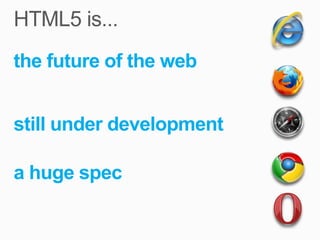
the future of the web


still under development

a huge spec
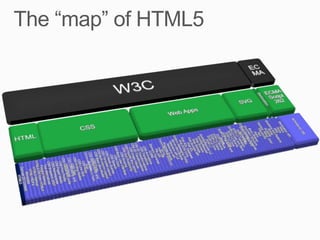
First Public                          Candidate           Proposed
                Working Draft                                            Recommendation
Working Draft                       Recommendation      Recommendation


                        Last call           Call to implement
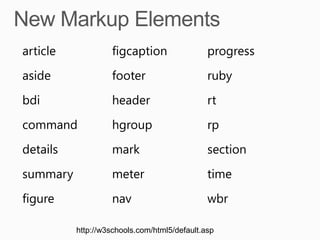
article            figcaption                 progress
aside              footer                     ruby
bdi                header                     rt
command            hgroup                     rp
details            mark                       section
summary            meter                      time
figure             nav                        wbr

          http://w3schools.com/html5/default.asp
audio    For multimedia content, sounds, music or other
         audio streams

video    For video content, such as a movie clip or other
         video streams

source   For media resources for media elements, defined
         inside video or audio elements

embed    For embedded content, such as a plug-in
track    For text tracks used in mediaplayers
<canvas></canvas
>

  http://w3schools.com/html5/default.asp
datalist   A list of options for input values
keygen     Generate keys to authenticate users
           For different types of output, such as output
output
           written by a script


           http://w3schools.com/html5/default.asp
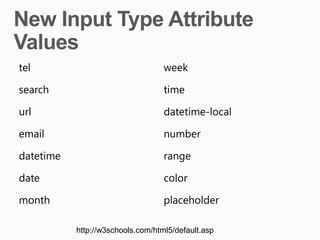
tel                                week

search                             time

url                                datetime-local

email                              number

datetime                           range

date                               color

month                              placeholder

           http://w3schools.com/html5/default.asp
Currently supported video formats : MP4, WebM, Ogg


Browser               MP4         WebM           Ogg

Internet Explorer 9   YES         NO             NO

Firefox 4.0           NO          YES            YES

Google Chrome 6       YES         YES            YES

Apple Safari 5        YES         NO             NO

Opera 10.6            NO          YES            YES
XML-based
• Scriptable, extensible, easily editable
• Easy to apply CSS styles

Vector graphics
• Resizable without degradation
• Vector images are composed of shapes
  instead of pixels

Compression
• Fast download

Easy debugging
• It is just XML!
<svg width="400" height="200" xmlns="http://www.w3.org/2000/svg">
    <rect fill="red" x="20" y="20" width="100" height="75" />
    <rect fill="blue" x="50" y="50" width="100" height="75" />
</svg>
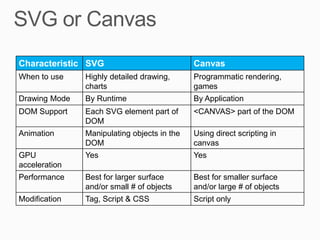
Characteristic SVG                           Canvas
When to use    Highly detailed drawing,      Programmatic rendering,
               charts                        games
Drawing Mode   By Runtime                    By Application
DOM Support    Each SVG element part of      <CANVAS> part of the DOM
               DOM
Animation      Manipulating objects in the   Using direct scripting in
               DOM                           canvas
GPU            Yes                           Yes
acceleration
Performance    Best for larger surface       Best for smaller surface
               and/or small # of objects     and/or large # of objects
Modification   Tag, Script & CSS             Script only
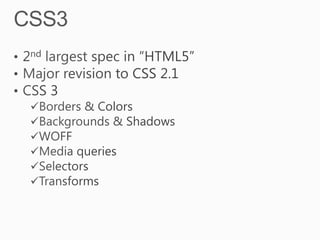
CSS
3
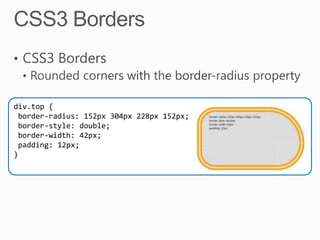
div.top {
 border-radius: 152px 304px 228px 152px;
 border-style: double;
 border-width: 42px;
 padding: 12px;
}
div.top {
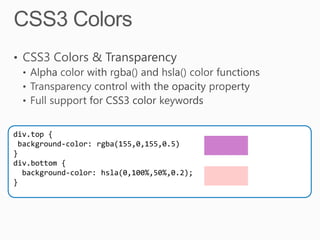
 background-color: rgba(155,0,155,0.5)
}
div.bottom {
  background-color: hsla(0,100%,50%,0.2);
}
div{…
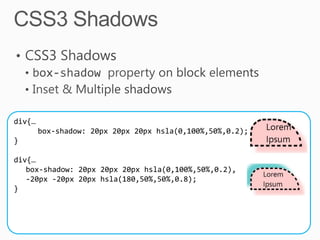
        box-shadow: 20px 20px 20px hsla(0,100%,50%,0.2);
}

div{…
   box-shadow: 20px 20px 20px hsla(0,100%,50%,0.2),
   -20px -20px 20px hsla(180,50%,50%,0.8);
}
div
{
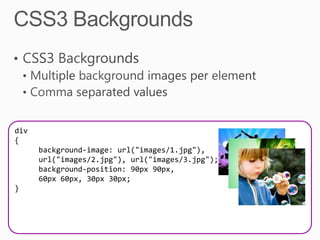
      background-image: url("images/1.jpg"),
      url("images/2.jpg"), url("images/3.jpg");
      background-position: 90px 90px,
      60px 60px, 30px 30px;
}
<link href=“mobile.css" rel="stylesheet"
  media="screen and (max-width:480px)" type="text/css"/>

<link href=“netbook.css" rel="stylesheet"
  media="screen and (min-width:481px) and (max-
  width: 1024px)" type="text/css" />

<link href=“laptop.css" rel="stylesheet"
  media="screen and (min-width:1025px)" type="text/css" />
div {
  -ms-transform: scale(2, 2) rotate(30deg);
}
                                     34
http://theshravan.net | @techieshravan
I Love HTML5

I Love HTML5

  • 3.
    Who Shravan Kumar Kasagoni TechnicalFellow @ Thomson Reuters Microsoft MVP – ASP.NET & IIS http://theshravan.net @techieshravan
  • 6.
  • 7.
    HTML 5 != HTMLISNOT JUST HTML 5 HTML
  • 9.
  • 10.
    the future ofthe web still under development a huge spec
  • 12.
    First Public Candidate Proposed Working Draft Recommendation Working Draft Recommendation Recommendation Last call Call to implement
  • 15.
    article figcaption progress aside footer ruby bdi header rt command hgroup rp details mark section summary meter time figure nav wbr http://w3schools.com/html5/default.asp
  • 16.
    audio For multimedia content, sounds, music or other audio streams video For video content, such as a movie clip or other video streams source For media resources for media elements, defined inside video or audio elements embed For embedded content, such as a plug-in track For text tracks used in mediaplayers
  • 17.
  • 18.
    datalist A list of options for input values keygen Generate keys to authenticate users For different types of output, such as output output written by a script http://w3schools.com/html5/default.asp
  • 19.
    tel week search time url datetime-local email number datetime range date color month placeholder http://w3schools.com/html5/default.asp
  • 20.
    Currently supported videoformats : MP4, WebM, Ogg Browser MP4 WebM Ogg Internet Explorer 9 YES NO NO Firefox 4.0 NO YES YES Google Chrome 6 YES YES YES Apple Safari 5 YES NO NO Opera 10.6 NO YES YES
  • 21.
    XML-based • Scriptable, extensible,easily editable • Easy to apply CSS styles Vector graphics • Resizable without degradation • Vector images are composed of shapes instead of pixels Compression • Fast download Easy debugging • It is just XML!
  • 22.
    <svg width="400" height="200"xmlns="http://www.w3.org/2000/svg"> <rect fill="red" x="20" y="20" width="100" height="75" /> <rect fill="blue" x="50" y="50" width="100" height="75" /> </svg>
  • 23.
    Characteristic SVG Canvas When to use Highly detailed drawing, Programmatic rendering, charts games Drawing Mode By Runtime By Application DOM Support Each SVG element part of <CANVAS> part of the DOM DOM Animation Manipulating objects in the Using direct scripting in DOM canvas GPU Yes Yes acceleration Performance Best for larger surface Best for smaller surface and/or small # of objects and/or large # of objects Modification Tag, Script & CSS Script only
  • 24.
  • 26.
    div.top { border-radius:152px 304px 228px 152px; border-style: double; border-width: 42px; padding: 12px; }
  • 27.
    div.top { background-color:rgba(155,0,155,0.5) } div.bottom { background-color: hsla(0,100%,50%,0.2); }
  • 28.
    div{… box-shadow: 20px 20px 20px hsla(0,100%,50%,0.2); } div{… box-shadow: 20px 20px 20px hsla(0,100%,50%,0.2), -20px -20px 20px hsla(180,50%,50%,0.8); }
  • 29.
    div { background-image: url("images/1.jpg"), url("images/2.jpg"), url("images/3.jpg"); background-position: 90px 90px, 60px 60px, 30px 30px; }
  • 31.
    <link href=“mobile.css" rel="stylesheet" media="screen and (max-width:480px)" type="text/css"/> <link href=“netbook.css" rel="stylesheet" media="screen and (min-width:481px) and (max- width: 1024px)" type="text/css" /> <link href=“laptop.css" rel="stylesheet" media="screen and (min-width:1025px)" type="text/css" />
  • 33.
    div { -ms-transform: scale(2, 2) rotate(30deg); } 34
  • 34.

Editor's Notes

  • #14 Working Draft (WD)Published during the process of drafting the specification, the purpose of a public Working Draft is to create a snapshot of the specification&apos;s current state and to solicit input from the W3C and the public. The document is known to be unstable, and is often incomplete.Last Call Working Draft (LC or LCWD)By publishing a Last Call Working Draft, a working group is expressing that they consider the spec to be complete and all issues to be resolved. Publishing a Last Call Working Draft announces that this specification will move toward Candidate Recommendation unless significant issues are brought up. The Last Call period is a last chance for others to submit issues before the transition to CR.Candidate Recommendation (CR)By publishing a Candidate Recommendation, a working group is expressing that have resolved all known issues and they believe the spec is ready for implementation.Proposed Recommendation (PR)To exit CR and enter this stage, the spec needs a comprehensive test suite and implementation reports proving that every feature in the spec is interoperably implemented in at least two shipping implementations. Entering the Proposed Recommendation stage signals to the W3C that these requirements have been met. Once the W3C officially approves the specification, it becomes a Recommendation.Recommendation (REC)This is the final stage. At this point there should need to be no more changes.
  • #24 Scalable Vector Graphics (SVG) are a graphics format that describe vector graphics with an XML-based file format. Unlike rasterized images, instead of drawing individual pixels on a page, vector graphics render based on the shapes defined in the XML file. Because they’re based on shapes instead of pixels, there’s no limit to how they can be zoomed in, there isn’t a loss because of a lack of pixel depth. And since they’re just XML files, they can be included right in your HTML, like you would any other HTML element, and are treated by the browser just like any other HTML element – they’re fully accessible via the DOM and can be scripted and modified as you want.SVG drawings work really well for organizational charts, simple images and line drawings. For example, a flow chart, or business organizational chart. The code on this page shows a very simple example, in our HTML I’ve placed an SVG element, 400 pixels wide by 200 pixels high. Within that SVG element, we’ve drawn two shapes, both rectangles. Almost all browsers today support the basic shapes like rectangles, circles, polygons; as well as paths, colors, gradients, patterns and more.
  • #26 Internet Explorer 9 adds support for several features of the CSS3 Backgrounds and Borders Module. The most notable new feature, the border-radius properties, is also the most requested CSS border feature.The border-radius properties enable you to curve border corners by essentially “replacing” the hard corners with a quarter-ellipse and specifying the radii of each ellipse.
  • #27 CSS3 adds several new ways of defining the opacity of elements, including the opacity CSS property, but also the ability to set the alpha-transparency value when defining colors with the RGBA or HSLA color model. The RGBA color model allows you to specify the amount of red, green and blue as 0-255 values, with the final parameter being the transparency of the element. The alpha transparency value ranges from zero to one, with zero being completely transparent, and one being fully opaque. If you set the alpha transparency to 0.5, the object will allow 50% of the background through. Some designers and developers grew up and are more confortable with the HSLA color model, which is a little different. HSLA stands for hue, saturation, light and alpha transparency. The hue is represented as a color wheel with a value of 0 to 360, where red is 0 (or 360), green is 120, and blue is 240. For example, a pure purple would be 300 (in between the red and the blue). The saturation value, represented as a precentage defines how strong the color is. Lightness defines the how “bright” the color is – where 0% is black, and 100% is pure white. At 50%, the color is at it’s “normal” color.Demo From IETestDrive.com-None-
  • #28 Internet Explorer 9 adds support for several features of the CSS3 Backgrounds and Borders Module. The most notable new feature, the border-radius properties, is also the most requested CSS border feature.The border-radius properties enable you to curve border corners by essentially “replacing” the hard corners with a quarter-ellipse and specifying the radii of each ellipse.
  • #29 Internet Explorer 9 adds support for several features of the CSS3 Backgrounds and Borders Module. The most notable new feature, the border-radius properties, is also the most requested CSS border feature.The border-radius properties enable you to curve border corners by essentially “replacing” the hard corners with a quarter-ellipse and specifying the radii of each ellipse.
  • #30 Better typographic control has been a consistent feature of each new iteration of CSS. At the same time, the lack of an interoperable Web font format can be frustrating. Internet Explorer 9 enhances existing support for CSS fonts to provide compliance with the CSS3 Fonts Module. It also adds support for the Web Open Font Format (WOFF) and raw fonts. WOFF is backed by all of the major browser vendors and font foundries is a repackaging of the OpenType font format – for which there are many tools available to developers for packaging fonts today.No longer are designers and developers limited to the small list of web safe fonts. By using the @font-face, and specifying a source URL for the WOFF font file, the browser downloads the necessary font and uses it as the page designer specifies. Demo From IETestDrive.comhttp://ie.microsoft.com/testdrive/Graphics/WebFonts/http://ie.microsoft.com/testdrive/Graphics/MoreWebFonts/
  • #31 The CSS3 Media Queries Module specifies methods to enable web developers to scope a style sheet to a set of precise device capabilities. For instance, you might want to design pages differently for users browsing on a mobile device (that has a tiny screen, limited color palette, low resolution, and so on) versus a netbook (that has a small screen, full color palette, high resolution, and so on) versus a standard computer (with a large screen, full color palette, high resolution, and so on). The full list of media properties supported by CSS3 media queries includes width, height, device-width, device-height, orientation, aspect-ratio, device-aspect-ratio, color, color-index, monochrome, and resolution.Demos From IETestDrive.comhttp://ie.microsoft.com/testdrive/HTML5/85CSS3_MediaQueries/Default.html
  • #32 2D transforms in CSS allow for various transformation to be applied to elements, such as scaling or rotating. It is possible to apply one or many transforms to a single element. This allows for effects such as rotating text or images at an angle, and can be combined with transitions to apply interactive effects such as scaling up elements when the users interacts with them.