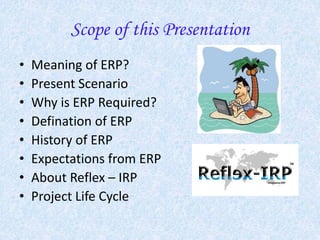
People Friendly ERP Solutions!
Scope of this Presentation
• Meaning of ERP?
• Present Scenario
• Why is ERP Required?
• Defination of ERP
• History of ERP
• Expectations from ERP
• About Reflex – IRP
• Project Life Cycle
ERP –Enterprise Resource Planning
What it means?
ERP is a solution which ....
• Integrates Company-wise information systems
covering all functional areas.
• Performs core Corporate activities and focuses
on Customer Service & Customer Satisfacion.
• Adheres to Global Best Practices.
Present Scenario!
• Information on various islands
• Resistance to change
• Stuck to obsolete legacy systems
• Difficult to get timely / relevant information /
data.
• Poor connectivity between multi-organizational
locations
• Heterogeous hardware, software and practices
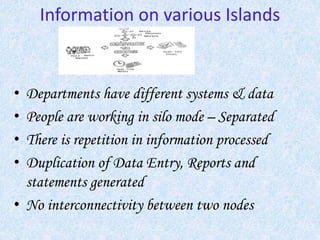
Information on various Islands
• Departments have different systems & data
• People are working in silo mode – Separated
• There is repetition in information processed
• Duplication of Data Entry, Reports and
statements generated
• No interconnectivity between two nodes
ERP – Why is it required?
• Management – Better management of Commercial and
Financial Data
• Timely availability of information to make strategic decisions
• To give Customers Higher level of satisfaction against their
High expectations
• To reduce cycle time both for commercial, production, and
delivery cycles.
• Drastic Cost reduction and Lower Working Capital
• Absorb Best practices and technologies of the modern world.
• Improve overall workflow and efficiency
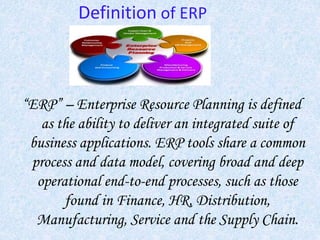
Definition of ERP
“ERP” – Enterprise Resource Planning is defined
as the ability to deliver an integrated suite of
business applications. ERP tools share a common
process and data model, covering broad and deep
operational end-to-end processes, such as those
found in Finance, HR, Distribution,
Manufacturing, Service and the Supply Chain.
History of ERP
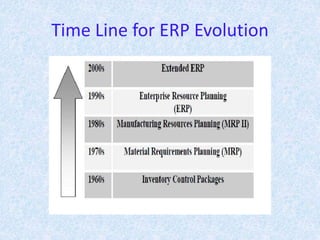
• 1960’s – Systems just for Inventory Control
• 1970’s – MRP – Material Requirement
Planning (Inventory with Material Planning
& Procurement)
• 1980’s – MRPII – Manufacturing Resources
Planning (Extended MRP to Shop Floor &
Distribution Management)
• 1990’s – ERP – Enterprise Resource
Planning (Covering all functions of
Enterprise)
• 2000 onwards – ERPII – E-Commerce
(Extending ERP to the Outside World)
Time Line for ERP Evolution
Expectations from ERP
• Integration of all functions of the Business Entity
• Integration of the systems running at all locations for multi-
location Organizations
• Transparency of Information using a single data source
across the orgnization without compromising on Data
Security
• Sofware must be responsive
Modular
Flexible
Easy to Add Functionalities
Easy to Use and Adapt Statutory Compliances
Provide Growth Plan
About – Reflex - IRP
• Generalized off the shelf application software package
• Modules based on rich functionalities for all business
processes
• Flexible for minor customizations
• Implementation possible within 2 -3 weeks not months
• Up-gradation of functionalities with version control
• Tuned for multi users with adequate in-built security
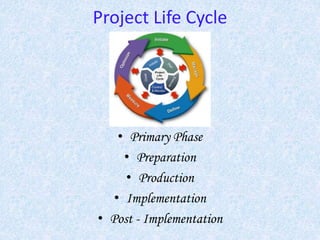
Project Life Cycle
• Primary Phase
• Preparation
• Production
• Implementation
• Post - Implementation
Primary Phase
• ERP Implementation Core Team formation
• Appointment of Consultants (Need Based)
• Scope Study
• Freezing the requirements
• Implementation Partner selection
• Cost Estimation
Preparations
• Chalking out Implementation Strategies
• Formation of Apex and Steering Committee
• Functional and IT Team formation
• Training on ERP functionsand phases
• Requirement finalized
• GAP Analysis
• Action plans for resolving the GAP’s
Production
• Installing the software
• Tuning the package to suite the requirements
• Assigning user rights as per location and people
specific needs, for modular access and security
Implementation
• Conference Room Pilot (CRP)
• Resolving the CRP Issues
• Training the End User
• User Acceptance Test (UAT)
• Go-Live
Post - Implementation
• Monitoring on regular periods
• Resolving the performance issues by tuning the
software / hardware
• Maintenance by off-line or on-line support
Critical Success Factors
• The Dedicated Team
• Change Management
• Right Technical Infrastructure
• Clear Vision and Management Support
• Strict Implementation Schedules
• Involvement of functional and IT
Teams
• Periodical Monitoring
Special Features
• On – Premise ERP Solutions
• On – Cloud ERP Solutions
• On – Rental ERP Solutions
• User-Friendly and Pocket Friendly
Contact Us
• Website:http://www.iserveinfotech.co.in
• Email: info@iserveinfotech.co.in
• Business Development Team: bdm@iserveinfotech.co.in
Thank You

IServe presentation 01

  • 1.
  • 2.
    Scope of thisPresentation • Meaning of ERP? • Present Scenario • Why is ERP Required? • Defination of ERP • History of ERP • Expectations from ERP • About Reflex – IRP • Project Life Cycle
  • 3.
    ERP –Enterprise ResourcePlanning What it means? ERP is a solution which .... • Integrates Company-wise information systems covering all functional areas. • Performs core Corporate activities and focuses on Customer Service & Customer Satisfacion. • Adheres to Global Best Practices.
  • 4.
    Present Scenario! • Informationon various islands • Resistance to change • Stuck to obsolete legacy systems • Difficult to get timely / relevant information / data. • Poor connectivity between multi-organizational locations • Heterogeous hardware, software and practices
  • 5.
    Information on variousIslands • Departments have different systems & data • People are working in silo mode – Separated • There is repetition in information processed • Duplication of Data Entry, Reports and statements generated • No interconnectivity between two nodes
  • 6.
    ERP – Whyis it required? • Management – Better management of Commercial and Financial Data • Timely availability of information to make strategic decisions • To give Customers Higher level of satisfaction against their High expectations • To reduce cycle time both for commercial, production, and delivery cycles. • Drastic Cost reduction and Lower Working Capital • Absorb Best practices and technologies of the modern world. • Improve overall workflow and efficiency
  • 7.
    Definition of ERP “ERP”– Enterprise Resource Planning is defined as the ability to deliver an integrated suite of business applications. ERP tools share a common process and data model, covering broad and deep operational end-to-end processes, such as those found in Finance, HR, Distribution, Manufacturing, Service and the Supply Chain.
  • 8.
    History of ERP •1960’s – Systems just for Inventory Control • 1970’s – MRP – Material Requirement Planning (Inventory with Material Planning & Procurement) • 1980’s – MRPII – Manufacturing Resources Planning (Extended MRP to Shop Floor & Distribution Management) • 1990’s – ERP – Enterprise Resource Planning (Covering all functions of Enterprise) • 2000 onwards – ERPII – E-Commerce (Extending ERP to the Outside World)
  • 9.
    Time Line forERP Evolution
  • 10.
    Expectations from ERP •Integration of all functions of the Business Entity • Integration of the systems running at all locations for multi- location Organizations • Transparency of Information using a single data source across the orgnization without compromising on Data Security • Sofware must be responsive Modular Flexible Easy to Add Functionalities Easy to Use and Adapt Statutory Compliances Provide Growth Plan
  • 11.
    About – Reflex- IRP • Generalized off the shelf application software package • Modules based on rich functionalities for all business processes • Flexible for minor customizations • Implementation possible within 2 -3 weeks not months • Up-gradation of functionalities with version control • Tuned for multi users with adequate in-built security
  • 12.
    Project Life Cycle •Primary Phase • Preparation • Production • Implementation • Post - Implementation
  • 13.
    Primary Phase • ERPImplementation Core Team formation • Appointment of Consultants (Need Based) • Scope Study • Freezing the requirements • Implementation Partner selection • Cost Estimation
  • 14.
    Preparations • Chalking outImplementation Strategies • Formation of Apex and Steering Committee • Functional and IT Team formation • Training on ERP functionsand phases • Requirement finalized • GAP Analysis • Action plans for resolving the GAP’s
  • 15.
    Production • Installing thesoftware • Tuning the package to suite the requirements • Assigning user rights as per location and people specific needs, for modular access and security
  • 16.
    Implementation • Conference RoomPilot (CRP) • Resolving the CRP Issues • Training the End User • User Acceptance Test (UAT) • Go-Live
  • 17.
    Post - Implementation •Monitoring on regular periods • Resolving the performance issues by tuning the software / hardware • Maintenance by off-line or on-line support
  • 18.
    Critical Success Factors •The Dedicated Team • Change Management • Right Technical Infrastructure • Clear Vision and Management Support • Strict Implementation Schedules • Involvement of functional and IT Teams • Periodical Monitoring
  • 19.
    Special Features • On– Premise ERP Solutions • On – Cloud ERP Solutions • On – Rental ERP Solutions • User-Friendly and Pocket Friendly
  • 20.
    Contact Us • Website:http://www.iserveinfotech.co.in •Email: info@iserveinfotech.co.in • Business Development Team: bdm@iserveinfotech.co.in
  • 21.