INTRODUCTION
TO
HTML AND CSS
A BEGINNER FRIENDLY SESSION
Google Developer Students Club
Indian Institute Of Information Technology Kota
INTRODUCTION
HTML BOILER PLATE
BASIC TAGS
TABLES
DIVISION
FORM
TOPICS TO
BE
COVERED
INTRODUCTION
WAYS TO INSERT CSS
ANATOMY AND SYNTAX
SELECTORS
BOX MODEL
POSITIONING
BASIC PROPERTIES
INTRODUCTION
INTRODUCTION
TO
TO
HTML
HTML
ABOUT HTML
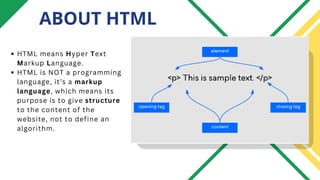
HTML means Hyper Text
Markup Language.
HTML is NOT a programming
language, it’s a markup
language, which means its
purpose is to give structure
to the content of the
website, not to define an
algorithm.
HTML BOILER PLATE
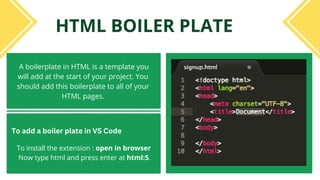
A boilerplate in HTML is a template you
will add at the start of your project. You
should add this boilerplate to all of your
HTML pages.
To install the extension : open in browser
Now type html and press enter at html:5.
To add a boiler plate in VS Code
HTML TAGS
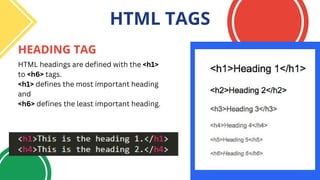
HEADING TAG
HTML headings are defined with the <h1>
to <h6> tags.
<h1> defines the most important heading
and
<h6> defines the least important heading.
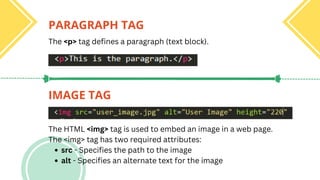
PARAGRAPH TAG
IMAGE TAG
The <p> tag defines a paragraph (text block).
src - Specifies the path to the image
alt - Specifies an alternate text for the image
The HTML <img> tag is used to embed an image in a web page.
The <img> tag has two required attributes:
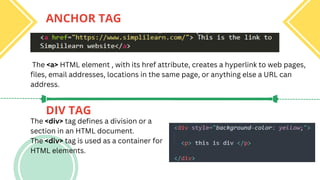
DIV TAG
ANCHOR TAG
The <a> HTML element , with its href attribute, creates a hyperlink to web pages,
files, email addresses, locations in the same page, or anything else a URL can
address.
The <div> tag defines a division or a
section in an HTML document.
The <div> tag is used as a container for
HTML elements.
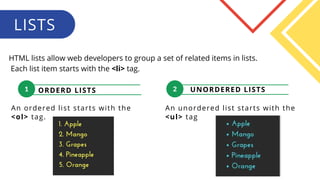
ORDERD LISTS
1 2 UNORDERED LISTS
An ordered list starts with the
<ol> tag.
1
LISTS
HTML lists allow web developers to group a set of related items in lists.
Each list item starts with the <li> tag.
An unordered list starts with the
<ul> tag
1
TABLE
HTML tables allow web developers to
arrange data into rows and columns.
<td>
<th>
<tr>
Each table row starts with a <tr> and
ends with a </tr> tag.
Each table cell is defined by a <td>
and a </td> tag which contains the
content of the table cell.
This is used when you want your cells to
be header cells adding a heading to them.
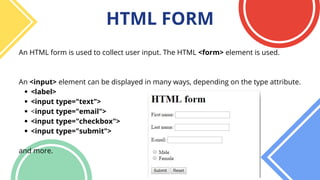
<label>
<input type="text">
<input type="email">
<input type="checkbox">
<input type="submit">
An HTML form is used to collect user input. The HTML <form> element is used.
An <input> element can be displayed in many ways, depending on the type attribute.
and more.
HTML FORM
INTRODUCTION
INTRODUCTION
TO
TO
CSS
CSS
ABOUT CSS
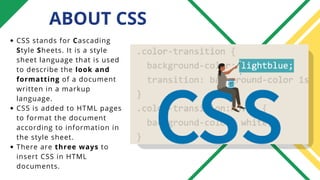
CSS stands for Cascading
Style Sheets. It is a style
sheet language that is used
to describe the look and
formatting of a document
written in a markup
language.
CSS is added to HTML pages
to format the document
according to information in
the style sheet.
There are three ways to
insert CSS in HTML
documents.
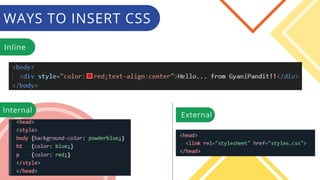
WAYS TO INSERT CSS
Inline
External
Internal
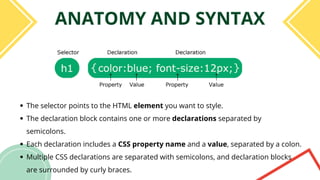
ANATOMY AND SYNTAX
The selector points to the HTML element you want to style.
The declaration block contains one or more declarations separated by
semicolons.
Each declaration includes a CSS property name and a value, separated by a colon.
Multiple CSS declarations are separated with semicolons, and declaration blocks
are surrounded by curly braces.
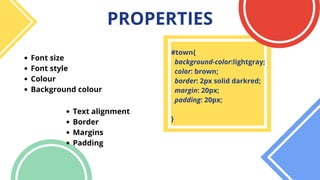
PROPERTIES
Font size
Font style
Colour
Background colour
Text alignment
Border
Margins
Padding
#town{
background-color:lightgray;
color: brown;
border: 2px solid darkred;
margin: 20px;
padding: 20px;
}
SELECTORS
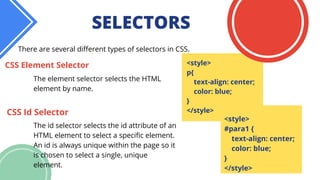
There are several different types of selectors in CSS.
The element selector selects the HTML
element by name.
CSS Element Selector <style>
p{
text-align: center;
color: blue;
}
</style>
CSS Id Selector
The id selector selects the id attribute of an
HTML element to select a specific element.
An id is always unique within the page so it
is chosen to select a single, unique
element.
<style>
#para1 {
text-align: center;
color: blue;
}
</style>
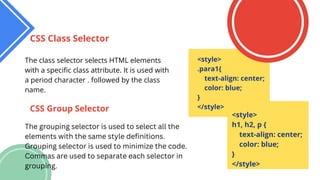
The class selector selects HTML elements
with a specific class attribute. It is used with
a period character . followed by the class
name.
CSS Class Selector
CSS Group Selector
The grouping selector is used to select all the
elements with the same style definitions.
Grouping selector is used to minimize the code.
Commas are used to separate each selector in
grouping.
<style>
h1, h2, p {
text-align: center;
color: blue;
}
</style>
<style>
.para1{
text-align: center;
color: blue;
}
</style>
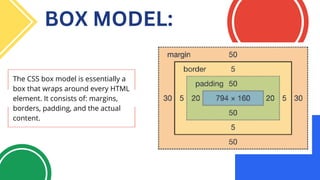
BOX MODEL:
The CSS box model is essentially a
box that wraps around every HTML
element. It consists of: margins,
borders, padding, and the actual
content.
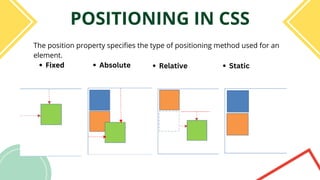
POSITIONING IN CSS
Fixed
The position property specifies the type of positioning method used for an
element.
Absolute Relative Static
COMMENTS
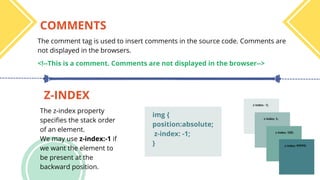
Z-INDEX
The comment tag is used to insert comments in the source code. Comments are
not displayed in the browsers.
The z-index property
specifies the stack order
of an element.
We may use z-index:-1 if
we want the element to
be present at the
backward position.
<!--This is a comment. Comments are not displayed in the browser-->
img {
position:absolute;
z-index: -1;
}
HTML:
https://developer.mozilla.org/en-US/docs/Web/HTML
https://www.w3schools.com/html/default.asp
CSS:
https://www.w3schools.com/css/
https://developer.mozilla.org/en-US/docs/Web/CSS
RESOURCES
THANK YOU
THANK YOU

HTML CSS.pdf

  • 1.
    INTRODUCTION TO HTML AND CSS ABEGINNER FRIENDLY SESSION Google Developer Students Club Indian Institute Of Information Technology Kota
  • 2.
    INTRODUCTION HTML BOILER PLATE BASICTAGS TABLES DIVISION FORM TOPICS TO BE COVERED INTRODUCTION WAYS TO INSERT CSS ANATOMY AND SYNTAX SELECTORS BOX MODEL POSITIONING BASIC PROPERTIES
  • 3.
  • 4.
    ABOUT HTML HTML meansHyper Text Markup Language. HTML is NOT a programming language, it’s a markup language, which means its purpose is to give structure to the content of the website, not to define an algorithm.
  • 5.
    HTML BOILER PLATE Aboilerplate in HTML is a template you will add at the start of your project. You should add this boilerplate to all of your HTML pages. To install the extension : open in browser Now type html and press enter at html:5. To add a boiler plate in VS Code
  • 6.
    HTML TAGS HEADING TAG HTMLheadings are defined with the <h1> to <h6> tags. <h1> defines the most important heading and <h6> defines the least important heading.
  • 7.
    PARAGRAPH TAG IMAGE TAG The<p> tag defines a paragraph (text block). src - Specifies the path to the image alt - Specifies an alternate text for the image The HTML <img> tag is used to embed an image in a web page. The <img> tag has two required attributes:
  • 8.
    DIV TAG ANCHOR TAG The<a> HTML element , with its href attribute, creates a hyperlink to web pages, files, email addresses, locations in the same page, or anything else a URL can address. The <div> tag defines a division or a section in an HTML document. The <div> tag is used as a container for HTML elements.
  • 9.
    ORDERD LISTS 1 2UNORDERED LISTS An ordered list starts with the <ol> tag. 1 LISTS HTML lists allow web developers to group a set of related items in lists. Each list item starts with the <li> tag. An unordered list starts with the <ul> tag
  • 10.
    1 TABLE HTML tables allowweb developers to arrange data into rows and columns. <td> <th> <tr> Each table row starts with a <tr> and ends with a </tr> tag. Each table cell is defined by a <td> and a </td> tag which contains the content of the table cell. This is used when you want your cells to be header cells adding a heading to them.
  • 11.
    <label> <input type="text"> <input type="email"> <inputtype="checkbox"> <input type="submit"> An HTML form is used to collect user input. The HTML <form> element is used. An <input> element can be displayed in many ways, depending on the type attribute. and more. HTML FORM
  • 12.
  • 13.
    ABOUT CSS CSS standsfor Cascading Style Sheets. It is a style sheet language that is used to describe the look and formatting of a document written in a markup language. CSS is added to HTML pages to format the document according to information in the style sheet. There are three ways to insert CSS in HTML documents.
  • 14.
    WAYS TO INSERTCSS Inline External Internal
  • 15.
    ANATOMY AND SYNTAX Theselector points to the HTML element you want to style. The declaration block contains one or more declarations separated by semicolons. Each declaration includes a CSS property name and a value, separated by a colon. Multiple CSS declarations are separated with semicolons, and declaration blocks are surrounded by curly braces.
  • 16.
    PROPERTIES Font size Font style Colour Backgroundcolour Text alignment Border Margins Padding #town{ background-color:lightgray; color: brown; border: 2px solid darkred; margin: 20px; padding: 20px; }
  • 17.
    SELECTORS There are severaldifferent types of selectors in CSS. The element selector selects the HTML element by name. CSS Element Selector <style> p{ text-align: center; color: blue; } </style> CSS Id Selector The id selector selects the id attribute of an HTML element to select a specific element. An id is always unique within the page so it is chosen to select a single, unique element. <style> #para1 { text-align: center; color: blue; } </style>
  • 18.
    The class selectorselects HTML elements with a specific class attribute. It is used with a period character . followed by the class name. CSS Class Selector CSS Group Selector The grouping selector is used to select all the elements with the same style definitions. Grouping selector is used to minimize the code. Commas are used to separate each selector in grouping. <style> h1, h2, p { text-align: center; color: blue; } </style> <style> .para1{ text-align: center; color: blue; } </style>
  • 19.
    BOX MODEL: The CSSbox model is essentially a box that wraps around every HTML element. It consists of: margins, borders, padding, and the actual content.
  • 20.
    POSITIONING IN CSS Fixed Theposition property specifies the type of positioning method used for an element. Absolute Relative Static
  • 21.
    COMMENTS Z-INDEX The comment tagis used to insert comments in the source code. Comments are not displayed in the browsers. The z-index property specifies the stack order of an element. We may use z-index:-1 if we want the element to be present at the backward position. <!--This is a comment. Comments are not displayed in the browser--> img { position:absolute; z-index: -1; }
  • 22.
  • 23.