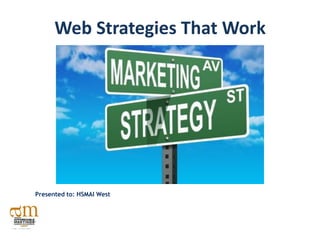
Web Strategies That Work


Presented to: HSMAI West
About Marcel Media
Marcel Media is full service interactive marketing agency specializing in
Search Engine Marketing (SEM).

We partner with organizations to provide creative and customized
marketing solutions such as Social Media, Interactive Facebook
Applications, Search Engine Optimization (SEO), Conversion
Optimization, Website Development and Web Analytics.


                          @marcelmedia


                          Facebook.com/marcelmedia

                          www.marcelmedia.com/blog


                                                                        2
About Kelly Cutler
Kelly Cutler is the CEO of Marcel Media, an
award-winning, interactive marketing firm
specializing in search engine and social
media marketing.

Beginning her career in 1997 with companies
including AOL and Classified Ventures, Kelly’s
achievements include serving as the first
woman president of the Chicago
Entrepreneurs’ Organization, and                    Connect with Kelly
instructing at the University of Chicago
and DePaul University.                         Linkedin.com/in/kellycutler
                                                         or
She is a sought after subject matter expert,         @kfcutler 0
speaking on industry topics such as search
engine optimization, web analytics and
social media marketing across the country.
Agenda

Intro: Viral Video             5


SEO                            6


Website Analytics             18


Online Video                  32
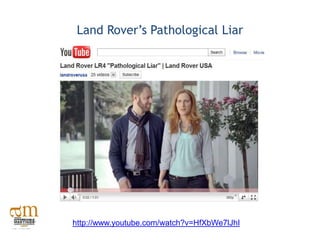
Land Rover’s Pathological Liar


http://www.youtube.com/watch?v=HfXbWe7lJhI
Let’s Take a Closer Look at SEO


                                     Search Engine
                                  Optimization (SEO)…


                                                        3
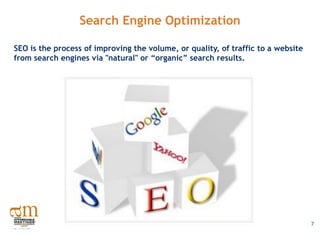
Search Engine Optimization

SEO is the process of improving the volume, or quality, of traffic to a website
from search engines via "natural" or “organic” search results.


                                                                                  7
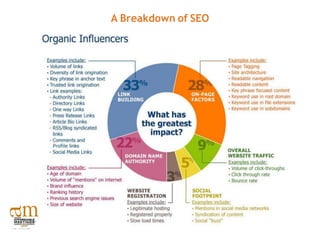
A Breakdown of SEO
7 Simple On Page SEO Tips

 URL Structure- Include keywords
      www.marcelmedia.com/social-media-marketing/

 ALT Tags - Should be image specific keywords, filenames should
  be all lowercase

 XML Site Map - Lays out the site architecture in an easy to
  process web document so all pages can be crawled and indexed
  by engines
7 Simple On Page SEO Tips

 Title Tags – Should be comprised of two sections. A keyword
  portion first, separate with a pipe bar (|) then a branding
  portion
        Keyword portion should be less than 65 characters and
         positioned with page-specific keywords (head terms)
        Ex. Chicago Search Engine Optimization | Marcel Media

 Navigation -This should be text-based HTML (don’t use flash,
  don’t place in footer)

 Start a blog and syndicate content across the web

 Press Release Optimization
Benefits of Off Page SEO: Link Building

  What is a “link”?
  On page HTML element that allows the user to navigate to another page on the
  internet

  Why are links important?
  All links are important to SEO .The most important types of links for SEO are
  "backlinks“ or "inlinks".

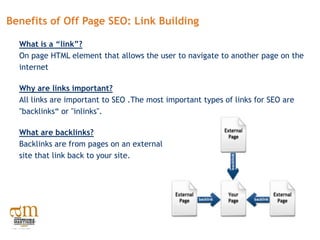
  What are backlinks?
  Backlinks are from pages on an external
  site that link back to your site.
Examples of Backlinks
  •   Authority Links -links from relevant sites such as .edu sites, personal
      websites etc

  •   Directory Links -include search engine and paid directories such as the
      "Yahoo Directory”

  •   Real Time Links -links from regularly updated content-driven sites such as
      blogs, PR sites

  •   Social Bookmarks - Bookmarks allow users to tag a website or webpage, save
      it for later, or share the links with friends. This helps to syndicate branded
      content and compliments off page SEO.
Writing Content for the Web: Tips for Success

•   Write for power skimmers – bullet points are your greatest ally

•   Use the headline to ask a question - ex. “Were You Affected By Google’s
    Latest Algorithm Update?”

•   Use sub-headlines - if it’s more then 250-400 words, use sub-headlines

•   Do your research - find the phrases your audience is searching for through
    Google Traffic Estimator and Keyword Tool

•   Use numbers- stats/numbers grab attention and promote linking

•   Strong calls to action - don’t use halfway words try, maybe, might,
    possibly and perhaps

•   Use multimedia to help tell your story


                                                                                 8
Press Release Optimization: Tips for Success

 1. Use strategic keyword placement - incorporate search terms into the
    headline and focus your keywords in the first two paragraphs

 2. Write a concise, clear headline under 22 words

 3. Hyperlink targeted keywords and phrases - link early, deeply and
    descriptively

 4. Include multimedia whenever possible

 5. Syndicate your release on social media sites

 6. Distribute over the wire - PRWeb, Marketwire or
    PR Newswire

 7. Create a press room on your website


                                                                          9
Tools the Pros Use

Let the Data Drive Decisions


                               10
A Few Useful Tools
Google Analytics
  http://www.google.com/analytics/index.html

Website Grader
   http://websitegrader.com/

Google Insights for Search
   http://www.google.com/insights/search/#


                                               11
Google Analytics: Tying Everything Together

What Analytics Can Do:

•   Filter out internal traffic

•   Track across multiple domains

•   Easy tagging for all online marketing
    (including email signatures)

•   Track eCommerce

•   Set defined goals

•   Track outbound links, PDF downloads
     and form submissions


                                              12
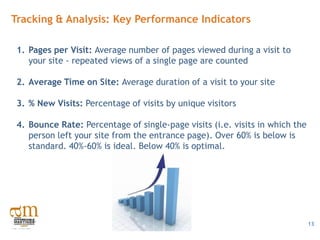
Tracking & Analysis: Key Performance Indicators

 1. Pages per Visit: Average number of pages viewed during a visit to
    your site - repeated views of a single page are counted

 2. Average Time on Site: Average duration of a visit to your site

 3. % New Visits: Percentage of visits by unique visitors

 4. Bounce Rate: Percentage of single-page visits (i.e. visits in which the
    person left your site from the entrance page). Over 60% is below is
    standard. 40%-60% is ideal. Below 40% is optimal.


                                                                              13
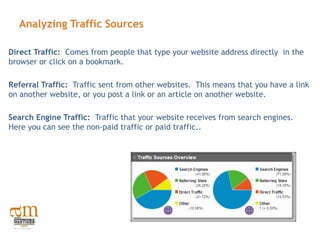
Analyzing Traffic Sources

Direct Traffic: Comes from people that type your website address directly in the
browser or click on a bookmark.

Referral Traffic: Traffic sent from other websites. This means that you have a link
on another website, or you post a link or an article on another website.

Search Engine Traffic: Traffic that your website receives from search engines.
Here you can see the non-paid traffic or paid traffic..
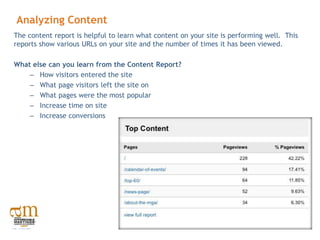
Analyzing Content
The content report is helpful to learn what content on your site is performing well. This
reports show various URLs on your site and the number of times it has been viewed.

What else can you learn from the Content Report?
    – How visitors entered the site
    – What page visitors left the site on
    – What pages were the most popular
    – Increase time on site
    – Increase conversions
Social Media for
  Associations


                   16
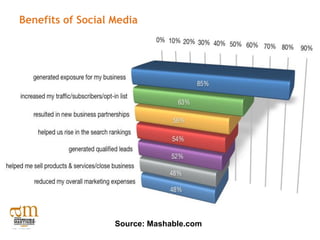
Benefits of Social Media


                   Source: Mashable.com
Best Practices: Social Media Strategy
1. Define a Distribution Strategy: Evaluate the main brand, sub brands and
   notable personalities that are “follow worthy”

2. Create a Life Support System: Make sure each account has a dedicated
   community manager that can respond quickly and effectively

3. Mission and Purpose: Know the audience you’re trying to reach and have a
   purpose for each account

4. Develop an Editorial Program: Evoke the new K.I.S.S. (Keep It Significant and
   Shareable)

5. Construct a Listening Framework: Monitor your brand as well as the distinct
   conversations related to each account
Best Practices: Social Media Strategy


6.    Escalation & Workflow: Draft a clear flowchart that details the steps for a
      variety of “if this happens, then do this” situations

7.    Social Media Brand Style Guide: This documents primary function is to define
      the brand persona, characteristics, voice, and messaging

8.    Serve Customers and Prospects: Each channel needs a service function that
      aims to promote customer appreciation and loyalty

9.    Response Time: Timing is everything and in brevity there’s clarity

10. Define Benchmarks: Monitor the performance of each
    account to improve its engagement and editorial strategy
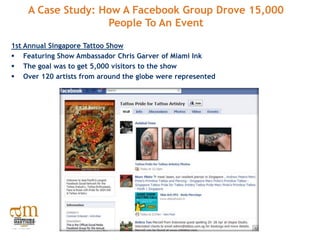
A Case Study: How A Facebook Group Drove 15,000
                   People To An Event

1st Annual Singapore Tattoo Show
 Featuring Show Ambassador Chris Garver of Miami Ink
 The goal was to get 5,000 visitors to the show
 Over 120 artists from around the globe were represented
What Marketing Looked Like Before Social Media
•   Telemarketing

•   Buy Email lists

•   Email marketing campaign

•   Buy a postal mailing list

•   Send out snail mail to the bought list

•   Build a Good Website (This is still important!)

•   Optimize The Website for Search Engines/SEO (This is still important!)

•   Posters

•   Niche Magazine Print Advertising
What Marketing Can Look Like After Social Media
Andrew Peters the brains behind the social media promotions decided to do
something different.

        • He created the Facebook group called Tattoo Artistry that was started
          three months prior to the event

        • Tattoo Artistry Facebook Group quickly gained 3,000 members

        • Instead of relying on expensive advertising, he built a community of
          passionate fans who executed word of mouth marketing for the event

        • More than 15,000 people attend, 3x the expected number of attendees

        • The Tattoo Artistry Facebook group is now Asia’s largest social network
          for the tattoo industry, tattoo enthusiasts, and fans
Social Media Tool Kit

Social Mention (free): Allows you to set up email alerts and real time mentions
of your brand on social media

Klout (free): Determines the level of influence your brand has in the social
media marketplace

Cinch: This simple tool can record audio, either via the web or phone so you
can share audio messages with your followers
Social Media Tool Kit

HootSuite: Allows you to have multiple contributors to your social profiles
without sharing passwords. Assign messages for follow-up and track responses,
and monitor and post to multiple social networks

TweetDeck: Customization options for columns, groups, saved searches and
automatic updates. See what people are saying about you and tweet, sharing
photos, videos or links directly from TweetDeck

Ping.FM: Simple, free, web based app that allows you to post to multiple sites
at once
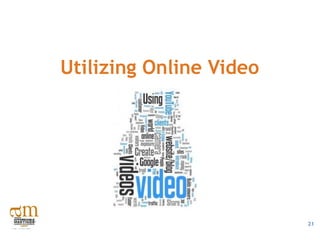
Utilizing Online Video


                         21
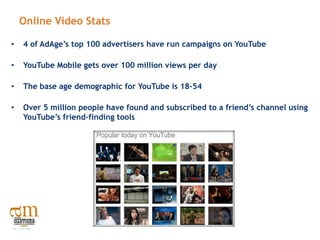
Online Video Stats

•   4 of AdAge’s top 100 advertisers have run campaigns on YouTube

•   YouTube Mobile gets over 100 million views per day

•   The base age demographic for YouTube is 18-54

•   Over 5 million people have found and subscribed to a friend’s channel using
    YouTube’s friend-finding tools
5 Tips to Create a Viral Video

  1. Unique Content - funny, shocking, clever, controversial, interesting,
     different, sexy, or quirky. Make people go “WOW”

  2. Make it short: 30 seconds is good. 2 minutes max

  3. Give it an attention-grabbing title

  4. Use the power of the thumbnail: YouTube gives you three options for
     thumbnails when uploading a video. Make sure that the thumbnail you
     choose is clear and intriguing

  5. YouTube allows you to tag videos: don’t
     tag generically; tag creatively and specifically
The Process

•    You don’t need an expensive crew – get started with a hand-held video recorder

•    Video files must be accessible on your site by search crawlers via standard HTTP
     requests
           Search crawlers can read the following formats: .mpg, .mpeg, .mp4, .mov,
               .wmv, .asf, .avi, .ra, .ram, .rm, .flv

•    Include branding/logo in your video

•    Syndicate: Facebook, YouTube, Vimeo, Viddler, Metacafe, Tubemogul

•    Blast an email out to your list. Link the video and recommend that people watch it
     and forward it.

•    Put it on your homepage and embed it into your blog


                                                                                          23
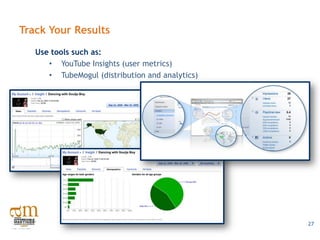
Track Your Results
   Use tools such as:
      • YouTube Insights (user metrics)
      • TubeMogul (distribution and analytics)


                                                 27
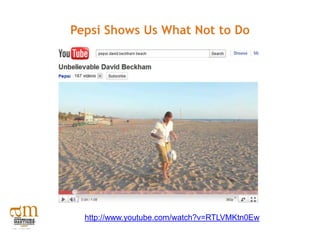
Pepsi Shows Us What Not to Do


  http://www.youtube.com/watch?v=RTLVMKtn0Ew
Thank You!

      Kelly Cutler

kelly@marcelmedia.com

LinkedIn.com/kellycutler

  Twitter.com/kfcutler


    Questions?

HSMAI2011 west web-strategiesthatwork

  • 1.
    Web Strategies ThatWork Presented to: HSMAI West
  • 2.
    About Marcel Media MarcelMedia is full service interactive marketing agency specializing in Search Engine Marketing (SEM). We partner with organizations to provide creative and customized marketing solutions such as Social Media, Interactive Facebook Applications, Search Engine Optimization (SEO), Conversion Optimization, Website Development and Web Analytics. @marcelmedia Facebook.com/marcelmedia www.marcelmedia.com/blog 2
  • 3.
    About Kelly Cutler KellyCutler is the CEO of Marcel Media, an award-winning, interactive marketing firm specializing in search engine and social media marketing. Beginning her career in 1997 with companies including AOL and Classified Ventures, Kelly’s achievements include serving as the first woman president of the Chicago Entrepreneurs’ Organization, and Connect with Kelly instructing at the University of Chicago and DePaul University. Linkedin.com/in/kellycutler or She is a sought after subject matter expert, @kfcutler 0 speaking on industry topics such as search engine optimization, web analytics and social media marketing across the country.
  • 4.
    Agenda Intro: Viral Video 5 SEO 6 Website Analytics 18 Online Video 32
  • 5.
    Land Rover’s PathologicalLiar http://www.youtube.com/watch?v=HfXbWe7lJhI
  • 6.
    Let’s Take aCloser Look at SEO Search Engine Optimization (SEO)… 3
  • 7.
    Search Engine Optimization SEOis the process of improving the volume, or quality, of traffic to a website from search engines via "natural" or “organic” search results. 7
  • 8.
  • 9.
    7 Simple OnPage SEO Tips  URL Structure- Include keywords www.marcelmedia.com/social-media-marketing/  ALT Tags - Should be image specific keywords, filenames should be all lowercase  XML Site Map - Lays out the site architecture in an easy to process web document so all pages can be crawled and indexed by engines
  • 10.
    7 Simple OnPage SEO Tips  Title Tags – Should be comprised of two sections. A keyword portion first, separate with a pipe bar (|) then a branding portion  Keyword portion should be less than 65 characters and positioned with page-specific keywords (head terms)  Ex. Chicago Search Engine Optimization | Marcel Media  Navigation -This should be text-based HTML (don’t use flash, don’t place in footer)  Start a blog and syndicate content across the web  Press Release Optimization
  • 11.
    Benefits of OffPage SEO: Link Building What is a “link”? On page HTML element that allows the user to navigate to another page on the internet Why are links important? All links are important to SEO .The most important types of links for SEO are "backlinks“ or "inlinks". What are backlinks? Backlinks are from pages on an external site that link back to your site.
  • 12.
    Examples of Backlinks • Authority Links -links from relevant sites such as .edu sites, personal websites etc • Directory Links -include search engine and paid directories such as the "Yahoo Directory” • Real Time Links -links from regularly updated content-driven sites such as blogs, PR sites • Social Bookmarks - Bookmarks allow users to tag a website or webpage, save it for later, or share the links with friends. This helps to syndicate branded content and compliments off page SEO.
  • 13.
    Writing Content forthe Web: Tips for Success • Write for power skimmers – bullet points are your greatest ally • Use the headline to ask a question - ex. “Were You Affected By Google’s Latest Algorithm Update?” • Use sub-headlines - if it’s more then 250-400 words, use sub-headlines • Do your research - find the phrases your audience is searching for through Google Traffic Estimator and Keyword Tool • Use numbers- stats/numbers grab attention and promote linking • Strong calls to action - don’t use halfway words try, maybe, might, possibly and perhaps • Use multimedia to help tell your story 8
  • 14.
    Press Release Optimization:Tips for Success 1. Use strategic keyword placement - incorporate search terms into the headline and focus your keywords in the first two paragraphs 2. Write a concise, clear headline under 22 words 3. Hyperlink targeted keywords and phrases - link early, deeply and descriptively 4. Include multimedia whenever possible 5. Syndicate your release on social media sites 6. Distribute over the wire - PRWeb, Marketwire or PR Newswire 7. Create a press room on your website 9
  • 15.
    Tools the ProsUse Let the Data Drive Decisions 10
  • 16.
    A Few UsefulTools Google Analytics http://www.google.com/analytics/index.html Website Grader http://websitegrader.com/ Google Insights for Search http://www.google.com/insights/search/# 11
  • 17.
    Google Analytics: TyingEverything Together What Analytics Can Do: • Filter out internal traffic • Track across multiple domains • Easy tagging for all online marketing (including email signatures) • Track eCommerce • Set defined goals • Track outbound links, PDF downloads and form submissions 12
  • 18.
    Tracking & Analysis:Key Performance Indicators 1. Pages per Visit: Average number of pages viewed during a visit to your site - repeated views of a single page are counted 2. Average Time on Site: Average duration of a visit to your site 3. % New Visits: Percentage of visits by unique visitors 4. Bounce Rate: Percentage of single-page visits (i.e. visits in which the person left your site from the entrance page). Over 60% is below is standard. 40%-60% is ideal. Below 40% is optimal. 13
  • 19.
    Analyzing Traffic Sources DirectTraffic: Comes from people that type your website address directly in the browser or click on a bookmark. Referral Traffic: Traffic sent from other websites. This means that you have a link on another website, or you post a link or an article on another website. Search Engine Traffic: Traffic that your website receives from search engines. Here you can see the non-paid traffic or paid traffic..
  • 20.
    Analyzing Content The contentreport is helpful to learn what content on your site is performing well. This reports show various URLs on your site and the number of times it has been viewed. What else can you learn from the Content Report? – How visitors entered the site – What page visitors left the site on – What pages were the most popular – Increase time on site – Increase conversions
  • 21.
    Social Media for Associations 16
  • 22.
    Benefits of SocialMedia Source: Mashable.com
  • 23.
    Best Practices: SocialMedia Strategy 1. Define a Distribution Strategy: Evaluate the main brand, sub brands and notable personalities that are “follow worthy” 2. Create a Life Support System: Make sure each account has a dedicated community manager that can respond quickly and effectively 3. Mission and Purpose: Know the audience you’re trying to reach and have a purpose for each account 4. Develop an Editorial Program: Evoke the new K.I.S.S. (Keep It Significant and Shareable) 5. Construct a Listening Framework: Monitor your brand as well as the distinct conversations related to each account
  • 24.
    Best Practices: SocialMedia Strategy 6. Escalation & Workflow: Draft a clear flowchart that details the steps for a variety of “if this happens, then do this” situations 7. Social Media Brand Style Guide: This documents primary function is to define the brand persona, characteristics, voice, and messaging 8. Serve Customers and Prospects: Each channel needs a service function that aims to promote customer appreciation and loyalty 9. Response Time: Timing is everything and in brevity there’s clarity 10. Define Benchmarks: Monitor the performance of each account to improve its engagement and editorial strategy
  • 25.
    A Case Study:How A Facebook Group Drove 15,000 People To An Event 1st Annual Singapore Tattoo Show  Featuring Show Ambassador Chris Garver of Miami Ink  The goal was to get 5,000 visitors to the show  Over 120 artists from around the globe were represented
  • 26.
    What Marketing LookedLike Before Social Media • Telemarketing • Buy Email lists • Email marketing campaign • Buy a postal mailing list • Send out snail mail to the bought list • Build a Good Website (This is still important!) • Optimize The Website for Search Engines/SEO (This is still important!) • Posters • Niche Magazine Print Advertising
  • 27.
    What Marketing CanLook Like After Social Media Andrew Peters the brains behind the social media promotions decided to do something different. • He created the Facebook group called Tattoo Artistry that was started three months prior to the event • Tattoo Artistry Facebook Group quickly gained 3,000 members • Instead of relying on expensive advertising, he built a community of passionate fans who executed word of mouth marketing for the event • More than 15,000 people attend, 3x the expected number of attendees • The Tattoo Artistry Facebook group is now Asia’s largest social network for the tattoo industry, tattoo enthusiasts, and fans
  • 28.
    Social Media ToolKit Social Mention (free): Allows you to set up email alerts and real time mentions of your brand on social media Klout (free): Determines the level of influence your brand has in the social media marketplace Cinch: This simple tool can record audio, either via the web or phone so you can share audio messages with your followers
  • 29.
    Social Media ToolKit HootSuite: Allows you to have multiple contributors to your social profiles without sharing passwords. Assign messages for follow-up and track responses, and monitor and post to multiple social networks TweetDeck: Customization options for columns, groups, saved searches and automatic updates. See what people are saying about you and tweet, sharing photos, videos or links directly from TweetDeck Ping.FM: Simple, free, web based app that allows you to post to multiple sites at once
  • 30.
  • 31.
    Online Video Stats • 4 of AdAge’s top 100 advertisers have run campaigns on YouTube • YouTube Mobile gets over 100 million views per day • The base age demographic for YouTube is 18-54 • Over 5 million people have found and subscribed to a friend’s channel using YouTube’s friend-finding tools
  • 32.
    5 Tips toCreate a Viral Video 1. Unique Content - funny, shocking, clever, controversial, interesting, different, sexy, or quirky. Make people go “WOW” 2. Make it short: 30 seconds is good. 2 minutes max 3. Give it an attention-grabbing title 4. Use the power of the thumbnail: YouTube gives you three options for thumbnails when uploading a video. Make sure that the thumbnail you choose is clear and intriguing 5. YouTube allows you to tag videos: don’t tag generically; tag creatively and specifically
  • 33.
    The Process • You don’t need an expensive crew – get started with a hand-held video recorder • Video files must be accessible on your site by search crawlers via standard HTTP requests  Search crawlers can read the following formats: .mpg, .mpeg, .mp4, .mov, .wmv, .asf, .avi, .ra, .ram, .rm, .flv • Include branding/logo in your video • Syndicate: Facebook, YouTube, Vimeo, Viddler, Metacafe, Tubemogul • Blast an email out to your list. Link the video and recommend that people watch it and forward it. • Put it on your homepage and embed it into your blog 23
  • 34.
    Track Your Results Use tools such as: • YouTube Insights (user metrics) • TubeMogul (distribution and analytics) 27
  • 35.
    Pepsi Shows UsWhat Not to Do http://www.youtube.com/watch?v=RTLVMKtn0Ew
  • 36.
    Thank You! Kelly Cutler kelly@marcelmedia.com LinkedIn.com/kellycutler Twitter.com/kfcutler Questions?