




How to plan a successful
Digital Signage Campaign
in 5 steps
There is more to a successful digital signage campaign than meets the eye.
The following 5 phases define a framework that will help you doing the right steps
at the right time:
The Framework
1. The bigger picture
2. Content
3. Software
4. Hardware
5. Reshuffle and finalise
The Bigger Picture
1. Dedicate some effort on this now, to
save lots of time (and money) later on
2. Give an answer that is both qualitative
and quantitative, i.e. set a target and a
KPI to measure how close you get
What do I want to achieve?
Examples:
• “to attract more people”, measured by walk-ins or audience size
• “to engage people more”, measured by dwell time distribution
• “to know more about the customers”, measured by the number of customers
for whom you get the data, the amount of data, or the quality of the data
Content
1. You set the target, now think on which content to offer to your customers
2. By “content” we don’t mean the technicalities, but the media to show, the
possibility to interact, the installation type, real time personalisation, …
3. Follow a customer-centric approach and define the use cases in details
How can I get there?
Examples:
• Are you trying to attract more people? Are your customers tech-savvy?
Use QR code overlay
• Are you focusing on engaging different customer segments?
Use face detection mechanisms, to make targeted advertising,
along with touch screen technology
Software
What everybody want is:
a software that allows you to create the experience
that you want to offer to your customers
Unfortunately, most of the people just start from here, and they have a very hard
time in turning the previous sentence into clear requirements.
If you have done your homework in the first two phases, now you know what you
need and what you want your software to do.
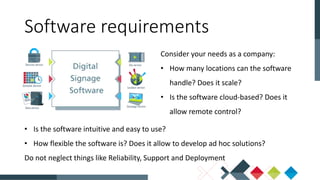
Software requirements
Consider your needs as a company:
• How many locations can the software
handle? Does it scale?
• Is the software cloud-based? Does it
allow remote control?
Software requirements
• Is the software intuitive and easy to use?
• How flexible the software is? Does it allow to develop ad hoc solutions?
Do not neglect things like Reliability, Support and Deployment
Hardware
• Write down a list with all of the requirements for your campaign
• Choose a compatible hardware, this refers both to the screen where to offer the
content and to the mini-pc/player where to run the software. Today we are facing
the flourishing of a variety of choices: low cost players, ARM based players,
players embedded into the screens…
Choose your supplier
• Do not forget to consider the accessories needed to install the hardware, such as
the VESA support, double check compatibility, for the connections, for the mini-
pc and for other components that might be part of your solutions (e.g. a webcam)
• Before buying large stocks, always perform a small-scale check
Choose your supplier
Reshuffle and finalise
• Abandon the step-by-step approach and look at the campaign as a whole
• Start over again and consider all of the previous four points (strategy, content,
software and hardware) at the same time. They are all connected to each other:
hardware can inspire new ways to engage with the customer (e.g. video-wall) and
software features can have an impact in the global strategy (e.g. data collection
and analysis)
Start again to excel
• The financial aspect should now be addressed
• “Cheap” and “expensive” are forbidden words until one quantifies the value of
achieving the target. Calculating the return of the investment (ROI) is the right
approach here
Start again to excel
This short overview provides a framework where to move for planning
and creating a successful digital signage campaign.
Contacts
If you want to know more
feel free to connect

How to plan a successful Digital Signage Campaign in 5 steps

  • 1.
    How to plana successful Digital Signage Campaign in 5 steps
  • 2.
    There is moreto a successful digital signage campaign than meets the eye. The following 5 phases define a framework that will help you doing the right steps at the right time: The Framework 1. The bigger picture 2. Content 3. Software 4. Hardware 5. Reshuffle and finalise
  • 3.
  • 4.
    1. Dedicate someeffort on this now, to save lots of time (and money) later on 2. Give an answer that is both qualitative and quantitative, i.e. set a target and a KPI to measure how close you get What do I want to achieve?
  • 5.
    What do Iwant to achieve? Examples: • “to attract more people”, measured by walk-ins or audience size • “to engage people more”, measured by dwell time distribution • “to know more about the customers”, measured by the number of customers for whom you get the data, the amount of data, or the quality of the data
  • 6.
  • 7.
    1. You setthe target, now think on which content to offer to your customers 2. By “content” we don’t mean the technicalities, but the media to show, the possibility to interact, the installation type, real time personalisation, … 3. Follow a customer-centric approach and define the use cases in details How can I get there?
  • 8.
    How can Iget there? Examples: • Are you trying to attract more people? Are your customers tech-savvy? Use QR code overlay • Are you focusing on engaging different customer segments? Use face detection mechanisms, to make targeted advertising, along with touch screen technology
  • 9.
  • 10.
    What everybody wantis: a software that allows you to create the experience that you want to offer to your customers Unfortunately, most of the people just start from here, and they have a very hard time in turning the previous sentence into clear requirements. If you have done your homework in the first two phases, now you know what you need and what you want your software to do. Software requirements
  • 11.
    Consider your needsas a company: • How many locations can the software handle? Does it scale? • Is the software cloud-based? Does it allow remote control? Software requirements • Is the software intuitive and easy to use? • How flexible the software is? Does it allow to develop ad hoc solutions? Do not neglect things like Reliability, Support and Deployment
  • 12.
  • 13.
    • Write downa list with all of the requirements for your campaign • Choose a compatible hardware, this refers both to the screen where to offer the content and to the mini-pc/player where to run the software. Today we are facing the flourishing of a variety of choices: low cost players, ARM based players, players embedded into the screens… Choose your supplier
  • 14.
    • Do notforget to consider the accessories needed to install the hardware, such as the VESA support, double check compatibility, for the connections, for the mini- pc and for other components that might be part of your solutions (e.g. a webcam) • Before buying large stocks, always perform a small-scale check Choose your supplier
  • 15.
  • 16.
    • Abandon thestep-by-step approach and look at the campaign as a whole • Start over again and consider all of the previous four points (strategy, content, software and hardware) at the same time. They are all connected to each other: hardware can inspire new ways to engage with the customer (e.g. video-wall) and software features can have an impact in the global strategy (e.g. data collection and analysis) Start again to excel
  • 17.
    • The financialaspect should now be addressed • “Cheap” and “expensive” are forbidden words until one quantifies the value of achieving the target. Calculating the return of the investment (ROI) is the right approach here Start again to excel
  • 18.
    This short overviewprovides a framework where to move for planning and creating a successful digital signage campaign. Contacts If you want to know more feel free to connect