How to View the Recommended
Course Sequence for your
Academic Program
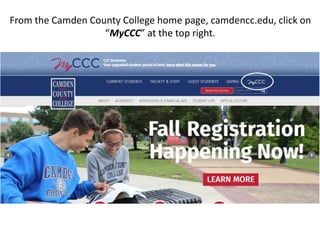
From the Camden County College home page, camdencc.edu, click on
“MyCCC” at the top right.
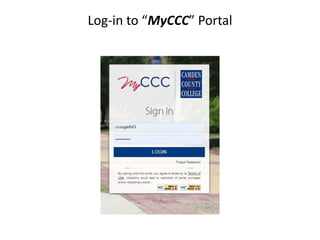
Log-in to “MyCCC” Portal
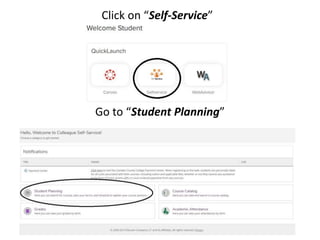
Click on “Self-Service”
Go to “Student Planning”
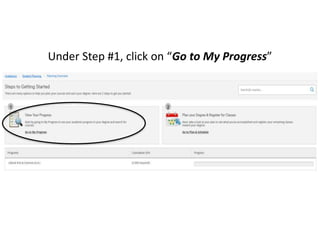
Under Step #1, click on “Go to My Progress”
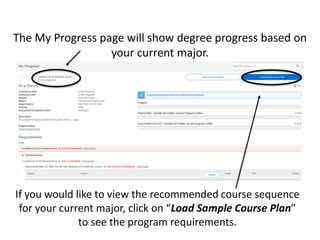
The My Progress page will show degree progress based on
your current major.
If you would like to view the recommended course sequence
for your current major, click on “Load Sample Course Plan”
to see the program requirements.
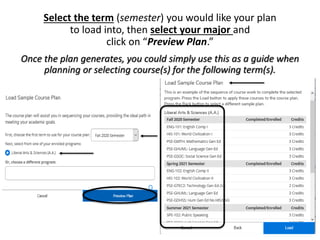
Select the term (semester) you would like your plan
to load into, then select your major and
click on “Preview Plan.”
Once the plan generates, you could simply use this as a guide when
planning or selecting course(s) for the following term(s).
Please visit our website for additional resources
such as:
• Understanding My Progress
• How to add courses to your plan
• Scheduling courses
• Adding and dropping courses

How to view the recommended course sequence for your academic program

  • 1.
    How to Viewthe Recommended Course Sequence for your Academic Program
  • 2.
    From the CamdenCounty College home page, camdencc.edu, click on “MyCCC” at the top right.
  • 3.
  • 4.
    Click on “Self-Service” Goto “Student Planning”
  • 5.
    Under Step #1,click on “Go to My Progress”
  • 6.
    The My Progresspage will show degree progress based on your current major. If you would like to view the recommended course sequence for your current major, click on “Load Sample Course Plan” to see the program requirements.
  • 7.
    Select the term(semester) you would like your plan to load into, then select your major and click on “Preview Plan.” Once the plan generates, you could simply use this as a guide when planning or selecting course(s) for the following term(s).
  • 8.
    Please visit ourwebsite for additional resources such as: • Understanding My Progress • How to add courses to your plan • Scheduling courses • Adding and dropping courses