How to use the
ONLINE REFERENCING
GENERATOR
To automatically create your
reference list using the
Harvard Author-Date System
Step 1.
• Click on the ‘ Library webpage’ icon on the desktop if you are at school.
• Google renmark high library if you are at home.
This will take you to the Renmark High School Library Homepage.
Click on the online
referencing generator
Step 2.
• You will need to type in a password. Leave the user name blank and type ‘index’
for the password.
• Click okay
• Choose Middle School Bibliography (Years 8-9) or Senior Bibliography (Years 10-
12 (Let’s begin)
Step 3
• Look at the source you are getting your information from and choose the
corresponding source from the major headings.
i.e website without an author (found under the heading
Website)
i.e. Encyclopedia, electronic (eg. Wikipedia or Britanica) and
(found under the heading Encyclopedia)
Click here for website
without an author.
Click here for
electronic
Encyclopaedia.
These are
the different
headings of
information
sources.
Step 4
Example: website without an author
• Type in the title of your article in the box called ‘Title of Article’
• Type in the name of the ‘sponsor’ or who owns the webpage and when it ‘was
last updated’ (if there is no date type in n.d.)
• Copy and paste the URL into the correct box.
• Click on ‘create citation’.
Click on Create citation
You do not have to type the day you
accessed the information, as it will
come up automatically.
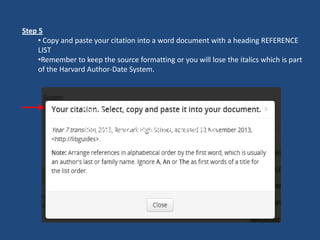
Step 5
Copy and paste your citation into a word
document with a heading REFERENCE LIST
Step 5
• Copy and paste your citation into a word document with a heading REFERENCE
LIST
•Remember to keep the source formatting or you will lose the italics which is part
of the Harvard Author-Date System.
Step 6
• Your final product should look like the example below.
• When you have several references in your list you need to arrange them in
alphabetical order by the first word, which is usually an author’s last or the title.
Ignore A, An, or The as first words of a title for the list order.
REFERENCE LIST
Holly, P n.d., Nutella, The Atlantic, accessed 30 March 2014,
<http://www.theatlantic.com/business/archive/2013/12/map-all-the-countries-that-
contribute-to-a-single-jar-of-nutella/282252/>.
Year 7 transition, 2013, Renmark High School, accessed 22 November 2013,
<http://libguides>.

How to use the online reference generator

  • 1.
    How to usethe ONLINE REFERENCING GENERATOR To automatically create your reference list using the Harvard Author-Date System
  • 2.
    Step 1. • Clickon the ‘ Library webpage’ icon on the desktop if you are at school. • Google renmark high library if you are at home. This will take you to the Renmark High School Library Homepage. Click on the online referencing generator
  • 3.
    Step 2. • Youwill need to type in a password. Leave the user name blank and type ‘index’ for the password. • Click okay • Choose Middle School Bibliography (Years 8-9) or Senior Bibliography (Years 10- 12 (Let’s begin)
  • 4.
    Step 3 • Lookat the source you are getting your information from and choose the corresponding source from the major headings. i.e website without an author (found under the heading Website) i.e. Encyclopedia, electronic (eg. Wikipedia or Britanica) and (found under the heading Encyclopedia) Click here for website without an author. Click here for electronic Encyclopaedia. These are the different headings of information sources.
  • 5.
    Step 4 Example: websitewithout an author • Type in the title of your article in the box called ‘Title of Article’ • Type in the name of the ‘sponsor’ or who owns the webpage and when it ‘was last updated’ (if there is no date type in n.d.) • Copy and paste the URL into the correct box. • Click on ‘create citation’. Click on Create citation You do not have to type the day you accessed the information, as it will come up automatically.
  • 6.
    Step 5 Copy andpaste your citation into a word document with a heading REFERENCE LIST Step 5 • Copy and paste your citation into a word document with a heading REFERENCE LIST •Remember to keep the source formatting or you will lose the italics which is part of the Harvard Author-Date System.
  • 7.
    Step 6 • Yourfinal product should look like the example below. • When you have several references in your list you need to arrange them in alphabetical order by the first word, which is usually an author’s last or the title. Ignore A, An, or The as first words of a title for the list order. REFERENCE LIST Holly, P n.d., Nutella, The Atlantic, accessed 30 March 2014, <http://www.theatlantic.com/business/archive/2013/12/map-all-the-countries-that- contribute-to-a-single-jar-of-nutella/282252/>. Year 7 transition, 2013, Renmark High School, accessed 22 November 2013, <http://libguides>.