









How to Tango with Salesforce &
jQueryMobile for HTML5 Goodness
By Joshua Hoskins | @jhoskins
Moscone Center West, DevZone Unconference C
All about Me

               Joshua Hoskins
               Technical Cloud Consultant at

                   Customer since 2006                 Twitter: @jhoskins
                   User Group Leader since 2009        Email: jhoskins@CRMified.com
                   Currently in Singapore
                                                        LinkedIn:
                   Process Engineering                  http://www.linkedin.com/in/jhoskins
                   Implementation/Solution Delivery    Blog: CRMified.com
                   Data & Integrations Architect
Agenda

 • Anatomy of a Visualforce Page
 • Exchanging Data with SFDC
 • Dynamically updating page content
 • Debug Javascript Errors
 • Gracefully Handle Apex Exceptions
Components

 • Static Resources
 • Visualforce
 • Apex
 • Javascript
 • CSS (LESS is more!)
Resources

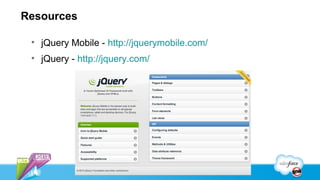
 • jQuery Mobile - http://jquerymobile.com/
 • jQuery - http://jquery.com/
Page Anatomy

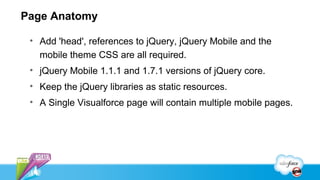
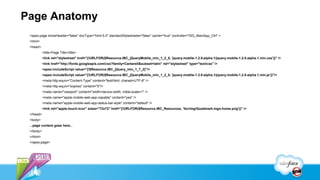
 • Add 'head', references to jQuery, jQuery Mobile and the
   mobile theme CSS are all required.
 • jQuery Mobile 1.1.1 and 1.7.1 versions of jQuery core.
 • Keep the jQuery libraries as static resources.
 • A Single Visualforce page will contain multiple mobile pages.
Page Anatomy
 <apex:page showHeader="false" docType="html-5.0" standardStylesheets="false" cache="true" controller="ISG_MainApp_Ctrl" >
 <html>
 <head>
           <title>Page Title</title>
           <link rel="stylesheet" href="{!URLFOR($Resource.IBC_jQueryMobile_min_1_2_0, 'jquery.mobile-1.2.0-alpha.1/jquery.mobile-1.2.0-alpha.1.min.css')}" />
           <link href="http://fonts.googleapis.com/css?family=Cantarell&subset=latin" rel="stylesheet" type="text/css" />
           <apex:includeScript value="{!$Resource.IBC_jQuery_min_1_7_2}"/>
           <apex:includeScript value="{!URLFOR($Resource.IBC_jQueryMobile_min_1_2_0, 'jquery.mobile-1.2.0-alpha.1/jquery.mobile-1.2.0-alpha.1.min.js')}"/>
           <meta http-equiv="Content-Type" content="text/html; charset=UTF-8" />
           <meta http-equiv="expires" content="0"/>
           <meta name="viewport" content="width=device-width, initial-scale=1" />
           <meta name="apple-mobile-web-app-capable" content="yes" />
           <meta name="apple-mobile-web-app-status-bar-style" content="default" />
           <link rel="apple-touch-icon" sizes="72x72" href="{!URLFOR($Resource.IBC_Resources, 'ibc/img/Quadmark-logo-home.png')}" />
 </head>
 <body>
 ...page content goes here...
 </body>
 </html>
 </apex:page>
jQuery Mobile & Force.com

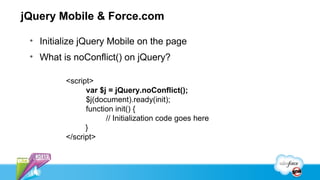
 • Initialize jQuery Mobile on the page
 • What is noConflict() on jQuery?

         <script>
               var $j = jQuery.noConflict();
               $j(document).ready(init);
               function init() {
                     // Initialization code goes here
               }
         </script>
Page Content and Transitions

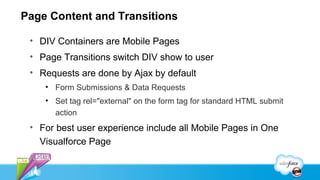
 • DIV Containers are Mobile Pages
 • Page Transitions switch DIV show to user
 • Requests are done by Ajax by default
    • Form Submissions & Data Requests
    • Set tag rel="external" on the form tag for standard HTML submit
      action
 • For best user experience include all Mobile Pages in One
   Visualforce Page
Page Content and Transitions
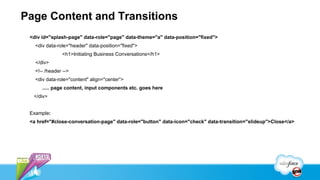
 <div id="splash-page" data-role="page" data-theme="a" data-position="fixed">
   <div data-role="header" data-position="fixed">
               <h1>Initiating Business Conversations</h1>
   </div>
   <!-- /header -->
   <div data-role="content" align="center”>
      ..... page content, input components etc. goes here
  </div>


 Example:
 <a href="#close-conversation-page" data-role="button" data-icon="check" data-transition="slideup">Close</a>
@RemoteAction with
Apex
Javascript in Visualforce
Javascript Objects
Handling Apex
Exceptions
Updating Page Content
Dynamically
Debugging
Lessons Learned

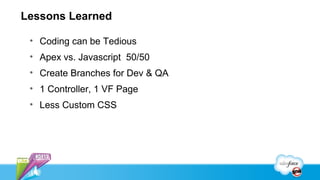
 • Coding can be Tedious
 • Apex vs. Javascript 50/50
 • Create Branches for Dev & QA
 • 1 Controller, 1 VF Page
 • Less Custom CSS
Joshua Hoskins
    Speaker
Appirio Helps Enterprises Power Their Business with
                    Public Cloud Solutions

                                   Helping Enterprises Become:

                             Efficient            Effective            Agile
                                         Social               Mobile


                     Technology-enabled professional services, supported by
                   500 cloud experts and a 50,000+ cloud developer community
                      5 years, 300 enterprises, 1.5M users moved to the cloud


19
How to Tango with Salesforce & jQueryMobile for HTML5 Goodness

How to Tango with Salesforce & jQueryMobile for HTML5 Goodness

  • 1.
    How to Tangowith Salesforce & jQueryMobile for HTML5 Goodness By Joshua Hoskins | @jhoskins Moscone Center West, DevZone Unconference C
  • 2.
    All about Me Joshua Hoskins Technical Cloud Consultant at  Customer since 2006  Twitter: @jhoskins  User Group Leader since 2009  Email: jhoskins@CRMified.com  Currently in Singapore  LinkedIn:  Process Engineering http://www.linkedin.com/in/jhoskins  Implementation/Solution Delivery  Blog: CRMified.com  Data & Integrations Architect
  • 3.
    Agenda • Anatomyof a Visualforce Page • Exchanging Data with SFDC • Dynamically updating page content • Debug Javascript Errors • Gracefully Handle Apex Exceptions
  • 4.
    Components • StaticResources • Visualforce • Apex • Javascript • CSS (LESS is more!)
  • 5.
    Resources • jQueryMobile - http://jquerymobile.com/ • jQuery - http://jquery.com/
  • 6.
    Page Anatomy •Add 'head', references to jQuery, jQuery Mobile and the mobile theme CSS are all required. • jQuery Mobile 1.1.1 and 1.7.1 versions of jQuery core. • Keep the jQuery libraries as static resources. • A Single Visualforce page will contain multiple mobile pages.
  • 7.
    Page Anatomy <apex:pageshowHeader="false" docType="html-5.0" standardStylesheets="false" cache="true" controller="ISG_MainApp_Ctrl" > <html> <head> <title>Page Title</title> <link rel="stylesheet" href="{!URLFOR($Resource.IBC_jQueryMobile_min_1_2_0, 'jquery.mobile-1.2.0-alpha.1/jquery.mobile-1.2.0-alpha.1.min.css')}" /> <link href="http://fonts.googleapis.com/css?family=Cantarell&subset=latin" rel="stylesheet" type="text/css" /> <apex:includeScript value="{!$Resource.IBC_jQuery_min_1_7_2}"/> <apex:includeScript value="{!URLFOR($Resource.IBC_jQueryMobile_min_1_2_0, 'jquery.mobile-1.2.0-alpha.1/jquery.mobile-1.2.0-alpha.1.min.js')}"/> <meta http-equiv="Content-Type" content="text/html; charset=UTF-8" /> <meta http-equiv="expires" content="0"/> <meta name="viewport" content="width=device-width, initial-scale=1" /> <meta name="apple-mobile-web-app-capable" content="yes" /> <meta name="apple-mobile-web-app-status-bar-style" content="default" /> <link rel="apple-touch-icon" sizes="72x72" href="{!URLFOR($Resource.IBC_Resources, 'ibc/img/Quadmark-logo-home.png')}" /> </head> <body> ...page content goes here... </body> </html> </apex:page>
  • 8.
    jQuery Mobile &Force.com • Initialize jQuery Mobile on the page • What is noConflict() on jQuery? <script> var $j = jQuery.noConflict(); $j(document).ready(init); function init() { // Initialization code goes here } </script>
  • 9.
    Page Content andTransitions • DIV Containers are Mobile Pages • Page Transitions switch DIV show to user • Requests are done by Ajax by default • Form Submissions & Data Requests • Set tag rel="external" on the form tag for standard HTML submit action • For best user experience include all Mobile Pages in One Visualforce Page
  • 10.
    Page Content andTransitions <div id="splash-page" data-role="page" data-theme="a" data-position="fixed"> <div data-role="header" data-position="fixed"> <h1>Initiating Business Conversations</h1> </div> <!-- /header --> <div data-role="content" align="center”> ..... page content, input components etc. goes here </div> Example: <a href="#close-conversation-page" data-role="button" data-icon="check" data-transition="slideup">Close</a>
  • 11.
  • 12.
  • 13.
  • 14.
  • 15.
  • 16.
  • 17.
    Lessons Learned •Coding can be Tedious • Apex vs. Javascript 50/50 • Create Branches for Dev & QA • 1 Controller, 1 VF Page • Less Custom CSS
  • 18.
  • 19.
    Appirio Helps EnterprisesPower Their Business with Public Cloud Solutions Helping Enterprises Become: Efficient Effective Agile Social Mobile Technology-enabled professional services, supported by 500 cloud experts and a 50,000+ cloud developer community 5 years, 300 enterprises, 1.5M users moved to the cloud 19

Editor's Notes

  • #3 Customer since 2006 User Group Leader since 2009 Currently in Singapore Companies I’ve worked for are listed.
  • #9 Many libraries including SF own make use of $ as function or variable name call noConflict method to prevent conflict with other libraries
  • #10 Single page serves as container for multiple mobile pages represented as div elements. Number of different page transitions are available typically jQuery simply switches div that is visible on mobile device to show a new page. Requests are done as ajax by default, things such as form submit for example The standard form submit or use of apex:form tag is possible only by turning OFF default ajax processing for the page segment (set tag rel=&quot;external&quot; on the form tag for standard HTML submit action) For best user experience and application performance it is best to have all pages in same HTML Open IDE
  • #12 Call remote Controller methods from jQuery, JavaScript Visual Force with Winter 12&apos; release introduced remote methods. Simple annotation @RemoteAction makes any controller method remote and can be called from page JavaScript can pass methods parameters as primitive types, sObjects and collections of primitives and sObjects Controller methods must be global static to be remote NOTE: Documentation states global or public but public methods do not work NOT visible some bug in APEX or VFP
  • #13 Call remote Controller methods from jQuery, JavaScript Visual Force with Winter 12&apos; release introduced remote methods. Simple annotation @RemoteAction makes any controller method remote and can be called from page JavaScript can pass methods parameters as primitive types, sObjects and collections of primitives and sObjects Controller methods must be global static to be remote NOTE: Documentation states global or public but public methods do not work NOT visible some bug in APEX or VFP
  • #14 Call remote Controller methods from jQuery, JavaScript Visual Force with Winter 12&apos; release introduced remote methods. Simple annotation @RemoteAction makes any controller method remote and can be called from page JavaScript can pass methods parameters as primitive types, sObjects and collections of primitives and sObjects Controller methods must be global static to be remote NOTE: Documentation states global or public but public methods do not work NOT visible some bug in APEX or VFP
  • #15 Call remote Controller methods from jQuery, JavaScript Visual Force with Winter 12&apos; release introduced remote methods. Simple annotation @RemoteAction makes any controller method remote and can be called from page JavaScript can pass methods parameters as primitive types, sObjects and collections of primitives and sObjects Controller methods must be global static to be remote NOTE: Documentation states global or public but public methods do not work NOT visible some bug in APEX or VFP
  • #16 Call remote Controller methods from jQuery, JavaScript Visual Force with Winter 12&apos; release introduced remote methods. Simple annotation @RemoteAction makes any controller method remote and can be called from page JavaScript can pass methods parameters as primitive types, sObjects and collections of primitives and sObjects Controller methods must be global static to be remote NOTE: Documentation states global or public but public methods do not work NOT visible some bug in APEX or VFP
  • #17 Call remote Controller methods from jQuery, JavaScript Visual Force with Winter 12&apos; release introduced remote methods. Simple annotation @RemoteAction makes any controller method remote and can be called from page JavaScript can pass methods parameters as primitive types, sObjects and collections of primitives and sObjects Controller methods must be global static to be remote NOTE: Documentation states global or public but public methods do not work NOT visible some bug in APEX or VFP
  • #20 Appirio helps enterprises power their business with cloud solutions like Salesforce, Google, Workday and Amazon By adopting, connecting and extending these and other cloud platforms, we can help customers to become more efficient, agile and effective than ever before We do this with professional services that are delivered by our 500+ cloud experts and supported by a 40,000 person developer community and unique technology built from over 1000 projects We ’ve been in business for 5 years, have worked with 300 enterprises and have moved more than 1.5M users to the public cloud We ’ve been privileged to work with many of the world’s largest and most forward thinking companies – Genentech, Dell, Home Depot, DeVry, PayPal, Facebook, Japan Post and many more