How to Survive Mobilegeddon: A Guide to
Mobile SEO
Meghan Furey
@meg_furey
Anthony Caccavale
@VTCaccavale
@KnucklepuckDC
...and Rickrolling
Now Let’s Talk Mobile
Why is Mobile SEO Essential?
More Google searches take place on mobile devices than on computers in
10 countries including the US and Japan. (but we all knew this...right?)
34% of online purchases happen on mobile device
This year, according to PayPal, ⅓ of Thanksgiving & Black Friday sales came
from mobile
In November 2016, Google began testing mobile-first index
Mobile page becomes primary determinant for ranking
How Much Effort Should You Focus on Your
Mobile SEO?
It depends…
Is mobile crucial to your business?
What is your percentage of traffic coming from mobile? Percentage of
conversions?
Has the percentage of mobile users increased?
What Type of Mobile Site?
Responsive
Pros: One URL; Google <3; no redirects; no additional meta data
Cons: might have an issue with pagespeed; might have some
coding issues
Dynamic serving
Pros: One URL; different content shown to user depending on
device
Cons: Might be a little tricky from a technical standpoint (Vary:
User-Agent)
Mobile content
Pagespeed
If a site loads for more than 3 seconds a user will more than likely leave
Leverage tools at your disposal...
Pagespeed Tools & Tips
Tools:
Become BFFLs with your dev team
Google Pagespeed Insights
WebPagetest
Google Analytics
Common Tips:
Compress Images
Prioritize visible content
Leverage caching
Accelerated Mobile Pages (AMP)
The new buzzword for SEO
Brand new mobile framework
Advantages
Fast
Great if you don’t have a Dev team
Appear in mobile search carousel
Disadvantages
Still in infancy
Interstitial Penalty
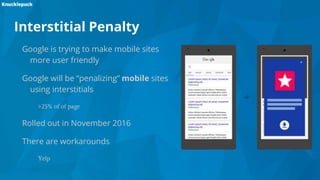
Google is trying to make mobile sites
more user friendly
Google will be “penalizing” mobile sites
using interstitials
>25% of of page
Rolled out in November 2016
There are workarounds
Yelp
Viewing Mobile on Desktop
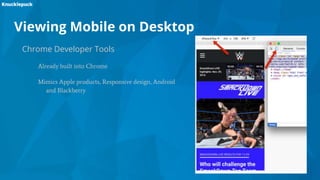
Chrome Developer Tools
Already built into Chrome
Mimics Apple products, Responsive design, Android
and Blackberry
Viewing Mobile on Desktop
User-Agent Switcher for Chrome
Chrome extension
Easier to use
Mimics Apple products, Responsive design, Android and Blackberry
Can be a bit buggy
Performance:
Google Analytics
Pagespeed:
Google Analytics
Google Pagespeed Insights
WebPagetest
Mobile Usability:
Google Search Console
Google Mobile-Friendly Test
Chrome Developer Tools
User-Agent Switcher for Chrome
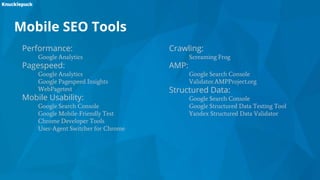
Mobile SEO Tools
Crawling:
Screaming Frog
AMP:
Google Search Console
Validator.AMPProject.org
Structured Data:
Google Search Console
Google Structured Data Testing Tool
Yandex Structured Data Validator
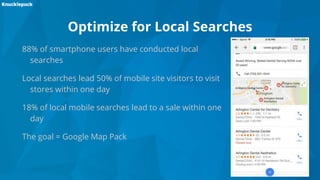
Optimize for Local Searches
88% of smartphone users have conducted local
searches
Local searches lead 50% of mobile site visitors to visit
stores within one day
18% of local mobile searches lead to a sale within one
day
The goal = Google Map Pack
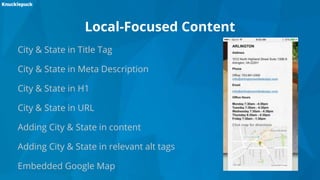
Local-Focused Content
City & State in Title Tag
City & State in Meta Description
City & State in H1
City & State in URL
Adding City & State in content
Adding City & State in relevant alt tags
Embedded Google Map
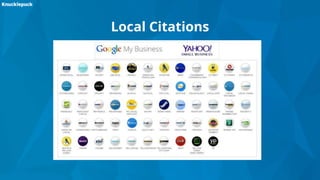
Local Citations
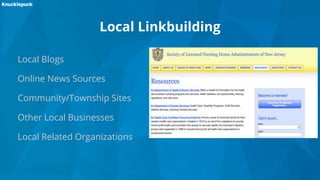
Local Linkbuilding
Local Blogs
Online News Sources
Community/Township Sites
Other Local Businesses
Local Related Organizations
Rich Snippets & Structured Data
Enhances organic listings
Provides additional, relevant
information for users (ex.
Business address, product
reviews, recipes)
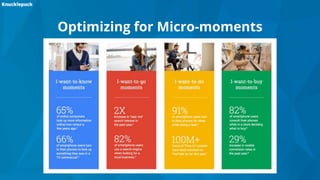
Optimizing for Micro-moments
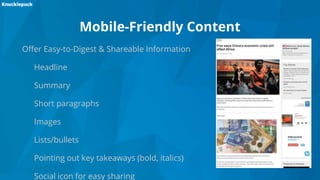
Mobile-Friendly Content
Offer Easy-to-Digest & Shareable Information
Headline
Summary
Short paragraphs
Images
Lists/bullets
Pointing out key takeaways (bold, italics)
Social icon for easy sharing
Title Tags
Take Advantage of Length - Up to 78 Characters!
Keyword Research
Consider Words that Convert Audience
Mobile UX
Research Your Audience
CrazyEgg.com
UserTesting.com
HotJar.com
A/B Test
Mobile UX Wins
Short Headlines
Simple Navigation Menus
Make Site Search Visible & Easy to
Use (Consider Filters)
Fat-Finger CTAs
Accordions & Drop-Down Menus
Minimize Required Fields on Forms
Mobile UX
Mobile UX
Any questions?

How to survive mobilegeddon

  • 1.
    How to SurviveMobilegeddon: A Guide to Mobile SEO Meghan Furey @meg_furey Anthony Caccavale @VTCaccavale @KnucklepuckDC
  • 4.
  • 6.
  • 7.
    Why is MobileSEO Essential? More Google searches take place on mobile devices than on computers in 10 countries including the US and Japan. (but we all knew this...right?) 34% of online purchases happen on mobile device This year, according to PayPal, ⅓ of Thanksgiving & Black Friday sales came from mobile In November 2016, Google began testing mobile-first index Mobile page becomes primary determinant for ranking
  • 8.
    How Much EffortShould You Focus on Your Mobile SEO? It depends… Is mobile crucial to your business? What is your percentage of traffic coming from mobile? Percentage of conversions? Has the percentage of mobile users increased?
  • 9.
    What Type ofMobile Site? Responsive Pros: One URL; Google <3; no redirects; no additional meta data Cons: might have an issue with pagespeed; might have some coding issues Dynamic serving Pros: One URL; different content shown to user depending on device Cons: Might be a little tricky from a technical standpoint (Vary: User-Agent) Mobile content
  • 10.
    Pagespeed If a siteloads for more than 3 seconds a user will more than likely leave Leverage tools at your disposal...
  • 11.
    Pagespeed Tools &Tips Tools: Become BFFLs with your dev team Google Pagespeed Insights WebPagetest Google Analytics Common Tips: Compress Images Prioritize visible content Leverage caching
  • 12.
    Accelerated Mobile Pages(AMP) The new buzzword for SEO Brand new mobile framework Advantages Fast Great if you don’t have a Dev team Appear in mobile search carousel Disadvantages Still in infancy
  • 13.
    Interstitial Penalty Google istrying to make mobile sites more user friendly Google will be “penalizing” mobile sites using interstitials >25% of of page Rolled out in November 2016 There are workarounds Yelp
  • 14.
    Viewing Mobile onDesktop Chrome Developer Tools Already built into Chrome Mimics Apple products, Responsive design, Android and Blackberry
  • 15.
    Viewing Mobile onDesktop User-Agent Switcher for Chrome Chrome extension Easier to use Mimics Apple products, Responsive design, Android and Blackberry Can be a bit buggy
  • 16.
    Performance: Google Analytics Pagespeed: Google Analytics GooglePagespeed Insights WebPagetest Mobile Usability: Google Search Console Google Mobile-Friendly Test Chrome Developer Tools User-Agent Switcher for Chrome Mobile SEO Tools Crawling: Screaming Frog AMP: Google Search Console Validator.AMPProject.org Structured Data: Google Search Console Google Structured Data Testing Tool Yandex Structured Data Validator
  • 17.
    Optimize for LocalSearches 88% of smartphone users have conducted local searches Local searches lead 50% of mobile site visitors to visit stores within one day 18% of local mobile searches lead to a sale within one day The goal = Google Map Pack
  • 18.
    Local-Focused Content City &State in Title Tag City & State in Meta Description City & State in H1 City & State in URL Adding City & State in content Adding City & State in relevant alt tags Embedded Google Map
  • 19.
  • 20.
    Local Linkbuilding Local Blogs OnlineNews Sources Community/Township Sites Other Local Businesses Local Related Organizations
  • 21.
    Rich Snippets &Structured Data Enhances organic listings Provides additional, relevant information for users (ex. Business address, product reviews, recipes)
  • 22.
  • 23.
    Mobile-Friendly Content Offer Easy-to-Digest& Shareable Information Headline Summary Short paragraphs Images Lists/bullets Pointing out key takeaways (bold, italics) Social icon for easy sharing
  • 24.
    Title Tags Take Advantageof Length - Up to 78 Characters! Keyword Research Consider Words that Convert Audience
  • 25.
    Mobile UX Research YourAudience CrazyEgg.com UserTesting.com HotJar.com A/B Test
  • 26.
    Mobile UX Wins ShortHeadlines Simple Navigation Menus Make Site Search Visible & Easy to Use (Consider Filters) Fat-Finger CTAs Accordions & Drop-Down Menus Minimize Required Fields on Forms
  • 27.
  • 28.
  • 29.

Editor's Notes

  • #8 http://searchengineland.com/googles-shift-mobile-first-mobile-moments-matter-263971 https://adwords.googleblog.com/2015/05/building-for-next-moment.html https://techcrunch.com/2016/11/28/paypal-says-mobile-shopping-accounted-for-a-third-of-thanksgiving-black-friday-sales/ https://webmasters.googleblog.com/2016/11/mobile-first-indexing.html Mobile first: Old: looking at desktop version of the site New: Looking at mobile version of site first
  • #10 Responsive Google’s preference (the irony shouldn’t be lost on everyone) Not necessarily easy for devs, but from SEO: No redirects needed No rel=alternate; canonicals Might have an issue with pagespeed (but your devs should be able to handle) Dynamic Serving Depends on the device a user sees Vary: User-Agent HTTP Header Mobile URLs Can have completely different experiences More maintenance Will definitely need a mobile XML sitemap rel=alternate Going to need redirects on mobile (which adds to pagespeed) http://searchengineland.com/the-definitive-guide-to-mobile-technical-seo-166066
  • #12 Don’t use Flash (why are we still saying this) Use structured data No popups - seriously stop it Tools: Pagespeed Insights WebPagetest Google Analytics https://moz.com/learn/seo/page-speed
  • #13 Work within Google’s Framework Structured data More support needed
  • #14 Neilpatel.com No mobile interstitial Desktop ok though E.g., Yelp creating a webpage that LOOKS like an interstitial E.g., LinkdedIn hiding it by having a URL not being indexed http://marketingland.com/surviving-googles-new-policy-interstitial-ads-154239 http://www.webpagefx.com/blog/internet/interstitial-ads-google-hate/
  • #17 Performance: Google Analytics Pagespeed: Google Analytics Pagespeed Insights WebPagetest (pagespeed notes for fixes) Mobile Usability: Google Search Console (provides usability notes) Mobile-Friendly Test (UX for mobile; also alerts about blocked resources) Chrome Developer Tools (can mimic mobile devices) User-Agent Switcher for Chrome (mimic User-Agents) Crawling: Screaming Frog AMP: Google Search Console Validator.AMPProject.org Structured Data: Google Search Console Google Structured Data Testing Tool Yandex Structured Data Validator
  • #21 Offer NJ Nursing Home Abuse Law example
  • #22 Enhance & Click-through-rate
  • #26 Add list CrazyEgg, UserTesting.com, HotJar, Click Tail