Start Django automatically
after restarting development
system/server in Linux
http://pulse7.net/
* Are you tired of writing script manually whenever you
restart your systems to start Django?
* Don’t worry about it. Today we are going to learn how to
start Django automatically after restarting development or
local systems/server in Linux.
http://pulse7.net/
Please don’t use this script on the live server, this script is
for only development or local system.
Start Django automatically after restarting
development or local system/server in Linux
1. First open gedit in your Linux system.
Run the following command in terminal.$gedit
http://pulse7.net/
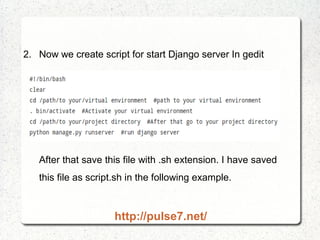
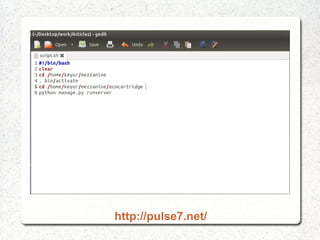
2. Now we create script for start Django server In gedit
After that save this file with .sh extension. I have saved
this file as script.sh in the following example.
http://pulse7.net/
http://pulse7.net/
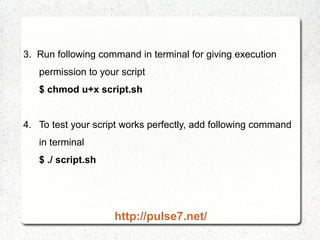
3. Run following command in terminal for giving execution
permission to your script
$ chmod u+x script.sh
4. To test your script works perfectly, add following command
in terminal
$ ./ script.sh
http://pulse7.net/
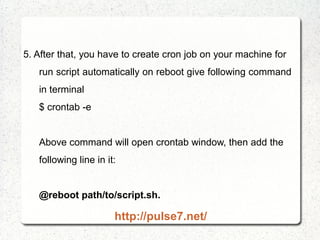
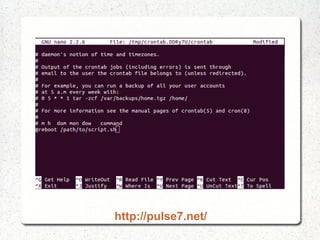
5. After that, you have to create cron job on your machine for
run script automatically on reboot give following command
in terminal
$ crontab -e
Above command will open crontab window, then add the
following line in it:
@reboot path/to/script.sh.
http://pulse7.net/
http://pulse7.net/
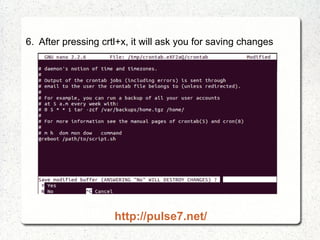
6. After pressing crtl+x, it will ask you for saving changes
http://pulse7.net/
7. Now, press Y to save your changes
Bravo!!! We have done it. Whenever you restart your
machine, Django will run automatically.
http://pulse7.net/
I hope you like this article. Share your views to to improve
content. Happy Learning !!!
Subscribe for more articles !!
http://pulse7.net/

How to start Django automatically after restarting development or local systems/server in Linux

  • 1.
    Start Django automatically afterrestarting development system/server in Linux http://pulse7.net/
  • 2.
    * Are youtired of writing script manually whenever you restart your systems to start Django? * Don’t worry about it. Today we are going to learn how to start Django automatically after restarting development or local systems/server in Linux. http://pulse7.net/
  • 3.
    Please don’t usethis script on the live server, this script is for only development or local system. Start Django automatically after restarting development or local system/server in Linux 1. First open gedit in your Linux system. Run the following command in terminal.$gedit http://pulse7.net/
  • 4.
    2. Now wecreate script for start Django server In gedit After that save this file with .sh extension. I have saved this file as script.sh in the following example. http://pulse7.net/
  • 5.
  • 6.
    3. Run followingcommand in terminal for giving execution permission to your script $ chmod u+x script.sh 4. To test your script works perfectly, add following command in terminal $ ./ script.sh http://pulse7.net/
  • 7.
    5. After that,you have to create cron job on your machine for run script automatically on reboot give following command in terminal $ crontab -e Above command will open crontab window, then add the following line in it: @reboot path/to/script.sh. http://pulse7.net/
  • 8.
  • 9.
    6. After pressingcrtl+x, it will ask you for saving changes http://pulse7.net/
  • 10.
    7. Now, pressY to save your changes Bravo!!! We have done it. Whenever you restart your machine, Django will run automatically. http://pulse7.net/
  • 11.
    I hope youlike this article. Share your views to to improve content. Happy Learning !!! Subscribe for more articles !! http://pulse7.net/