For users of Microsoft Office on your home computer
How to Set Up
Your Outlook Account
• You can create an account in Outlook that connects
directly to another account hosted by a different server
• You cannot connect to the LGH Outlook account because it is
hosted on a private server
• You can connect using your ISP address (provided by your
wireless provider. You will need to call their tech support # for
your specifics
• You can also connect to your preferred server (for me, this is
AOL)
Know Before You Start
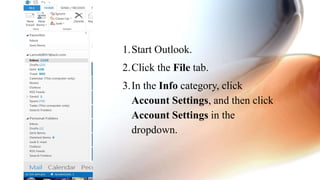
1.Start Outlook.
2.Click the File tab.
3.In the Info category, click
Account Settings, and then click
Account Settings in the
dropdown.
1. Start Outlook.
2. Click the File tab.
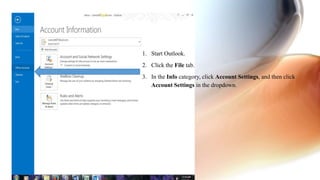
3. In the Info category, click Account Settings, and then click
Account Settings in the dropdown.
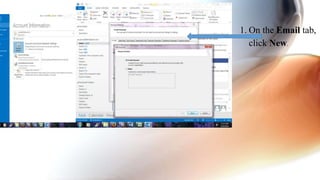
1. On the Email tab,
click New.
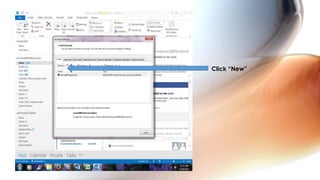
Click “New”
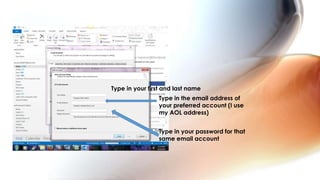
Type in your first and last name
Type in the email address of
your preferred account (I use
my AOL address)
Type in your password for that
same email account
Then hit next
Then finish.
You should now have both
account linked and will
receive email at both
addresses.

How to set up outlook account

  • 1.
    For users ofMicrosoft Office on your home computer How to Set Up Your Outlook Account
  • 2.
    • You cancreate an account in Outlook that connects directly to another account hosted by a different server • You cannot connect to the LGH Outlook account because it is hosted on a private server • You can connect using your ISP address (provided by your wireless provider. You will need to call their tech support # for your specifics • You can also connect to your preferred server (for me, this is AOL) Know Before You Start
  • 3.
    1.Start Outlook. 2.Click theFile tab. 3.In the Info category, click Account Settings, and then click Account Settings in the dropdown.
  • 4.
    1. Start Outlook. 2.Click the File tab. 3. In the Info category, click Account Settings, and then click Account Settings in the dropdown.
  • 5.
    1. On theEmail tab, click New.
  • 6.
  • 7.
    Type in yourfirst and last name Type in the email address of your preferred account (I use my AOL address) Type in your password for that same email account
  • 8.
    Then hit next Thenfinish. You should now have both account linked and will receive email at both addresses.