(WPF + WinForms) * .NET Core =
Modern Desktop
About
• Chief Architect, DevOps & Modern Software at Insight
• Microsoft Regional Director
• Microsoft MVP
• Visual Studio ALM Ranger
• Blog: //oren.codes
• Twitter: @onovotny
Survey says?
• WPF?
• Windows Forms?
+50%
In the last 18 months
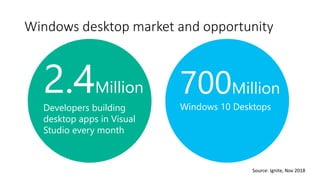
Windows desktop market and opportunity
2.4Million
Developers building
desktop apps in Visual
Studio every month
700Million
Windows 10 Desktops
Source: Ignite, Nov 2018
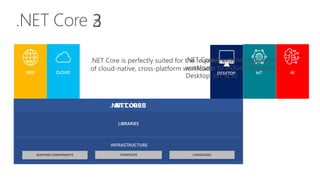
.NET Core
DESKTOPWEB CLOUD IoT AI
LIBRARIES
INFRASTRUCTURE
.NET CORE.NET CORE 3
.NET Core 3 expands supported
workloads to include Windows
Desktop, IoT & AI
.NET Core is perfectly suited for the requirements
of cloud-native, cross-platform workloads
.NET Core 3 Desktop Improvements
• Support for WinForms and WPF
• XAML Islands - WinForms & WPF can host UWP
• XAML Controls – WinForms & WPF browser and media UWP controls
• High DPI fixes for WinForms
• Access to all the Windows 10 APIs
• Self-contained .exe
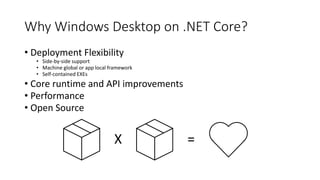
Why Windows Desktop on .NET Core?
• Deployment Flexibility
• Side-by-side support
• Machine global or app local framework
• Self-contained EXEs
• Core runtime and API improvements
• Performance
• Open Source
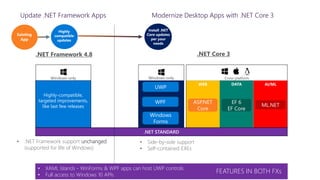
Highly-compatible,
targeted improvements,
like last few releases
• .NET Framework support unchanged
(supported for life of Windows)
• Side-by-side support
• Self-contained EXEs
UWP
Windows-only
DATAWEB
ASP.NET
Core
EF 6
EF Core
AI/ML
ML.NET
WPF
.NET Core 3.NET Framework 4.8
.NET STANDARD
Existing
App
Highly
compatible
updates
Install .NET
Core updates
per your
needs
Modernize Desktop Apps with .NET Core 3
Windows-only Cross-platform
Windows
Forms
Update .NET Framework Apps
• XAML Islands - WinForms & WPF apps can host UWP controls
• Full access to Windows 10 APIs
FEATURES IN BOTH FXs
Current status of .NET Core 3
• .NET Core 3 Preview SDK’s now build WinForms & WPF
• dotnet new wpf
• dotnet new winforms
• Visual Studio 2019 supports building and debugging
• Designers not available yet
• Preview 2 announced in January
• WPF, Windows Forms, Windows UI Library are OSS
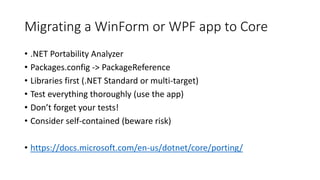
Migrating a WinForm or WPF app to Core
• .NET Portability Analyzer
• Packages.config -> PackageReference
• Libraries first (.NET Standard or multi-target)
• Test everything thoroughly (use the app)
• Don’t forget your tests!
• Consider self-contained (beware risk)
• https://docs.microsoft.com/en-us/dotnet/core/porting/
Migrating a WinForm or WPF app to Core
• For designers, map existing application into a new
Core application
1. dotnet new winforms
2. Delete all files except the .csproj file
3. Open the .csproj file
4. Stop the generation of AssemblyInfo using:
<GenerateAssemblyInfo>false</GenerateAssemblyInfo>
5. Maps files from existing application into the .NET Core application:
<ItemGroup>
<Compile Include="..[Your Existing App]***.cs" />
</ItemGroup>
6. Add any references to other projects or libraries
• Now you can use the designers in the old project
while running on Core in the new project
Demos
Performance
CLI
Migrating a real app
Distribution
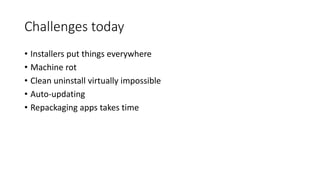
Challenges today
• Installers put things everywhere
• Machine rot
• Clean uninstall virtually impossible
• Auto-updating
• Repackaging apps takes time
script.vbsSetup.exe
Evolve to a modern deployment technology
MSIX
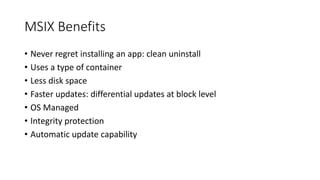
MSIX Benefits
• Never regret installing an app: clean uninstall
• Uses a type of container
• Less disk space
• Faster updates: differential updates at block level
• OS Managed
• Integrity protection
• Automatic update capability
Distribution options
• Store / Store for Business
• File Share
• HTTPS endpoint
• Anywhere
Migrate existing projects
New project template in VS 2017
• Package your Windows project
directly in VS for streamline deployment
• You can reference your existing projects
such as: WPF, WinForms, or MFC
• Leverage the advanced Universal
Windows Platform tools such as:
Packaging, Manifest editing,
and Store association
Demos
Packaging project as MSIX
Windows 10 Light Up
Self-contained on Win 7
Takeaways
• All new apps should be on .NET Core 3
• Existing apps that are only bug-fixes, leave them alone
• Actively evolving the app, investigate migrating
Resources
• .NET Core 3
• https://dot.net
• Visual Studio 2019
• https://visualstudio.microsoft.com/vs/preview/
• My blog
• https://oren.codes
• Twitter
• https://twitter.com/onovotny
• GitHub (samples)
• https://github.com/onovotny/Win10LightUp

(WPF + WinForms) * .NET Core = Modern Desktop

  • 1.
    (WPF + WinForms)* .NET Core = Modern Desktop
  • 2.
    About • Chief Architect,DevOps & Modern Software at Insight • Microsoft Regional Director • Microsoft MVP • Visual Studio ALM Ranger • Blog: //oren.codes • Twitter: @onovotny
  • 3.
  • 4.
    +50% In the last18 months Windows desktop market and opportunity 2.4Million Developers building desktop apps in Visual Studio every month 700Million Windows 10 Desktops Source: Ignite, Nov 2018
  • 5.
    .NET Core DESKTOPWEB CLOUDIoT AI LIBRARIES INFRASTRUCTURE .NET CORE.NET CORE 3 .NET Core 3 expands supported workloads to include Windows Desktop, IoT & AI .NET Core is perfectly suited for the requirements of cloud-native, cross-platform workloads
  • 6.
    .NET Core 3Desktop Improvements • Support for WinForms and WPF • XAML Islands - WinForms & WPF can host UWP • XAML Controls – WinForms & WPF browser and media UWP controls • High DPI fixes for WinForms • Access to all the Windows 10 APIs • Self-contained .exe
  • 7.
    Why Windows Desktopon .NET Core? • Deployment Flexibility • Side-by-side support • Machine global or app local framework • Self-contained EXEs • Core runtime and API improvements • Performance • Open Source
  • 8.
    Highly-compatible, targeted improvements, like lastfew releases • .NET Framework support unchanged (supported for life of Windows) • Side-by-side support • Self-contained EXEs UWP Windows-only DATAWEB ASP.NET Core EF 6 EF Core AI/ML ML.NET WPF .NET Core 3.NET Framework 4.8 .NET STANDARD Existing App Highly compatible updates Install .NET Core updates per your needs Modernize Desktop Apps with .NET Core 3 Windows-only Cross-platform Windows Forms Update .NET Framework Apps • XAML Islands - WinForms & WPF apps can host UWP controls • Full access to Windows 10 APIs FEATURES IN BOTH FXs
  • 9.
    Current status of.NET Core 3 • .NET Core 3 Preview SDK’s now build WinForms & WPF • dotnet new wpf • dotnet new winforms • Visual Studio 2019 supports building and debugging • Designers not available yet • Preview 2 announced in January • WPF, Windows Forms, Windows UI Library are OSS
  • 10.
    Migrating a WinFormor WPF app to Core • .NET Portability Analyzer • Packages.config -> PackageReference • Libraries first (.NET Standard or multi-target) • Test everything thoroughly (use the app) • Don’t forget your tests! • Consider self-contained (beware risk) • https://docs.microsoft.com/en-us/dotnet/core/porting/
  • 11.
    Migrating a WinFormor WPF app to Core • For designers, map existing application into a new Core application 1. dotnet new winforms 2. Delete all files except the .csproj file 3. Open the .csproj file 4. Stop the generation of AssemblyInfo using: <GenerateAssemblyInfo>false</GenerateAssemblyInfo> 5. Maps files from existing application into the .NET Core application: <ItemGroup> <Compile Include="..[Your Existing App]***.cs" /> </ItemGroup> 6. Add any references to other projects or libraries • Now you can use the designers in the old project while running on Core in the new project
  • 12.
  • 13.
  • 14.
    Challenges today • Installersput things everywhere • Machine rot • Clean uninstall virtually impossible • Auto-updating • Repackaging apps takes time
  • 15.
    script.vbsSetup.exe Evolve to amodern deployment technology MSIX
  • 16.
    MSIX Benefits • Neverregret installing an app: clean uninstall • Uses a type of container • Less disk space • Faster updates: differential updates at block level • OS Managed • Integrity protection • Automatic update capability
  • 17.
    Distribution options • Store/ Store for Business • File Share • HTTPS endpoint • Anywhere
  • 18.
    Migrate existing projects Newproject template in VS 2017 • Package your Windows project directly in VS for streamline deployment • You can reference your existing projects such as: WPF, WinForms, or MFC • Leverage the advanced Universal Windows Platform tools such as: Packaging, Manifest editing, and Store association
  • 19.
    Demos Packaging project asMSIX Windows 10 Light Up Self-contained on Win 7
  • 20.
    Takeaways • All newapps should be on .NET Core 3 • Existing apps that are only bug-fixes, leave them alone • Actively evolving the app, investigate migrating
  • 21.
    Resources • .NET Core3 • https://dot.net • Visual Studio 2019 • https://visualstudio.microsoft.com/vs/preview/ • My blog • https://oren.codes • Twitter • https://twitter.com/onovotny • GitHub (samples) • https://github.com/onovotny/Win10LightUp

Editor's Notes

  • #2 Description: Learn how .NET Core 3 brings WPF and Windows Forms into the future with a modern runtime. See what’s new for WPF and Windows Forms, learn how to easily retarget your .NET Framework application over to .NET Core, and how to get these modern desktop apps to your users. Objectives: Learn what’s .NET Core 3 brings for the desktop developer Easily migrate an existing Windows Forms and WPF application to .NET Core 3 Package and distribute the application to your users
  • #4 Logos for these?
  • #6 ANIMATED SLIDE – shows progression of entire .NET platform into .NET Core specific workloads. Recap – assume no one knows anything about netcore .NET Core is our cross-platform, open source implementation of .NET and is perfectly suited for requirements of cloud-native, cross-platform services. We’ve made significant investments in the core performance as well as the web stack so that you can easily take advantage of cloud patterns and scale. .NET Core 3 will expand on the supported workloads to include IoT, AI and Windows Desktop.
  • #7 XAML Islands let you host your own UWP control if you want Windows Toolkit wraps some of the most popular UWP controls and makes them available in the toolbox Fixing Hi DPI breaks behavior of WinForms
  • #9 .NET Framework will continue with highly-compatible targeted improvements like the last few releases and support will remain unchanged. You will be able to retarget existing apps to 4.8 and gain these improvements. When you’re ready to move to .NET Core 3 (to take advantage of SxS install, interop between desktop app frameworks, and .NET Core performance) you can retarget and rebuild your apps to .NET Core.
  • #13 Demo 1 (PieChart) performance with chart Show designer workaround Publish self contained, show output files…more on that later Dotnet new wpf / winforms (dotnet new wpf) -- Migrate MSBuildLogViewer Snippet for csproj Remove attributes from Entrypoint (Try to compile first and talk about error) Run, click help link, talk about behavior difference Find/fix Process.Start Publish as self contained and talk through output -- PieChart: https://github.com/onovotny/PieChartDemo MSBuildLogViewer: https://github.com/onovotny/MSBuildStructuredLog
  • #15 Modernizing apps doesn’t always start with the parts you can see. Like anything, a solid foundation is key to a well-performing app. One foundational piece is distribution How many of you use ClickOne? MSI Installers? Squirrel? Something else – what?
  • #16  There’s no app model today, no container where apps can live. Over time, files and registry keys get put everywhere Auto updating apps can leave you without much control Many orgs take third party installers and repackage them. This can add substantial delays and can break
  • #17 Takes all of the existing techniques and moves forward
  • #18 Never Regret Installing an app Predictable, safe, and reliable deployment Clean uninstall … really! Disk space optimization Single instance storage of files (across apps and users) Resource Packages Network optimization Differential updates at the block level Streaming Installs Easy componentization OS Managed Windows installs, updates and removes Apps are installed per user App state formalized Windows provides integrity for the app Tamper protection Policies can limit the trusted sources via signing
  • #21 Adding a self-contained MSIX to the demo -- MSBuildLogViewer: Add packaging project Create Store Package, show side-load with auto-update -- Win10LightUp Start at branch ___ (with snippets loaded) Talk about wanting to show a toast Click_Me button -> write code Drag win10 & downlevel snippet Run on Win10 Publish as self-contained, zip up files Copy to Win7 VM, unzip, run.