Highlights from the
//build/ 2016 Conference
Agenda
• Conference Overview
• Keynote and most noticeable announcements
• Selected Sessions Overview
Conference Overview
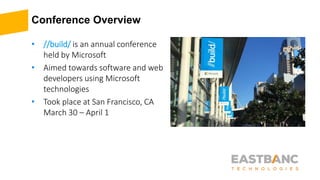
• //build/ is an annual conference
held by Microsoft
• Aimed towards software and web
developers using Microsoft
technologies
• Took place at San Francisco, CA
March 30 – April 1
Keynote Day #1
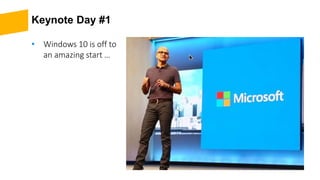
• Windows 10 is off to
an amazing start …
Keynote Day #1 (continued)
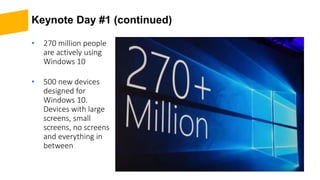
• 270 million people
are actively using
Windows 10
• 500 new devices
designed for
Windows 10.
Devices with large
screens, small
screens, no screens
and everything in
between
Keynote Day #1 (continued)
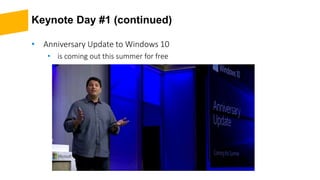
• Anniversary Update to Windows 10
• is coming out this summer for free
Keynote Day #1 (continued)
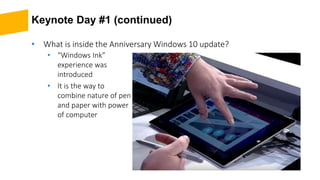
• “Windows Ink”
experience was
introduced
• It is the way to
combine nature of pen
and paper with power
of computer
• What is inside the Anniversary Windows 10 update?
Keynote Day #1 (continued)
• With Anniversary Windows 10 update
• You will be able to use “Windows Hello” (secure biometric authentication)
with your apps
• Digital assistant “Cortana” will be deeply integrated with other services
(Skype, Outlook) and devices (Xbox One).
• Lots of new Universal Windows Platform (UWP) Apps are coming. E.g.
Facebook, Instagram, Twitter, Bank of America, Starbucks, Uber, and many
more.
Keynote Day #1 (continued)
• Visual Studio 2015 Update 2 and Anniversary SDK preview were
released
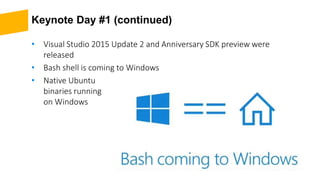
• Bash shell is coming to Windows
• Native Ubuntu
binaries running
on Windows
Keynote Day #1 (continued)
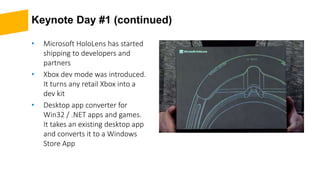
• Microsoft HoloLens has started
shipping to developers and
partners
• Xbox dev mode was introduced.
It turns any retail Xbox into a
dev kit
• Desktop app converter for
Win32 / .NET apps and games.
It takes an existing desktop app
and converts it to a Windows
Store App
Keynote Day #1 (continued)
• Microsoft Bot Framework
• Conversations as a Platform
• Human language is the new UI
• Bots are the new apps
• Digital assistants are new browsers
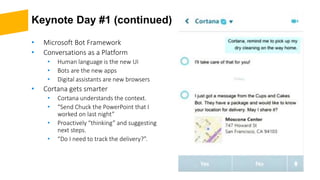
• Cortana gets smarter
• Cortana understands the context.
• “Send Chuck the PowerPoint that I
worked on last night”
• Proactively “thinking” and suggesting
next steps.
• “Do I need to track the delivery?”.
Keynote Day #1 (continued)
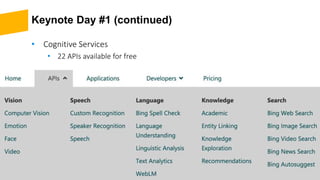
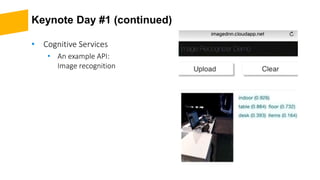
• Cognitive Services
• 22 APIs available for free
Keynote Day #1 (continued)
• Cognitive Services
• An example API:
Image recognition
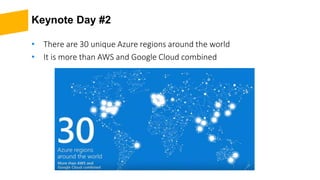
Keynote Day #2
• There are 30 unique Azure regions around the world
• It is more than AWS and Google Cloud combined
Keynote Day #2 (continued)
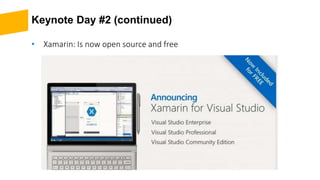
• Xamarin: Is now open source and free
Keynote Day #2 (continued)
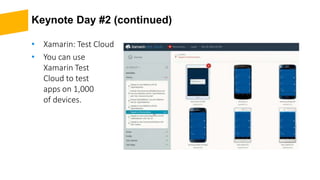
• Xamarin: Test Cloud
• You can use
Xamarin Test
Cloud to test
apps on 1,000
of devices.
Keynote Day #2
• Other announcements
• Microsoft announced “Power BI Embedded” for in-app data visualization
directly within your own applications. The tool will be free to try until
December 1.
• Other Azure products such as Container Service and Service Fabric previews
are available.
• You can now connect DocumentDB using MongoDB tools or libraries.
• Office add-ins for Mac are arriving, adding to the support lineup for
Windows, iOS, and iPad.
Selected Sessions Overview
• Building a conversational Bot
• UWP(2D) apps on HoloLens
• .NET Overview
• ASP.NET & ASP.NET Core Overview
• The Future of C#
• Entity Framework Core
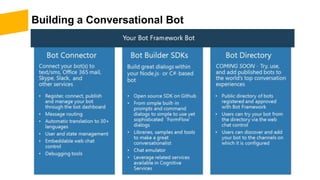
Building a Conversational Bot
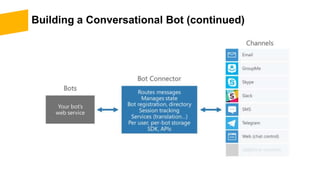
Building a Conversational Bot (continued)
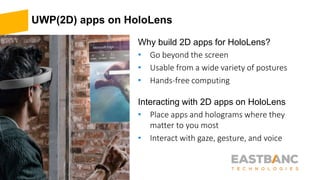
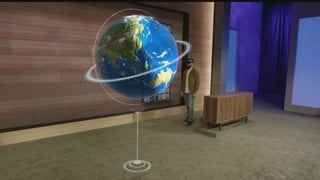
UWP(2D) apps on HoloLens
Why build 2D apps for HoloLens?
• Go beyond the screen
• Usable from a wide variety of postures
• Hands-free computing
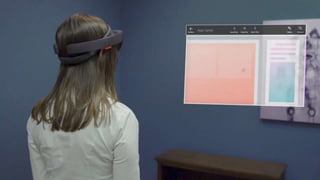
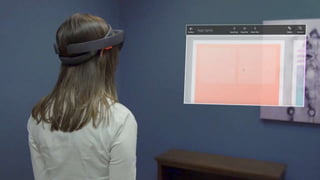
Interacting with 2D apps on HoloLens
• Place apps and holograms where they
matter to you most
• Interact with gaze, gesture, and voice
Crash course on HoloLens gestures
• Opening the Start menu
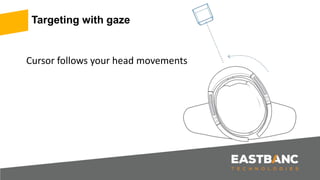
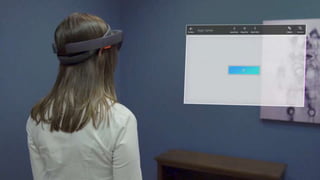
• Targeting with gaze
• Clicking on things
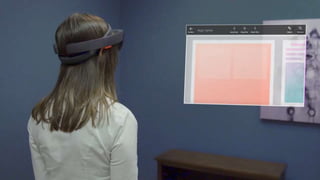
• Scrolling
• Dragging
• Zooming
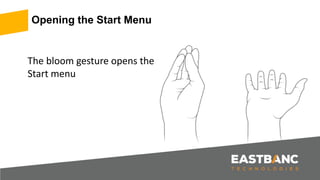
The bloom gesture opens the
Start menu
Opening the Start Menu
Cursor follows your head movements
Targeting with gaze
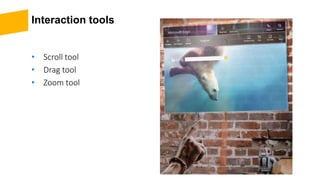
Interaction tools
• Scroll tool
• Drag tool
• Zoom tool
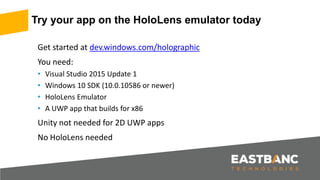
Get started at dev.windows.com/holographic
You need:
• Visual Studio 2015 Update 1
• Windows 10 SDK (10.0.10586 or newer)
• HoloLens Emulator
• A UWP app that builds for x86
Unity not needed for 2D UWP apps
No HoloLens needed
Try your app on the HoloLens emulator today
.NET Overview
• .NET today
• .NET tomorrow
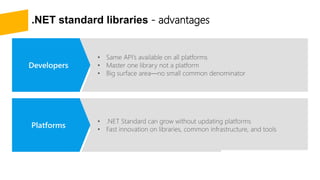
• .NET standard libraries—advantages
.NET FRAMEWORK .NET COREXAMARIN
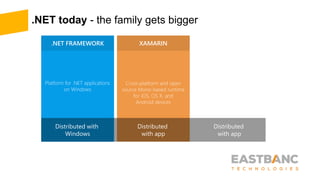
.NET today - the family gets bigger
.NET FRAMEWORK .NET CORE XAMARIN
APP
MODELS
BASE
LIBRARIES
*
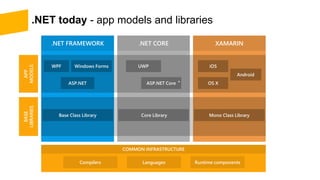
.NET today - app models and libraries
.NET FRAMEWORK .NET CORE XAMARIN
APP
MODELS
BASE
LIBRARIES
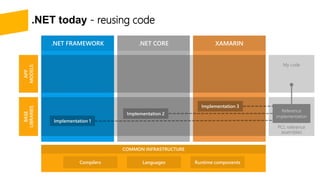
.NET today - reusing code
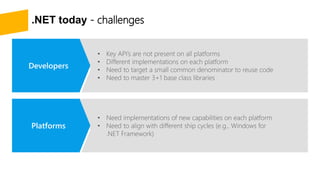
.NET today - challenges
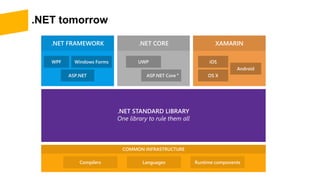
.NET tomorrow
.NET FRAMEWORK .NET CORE XAMARIN
*
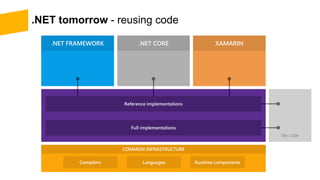
.NET tomorrow - reusing code
.NET FRAMEWORK .NET CORE XAMARIN
.NET standard libraries - advantages
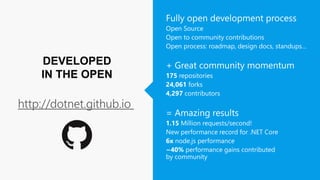
DEVELOPED
IN THE OPEN
http://dotnet.github.io
ASP.NET & ASP.NET Core Overview
• ASP.NET 4.6 and ASP.NET Core 1.0
• ASP.NET Core
• ASP.NET Core MVC
ASP.NET Core (previously ASP.NET 5)
A new open-source and cross-platform framework for building modern
cloud-based Web applications using .NET
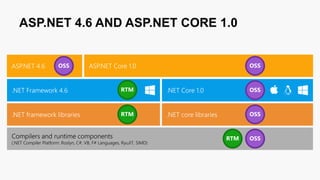
ASP.NET 4.6 AND ASP.NET CORE 1.0
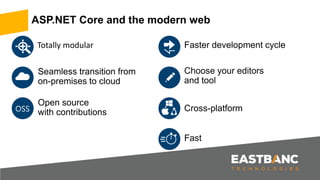
Totally modular
ASP.NET Core and the modern web
OSS
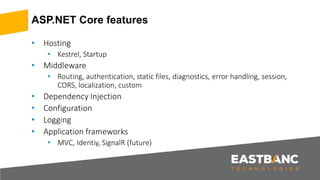
ASP.NET Core features
• Hosting
• Kestrel, Startup
• Middleware
• Routing, authentication, static files, diagnostics, error handling, session,
CORS, localization, custom
• Dependency Injection
• Configuration
• Logging
• Application frameworks
• MVC, Identiy, SignalR (future)
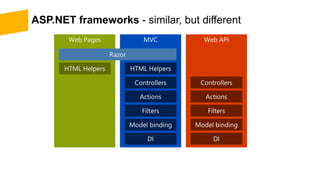
ASP.NET frameworks - similar, but different
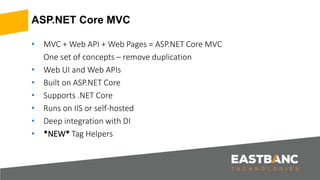
ASP.NET Core MVC
• MVC + Web API + Web Pages = ASP.NET Core MVC
One set of concepts – remove duplication
• Web UI and Web APIs
• Built on ASP.NET Core
• Supports .NET Core
• Runs on IIS or self-hosted
• Deep integration with DI
• *NEW* Tag Helpers
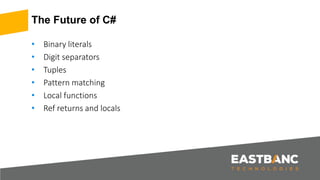
The Future of C#
• Binary literals
• Digit separators
• Tuples
• Pattern matching
• Local functions
• Ref returns and locals
Entity Framework Core
• EF Core & EF6.x
• New features
Resources
• Watch //build/ 2016 sessions online at
• https://channel9.msdn.com/Events/Build/2016
THANK YOU
Alexey Konoplev
Team Lead
akonoplev@eastbanctech.com
202-295-3000
eastbanctech.com
Dzmitry Danchanka
Senior Developer
ddanchanka@eastbanctech.com
202-295-3000
eastbanctech.com

Highlights from MS build\\2016 Conference

  • 1.
  • 2.
    Agenda • Conference Overview •Keynote and most noticeable announcements • Selected Sessions Overview
  • 3.
    Conference Overview • //build/is an annual conference held by Microsoft • Aimed towards software and web developers using Microsoft technologies • Took place at San Francisco, CA March 30 – April 1
  • 4.
    Keynote Day #1 •Windows 10 is off to an amazing start …
  • 5.
    Keynote Day #1(continued) • 270 million people are actively using Windows 10 • 500 new devices designed for Windows 10. Devices with large screens, small screens, no screens and everything in between
  • 6.
    Keynote Day #1(continued) • Anniversary Update to Windows 10 • is coming out this summer for free
  • 7.
    Keynote Day #1(continued) • “Windows Ink” experience was introduced • It is the way to combine nature of pen and paper with power of computer • What is inside the Anniversary Windows 10 update?
  • 8.
    Keynote Day #1(continued) • With Anniversary Windows 10 update • You will be able to use “Windows Hello” (secure biometric authentication) with your apps • Digital assistant “Cortana” will be deeply integrated with other services (Skype, Outlook) and devices (Xbox One). • Lots of new Universal Windows Platform (UWP) Apps are coming. E.g. Facebook, Instagram, Twitter, Bank of America, Starbucks, Uber, and many more.
  • 9.
    Keynote Day #1(continued) • Visual Studio 2015 Update 2 and Anniversary SDK preview were released • Bash shell is coming to Windows • Native Ubuntu binaries running on Windows
  • 10.
    Keynote Day #1(continued) • Microsoft HoloLens has started shipping to developers and partners • Xbox dev mode was introduced. It turns any retail Xbox into a dev kit • Desktop app converter for Win32 / .NET apps and games. It takes an existing desktop app and converts it to a Windows Store App
  • 11.
    Keynote Day #1(continued) • Microsoft Bot Framework • Conversations as a Platform • Human language is the new UI • Bots are the new apps • Digital assistants are new browsers • Cortana gets smarter • Cortana understands the context. • “Send Chuck the PowerPoint that I worked on last night” • Proactively “thinking” and suggesting next steps. • “Do I need to track the delivery?”.
  • 12.
    Keynote Day #1(continued) • Cognitive Services • 22 APIs available for free
  • 13.
    Keynote Day #1(continued) • Cognitive Services • An example API: Image recognition
  • 14.
    Keynote Day #2 •There are 30 unique Azure regions around the world • It is more than AWS and Google Cloud combined
  • 15.
    Keynote Day #2(continued) • Xamarin: Is now open source and free
  • 16.
    Keynote Day #2(continued) • Xamarin: Test Cloud • You can use Xamarin Test Cloud to test apps on 1,000 of devices.
  • 17.
    Keynote Day #2 •Other announcements • Microsoft announced “Power BI Embedded” for in-app data visualization directly within your own applications. The tool will be free to try until December 1. • Other Azure products such as Container Service and Service Fabric previews are available. • You can now connect DocumentDB using MongoDB tools or libraries. • Office add-ins for Mac are arriving, adding to the support lineup for Windows, iOS, and iPad.
  • 18.
    Selected Sessions Overview •Building a conversational Bot • UWP(2D) apps on HoloLens • .NET Overview • ASP.NET & ASP.NET Core Overview • The Future of C# • Entity Framework Core
  • 19.
  • 20.
  • 21.
    UWP(2D) apps onHoloLens Why build 2D apps for HoloLens? • Go beyond the screen • Usable from a wide variety of postures • Hands-free computing Interacting with 2D apps on HoloLens • Place apps and holograms where they matter to you most • Interact with gaze, gesture, and voice
  • 23.
    Crash course onHoloLens gestures • Opening the Start menu • Targeting with gaze • Clicking on things • Scrolling • Dragging • Zooming
  • 24.
    The bloom gestureopens the Start menu Opening the Start Menu
  • 25.
    Cursor follows yourhead movements Targeting with gaze
  • 27.
    Interaction tools • Scrolltool • Drag tool • Zoom tool
  • 31.
    Get started atdev.windows.com/holographic You need: • Visual Studio 2015 Update 1 • Windows 10 SDK (10.0.10586 or newer) • HoloLens Emulator • A UWP app that builds for x86 Unity not needed for 2D UWP apps No HoloLens needed Try your app on the HoloLens emulator today
  • 32.
    .NET Overview • .NETtoday • .NET tomorrow • .NET standard libraries—advantages
  • 33.
    .NET FRAMEWORK .NETCOREXAMARIN .NET today - the family gets bigger
  • 34.
    .NET FRAMEWORK .NETCORE XAMARIN APP MODELS BASE LIBRARIES * .NET today - app models and libraries
  • 35.
    .NET FRAMEWORK .NETCORE XAMARIN APP MODELS BASE LIBRARIES .NET today - reusing code
  • 36.
    .NET today -challenges
  • 37.
    .NET tomorrow .NET FRAMEWORK.NET CORE XAMARIN *
  • 38.
    .NET tomorrow -reusing code .NET FRAMEWORK .NET CORE XAMARIN
  • 39.
  • 40.
  • 41.
    ASP.NET & ASP.NETCore Overview • ASP.NET 4.6 and ASP.NET Core 1.0 • ASP.NET Core • ASP.NET Core MVC
  • 42.
    ASP.NET Core (previouslyASP.NET 5) A new open-source and cross-platform framework for building modern cloud-based Web applications using .NET
  • 43.
    ASP.NET 4.6 ANDASP.NET CORE 1.0
  • 44.
    Totally modular ASP.NET Coreand the modern web OSS
  • 46.
    ASP.NET Core features •Hosting • Kestrel, Startup • Middleware • Routing, authentication, static files, diagnostics, error handling, session, CORS, localization, custom • Dependency Injection • Configuration • Logging • Application frameworks • MVC, Identiy, SignalR (future)
  • 47.
    ASP.NET frameworks -similar, but different
  • 48.
    ASP.NET Core MVC •MVC + Web API + Web Pages = ASP.NET Core MVC One set of concepts – remove duplication • Web UI and Web APIs • Built on ASP.NET Core • Supports .NET Core • Runs on IIS or self-hosted • Deep integration with DI • *NEW* Tag Helpers
  • 49.
    The Future ofC# • Binary literals • Digit separators • Tuples • Pattern matching • Local functions • Ref returns and locals
  • 50.
    Entity Framework Core •EF Core & EF6.x • New features
  • 51.
    Resources • Watch //build/2016 sessions online at • https://channel9.msdn.com/Events/Build/2016
  • 52.
    THANK YOU Alexey Konoplev TeamLead akonoplev@eastbanctech.com 202-295-3000 eastbanctech.com Dzmitry Danchanka Senior Developer ddanchanka@eastbanctech.com 202-295-3000 eastbanctech.com

Editor's Notes

  • #12 Microsoft keeps pushing Skype, and now it’s making it a lot smarter. Basically, Skype will be able to talk to Cortana, which "brokers" a conversation with a third-party bot. Cortana is smarter than the bot (she understands context), but the bot is what does things like book a hotel room. During a Skype demo, a bot from Cups and Cakes asked for an address to complete a delivery. Cortana brokered the conversation and gave the user a map with updates on arrival time. When asked to add an appointment to a calendar, Cortana automatically engaged with a bot from the Weston hotel, filling in location and date, and allowed the user to book the hotel room with a few clicks. Finally, she suggested chatting with a friend who lived in the same area, and produced an automatic message in the mode of Google’s smart Inbox replies.