Faculty Coordinator
Dr.Vartika Srivastava
Dr. Monika Gautam
Organizes
Workshop
On
How to Make an Effective Presentation
Venue: Mini Auditorium
Time: 11:15 AM
Student Coordinator
Md Huzaifa
M.Ed Semester IV
AMITY UNIVERSITY
UTTAR PRADESH LUCKNOW
Guide
Prof. Dr. Mala Tandon
Objectives of the
Workshop
• To Learn how to create visually effective slides using
appropriate fonts, colors, images, and layouts.
• To Understand the concept of a presentation and its
significance.
• To Identify tips and techniques for delivering impactful
presentations.
• To Learn the essential steps for creating an effective
presentation.
• To Explore the components of a well-structured presentation.
PRESENTATION
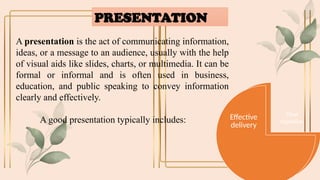
A presentation is the act of communicating information,
ideas, or a message to an audience, usually with the help
of visual aids like slides, charts, or multimedia. It can be
formal or informal and is often used in business,
education, and public speaking to convey information
clearly and effectively.
A good presentation typically includes:
Clear
objective
Engaging
content
Effective
delivery
Education
Business
Personal
use
Online &
Social media
Conference &
Public Speaking
Where to use
Presentation?
Significance of Presentation
 Effective Communication
 Engages the Audience
 Develops critical thinking
 Build Confidence
 Professional Growth
 Encourage Interaction
 Facilitates Decision-Making
 Promotes Learning
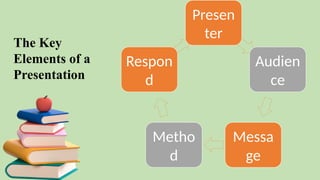
Presen
ter
Audien
ce
Messa
ge
Metho
d
Respon
d
The Key
Elements of a
Presentation
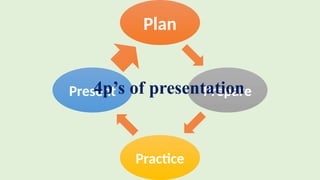
Plan
Prepare
Practice
Present
4p’s of presentation
Tips for effective presentation
Keep It Simple: Focus on the main message. Use bullet points,
short phrases, and simple visuals to communicate your ideas
clearly.
Consistency is Key: Maintain consistent fonts, colors, and slide
layouts throughout the presentation to make it cohesive and
professional.
Engage Your Audience: Use visuals, such as images, charts, and
videos, to keep your audience engaged. This makes complex
ideas easier to understand.
Limit Text: Keep Balance between text and visuals, and elaborate
on points verbally.
Use Transitions and Animations Sparingly: While animations
and transitions can add a nice touch, avoid overusing them. They
should support your message, not distract from it.
Practice and Prepare: Rehearse your presentation multiple times
to ensure smooth delivery. Be familiar with your slides so you can
speak confidently without reading directly from them.
Continue...
Platform for
making
Presentation
Microsoft PowerPoint
Canva
Slidesgo
Google Slides
Visme
Conclusion
A well-crafted presentation can engage, inform, and persuade
your audience, making it a crucial skill in personal and
professional settings. Remember to know your audience, focus
on a clear message, use visual aids, practice your delivery, and
encourage interaction. Apply these tips to your next
presentation and see the difference for yourself.

"How to Make an Effective Presentation."

  • 1.
    Faculty Coordinator Dr.Vartika Srivastava Dr.Monika Gautam Organizes Workshop On How to Make an Effective Presentation Venue: Mini Auditorium Time: 11:15 AM Student Coordinator Md Huzaifa M.Ed Semester IV AMITY UNIVERSITY UTTAR PRADESH LUCKNOW Guide Prof. Dr. Mala Tandon
  • 2.
    Objectives of the Workshop •To Learn how to create visually effective slides using appropriate fonts, colors, images, and layouts. • To Understand the concept of a presentation and its significance. • To Identify tips and techniques for delivering impactful presentations. • To Learn the essential steps for creating an effective presentation. • To Explore the components of a well-structured presentation.
  • 3.
    PRESENTATION A presentation isthe act of communicating information, ideas, or a message to an audience, usually with the help of visual aids like slides, charts, or multimedia. It can be formal or informal and is often used in business, education, and public speaking to convey information clearly and effectively. A good presentation typically includes: Clear objective Engaging content Effective delivery
  • 4.
    Education Business Personal use Online & Social media Conference& Public Speaking Where to use Presentation?
  • 5.
    Significance of Presentation Effective Communication  Engages the Audience  Develops critical thinking  Build Confidence  Professional Growth  Encourage Interaction  Facilitates Decision-Making  Promotes Learning
  • 6.
  • 7.
  • 8.
    Tips for effectivepresentation Keep It Simple: Focus on the main message. Use bullet points, short phrases, and simple visuals to communicate your ideas clearly. Consistency is Key: Maintain consistent fonts, colors, and slide layouts throughout the presentation to make it cohesive and professional. Engage Your Audience: Use visuals, such as images, charts, and videos, to keep your audience engaged. This makes complex ideas easier to understand.
  • 9.
    Limit Text: KeepBalance between text and visuals, and elaborate on points verbally. Use Transitions and Animations Sparingly: While animations and transitions can add a nice touch, avoid overusing them. They should support your message, not distract from it. Practice and Prepare: Rehearse your presentation multiple times to ensure smooth delivery. Be familiar with your slides so you can speak confidently without reading directly from them. Continue...
  • 10.
  • 11.
    Conclusion A well-crafted presentationcan engage, inform, and persuade your audience, making it a crucial skill in personal and professional settings. Remember to know your audience, focus on a clear message, use visual aids, practice your delivery, and encourage interaction. Apply these tips to your next presentation and see the difference for yourself.

Editor's Notes

  • #3 clear objective – What do you want your audience to learn or take away? Engaging content – content should captures and holds the audience's attention, making them interested, involved, and motivated to listen or interact. It should be clear and relevant. Effective delivery – Confident speaking, good body language, and audience interaction.
  • #4 Personal- To explain ur creative ideas & story. Online- share on Instagram, linked in. Conference- keynotes se help milti, content ko more engage and interesting bnata h.
  • #6 Presenter-The role of the presenter is to communicate with the audience and control the presentation. Audience-The audience receives the presenter's message. Message-The message or messages are delivered by the presenter to the audience. Method- How will the presentation be delivered? Reaction/Respond-The audience's reaction
  • #10 Next page is conclusion 1.Smart chart (dusre ppt me) 2. Png (dusre ppt me dikhaenge) 3. Vdo audio autoplay 5. Slide show settings bataenge (PEN, HIGHLIGHTER, G for slide jump, slide no+ enter) 4. canva