Introduction To Makefile
Makefile Tutorial
EL KTAOUI ZAKARIA
Email: : elktaoui@outlook.com
Faecbook: https://www.facebook.com/Elktaoui.zakaria
Linkedin: ma.linkedin.com/in/elktaoui/
Table of Content
 Introduction
 Why Makefile ?
 How does it work ?
 How to Make a simple Makefile ?
 Makefile Rules
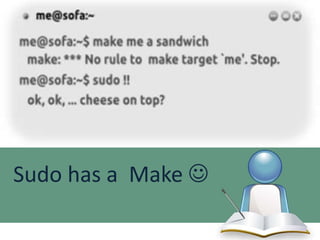
Sudo has a Make 
Introduction
The utility simply known as make is one of the
most enduring features of both Unix and other
operating systems.
First invented in the 1970s, make still turns up
to this day as the central engine in
most programming projects; it even builds
the Linux kernel.
In this presentation you will learn why this
utility continues to hold its top position
in project build software, despite many
younger competitors.
Makefile Why ?
 Make checks timestamps to see what has changed and rebuilds just
what you need, without wasting time rebuilding other files.
 Manage Several source files and compile them quickly with a single
Command Line.
 Make layers a rich collection of options that lets you manipulate
multiple directories, build different versions of programs for different
platforms, and customize your builds in other ways.
Make Utility

If you run
make

This will cause the make program to read the makefile and build the first
target it finds there

.

If you have several makefiles, then you can
execute them with the command:
make -f mymakefile
For more options use : $ man make
How does it work ?
Typically the default goal in most makefiles is to build
a program. This usually involves many steps:
1. Generate the source code using some utilities like Flex &
Bison.
2. Compile the source code into binary file (.o files c/c++/java
etc ..
3. bound the Object files together using a linker( gcc/g++) to
form an executable program(.exe)
How does it work ?
Makefile contains a set of rules used to build
an application.
The first rule (default rule) seen by make
consists of three parts:
 The Target.
 The Dependencies.
 The Command to be performed.
Target and Dependencies
Now let’s see the Make Process :
 Make is asked to evaluate a rule, it begins by finding the files
indicated by the dependencies and target.
 If any of the dependencies has an associated rule, make attempts to
update those first. Next, the target file is considered.

 If any dependency is newer than the target, the target is
remade by executing the commands.
 If any dependency is newer than the target, the target is
remade by executing the commands.
How to Make a Simple Makefile
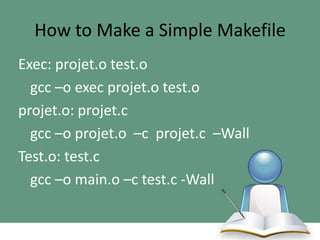
Exec: projet.o test.o
gcc –o exec projet.o test.o
projet.o: projet.c
gcc –o projet.o –c projet.c –Wall
Test.o: test.c
gcc –o main.o –c test.c -Wall
How to Make a Simple Makefile
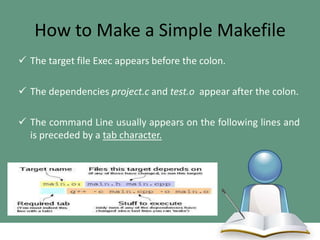
 The target file Exec appears before the colon.

 The dependencies project.c and test.o appear after the colon.
 The command Line usually appears on the following lines and
is preceded by a tab character.
How to Make a Simple Makefile
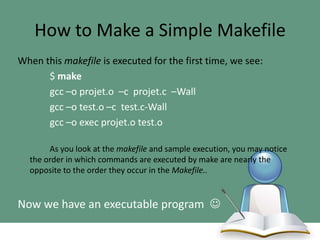
When this makefile is executed for the first time, we see:
$ make
gcc –o projet.o –c projet.c –Wall
gcc –o test.o –c test.c-Wall
gcc –o exec projet.o test.o
As you look at the makefile and sample execution, you may notice
the order in which commands are executed by make are nearly the
opposite to the order they occur in the Makefile..

Now we have an executable program 
How to Make a Simple Makefile
But How He did that  :
1. First make notices that the command line contains no targets so it decides to make
the default goal, Exec(Our Executable) .
2. It checks for dependencies and sees three: project.o main.o now considers how to
build projetc.o and main.o and sees a rule for it

3. Again, it checks the dependencies, notices that project.c has no rule but (that file
exists), so make executes the commands to transform project.c into project.o by
executing the command ! gcc –o projet.o –c projet.c –Wall
Makefile Rules
In the last section, we wrote some rules to compile and link our program.
Each of those rules defines a target, that is, a file to be updated. Each
target file depends on a set of dependencies, which are also files.
Since rules are so important in make, there are a number of different kinds
of rules. Explicit rules (This is the most common type of rule you will be
writing), and Implicit rules.
Makefile Rules
A makefile often contains long lists of files. To simplify this process make supports
wildcards (also known as globbing).

Wildcards can be very useful for creating more adaptable makefiles. For instance,
instead of listing all the files in a program explicitly, you can use wildcards define a
rule that applies to all files ending in the %.o and %.c suffix.
Automatic variables are set by make after a rule is matched. They provide access
to elements from the target and dependency (so you don’t have to explicitly
specify any filenames)
Variables (Constants) : some can be set by the user to control make’s behavior
while others are set by make to communicate with the user’s makefile.
Makefile Rules
Use WildCard:
%.o: %.c
gcc –o $@ –c $< –Wall
Explanation :
1.
2.
3.
4.

The .o files depends on the .c files.
To generate the .o file, we needs to compile the .c file.
$@ define the filename of the target.
$< define the filename of the first dependency.
Makefile Rules
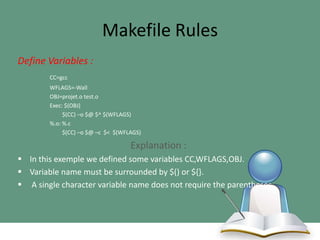
Define Variables :
CC=gcc
WFLAGS=-Wall
OBJ=projet.o test.o
Exec: $(OBJ)
$(CC) –o $@ $^ $(WFLAGS)
%.o: %.c
$(CC) –o $@ –c $< $(WFLAGS)

Explanation :
 In this exemple we defined some variables CC,WFLAGS,OBJ.
 Variable name must be surrounded by $() or ${}.
 A single character variable name does not require the parentheses.
Makefile Rules
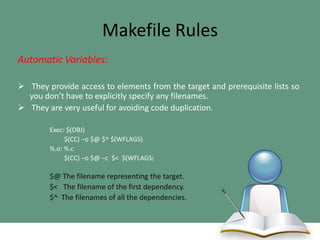
Automatic Variables:
 They provide access to elements from the target and prerequisite lists so
you don’t have to explicitly specify any filenames.
 They are very useful for avoiding code duplication.
Exec: $(OBJ)
$(CC) –o $@ $^ $(WFLAGS)
%.o: %.c
$(CC) –o $@ –c $< $(WFLAGS)

$@ The filename representing the target.
$< The filename of the first dependency.
$^ The filenames of all the dependencies.
Conclusion
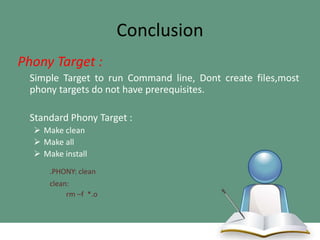
Phony Target :
Simple Target to run Command line, Dont create files,most
phony targets do not have prerequisites.
Standard Phony Target :
 Make clean
 Make all
 Make install
.PHONY: clean
clean:
rm –f *.o
Conclusion
Remarks:
 Don’t forget about the TAB Before the
Command.
 Read Tutorials and practice with simple
Example.
 Send Message on Social Media  feel free to
Ask.
Introduction to Makefile

Introduction to Makefile

  • 1.
    Introduction To Makefile MakefileTutorial EL KTAOUI ZAKARIA Email: : elktaoui@outlook.com Faecbook: https://www.facebook.com/Elktaoui.zakaria Linkedin: ma.linkedin.com/in/elktaoui/
  • 2.
    Table of Content Introduction  Why Makefile ?  How does it work ?  How to Make a simple Makefile ?  Makefile Rules
  • 3.
    Sudo has aMake 
  • 4.
    Introduction The utility simplyknown as make is one of the most enduring features of both Unix and other operating systems. First invented in the 1970s, make still turns up to this day as the central engine in most programming projects; it even builds the Linux kernel.
  • 5.
    In this presentationyou will learn why this utility continues to hold its top position in project build software, despite many younger competitors.
  • 6.
    Makefile Why ? Make checks timestamps to see what has changed and rebuilds just what you need, without wasting time rebuilding other files.  Manage Several source files and compile them quickly with a single Command Line.  Make layers a rich collection of options that lets you manipulate multiple directories, build different versions of programs for different platforms, and customize your builds in other ways.
  • 7.
    Make Utility If yourun make This will cause the make program to read the makefile and build the first target it finds there . If you have several makefiles, then you can execute them with the command: make -f mymakefile For more options use : $ man make
  • 8.
    How does itwork ? Typically the default goal in most makefiles is to build a program. This usually involves many steps: 1. Generate the source code using some utilities like Flex & Bison. 2. Compile the source code into binary file (.o files c/c++/java etc .. 3. bound the Object files together using a linker( gcc/g++) to form an executable program(.exe)
  • 9.
    How does itwork ? Makefile contains a set of rules used to build an application. The first rule (default rule) seen by make consists of three parts:  The Target.  The Dependencies.  The Command to be performed.
  • 10.
    Target and Dependencies Nowlet’s see the Make Process :  Make is asked to evaluate a rule, it begins by finding the files indicated by the dependencies and target.  If any of the dependencies has an associated rule, make attempts to update those first. Next, the target file is considered.  If any dependency is newer than the target, the target is remade by executing the commands.  If any dependency is newer than the target, the target is remade by executing the commands.
  • 11.
    How to Makea Simple Makefile Exec: projet.o test.o gcc –o exec projet.o test.o projet.o: projet.c gcc –o projet.o –c projet.c –Wall Test.o: test.c gcc –o main.o –c test.c -Wall
  • 12.
    How to Makea Simple Makefile  The target file Exec appears before the colon.  The dependencies project.c and test.o appear after the colon.  The command Line usually appears on the following lines and is preceded by a tab character.
  • 13.
    How to Makea Simple Makefile When this makefile is executed for the first time, we see: $ make gcc –o projet.o –c projet.c –Wall gcc –o test.o –c test.c-Wall gcc –o exec projet.o test.o As you look at the makefile and sample execution, you may notice the order in which commands are executed by make are nearly the opposite to the order they occur in the Makefile.. Now we have an executable program 
  • 14.
    How to Makea Simple Makefile But How He did that  : 1. First make notices that the command line contains no targets so it decides to make the default goal, Exec(Our Executable) . 2. It checks for dependencies and sees three: project.o main.o now considers how to build projetc.o and main.o and sees a rule for it 3. Again, it checks the dependencies, notices that project.c has no rule but (that file exists), so make executes the commands to transform project.c into project.o by executing the command ! gcc –o projet.o –c projet.c –Wall
  • 15.
    Makefile Rules In thelast section, we wrote some rules to compile and link our program. Each of those rules defines a target, that is, a file to be updated. Each target file depends on a set of dependencies, which are also files. Since rules are so important in make, there are a number of different kinds of rules. Explicit rules (This is the most common type of rule you will be writing), and Implicit rules.
  • 16.
    Makefile Rules A makefileoften contains long lists of files. To simplify this process make supports wildcards (also known as globbing). Wildcards can be very useful for creating more adaptable makefiles. For instance, instead of listing all the files in a program explicitly, you can use wildcards define a rule that applies to all files ending in the %.o and %.c suffix. Automatic variables are set by make after a rule is matched. They provide access to elements from the target and dependency (so you don’t have to explicitly specify any filenames) Variables (Constants) : some can be set by the user to control make’s behavior while others are set by make to communicate with the user’s makefile.
  • 17.
    Makefile Rules Use WildCard: %.o:%.c gcc –o $@ –c $< –Wall Explanation : 1. 2. 3. 4. The .o files depends on the .c files. To generate the .o file, we needs to compile the .c file. $@ define the filename of the target. $< define the filename of the first dependency.
  • 18.
    Makefile Rules Define Variables: CC=gcc WFLAGS=-Wall OBJ=projet.o test.o Exec: $(OBJ) $(CC) –o $@ $^ $(WFLAGS) %.o: %.c $(CC) –o $@ –c $< $(WFLAGS) Explanation :  In this exemple we defined some variables CC,WFLAGS,OBJ.  Variable name must be surrounded by $() or ${}.  A single character variable name does not require the parentheses.
  • 19.
    Makefile Rules Automatic Variables: They provide access to elements from the target and prerequisite lists so you don’t have to explicitly specify any filenames.  They are very useful for avoiding code duplication. Exec: $(OBJ) $(CC) –o $@ $^ $(WFLAGS) %.o: %.c $(CC) –o $@ –c $< $(WFLAGS) $@ The filename representing the target. $< The filename of the first dependency. $^ The filenames of all the dependencies.
  • 20.
    Conclusion Phony Target : SimpleTarget to run Command line, Dont create files,most phony targets do not have prerequisites. Standard Phony Target :  Make clean  Make all  Make install .PHONY: clean clean: rm –f *.o
  • 21.
    Conclusion Remarks:  Don’t forgetabout the TAB Before the Command.  Read Tutorials and practice with simple Example.  Send Message on Social Media  feel free to Ask.