1/38
How to create a high quality
static code analyzer
Sergey Khrenov (PVS-Studio)
2/38
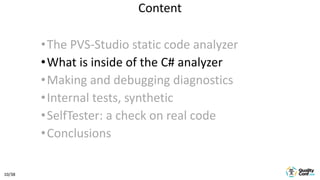
•The PVS-Studio static code analyzer
•What is inside of the C# analyzer
•Making and debugging diagnostics
•Internal tests, synthetics
•SelfTester: a check on real code
•Conclusions
Content
3/38
• It doesn’t replace but supplement
code reviews
• Detects errors in code without
running the program
• It helps to control the code quality
in large projects
Static analysis
4/38
PVS-Studio
• The classic C, C++, C# and Java static code analyzer
• It works in Windows, Linux and macOS
• It supports ARM platforms
• It has plugins for Visual Studio, IntelliJ IDEA, Jenkins,
Maven, Gradle, SonarQube
• It supports CWE, SEI CERT, MISRA standards
5/38
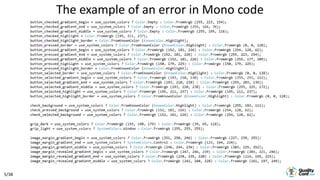
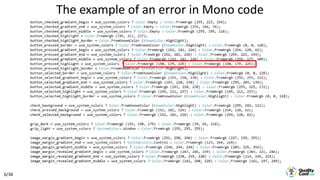
The example of an error in Mono code
6/38
The example of an error in Mono code
7/38
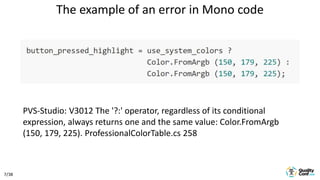
PVS-Studio: V3012 The '?:' operator, regardless of its conditional
expression, always returns one and the same value: Color.FromArgb
(150, 179, 225). ProfessionalColorTable.cs 258
The example of an error in Mono code
8/38
Issues
• Scientific character
• Different programming languages
• Cross-platforming
• Standards support
• Product specificity
• Classic testing methods are not enough
9/38
How to ensure quality?
• Joint code reviews (it works!)
• Static analysis
• Unit-tests
• UI-tests
• Functional tests
• Load testing
• Real project checks
10/38
•The PVS-Studio static code analyzer
•What is inside of the C# analyzer
•Making and debugging diagnostics
•Internal tests, synthetic
•SelfTester: a check on real code
•Conclusions
Content
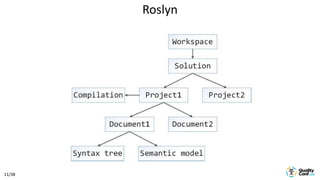
11/38
Roslyn
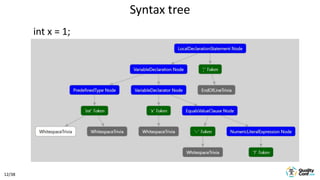
12/38
int x = 1;
Syntax tree
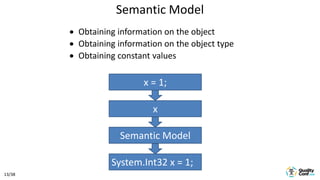
13/38
Semantic Model
 Obtaining information on the object
 Obtaining information on the object type
 Obtaining constant values
x = 1;
x
Semantic Model
System.Int32 x = 1;
14/38
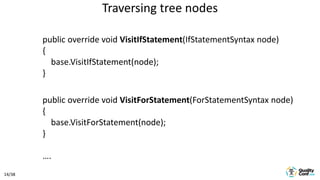
Traversing tree nodes
public override void VisitIfStatement(IfStatementSyntax node)
{
base.VisitIfStatement(node);
}
public override void VisitForStatement(ForStatementSyntax node)
{
base.VisitForStatement(node);
}
….
15/38
•The PVS-Studio static code analyzer
•What is inside of the C# analyzer
•Making and debugging diagnostics
•Internal tests, synthetics
•SelfTester: a check on real code
•Conclusions
Content
16/38
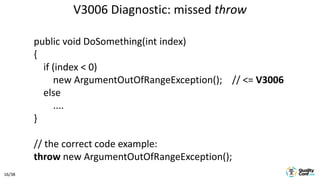
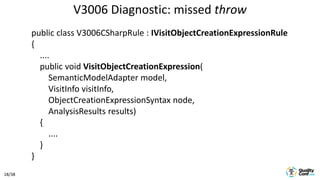
V3006 Diagnostic: missed throw
public void DoSomething(int index)
{
if (index < 0)
new ArgumentOutOfRangeException(); // <= V3006
else
....
}
// the correct code example:
throw new ArgumentOutOfRangeException();
17/38
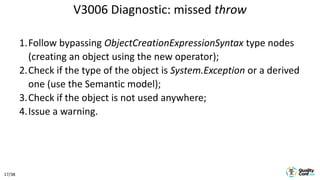
1.Follow bypassing ObjectCreationExpressionSyntax type nodes
(creating an object using the new operator);
2.Check if the type of the object is System.Exception or a derived
one (use the Semantic model);
3.Check if the object is not used anywhere;
4.Issue a warning.
V3006 Diagnostic: missed throw
18/38
public class V3006CSharpRule : IVisitObjectCreationExpressionRule
{
....
public void VisitObjectCreationExpression(
SemanticModelAdapter model,
VisitInfo visitInfo,
ObjectCreationExpressionSyntax node,
AnalysisResults results)
{
....
}
}
V3006 Diagnostic: missed throw
19/38
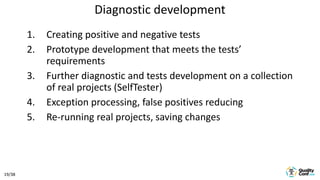
Diagnostic development
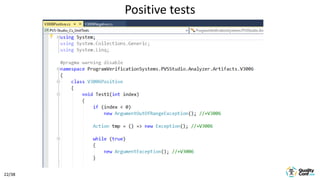
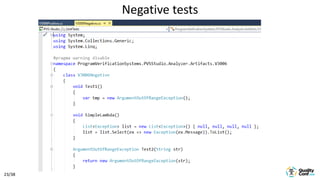
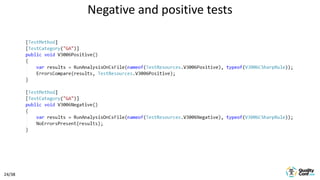
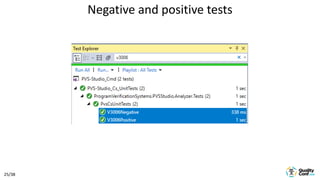
1. Creating positive and negative tests
2. Prototype development that meets the tests’
requirements
3. Further diagnostic and tests development on a collection
of real projects (SelfTester)
4. Exception processing, false positives reducing
5. Re-running real projects, saving changes
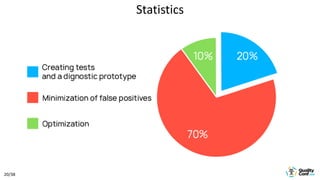
20/38
Statistics
21/38
•The PVS-Studio static code analyzer
•What is inside of the C# analyzer
•Making and debugging diagnostics
•Internal tests, synthetics
•SelfTester: a check on real code
•Conclusions
Content
22/38
Positive tests
23/38
Negative tests
24/38
Negative and positive tests
25/38
Negative and positive tests
26/38
•The PVS-Studio static code analyzer
•What is inside of the C# analyzer
•Making and debugging diagnostics
•Internal tests, synthetic
•SelfTester: a check on real code
•Conclusions
Content
27/38
• The tool for batch-checking real projects
• SelfTester for С/С++ and C# uses a local set of
projects
• SelfTester for Java downloads the projects of a
particular version from the GitHub repository
PVS-Studio SelfTester
28/38
SelfTester tasks
• The main task is to detect defects of
PVS-Studio behavior
• Defects - difference in comparing to
previous analysis results
• Defects often represent expected
behavior
29/38
How to tell that the analyzer’s behavior has changed?
• The warnings composition has changed: the
new ones appeared, the old ones
disappeared
• The time spent on tests has changed
• Sometimes no change is a bad result (if you
have changed the core)
• There are errors after the check
30/38
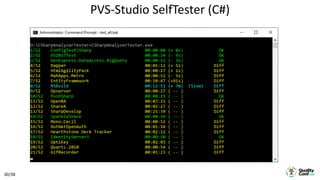
PVS-Studio SelfTester (С#)
31/38
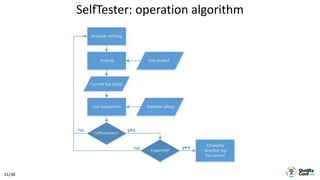
SelfTester: operation algorithm
32/38
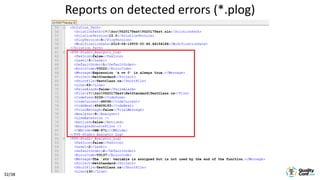
Reports on detected errors (*.plog)
33/38
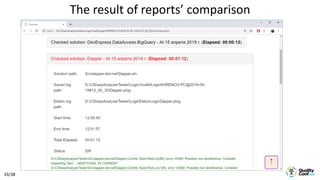
The result of reports’ comparison
34/38
Getting ready for production
• Further development on the basis
of user feedback (including the
internal users)
• Further development related to
change of the core behavior
(mechanisms finalization, new
language standards support, etc)
35/38
•The PVS-Studio static code analyzer
•What is inside of the C# analyzer
•Making and debugging diagnostics
•Internal tests, synthetic
•SelfTester: a check on real code
•Conclusions
Content
36/38
High-quality static analyzer
• A proprietary one
• Fast code processing
• Minimum false positives
• Advanced means of integrating
• Simple introduction in large projects
37/38
Any questions?
38/38
Sergey Khrenov
C# developer, PVS-Studio
khrenov@viva64.com
www.viva64.com
Contacts

How to create a high quality static code analyzer

  • 1.
    1/38 How to createa high quality static code analyzer Sergey Khrenov (PVS-Studio)
  • 2.
    2/38 •The PVS-Studio staticcode analyzer •What is inside of the C# analyzer •Making and debugging diagnostics •Internal tests, synthetics •SelfTester: a check on real code •Conclusions Content
  • 3.
    3/38 • It doesn’treplace but supplement code reviews • Detects errors in code without running the program • It helps to control the code quality in large projects Static analysis
  • 4.
    4/38 PVS-Studio • The classicC, C++, C# and Java static code analyzer • It works in Windows, Linux and macOS • It supports ARM platforms • It has plugins for Visual Studio, IntelliJ IDEA, Jenkins, Maven, Gradle, SonarQube • It supports CWE, SEI CERT, MISRA standards
  • 5.
    5/38 The example ofan error in Mono code
  • 6.
    6/38 The example ofan error in Mono code
  • 7.
    7/38 PVS-Studio: V3012 The'?:' operator, regardless of its conditional expression, always returns one and the same value: Color.FromArgb (150, 179, 225). ProfessionalColorTable.cs 258 The example of an error in Mono code
  • 8.
    8/38 Issues • Scientific character •Different programming languages • Cross-platforming • Standards support • Product specificity • Classic testing methods are not enough
  • 9.
    9/38 How to ensurequality? • Joint code reviews (it works!) • Static analysis • Unit-tests • UI-tests • Functional tests • Load testing • Real project checks
  • 10.
    10/38 •The PVS-Studio staticcode analyzer •What is inside of the C# analyzer •Making and debugging diagnostics •Internal tests, synthetic •SelfTester: a check on real code •Conclusions Content
  • 11.
  • 12.
    12/38 int x =1; Syntax tree
  • 13.
    13/38 Semantic Model  Obtaininginformation on the object  Obtaining information on the object type  Obtaining constant values x = 1; x Semantic Model System.Int32 x = 1;
  • 14.
    14/38 Traversing tree nodes publicoverride void VisitIfStatement(IfStatementSyntax node) { base.VisitIfStatement(node); } public override void VisitForStatement(ForStatementSyntax node) { base.VisitForStatement(node); } ….
  • 15.
    15/38 •The PVS-Studio staticcode analyzer •What is inside of the C# analyzer •Making and debugging diagnostics •Internal tests, synthetics •SelfTester: a check on real code •Conclusions Content
  • 16.
    16/38 V3006 Diagnostic: missedthrow public void DoSomething(int index) { if (index < 0) new ArgumentOutOfRangeException(); // <= V3006 else .... } // the correct code example: throw new ArgumentOutOfRangeException();
  • 17.
    17/38 1.Follow bypassing ObjectCreationExpressionSyntaxtype nodes (creating an object using the new operator); 2.Check if the type of the object is System.Exception or a derived one (use the Semantic model); 3.Check if the object is not used anywhere; 4.Issue a warning. V3006 Diagnostic: missed throw
  • 18.
    18/38 public class V3006CSharpRule: IVisitObjectCreationExpressionRule { .... public void VisitObjectCreationExpression( SemanticModelAdapter model, VisitInfo visitInfo, ObjectCreationExpressionSyntax node, AnalysisResults results) { .... } } V3006 Diagnostic: missed throw
  • 19.
    19/38 Diagnostic development 1. Creatingpositive and negative tests 2. Prototype development that meets the tests’ requirements 3. Further diagnostic and tests development on a collection of real projects (SelfTester) 4. Exception processing, false positives reducing 5. Re-running real projects, saving changes
  • 20.
  • 21.
    21/38 •The PVS-Studio staticcode analyzer •What is inside of the C# analyzer •Making and debugging diagnostics •Internal tests, synthetics •SelfTester: a check on real code •Conclusions Content
  • 22.
  • 23.
  • 24.
  • 25.
  • 26.
    26/38 •The PVS-Studio staticcode analyzer •What is inside of the C# analyzer •Making and debugging diagnostics •Internal tests, synthetic •SelfTester: a check on real code •Conclusions Content
  • 27.
    27/38 • The toolfor batch-checking real projects • SelfTester for С/С++ and C# uses a local set of projects • SelfTester for Java downloads the projects of a particular version from the GitHub repository PVS-Studio SelfTester
  • 28.
    28/38 SelfTester tasks • Themain task is to detect defects of PVS-Studio behavior • Defects - difference in comparing to previous analysis results • Defects often represent expected behavior
  • 29.
    29/38 How to tellthat the analyzer’s behavior has changed? • The warnings composition has changed: the new ones appeared, the old ones disappeared • The time spent on tests has changed • Sometimes no change is a bad result (if you have changed the core) • There are errors after the check
  • 30.
  • 31.
  • 32.
  • 33.
    33/38 The result ofreports’ comparison
  • 34.
    34/38 Getting ready forproduction • Further development on the basis of user feedback (including the internal users) • Further development related to change of the core behavior (mechanisms finalization, new language standards support, etc)
  • 35.
    35/38 •The PVS-Studio staticcode analyzer •What is inside of the C# analyzer •Making and debugging diagnostics •Internal tests, synthetic •SelfTester: a check on real code •Conclusions Content
  • 36.
    36/38 High-quality static analyzer •A proprietary one • Fast code processing • Minimum false positives • Advanced means of integrating • Simple introduction in large projects
  • 37.
  • 38.
    38/38 Sergey Khrenov C# developer,PVS-Studio khrenov@viva64.com www.viva64.com Contacts