PVS-Studio features overview
Windows, Linux, macOS
C, C++, C#, Java
Phillip Khandeliants
khandeliants@viva64.com
Speaker
 Lead C++/C# developer in PVS-
Studio team
 Have been working in the
company since 2016
 Popularizing modern C++
 Static code analyzers for C, C++, C++/CLI, C++/CX,
C#, and Java on Windows, Linux and macOS;
 Supported compilers (C/C++): MSVC, GCC, Clang,
MingW, ARM GCC, ARM Clang, Keil ARM
Compiler 5/6, IAR C/C++ Compiler for ARM, TI
ARM CGT;
 Plugins for Visual Studio 2010-2019, Rider, IntelliJ
IDEA;
PVS-Studio infrastructure
 Compilation monitoring utility for performing
analysis independently of the IDE or build system
(C/C++ only);
 Suppress files: ability to view warnings only on
newly written code;
 Incremental analysis: automatic analysis of changed
files
PVS-Studio infrastructure
 Integration with TeamCity, Azure DevOps, Travis CI,
CircleCI, GitLab CI/CD, Jenkins, SonarQube, etc.
 PlogConverter utility to convert raw log to desirable
format
 BlameNotifier utility to distribute warnings by mail
PVS-Studio infrastructure
 C, C++ diagnostics : 510
 C# diagnostics : 153
 Java diagnostics : 82
By July 2020 we’ve implemented in PVS-Studio:
 Copy-paste errors
 Array index out of bounds
 Buffer overrun
 Memory/resource leaks
 Invalid operator precedence
 Dereferencing of nullable types
 Dead/unreachable code
 Use of uninitialized variables
 Undefined/unspecified behavior
 ….
What can be detected?
Great attention is paid to analyzer warnings:
 Warnings classification is supported according to:
 Common Weakness Enumeration (CWE)
 SEI CERT C Coding Standard
 SEI CERT C++ Coding Standard
 MISRA C, MISRA C++
 Detailed documentation in Russian and English:
 Online
 PDF
Diagnostic capabilities of PVS-Studio
 This error demonstrates greatly how DataFlow analysis works in
PVS-Studio
 This error was found using PVS-Studio in Chromium project
(Protocol Buffers)
 The analyzer issues two warnings:
 V547 Expression 'time.month <= kDaysInMonth[time.month] + 1' is always
true. time.cc 83
 V547 Expression 'time.month <= kDaysInMonth[time.month]' is always true.
time.cc 85
Data Flow analysis
static const int kDaysInMonth[13] = {
0, 31, 28, 31, 30, 31, 30, 31, 31, 30, 31, 30, 31
};
bool ValidateDateTime(const DateTime& time) {
if (time.year < 1 || time.year > 9999 ||
time.month < 1 || time.month > 12 ||
time.day < 1 || time.day > 31 ||
time.hour < 0 || time.hour > 23 ||
time.minute < 0 || time.minute > 59 ||
time.second < 0 || time.second > 59) {
return false;
}
if (time.month == 2 && IsLeapYear(time.year)) {
return time.month <= kDaysInMonth[time.month] + 1;
} else {
return time.month <= kDaysInMonth[time.month];
}
}
static const int kDaysInMonth[13] = {
0, 31, 28, 31, 30, 31, 30, 31, 31, 30, 31, 30, 31
};
bool ValidateDateTime(const DateTime& time) {
if (time.year < 1 || time.year > 9999 ||
time.month < 1 || time.month > 12 ||
time.day < 1 || time.day > 31 ||
time.hour < 0 || time.hour > 23 ||
time.minute < 0 || time.minute > 59 ||
time.second < 0 || time.second > 59) {
return false;
}
if (time.month == 2 && IsLeapYear(time.year)) {
return time.month <= kDaysInMonth[time.month] + 1;
} else {
return time.month <= kDaysInMonth[time.month];
}
}
static const int kDaysInMonth[13] = {
0, 31, 28, 31, 30, 31, 30, 31, 31, 30, 31, 30, 31
};
bool ValidateDateTime(const DateTime& time) {
if (time.year < 1 || time.year > 9999 ||
time.month < 1 || time.month > 12 ||
time.day < 1 || time.day > 31 ||
time.hour < 0 || time.hour > 23 ||
time.minute < 0 || time.minute > 59 ||
time.second < 0 || time.second > 59) {
return false;
}
if (time.month == 2 && IsLeapYear(time.year)) {
return time.month <= kDaysInMonth[time.month] + 1;
} else {
return time.month <= kDaysInMonth[time.month];
}
}
static const int kDaysInMonth[13] = {
0, 31, 28, 31, 30, 31, 30, 31, 31, 30, 31, 30, 31
};
bool ValidateDateTime(const DateTime& time) {
if (time.year < 1 || time.year > 9999 ||
time.month < 1 || time.month > 12 ||
time.day < 1 || time.day > 31 ||
time.hour < 0 || time.hour > 23 ||
time.minute < 0 || time.minute > 59 ||
time.second < 0 || time.second > 59) {
return false;
}
if (time.month == 2 && IsLeapYear(time.year)) {
return time.month <= kDaysInMonth[time.month] + 1;
} else {
return time.month <= kDaysInMonth[time.month];
}
} time.day
int x0 = ....; int x1 = ....;
int y0 = ....; int y1 = ....;
assert(x0 <= x1 && "....");
assert(y0 <= y1 && "....");
assert((x1 - x0) == (y1 - y0) && "....");
assert(x0 >= 0 && x0 < int(some_value) && "....");
assert(x1 >= 0 && x1 < int(some_value) && "...."); // x1 >= 0
assert(y0 >= 0 && y0 < int(some_value) && "...."); // y0 >= 0
assert(y1 >= 0 && y1 < int(some_value) && "...."); // y1 >= 0
Symbolic execution
V560 A part of conditional expression is always true.
Method/class annotations
Our team has annotated thousands of functions and classes, given in:
 standard C library
 standard С++ library
 WinAPI
 glibc (GNU C Library)
 Qt
 MFC
 and so on
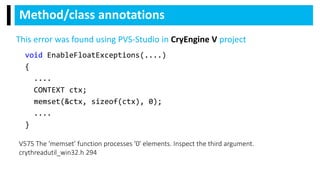
void EnableFloatExceptions(....)
{
....
CONTEXT ctx;
memset(&ctx, sizeof(ctx), 0);
....
}
Method/class annotations
V575 The 'memset' function processes '0' elements. Inspect the third argument.
crythreadutil_win32.h 294
This error was found using PVS-Studio in CryEngine V project
static void FwdLockGlue_InitializeRoundKeys()
{
unsigned char keyEncryptionKey[KEY_SIZE];
....
memset(keyEncryptionKey, 0, KEY_SIZE); // Zero out key data.
}
Pattern-based matching analysis
V597 CWE-14 The compiler could delete the 'memset' function call, which is used to flush
'keyEncryptionKey' buffer. The memset_s() function should be used to erase the private data.
FwdLockGlue.c 102
This error was found using PVS-Studio in Android
project
Start using PVS-Studio
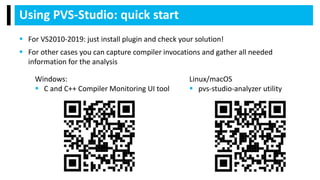
 For VS2010-2019: just install plugin and check your solution!
 For other cases you can capture compiler invocations and gather all needed
information for the analysis
Using PVS-Studio: quick start
Windows:
 C and C++ Compiler Monitoring UI tool
Linux/macOS
 pvs-studio-analyzer utility
Using PVS-Studio: mass suppression
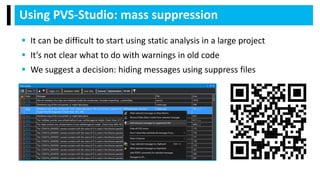
 It can be difficult to start using static analysis in a large project
 It’s not clear what to do with warnings in old code
 We suggest a decision: hiding messages using suppress files
Using PVS-Studio: suppressing of false positives
 Various ways to suppress false positives in specific lines of code
 Suppression of false positives in macros
 Suppression of false positives using pvsconfig diagnostics
configuration files
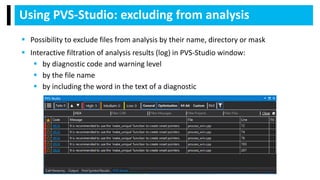
Using PVS-Studio: excluding from analysis
 Possibility to exclude files from analysis by their name, directory or mask
 Interactive filtration of analysis results (log) in PVS-Studio window:
 by diagnostic code and warning level
 by the file name
 by including the word in the text of a diagnostic
 The most efficient way of fixing an error is to do it right after it
appeared in code
Using PVS-Studio: automatic analysis of files after
their recompilation
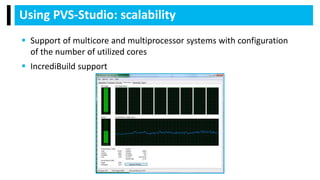
Using PVS-Studio: scalability
 Support of multicore and multiprocessor systems with configuration
of the number of utilized cores
 IncrediBuild support
 Running analysis from command line for
checking the whole project
 Saving and loading of analysis results
 Using of relative paths in report files
 Send mail notifications with
BlameNotifier utility
Using PVS-Studio: continuous integration
 Convenient online reference on all diagnostics
Using PVS-Studio: documentation
 We developed a plugin for importing analysis results into SonarQube
 Using of this plugin allows to add warnings found by PVS-Studio
analyzer to the warnings base of SonarQube server
Using PVS-Studio: SonarQube
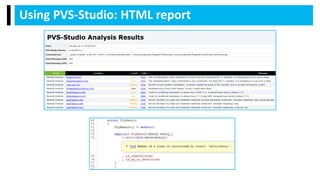
Using PVS-Studio: HTML report
 Write to us: support@viva64.com
 Subscribe:
 Twitter: @Code_Analysis
 RSS: http://feeds.feedburner.com/viva64-blog-en
 Facebook: https://www.facebook.com/StaticCodeAnalyzer
 Telegram: https://t.me/pvsstudio_en
 Download PVS-Studio:
https://www.viva64.com/download_cpp_on_sea/
Thank you for attention!

PVS-Studio features overview (2020)

  • 1.
    PVS-Studio features overview Windows,Linux, macOS C, C++, C#, Java Phillip Khandeliants khandeliants@viva64.com
  • 2.
    Speaker  Lead C++/C#developer in PVS- Studio team  Have been working in the company since 2016  Popularizing modern C++
  • 3.
     Static codeanalyzers for C, C++, C++/CLI, C++/CX, C#, and Java on Windows, Linux and macOS;  Supported compilers (C/C++): MSVC, GCC, Clang, MingW, ARM GCC, ARM Clang, Keil ARM Compiler 5/6, IAR C/C++ Compiler for ARM, TI ARM CGT;  Plugins for Visual Studio 2010-2019, Rider, IntelliJ IDEA; PVS-Studio infrastructure
  • 4.
     Compilation monitoringutility for performing analysis independently of the IDE or build system (C/C++ only);  Suppress files: ability to view warnings only on newly written code;  Incremental analysis: automatic analysis of changed files PVS-Studio infrastructure
  • 5.
     Integration withTeamCity, Azure DevOps, Travis CI, CircleCI, GitLab CI/CD, Jenkins, SonarQube, etc.  PlogConverter utility to convert raw log to desirable format  BlameNotifier utility to distribute warnings by mail PVS-Studio infrastructure
  • 6.
     C, C++diagnostics : 510  C# diagnostics : 153  Java diagnostics : 82 By July 2020 we’ve implemented in PVS-Studio:
  • 7.
     Copy-paste errors Array index out of bounds  Buffer overrun  Memory/resource leaks  Invalid operator precedence  Dereferencing of nullable types  Dead/unreachable code  Use of uninitialized variables  Undefined/unspecified behavior  …. What can be detected?
  • 8.
    Great attention ispaid to analyzer warnings:  Warnings classification is supported according to:  Common Weakness Enumeration (CWE)  SEI CERT C Coding Standard  SEI CERT C++ Coding Standard  MISRA C, MISRA C++  Detailed documentation in Russian and English:  Online  PDF
  • 9.
  • 10.
     This errordemonstrates greatly how DataFlow analysis works in PVS-Studio  This error was found using PVS-Studio in Chromium project (Protocol Buffers)  The analyzer issues two warnings:  V547 Expression 'time.month <= kDaysInMonth[time.month] + 1' is always true. time.cc 83  V547 Expression 'time.month <= kDaysInMonth[time.month]' is always true. time.cc 85 Data Flow analysis
  • 11.
    static const intkDaysInMonth[13] = { 0, 31, 28, 31, 30, 31, 30, 31, 31, 30, 31, 30, 31 }; bool ValidateDateTime(const DateTime& time) { if (time.year < 1 || time.year > 9999 || time.month < 1 || time.month > 12 || time.day < 1 || time.day > 31 || time.hour < 0 || time.hour > 23 || time.minute < 0 || time.minute > 59 || time.second < 0 || time.second > 59) { return false; } if (time.month == 2 && IsLeapYear(time.year)) { return time.month <= kDaysInMonth[time.month] + 1; } else { return time.month <= kDaysInMonth[time.month]; } }
  • 12.
    static const intkDaysInMonth[13] = { 0, 31, 28, 31, 30, 31, 30, 31, 31, 30, 31, 30, 31 }; bool ValidateDateTime(const DateTime& time) { if (time.year < 1 || time.year > 9999 || time.month < 1 || time.month > 12 || time.day < 1 || time.day > 31 || time.hour < 0 || time.hour > 23 || time.minute < 0 || time.minute > 59 || time.second < 0 || time.second > 59) { return false; } if (time.month == 2 && IsLeapYear(time.year)) { return time.month <= kDaysInMonth[time.month] + 1; } else { return time.month <= kDaysInMonth[time.month]; } }
  • 13.
    static const intkDaysInMonth[13] = { 0, 31, 28, 31, 30, 31, 30, 31, 31, 30, 31, 30, 31 }; bool ValidateDateTime(const DateTime& time) { if (time.year < 1 || time.year > 9999 || time.month < 1 || time.month > 12 || time.day < 1 || time.day > 31 || time.hour < 0 || time.hour > 23 || time.minute < 0 || time.minute > 59 || time.second < 0 || time.second > 59) { return false; } if (time.month == 2 && IsLeapYear(time.year)) { return time.month <= kDaysInMonth[time.month] + 1; } else { return time.month <= kDaysInMonth[time.month]; } }
  • 14.
    static const intkDaysInMonth[13] = { 0, 31, 28, 31, 30, 31, 30, 31, 31, 30, 31, 30, 31 }; bool ValidateDateTime(const DateTime& time) { if (time.year < 1 || time.year > 9999 || time.month < 1 || time.month > 12 || time.day < 1 || time.day > 31 || time.hour < 0 || time.hour > 23 || time.minute < 0 || time.minute > 59 || time.second < 0 || time.second > 59) { return false; } if (time.month == 2 && IsLeapYear(time.year)) { return time.month <= kDaysInMonth[time.month] + 1; } else { return time.month <= kDaysInMonth[time.month]; } } time.day
  • 15.
    int x0 =....; int x1 = ....; int y0 = ....; int y1 = ....; assert(x0 <= x1 && "...."); assert(y0 <= y1 && "...."); assert((x1 - x0) == (y1 - y0) && "...."); assert(x0 >= 0 && x0 < int(some_value) && "...."); assert(x1 >= 0 && x1 < int(some_value) && "...."); // x1 >= 0 assert(y0 >= 0 && y0 < int(some_value) && "...."); // y0 >= 0 assert(y1 >= 0 && y1 < int(some_value) && "...."); // y1 >= 0 Symbolic execution V560 A part of conditional expression is always true. V560 A part of conditional expression is always true. V560 A part of conditional expression is always true.
  • 16.
    Method/class annotations Our teamhas annotated thousands of functions and classes, given in:  standard C library  standard С++ library  WinAPI  glibc (GNU C Library)  Qt  MFC  and so on
  • 17.
    void EnableFloatExceptions(....) { .... CONTEXT ctx; memset(&ctx,sizeof(ctx), 0); .... } Method/class annotations V575 The 'memset' function processes '0' elements. Inspect the third argument. crythreadutil_win32.h 294 This error was found using PVS-Studio in CryEngine V project
  • 18.
    static void FwdLockGlue_InitializeRoundKeys() { unsignedchar keyEncryptionKey[KEY_SIZE]; .... memset(keyEncryptionKey, 0, KEY_SIZE); // Zero out key data. } Pattern-based matching analysis V597 CWE-14 The compiler could delete the 'memset' function call, which is used to flush 'keyEncryptionKey' buffer. The memset_s() function should be used to erase the private data. FwdLockGlue.c 102 This error was found using PVS-Studio in Android project
  • 19.
  • 20.
     For VS2010-2019:just install plugin and check your solution!  For other cases you can capture compiler invocations and gather all needed information for the analysis Using PVS-Studio: quick start Windows:  C and C++ Compiler Monitoring UI tool Linux/macOS  pvs-studio-analyzer utility
  • 21.
    Using PVS-Studio: masssuppression  It can be difficult to start using static analysis in a large project  It’s not clear what to do with warnings in old code  We suggest a decision: hiding messages using suppress files
  • 22.
    Using PVS-Studio: suppressingof false positives  Various ways to suppress false positives in specific lines of code  Suppression of false positives in macros  Suppression of false positives using pvsconfig diagnostics configuration files
  • 23.
    Using PVS-Studio: excludingfrom analysis  Possibility to exclude files from analysis by their name, directory or mask  Interactive filtration of analysis results (log) in PVS-Studio window:  by diagnostic code and warning level  by the file name  by including the word in the text of a diagnostic
  • 24.
     The mostefficient way of fixing an error is to do it right after it appeared in code Using PVS-Studio: automatic analysis of files after their recompilation
  • 25.
    Using PVS-Studio: scalability Support of multicore and multiprocessor systems with configuration of the number of utilized cores  IncrediBuild support
  • 26.
     Running analysisfrom command line for checking the whole project  Saving and loading of analysis results  Using of relative paths in report files  Send mail notifications with BlameNotifier utility Using PVS-Studio: continuous integration
  • 27.
     Convenient onlinereference on all diagnostics Using PVS-Studio: documentation
  • 28.
     We developeda plugin for importing analysis results into SonarQube  Using of this plugin allows to add warnings found by PVS-Studio analyzer to the warnings base of SonarQube server Using PVS-Studio: SonarQube
  • 29.
  • 30.
  • 31.
  • 32.
     Write tous: support@viva64.com  Subscribe:  Twitter: @Code_Analysis  RSS: http://feeds.feedburner.com/viva64-blog-en  Facebook: https://www.facebook.com/StaticCodeAnalyzer  Telegram: https://t.me/pvsstudio_en  Download PVS-Studio: https://www.viva64.com/download_cpp_on_sea/ Thank you for attention!

Editor's Notes

  • #2 Hello everybody, today I’d like to present you some feature overview of PVS-Studio static code analyzer
  • #3 My name is Phillip, I’m a lead C++/C# developer in PVS-Studio team and I’ve been working in the company since 2016
  • #4 So, what is PVS-Studio? PVS-Studio is a ecosystem that provides you static code analyzer for C, C++, C# and Java programming languages and utilities to make life with static code analyzer easier. PVS-Studio works on Windows, Linux and macOS platforms. I’ll focus more on C/C++ features. So, we support modern and famous compilers such as: MSVC, GCC, Clang - and several compiler for Embedded systems: ARM GCC/Clang, Keil, IAR, TI. We also have several plugins for modern IDEs for convenient work: Visual Studio 2010-2019, JetBrains Rider and IntelliJ IDEA.
  • #5 Compilation monitoring. We provide a tool that may help you to check your project with “exotic” build system (e.g. SCons, Bazel, etc). Suppress files. After you’ve checked your project, you may get tons of warnings on your legacy code. There is a solution – you push all your warnings in some file called suppress base, and in the next run you’ll get 0 warnings. Incremental analysis. If you modify some files in your project, you want only them to be checked as the compiler recompiles them. We have scenery for that. We call it incremental analysis.
  • #6 I think everybody would want to automate such process, like how we’re doing it with compilation, testing, etc. Of course, you can directly integrate PVS-Studio in CI-servers, such as Jenkins, TeamCity, etc. After analysis you get raw log and probably you want it to some format that suits you. E.g., HTML, QtCreator tasklist, errorlist (format of compilers output), etc. PlogConverter may help you with this. And finally BlameNotifier. If you get warnings after you’ve checked your project after commit, you may want to notify developers who made a mistake about this. BlameNotifier send mails corresponding to your VCS.
  • #7 By July 2020 we’ve implemented 510 diagnostic for C/C++, 153 for C# and 82 for Java. We’re continuously adding new rules.
  • #8 What type of errors can be detected? Here is a short list what our analyzer can detect: copy-paste errors, dereferencing of nullable types, undefined or unspecified behavior and so on. You can find full information about detectable errors from this QR-code.
  • #9 We pay great attention while implementing diagnostic rules. Many of them is classified according to Common Weakness Enumeration and CERT C/C++ Coding Standard. We’ve also implemented rules for MISRA C/C++ compliance. For each rule we provide detailed documentation from website or download a pdf. By the way, you can access docs from VS plugin too.
  • #10 We use several technologies to find bugs in source code.
  • #11 First is the data flow analysis. Let’s see how it can help to find bugs on a following code snippet from protobuf. PVS-Studio warns about two expressions that they’re always true.
  • #12 Here we have ValidateDateTime function that check for incorrect DateTime and static const array ‘kDaysInMonth’ that contains the number of days per month. The first element is extra element for convenient access to array: we’ll use indexes [1..12]. Let’s look at the first if statement.
  • #13 Data flow analysis knows if ‘time.month’ field isn’t in the range [1..12], execution of the function will stop.
  • #14 Now let’s look at the second ‘if’ statement. If ‘time.month’ is two (it’s February) and the year is leap, we return the result of comparison ‘time.month <= kDaysInMonth[time.month] + 1’. ‘2 <= 29’ – this is always true. If you look at ‘else’ branch, expression in return statement is always true too, now we compare two range: lhs – [1..12] and rhs – [28..31].
  • #15 It’s needed to compare ‘time.day’ field.
  • #16 Next technology is Symbolic execution. It helps when we don’t know we exact value of variables. Look at this example. Here PVS-Studio tells that 3 lash subconditions is always true. Let’s find out why/ First two asserts set relation between pairs of variables [x0, x1] and [y0; y1]. So, we know that x1 may be equal to or greater than x0, absolutely the same with y0 and y1. Third assert sets that differences between pairs of values are equal. And now fourth assert. If x0 is non-negative, then x1 is non-negative too because of the first assert. So, the part of condition in the fifth assert is always true. If x0 and x1 are both non-negative, their subtraction is non-negative too. This means that y0 and y1 are non-negative too. So, parts of the last two assert are always true.
  • #17 Next technology is method/class annotations. We know a behavior of many functions from different libraries and this helps to find interesting bugs.
  • #18 For example, in CryEngine V we have function EnableFloatExceptions. We want to zeroize the ‘ctx’ variable. But the second and the third function parameters were mixed up, and now memset will do nothing.
  • #19 And the last thing we use in our analyzer is ‘pattern-based’ matching. We’re looking for code patterns that lead to bugs in the parse tree. This isn’t regular expression search. For example, there is a errorneous pattern when we want to zeroize some private data in an array. Most often this is done by calling the ‘memset’ function. But modern compilers can optimize this call out. We can fix that by calling safe methods, such as memset_s from C11.
  • #20 So, how to start using PVS-Studio in your project?
  • #21 As I mentioned earlier, if you have VS project, you can install plugin and easily check your project in one click. If you have project that isn’t VS- or Cmake-based, you can check it with C and C++ Compiler Monitoring UI or pvs-studio-analyzer tools. It captures compiler invocations to get information about your project and then start analysis on files that were compiled. If you want to get more information – you can follow the link in QR codes.
  • #22 Ok, but your project is too old and you have legacy. When you’ve checked your project, you get tons of warnings and you want to get rid of them. We have a solution – suppress base: you push all your warnings to some files and in the next run of the analysis you will get 0 warnings. This makes possible to integrate a static code analyzer into a project of any size. You will get warnings only on fresh code. You can return to your technical debt later and fix these warnings. Follow the link in QR code to get more information.
  • #23 There are several ways to mark some warnings that false positive for you. For example, static code analyzer warns you about some code that was expanded from a macro. You can mark this macro and analyzer won’t warn you about this code anymore. You can add these mark directly to your code or special pvsconfig-file. Follow the link in QR code to get more information.
  • #24 What if you have some third-party libraries and you don’t want to get messages from these projects. Of course It’s possible to exclude these projects from analysis by specifying some name of the file, directory or wildcard pattern. Another thing that we provide interactive filtration of warnings in PVS-Studio output window in VS plugin. You can filter messages by the level of the warning, type of the warning, filename, text in the message.
  • #25 If you change only one file, you may want to analyze only modified file. This may be done by incremental analysis.
  • #26 PVS-Studio may analyze up to “the number of logical cores” files simultaneously. This may dramatically reduce the analysis time. If this isn’t enough, you can try PVS-Studio together with IncrediBuild. IncrediBuild may distribute analysis on several machines.
  • #27 Until this moment, I meant that analysis is performed on developer machine. But what if we want to analyze project on continuous integration server on each commit / PR? PVS-Studio can be directly integrated in CI-servers and can perform analysis on commit / PR / night build. If there is some warning in analysis report, you can notify developers about this problem with help of BlameNotifier tool. If you want to get more information – you can follow the link in QR codes.
  • #28 For each our diagnostic rule we provide documentation with the description what is wrong and how to fix it. You can access this documentation on our website or download pdf. If you use VS plugin, you can open the documentation for diagnostic rule in VS itself – just click on the warning number in PVS-Studio output windows. On the screen you can see how it looks.
  • #29 Many our customers were interested in importing analysis results into SonarQube. SonarQube is a platform for continuous code inspection of projects. We developed a plugin for SonarQube that can do that. If you want to get more information – you can follow the link in QR codes.
  • #30 Here you can see all imported diagnostic rules from PVS-Studio into SonarQube.
  • #31 This is how it looks as a result.
  • #32 If you don’t have SonarQube, but you want to review warnings with source code in CI-server, you can convert analysis report into FullHTML format. This format looks like output from Clang SA. You click a location link in the “Location column” for the warning, and it opens a source code in HTML and scrolls to the interested line. This FullHTML report then can be published on CI-server.
  • #33 That’s all for now. Thank you for you attention! If you have questions, I’m ready to answer them.