Create a direct mail campaign using the Letters &
Labels feature
Create a direct mail campaign using the Letters & Labels feature
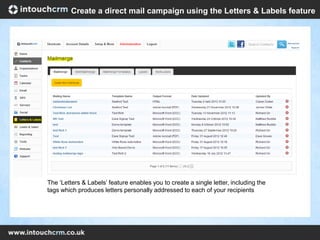
The ‘Letters & Labels’ feature enables you to create a single letter, including the
tags which produces letters personally addressed to each of your recipients
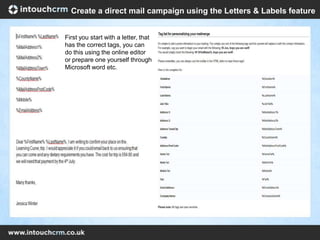
First you start with a letter, that
has the correct tags, you can
do this using the online editor
or prepare one yourself through
Microsoft word etc.
Create a direct mail campaign using the Letters & Labels feature
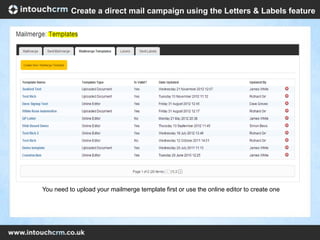
You need to upload your mailmerge template first or use the online editor to create one
Create a direct mail campaign using the Letters & Labels feature
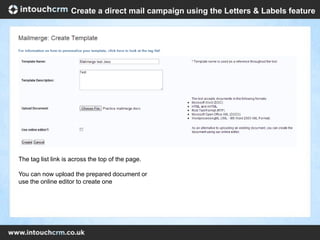
The tag list link is across the top of the page.
You can now upload the prepared document or
use the online editor to create one
Create a direct mail campaign using the Letters & Labels feature
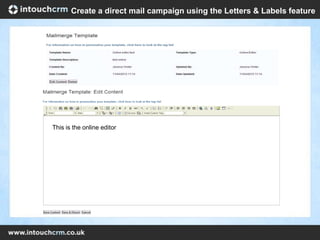
This is the online editor
Create a direct mail campaign using the Letters & Labels feature
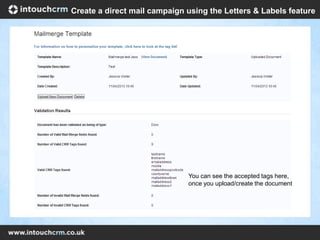
You can see the accepted tags here,
once you upload/create the document
Create a direct mail campaign using the Letters & Labels feature
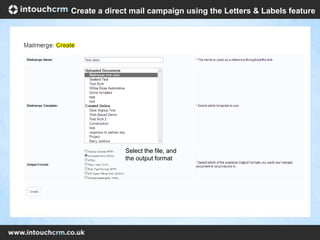
Select the file, and
the output format
Create a direct mail campaign using the Letters & Labels feature
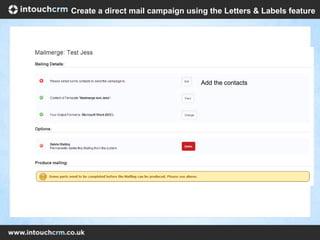
Add the contacts
Create a direct mail campaign using the Letters & Labels feature
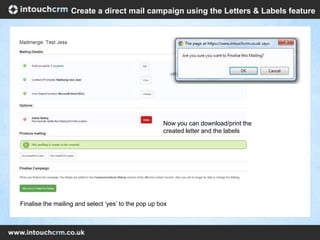
Now you can download/print the
created letter and the labels
Finalise the mailing and select ‘yes’ to the pop up box
Create a direct mail campaign using the Letters & Labels feature
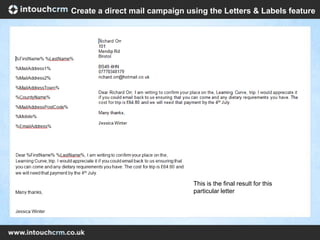
This is the final result for this
particular letter
Create a direct mail campaign using the Letters & Labels feature

How to create a direct mail campaign

  • 1.
    Create a directmail campaign using the Letters & Labels feature
  • 2.
    Create a directmail campaign using the Letters & Labels feature The ‘Letters & Labels’ feature enables you to create a single letter, including the tags which produces letters personally addressed to each of your recipients
  • 3.
    First you startwith a letter, that has the correct tags, you can do this using the online editor or prepare one yourself through Microsoft word etc. Create a direct mail campaign using the Letters & Labels feature
  • 4.
    You need toupload your mailmerge template first or use the online editor to create one Create a direct mail campaign using the Letters & Labels feature
  • 5.
    The tag listlink is across the top of the page. You can now upload the prepared document or use the online editor to create one Create a direct mail campaign using the Letters & Labels feature
  • 6.
    This is theonline editor Create a direct mail campaign using the Letters & Labels feature
  • 7.
    You can seethe accepted tags here, once you upload/create the document Create a direct mail campaign using the Letters & Labels feature
  • 8.
    Select the file,and the output format Create a direct mail campaign using the Letters & Labels feature
  • 9.
    Add the contacts Createa direct mail campaign using the Letters & Labels feature
  • 10.
    Now you candownload/print the created letter and the labels Finalise the mailing and select ‘yes’ to the pop up box Create a direct mail campaign using the Letters & Labels feature
  • 11.
    This is thefinal result for this particular letter Create a direct mail campaign using the Letters & Labels feature