CONVERTING FLASH TRAINING TO
iPAD/HTML5

Dave Goodman
SoftAssist, Inc.
610.265.8484 ext 14
dgood@softassist.com
www.softassist.com
Today’s Emphasis
Your company has a large number of training courses that were designed
in Flash that must now be delivered on the iPad and other tablets. How is
this conversion successfully achieved?
We are not addressing how to develop a new course for the iPad or HTML5 delivery.
There are many options to achieve this.
SoftAssist’s Experience

• 20 years experience
• 500 engagements
• 11 National Awards
• Stellar Clients

Partial Clients

Univ. of Pa Health
UHS, Inc.
Johns Hopkins
Montefiore
Mercy Health System
Lehigh Valley Hospital
ProCure
Take Care
Houghton International
Merck & Co.
Novartis
AstraZeneca
Sanofi Aventis
Volvo
Terumo
CR Bard
Federal Reserve Bank

The World Bank/IFC
World Trade Organization
Mercedes Benz
Provident Bank
Commerce Bank
CEI
Children's Hosp of Phila.
ESRI Institute
The Institutes
Procter & Gamble
AmerisourceBergen
Dept. of Energy
TriZetto
BlueCross BlueShield
CareFirst
Aramark

1150 First Avenue Suite 960 King of Prussia, Pa. www.softassist.com Info: 610.265.8484 x14 Dave Goodman
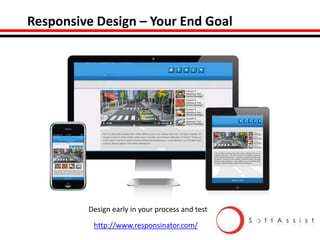
Responsive Design – Your End Goal

Design early in your process and test
http://www.responsinator.com/
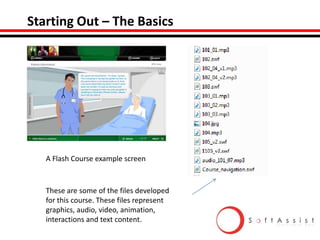
Starting Out – The Basics

A Flash Course example screen

These are some of the files developed
for this course. These files represent
graphics, audio, video, animation,
interactions and text content.
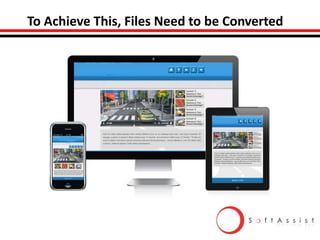
To Achieve This, Files Need to be Converted
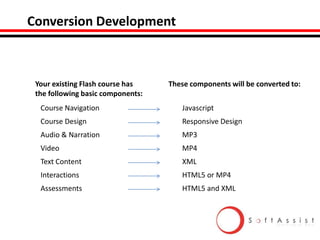
Conversion Development

Your existing Flash course has
the following basic components:

These components will be converted to:

Course Navigation

Javascript

Course Design

Responsive Design

Audio & Narration

MP3

Video

MP4

Text Content

XML

Interactions

HTML5 or MP4

Assessments

HTML5 and XML
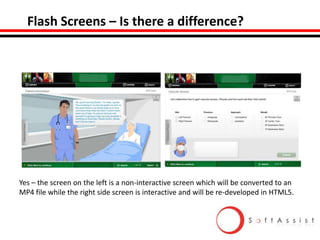
Flash Screens – Is there a difference?

Yes – the screen on the left is a non-interactive screen which will be converted to an
MP4 file while the right side screen is interactive and will be re-developed in HTML5.
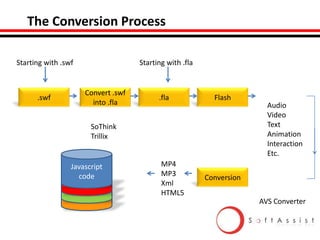
The Conversion Process
Starting with .swf

.swf

Starting with .fla

Convert .swf
into .fla

.fla

Flash

SoThink
Trillix

Javascript
code
CSS3
HTML%
XM

MP4
MP3
Xml
HTML5

Audio
Video
Text
Animation
Interaction
Etc.

Conversion
AVS Converter
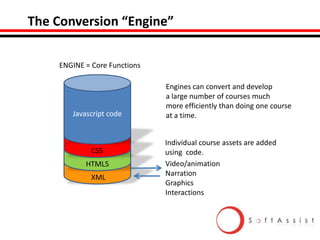
The Conversion “Engine”
ENGINE = Core Functions

Javascript code

Engines can convert and develop
a large number of courses much
more efficiently than doing one course
at a time.

CSS3
HTML%
CSS
XM
HTML5
XML

Individual course assets are added
using code.
Video/animation
Narration
Graphics
Interactions
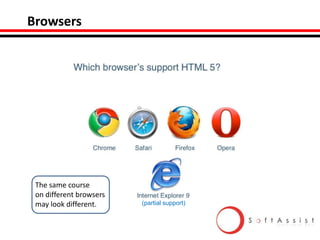
Browsers

The same course
on different browsers
may look different.

(partial support)
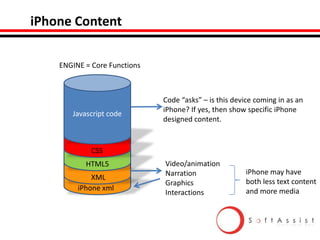
iPhone Content
ENGINE = Core Functions

Javascript code
CSS3

Code “asks” – is this device coming in as an
iPhone? If yes, then show specific iPhone
designed content.

HTML%
CSS
XM
HTML5
XM
XML
iPhone xml

Video/animation
Narration
Graphics
Interactions

iPhone may have
both less text content
and more media
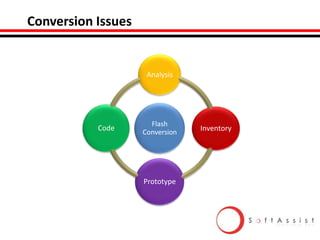
Conversion Issues

1

Code

4

Analysis

Flash
Conversion

Prototype

3

Inventory
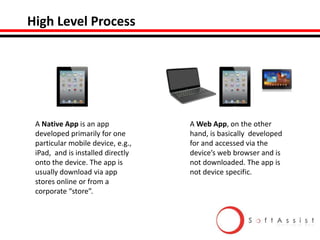
High Level Process

A Native App is an app
developed primarily for one
particular mobile device, e.g.,
iPad, and is installed directly
onto the device. The app is
usually download via app
stores online or from a
corporate “store”.

A Web App, on the other
hand, is basically developed
for and accessed via the
device’s web browser and is
not downloaded. The app is
not device specific.
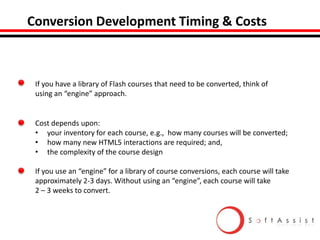
Conversion Development Timing & Costs

If you have a library of Flash courses that need to be converted, think of
using an “engine” approach.

Cost depends upon:
• your inventory for each course, e.g., how many courses will be converted;
• how many new HTML5 interactions are required; and,
• the complexity of the course design
If you use an “engine” for a library of course conversions, each course will take
approximately 2-3 days. Without using an “engine”, each course will take
2 – 3 weeks to convert.
Additional Information

The following screens offer additional information for your
review but will not be addressed today.
Lessons Learned

1. You will underestimate the amount of time required
2. You will change your responsive design which will have a ripple
effect throughout
3. Your expectations will change as you understand what is possible
4. Sales staff may want more “glitz” than is practical
5. This is a team effort – everyone must learn and relearn new skills
6. Keep everyone informed along the way
7. The technology will change – you can not project what the iPad10
will do or what html5 will become
8. You will need to test and re-test multiple times
Instructional Design Issues

• Do not try to place the same content on a phone as you would on a laptop.
You must redesign and collapse the content.
• Are you designing only for the iPad? Will you use the iPad features like the camera?
• Do you really need the graphics and the interactions? You may need to redesign
and “re-conceive” your instructions.
• Minimize scrolling for the phones. Reduce your content.
• Field people, especially sales, want very brief mini-modules – 2 - 3 minutes or less.
• You do not have the same level of interactions in HTML5 as you do in Flash. You
may need to rethink your interactions.
Resources
http://mobiledevices.about.com/lr/native_apps_vs_web_apps/1864073/2/
http://msdn.microsoft.com/en-us/magazine/hh335062.aspx
http://html5test.com/
http://caniuse.com/
http://www.html5rocks.com
http://html5doctor.com/multimedia-troubleshooting/
http://blog.teamtreehouse.com/beginners-guide-to-responsive-web-design
http://diveintohtml5.info/
http://www.iorgsoft.com/compare/mp4-vs-h.264-comparison.html
http://praegnanz.de/html5video/
http://www.streaminglearningcenter.com/
http://www.coronalabs.com/products/corona-sdk/
http://www.netmagazine.com/news/are-css3-and-html5-new-flash-111301
Other Webinars

1. Three Approaches for Increasing Creative Instructional Designs
2. Why Projects Fail: Tips for Recovery
3. Responding to the 54%: What to do after the Training?
4. Investment Strategies for Learning
5. Five Learning Trends: Impact on You and How to Prepare for the Future
6. Designing Successful Sales Training
Q&A and a BigThank You!

SoftAssist’s Services include:
•
•
•
•
•

Custom course design
Engine Conversion
After market re-enforcement
HTML5/Flash interactions
Mobile training

Dave Goodman
SoftAssist, Inc.
610.265.8484 ext 14
dgood@softassist.com
www.softassist.com

How to Convert Flash Training Course Library to iPad/HTML5

  • 1.
    CONVERTING FLASH TRAININGTO iPAD/HTML5 Dave Goodman SoftAssist, Inc. 610.265.8484 ext 14 dgood@softassist.com www.softassist.com
  • 2.
    Today’s Emphasis Your companyhas a large number of training courses that were designed in Flash that must now be delivered on the iPad and other tablets. How is this conversion successfully achieved? We are not addressing how to develop a new course for the iPad or HTML5 delivery. There are many options to achieve this.
  • 3.
    SoftAssist’s Experience • 20years experience • 500 engagements • 11 National Awards • Stellar Clients Partial Clients Univ. of Pa Health UHS, Inc. Johns Hopkins Montefiore Mercy Health System Lehigh Valley Hospital ProCure Take Care Houghton International Merck & Co. Novartis AstraZeneca Sanofi Aventis Volvo Terumo CR Bard Federal Reserve Bank The World Bank/IFC World Trade Organization Mercedes Benz Provident Bank Commerce Bank CEI Children's Hosp of Phila. ESRI Institute The Institutes Procter & Gamble AmerisourceBergen Dept. of Energy TriZetto BlueCross BlueShield CareFirst Aramark 1150 First Avenue Suite 960 King of Prussia, Pa. www.softassist.com Info: 610.265.8484 x14 Dave Goodman
  • 4.
    Responsive Design –Your End Goal Design early in your process and test http://www.responsinator.com/
  • 5.
    Starting Out –The Basics A Flash Course example screen These are some of the files developed for this course. These files represent graphics, audio, video, animation, interactions and text content.
  • 6.
    To Achieve This,Files Need to be Converted
  • 7.
    Conversion Development Your existingFlash course has the following basic components: These components will be converted to: Course Navigation Javascript Course Design Responsive Design Audio & Narration MP3 Video MP4 Text Content XML Interactions HTML5 or MP4 Assessments HTML5 and XML
  • 8.
    Flash Screens –Is there a difference? Yes – the screen on the left is a non-interactive screen which will be converted to an MP4 file while the right side screen is interactive and will be re-developed in HTML5.
  • 9.
    The Conversion Process Startingwith .swf .swf Starting with .fla Convert .swf into .fla .fla Flash SoThink Trillix Javascript code CSS3 HTML% XM MP4 MP3 Xml HTML5 Audio Video Text Animation Interaction Etc. Conversion AVS Converter
  • 10.
    The Conversion “Engine” ENGINE= Core Functions Javascript code Engines can convert and develop a large number of courses much more efficiently than doing one course at a time. CSS3 HTML% CSS XM HTML5 XML Individual course assets are added using code. Video/animation Narration Graphics Interactions
  • 11.
    Browsers The same course ondifferent browsers may look different. (partial support)
  • 12.
    iPhone Content ENGINE =Core Functions Javascript code CSS3 Code “asks” – is this device coming in as an iPhone? If yes, then show specific iPhone designed content. HTML% CSS XM HTML5 XM XML iPhone xml Video/animation Narration Graphics Interactions iPhone may have both less text content and more media
  • 13.
  • 14.
    High Level Process ANative App is an app developed primarily for one particular mobile device, e.g., iPad, and is installed directly onto the device. The app is usually download via app stores online or from a corporate “store”. A Web App, on the other hand, is basically developed for and accessed via the device’s web browser and is not downloaded. The app is not device specific.
  • 15.
    Conversion Development Timing& Costs If you have a library of Flash courses that need to be converted, think of using an “engine” approach. Cost depends upon: • your inventory for each course, e.g., how many courses will be converted; • how many new HTML5 interactions are required; and, • the complexity of the course design If you use an “engine” for a library of course conversions, each course will take approximately 2-3 days. Without using an “engine”, each course will take 2 – 3 weeks to convert.
  • 16.
    Additional Information The followingscreens offer additional information for your review but will not be addressed today.
  • 17.
    Lessons Learned 1. Youwill underestimate the amount of time required 2. You will change your responsive design which will have a ripple effect throughout 3. Your expectations will change as you understand what is possible 4. Sales staff may want more “glitz” than is practical 5. This is a team effort – everyone must learn and relearn new skills 6. Keep everyone informed along the way 7. The technology will change – you can not project what the iPad10 will do or what html5 will become 8. You will need to test and re-test multiple times
  • 18.
    Instructional Design Issues •Do not try to place the same content on a phone as you would on a laptop. You must redesign and collapse the content. • Are you designing only for the iPad? Will you use the iPad features like the camera? • Do you really need the graphics and the interactions? You may need to redesign and “re-conceive” your instructions. • Minimize scrolling for the phones. Reduce your content. • Field people, especially sales, want very brief mini-modules – 2 - 3 minutes or less. • You do not have the same level of interactions in HTML5 as you do in Flash. You may need to rethink your interactions.
  • 19.
  • 20.
    Other Webinars 1. ThreeApproaches for Increasing Creative Instructional Designs 2. Why Projects Fail: Tips for Recovery 3. Responding to the 54%: What to do after the Training? 4. Investment Strategies for Learning 5. Five Learning Trends: Impact on You and How to Prepare for the Future 6. Designing Successful Sales Training
  • 21.
    Q&A and aBigThank You! SoftAssist’s Services include: • • • • • Custom course design Engine Conversion After market re-enforcement HTML5/Flash interactions Mobile training Dave Goodman SoftAssist, Inc. 610.265.8484 ext 14 dgood@softassist.com www.softassist.com