





data & content design
Frieda Brioschi - frieda.brioschi@gmail.com
Emma Tracanella - emma.tracanella@gmail.com
HOW TO COLLECT AND ORGANIZE DATA
LESSON 2 - 2019/20
A QUICK INTRO
LET’S START
data & content design
LESSON 2
3
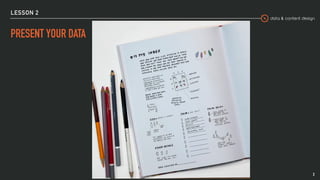
PRESENT YOUR DATA
data & content design
DATA IS ALL AROUND US
LESSON 2
4
METHODS
DATA COLLECTION
data & content design
LESSON 2
WHAT ARE DATA
Data are individual units of information.
A datum describes a single quality or quantity of some object or phenomenon.
Data are measured, collected and reported, and analyzed, whereupon they can
be visualized using graphs, images or other analysis tools.
6
data & content design
LESSON 2
PRIMARY VS SECONDARY DATA
▸ Primary data is data that is observed or collected from first-hand sources
▸ Secondary data is data gathered from studies, surveys, or experiments that
have been run by other people
7
data & content design
LESSON 2
QUALITATIVE VS QUANTITATIVE
▸ Quantitative data comes in the form of numbers, quantities and values. 

Pro: it’s concrete and easily measurable.
▸ Qualitative data is descriptive, based on attributes. 

It helps to explain the “why” behind the information quantitative data
reveals.
8
data & content design
LESSON 2
PRIMARY DATA COLLECTION
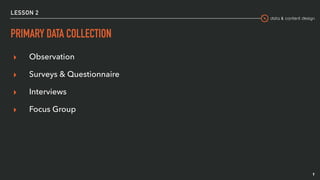
▸ Observation
▸ Surveys & Questionnaire
▸ Interviews
▸ Focus Group
9
data & content design
LESSON 2
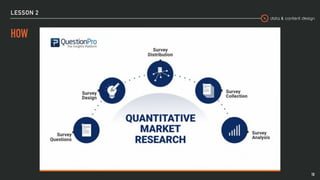
HOW
10
data & content design
LESSON 2
PRIMARY DATA COLLECTION
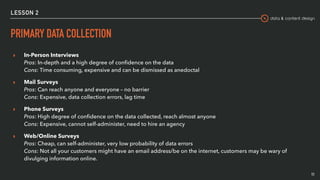
▸ In-Person Interviews

Pros: In-depth and a high degree of confidence on the data

Cons: Time consuming, expensive and can be dismissed as anedoctal
▸ Mail Surveys

Pros: Can reach anyone and everyone – no barrier

Cons: Expensive, data collection errors, lag time
▸ Phone Surveys

Pros: High degree of confidence on the data collected, reach almost anyone

Cons: Expensive, cannot self-administer, need to hire an agency
▸ Web/Online Surveys

Pros: Cheap, can self-administer, very low probability of data errors

Cons: Not all your customers might have an email address/be on the internet, customers may be wary of
divulging information online.
11
data & content design
LESSON 2
BIAS
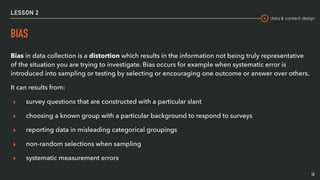
Bias in data collection is a distortion which results in the information not being truly representative
of the situation you are trying to investigate. Bias occurs for example when systematic error is
introduced into sampling or testing by selecting or encouraging one outcome or answer over others.
It can results from:
▸ survey questions that are constructed with a particular slant
▸ choosing a known group with a particular background to respond to surveys
▸ reporting data in misleading categorical groupings
▸ non-random selections when sampling
▸ systematic measurement errors
12
data & content design
LESSON 2
CASE STUDY: TAY.AI
Tay was an artificial intelligence chatter bot that was originally released by
Microsoft via Twitter on March 23, 2016.
It caused subsequent controversy when the bot began to post inflammatory and
offensive tweets through its Twitter account, causing Microsoft to shut down the
service only 16 hours after its launch.
13
data & content design
LESSON 2
SECONDARY DATA SOURCES
▸ Our data:
▸ Personal information, likes, activities and interests (Facebook, instagram,
Youtube, …)
▸ Personal data (from mobile phone)
14
data & content design
LESSON 2
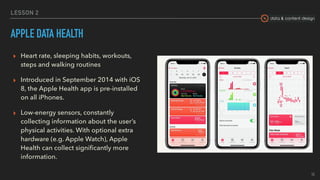
APPLE DATA HEALTH
▸ Heart rate, sleeping habits, workouts,
steps and walking routines
▸ Introduced in September 2014 with iOS
8, the Apple Health app is pre-installed
on all iPhones.
▸ Low-energy sensors, constantly
collecting information about the user’s
physical activities. With optional extra
hardware (e.g. Apple Watch), Apple
Health can collect significantly more
information. 
15
data & content design
LESSON 2
SECONDARY DATA SOURCES
▸ Other data:
▸ Public data sets
▸ Historical data
16
data & content design
LESSON 2
FLIGHTRADAR24
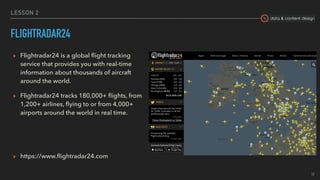
▸ Flightradar24 is a global flight tracking
service that provides you with real-time
information about thousands of aircraft
around the world.
▸ Flightradar24 tracks 180,000+ flights, from
1,200+ airlines, flying to or from 4,000+
airports around the world in real time.
▸ https://www.flightradar24.com
17
data & content design
LESSON 2
HISTORICAL CLIMATE DATA
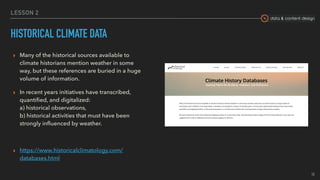
▸ Many of the historical sources available to
climate historians mention weather in some
way, but these references are buried in a huge
volume of information.
▸ In recent years initiatives have transcribed,
quantified, and digitalized: 

a) historical observations, 

b) historical activities that must have been
strongly influenced by weather.
▸ https://www.historicalclimatology.com/
databases.html
18
data & content design
LESSON 2
ATLAS OF URBAN EXPANSION
▸ As of 2010, the world contained 4,231 cities with
100,000 or more people.
▸ The Atlas of Urban Expansion collects and analyzes
data on the quantity and quality of urban
expansion in a stratified global sample of 200
cities.
▸ The Atlas presents the output of the first two
phases of the Monitoring Global Urban Expansion
Program, an initiative that gathers data and
evidence on cities worldwide.
▸ http://atlasofurbanexpansion.org/cities/view/Milan
19
data & content design
LESSON 2
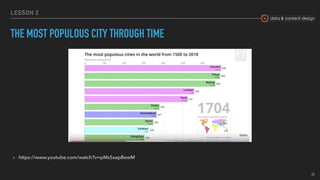
THE MOST POPULOUS CITY THROUGH TIME
▸ https://www.youtube.com/watch?v=pMs5xapBewM
20
data & content design
DATA COLLECTION MAY BE AFFECTED BY
THEIR USE!
We
LESSON 2
21
PROCESSING
DATA
data & content design
LESSON 2
STRUCTURED DATA
Structured data is usually contained in rows and columns and its elements can be mapped into fixed pre-
defined model. Examples of sources:
▸ SQL Databases
▸ Spreadsheets such as Excel
▸ OLTP Systems
▸ Online forms
▸ Sensors such as GPS or RFID tags
▸ Network and Web server logs
▸ Medical devices
23
data & content design
LESSON 2
UNSTRUCTURED DATA
Unstructured data is data that cannot be contained in a row-column format and doesn’t have a data
model. Examples of sources:
▸ Web pages
▸ Images (JPEG, GIF, PNG, etc.)
▸ Videos
▸ Memos
▸ Reports
▸ Word documents and PowerPoint persentations
▸ Surveys
24
data & content design
LESSON 2
SEMI-STRUCTURED DATA
Basically it’s a mix between both of the previous ones. Semi-structured data has some defining or
consistent characteristics but doesn’t conform to a rigid structure. Examples of sources:
▸ E-mails
▸ XML and other markup languages
▸ Binary executables
▸ TCP/IP packets
▸ Zipped files
▸ JSON
▸ Web pages
25
data & content design
LESSON 2
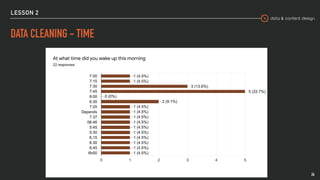
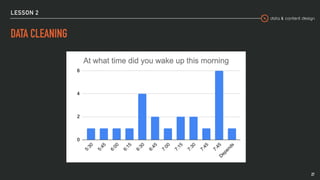
DATA CLEANING - TIME
26
data & content design
LESSON 2
DATA CLEANING
27
data & content design
LESSON 2
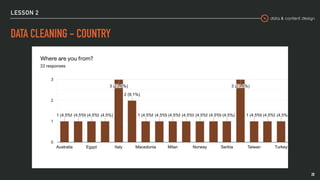
DATA CLEANING - COUNTRY
28
data & content design
LESSON 2
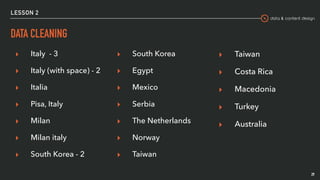
DATA CLEANING
▸ Italy - 3
▸ Italy (with space) - 2
▸ Italia
▸ Pisa, Italy
▸ Milan
▸ Milan italy
▸ South Korea - 2
29
▸ South Korea
▸ Egypt
▸ Mexico
▸ Serbia
▸ The Netherlands
▸ Norway
▸ Taiwan
▸ Taiwan
▸ Costa Rica
▸ Macedonia
▸ Turkey
▸ Australia
data & content design
LESSON 2
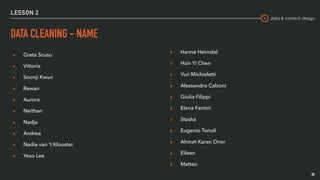
DATA CLEANING - NAME
▸ Greta Scuso
▸ Vittoria
▸ Soonji Kwun
▸ Rewan
▸ Aurora
▸ Neithan
▸ Nadja
▸ Andrea
▸ Nadia van 't Klooster
▸ Yeso Lee
30
▸ Hanne Heimdal
▸ Hsin Yi Chen
▸ Yuri Michieletti
▸ Alessandro Calzoni
▸ Giulia Filippi
▸ Elena Fantini
▸ Stasha
▸ Eugenio Tonoli
▸ Ahmet Karan Oner
▸ Eileen
▸ Matteo
DATABASES
DON’T BE AFRAID OF
data & content design
LESSON 2
WHAT IS A DB?
According to Wikipedia “a database is an organized collection of data, generally
stored and accessed electronically from a computer system”.
Ideally it is organized in such a way that it can be easily accessed, managed, and
updated.
32
data & content design
LESSON 2
DB JARGON: QUERY
When you want to perform an operation on data stored in a db, you should run a
query. This is typically one of SELECT, INSERT, UPDATE, or DELETE.
SELECT wakeUpTime FROM dCDCourse
33
data & content design
LESSON 2
DB JARGON: TRANSACTION
When you need to perform a sequence of operations as a single unit of work,
that’s a transaction.
If one of you decide to withdraw from this course, then I need to update both the
list of students enrolled to this course and the total count of students. If I didn’t
operate inside a transaction, there’s a moment when one information (list of
students or total count) is wrong.
34
data & content design
LESSON 2
DB JARGON: ACID
Wikipedia: ACID (Atomicity, Consistency, Isolation, Durability) is a set of properties of database
transactions intended to guarantee validity even in the event of errors, power failures, etc.
▸ Atomicity means that you guarantee that either all of the transaction succeeds or none of
it does.
▸ Consistency ensures that you guarantee that all data will be consistent.
▸ Isolation guarantees that all transactions will occur in isolation. No transaction will be
affected by any other transaction.
▸ Durability means that, once a transaction is committed, it will remain permanently in the
system.
35
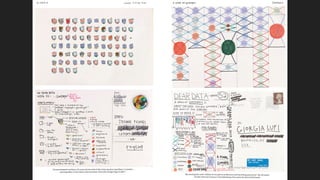
DEAR DATA
GIORGIA LUPI
How to collect and organize data

How to collect and organize data

  • 1.
    data & contentdesign Frieda Brioschi - frieda.brioschi@gmail.com Emma Tracanella - emma.tracanella@gmail.com HOW TO COLLECT AND ORGANIZE DATA LESSON 2 - 2019/20
  • 2.
  • 3.
    data & contentdesign LESSON 2 3 PRESENT YOUR DATA
  • 4.
    data & contentdesign DATA IS ALL AROUND US LESSON 2 4
  • 5.
  • 6.
    data & contentdesign LESSON 2 WHAT ARE DATA Data are individual units of information. A datum describes a single quality or quantity of some object or phenomenon. Data are measured, collected and reported, and analyzed, whereupon they can be visualized using graphs, images or other analysis tools. 6
  • 7.
    data & contentdesign LESSON 2 PRIMARY VS SECONDARY DATA ▸ Primary data is data that is observed or collected from first-hand sources ▸ Secondary data is data gathered from studies, surveys, or experiments that have been run by other people 7
  • 8.
    data & contentdesign LESSON 2 QUALITATIVE VS QUANTITATIVE ▸ Quantitative data comes in the form of numbers, quantities and values. 
 Pro: it’s concrete and easily measurable. ▸ Qualitative data is descriptive, based on attributes. 
 It helps to explain the “why” behind the information quantitative data reveals. 8
  • 9.
    data & contentdesign LESSON 2 PRIMARY DATA COLLECTION ▸ Observation ▸ Surveys & Questionnaire ▸ Interviews ▸ Focus Group 9
  • 10.
    data & contentdesign LESSON 2 HOW 10
  • 11.
    data & contentdesign LESSON 2 PRIMARY DATA COLLECTION ▸ In-Person Interviews
 Pros: In-depth and a high degree of confidence on the data
 Cons: Time consuming, expensive and can be dismissed as anedoctal ▸ Mail Surveys
 Pros: Can reach anyone and everyone – no barrier
 Cons: Expensive, data collection errors, lag time ▸ Phone Surveys
 Pros: High degree of confidence on the data collected, reach almost anyone
 Cons: Expensive, cannot self-administer, need to hire an agency ▸ Web/Online Surveys
 Pros: Cheap, can self-administer, very low probability of data errors
 Cons: Not all your customers might have an email address/be on the internet, customers may be wary of divulging information online. 11
  • 12.
    data & contentdesign LESSON 2 BIAS Bias in data collection is a distortion which results in the information not being truly representative of the situation you are trying to investigate. Bias occurs for example when systematic error is introduced into sampling or testing by selecting or encouraging one outcome or answer over others. It can results from: ▸ survey questions that are constructed with a particular slant ▸ choosing a known group with a particular background to respond to surveys ▸ reporting data in misleading categorical groupings ▸ non-random selections when sampling ▸ systematic measurement errors 12
  • 13.
    data & contentdesign LESSON 2 CASE STUDY: TAY.AI Tay was an artificial intelligence chatter bot that was originally released by Microsoft via Twitter on March 23, 2016. It caused subsequent controversy when the bot began to post inflammatory and offensive tweets through its Twitter account, causing Microsoft to shut down the service only 16 hours after its launch. 13
  • 14.
    data & contentdesign LESSON 2 SECONDARY DATA SOURCES ▸ Our data: ▸ Personal information, likes, activities and interests (Facebook, instagram, Youtube, …) ▸ Personal data (from mobile phone) 14
  • 15.
    data & contentdesign LESSON 2 APPLE DATA HEALTH ▸ Heart rate, sleeping habits, workouts, steps and walking routines ▸ Introduced in September 2014 with iOS 8, the Apple Health app is pre-installed on all iPhones. ▸ Low-energy sensors, constantly collecting information about the user’s physical activities. With optional extra hardware (e.g. Apple Watch), Apple Health can collect significantly more information.  15
  • 16.
    data & contentdesign LESSON 2 SECONDARY DATA SOURCES ▸ Other data: ▸ Public data sets ▸ Historical data 16
  • 17.
    data & contentdesign LESSON 2 FLIGHTRADAR24 ▸ Flightradar24 is a global flight tracking service that provides you with real-time information about thousands of aircraft around the world. ▸ Flightradar24 tracks 180,000+ flights, from 1,200+ airlines, flying to or from 4,000+ airports around the world in real time. ▸ https://www.flightradar24.com 17
  • 18.
    data & contentdesign LESSON 2 HISTORICAL CLIMATE DATA ▸ Many of the historical sources available to climate historians mention weather in some way, but these references are buried in a huge volume of information. ▸ In recent years initiatives have transcribed, quantified, and digitalized: 
 a) historical observations, 
 b) historical activities that must have been strongly influenced by weather. ▸ https://www.historicalclimatology.com/ databases.html 18
  • 19.
    data & contentdesign LESSON 2 ATLAS OF URBAN EXPANSION ▸ As of 2010, the world contained 4,231 cities with 100,000 or more people. ▸ The Atlas of Urban Expansion collects and analyzes data on the quantity and quality of urban expansion in a stratified global sample of 200 cities. ▸ The Atlas presents the output of the first two phases of the Monitoring Global Urban Expansion Program, an initiative that gathers data and evidence on cities worldwide. ▸ http://atlasofurbanexpansion.org/cities/view/Milan 19
  • 20.
    data & contentdesign LESSON 2 THE MOST POPULOUS CITY THROUGH TIME ▸ https://www.youtube.com/watch?v=pMs5xapBewM 20
  • 21.
    data & contentdesign DATA COLLECTION MAY BE AFFECTED BY THEIR USE! We LESSON 2 21
  • 22.
  • 23.
    data & contentdesign LESSON 2 STRUCTURED DATA Structured data is usually contained in rows and columns and its elements can be mapped into fixed pre- defined model. Examples of sources: ▸ SQL Databases ▸ Spreadsheets such as Excel ▸ OLTP Systems ▸ Online forms ▸ Sensors such as GPS or RFID tags ▸ Network and Web server logs ▸ Medical devices 23
  • 24.
    data & contentdesign LESSON 2 UNSTRUCTURED DATA Unstructured data is data that cannot be contained in a row-column format and doesn’t have a data model. Examples of sources: ▸ Web pages ▸ Images (JPEG, GIF, PNG, etc.) ▸ Videos ▸ Memos ▸ Reports ▸ Word documents and PowerPoint persentations ▸ Surveys 24
  • 25.
    data & contentdesign LESSON 2 SEMI-STRUCTURED DATA Basically it’s a mix between both of the previous ones. Semi-structured data has some defining or consistent characteristics but doesn’t conform to a rigid structure. Examples of sources: ▸ E-mails ▸ XML and other markup languages ▸ Binary executables ▸ TCP/IP packets ▸ Zipped files ▸ JSON ▸ Web pages 25
  • 26.
    data & contentdesign LESSON 2 DATA CLEANING - TIME 26
  • 27.
    data & contentdesign LESSON 2 DATA CLEANING 27
  • 28.
    data & contentdesign LESSON 2 DATA CLEANING - COUNTRY 28
  • 29.
    data & contentdesign LESSON 2 DATA CLEANING ▸ Italy - 3 ▸ Italy (with space) - 2 ▸ Italia ▸ Pisa, Italy ▸ Milan ▸ Milan italy ▸ South Korea - 2 29 ▸ South Korea ▸ Egypt ▸ Mexico ▸ Serbia ▸ The Netherlands ▸ Norway ▸ Taiwan ▸ Taiwan ▸ Costa Rica ▸ Macedonia ▸ Turkey ▸ Australia
  • 30.
    data & contentdesign LESSON 2 DATA CLEANING - NAME ▸ Greta Scuso ▸ Vittoria ▸ Soonji Kwun ▸ Rewan ▸ Aurora ▸ Neithan ▸ Nadja ▸ Andrea ▸ Nadia van 't Klooster ▸ Yeso Lee 30 ▸ Hanne Heimdal ▸ Hsin Yi Chen ▸ Yuri Michieletti ▸ Alessandro Calzoni ▸ Giulia Filippi ▸ Elena Fantini ▸ Stasha ▸ Eugenio Tonoli ▸ Ahmet Karan Oner ▸ Eileen ▸ Matteo
  • 31.
  • 32.
    data & contentdesign LESSON 2 WHAT IS A DB? According to Wikipedia “a database is an organized collection of data, generally stored and accessed electronically from a computer system”. Ideally it is organized in such a way that it can be easily accessed, managed, and updated. 32
  • 33.
    data & contentdesign LESSON 2 DB JARGON: QUERY When you want to perform an operation on data stored in a db, you should run a query. This is typically one of SELECT, INSERT, UPDATE, or DELETE. SELECT wakeUpTime FROM dCDCourse 33
  • 34.
    data & contentdesign LESSON 2 DB JARGON: TRANSACTION When you need to perform a sequence of operations as a single unit of work, that’s a transaction. If one of you decide to withdraw from this course, then I need to update both the list of students enrolled to this course and the total count of students. If I didn’t operate inside a transaction, there’s a moment when one information (list of students or total count) is wrong. 34
  • 35.
    data & contentdesign LESSON 2 DB JARGON: ACID Wikipedia: ACID (Atomicity, Consistency, Isolation, Durability) is a set of properties of database transactions intended to guarantee validity even in the event of errors, power failures, etc. ▸ Atomicity means that you guarantee that either all of the transaction succeeds or none of it does. ▸ Consistency ensures that you guarantee that all data will be consistent. ▸ Isolation guarantees that all transactions will occur in isolation. No transaction will be affected by any other transaction. ▸ Durability means that, once a transaction is committed, it will remain permanently in the system. 35
  • 36.