1 | P a g e
2 | P a g e
Project Report
Chapter 1: Introduction
 Introduction
Health of citizen is the wealth of Nation. Hospital Management
database System is a computer base software system automate
the hospital management system. It is designed to improve the
quality and management in areas of clinical process analysis.
The Project Hospital Management Database System
include the registration of patients, Doctors, Nurses,
Receptionists and Rooms storing their detail into System by using
database. The software has facility to give the unique id to
Patient, Doctor, Nurse, Receptionist and room and store their
details.
Hospital Management Database System have User Friendly
interface. This system also has the Queries option.
3 | P a g e
 Problem: Storage time accuracy efficiency
1. This system is manual.
2. The information is very difficult to retrieve for example to
find the patient history.
3. Manually data entry has a chance of inaccuracy.
4. Manual data entry in inefficient
5. Wastage of time
 Solution
1. It will be the Computer base system
2. Data entry become more efficient
3. Reduction Of errors
4. No Wastage of time
4 | P a g e
Chapter 2: Data Requirement
 Entity Classes
In this project there are 5 entity classes. The detail is as under
1. DOCTOR
Doctor class stores the data of doctors who diagnose the patients.
2. NURSE
Nurse class stores the data of nurses who treat the patients.
3. PATIENT
Patient class stores the data of patient who take appointment from
Reception.
4. RECEPTIONIST
Receptionist class stores the data of receptionist who interact with
patient.
5. ROOM
Room class stores the record which patients are admitted.
 Attribute
1. DOCTOR: Doctor class have 4 attributes
I. Dr_ID
II. Dr_Name
III. Dr_Specialization
IV. Dr_Gender
2. NURSE: Nurse class have 4 attributes
5 | P a g e
I. N_Name
II. N_Id
III. N_Add (Address)
IV. N_Email
3. PATIENT: Patient class have 7 attributes
I. P_ID
II. P_Name
III. P_Gender (Address)
IV. P_Entry Date
V. P_Exit Date
VI. N_ID
VII. R_ID
4. RECEPTIONIST: Receptionist class have 4 attributes
I. R_ID
II. R_Name
III. R_Gender
IV. R_Add (Addrss)
5. ROOM: Room class have 4 attributes
I. R_Number
II. R_Serial
III. R_Entry Date
IV. R_Exit Date
 Business Rule
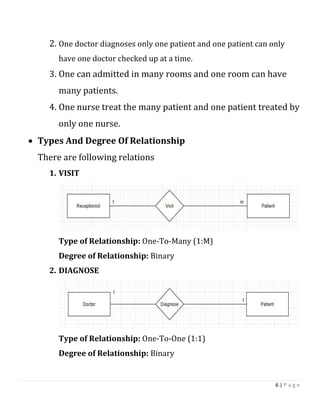
1. One receptionist deal many patients and one patient interact with
only one receptionist.
6 | P a g e
2. One doctor diagnoses only one patient and one patient can only
have one doctor checked up at a time.
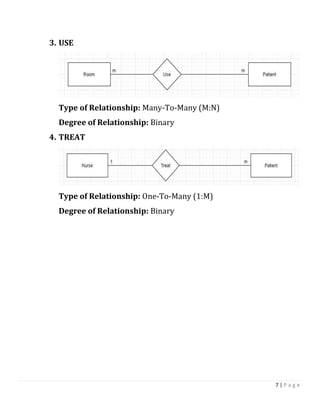
3. One can admitted in many rooms and one room can have
many patients.
4. One nurse treat the many patient and one patient treated by
only one nurse.
 Types And Degree Of Relationship
There are following relations
1. VISIT
Type of Relationship: One-To-Many (1:M)
Degree of Relationship: Binary
2. DIAGNOSE
Type of Relationship: One-To-One (1:1)
Degree of Relationship: Binary
7 | P a g e
3. USE
Type of Relationship: Many-To-Many (M:N)
Degree of Relationship: Binary
4. TREAT
Type of Relationship: One-To-Many (1:M)
Degree of Relationship: Binary
8 | P a g e
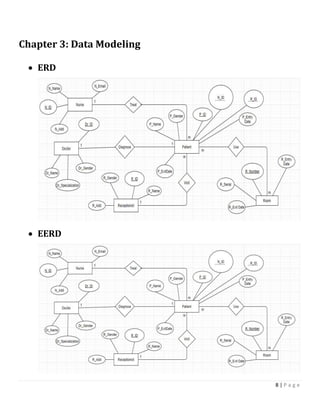
Chapter 3: Data Modeling
 ERD
 EERD
9 | P a g e
Chapter 4: Logical Data Model
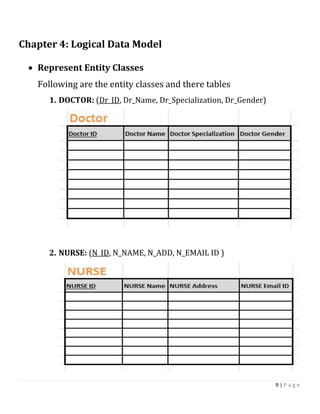
 Represent Entity Classes
Following are the entity classes and there tables
1. DOCTOR: (Dr_ID, Dr_Name, Dr_Specialization, Dr_Gender)
2. NURSE: (N_ID, N_NAME, N_ADD, N_EMAIL ID )
10 | P a g e
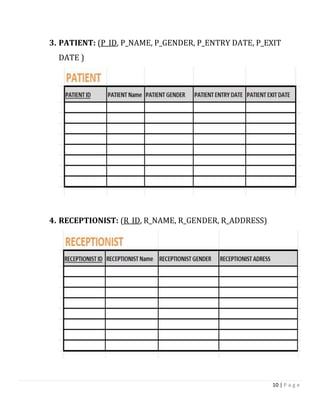
3. PATIENT: (P_ID, P_NAME, P_GENDER, P_ENTRY DATE, P_EXIT
DATE )
4. RECEPTIONIST: (R_ID, R_NAME, R_GENDER, R_ADDRESS)
11 | P a g e
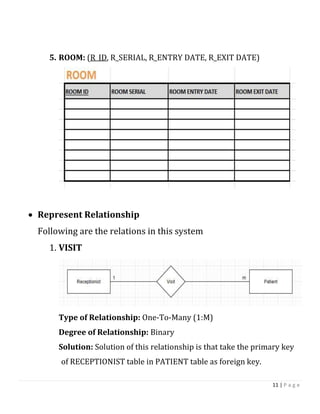
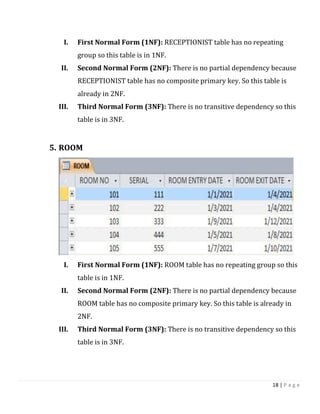
5. ROOM: (R_ID, R_SERIAL, R_ENTRY DATE, R_EXIT DATE)
 Represent Relationship
Following are the relations in this system
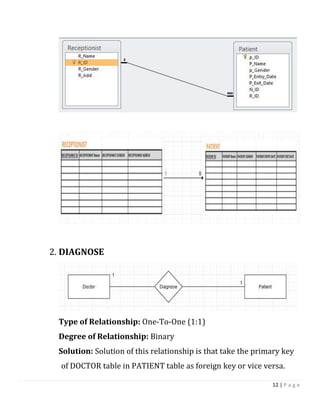
1. VISIT
Type of Relationship: One-To-Many (1:M)
Degree of Relationship: Binary
Solution: Solution of this relationship is that take the primary key
of RECEPTIONIST table in PATIENT table as foreign key.
12 | P a g e
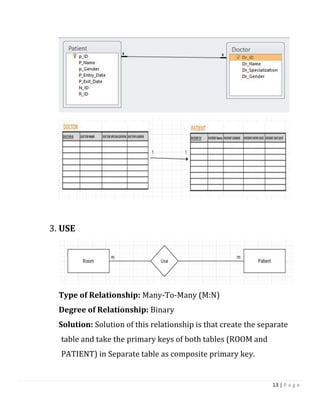
2. DIAGNOSE
Type of Relationship: One-To-One (1:1)
Degree of Relationship: Binary
Solution: Solution of this relationship is that take the primary key
of DOCTOR table in PATIENT table as foreign key or vice versa.
13 | P a g e
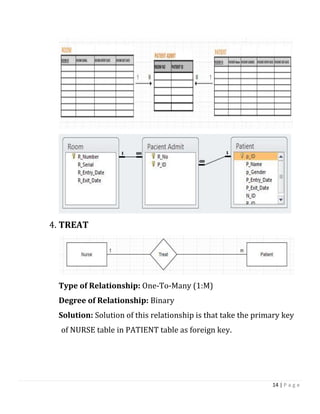
3. USE
Type of Relationship: Many-To-Many (M:N)
Degree of Relationship: Binary
Solution: Solution of this relationship is that create the separate
table and take the primary keys of both tables (ROOM and
PATIENT) in Separate table as composite primary key.
14 | P a g e
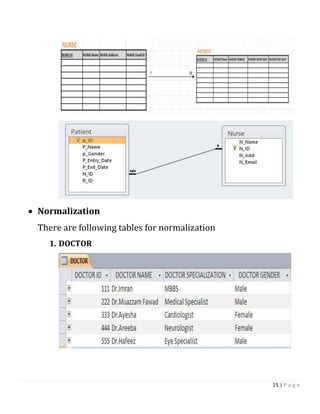
4. TREAT
Type of Relationship: One-To-Many (1:M)
Degree of Relationship: Binary
Solution: Solution of this relationship is that take the primary key
of NURSE table in PATIENT table as foreign key.
15 | P a g e
 Normalization
There are following tables for normalization
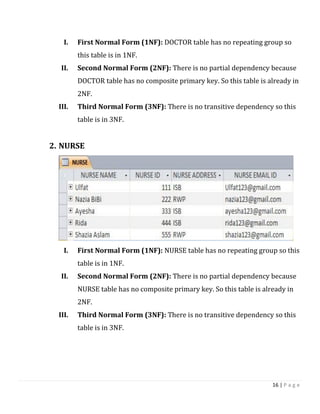
1. DOCTOR
16 | P a g e
I. First Normal Form (1NF): DOCTOR table has no repeating group so
this table is in 1NF.
II. Second Normal Form (2NF): There is no partial dependency because
DOCTOR table has no composite primary key. So this table is already in
2NF.
III. Third Normal Form (3NF): There is no transitive dependency so this
table is in 3NF.
2. NURSE
I. First Normal Form (1NF): NURSE table has no repeating group so this
table is in 1NF.
II. Second Normal Form (2NF): There is no partial dependency because
NURSE table has no composite primary key. So this table is already in
2NF.
III. Third Normal Form (3NF): There is no transitive dependency so this
table is in 3NF.
17 | P a g e
3. PATIENT
I. First Normal Form (1NF): PATIENT table has no repeating group so
this table is in 1NF.
II. Second Normal Form (2NF): There is no partial dependency because
PATIENT table has no composite primary key. So this table is already in
2NF.
III. Third Normal Form (3NF): There is no transitive dependency so this
table is in 3NF.
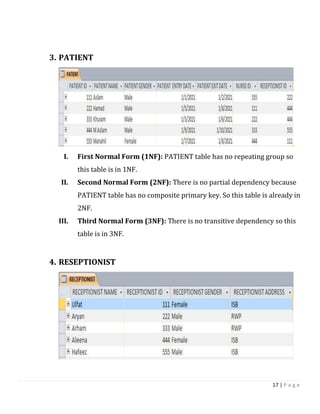
4. RESEPTIONIST
18 | P a g e
I. First Normal Form (1NF): RECEPTIONIST table has no repeating
group so this table is in 1NF.
II. Second Normal Form (2NF): There is no partial dependency because
RECEPTIONIST table has no composite primary key. So this table is
already in 2NF.
III. Third Normal Form (3NF): There is no transitive dependency so this
table is in 3NF.
5. ROOM
I. First Normal Form (1NF): ROOM table has no repeating group so this
table is in 1NF.
II. Second Normal Form (2NF): There is no partial dependency because
ROOM table has no composite primary key. So this table is already in
2NF.
III. Third Normal Form (3NF): There is no transitive dependency so this
table is in 3NF.
19 | P a g e
Chapter 5: Implementation
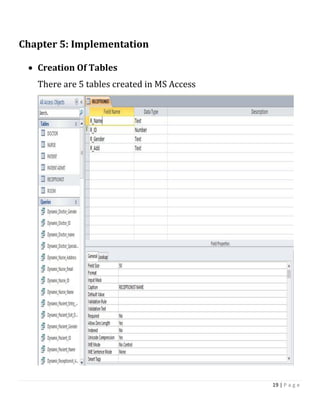
 Creation Of Tables
There are 5 tables created in MS Access
20 | P a g e
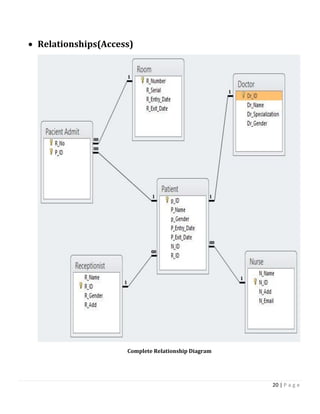
 Relationships(Access)
Complete Relationship Diagram
21 | P a g e
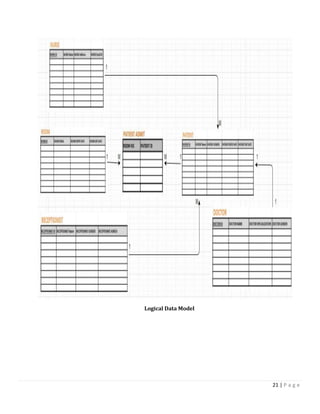
Logical Data Model
22 | P a g e
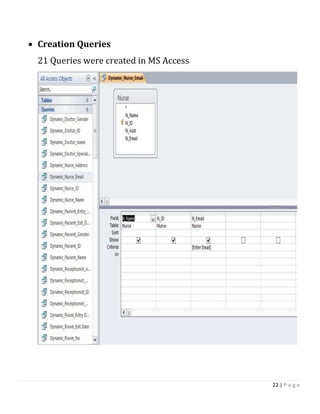
 Creation Queries
21 Queries were created in MS Access
23 | P a g e
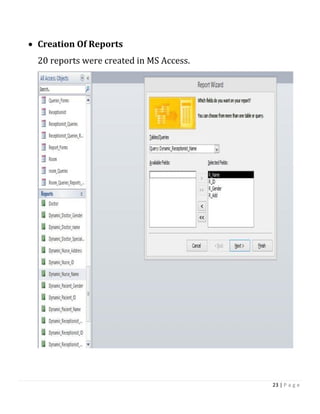
 Creation Of Reports
20 reports were created in MS Access.
24 | P a g e
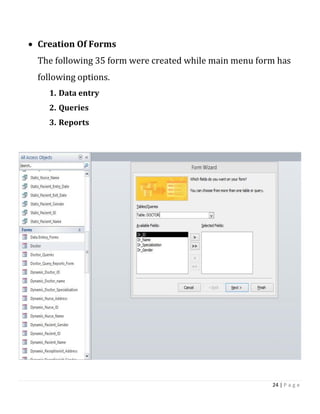
 Creation Of Forms
The following 35 form were created while main menu form has
following options.
1. Data entry
2. Queries
3. Reports
25 | P a g e
Appendix
 User Manual
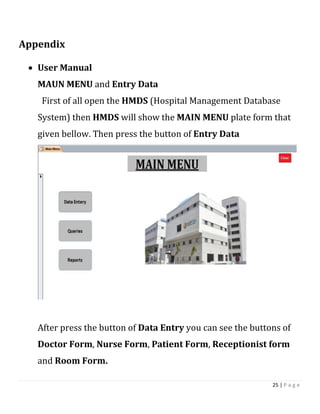
MAUN MENU and Entry Data
First of all open the HMDS (Hospital Management Database
System) then HMDS will show the MAIN MENU plate form that
given bellow. Then press the button of Entry Data
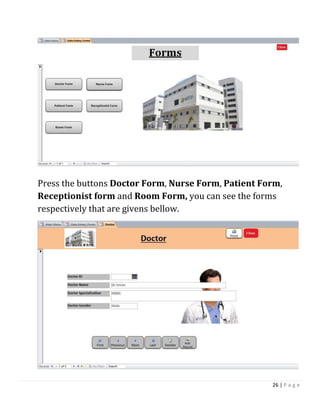
After press the button of Data Entry you can see the buttons of
Doctor Form, Nurse Form, Patient Form, Receptionist form
and Room Form.
26 | P a g e
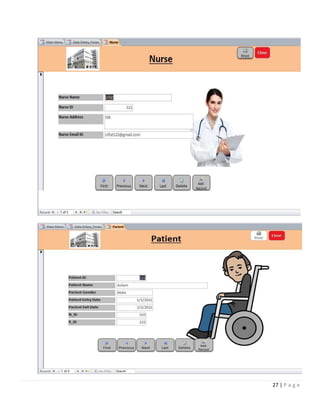
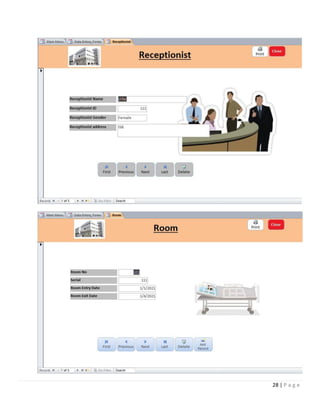
Press the buttons Doctor Form, Nurse Form, Patient Form,
Receptionist form and Room Form, you can see the forms
respectively that are givens bellow.
27 | P a g e
28 | P a g e
29 | P a g e
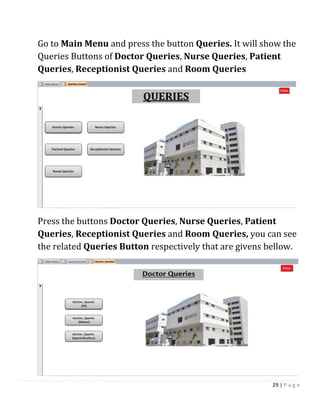
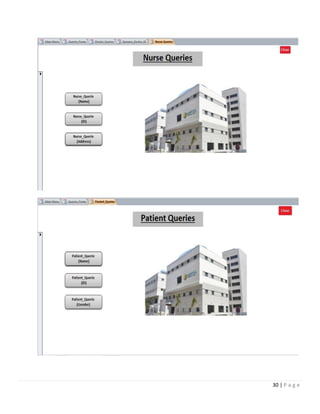
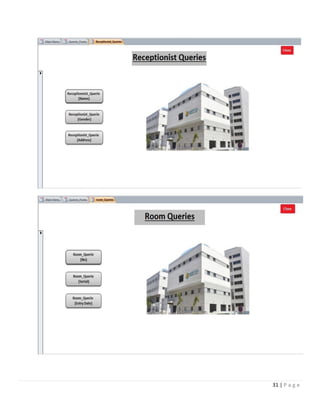
Go to Main Menu and press the button Queries. It will show the
Queries Buttons of Doctor Queries, Nurse Queries, Patient
Queries, Receptionist Queries and Room Queries
Press the buttons Doctor Queries, Nurse Queries, Patient
Queries, Receptionist Queries and Room Queries, you can see
the related Queries Button respectively that are givens bellow.
30 | P a g e
31 | P a g e
32 | P a g e
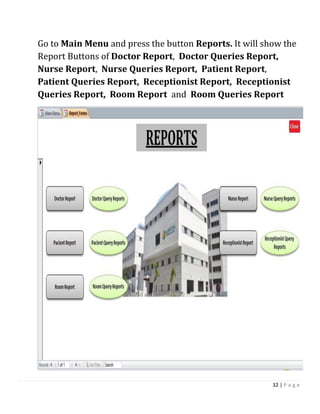
Go to Main Menu and press the button Reports. It will show the
Report Buttons of Doctor Report, Doctor Queries Report,
Nurse Report, Nurse Queries Report, Patient Report,
Patient Queries Report, Receptionist Report, Receptionist
Queries Report, Room Report and Room Queries Report
33 | P a g e
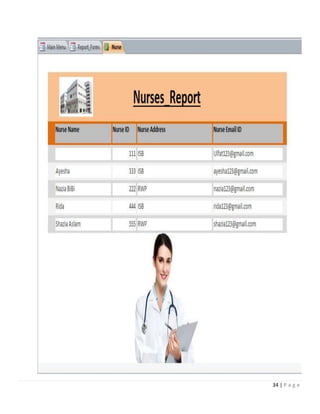
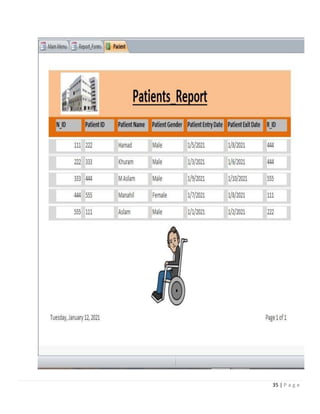
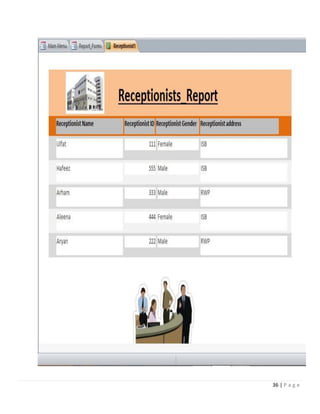
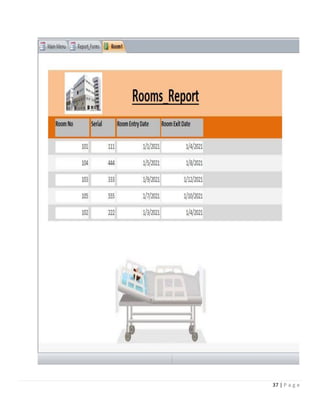
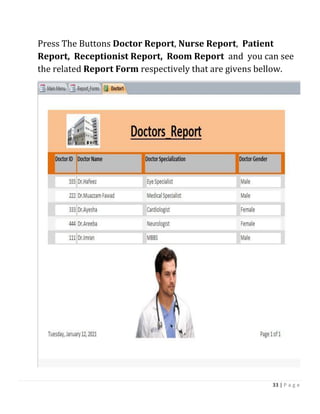
Press The Buttons Doctor Report, Nurse Report, Patient
Report, Receptionist Report, Room Report and you can see
the related Report Form respectively that are givens bellow.
34 | P a g e
35 | P a g e
36 | P a g e
37 | P a g e
38 | P a g e
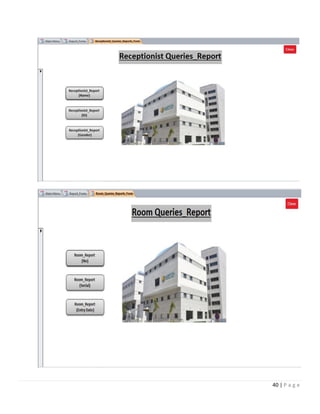
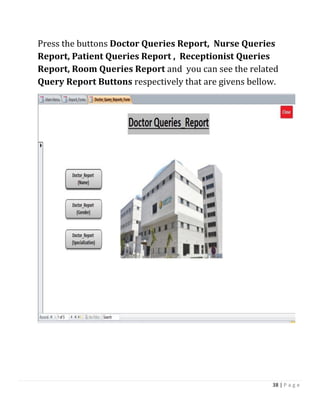
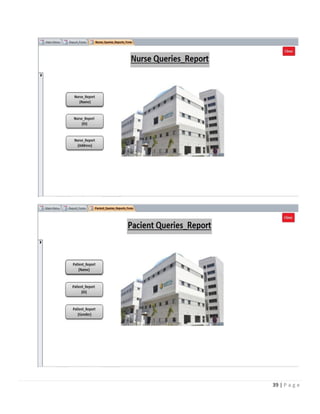
Press the buttons Doctor Queries Report, Nurse Queries
Report, Patient Queries Report , Receptionist Queries
Report, Room Queries Report and you can see the related
Query Report Buttons respectively that are givens bellow.
39 | P a g e
40 | P a g e
41 | P a g e

Hospital database management system project report

  • 1.
    1 | Pa g e
  • 2.
    2 | Pa g e Project Report Chapter 1: Introduction  Introduction Health of citizen is the wealth of Nation. Hospital Management database System is a computer base software system automate the hospital management system. It is designed to improve the quality and management in areas of clinical process analysis. The Project Hospital Management Database System include the registration of patients, Doctors, Nurses, Receptionists and Rooms storing their detail into System by using database. The software has facility to give the unique id to Patient, Doctor, Nurse, Receptionist and room and store their details. Hospital Management Database System have User Friendly interface. This system also has the Queries option.
  • 3.
    3 | Pa g e  Problem: Storage time accuracy efficiency 1. This system is manual. 2. The information is very difficult to retrieve for example to find the patient history. 3. Manually data entry has a chance of inaccuracy. 4. Manual data entry in inefficient 5. Wastage of time  Solution 1. It will be the Computer base system 2. Data entry become more efficient 3. Reduction Of errors 4. No Wastage of time
  • 4.
    4 | Pa g e Chapter 2: Data Requirement  Entity Classes In this project there are 5 entity classes. The detail is as under 1. DOCTOR Doctor class stores the data of doctors who diagnose the patients. 2. NURSE Nurse class stores the data of nurses who treat the patients. 3. PATIENT Patient class stores the data of patient who take appointment from Reception. 4. RECEPTIONIST Receptionist class stores the data of receptionist who interact with patient. 5. ROOM Room class stores the record which patients are admitted.  Attribute 1. DOCTOR: Doctor class have 4 attributes I. Dr_ID II. Dr_Name III. Dr_Specialization IV. Dr_Gender 2. NURSE: Nurse class have 4 attributes
  • 5.
    5 | Pa g e I. N_Name II. N_Id III. N_Add (Address) IV. N_Email 3. PATIENT: Patient class have 7 attributes I. P_ID II. P_Name III. P_Gender (Address) IV. P_Entry Date V. P_Exit Date VI. N_ID VII. R_ID 4. RECEPTIONIST: Receptionist class have 4 attributes I. R_ID II. R_Name III. R_Gender IV. R_Add (Addrss) 5. ROOM: Room class have 4 attributes I. R_Number II. R_Serial III. R_Entry Date IV. R_Exit Date  Business Rule 1. One receptionist deal many patients and one patient interact with only one receptionist.
  • 6.
    6 | Pa g e 2. One doctor diagnoses only one patient and one patient can only have one doctor checked up at a time. 3. One can admitted in many rooms and one room can have many patients. 4. One nurse treat the many patient and one patient treated by only one nurse.  Types And Degree Of Relationship There are following relations 1. VISIT Type of Relationship: One-To-Many (1:M) Degree of Relationship: Binary 2. DIAGNOSE Type of Relationship: One-To-One (1:1) Degree of Relationship: Binary
  • 7.
    7 | Pa g e 3. USE Type of Relationship: Many-To-Many (M:N) Degree of Relationship: Binary 4. TREAT Type of Relationship: One-To-Many (1:M) Degree of Relationship: Binary
  • 8.
    8 | Pa g e Chapter 3: Data Modeling  ERD  EERD
  • 9.
    9 | Pa g e Chapter 4: Logical Data Model  Represent Entity Classes Following are the entity classes and there tables 1. DOCTOR: (Dr_ID, Dr_Name, Dr_Specialization, Dr_Gender) 2. NURSE: (N_ID, N_NAME, N_ADD, N_EMAIL ID )
  • 10.
    10 | Pa g e 3. PATIENT: (P_ID, P_NAME, P_GENDER, P_ENTRY DATE, P_EXIT DATE ) 4. RECEPTIONIST: (R_ID, R_NAME, R_GENDER, R_ADDRESS)
  • 11.
    11 | Pa g e 5. ROOM: (R_ID, R_SERIAL, R_ENTRY DATE, R_EXIT DATE)  Represent Relationship Following are the relations in this system 1. VISIT Type of Relationship: One-To-Many (1:M) Degree of Relationship: Binary Solution: Solution of this relationship is that take the primary key of RECEPTIONIST table in PATIENT table as foreign key.
  • 12.
    12 | Pa g e 2. DIAGNOSE Type of Relationship: One-To-One (1:1) Degree of Relationship: Binary Solution: Solution of this relationship is that take the primary key of DOCTOR table in PATIENT table as foreign key or vice versa.
  • 13.
    13 | Pa g e 3. USE Type of Relationship: Many-To-Many (M:N) Degree of Relationship: Binary Solution: Solution of this relationship is that create the separate table and take the primary keys of both tables (ROOM and PATIENT) in Separate table as composite primary key.
  • 14.
    14 | Pa g e 4. TREAT Type of Relationship: One-To-Many (1:M) Degree of Relationship: Binary Solution: Solution of this relationship is that take the primary key of NURSE table in PATIENT table as foreign key.
  • 15.
    15 | Pa g e  Normalization There are following tables for normalization 1. DOCTOR
  • 16.
    16 | Pa g e I. First Normal Form (1NF): DOCTOR table has no repeating group so this table is in 1NF. II. Second Normal Form (2NF): There is no partial dependency because DOCTOR table has no composite primary key. So this table is already in 2NF. III. Third Normal Form (3NF): There is no transitive dependency so this table is in 3NF. 2. NURSE I. First Normal Form (1NF): NURSE table has no repeating group so this table is in 1NF. II. Second Normal Form (2NF): There is no partial dependency because NURSE table has no composite primary key. So this table is already in 2NF. III. Third Normal Form (3NF): There is no transitive dependency so this table is in 3NF.
  • 17.
    17 | Pa g e 3. PATIENT I. First Normal Form (1NF): PATIENT table has no repeating group so this table is in 1NF. II. Second Normal Form (2NF): There is no partial dependency because PATIENT table has no composite primary key. So this table is already in 2NF. III. Third Normal Form (3NF): There is no transitive dependency so this table is in 3NF. 4. RESEPTIONIST
  • 18.
    18 | Pa g e I. First Normal Form (1NF): RECEPTIONIST table has no repeating group so this table is in 1NF. II. Second Normal Form (2NF): There is no partial dependency because RECEPTIONIST table has no composite primary key. So this table is already in 2NF. III. Third Normal Form (3NF): There is no transitive dependency so this table is in 3NF. 5. ROOM I. First Normal Form (1NF): ROOM table has no repeating group so this table is in 1NF. II. Second Normal Form (2NF): There is no partial dependency because ROOM table has no composite primary key. So this table is already in 2NF. III. Third Normal Form (3NF): There is no transitive dependency so this table is in 3NF.
  • 19.
    19 | Pa g e Chapter 5: Implementation  Creation Of Tables There are 5 tables created in MS Access
  • 20.
    20 | Pa g e  Relationships(Access) Complete Relationship Diagram
  • 21.
    21 | Pa g e Logical Data Model
  • 22.
    22 | Pa g e  Creation Queries 21 Queries were created in MS Access
  • 23.
    23 | Pa g e  Creation Of Reports 20 reports were created in MS Access.
  • 24.
    24 | Pa g e  Creation Of Forms The following 35 form were created while main menu form has following options. 1. Data entry 2. Queries 3. Reports
  • 25.
    25 | Pa g e Appendix  User Manual MAUN MENU and Entry Data First of all open the HMDS (Hospital Management Database System) then HMDS will show the MAIN MENU plate form that given bellow. Then press the button of Entry Data After press the button of Data Entry you can see the buttons of Doctor Form, Nurse Form, Patient Form, Receptionist form and Room Form.
  • 26.
    26 | Pa g e Press the buttons Doctor Form, Nurse Form, Patient Form, Receptionist form and Room Form, you can see the forms respectively that are givens bellow.
  • 27.
    27 | Pa g e
  • 28.
    28 | Pa g e
  • 29.
    29 | Pa g e Go to Main Menu and press the button Queries. It will show the Queries Buttons of Doctor Queries, Nurse Queries, Patient Queries, Receptionist Queries and Room Queries Press the buttons Doctor Queries, Nurse Queries, Patient Queries, Receptionist Queries and Room Queries, you can see the related Queries Button respectively that are givens bellow.
  • 30.
    30 | Pa g e
  • 31.
    31 | Pa g e
  • 32.
    32 | Pa g e Go to Main Menu and press the button Reports. It will show the Report Buttons of Doctor Report, Doctor Queries Report, Nurse Report, Nurse Queries Report, Patient Report, Patient Queries Report, Receptionist Report, Receptionist Queries Report, Room Report and Room Queries Report
  • 33.
    33 | Pa g e Press The Buttons Doctor Report, Nurse Report, Patient Report, Receptionist Report, Room Report and you can see the related Report Form respectively that are givens bellow.
  • 34.
    34 | Pa g e
  • 35.
    35 | Pa g e
  • 36.
    36 | Pa g e
  • 37.
    37 | Pa g e
  • 38.
    38 | Pa g e Press the buttons Doctor Queries Report, Nurse Queries Report, Patient Queries Report , Receptionist Queries Report, Room Queries Report and you can see the related Query Report Buttons respectively that are givens bellow.
  • 39.
    39 | Pa g e
  • 40.
    40 | Pa g e
  • 41.
    41 | Pa g e