
Integrate Docker With Selenium-
C#- Mbunit framework
Agenda
 What is Docker
 Advantages
 Frequently used Commands
 How to hook Docker into Selenium?
 Demo
 Challenges
What is Docker??
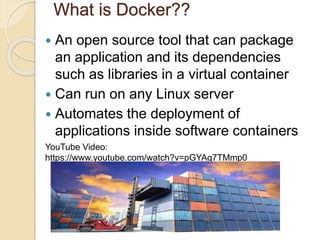
 An open source tool that can package
an application and its dependencies
such as libraries in a virtual container
 Can run on any Linux server
 Automates the deployment of
applications inside software containers
YouTube Video:
https://www.youtube.com/watch?v=pGYAg7TMmp0
Advantages
 No longer need a virtual machine spin up
for each application
 Greater portability (Solves the problem of
Shipping code from one machine to
another)
 Lesser resources
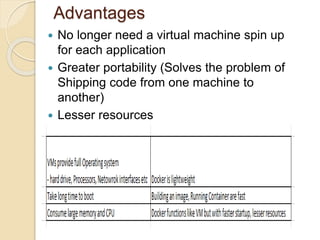
Virtual Machines Vs Docker
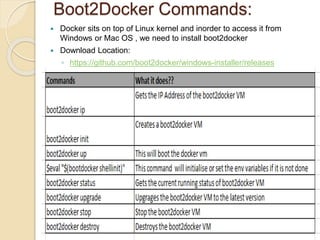
Boot2Docker Commands:
 Docker sits on top of Linux kernel and inorder to access it from
Windows or Mac OS , we need to install boot2docker
 Download Location:
◦ https://github.com/boot2docker/windows-installer/releases
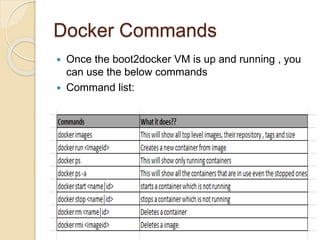
Docker Commands
 Once the boot2docker VM is up and running , you
can use the below commands
 Command list:
https://docs.docker.com/reference/commandline/run/
Hook Docker into Selenium
 Download the Images to your local:
Hub (Server):
 docker pull selenium/hub:latest
Nodes (Browsers):
 docker pull selenium/node-chrome:2.44.0
 docker pull selenium/node-chrome:2.45.0
 docker pull selenium/node-chrome:latest
 Export the images to an archive(.tar file) if needed
◦ docker save -o ~/Downloads/docker_selenium_hub.tar selenium/hub
◦ docker save –o ~/Downloads/docker_selenium_node_chrome.2.46.0.tar
selenium/node-chrome:2.46.0
 Load the images from the .tar file
◦ docker load --input ~/Downloads/docker_selenium_hub.tar
All these images are maintained by Selenium development team
https://github.com/SeleniumHQ/docker-selenium
https://hub.docker.com/
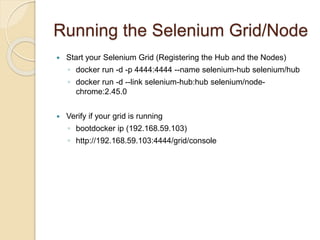
Running the Selenium Grid/Node
 Start your Selenium Grid (Registering the Hub and the Nodes)
◦ docker run -d -p 4444:4444 --name selenium-hub selenium/hub
◦ docker run -d --link selenium-hub:hub selenium/node-
chrome:2.45.0
 Verify if your grid is running
◦ bootdocker ip (192.168.59.103)
◦ http://192.168.59.103:4444/grid/console
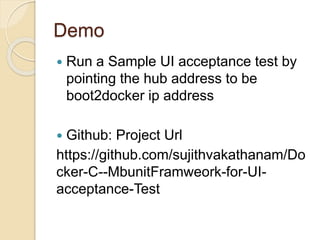
Demo
 Run a Sample UI acceptance test by
pointing the hub address to be
boot2docker ip address
 Github: Project Url
https://github.com/sujithvakathanam/Do
cker-C--MbunitFramweork-for-UI-
acceptance-Test
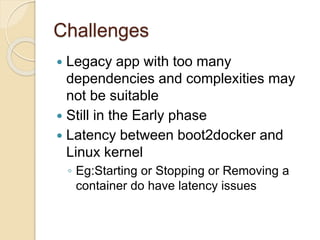
Challenges
 Legacy app with too many
dependencies and complexities may
not be suitable
 Still in the Early phase
 Latency between boot2docker and
Linux kernel
◦ Eg:Starting or Stopping or Removing a
container do have latency issues
Q & A???

Hooking Docker With Selenium

  • 1.
    Integrate Docker WithSelenium- C#- Mbunit framework
  • 2.
    Agenda  What isDocker  Advantages  Frequently used Commands  How to hook Docker into Selenium?  Demo  Challenges
  • 3.
    What is Docker?? An open source tool that can package an application and its dependencies such as libraries in a virtual container  Can run on any Linux server  Automates the deployment of applications inside software containers YouTube Video: https://www.youtube.com/watch?v=pGYAg7TMmp0
  • 4.
    Advantages  No longerneed a virtual machine spin up for each application  Greater portability (Solves the problem of Shipping code from one machine to another)  Lesser resources Virtual Machines Vs Docker
  • 5.
    Boot2Docker Commands:  Dockersits on top of Linux kernel and inorder to access it from Windows or Mac OS , we need to install boot2docker  Download Location: ◦ https://github.com/boot2docker/windows-installer/releases
  • 6.
    Docker Commands  Oncethe boot2docker VM is up and running , you can use the below commands  Command list: https://docs.docker.com/reference/commandline/run/
  • 7.
    Hook Docker intoSelenium  Download the Images to your local: Hub (Server):  docker pull selenium/hub:latest Nodes (Browsers):  docker pull selenium/node-chrome:2.44.0  docker pull selenium/node-chrome:2.45.0  docker pull selenium/node-chrome:latest  Export the images to an archive(.tar file) if needed ◦ docker save -o ~/Downloads/docker_selenium_hub.tar selenium/hub ◦ docker save –o ~/Downloads/docker_selenium_node_chrome.2.46.0.tar selenium/node-chrome:2.46.0  Load the images from the .tar file ◦ docker load --input ~/Downloads/docker_selenium_hub.tar All these images are maintained by Selenium development team https://github.com/SeleniumHQ/docker-selenium https://hub.docker.com/
  • 8.
    Running the SeleniumGrid/Node  Start your Selenium Grid (Registering the Hub and the Nodes) ◦ docker run -d -p 4444:4444 --name selenium-hub selenium/hub ◦ docker run -d --link selenium-hub:hub selenium/node- chrome:2.45.0  Verify if your grid is running ◦ bootdocker ip (192.168.59.103) ◦ http://192.168.59.103:4444/grid/console
  • 9.
    Demo  Run aSample UI acceptance test by pointing the hub address to be boot2docker ip address  Github: Project Url https://github.com/sujithvakathanam/Do cker-C--MbunitFramweork-for-UI- acceptance-Test
  • 10.
    Challenges  Legacy appwith too many dependencies and complexities may not be suitable  Still in the Early phase  Latency between boot2docker and Linux kernel ◦ Eg:Starting or Stopping or Removing a container do have latency issues
  • 11.

Editor's Notes

  • #6 Docker sits on top of linux kernal. Boot2 docker is a lightweight linux distribution made to run Docker Containers. It runs completely from RAM Environment Variables: Name: DOCKER_CERT_PATH Value: C:\Users\XXX\.boot2docker\certs\boot2docker-vm Name: DOCKER_HOST Value: tcp://192.168.59.103:2376 Name:DOCKER_TLS_VERIFY Value: 1