Microsoft RMS Point of Sale 
Single or Multi Store 
Point of Sale 
Be Prepared For The Holiday 
Shopping Season
Microsoft Retail Management System 
What it means to Retailers 
Lowest Cost of Ownership 
Industry Leadership 
Customer Commitment 
Outstanding customer support available 24/7 
A complete set of in-depth customer training tools 
Microsoft R&D investment is highest in industry 
Broad ecosystem of knowledgeable and responsive partners 
Top retailers use Microsoft
Microsoft RMS 
Value Proposition 
Affordable: 
• Financing available 
• Supported by Microsoft and independently priced Microsoft Partners worldwide 
• Eliminates single supplier helpdesk with uncontrollable fees 
Stable: 
• The latest technology from the most stable software company...Microsoft 
• Supported by Microsoft and Microsoft RMS Partners in every state 
Increase Sales: 
• Customer Rewards program to drive customers to your store 
• Offer a great checkout experience and engage customers with custom messages 
Reduce Inventory and Costs: 
• Keep your team in-the-know, customer history, item images, and on-hand quantities 
• Offer an easy return process and keep your returns organized with the Return Tracker 
Decrease Labor: 
• Cut down on time at the register with rapid location using Item and Picture Drill Down 
• AR management, statements with receipts, and auto E-mail receipts and statements
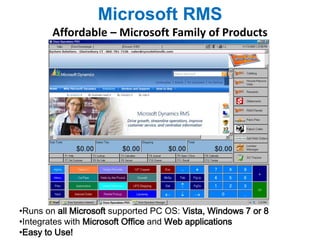
Microsoft RMS 
Affordable – Microsoft Family of Products 
•Runs on all Microsoft supported PC OS: Vista, Windows 7 or 8 
•Integrates with Microsoft Office and Web applications 
•Easy to Use!
Microsoft RMS 
Stable – Current POS Technology 
• Microsoft RMS is a modern Point of Sale application running on Microsoft SQL 
• Old Access or character based programs are poor investments 
• Avoid POS that does not respond to Microsoft controls. Make sure you can: 
o Click “X” to close all programs and windows 
o Mouse “double click” to select an item from a browser 
o Shrink windows or grow to full screen by clicking and dragging the edge 
o Scroll through lists of items, customers, vendors, or other records 
o Run on Any Microsoft OS: Windows Vista, Windows 7 or 8 
• Dated POS software drifts further behind without revenue resulting in: 
o Problems maintaining existing features or adding new features 
o Higher support fees and reduced innovation until eventual End of Life 
• Support for Microsoft RMS costs significantly less than other POS systems: 
o Microsoft RMS is modern and is fully customizable with current skills 
o Microsoft RMS is supported by Microsoft Partners in every state 
o Microsoft RMS is portable for use with any COOP, any supplier 
o Microsoft RMS Plug-Ins exist for any retail product or vertical market 
o Google “Microsoft RMS Add On” to find out more about Plug-Ins available
Microsoft RMS 
Be Prepared This Holiday Shopping Season With: 
• Green Customer Service – Reduce paper costs for you and provide easy-to-reference 
receipts/statements for your customers 
• Ingenico Controls – Make payments quick and easy 
• Return Tracker – Organize returns when they are at their highest 
• Item and Picture Drill Down – Reduce checkout line time with rapid item location 
• Item Quantity Prompt – Reduce mistakes by prompting for quantity per item 
• Customer Rewards – Set up holiday sales and encourage customers to return 
• HTML Status Bar – Keep everyone informed by displaying enhanced data at 
point of sale
Microsoft RMS 
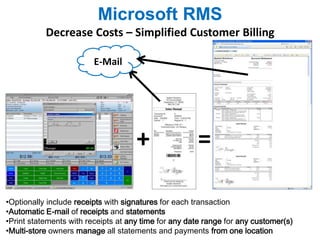
Decrease Costs – Simplified Customer Billing 
+ = 
E-Mail 
•Optionally include receipts with signatures for each transaction 
•Automatic E-mail of receipts and statements 
•Print statements with receipts at any time for any date range for any customer(s) 
•Multi-store owners manage all statements and payments from one location
Microsoft RMS 
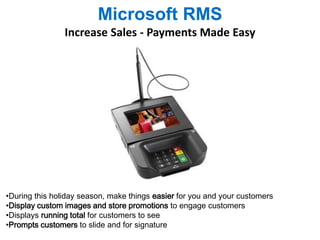
Increase Sales - Payments Made Easy 
•During this holiday season, make things easier for you and your customers 
•Display custom images and store promotions to engage customers 
•Displays running total for customers to see 
•Prompts customers to slide and for signature
Microsoft RMS 
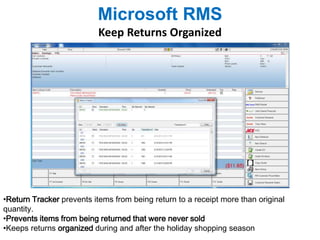
Keep Returns Organized 
•Return Tracker prevents items from being return to a receipt more than original 
quantity. 
•Prevents items from being returned that were never sold 
•Keeps returns organized during and after the holiday shopping season
Microsoft RMS 
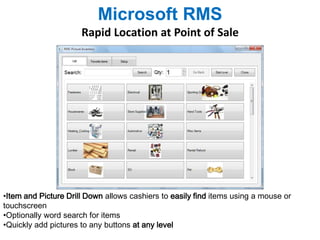
Rapid Location at Point of Sale 
•Item and Picture Drill Down allows cashiers to easily find items using a mouse or 
touchscreen 
•Optionally word search for items 
•Quickly add pictures to any buttons at any level
Microsoft RMS 
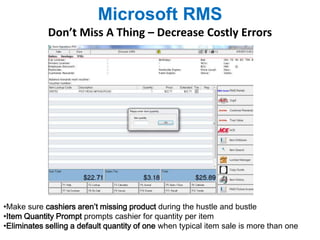
Don’t Miss A Thing – Decrease Costly Errors 
•Make sure cashiers aren’t missing product during the hustle and bustle 
•Item Quantity Prompt prompts cashier for quantity per item 
•Eliminates selling a default quantity of one when typical item sale is more than one
Microsoft RMS 
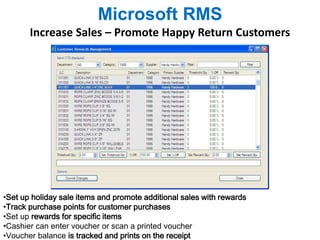
Increase Sales – Promote Happy Return Customers 
•Set up holiday sale items and promote additional sales with rewards 
•Track purchase points for customer purchases 
•Set up rewards for specific items 
•Cashier can enter voucher or scan a printed voucher 
•Voucher balance is tracked and prints on the receipt
Microsoft RMS 
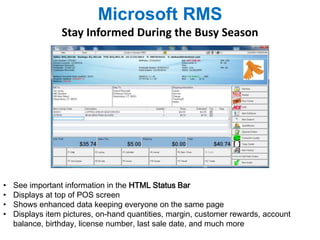
Stay Informed During the Busy Season 
• See important information in the HTML Status Bar 
• Displays at top of POS screen 
• Shows enhanced data keeping everyone on the same page 
• Displays item pictures, on-hand quantities, margin, customer rewards, account 
balance, birthday, license number, last sale date, and much more

Holiday Preparation For Retailers

  • 1.
    Microsoft RMS Pointof Sale Single or Multi Store Point of Sale Be Prepared For The Holiday Shopping Season
  • 2.
    Microsoft Retail ManagementSystem What it means to Retailers Lowest Cost of Ownership Industry Leadership Customer Commitment Outstanding customer support available 24/7 A complete set of in-depth customer training tools Microsoft R&D investment is highest in industry Broad ecosystem of knowledgeable and responsive partners Top retailers use Microsoft
  • 3.
    Microsoft RMS ValueProposition Affordable: • Financing available • Supported by Microsoft and independently priced Microsoft Partners worldwide • Eliminates single supplier helpdesk with uncontrollable fees Stable: • The latest technology from the most stable software company...Microsoft • Supported by Microsoft and Microsoft RMS Partners in every state Increase Sales: • Customer Rewards program to drive customers to your store • Offer a great checkout experience and engage customers with custom messages Reduce Inventory and Costs: • Keep your team in-the-know, customer history, item images, and on-hand quantities • Offer an easy return process and keep your returns organized with the Return Tracker Decrease Labor: • Cut down on time at the register with rapid location using Item and Picture Drill Down • AR management, statements with receipts, and auto E-mail receipts and statements
  • 4.
    Microsoft RMS Affordable– Microsoft Family of Products •Runs on all Microsoft supported PC OS: Vista, Windows 7 or 8 •Integrates with Microsoft Office and Web applications •Easy to Use!
  • 5.
    Microsoft RMS Stable– Current POS Technology • Microsoft RMS is a modern Point of Sale application running on Microsoft SQL • Old Access or character based programs are poor investments • Avoid POS that does not respond to Microsoft controls. Make sure you can: o Click “X” to close all programs and windows o Mouse “double click” to select an item from a browser o Shrink windows or grow to full screen by clicking and dragging the edge o Scroll through lists of items, customers, vendors, or other records o Run on Any Microsoft OS: Windows Vista, Windows 7 or 8 • Dated POS software drifts further behind without revenue resulting in: o Problems maintaining existing features or adding new features o Higher support fees and reduced innovation until eventual End of Life • Support for Microsoft RMS costs significantly less than other POS systems: o Microsoft RMS is modern and is fully customizable with current skills o Microsoft RMS is supported by Microsoft Partners in every state o Microsoft RMS is portable for use with any COOP, any supplier o Microsoft RMS Plug-Ins exist for any retail product or vertical market o Google “Microsoft RMS Add On” to find out more about Plug-Ins available
  • 6.
    Microsoft RMS BePrepared This Holiday Shopping Season With: • Green Customer Service – Reduce paper costs for you and provide easy-to-reference receipts/statements for your customers • Ingenico Controls – Make payments quick and easy • Return Tracker – Organize returns when they are at their highest • Item and Picture Drill Down – Reduce checkout line time with rapid item location • Item Quantity Prompt – Reduce mistakes by prompting for quantity per item • Customer Rewards – Set up holiday sales and encourage customers to return • HTML Status Bar – Keep everyone informed by displaying enhanced data at point of sale
  • 7.
    Microsoft RMS DecreaseCosts – Simplified Customer Billing + = E-Mail •Optionally include receipts with signatures for each transaction •Automatic E-mail of receipts and statements •Print statements with receipts at any time for any date range for any customer(s) •Multi-store owners manage all statements and payments from one location
  • 8.
    Microsoft RMS IncreaseSales - Payments Made Easy •During this holiday season, make things easier for you and your customers •Display custom images and store promotions to engage customers •Displays running total for customers to see •Prompts customers to slide and for signature
  • 9.
    Microsoft RMS KeepReturns Organized •Return Tracker prevents items from being return to a receipt more than original quantity. •Prevents items from being returned that were never sold •Keeps returns organized during and after the holiday shopping season
  • 10.
    Microsoft RMS RapidLocation at Point of Sale •Item and Picture Drill Down allows cashiers to easily find items using a mouse or touchscreen •Optionally word search for items •Quickly add pictures to any buttons at any level
  • 11.
    Microsoft RMS Don’tMiss A Thing – Decrease Costly Errors •Make sure cashiers aren’t missing product during the hustle and bustle •Item Quantity Prompt prompts cashier for quantity per item •Eliminates selling a default quantity of one when typical item sale is more than one
  • 12.
    Microsoft RMS IncreaseSales – Promote Happy Return Customers •Set up holiday sale items and promote additional sales with rewards •Track purchase points for customer purchases •Set up rewards for specific items •Cashier can enter voucher or scan a printed voucher •Voucher balance is tracked and prints on the receipt
  • 13.
    Microsoft RMS StayInformed During the Busy Season • See important information in the HTML Status Bar • Displays at top of POS screen • Shows enhanced data keeping everyone on the same page • Displays item pictures, on-hand quantities, margin, customer rewards, account balance, birthday, license number, last sale date, and much more

Editor's Notes

  • #3 © 2005 Microsoft Corporation. All rights reserved. This presentation is for informational purposes only. Microsoft makes no warranties, express or implied, in this summary.