Getting started
DGS Library Services: Online Resources
What is History Study Centre?
 online resource with digitised primary and secondary
sources
 global history from ancient times to the present day.
 books, essays, journal articles, historical newspaper
and magazine articles, maps, rare
books, government documents, historical
speeches, images and video clips.
 over 40,000 documents and articles, with over 50
reference works, 3,000 images and links to 2,000
Web sites
We have unlimited access for
all DGS staff and students at
home or at school.
How do I access History
Study Centre?
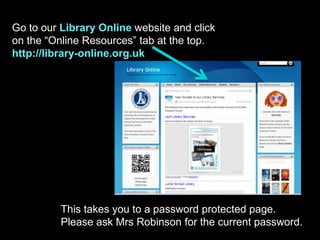
Go to our Library Online website and click
on the “Online Resources” tab at the top.
http://library-online.org.uk
This takes you to a password protected page.
Please ask Mrs Robinson for the current password.
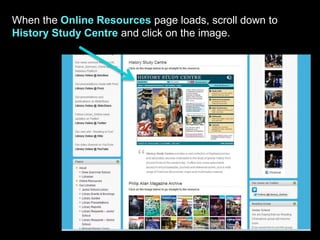
When the Online Resources page loads, scroll down to
History Study Centre and click on the image.
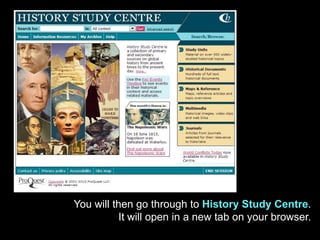
You will then go through to History Study Centre.
It will open in a new tab on your browser.
What are the contents of
History Study Centre?
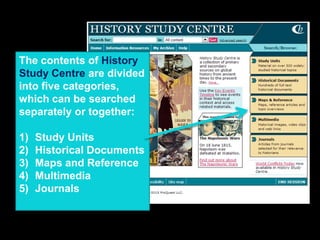
The contents of History
Study Centre are divided
into five categories,
which can be searched
separately or together:
1) Study Units
2) Historical Documents
3) Maps and Reference
4) Multimedia
5) Journals
Five Content Types
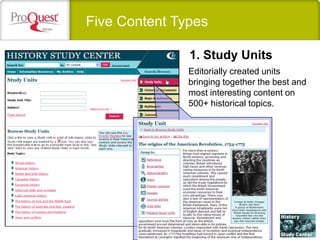
Editorially created units
bringing together the best and
most interesting content on
500+ historical topics.
1. Study Units
Five Content Types
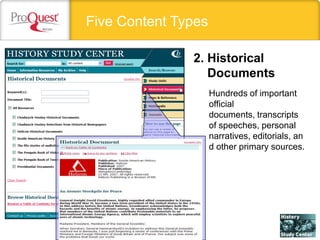
Hundreds of important
official
documents, transcripts
of speeches, personal
narratives, editorials, an
d other primary sources.
2. Historical
Documents
History Study Center
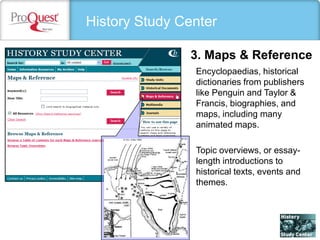
Encyclopaedias, historical
dictionaries from publishers
like Penguin and Taylor &
Francis, biographies, and
maps, including many
animated maps.
Topic overviews, or essay-
length introductions to
historical texts, events and
themes.
3. Maps & Reference
History Study Center
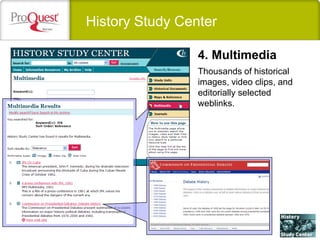
Thousands of historical
images, video clips, and
editorially selected
weblinks.
4. Multimedia
History Study Center
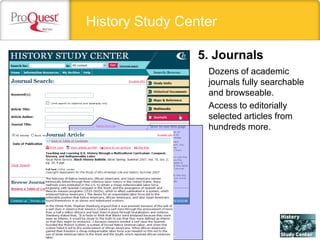
Dozens of academic
journals fully searchable
and browseable.
Access to editorially
selected articles from
hundreds more.
5. Journals
What is Quick search?
Quick search allows you to quickly search all of the
content in History Study Centre or limit your search
to a particular content type: Study Units, Historical
Documents, Maps & Reference, Multimedia or
Journals. A Quick Search box appears at the top
of every page.
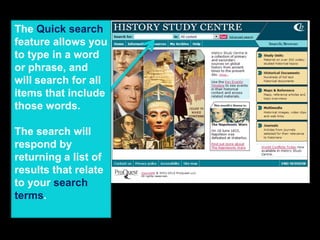
The Quick search
feature allows you
to type in a word
or phrase, and
will search for all
items that include
those words.
The search will
respond by
returning a list of
results that relate
to your search
terms.
To conduct a
search, type your
search terms
(individual words
or phrases) into
the Search
for box. Choose
an option from
the dropdown box
if you wish to
restrict your
search to a
particular content
type. When you have finished
entering your search criteria,
click Go!.
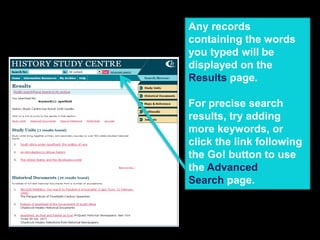
Any records
containing the words
you typed will be
displayed on the
Results page.
For precise search
results, try adding
more keywords, or
click the link following
the Go! button to use
the Advanced
Search page.
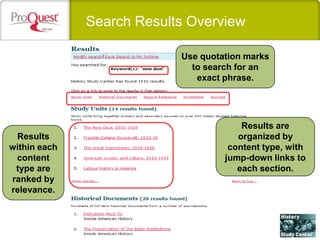
Search Results Overview
Use quotation marks
to search for an
exact phrase.
Results are
organized by
content type, with
jump-down links to
each section.
Results
within each
content
type are
ranked by
relevance.
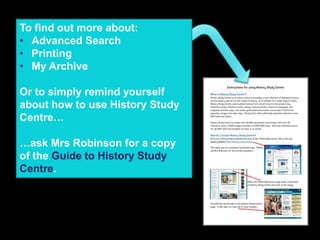
To find out more about:
• Advanced Search
• Printing
• My Archive
Or to simply remind yourself
about how to use History Study
Centre…
…ask Mrs Robinson for a copy
of the Guide to History Study
Centre.
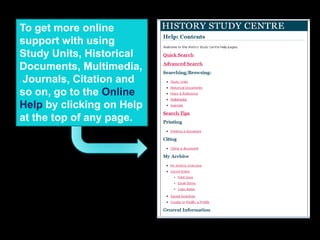
To get more online
support with using
Study Units, Historical
Documents, Multimedia,
Journals, Citation and
so on, go to the Online
Help by clicking on Help
at the top of any page.
Quick Recap in less than 2 minutes!
Created by Mrs Robinson, Librarian for The Dixie
Grammar School Library Services.
Some slides and resources were added from the
official ProQuest History Study Center Presentation.

History Study Centre Presentation

  • 1.
    Getting started DGS LibraryServices: Online Resources
  • 2.
    What is HistoryStudy Centre?  online resource with digitised primary and secondary sources  global history from ancient times to the present day.  books, essays, journal articles, historical newspaper and magazine articles, maps, rare books, government documents, historical speeches, images and video clips.  over 40,000 documents and articles, with over 50 reference works, 3,000 images and links to 2,000 Web sites
  • 3.
    We have unlimitedaccess for all DGS staff and students at home or at school.
  • 4.
    How do Iaccess History Study Centre?
  • 5.
    Go to ourLibrary Online website and click on the “Online Resources” tab at the top. http://library-online.org.uk This takes you to a password protected page. Please ask Mrs Robinson for the current password.
  • 6.
    When the OnlineResources page loads, scroll down to History Study Centre and click on the image.
  • 7.
    You will thengo through to History Study Centre. It will open in a new tab on your browser.
  • 8.
    What are thecontents of History Study Centre?
  • 9.
    The contents ofHistory Study Centre are divided into five categories, which can be searched separately or together: 1) Study Units 2) Historical Documents 3) Maps and Reference 4) Multimedia 5) Journals
  • 10.
    Five Content Types Editoriallycreated units bringing together the best and most interesting content on 500+ historical topics. 1. Study Units
  • 11.
    Five Content Types Hundredsof important official documents, transcripts of speeches, personal narratives, editorials, an d other primary sources. 2. Historical Documents
  • 12.
    History Study Center Encyclopaedias,historical dictionaries from publishers like Penguin and Taylor & Francis, biographies, and maps, including many animated maps. Topic overviews, or essay- length introductions to historical texts, events and themes. 3. Maps & Reference
  • 13.
    History Study Center Thousandsof historical images, video clips, and editorially selected weblinks. 4. Multimedia
  • 14.
    History Study Center Dozensof academic journals fully searchable and browseable. Access to editorially selected articles from hundreds more. 5. Journals
  • 15.
    What is Quicksearch? Quick search allows you to quickly search all of the content in History Study Centre or limit your search to a particular content type: Study Units, Historical Documents, Maps & Reference, Multimedia or Journals. A Quick Search box appears at the top of every page.
  • 16.
    The Quick search featureallows you to type in a word or phrase, and will search for all items that include those words. The search will respond by returning a list of results that relate to your search terms.
  • 17.
    To conduct a search,type your search terms (individual words or phrases) into the Search for box. Choose an option from the dropdown box if you wish to restrict your search to a particular content type. When you have finished entering your search criteria, click Go!.
  • 18.
    Any records containing thewords you typed will be displayed on the Results page. For precise search results, try adding more keywords, or click the link following the Go! button to use the Advanced Search page.
  • 19.
    Search Results Overview Usequotation marks to search for an exact phrase. Results are organized by content type, with jump-down links to each section. Results within each content type are ranked by relevance.
  • 20.
    To find outmore about: • Advanced Search • Printing • My Archive Or to simply remind yourself about how to use History Study Centre… …ask Mrs Robinson for a copy of the Guide to History Study Centre.
  • 21.
    To get moreonline support with using Study Units, Historical Documents, Multimedia, Journals, Citation and so on, go to the Online Help by clicking on Help at the top of any page.
  • 22.
    Quick Recap inless than 2 minutes!
  • 23.
    Created by MrsRobinson, Librarian for The Dixie Grammar School Library Services. Some slides and resources were added from the official ProQuest History Study Center Presentation.