Think…Ask…Read…Imagine…Create…@ Your Library
The Dixie Grammar School
Michael Parker Library
Energy Sources
Biofuels
Fossil fuels
Geothermal
Nuclear
Solar
Wind
Water
Gordon River Dam by david_pointing on Flickr
Task
 Working in a group,
research your given
energy resource.
 Present your findings to
the rest of the class.
1. On your own, use a note-
taking sheet and answer
the questions using the
resources provided.
2. Note your sources of
information, including
images, diagrams etc.
3. Working in your group,
create a PowerPoint
presentation with a slide
for each question.
4. Limit the number of words
on your slides.
5. Use images, diagrams,
video.
6. When you present, do not
read from your PowerPoint
- make a script!
7. Last slide must be a list of
your sources.
Method
Using a note-taking
sheet to stop
cut-and-paste!
This will be marked.
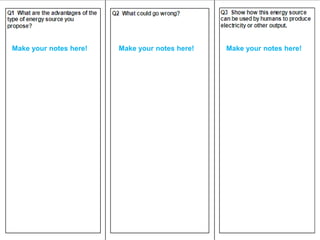
Make your notes here! Make your notes here! Make your notes here!
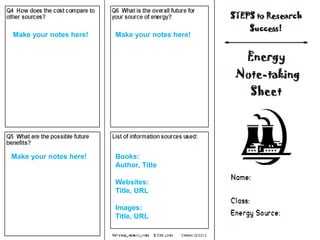
Make your notes here! Make your notes here!
Make your notes here! Books:
Author, Title
Websites:
Title, URL
Images:
Title, URL
Use the books
which have been
selected for you.
Use the Research
Guide made by
the Librarian.
How do I find
the Research
Guide?
Either
Go to the main Library site, Library
Online, and follow the link:
http://library-online.org.uk
Link to your topic
Or
Go straight to the
Research Guide at:
http://library-
online.libguides.com/science-
energy
Click on “Selected
Websites” to find
loads of links.
Click on “How to
Research” to help
with your skills.
P = Purpose Plan and be prepared
L = Location Search for and find your information
U = Use Make notes, organise and create
S = Self Evaluation Did I work well?
Balance
of
sources
Use your notes
to write your
presentation.
Great source of
images:
http://www.flickr.com/
Assessment
Your Teacher -
will mark your work looking at:
 Subject content on your
PowerPoint - did you answer the
questions?
 How well your team has worked
together, sharing out the tasks.
 Your presentation skills as a
group – have you used a script
rather than reading from the
screen?
 Use of appropriate diagrams,
images, animations and video.
Your Librarian -
will mark your work looking at:
 Quality of the notes in your Note-
taking Sheet.
 Do your notes relate to the
content of your PowerPoint?
 Have you avoided cut-and-paste
and used your own words?
 Have you listed your sources
properly on the Note-taking Sheet
and on your PowerPoint?
Write a scriptNo Cut & Paste!
Tips for good
presentations
Reminders
 Make notes on your sheet
using a range of resources:
• Books
• Websites, starting with the
Research Guide made by the
Librarian
 Make sure you answer all of the
questions.
 Use your Note-taking Sheet to
write your PowerPoint.
 Write a script so that you do
not read from the screen.
 Make sure you have listed your
sources properly on the Note-
taking Sheet and on your
PowerPoint.
 Google or Google Images are
NOT sources!!!!
You must hand in:
 Electronic copy of your
presentation.
 Your Note-Taking Sheets.
 Your Script.

Yr 8 Energy Powerpoint

  • 1.
    Think…Ask…Read…Imagine…Create…@ Your Library TheDixie Grammar School Michael Parker Library
  • 2.
  • 3.
    Task  Working ina group, research your given energy resource.  Present your findings to the rest of the class.
  • 4.
    1. On yourown, use a note- taking sheet and answer the questions using the resources provided. 2. Note your sources of information, including images, diagrams etc. 3. Working in your group, create a PowerPoint presentation with a slide for each question. 4. Limit the number of words on your slides. 5. Use images, diagrams, video. 6. When you present, do not read from your PowerPoint - make a script! 7. Last slide must be a list of your sources. Method
  • 5.
    Using a note-taking sheetto stop cut-and-paste! This will be marked.
  • 6.
    Make your noteshere! Make your notes here! Make your notes here!
  • 7.
    Make your noteshere! Make your notes here! Make your notes here! Books: Author, Title Websites: Title, URL Images: Title, URL
  • 8.
    Use the books whichhave been selected for you.
  • 9.
    Use the Research Guidemade by the Librarian.
  • 10.
    How do Ifind the Research Guide?
  • 11.
    Either Go to themain Library site, Library Online, and follow the link: http://library-online.org.uk
  • 12.
  • 13.
    Or Go straight tothe Research Guide at: http://library- online.libguides.com/science- energy
  • 15.
    Click on “Selected Websites”to find loads of links.
  • 16.
    Click on “Howto Research” to help with your skills.
  • 17.
    P = PurposePlan and be prepared L = Location Search for and find your information U = Use Make notes, organise and create S = Self Evaluation Did I work well?
  • 18.
  • 19.
    Use your notes towrite your presentation.
  • 20.
  • 21.
    Assessment Your Teacher - willmark your work looking at:  Subject content on your PowerPoint - did you answer the questions?  How well your team has worked together, sharing out the tasks.  Your presentation skills as a group – have you used a script rather than reading from the screen?  Use of appropriate diagrams, images, animations and video. Your Librarian - will mark your work looking at:  Quality of the notes in your Note- taking Sheet.  Do your notes relate to the content of your PowerPoint?  Have you avoided cut-and-paste and used your own words?  Have you listed your sources properly on the Note-taking Sheet and on your PowerPoint?
  • 22.
    Write a scriptNoCut & Paste! Tips for good presentations
  • 23.
    Reminders  Make noteson your sheet using a range of resources: • Books • Websites, starting with the Research Guide made by the Librarian  Make sure you answer all of the questions.  Use your Note-taking Sheet to write your PowerPoint.  Write a script so that you do not read from the screen.  Make sure you have listed your sources properly on the Note- taking Sheet and on your PowerPoint.  Google or Google Images are NOT sources!!!! You must hand in:  Electronic copy of your presentation.  Your Note-Taking Sheets.  Your Script.