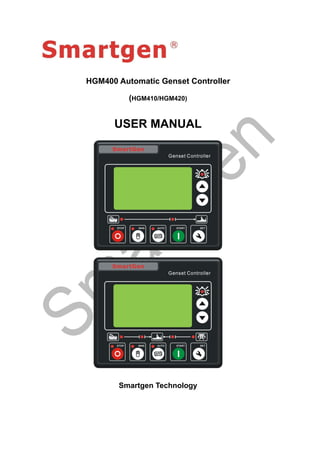
HGM400 Automatic Genset Controller
(HGM410/HGM420)
USER MANUAL
Smartgen Technology
Chinese trademark
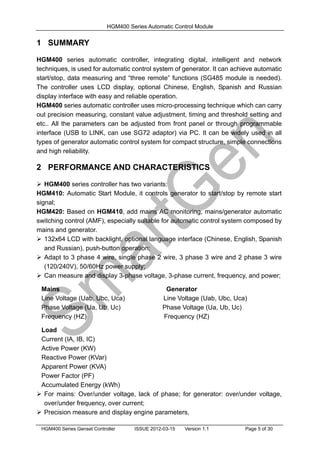
English trademark
Smartgen — make your generator smart
Smartgen Technology Co., Ltd
No. 28 Jinsuo Road
Zhengzhou
Henan Province
P. R. China
Tel: +86-371-67988888/67981888
+86-371-67991553/67992951/67992952
+86-371-67981000(overseas)
Fax: 0086-371-67992952/67981000
Web: http://www.smartgen.com.cn
http://www.smartgen.cn
Email: sales@smartgen.com.cn
All rights reserved. No part of this publication may be reproduced in any material form
(including photocopying or storing in any medium by electronic means or other) without
the written permission of the copyright holder.
Smartgen Technology reserves the right to change the contents of this document
without prior notice.
Software Version
Date Version Note
2011-07-06 1.0 Original release.
2012-03-15 1.1 Modify typical application.
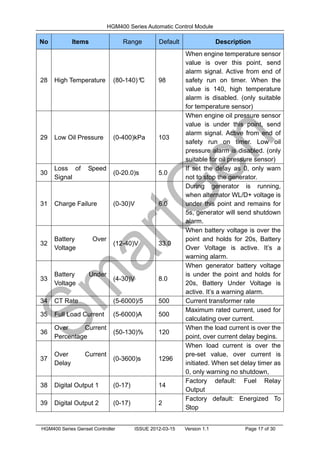
HGM400 Series Automatic Control Module
HGM400 Series Genset Controller ISSUE 2012-03-15 Version 1.1 Page 3 of 30
This manual is suitable for HGM400 series controller only.
Clarification of notation used within this publication.
SYMBOL INSTRUCTION
NOTE
Highlights an essential element of a procedure to ensure
correctness.
CAUTION!
Indicates a procedure or practice, which, if not strictly observed,
could result in damage or destruction of equipment.
WARNING!
Indicates a procedure or practice, which could result in injury to
personnel or loss of life if not followed correctly.
HGM400 Series Automatic Control Module
HGM400 Series Genset Controller ISSUE 2012-03-15 Version 1.1 Page 4 of 30
Table of Contents
1 SUMMARY....................................................................................5
2 PERFORMANCE AND CHARACTERISTICS ..............................5
3 SPECIFICATION ..........................................................................6
4 OPERATION.................................................................................7
4.1 PANEL KEYS ............................................................................................ 7
4.2 PANEL DESCRIPTION............................................................................. 8
4.3 AUTOMATIC START/STOP OPERATION................................................ 8
4.4 MANUAL START/STOP OPERATION.................................................... 10
5 PROTECTION ............................................................................10
5.1 WARNINGS ............................................................................................ 10
5.2 SHUTDOWN ALARM...............................................................................11
6 CONNECTIONS .........................................................................12
7 DEFINITION AND RANGE OF PARAMETERS .........................14
7.1 PARAMETER CONTENTS AND RANGE (TABLE 1) ............................. 14
7.2 PROGRAMMABLE OUTPUT 1-5 (TABLE 2).......................................... 20
7.3 PROGRAMMABLE INPUT 1-4 TABLE (ACTIVE WHEN CONNECT GND (B-)
(TABLE 3)....................................................................................................... 21
7.4 SENSOR SELECT (TABLE 4) ................................................................ 21
7.5 CONDITIONS OF CRANK DISCONNECT (TABLE 5) ........................... 22
8 PARAMETERS SETTING...........................................................23
9 SENSOR SELECT......................................................................24
10 COMMISSIONING......................................................................25
11 TYPICAL APPLICATION.............................................................26
12 INSTALLATION...........................................................................27
12.1FIXING CLIPS......................................................................................... 27
12.2OVERALL DIMENSION AND PANEL CUTOUT ..................................... 28
13 FAULT FINDING .........................................................................29
HGM400 Series Automatic Control Module
HGM400 Series Genset Controller ISSUE 2012-03-15 Version 1.1 Page 5 of 30
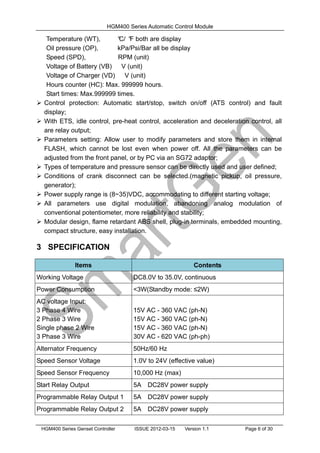
1 SUMMARY
HGM400 series automatic controller, integrating digital, intelligent and network
techniques, is used for automatic control system of generator. It can achieve automatic
start/stop, data measuring and “three remote” functions (SG485 module is needed).
The controller uses LCD display, optional Chinese, English, Spanish and Russian
display interface with easy and reliable operation.
HGM400 series automatic controller uses micro-processing technique which can carry
out precision measuring, constant value adjustment, timing and threshold setting and
etc.. All the parameters can be adjusted from front panel or through programmable
interface (USB to LINK, can use SG72 adaptor) via PC. It can be widely used in all
types of generator automatic control system for compact structure, simple connections
and high reliability.
2 PERFORMANCE AND CHARACTERISTICS
 HGM400 series controller has two variants:
HGM410: Automatic Start Module, it controls generator to start/stop by remote start
signal;
HGM420: Based on HGM410, add mains AC monitoring, mains/generator automatic
switching control (AMF), especially suitable for automatic control system composed by
mains and generator.
 132x64 LCD with backlight, optional language interface (Chinese, English, Spanish
and Russian), push-button operation;
 Adapt to 3 phase 4 wire, single phase 2 wire, 3 phase 3 wire and 2 phase 3 wire
(120/240V), 50/60Hz power supply;
 Can measure and display 3-phase voltage, 3-phase current, frequency, and power;
Mains Generator
Line Voltage (Uab, Ubc, Uca) Line Voltage (Uab, Ubc, Uca)
Phase Voltage (Ua, Ub, Uc) Phase Voltage (Ua, Ub, Uc)
Frequency (HZ) Frequency (HZ)
Load
Current (IA, IB, IC)
Active Power (KW)
Reactive Power (KVar)
Apparent Power (KVA)
Power Factor (PF)
Accumulated Energy (kWh)
 For mains: Over/under voltage, lack of phase; for generator: over/under voltage,
over/under frequency, over current;
 Precision measure and display engine parameters,
HGM400 Series Automatic Control Module
HGM400 Series Genset Controller ISSUE 2012-03-15 Version 1.1 Page 6 of 30
Temperature (WT), °
C/ °
F both are display
Oil pressure (OP), kPa/Psi/Bar all be display
Speed (SPD), RPM (unit)
Voltage of Battery (VB) V (unit)
Voltage of Charger (VD) V (unit)
Hours counter (HC): Max. 999999 hours.
Start times: Max.999999 times.
 Control protection: Automatic start/stop, switch on/off (ATS control) and fault
display;
 With ETS, idle control, pre-heat control, acceleration and deceleration control, all
are relay output;
 Parameters setting: Allow user to modify parameters and store them in internal
FLASH, which cannot be lost even when power off. All the parameters can be
adjusted from the front panel, or by PC via an SG72 adaptor;
 Types of temperature and pressure sensor can be directly used and user defined;
 Conditions of crank disconnect can be selected.(magnetic pickup, oil pressure,
generator);
 Power supply range is (8~35)VDC, accommodating to different starting voltage;
 All parameters use digital modulation, abandoning analog modulation of
conventional potentiometer, more reliability and stability;
 Modular design, flame retardant ABS shell, plug-in terminals, embedded mounting,
compact structure, easy installation.
3 SPECIFICATION
Items Contents
Working Voltage DC8.0V to 35.0V, continuous
Power Consumption <3W(Standby mode: ≤2W)
AC voltage Input:
3 Phase 4 Wire
2 Phase 3 Wire
Single phase 2 Wire
3 Phase 3 Wire
15V AC - 360 VAC (ph-N)
30V AC - 620 VAC (ph-ph)
Alternator Frequency 50Hz/60 Hz
Speed Sensor Voltage 1.0V to 24V (effective value)
Speed Sensor Frequency 10,000 Hz (max)
Start Relay Output 5A DC28V power supply
Programmable Relay Output 1 5A DC28V power supply
Programmable Relay Output 2 5A DC28V power supply
HGM400 Series Automatic Control Module
HGM400 Series Genset Controller ISSUE 2012-03-15 Version 1.1 Page 7 of 30
Programmable Relay Output 3 5A DC28V power supply
Programmable Relay Output 4 5A AC250V voltage-free output
Programmable Relay Output 5 5A AC250V voltage-free output
Overall Dimensions 130mm x 112mm x 39mm
Panel Cutout 110mm x 90mm
CT Secondary Current 5A (rated )
Working Condition Temperature: (-25~70)º
C; Humidity: (20~93)%RH
Storage Condition Temperature: (-30~+80)º
C
Protection Level
IP55: when waterproof rubber gasket added
between controller and its panel.
IP42: when waterproof rubber gasket not added
between controller and its panel.
Insulation Intensity
Object: among in input/output/power
Quote standard: IEC688-1992
Test way: AC1.5 kV/1min 3mA leakage current
Weight 0.26kg
4 OPERATION
4.1 PANEL KEYS
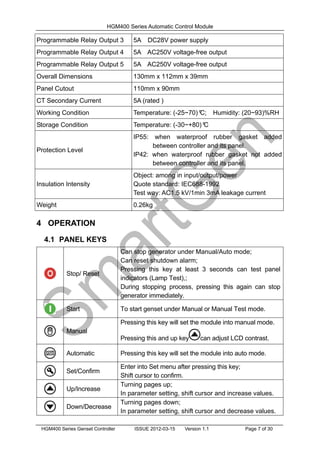
Stop/ Reset
Can stop generator under Manual/Auto mode;
Can reset shutdown alarm;
Pressing this key at least 3 seconds can test panel
indicators (Lamp Test),;
During stopping process, pressing this again can stop
generator immediately.
Start To start genset under Manual or Manual Test mode.
Manual
Pressing this key will set the module into manual mode.
Pressing this and up key can adjust LCD contrast.
Automatic Pressing this key will set the module into auto mode.
Set/Confirm
Enter into Set menu after pressing this key;
Shift cursor to confirm.
Up/Increase
Turning pages up;
In parameter setting, shift cursor and increase values.
Down/Decrease
Turning pages down;
In parameter setting, shift cursor and decrease values.
HGM400 Series Automatic Control Module
HGM400 Series Genset Controller ISSUE 2012-03-15 Version 1.1 Page 8 of 30
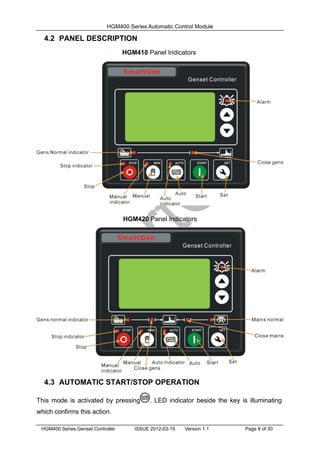
4.2 PANEL DESCRIPTION
HGM410 Panel Indicators
HGM420 Panel Indicators
4.3 AUTOMATIC START/STOP OPERATION
This mode is activated by pressing . LED indicator beside the key is illuminating
which confirms this action.
HGM400 Series Automatic Control Module
HGM400 Series Genset Controller ISSUE 2012-03-15 Version 1.1 Page 9 of 30
Start Sequence,
1) HGM420: when mains is abnormal (over/under voltage, lack of phase), enter into
“Mains Abnormal Delay” and LCD displays count-down timer. When the delay is
over, “Start Delay” begins.
2) HGM410: genset enters into “Start Delay” when “Remote Start” is active.
3) Count- down timer of “Start Delay” is displayed in LCD.
4) When start delay is over, preheat relay is outputting (if configured), “Preheat Delay
XX s” is displayed in LCD.
5) When preheat delay is over, fuel relay is outputting 1s and then start relay outputs; if
genset failed to start during “Start Time”, fuel and start relays stop outputting and
enter into “Crank Rest Time” and wait for next cranking.
6) If genset failed to start within specified start times, the fourth line of LED will turn
black and “Fail to Start” alarm will be displayed.
7) Whatever time to start successfully, genset will enter into “Safety on Run Time”.
During this period, alarms of low oil pressure, hi-temperature, under speed, charge
failure and auxiliary input (be configured) are disabled. As soon as this delay is over,
genset will enter into “Start Idle Delay” (if configured).
8) During start idle delay, alarms of under speed, under frequency, under voltage are
disabled. As soon as this delay is over, genset will enter into “Warming Up Delay” (if
configured).
9) When “Warming Up Delay” is over, the indicator is illuminating if gens normal. If
engine voltage and frequency reach the load demand, closing relay outputs, genset
takes load and indicator illuminates; if engine voltage and frequency appear
abnormal, controller will alarm to shutdown (alarm is displayed in LCD).
Stop Sequence,
1) HGM420: during genset running, if mains normal, enters into “Mains Normal Delay”.
When mains indicator illuminates, “Stop Delay” begins.
2) HGM410: genset enters into “Stop Delay” when “Remote Start” is inactive.
3) When stop delay is over, genset enters into “Cooling Delay”. Gens closing relay is
open. After switch “Transfer Rest Delay”, mains closing relay outputs, mains will take
load, power indicator of gens eliminates while indicator of gens illuminates.
4) When entering “Stop Idle Delay” (if configured), Idle relay is energized to output.
5) When entering “ETS delay”, ETS relay is energized to output, fuel relay is open.
6) When entering “Genset at Rest”, automatically judge whether genset is stopped or
not.
HGM400 Series Automatic Control Module
HGM400 Series Genset Controller ISSUE 2012-03-15 Version 1.1 Page 10 of 30
7) When genset has stopped, enters into standby mode; if failed to stop, controller will
alarm (“Fail to Stop” alarm will be displayed in LCD).
4.4 MANUAL START/STOP OPERATION
1) HGM420: Manual Mode is activated when press and its indicator illuminates.
Press key, choose “Manual Test Mode”. Under the two modes, press key to
start genset, it can automatically judge crank disconnect and accelerate to hi-speed
running. If high temperature, low oil pressure, over speed and abnormal voltage
occur during genset running, controller can effectively protect genset to stop (detail
procedures please refer to No.4~9 of Auto start operation). Under Manual Mode ,
if mains normal, load switch won’t transfer; if mains abnormal, load switch will transfer
to gens. Under Manual Test Mode, after genset normally runs in high speed, no
matter mains normal or not, load will be transferred to gens.
2) HGM410: Manual Mode is activated when press key and its indicator illuminates.
Then press key to start generator, it can automatically judge crank disconnect and
accelerate to hi-speed running. If hi-temperature, low oil pressure, over speed and
abnormal voltage occur during genset running, controller can effectively protect
genset to stop (detail procedures please refer to No.4~9 of Auto start operation).
Controller will send closing signal when genset runs in high speed.
3) Manual stop: pressing key can shut down the running genset. (detail procedures
please refer to No.3~7 of Auto stop operation)
5 PROTECTION
5.1 WARNINGS
When controller detects the warning signal, only alarm and not stop genset. The alarms
are displayed in LCD.
Warnings as following,
No Items Description
1
Loss Of Speed
Signal
When controller detected engine speed is 0 (the delay is 0),
a warning alarm signal will be sent and displayed in LCD.
2
Gens Over
Current
When controller detected gens current above the pre-set
value (the delay is 0), a warning alarm initiates and displayed
in LCD.
3 Fail To Stop When generator cannot stop after the “stop delay”, controller
HGM400 Series Automatic Control Module
HGM400 Series Genset Controller ISSUE 2012-03-15 Version 1.1 Page 11 of 30
No Items Description
will send warning alarm signal and it will be displayed in
LCD.
4 Low Fuel Level
When controller detected the fuel level is lower than
threshold, controller will send warning alarm signal and it will
be displayed in LCD.
5 Charge Failure
When controller detected the charger voltage is lower than
threshold, controller will send warning alarm signal and it will
be displayed in LCD.
6
Battery Under
Voltage
When controller detected the battery voltage is lower than
threshold, controller will send warning alarm signal and it will
be displayed in LCD.
7
Battery Over
Voltage
When controller detected the battery voltage is higher than
threshold, controller will send warning alarm signal and it will
be displayed in LCD.
8
Low Liquid
Level
When controller detected low water level input is active,
controller will send warning alarm signal and it will be
displayed in LCD.
9
Temp. Sensor
Open
When temperature sensor opens circuit and the warning
input is active, controller will send a warning alarm signal and
it will be displayed in LCD.
10
Oil Press
Sensor Open
When oil pressure sensor opens circuit and the warning input
is active, controller will send warning alarm signal and it will
be displayed in LCD.
5.2 SHUTDOWN ALARM
When controller detected shutdown alarm, it will send signal to open switch and stop the
unit. The alarms are displayed in LCD.
No Items Description
1 Emergency Stop
When controller detected emergency stop signal, it will send
a stop alarm signal and it will be displayed in LCD.
2
High
Temperature
When controller detected the temperature of water/cylinder
is higher than preset, it will send a stop alarm signal and it
will be displayed in LCD.
3
Low Oil
Pressure
When controller detected oil pressure is lower than the
preset, it will send a stop alarm signal and it will be displayed
in LCD.
4 Over Speed
When controller detected genset speed is over the preset, it
will send a stop alarm signal and it will be displayed in LCD.
5 Under Speed
When controller detected genset speed is under the preset, it
will send a stop alarm signal and it will be displayed in LCD.
6
Loss Of Speed
Signal
When controller detected genset speed is 0 (the delay is not
0), it will send a stop alarm signal and it will be displayed in
HGM400 Series Automatic Control Module
HGM400 Series Genset Controller ISSUE 2012-03-15 Version 1.1 Page 12 of 30
No Items Description
LCD.
7
Gens Over
Voltage
When controller detected genset voltage is over the preset, it
will send a stop alarm signal and it will be displayed in LCD.
8
Gens Under
Voltage
When controller detected genset voltage is under the preset,
it will send a stop alarm signal and it will be displayed in
LCD.
9
Gens Over
Current
When controller detected genset current is over the preset
and delay is not 0, it will send a stop alarm signal and it will
be displayed in LCD.
10 Fail To Start
During the start attempt times, if genset start failed, it will
send a stop alarm signal and it will be displayed in LCD.
11 Over Frequency
When controller detected genset frequency is over the
preset, it will send a stop alarm signal and it will be displayed
in LCD.
12
Under
Frequency
When controller detected genset frequency is under the
preset, it will send a stop alarm signal and it will be displayed
in LCD.
13 Genset Failed
When controller detected genset frequency is 0, it will send a
stop alarm signal and it will be displayed in LCD
14 Low Fuel Level
When controller detected genset fuel level low input is active,
it will send a stop alarm signal and it will be displayed in
LCD.
15
Low Liquid
Level
When controller detected genset water level low input is
active, it will send a stop alarm signal and it will be displayed
in LCD.
16
Temp. Sensor
Open
When temperature sensor opens circuit and the input is
active, controller will send a stop alarm signal and it will be
displayed in LCD.
17
Oil Pressure
Sensor Open
When oil pressure sensor opens circuit and the input is
active, controller will send a stop alarm signal and it will be
displayed in LCD.
6 CONNECTIONS
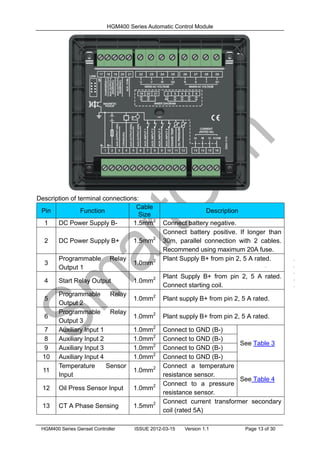
Compared with HGM420, HGM410 is lack of a 3 phase AC input terminal of mains.
The rear panel of HGM410 and HGM420 is as below.
HGM400 Series Automatic Control Module
HGM400 Series Genset Controller ISSUE 2012-03-15 Version 1.1 Page 13 of 30
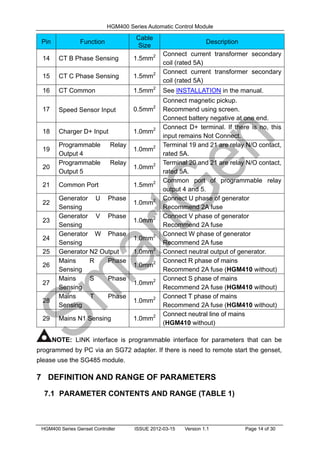
Description of terminal connections:
Pin Function
Cable
Size
Description
1 DC Power Supply B- 1.5mm2
Connect battery negative.
2 DC Power Supply B+ 1.5mm2
Connect battery positive. If longer than
30m, parallel connection with 2 cables.
Recommend using maximum 20A fuse.
3
Programmable Relay
Output 1
1.0mm2 Plant Supply B+ from pin 2, 5 A rated.
4 Start Relay Output 1.0mm2 Plant Supply B+ from pin 2, 5 A rated.
Connect starting coil.
5
Programmable Relay
Output 2
1.0mm2
Plant supply B+ from pin 2, 5 A rated.
6
Programmable Relay
Output 3
1.0mm2
Plant supply B+ from pin 2, 5 A rated.
7 Auxiliary Input 1 1.0mm2
Connect to GND (B-)
See Table 3
8 Auxiliary Input 2 1.0mm2
Connect to GND (B-)
9 Auxiliary Input 3 1.0mm2
Connect to GND (B-)
10 Auxiliary Input 4 1.0mm2
Connect to GND (B-)
11
Temperature Sensor
Input
1.0mm2 Connect a temperature
resistance sensor.
See Table 4
12 Oil Press Sensor Input 1.0mm2 Connect to a pressure
resistance sensor.
13 CT A Phase Sensing 1.5mm2 Connect current transformer secondary
coil (rated 5A)
HGM400 Series Automatic Control Module
HGM400 Series Genset Controller ISSUE 2012-03-15 Version 1.1 Page 14 of 30
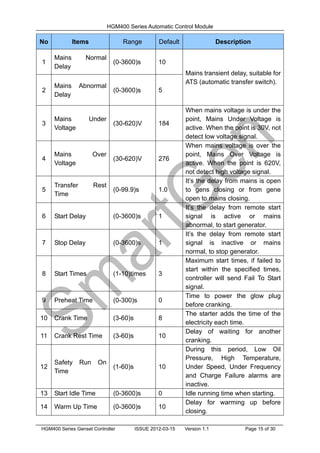
Pin Function
Cable
Size
Description
14 CT B Phase Sensing 1.5mm2 Connect current transformer secondary
coil (rated 5A)
15 CT C Phase Sensing 1.5mm2 Connect current transformer secondary
coil (rated 5A)
16 CT Common 1.5mm2
See INSTALLATION in the manual.
17 Speed Sensor Input 0.5mm2
Connect magnetic pickup.
Recommend using screen.
Connect battery negative at one end.
18 Charger D+ Input 1.0mm2 Connect D+ terminal. If there is no, this
input remains Not Connect.
19
Programmable Relay
Output 4
1.0mm2 Terminal 19 and 21 are relay N/O contact,
rated 5A.
20
Programmable Relay
Output 5
1.0mm2 Terminal 20 and 21 are relay N/O contact,
rated 5A.
21 Common Port 1.5mm2 Common port of programmable relay
output 4 and 5.
22
Generator U Phase
Sensing
1.0mm2 Connect U phase of generator
Recommend 2A fuse
23
Generator V Phase
Sensing
1.0mm2 Connect V phase of generator
Recommend 2A fuse
24
Generator W Phase
Sensing
1.0mm2 Connect W phase of generator
Recommend 2A fuse
25 Generator N2 Output 1.0mm2
Connect neutral output of generator.
26
Mains R Phase
Sensing
1.0mm2 Connect R phase of mains
Recommend 2A fuse (HGM410 without)
27
Mains S Phase
Sensing
1.0mm2 Connect S phase of mains
Recommend 2A fuse (HGM410 without)
28
Mains T Phase
Sensing
1.0mm2 Connect T phase of mains
Recommend 2A fuse (HGM410 without)
29 Mains N1 Sensing 1.0mm2 Connect neutral line of mains
(HGM410 without)
NOTE: LINK interface is programmable interface for parameters that can be
programmed by PC via an SG72 adapter. If there is need to remote start the genset,
please use the SG485 module.
7 DEFINITION AND RANGE OF PARAMETERS
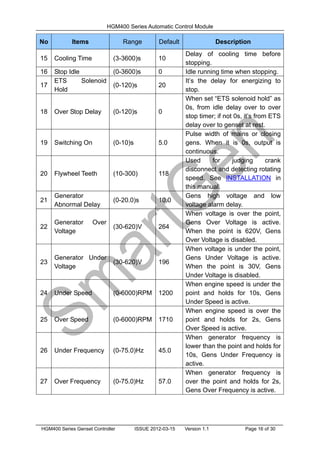
7.1 PARAMETER CONTENTS AND RANGE (TABLE 1)
HGM400 Series Automatic Control Module
HGM400 Series Genset Controller ISSUE 2012-03-15 Version 1.1 Page 15 of 30
No Items Range Default Description
1
Mains Normal
Delay
(0-3600)s 10
Mains transient delay, suitable for
ATS (automatic transfer switch).
2
Mains Abnormal
Delay
(0-3600)s 5
3
Mains Under
Voltage
(30-620)V 184
When mains voltage is under the
point, Mains Under Voltage is
active. When the point is 30V, not
detect low voltage signal.
4
Mains Over
Voltage
(30-620)V 276
When mains voltage is over the
point, Mains Over Voltage is
active. When the point is 620V,
not detect high voltage signal.
5
Transfer Rest
Time
(0-99.9)s 1.0
It’s the delay from mains is open
to gens closing or from gene
open to mains closing.
6 Start Delay (0-3600)s 1
It’s the delay from remote start
signal is active or mains
abnormal, to start generator.
7 Stop Delay (0-3600)s 1
It’s the delay from remote start
signal is inactive or mains
normal, to stop generator.
8 Start Times (1-10)times 3
Maximum start times, if failed to
start within the specified times,
controller will send Fail To Start
signal.
9 Preheat Time (0-300)s 0
Time to power the glow plug
before cranking.
10 Crank Time (3-60)s 8
The starter adds the time of the
electricity each time.
11 Crank Rest Time (3-60)s 10
Delay of waiting for another
cranking.
12
Safety Run On
Time
(1-60)s 10
During this period, Low Oil
Pressure, High Temperature,
Under Speed, Under Frequency
and Charge Failure alarms are
inactive.
13 Start Idle Time (0-3600)s 0 Idle running time when starting.
14 Warm Up Time (0-3600)s 10
Delay for warming up before
closing.
HGM400 Series Automatic Control Module
HGM400 Series Genset Controller ISSUE 2012-03-15 Version 1.1 Page 16 of 30
No Items Range Default Description
15 Cooling Time (3-3600)s 10
Delay of cooling time before
stopping.
16 Stop Idle (0-3600)s 0 Idle running time when stopping.
17
ETS Solenoid
Hold
(0-120)s 20
It’s the delay for energizing to
stop.
18 Over Stop Delay (0-120)s 0
When set “ETS solenoid hold” as
0s, from idle delay over to over
stop timer; if not 0s, it’s from ETS
delay over to genset at rest.
19 Switching On (0-10)s 5.0
Pulse width of mains or closing
gens. When it is 0s, output is
continuous.
20 Flywheel Teeth (10-300) 118
Used for judging crank
disconnect and detecting rotating
speed. See INSTALLATION in
this manual.
21
Generator
Abnormal Delay
(0-20.0)s 10.0
Gens high voltage and low
voltage alarm delay.
22
Generator Over
Voltage
(30-620)V 264
When voltage is over the point,
Gens Over Voltage is active.
When the point is 620V, Gens
Over Voltage is disabled.
23
Generator Under
Voltage
(30-620)V 196
When voltage is under the point,
Gens Under Voltage is active.
When the point is 30V, Gens
Under Voltage is disabled.
24 Under Speed (0-6000)RPM 1200
When engine speed is under the
point and holds for 10s, Gens
Under Speed is active.
25 Over Speed (0-6000)RPM 1710
When engine speed is over the
point and holds for 2s, Gens
Over Speed is active.
26 Under Frequency (0-75.0)Hz 45.0
When generator frequency is
lower than the point and holds for
10s, Gens Under Frequency is
active.
27 Over Frequency (0-75.0)Hz 57.0
When generator frequency is
over the point and holds for 2s,
Gens Over Frequency is active.
HGM400 Series Automatic Control Module
HGM400 Series Genset Controller ISSUE 2012-03-15 Version 1.1 Page 17 of 30
No Items Range Default Description
28 High Temperature (80-140)º
C 98
When engine temperature sensor
value is over this point, send
alarm signal. Active from end of
safety run on timer. When the
value is 140, high temperature
alarm is disabled. (only suitable
for temperature sensor)
29 Low Oil Pressure (0-400)kPa 103
When engine oil pressure sensor
value is under this point, send
alarm signal. Active from end of
safety run on timer. Low oil
pressure alarm is disabled. (only
suitable for oil pressure sensor)
30
Loss of Speed
Signal
(0-20.0)s 5.0
If set the delay as 0, only warn
not to stop the generator.
31 Charge Failure (0-30)V 6.0
During generator is running,
when alternator WL/D+ voltage is
under this point and remains for
5s, generator will send shutdown
alarm.
32
Battery Over
Voltage
(12-40)V 33.0
When battery voltage is over the
point and holds for 20s, Battery
Over Voltage is active. It’s a
warning alarm.
33
Battery Under
Voltage
(4-30)V 8.0
When generator battery voltage
is under the point and holds for
20s, Battery Under Voltage is
active. It’s a warning alarm.
34 CT Rate (5-6000)/5 500 Current transformer rate
35 Full Load Current (5-6000)A 500
Maximum rated current, used for
calculating over current.
36
Over Current
Percentage
(50-130)% 120
When the load current is over the
point, over current delay begins.
37
Over Current
Delay
(0-3600)s 1296
When load current is over the
pre-set value, over current is
initiated. When set delay timer as
0, only warning no shutdown,
38 Digital Output 1 (0-17) 14
Factory default: Fuel Relay
Output
39 Digital Output 2 (0-17) 2
Factory default: Energized To
Stop
HGM400 Series Automatic Control Module
HGM400 Series Genset Controller ISSUE 2012-03-15 Version 1.1 Page 18 of 30
No Items Range Default Description
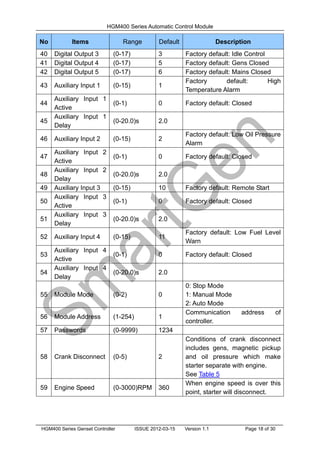
40 Digital Output 3 (0-17) 3 Factory default: Idle Control
41 Digital Output 4 (0-17) 5 Factory default: Gens Closed
42 Digital Output 5 (0-17) 6 Factory default: Mains Closed
43 Auxiliary Input 1 (0-15) 1
Factory default: High
Temperature Alarm
44
Auxiliary Input 1
Active
(0-1) 0 Factory default: Closed
45
Auxiliary Input 1
Delay
(0-20.0)s 2.0
46 Auxiliary Input 2 (0-15) 2
Factory default: Low Oil Pressure
Alarm
47
Auxiliary Input 2
Active
(0-1) 0 Factory default: Closed
48
Auxiliary Input 2
Delay
(0-20.0)s 2.0
49 Auxiliary Input 3 (0-15) 10 Factory default: Remote Start
50
Auxiliary Input 3
Active
(0-1) 0 Factory default: Closed
51
Auxiliary Input 3
Delay
(0-20.0)s 2.0
52 Auxiliary Input 4 (0-15) 11
Factory default: Low Fuel Level
Warn
53
Auxiliary Input 4
Active
(0-1) 0 Factory default: Closed
54
Auxiliary Input 4
Delay
(0-20.0)s 2.0
55 Module Mode (0-2) 0
0: Stop Mode
1: Manual Mode
2: Auto Mode
56 Module Address (1-254) 1
Communication address of
controller.
57 Passwords (0-9999) 1234
58 Crank Disconnect (0-5) 2
Conditions of crank disconnect
includes gens, magnetic pickup
and oil pressure which make
starter separate with engine.
See Table 5
59 Engine Speed (0-3000)RPM 360
When engine speed is over this
point, starter will disconnect.
HGM400 Series Automatic Control Module
HGM400 Series Genset Controller ISSUE 2012-03-15 Version 1.1 Page 19 of 30
No Items Range Default Description
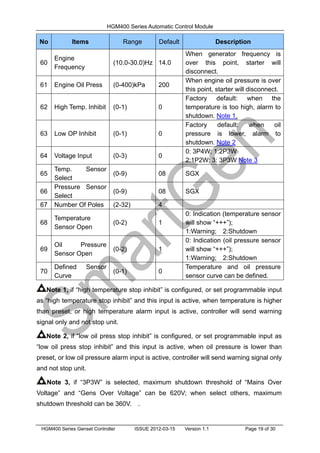
60
Engine
Frequency
(10.0-30.0)Hz 14.0
When generator frequency is
over this point, starter will
disconnect.
61 Engine Oil Press (0-400)kPa 200
When engine oil pressure is over
this point, starter will disconnect.
62 High Temp. Inhibit (0-1) 0
Factory default: when the
temperature is too high, alarm to
shutdown. Note 1.
63 Low OP Inhibit (0-1) 0
Factory default: when oil
pressure is lower, alarm to
shutdown. Note 2
64 Voltage Input (0-3) 0
0: 3P4W; 1:2P3W
2:1P2W; 3: 3P3W Note 3
65
Temp. Sensor
Select
(0-9) 08 SGX
66
Pressure Sensor
Select
(0-9) 08 SGX
67 Number Of Poles (2-32) 4
68
Temperature
Sensor Open
(0-2) 1
0: Indication (temperature sensor
will show “+++”);
1:Warning; 2:Shutdown
69
Oil Pressure
Sensor Open
(0-2) 1
0: Indication (oil pressure sensor
will show “+++”);
1:Warning; 2:Shutdown
70
Defined Sensor
Curve
(0-1) 0
Temperature and oil pressure
sensor curve can be defined.
Note 1, if “high temperature stop inhibit” is configured, or set programmable input
as “high temperature stop inhibit” and this input is active, when temperature is higher
than preset, or high temperature alarm input is active, controller will send warning
signal only and not stop unit.
Note 2, if “low oil press stop inhibit” is configured, or set programmable input as
“low oil press stop inhibit” and this input is active, when oil pressure is lower than
preset, or low oil pressure alarm input is active, controller will send warning signal only
and not stop unit.
Note 3, if “3P3W” is selected, maximum shutdown threshold of “Mains Over
Voltage” and “Gens Over Voltage” can be 620V; when select others, maximum
shutdown threshold can be 360V. .
HGM400 Series Automatic Control Module
HGM400 Series Genset Controller ISSUE 2012-03-15 Version 1.1 Page 20 of 30
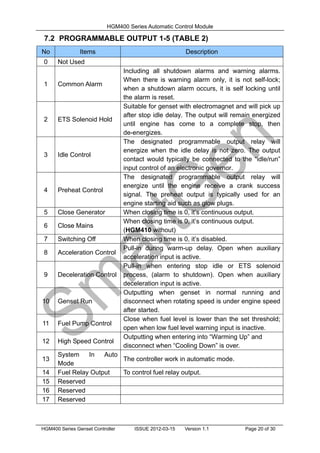
7.2 PROGRAMMABLE OUTPUT 1-5 (TABLE 2)
No Items Description
0 Not Used
1 Common Alarm
Including all shutdown alarms and warning alarms.
When there is warning alarm only, it is not self-lock;
when a shutdown alarm occurs, it is self locking until
the alarm is reset.
2 ETS Solenoid Hold
Suitable for genset with electromagnet and will pick up
after stop idle delay. The output will remain energized
until engine has come to a complete stop, then
de-energizes.
3 Idle Control
The designated programmable output relay will
energize when the idle delay is not zero. The output
contact would typically be connected to the “idle/run”
input control of an electronic governor.
4 Preheat Control
The designated programmable output relay will
energize until the engine receive a crank success
signal. The preheat output is typically used for an
engine starting aid such as glow plugs.
5 Close Generator When closing time is 0, it’s continuous output.
6 Close Mains
When closing time is 0, it’s continuous output.
(HGM410 without)
7 Switching Off When closing time is 0, it’s disabled.
8 Acceleration Control
Pull-in during warm-up delay. Open when auxiliary
acceleration input is active.
9 Deceleration Control
Pull-in when entering stop idle or ETS solenoid
process, (alarm to shutdown). Open when auxiliary
deceleration input is active.
10 Genset Run
Outputting when genset in normal running and
disconnect when rotating speed is under engine speed
after started.
11 Fuel Pump Control
Close when fuel level is lower than the set threshold;
open when low fuel level warning input is inactive.
12 High Speed Control
Outputting when entering into “Warming Up” and
disconnect when “Cooling Down” is over.
13
System In Auto
Mode
The controller work in automatic mode.
14 Fuel Relay Output To control fuel relay output.
15 Reserved
16 Reserved
17 Reserved
HGM400 Series Automatic Control Module
HGM400 Series Genset Controller ISSUE 2012-03-15 Version 1.1 Page 21 of 30
7.3 PROGRAMMABLE INPUT 1-4 TABLE (ACTIVE WHEN
CONNECT GND (B-) (TABLE 3)
No Items Description
0 Not Used
1 High Temp. Alarm When safety on run delay is over, if the signal is active,
generator will immediately alarm to shutdown.
2 Low OP Alarm
3 Auxiliary Alarm If the input is active, only warning, no shutdown.
4 Auxiliary Shutdown If the input is active, stop the genset immediately.
5 Coolant To Stop
During engine running, if the engine temperature is too
high, the controller will stop the unit after cooling delay;
when the input is inactive, controller will stop the unit
immediately.
6 Generator Closed
7 Mains Closed HGM410 without
8
High Temp. Stop
Inhibit
When it is active, prohibit stopping when high
temperature occurs. Note 1
9
Low Oil Pressure
Stop Inhibit
When it is active, prohibit stopping when oil low
pressure occurs. Note 2
10 Remote Start Input HGM420 without
11
Low Fuel Level
Warn
12
Low Liquid Level
Warn
13
Low Fuel Level
Shutdown
14
Low Liquid Level
Shutdown
15 Auto Start Inhibit
In Auto mode, if this input is active, when mains failure
(HGM420) or a remote start signal occurs (HGM410),
the controller will not give a start command to the
generator. If generator is running, stop command won’t
be executed. When this input is inactive, genset will
automatically start or stop according to the mains
normal or abnormal.
7.4 SENSOR SELECT (TABLE 4)
No Content Description
1
Temperature
Sensor
0 Not used
1 Defined Res. Type
2 VDO
3 SGH(Huanghe sensor)
4 SGD(Dongkang sensor)
Defined input resistance
range is (0~6000)Ω.
Factory default is SGX.
HGM400 Series Automatic Control Module
HGM400 Series Genset Controller ISSUE 2012-03-15 Version 1.1 Page 22 of 30
No Content Description
5 CURTIS
6 DATCON
7 VOLVO-EC
8 SGX
9 Reserved
2
Pressure
Sensor
0 Not used
1 Defined Res. Type
2 VDO 10Bar
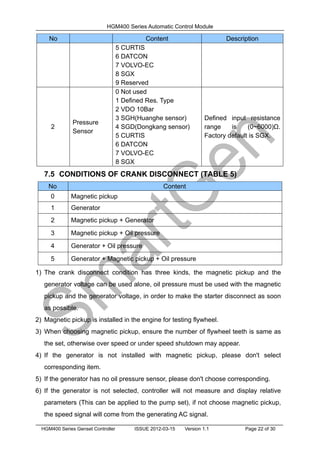
3 SGH(Huanghe sensor)
4 SGD(Dongkang sensor)
5 CURTIS
6 DATCON
7 VOLVO-EC
8 SGX
Defined input resistance
range is (0~6000)Ω.
Factory default is SGX.
7.5 CONDITIONS OF CRANK DISCONNECT (TABLE 5)
No Content
0 Magnetic pickup
1 Generator
2 Magnetic pickup + Generator
3 Magnetic pickup + Oil pressure
4 Generator + Oil pressure
5 Generator + Magnetic pickup + Oil pressure
1) The crank disconnect condition has three kinds, the magnetic pickup and the
generator voltage can be used alone, oil pressure must be used with the magnetic
pickup and the generator voltage, in order to make the starter disconnect as soon
as possible.
2) Magnetic pickup is installed in the engine for testing flywheel.
3) When choosing magnetic pickup, ensure the number of flywheel teeth is same as
the set, otherwise over speed or under speed shutdown may appear.
4) If the generator is not installed with magnetic pickup, please don't select
corresponding item.
5) If the generator has no oil pressure sensor, please don't choose corresponding.
6) If the generator is not selected, controller will not measure and display relative
parameters (This can be applied to the pump set), if not choose magnetic pickup,
the speed signal will come from the generating AC signal.
HGM400 Series Automatic Control Module
HGM400 Series Genset Controller ISSUE 2012-03-15 Version 1.1 Page 23 of 30
8 PARAMETERS SETTING
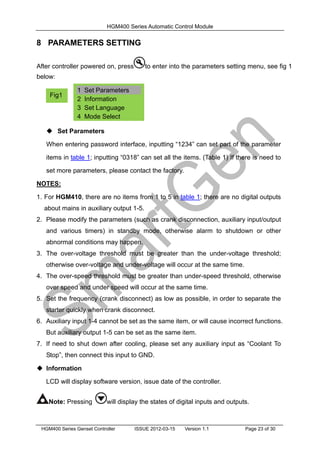
After controller powered on, press to enter into the parameters setting menu, see fig 1
below:
 Set Parameters
When entering password interface, inputting “1234” can set part of the parameter
items in table 1; inputting “0318” can set all the items. (Table 1) If there is need to
set more parameters, please contact the factory.
NOTES:
1. For HGM410, there are no items from 1 to 5 in table 1; there are no digital outputs
about mains in auxiliary output 1-5.
2. Please modify the parameters (such as crank disconnection, auxiliary input/output
and various timers) in standby mode, otherwise alarm to shutdown or other
abnormal conditions may happen.
3. The over-voltage threshold must be greater than the under-voltage threshold;
otherwise over-voltage and under-voltage will occur at the same time.
4. The over-speed threshold must be greater than under-speed threshold, otherwise
over speed and under speed will occur at the same time.
5. Set the frequency (crank disconnect) as low as possible, in order to separate the
starter quickly when crank disconnect.
6. Auxiliary input 1-4 cannot be set as the same item, or will cause incorrect functions.
But auxiliary output 1-5 can be set as the same item.
7. If need to shut down after cooling, please set any auxiliary input as “Coolant To
Stop”, then connect this input to GND.
 Information
LCD will display software version, issue date of the controller.
Note: Pressing will display the states of digital inputs and outputs.
1 Set Parameters
2 Information
3 Set Language
4 Mode Select
Fig1
HGM400 Series Automatic Control Module
HGM400 Series Genset Controller ISSUE 2012-03-15 Version 1.1 Page 24 of 30
 Set Language
Chinese, English, Spanish and Russian interface can be selected.
 Mode Select
The controller can be set as Manual Test Mode, Manual Mode or Auto Mode.
Note: Pressing key at any time will quit the setting and return to the previous
setting menu.
9 SENSOR SELECT
1) When choosing sensor, standard of sensor curve will be needed. If set
temperature sensor as SGH (120º
C resistance type), sensor curve should be SGH
(120o
C resistance type); If set as SGD (120º
C resistance type), sensor curve
should be SGD curve.
2) If there is difference between standard sensor curve and chosen sensor, select
"defined sensor", and then input defined sensor curve.
3) When inputting sensor curve, X value (resistance) must be in accordance with the
order of higher to lower, otherwise errors will occur.
4) When select sensor "Not used", temperature, pressure and fuel level will be
display as" - - -" in LCD.
5) If there is no pressure sensor, but only has low pressure alarm switch, then you
must set pressure sensor as "Not used", otherwise oil pressure low alarm
shutdown may appear.
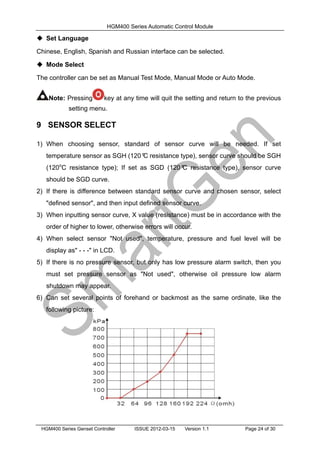
6) Can set several points of forehand or backmost as the same ordinate, like the
following picture:
HGM400 Series Automatic Control Module
HGM400 Series Genset Controller ISSUE 2012-03-15 Version 1.1 Page 25 of 30
Common unit conversion table
1N/m2
(pa) 1kgf/cm2
1bar (1b/in2
) psi
1Pa 1 1.02x10
-5
1x10
-5
1.45x10
-4
1kgf/cm2
9.8x10⁴
1 0.98 14.2
1bar 1x10⁵
1.02 1 14.5
1psi 6.89x10³
7.03x10
-2
6.89x10
-2
1
10 COMMISSIONING
Before operation, the following checking should be carried out:
1) Check and ensure all the connections are correct and wires diameter is suitable.
2) Ensure that the controller DC power has insurance; battery positive and negative
have correctly connected.
3) Emergence stop input must be connected to positive of starting battery via normally
close contact of emergency stop.
4) Take proper actions to prevent engine to disconnect crank (for example, to remove
the connections of fuel value). If checking is OK, connect start battery, select Manual
Mode, controller will execute the program.
5) Set controller as Manual Mode, press “start” button to start genset. If failed within the
setting crank times, controller will send “Failed to Start” signal; then press “Reset” to
reset controller.
6) Recover actions of preventing engine to disconnect crank (e. g. Connect wire of fuel
value), press “start” button again, genset will start. If everything goes well, genset will
normal run after idle running (if configured). During this period, watch for engine’s
running situations and voltage and frequency of alternator. If abnormal, stop genset
and check all connections according to this manual.
7) Select the Auto Mode from front panel, connect to mains signal. After the mains
normal delay, controller will transfer ATS (if configured) and into mains load. After
cooling, controller will stop genset and into standby state until mains abnormal again.
8) When mains abnormal again, genset will start automatically and into normal running,
send signal to make gens close, transfer ATS and make genset take load. If not like
this, please check connections of ATS according to this manual.
9) If there are any other questions, please contact our technical personnel.
HGM400 Series Automatic Control Module
HGM400 Series Genset Controller ISSUE 2012-03-15 Version 1.1 Page 26 of 30
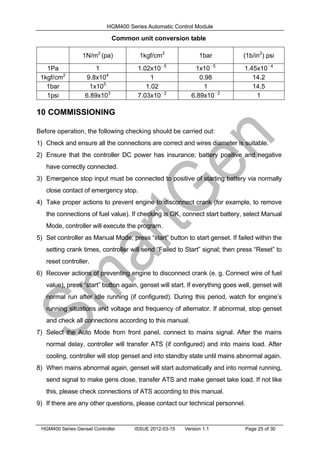
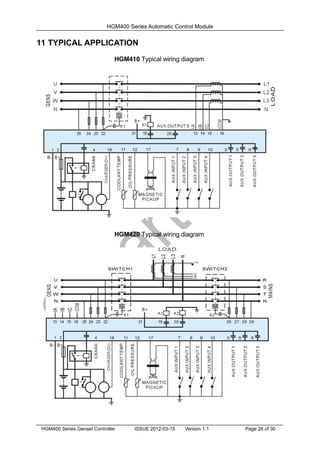
11 TYPICAL APPLICATION
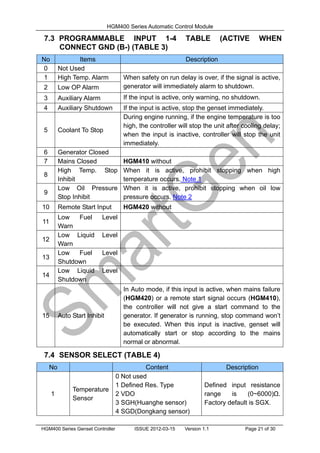
HGM410 Typical wiring diagram
HGM420 Typical wiring diagram
HGM400 Series Automatic Control Module
HGM400 Series Genset Controller ISSUE 2012-03-15 Version 1.1 Page 27 of 30
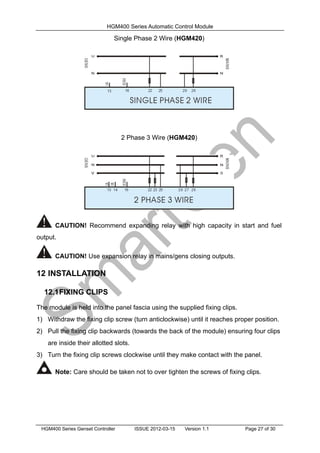
Single Phase 2 Wire (HGM420)
2 Phase 3 Wire (HGM420)
CAUTION! Recommend expanding relay with high capacity in start and fuel
output.
CAUTION! Use expansion relay in mains/gens closing outputs.
12 INSTALLATION
12.1FIXING CLIPS
The module is held into the panel fascia using the supplied fixing clips.
1) Withdraw the fixing clip screw (turn anticlockwise) until it reaches proper position.
2) Pull the fixing clip backwards (towards the back of the module) ensuring four clips
are inside their allotted slots.
3) Turn the fixing clip screws clockwise until they make contact with the panel.
Note: Care should be taken not to over tighten the screws of fixing clips.
HGM400 Series Automatic Control Module
HGM400 Series Genset Controller ISSUE 2012-03-15 Version 1.1 Page 28 of 30
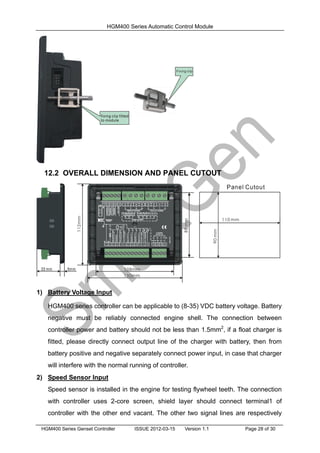
12.2 OVERALL DIMENSION AND PANEL CUTOUT
1) Battery Voltage Input
HGM400 series controller can be applicable to (8-35) VDC battery voltage. Battery
negative must be reliably connected engine shell. The connection between
controller power and battery should not be less than 1.5mm2
, if a float charger is
fitted, please directly connect output line of the charger with battery, then from
battery positive and negative separately connect power input, in case that charger
will interfere with the normal running of controller.
2) Speed Sensor Input
Speed sensor is installed in the engine for testing flywheel teeth. The connection
with controller uses 2-core screen, shield layer should connect terminal1 of
controller with the other end vacant. The other two signal lines are respectively
HGM400 Series Automatic Control Module
HGM400 Series Genset Controller ISSUE 2012-03-15 Version 1.1 Page 29 of 30
connected to terminal 1 and terminal 17. At full speed, output voltage range is
1-24VAC (RMS). Recommend using 12VAC (rated speed) voltage. During
installing, make the speed sensor contact the flywheel firstly, then pour out 1/3
laps, finally lock nut on the sensor.
3) Output And Expansion Relay
All outputs of the controller are relay contact outputs, if expansion relay is needed,
please add free-wheeling diode at both ends of the relay coil (expansion relay coil
links DC) or increase RC loop (expansion relay coil links AC) in order to prevent
from interfering controller or other equipment.
4) AC Input
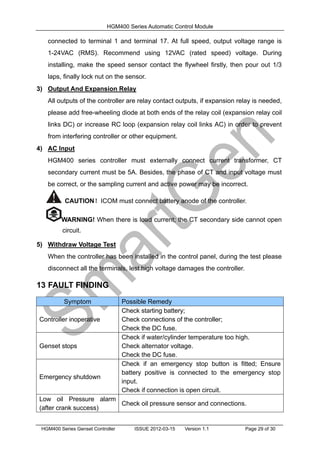
HGM400 series controller must externally connect current transformer, CT
secondary current must be 5A. Besides, the phase of CT and input voltage must
be correct, or the sampling current and active power may be incorrect.
CAUTION!ICOM must connect battery anode of the controller.
WARNING! When there is load current; the CT secondary side cannot open
circuit.
5) Withdraw Voltage Test
When the controller has been installed in the control panel, during the test please
disconnect all the terminals, lest high voltage damages the controller.
13 FAULT FINDING
Symptom Possible Remedy
Controller inoperative
Check starting battery;
Check connections of the controller;
Check the DC fuse.
Genset stops
Check if water/cylinder temperature too high.
Check alternator voltage.
Check the DC fuse.
Emergency shutdown
Check if an emergency stop button is fitted; Ensure
battery positive is connected to the emergency stop
input.
Check if connection is open circuit.
Low oil Pressure alarm
(after crank success)
Check oil pressure sensor and connections.
HGM400 Series Automatic Control Module
HGM400 Series Genset Controller ISSUE 2012-03-15 Version 1.1 Page 30 of 30
Symptom Possible Remedy
High Temp. alarm (after
crank success)
Check temperature sensor and connections.
Shutdown Alarm During
Running
Check switch and connections according to information
on LCD.
Check configuration inputs.
Crank Not Disconnect
Check connections of fuel solenoid.
Check starting battery.
Check speed sensor and its connections.
Refer to engine manual.
Starter Inoperative
Check connections of starter;
Check starting battery.
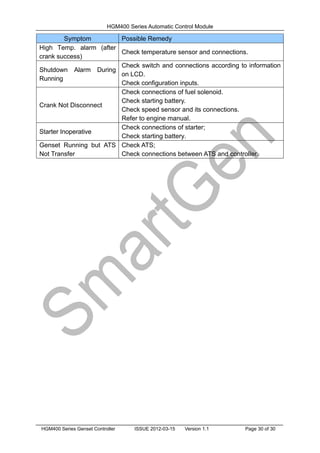
Genset Running but ATS
Not Transfer
Check ATS;
Check connections between ATS and controller.

Hgm400 v1.1 en

  • 1.
    HGM400 Automatic GensetController (HGM410/HGM420) USER MANUAL Smartgen Technology
  • 2.
    Chinese trademark English trademark Smartgen— make your generator smart Smartgen Technology Co., Ltd No. 28 Jinsuo Road Zhengzhou Henan Province P. R. China Tel: +86-371-67988888/67981888 +86-371-67991553/67992951/67992952 +86-371-67981000(overseas) Fax: 0086-371-67992952/67981000 Web: http://www.smartgen.com.cn http://www.smartgen.cn Email: sales@smartgen.com.cn All rights reserved. No part of this publication may be reproduced in any material form (including photocopying or storing in any medium by electronic means or other) without the written permission of the copyright holder. Smartgen Technology reserves the right to change the contents of this document without prior notice. Software Version Date Version Note 2011-07-06 1.0 Original release. 2012-03-15 1.1 Modify typical application.
  • 3.
    HGM400 Series AutomaticControl Module HGM400 Series Genset Controller ISSUE 2012-03-15 Version 1.1 Page 3 of 30 This manual is suitable for HGM400 series controller only. Clarification of notation used within this publication. SYMBOL INSTRUCTION NOTE Highlights an essential element of a procedure to ensure correctness. CAUTION! Indicates a procedure or practice, which, if not strictly observed, could result in damage or destruction of equipment. WARNING! Indicates a procedure or practice, which could result in injury to personnel or loss of life if not followed correctly.
  • 4.
    HGM400 Series AutomaticControl Module HGM400 Series Genset Controller ISSUE 2012-03-15 Version 1.1 Page 4 of 30 Table of Contents 1 SUMMARY....................................................................................5 2 PERFORMANCE AND CHARACTERISTICS ..............................5 3 SPECIFICATION ..........................................................................6 4 OPERATION.................................................................................7 4.1 PANEL KEYS ............................................................................................ 7 4.2 PANEL DESCRIPTION............................................................................. 8 4.3 AUTOMATIC START/STOP OPERATION................................................ 8 4.4 MANUAL START/STOP OPERATION.................................................... 10 5 PROTECTION ............................................................................10 5.1 WARNINGS ............................................................................................ 10 5.2 SHUTDOWN ALARM...............................................................................11 6 CONNECTIONS .........................................................................12 7 DEFINITION AND RANGE OF PARAMETERS .........................14 7.1 PARAMETER CONTENTS AND RANGE (TABLE 1) ............................. 14 7.2 PROGRAMMABLE OUTPUT 1-5 (TABLE 2).......................................... 20 7.3 PROGRAMMABLE INPUT 1-4 TABLE (ACTIVE WHEN CONNECT GND (B-) (TABLE 3)....................................................................................................... 21 7.4 SENSOR SELECT (TABLE 4) ................................................................ 21 7.5 CONDITIONS OF CRANK DISCONNECT (TABLE 5) ........................... 22 8 PARAMETERS SETTING...........................................................23 9 SENSOR SELECT......................................................................24 10 COMMISSIONING......................................................................25 11 TYPICAL APPLICATION.............................................................26 12 INSTALLATION...........................................................................27 12.1FIXING CLIPS......................................................................................... 27 12.2OVERALL DIMENSION AND PANEL CUTOUT ..................................... 28 13 FAULT FINDING .........................................................................29
  • 5.
    HGM400 Series AutomaticControl Module HGM400 Series Genset Controller ISSUE 2012-03-15 Version 1.1 Page 5 of 30 1 SUMMARY HGM400 series automatic controller, integrating digital, intelligent and network techniques, is used for automatic control system of generator. It can achieve automatic start/stop, data measuring and “three remote” functions (SG485 module is needed). The controller uses LCD display, optional Chinese, English, Spanish and Russian display interface with easy and reliable operation. HGM400 series automatic controller uses micro-processing technique which can carry out precision measuring, constant value adjustment, timing and threshold setting and etc.. All the parameters can be adjusted from front panel or through programmable interface (USB to LINK, can use SG72 adaptor) via PC. It can be widely used in all types of generator automatic control system for compact structure, simple connections and high reliability. 2 PERFORMANCE AND CHARACTERISTICS  HGM400 series controller has two variants: HGM410: Automatic Start Module, it controls generator to start/stop by remote start signal; HGM420: Based on HGM410, add mains AC monitoring, mains/generator automatic switching control (AMF), especially suitable for automatic control system composed by mains and generator.  132x64 LCD with backlight, optional language interface (Chinese, English, Spanish and Russian), push-button operation;  Adapt to 3 phase 4 wire, single phase 2 wire, 3 phase 3 wire and 2 phase 3 wire (120/240V), 50/60Hz power supply;  Can measure and display 3-phase voltage, 3-phase current, frequency, and power; Mains Generator Line Voltage (Uab, Ubc, Uca) Line Voltage (Uab, Ubc, Uca) Phase Voltage (Ua, Ub, Uc) Phase Voltage (Ua, Ub, Uc) Frequency (HZ) Frequency (HZ) Load Current (IA, IB, IC) Active Power (KW) Reactive Power (KVar) Apparent Power (KVA) Power Factor (PF) Accumulated Energy (kWh)  For mains: Over/under voltage, lack of phase; for generator: over/under voltage, over/under frequency, over current;  Precision measure and display engine parameters,
  • 6.
    HGM400 Series AutomaticControl Module HGM400 Series Genset Controller ISSUE 2012-03-15 Version 1.1 Page 6 of 30 Temperature (WT), ° C/ ° F both are display Oil pressure (OP), kPa/Psi/Bar all be display Speed (SPD), RPM (unit) Voltage of Battery (VB) V (unit) Voltage of Charger (VD) V (unit) Hours counter (HC): Max. 999999 hours. Start times: Max.999999 times.  Control protection: Automatic start/stop, switch on/off (ATS control) and fault display;  With ETS, idle control, pre-heat control, acceleration and deceleration control, all are relay output;  Parameters setting: Allow user to modify parameters and store them in internal FLASH, which cannot be lost even when power off. All the parameters can be adjusted from the front panel, or by PC via an SG72 adaptor;  Types of temperature and pressure sensor can be directly used and user defined;  Conditions of crank disconnect can be selected.(magnetic pickup, oil pressure, generator);  Power supply range is (8~35)VDC, accommodating to different starting voltage;  All parameters use digital modulation, abandoning analog modulation of conventional potentiometer, more reliability and stability;  Modular design, flame retardant ABS shell, plug-in terminals, embedded mounting, compact structure, easy installation. 3 SPECIFICATION Items Contents Working Voltage DC8.0V to 35.0V, continuous Power Consumption <3W(Standby mode: ≤2W) AC voltage Input: 3 Phase 4 Wire 2 Phase 3 Wire Single phase 2 Wire 3 Phase 3 Wire 15V AC - 360 VAC (ph-N) 15V AC - 360 VAC (ph-N) 15V AC - 360 VAC (ph-N) 30V AC - 620 VAC (ph-ph) Alternator Frequency 50Hz/60 Hz Speed Sensor Voltage 1.0V to 24V (effective value) Speed Sensor Frequency 10,000 Hz (max) Start Relay Output 5A DC28V power supply Programmable Relay Output 1 5A DC28V power supply Programmable Relay Output 2 5A DC28V power supply
  • 7.
    HGM400 Series AutomaticControl Module HGM400 Series Genset Controller ISSUE 2012-03-15 Version 1.1 Page 7 of 30 Programmable Relay Output 3 5A DC28V power supply Programmable Relay Output 4 5A AC250V voltage-free output Programmable Relay Output 5 5A AC250V voltage-free output Overall Dimensions 130mm x 112mm x 39mm Panel Cutout 110mm x 90mm CT Secondary Current 5A (rated ) Working Condition Temperature: (-25~70)º C; Humidity: (20~93)%RH Storage Condition Temperature: (-30~+80)º C Protection Level IP55: when waterproof rubber gasket added between controller and its panel. IP42: when waterproof rubber gasket not added between controller and its panel. Insulation Intensity Object: among in input/output/power Quote standard: IEC688-1992 Test way: AC1.5 kV/1min 3mA leakage current Weight 0.26kg 4 OPERATION 4.1 PANEL KEYS Stop/ Reset Can stop generator under Manual/Auto mode; Can reset shutdown alarm; Pressing this key at least 3 seconds can test panel indicators (Lamp Test),; During stopping process, pressing this again can stop generator immediately. Start To start genset under Manual or Manual Test mode. Manual Pressing this key will set the module into manual mode. Pressing this and up key can adjust LCD contrast. Automatic Pressing this key will set the module into auto mode. Set/Confirm Enter into Set menu after pressing this key; Shift cursor to confirm. Up/Increase Turning pages up; In parameter setting, shift cursor and increase values. Down/Decrease Turning pages down; In parameter setting, shift cursor and decrease values.
  • 8.
    HGM400 Series AutomaticControl Module HGM400 Series Genset Controller ISSUE 2012-03-15 Version 1.1 Page 8 of 30 4.2 PANEL DESCRIPTION HGM410 Panel Indicators HGM420 Panel Indicators 4.3 AUTOMATIC START/STOP OPERATION This mode is activated by pressing . LED indicator beside the key is illuminating which confirms this action.
  • 9.
    HGM400 Series AutomaticControl Module HGM400 Series Genset Controller ISSUE 2012-03-15 Version 1.1 Page 9 of 30 Start Sequence, 1) HGM420: when mains is abnormal (over/under voltage, lack of phase), enter into “Mains Abnormal Delay” and LCD displays count-down timer. When the delay is over, “Start Delay” begins. 2) HGM410: genset enters into “Start Delay” when “Remote Start” is active. 3) Count- down timer of “Start Delay” is displayed in LCD. 4) When start delay is over, preheat relay is outputting (if configured), “Preheat Delay XX s” is displayed in LCD. 5) When preheat delay is over, fuel relay is outputting 1s and then start relay outputs; if genset failed to start during “Start Time”, fuel and start relays stop outputting and enter into “Crank Rest Time” and wait for next cranking. 6) If genset failed to start within specified start times, the fourth line of LED will turn black and “Fail to Start” alarm will be displayed. 7) Whatever time to start successfully, genset will enter into “Safety on Run Time”. During this period, alarms of low oil pressure, hi-temperature, under speed, charge failure and auxiliary input (be configured) are disabled. As soon as this delay is over, genset will enter into “Start Idle Delay” (if configured). 8) During start idle delay, alarms of under speed, under frequency, under voltage are disabled. As soon as this delay is over, genset will enter into “Warming Up Delay” (if configured). 9) When “Warming Up Delay” is over, the indicator is illuminating if gens normal. If engine voltage and frequency reach the load demand, closing relay outputs, genset takes load and indicator illuminates; if engine voltage and frequency appear abnormal, controller will alarm to shutdown (alarm is displayed in LCD). Stop Sequence, 1) HGM420: during genset running, if mains normal, enters into “Mains Normal Delay”. When mains indicator illuminates, “Stop Delay” begins. 2) HGM410: genset enters into “Stop Delay” when “Remote Start” is inactive. 3) When stop delay is over, genset enters into “Cooling Delay”. Gens closing relay is open. After switch “Transfer Rest Delay”, mains closing relay outputs, mains will take load, power indicator of gens eliminates while indicator of gens illuminates. 4) When entering “Stop Idle Delay” (if configured), Idle relay is energized to output. 5) When entering “ETS delay”, ETS relay is energized to output, fuel relay is open. 6) When entering “Genset at Rest”, automatically judge whether genset is stopped or not.
  • 10.
    HGM400 Series AutomaticControl Module HGM400 Series Genset Controller ISSUE 2012-03-15 Version 1.1 Page 10 of 30 7) When genset has stopped, enters into standby mode; if failed to stop, controller will alarm (“Fail to Stop” alarm will be displayed in LCD). 4.4 MANUAL START/STOP OPERATION 1) HGM420: Manual Mode is activated when press and its indicator illuminates. Press key, choose “Manual Test Mode”. Under the two modes, press key to start genset, it can automatically judge crank disconnect and accelerate to hi-speed running. If high temperature, low oil pressure, over speed and abnormal voltage occur during genset running, controller can effectively protect genset to stop (detail procedures please refer to No.4~9 of Auto start operation). Under Manual Mode , if mains normal, load switch won’t transfer; if mains abnormal, load switch will transfer to gens. Under Manual Test Mode, after genset normally runs in high speed, no matter mains normal or not, load will be transferred to gens. 2) HGM410: Manual Mode is activated when press key and its indicator illuminates. Then press key to start generator, it can automatically judge crank disconnect and accelerate to hi-speed running. If hi-temperature, low oil pressure, over speed and abnormal voltage occur during genset running, controller can effectively protect genset to stop (detail procedures please refer to No.4~9 of Auto start operation). Controller will send closing signal when genset runs in high speed. 3) Manual stop: pressing key can shut down the running genset. (detail procedures please refer to No.3~7 of Auto stop operation) 5 PROTECTION 5.1 WARNINGS When controller detects the warning signal, only alarm and not stop genset. The alarms are displayed in LCD. Warnings as following, No Items Description 1 Loss Of Speed Signal When controller detected engine speed is 0 (the delay is 0), a warning alarm signal will be sent and displayed in LCD. 2 Gens Over Current When controller detected gens current above the pre-set value (the delay is 0), a warning alarm initiates and displayed in LCD. 3 Fail To Stop When generator cannot stop after the “stop delay”, controller
  • 11.
    HGM400 Series AutomaticControl Module HGM400 Series Genset Controller ISSUE 2012-03-15 Version 1.1 Page 11 of 30 No Items Description will send warning alarm signal and it will be displayed in LCD. 4 Low Fuel Level When controller detected the fuel level is lower than threshold, controller will send warning alarm signal and it will be displayed in LCD. 5 Charge Failure When controller detected the charger voltage is lower than threshold, controller will send warning alarm signal and it will be displayed in LCD. 6 Battery Under Voltage When controller detected the battery voltage is lower than threshold, controller will send warning alarm signal and it will be displayed in LCD. 7 Battery Over Voltage When controller detected the battery voltage is higher than threshold, controller will send warning alarm signal and it will be displayed in LCD. 8 Low Liquid Level When controller detected low water level input is active, controller will send warning alarm signal and it will be displayed in LCD. 9 Temp. Sensor Open When temperature sensor opens circuit and the warning input is active, controller will send a warning alarm signal and it will be displayed in LCD. 10 Oil Press Sensor Open When oil pressure sensor opens circuit and the warning input is active, controller will send warning alarm signal and it will be displayed in LCD. 5.2 SHUTDOWN ALARM When controller detected shutdown alarm, it will send signal to open switch and stop the unit. The alarms are displayed in LCD. No Items Description 1 Emergency Stop When controller detected emergency stop signal, it will send a stop alarm signal and it will be displayed in LCD. 2 High Temperature When controller detected the temperature of water/cylinder is higher than preset, it will send a stop alarm signal and it will be displayed in LCD. 3 Low Oil Pressure When controller detected oil pressure is lower than the preset, it will send a stop alarm signal and it will be displayed in LCD. 4 Over Speed When controller detected genset speed is over the preset, it will send a stop alarm signal and it will be displayed in LCD. 5 Under Speed When controller detected genset speed is under the preset, it will send a stop alarm signal and it will be displayed in LCD. 6 Loss Of Speed Signal When controller detected genset speed is 0 (the delay is not 0), it will send a stop alarm signal and it will be displayed in
  • 12.
    HGM400 Series AutomaticControl Module HGM400 Series Genset Controller ISSUE 2012-03-15 Version 1.1 Page 12 of 30 No Items Description LCD. 7 Gens Over Voltage When controller detected genset voltage is over the preset, it will send a stop alarm signal and it will be displayed in LCD. 8 Gens Under Voltage When controller detected genset voltage is under the preset, it will send a stop alarm signal and it will be displayed in LCD. 9 Gens Over Current When controller detected genset current is over the preset and delay is not 0, it will send a stop alarm signal and it will be displayed in LCD. 10 Fail To Start During the start attempt times, if genset start failed, it will send a stop alarm signal and it will be displayed in LCD. 11 Over Frequency When controller detected genset frequency is over the preset, it will send a stop alarm signal and it will be displayed in LCD. 12 Under Frequency When controller detected genset frequency is under the preset, it will send a stop alarm signal and it will be displayed in LCD. 13 Genset Failed When controller detected genset frequency is 0, it will send a stop alarm signal and it will be displayed in LCD 14 Low Fuel Level When controller detected genset fuel level low input is active, it will send a stop alarm signal and it will be displayed in LCD. 15 Low Liquid Level When controller detected genset water level low input is active, it will send a stop alarm signal and it will be displayed in LCD. 16 Temp. Sensor Open When temperature sensor opens circuit and the input is active, controller will send a stop alarm signal and it will be displayed in LCD. 17 Oil Pressure Sensor Open When oil pressure sensor opens circuit and the input is active, controller will send a stop alarm signal and it will be displayed in LCD. 6 CONNECTIONS Compared with HGM420, HGM410 is lack of a 3 phase AC input terminal of mains. The rear panel of HGM410 and HGM420 is as below.
  • 13.
    HGM400 Series AutomaticControl Module HGM400 Series Genset Controller ISSUE 2012-03-15 Version 1.1 Page 13 of 30 Description of terminal connections: Pin Function Cable Size Description 1 DC Power Supply B- 1.5mm2 Connect battery negative. 2 DC Power Supply B+ 1.5mm2 Connect battery positive. If longer than 30m, parallel connection with 2 cables. Recommend using maximum 20A fuse. 3 Programmable Relay Output 1 1.0mm2 Plant Supply B+ from pin 2, 5 A rated. 4 Start Relay Output 1.0mm2 Plant Supply B+ from pin 2, 5 A rated. Connect starting coil. 5 Programmable Relay Output 2 1.0mm2 Plant supply B+ from pin 2, 5 A rated. 6 Programmable Relay Output 3 1.0mm2 Plant supply B+ from pin 2, 5 A rated. 7 Auxiliary Input 1 1.0mm2 Connect to GND (B-) See Table 3 8 Auxiliary Input 2 1.0mm2 Connect to GND (B-) 9 Auxiliary Input 3 1.0mm2 Connect to GND (B-) 10 Auxiliary Input 4 1.0mm2 Connect to GND (B-) 11 Temperature Sensor Input 1.0mm2 Connect a temperature resistance sensor. See Table 4 12 Oil Press Sensor Input 1.0mm2 Connect to a pressure resistance sensor. 13 CT A Phase Sensing 1.5mm2 Connect current transformer secondary coil (rated 5A)
  • 14.
    HGM400 Series AutomaticControl Module HGM400 Series Genset Controller ISSUE 2012-03-15 Version 1.1 Page 14 of 30 Pin Function Cable Size Description 14 CT B Phase Sensing 1.5mm2 Connect current transformer secondary coil (rated 5A) 15 CT C Phase Sensing 1.5mm2 Connect current transformer secondary coil (rated 5A) 16 CT Common 1.5mm2 See INSTALLATION in the manual. 17 Speed Sensor Input 0.5mm2 Connect magnetic pickup. Recommend using screen. Connect battery negative at one end. 18 Charger D+ Input 1.0mm2 Connect D+ terminal. If there is no, this input remains Not Connect. 19 Programmable Relay Output 4 1.0mm2 Terminal 19 and 21 are relay N/O contact, rated 5A. 20 Programmable Relay Output 5 1.0mm2 Terminal 20 and 21 are relay N/O contact, rated 5A. 21 Common Port 1.5mm2 Common port of programmable relay output 4 and 5. 22 Generator U Phase Sensing 1.0mm2 Connect U phase of generator Recommend 2A fuse 23 Generator V Phase Sensing 1.0mm2 Connect V phase of generator Recommend 2A fuse 24 Generator W Phase Sensing 1.0mm2 Connect W phase of generator Recommend 2A fuse 25 Generator N2 Output 1.0mm2 Connect neutral output of generator. 26 Mains R Phase Sensing 1.0mm2 Connect R phase of mains Recommend 2A fuse (HGM410 without) 27 Mains S Phase Sensing 1.0mm2 Connect S phase of mains Recommend 2A fuse (HGM410 without) 28 Mains T Phase Sensing 1.0mm2 Connect T phase of mains Recommend 2A fuse (HGM410 without) 29 Mains N1 Sensing 1.0mm2 Connect neutral line of mains (HGM410 without) NOTE: LINK interface is programmable interface for parameters that can be programmed by PC via an SG72 adapter. If there is need to remote start the genset, please use the SG485 module. 7 DEFINITION AND RANGE OF PARAMETERS 7.1 PARAMETER CONTENTS AND RANGE (TABLE 1)
  • 15.
    HGM400 Series AutomaticControl Module HGM400 Series Genset Controller ISSUE 2012-03-15 Version 1.1 Page 15 of 30 No Items Range Default Description 1 Mains Normal Delay (0-3600)s 10 Mains transient delay, suitable for ATS (automatic transfer switch). 2 Mains Abnormal Delay (0-3600)s 5 3 Mains Under Voltage (30-620)V 184 When mains voltage is under the point, Mains Under Voltage is active. When the point is 30V, not detect low voltage signal. 4 Mains Over Voltage (30-620)V 276 When mains voltage is over the point, Mains Over Voltage is active. When the point is 620V, not detect high voltage signal. 5 Transfer Rest Time (0-99.9)s 1.0 It’s the delay from mains is open to gens closing or from gene open to mains closing. 6 Start Delay (0-3600)s 1 It’s the delay from remote start signal is active or mains abnormal, to start generator. 7 Stop Delay (0-3600)s 1 It’s the delay from remote start signal is inactive or mains normal, to stop generator. 8 Start Times (1-10)times 3 Maximum start times, if failed to start within the specified times, controller will send Fail To Start signal. 9 Preheat Time (0-300)s 0 Time to power the glow plug before cranking. 10 Crank Time (3-60)s 8 The starter adds the time of the electricity each time. 11 Crank Rest Time (3-60)s 10 Delay of waiting for another cranking. 12 Safety Run On Time (1-60)s 10 During this period, Low Oil Pressure, High Temperature, Under Speed, Under Frequency and Charge Failure alarms are inactive. 13 Start Idle Time (0-3600)s 0 Idle running time when starting. 14 Warm Up Time (0-3600)s 10 Delay for warming up before closing.
  • 16.
    HGM400 Series AutomaticControl Module HGM400 Series Genset Controller ISSUE 2012-03-15 Version 1.1 Page 16 of 30 No Items Range Default Description 15 Cooling Time (3-3600)s 10 Delay of cooling time before stopping. 16 Stop Idle (0-3600)s 0 Idle running time when stopping. 17 ETS Solenoid Hold (0-120)s 20 It’s the delay for energizing to stop. 18 Over Stop Delay (0-120)s 0 When set “ETS solenoid hold” as 0s, from idle delay over to over stop timer; if not 0s, it’s from ETS delay over to genset at rest. 19 Switching On (0-10)s 5.0 Pulse width of mains or closing gens. When it is 0s, output is continuous. 20 Flywheel Teeth (10-300) 118 Used for judging crank disconnect and detecting rotating speed. See INSTALLATION in this manual. 21 Generator Abnormal Delay (0-20.0)s 10.0 Gens high voltage and low voltage alarm delay. 22 Generator Over Voltage (30-620)V 264 When voltage is over the point, Gens Over Voltage is active. When the point is 620V, Gens Over Voltage is disabled. 23 Generator Under Voltage (30-620)V 196 When voltage is under the point, Gens Under Voltage is active. When the point is 30V, Gens Under Voltage is disabled. 24 Under Speed (0-6000)RPM 1200 When engine speed is under the point and holds for 10s, Gens Under Speed is active. 25 Over Speed (0-6000)RPM 1710 When engine speed is over the point and holds for 2s, Gens Over Speed is active. 26 Under Frequency (0-75.0)Hz 45.0 When generator frequency is lower than the point and holds for 10s, Gens Under Frequency is active. 27 Over Frequency (0-75.0)Hz 57.0 When generator frequency is over the point and holds for 2s, Gens Over Frequency is active.
  • 17.
    HGM400 Series AutomaticControl Module HGM400 Series Genset Controller ISSUE 2012-03-15 Version 1.1 Page 17 of 30 No Items Range Default Description 28 High Temperature (80-140)º C 98 When engine temperature sensor value is over this point, send alarm signal. Active from end of safety run on timer. When the value is 140, high temperature alarm is disabled. (only suitable for temperature sensor) 29 Low Oil Pressure (0-400)kPa 103 When engine oil pressure sensor value is under this point, send alarm signal. Active from end of safety run on timer. Low oil pressure alarm is disabled. (only suitable for oil pressure sensor) 30 Loss of Speed Signal (0-20.0)s 5.0 If set the delay as 0, only warn not to stop the generator. 31 Charge Failure (0-30)V 6.0 During generator is running, when alternator WL/D+ voltage is under this point and remains for 5s, generator will send shutdown alarm. 32 Battery Over Voltage (12-40)V 33.0 When battery voltage is over the point and holds for 20s, Battery Over Voltage is active. It’s a warning alarm. 33 Battery Under Voltage (4-30)V 8.0 When generator battery voltage is under the point and holds for 20s, Battery Under Voltage is active. It’s a warning alarm. 34 CT Rate (5-6000)/5 500 Current transformer rate 35 Full Load Current (5-6000)A 500 Maximum rated current, used for calculating over current. 36 Over Current Percentage (50-130)% 120 When the load current is over the point, over current delay begins. 37 Over Current Delay (0-3600)s 1296 When load current is over the pre-set value, over current is initiated. When set delay timer as 0, only warning no shutdown, 38 Digital Output 1 (0-17) 14 Factory default: Fuel Relay Output 39 Digital Output 2 (0-17) 2 Factory default: Energized To Stop
  • 18.
    HGM400 Series AutomaticControl Module HGM400 Series Genset Controller ISSUE 2012-03-15 Version 1.1 Page 18 of 30 No Items Range Default Description 40 Digital Output 3 (0-17) 3 Factory default: Idle Control 41 Digital Output 4 (0-17) 5 Factory default: Gens Closed 42 Digital Output 5 (0-17) 6 Factory default: Mains Closed 43 Auxiliary Input 1 (0-15) 1 Factory default: High Temperature Alarm 44 Auxiliary Input 1 Active (0-1) 0 Factory default: Closed 45 Auxiliary Input 1 Delay (0-20.0)s 2.0 46 Auxiliary Input 2 (0-15) 2 Factory default: Low Oil Pressure Alarm 47 Auxiliary Input 2 Active (0-1) 0 Factory default: Closed 48 Auxiliary Input 2 Delay (0-20.0)s 2.0 49 Auxiliary Input 3 (0-15) 10 Factory default: Remote Start 50 Auxiliary Input 3 Active (0-1) 0 Factory default: Closed 51 Auxiliary Input 3 Delay (0-20.0)s 2.0 52 Auxiliary Input 4 (0-15) 11 Factory default: Low Fuel Level Warn 53 Auxiliary Input 4 Active (0-1) 0 Factory default: Closed 54 Auxiliary Input 4 Delay (0-20.0)s 2.0 55 Module Mode (0-2) 0 0: Stop Mode 1: Manual Mode 2: Auto Mode 56 Module Address (1-254) 1 Communication address of controller. 57 Passwords (0-9999) 1234 58 Crank Disconnect (0-5) 2 Conditions of crank disconnect includes gens, magnetic pickup and oil pressure which make starter separate with engine. See Table 5 59 Engine Speed (0-3000)RPM 360 When engine speed is over this point, starter will disconnect.
  • 19.
    HGM400 Series AutomaticControl Module HGM400 Series Genset Controller ISSUE 2012-03-15 Version 1.1 Page 19 of 30 No Items Range Default Description 60 Engine Frequency (10.0-30.0)Hz 14.0 When generator frequency is over this point, starter will disconnect. 61 Engine Oil Press (0-400)kPa 200 When engine oil pressure is over this point, starter will disconnect. 62 High Temp. Inhibit (0-1) 0 Factory default: when the temperature is too high, alarm to shutdown. Note 1. 63 Low OP Inhibit (0-1) 0 Factory default: when oil pressure is lower, alarm to shutdown. Note 2 64 Voltage Input (0-3) 0 0: 3P4W; 1:2P3W 2:1P2W; 3: 3P3W Note 3 65 Temp. Sensor Select (0-9) 08 SGX 66 Pressure Sensor Select (0-9) 08 SGX 67 Number Of Poles (2-32) 4 68 Temperature Sensor Open (0-2) 1 0: Indication (temperature sensor will show “+++”); 1:Warning; 2:Shutdown 69 Oil Pressure Sensor Open (0-2) 1 0: Indication (oil pressure sensor will show “+++”); 1:Warning; 2:Shutdown 70 Defined Sensor Curve (0-1) 0 Temperature and oil pressure sensor curve can be defined. Note 1, if “high temperature stop inhibit” is configured, or set programmable input as “high temperature stop inhibit” and this input is active, when temperature is higher than preset, or high temperature alarm input is active, controller will send warning signal only and not stop unit. Note 2, if “low oil press stop inhibit” is configured, or set programmable input as “low oil press stop inhibit” and this input is active, when oil pressure is lower than preset, or low oil pressure alarm input is active, controller will send warning signal only and not stop unit. Note 3, if “3P3W” is selected, maximum shutdown threshold of “Mains Over Voltage” and “Gens Over Voltage” can be 620V; when select others, maximum shutdown threshold can be 360V. .
  • 20.
    HGM400 Series AutomaticControl Module HGM400 Series Genset Controller ISSUE 2012-03-15 Version 1.1 Page 20 of 30 7.2 PROGRAMMABLE OUTPUT 1-5 (TABLE 2) No Items Description 0 Not Used 1 Common Alarm Including all shutdown alarms and warning alarms. When there is warning alarm only, it is not self-lock; when a shutdown alarm occurs, it is self locking until the alarm is reset. 2 ETS Solenoid Hold Suitable for genset with electromagnet and will pick up after stop idle delay. The output will remain energized until engine has come to a complete stop, then de-energizes. 3 Idle Control The designated programmable output relay will energize when the idle delay is not zero. The output contact would typically be connected to the “idle/run” input control of an electronic governor. 4 Preheat Control The designated programmable output relay will energize until the engine receive a crank success signal. The preheat output is typically used for an engine starting aid such as glow plugs. 5 Close Generator When closing time is 0, it’s continuous output. 6 Close Mains When closing time is 0, it’s continuous output. (HGM410 without) 7 Switching Off When closing time is 0, it’s disabled. 8 Acceleration Control Pull-in during warm-up delay. Open when auxiliary acceleration input is active. 9 Deceleration Control Pull-in when entering stop idle or ETS solenoid process, (alarm to shutdown). Open when auxiliary deceleration input is active. 10 Genset Run Outputting when genset in normal running and disconnect when rotating speed is under engine speed after started. 11 Fuel Pump Control Close when fuel level is lower than the set threshold; open when low fuel level warning input is inactive. 12 High Speed Control Outputting when entering into “Warming Up” and disconnect when “Cooling Down” is over. 13 System In Auto Mode The controller work in automatic mode. 14 Fuel Relay Output To control fuel relay output. 15 Reserved 16 Reserved 17 Reserved
  • 21.
    HGM400 Series AutomaticControl Module HGM400 Series Genset Controller ISSUE 2012-03-15 Version 1.1 Page 21 of 30 7.3 PROGRAMMABLE INPUT 1-4 TABLE (ACTIVE WHEN CONNECT GND (B-) (TABLE 3) No Items Description 0 Not Used 1 High Temp. Alarm When safety on run delay is over, if the signal is active, generator will immediately alarm to shutdown. 2 Low OP Alarm 3 Auxiliary Alarm If the input is active, only warning, no shutdown. 4 Auxiliary Shutdown If the input is active, stop the genset immediately. 5 Coolant To Stop During engine running, if the engine temperature is too high, the controller will stop the unit after cooling delay; when the input is inactive, controller will stop the unit immediately. 6 Generator Closed 7 Mains Closed HGM410 without 8 High Temp. Stop Inhibit When it is active, prohibit stopping when high temperature occurs. Note 1 9 Low Oil Pressure Stop Inhibit When it is active, prohibit stopping when oil low pressure occurs. Note 2 10 Remote Start Input HGM420 without 11 Low Fuel Level Warn 12 Low Liquid Level Warn 13 Low Fuel Level Shutdown 14 Low Liquid Level Shutdown 15 Auto Start Inhibit In Auto mode, if this input is active, when mains failure (HGM420) or a remote start signal occurs (HGM410), the controller will not give a start command to the generator. If generator is running, stop command won’t be executed. When this input is inactive, genset will automatically start or stop according to the mains normal or abnormal. 7.4 SENSOR SELECT (TABLE 4) No Content Description 1 Temperature Sensor 0 Not used 1 Defined Res. Type 2 VDO 3 SGH(Huanghe sensor) 4 SGD(Dongkang sensor) Defined input resistance range is (0~6000)Ω. Factory default is SGX.
  • 22.
    HGM400 Series AutomaticControl Module HGM400 Series Genset Controller ISSUE 2012-03-15 Version 1.1 Page 22 of 30 No Content Description 5 CURTIS 6 DATCON 7 VOLVO-EC 8 SGX 9 Reserved 2 Pressure Sensor 0 Not used 1 Defined Res. Type 2 VDO 10Bar 3 SGH(Huanghe sensor) 4 SGD(Dongkang sensor) 5 CURTIS 6 DATCON 7 VOLVO-EC 8 SGX Defined input resistance range is (0~6000)Ω. Factory default is SGX. 7.5 CONDITIONS OF CRANK DISCONNECT (TABLE 5) No Content 0 Magnetic pickup 1 Generator 2 Magnetic pickup + Generator 3 Magnetic pickup + Oil pressure 4 Generator + Oil pressure 5 Generator + Magnetic pickup + Oil pressure 1) The crank disconnect condition has three kinds, the magnetic pickup and the generator voltage can be used alone, oil pressure must be used with the magnetic pickup and the generator voltage, in order to make the starter disconnect as soon as possible. 2) Magnetic pickup is installed in the engine for testing flywheel. 3) When choosing magnetic pickup, ensure the number of flywheel teeth is same as the set, otherwise over speed or under speed shutdown may appear. 4) If the generator is not installed with magnetic pickup, please don't select corresponding item. 5) If the generator has no oil pressure sensor, please don't choose corresponding. 6) If the generator is not selected, controller will not measure and display relative parameters (This can be applied to the pump set), if not choose magnetic pickup, the speed signal will come from the generating AC signal.
  • 23.
    HGM400 Series AutomaticControl Module HGM400 Series Genset Controller ISSUE 2012-03-15 Version 1.1 Page 23 of 30 8 PARAMETERS SETTING After controller powered on, press to enter into the parameters setting menu, see fig 1 below:  Set Parameters When entering password interface, inputting “1234” can set part of the parameter items in table 1; inputting “0318” can set all the items. (Table 1) If there is need to set more parameters, please contact the factory. NOTES: 1. For HGM410, there are no items from 1 to 5 in table 1; there are no digital outputs about mains in auxiliary output 1-5. 2. Please modify the parameters (such as crank disconnection, auxiliary input/output and various timers) in standby mode, otherwise alarm to shutdown or other abnormal conditions may happen. 3. The over-voltage threshold must be greater than the under-voltage threshold; otherwise over-voltage and under-voltage will occur at the same time. 4. The over-speed threshold must be greater than under-speed threshold, otherwise over speed and under speed will occur at the same time. 5. Set the frequency (crank disconnect) as low as possible, in order to separate the starter quickly when crank disconnect. 6. Auxiliary input 1-4 cannot be set as the same item, or will cause incorrect functions. But auxiliary output 1-5 can be set as the same item. 7. If need to shut down after cooling, please set any auxiliary input as “Coolant To Stop”, then connect this input to GND.  Information LCD will display software version, issue date of the controller. Note: Pressing will display the states of digital inputs and outputs. 1 Set Parameters 2 Information 3 Set Language 4 Mode Select Fig1
  • 24.
    HGM400 Series AutomaticControl Module HGM400 Series Genset Controller ISSUE 2012-03-15 Version 1.1 Page 24 of 30  Set Language Chinese, English, Spanish and Russian interface can be selected.  Mode Select The controller can be set as Manual Test Mode, Manual Mode or Auto Mode. Note: Pressing key at any time will quit the setting and return to the previous setting menu. 9 SENSOR SELECT 1) When choosing sensor, standard of sensor curve will be needed. If set temperature sensor as SGH (120º C resistance type), sensor curve should be SGH (120o C resistance type); If set as SGD (120º C resistance type), sensor curve should be SGD curve. 2) If there is difference between standard sensor curve and chosen sensor, select "defined sensor", and then input defined sensor curve. 3) When inputting sensor curve, X value (resistance) must be in accordance with the order of higher to lower, otherwise errors will occur. 4) When select sensor "Not used", temperature, pressure and fuel level will be display as" - - -" in LCD. 5) If there is no pressure sensor, but only has low pressure alarm switch, then you must set pressure sensor as "Not used", otherwise oil pressure low alarm shutdown may appear. 6) Can set several points of forehand or backmost as the same ordinate, like the following picture:
  • 25.
    HGM400 Series AutomaticControl Module HGM400 Series Genset Controller ISSUE 2012-03-15 Version 1.1 Page 25 of 30 Common unit conversion table 1N/m2 (pa) 1kgf/cm2 1bar (1b/in2 ) psi 1Pa 1 1.02x10 -5 1x10 -5 1.45x10 -4 1kgf/cm2 9.8x10⁴ 1 0.98 14.2 1bar 1x10⁵ 1.02 1 14.5 1psi 6.89x10³ 7.03x10 -2 6.89x10 -2 1 10 COMMISSIONING Before operation, the following checking should be carried out: 1) Check and ensure all the connections are correct and wires diameter is suitable. 2) Ensure that the controller DC power has insurance; battery positive and negative have correctly connected. 3) Emergence stop input must be connected to positive of starting battery via normally close contact of emergency stop. 4) Take proper actions to prevent engine to disconnect crank (for example, to remove the connections of fuel value). If checking is OK, connect start battery, select Manual Mode, controller will execute the program. 5) Set controller as Manual Mode, press “start” button to start genset. If failed within the setting crank times, controller will send “Failed to Start” signal; then press “Reset” to reset controller. 6) Recover actions of preventing engine to disconnect crank (e. g. Connect wire of fuel value), press “start” button again, genset will start. If everything goes well, genset will normal run after idle running (if configured). During this period, watch for engine’s running situations and voltage and frequency of alternator. If abnormal, stop genset and check all connections according to this manual. 7) Select the Auto Mode from front panel, connect to mains signal. After the mains normal delay, controller will transfer ATS (if configured) and into mains load. After cooling, controller will stop genset and into standby state until mains abnormal again. 8) When mains abnormal again, genset will start automatically and into normal running, send signal to make gens close, transfer ATS and make genset take load. If not like this, please check connections of ATS according to this manual. 9) If there are any other questions, please contact our technical personnel.
  • 26.
    HGM400 Series AutomaticControl Module HGM400 Series Genset Controller ISSUE 2012-03-15 Version 1.1 Page 26 of 30 11 TYPICAL APPLICATION HGM410 Typical wiring diagram HGM420 Typical wiring diagram
  • 27.
    HGM400 Series AutomaticControl Module HGM400 Series Genset Controller ISSUE 2012-03-15 Version 1.1 Page 27 of 30 Single Phase 2 Wire (HGM420) 2 Phase 3 Wire (HGM420) CAUTION! Recommend expanding relay with high capacity in start and fuel output. CAUTION! Use expansion relay in mains/gens closing outputs. 12 INSTALLATION 12.1FIXING CLIPS The module is held into the panel fascia using the supplied fixing clips. 1) Withdraw the fixing clip screw (turn anticlockwise) until it reaches proper position. 2) Pull the fixing clip backwards (towards the back of the module) ensuring four clips are inside their allotted slots. 3) Turn the fixing clip screws clockwise until they make contact with the panel. Note: Care should be taken not to over tighten the screws of fixing clips.
  • 28.
    HGM400 Series AutomaticControl Module HGM400 Series Genset Controller ISSUE 2012-03-15 Version 1.1 Page 28 of 30 12.2 OVERALL DIMENSION AND PANEL CUTOUT 1) Battery Voltage Input HGM400 series controller can be applicable to (8-35) VDC battery voltage. Battery negative must be reliably connected engine shell. The connection between controller power and battery should not be less than 1.5mm2 , if a float charger is fitted, please directly connect output line of the charger with battery, then from battery positive and negative separately connect power input, in case that charger will interfere with the normal running of controller. 2) Speed Sensor Input Speed sensor is installed in the engine for testing flywheel teeth. The connection with controller uses 2-core screen, shield layer should connect terminal1 of controller with the other end vacant. The other two signal lines are respectively
  • 29.
    HGM400 Series AutomaticControl Module HGM400 Series Genset Controller ISSUE 2012-03-15 Version 1.1 Page 29 of 30 connected to terminal 1 and terminal 17. At full speed, output voltage range is 1-24VAC (RMS). Recommend using 12VAC (rated speed) voltage. During installing, make the speed sensor contact the flywheel firstly, then pour out 1/3 laps, finally lock nut on the sensor. 3) Output And Expansion Relay All outputs of the controller are relay contact outputs, if expansion relay is needed, please add free-wheeling diode at both ends of the relay coil (expansion relay coil links DC) or increase RC loop (expansion relay coil links AC) in order to prevent from interfering controller or other equipment. 4) AC Input HGM400 series controller must externally connect current transformer, CT secondary current must be 5A. Besides, the phase of CT and input voltage must be correct, or the sampling current and active power may be incorrect. CAUTION!ICOM must connect battery anode of the controller. WARNING! When there is load current; the CT secondary side cannot open circuit. 5) Withdraw Voltage Test When the controller has been installed in the control panel, during the test please disconnect all the terminals, lest high voltage damages the controller. 13 FAULT FINDING Symptom Possible Remedy Controller inoperative Check starting battery; Check connections of the controller; Check the DC fuse. Genset stops Check if water/cylinder temperature too high. Check alternator voltage. Check the DC fuse. Emergency shutdown Check if an emergency stop button is fitted; Ensure battery positive is connected to the emergency stop input. Check if connection is open circuit. Low oil Pressure alarm (after crank success) Check oil pressure sensor and connections.
  • 30.
    HGM400 Series AutomaticControl Module HGM400 Series Genset Controller ISSUE 2012-03-15 Version 1.1 Page 30 of 30 Symptom Possible Remedy High Temp. alarm (after crank success) Check temperature sensor and connections. Shutdown Alarm During Running Check switch and connections according to information on LCD. Check configuration inputs. Crank Not Disconnect Check connections of fuel solenoid. Check starting battery. Check speed sensor and its connections. Refer to engine manual. Starter Inoperative Check connections of starter; Check starting battery. Genset Running but ATS Not Transfer Check ATS; Check connections between ATS and controller.