Headless CMS. Sitecore JSS getting started,
tips and tricks
Artsem Prashkovich
Lead Sitecore Developer, Sitecore MVP 2018
twitter.com/apr_dev
a.prashkovich@brimit.com
Ihar Pauliuk
Lead Frontend Developer
i.pavlyuk@brimit.com
What is Headless Content Management?
Artsem Prashkovich and Ihar Pauliuk. Brimit. 2018.
Headless CMS
What is Headless Content Management?
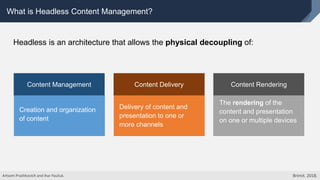
Creation and organization
of content
Content Management
Delivery of content and
presentation to one or
more channels
Content Delivery Content Rendering
The rendering of the
content and presentation
on one or multiple devices
Headless is an architecture that allows the physical decoupling of:
Artsem Prashkovich and Ihar Pauliuk. Brimit. 2018.
What is Headless Content Management?
… or,
CMS without the front-end (rendering) part.
Artsem Prashkovich and Ihar Pauliuk. Brimit. 2018.
What exactly is JSS?
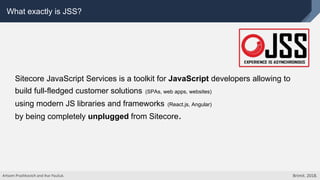
Sitecore JavaScript Services is a toolkit for JavaScript developers allowing to
build full-fledged customer solutions (SPAs, web apps, websites)
using modern JS libraries and frameworks (React.js, Angular)
by being completely unplugged from Sitecore.
Artsem Prashkovich and Ihar Pauliuk. Brimit. 2018.
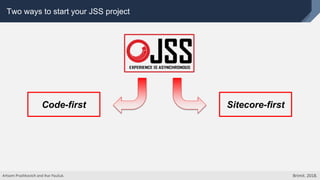
Two ways to start your JSS project
Code-first Sitecore-first
Artsem Prashkovich and Ihar Pauliuk. Brimit. 2018.
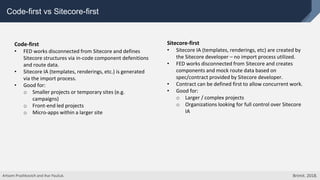
Code-first vs Sitecore-first
Code-first
• FED works disconnected from Sitecore and defines
Sitecore structures via in-code component defenitions
and route data.
• Sitecore IA (templates, renderings, etc.) is generated
via the import process.
• Good for:
o Smaller projects or temporary sites (e.g.
campaigns)
o Front-end led projects
o Micro-apps within a larger site
Sitecore-first
• Sitecore IA (templates, renderings, etc) are created by
the Sitecore developer – no import process utilized.
• FED works disconnected from Sitecore and creates
components and mock route data based on
spec/contract provided by Sitecore developer.
• Contract can be defined first to allow concurrent work.
• Good for:
o Larger / complex projects
o Organizations looking for full control over Sitecore
IA
Artsem Prashkovich and Ihar Pauliuk. Brimit. 2018.
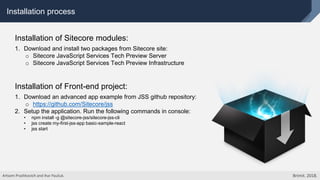
Installation process
Installation of Sitecore modules:
1. Download and install two packages from Sitecore site:
o Sitecore JavaScript Services Tech Preview Server
o Sitecore JavaScript Services Tech Preview Infrastructure
Installation of Front-end project:
1. Download an advanced app example from JSS github repository:
o https://github.com/Sitecore/jss
2. Setup the application. Run the following commands in console:
• npm install -g @sitecore-jss/sitecore-jss-cli
• jss create my-first-jss-app basic-sample-react
• jss start
Artsem Prashkovich and Ihar Pauliuk. Brimit. 2018.
JSS application modes
For development
• Disconnected dev mode
• Connected dev mode
• Integrated mode
Artsem Prashkovich and Ihar Pauliuk. Brimit. 2018.
For demo
• Static browser
rendering mode
For production
• Integrated mode
• Headless server-side
rendering mode
• Headless browser
rendering mode
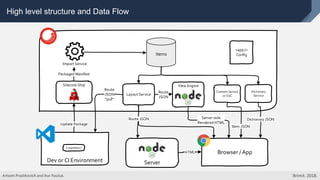
High level structure and Data Flow
Items
Packaged Manifest
Import Service
Sitecore.Ship
Update Package
Layout Service
Content Service
or SSC
Dictionary
Service
Route
JSON
pull
Item JSON
Dictionary JSON
Browser / App
Route
JSON
Server-side
Rendered HTML
<app />
Config
Route JSON
View Engine
Server
HTML
Dev or CI Environment
{ manifest }
Artsem Prashkovich and Ihar Pauliuk. Brimit. 2018.
Description of front-end project structure
DEMO TIME
Artsem Prashkovich and Ihar Pauliuk. Brimit. 2018.
Deploying changes to the Sitecore
o Deploy Sitecore IA without content and dictionary items (only templates, renderings, placeholders):
jss deploy package
o Deploy Sitecore IA like templates, renderings, placeholders WITH content an dictionary items:
jss deploy package --includeContent --includeDictionary --language=en
o Ability to deploy Sitecore IA and artefacts separately:
jss deploy package --noItems and jss deploy package --noFiles
All options are available by a command: jss deploy package --help
Artsem Prashkovich and Ihar Pauliuk. Brimit. 2018.
Features
Layout Service and extensibility
Dictionary Service
Content Service (GraphQL)
Supporting Multi-language and Multi-sites
Artsem Prashkovich and Ihar Pauliuk. Brimit. 2018.
Layout Service
Layout Service - is fundamental thing in JSS which outputs Sitecore item's
presentation data in JSON format with applied personalization rules.
http://{appName} /sitecore/api/layout/render/jss?item=/&sc_lang=en&tracking=true&sc_apikey={YOUR_API_KEY}
Artsem Prashkovich and Ihar Pauliuk. Brimit. 2018.
Parameters
• item=
• sc_lang=
• tracking=true/false
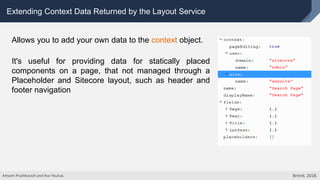
Extending Context Data Returned by the Layout Service
Allows you to add your own data to the context object.
It's useful for providing data for statically placed
components on a page, that not managed through a
Placeholder and Sitecore layout, such as header and
footer navigation
Artsem Prashkovich and Ihar Pauliuk. Brimit. 2018.
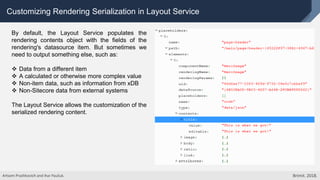
Customizing Rendering Serialization in Layout Service
By default, the Layout Service populates the
rendering contents object with the fields of the
rendering's datasource item. But sometimes we
need to output something else, such as:
 Data from a different item
 A calculated or otherwise more complex value
 Non-item data, such as information from xDB
 Non-Sitecore data from external systems
The Layout Service allows the customization of the
serialized rendering content.
Artsem Prashkovich and Ihar Pauliuk. Brimit. 2018.
Supporting Multi-language and Multi-sites
 Multi-sites - a separate front-end project needs to be created with a
configured different app and site names.
 Multi-language - the “jss-advanced-app” provides an example of
multi-language application. Only one language version can be
imported into Sitecore via the manifest. Multi-language import
currently is not supported.
Artsem Prashkovich and Ihar Pauliuk. Brimit. 2018.
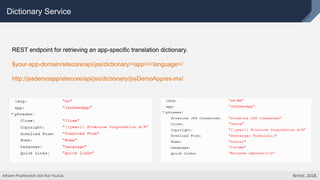
Dictionary Service
REST endpoint for retrieving an app-specific translation dictionary.
$your-app-domain/sitecore/api/jss/dictionary/<app>/<language>/
http://jssdemoapp/sitecore/api/jss/dictionary/jssDemoApp/es-mx/
Artsem Prashkovich and Ihar Pauliuk. Brimit. 2018.
Content Service
Experimental service which provides access to content items outside of the Layout Service usage.
URL Example:
http://jssdemoapp/sitecore/api/jss/contentsvc?itemPath=/content/FooterNavigation&sc_lang=en
Currently the Sitecore JSS team works on the in-depth integration with Sitecore Services Client for
retrieving content data. The JSS Content Service will not be supported in the future.
Artsem Prashkovich and Ihar Pauliuk. Brimit. 2018.
JSS Features
DEMO TIME
Artsem Prashkovich and Ihar Pauliuk. Brimit. 2018.
Conclusion
Artsem Prashkovich and Ihar Pauliuk. Brimit. 2018.
Thank you for attention!
Artsem Prashkovich and Ihar Pauliuk. Brimit. 2018.

Headless CMS. Sitecore JSS getting started, tips and tricks

  • 1.
    Headless CMS. SitecoreJSS getting started, tips and tricks Artsem Prashkovich Lead Sitecore Developer, Sitecore MVP 2018 twitter.com/apr_dev a.prashkovich@brimit.com Ihar Pauliuk Lead Frontend Developer i.pavlyuk@brimit.com
  • 2.
    What is HeadlessContent Management? Artsem Prashkovich and Ihar Pauliuk. Brimit. 2018. Headless CMS
  • 3.
    What is HeadlessContent Management? Creation and organization of content Content Management Delivery of content and presentation to one or more channels Content Delivery Content Rendering The rendering of the content and presentation on one or multiple devices Headless is an architecture that allows the physical decoupling of: Artsem Prashkovich and Ihar Pauliuk. Brimit. 2018.
  • 4.
    What is HeadlessContent Management? … or, CMS without the front-end (rendering) part. Artsem Prashkovich and Ihar Pauliuk. Brimit. 2018.
  • 5.
    What exactly isJSS? Sitecore JavaScript Services is a toolkit for JavaScript developers allowing to build full-fledged customer solutions (SPAs, web apps, websites) using modern JS libraries and frameworks (React.js, Angular) by being completely unplugged from Sitecore. Artsem Prashkovich and Ihar Pauliuk. Brimit. 2018.
  • 6.
    Two ways tostart your JSS project Code-first Sitecore-first Artsem Prashkovich and Ihar Pauliuk. Brimit. 2018.
  • 7.
    Code-first vs Sitecore-first Code-first •FED works disconnected from Sitecore and defines Sitecore structures via in-code component defenitions and route data. • Sitecore IA (templates, renderings, etc.) is generated via the import process. • Good for: o Smaller projects or temporary sites (e.g. campaigns) o Front-end led projects o Micro-apps within a larger site Sitecore-first • Sitecore IA (templates, renderings, etc) are created by the Sitecore developer – no import process utilized. • FED works disconnected from Sitecore and creates components and mock route data based on spec/contract provided by Sitecore developer. • Contract can be defined first to allow concurrent work. • Good for: o Larger / complex projects o Organizations looking for full control over Sitecore IA Artsem Prashkovich and Ihar Pauliuk. Brimit. 2018.
  • 8.
    Installation process Installation ofSitecore modules: 1. Download and install two packages from Sitecore site: o Sitecore JavaScript Services Tech Preview Server o Sitecore JavaScript Services Tech Preview Infrastructure Installation of Front-end project: 1. Download an advanced app example from JSS github repository: o https://github.com/Sitecore/jss 2. Setup the application. Run the following commands in console: • npm install -g @sitecore-jss/sitecore-jss-cli • jss create my-first-jss-app basic-sample-react • jss start Artsem Prashkovich and Ihar Pauliuk. Brimit. 2018.
  • 9.
    JSS application modes Fordevelopment • Disconnected dev mode • Connected dev mode • Integrated mode Artsem Prashkovich and Ihar Pauliuk. Brimit. 2018. For demo • Static browser rendering mode For production • Integrated mode • Headless server-side rendering mode • Headless browser rendering mode
  • 10.
    High level structureand Data Flow Items Packaged Manifest Import Service Sitecore.Ship Update Package Layout Service Content Service or SSC Dictionary Service Route JSON pull Item JSON Dictionary JSON Browser / App Route JSON Server-side Rendered HTML <app /> Config Route JSON View Engine Server HTML Dev or CI Environment { manifest } Artsem Prashkovich and Ihar Pauliuk. Brimit. 2018.
  • 11.
    Description of front-endproject structure DEMO TIME Artsem Prashkovich and Ihar Pauliuk. Brimit. 2018.
  • 12.
    Deploying changes tothe Sitecore o Deploy Sitecore IA without content and dictionary items (only templates, renderings, placeholders): jss deploy package o Deploy Sitecore IA like templates, renderings, placeholders WITH content an dictionary items: jss deploy package --includeContent --includeDictionary --language=en o Ability to deploy Sitecore IA and artefacts separately: jss deploy package --noItems and jss deploy package --noFiles All options are available by a command: jss deploy package --help Artsem Prashkovich and Ihar Pauliuk. Brimit. 2018.
  • 13.
    Features Layout Service andextensibility Dictionary Service Content Service (GraphQL) Supporting Multi-language and Multi-sites Artsem Prashkovich and Ihar Pauliuk. Brimit. 2018.
  • 14.
    Layout Service Layout Service- is fundamental thing in JSS which outputs Sitecore item's presentation data in JSON format with applied personalization rules. http://{appName} /sitecore/api/layout/render/jss?item=/&sc_lang=en&tracking=true&sc_apikey={YOUR_API_KEY} Artsem Prashkovich and Ihar Pauliuk. Brimit. 2018. Parameters • item= • sc_lang= • tracking=true/false
  • 15.
    Extending Context DataReturned by the Layout Service Allows you to add your own data to the context object. It's useful for providing data for statically placed components on a page, that not managed through a Placeholder and Sitecore layout, such as header and footer navigation Artsem Prashkovich and Ihar Pauliuk. Brimit. 2018.
  • 16.
    Customizing Rendering Serializationin Layout Service By default, the Layout Service populates the rendering contents object with the fields of the rendering's datasource item. But sometimes we need to output something else, such as:  Data from a different item  A calculated or otherwise more complex value  Non-item data, such as information from xDB  Non-Sitecore data from external systems The Layout Service allows the customization of the serialized rendering content. Artsem Prashkovich and Ihar Pauliuk. Brimit. 2018.
  • 17.
    Supporting Multi-language andMulti-sites  Multi-sites - a separate front-end project needs to be created with a configured different app and site names.  Multi-language - the “jss-advanced-app” provides an example of multi-language application. Only one language version can be imported into Sitecore via the manifest. Multi-language import currently is not supported. Artsem Prashkovich and Ihar Pauliuk. Brimit. 2018.
  • 18.
    Dictionary Service REST endpointfor retrieving an app-specific translation dictionary. $your-app-domain/sitecore/api/jss/dictionary/<app>/<language>/ http://jssdemoapp/sitecore/api/jss/dictionary/jssDemoApp/es-mx/ Artsem Prashkovich and Ihar Pauliuk. Brimit. 2018.
  • 19.
    Content Service Experimental servicewhich provides access to content items outside of the Layout Service usage. URL Example: http://jssdemoapp/sitecore/api/jss/contentsvc?itemPath=/content/FooterNavigation&sc_lang=en Currently the Sitecore JSS team works on the in-depth integration with Sitecore Services Client for retrieving content data. The JSS Content Service will not be supported in the future. Artsem Prashkovich and Ihar Pauliuk. Brimit. 2018.
  • 20.
    JSS Features DEMO TIME ArtsemPrashkovich and Ihar Pauliuk. Brimit. 2018.
  • 21.
    Conclusion Artsem Prashkovich andIhar Pauliuk. Brimit. 2018.
  • 22.
    Thank you forattention! Artsem Prashkovich and Ihar Pauliuk. Brimit. 2018.